Effective in 2026, to align with our trunk stable development model and ensure platform stability for the ecosystem, we will publish source code to AOSP in Q2 and Q4. For building and contributing to AOSP, use android-latest-release. The android-latest-release manifest branch will always reference the most recent release pushed to AOSP. For more information, see Changes to AOSP.
Accessibility
Stay organized with collections
Save and categorize content based on your preferences.
This page describes implementing accessibility with Android Protected Confirmation.
Hardware buttons
Use the following guidelines when implementing accessibility
with Android Protected Confirmation.
Hardware magnified view
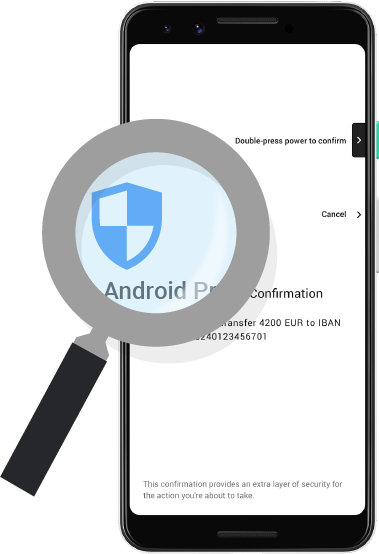
Confirmation string
| Message |
Double-press (button) to confirm |
| Color |
#000000 87% |
| Font face |
Roboto-Medium |
| Font size |
Requirement: 18sp |
| Line height |
Requirement: 20dp |
Cancel string
| Message |
Cancel |
| Color |
#000000 87% |
| Font face |
Roboto-Medium |
| Font size |
Requirement: 18sp |
| Line height |
Requirement: 20dp |
| Message |
Requirement: Android Protected Confirmation |
| Color |
#000000 87% |
| Font face |
Roboto-Regular |
| Font size |
Requirement: 22sp |
| Line height |
Requirement: 28dp |
Body text
| Message |
The body text is provided by the app developer. |
| Color |
#000000 87% |
| Font face |
Roboto-Regular |
| Font size |
Requirement: 20sp |
| Line height |
Requirement: 28dp |
| Message |
Requirement: This confirmation provides an extra layer of security for
the action you're about to take. |
| Color |
#000000 54% |
| Font face |
Roboto-Regular |
| Font size |
Requirement: 18sp |
| Line height |
Requirement: 24dp |
Hardware inverted colors
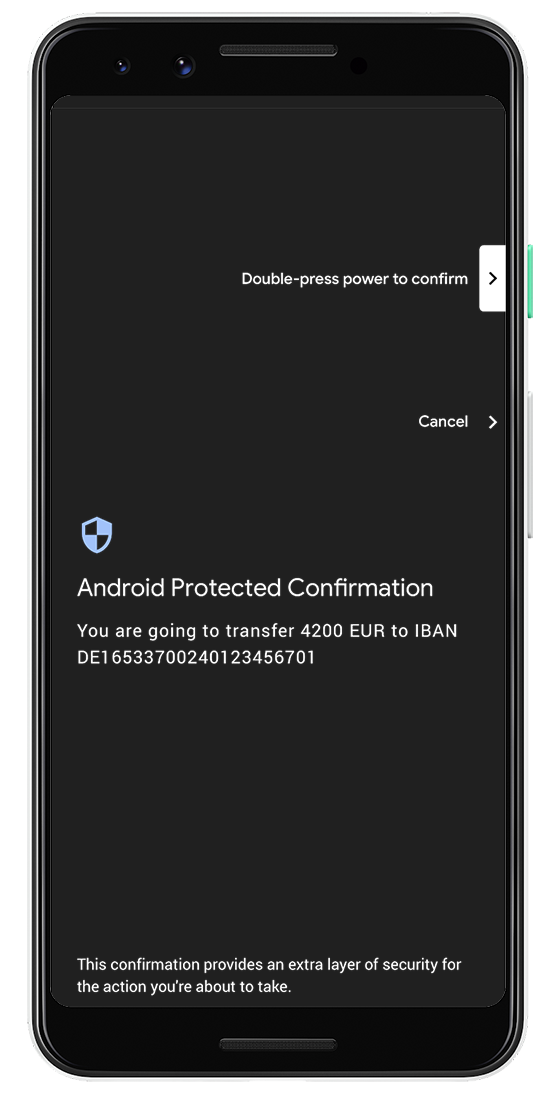
Inverted colors accessibility only changes the color properties. All other
properties of the UI remain the same.
| Background color |
#000000 87% |
| Icon color |
#a1c2fa |
| Confirmation string color |
#ffffff |
| Cancel string color |
#ffffff |
| Header text color |
#ffffff |
| Developer text color |
#ffffff |
| Subheader text color |
#ffffff |
Software buttons
Use the following guidelines when implementing accessibility
if your Android Protected Confirmation implementation uses
software buttons.
Software magnified view
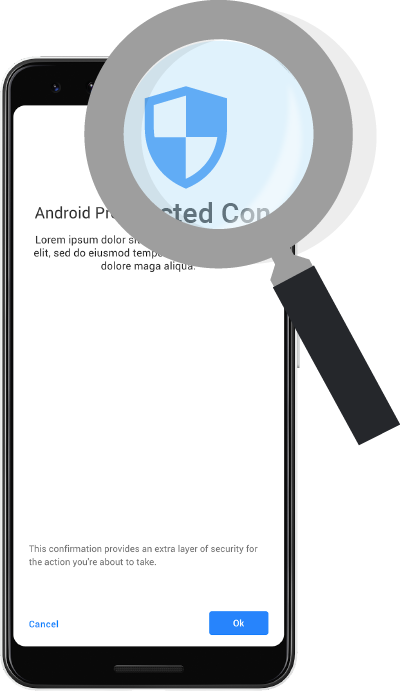
Confirmation string
| Message |
Ok |
| Button color |
#4285f4 100% |
| Font face |
Roboto-Medium |
| Font size |
Requirement: 20sp |
Cancel string
| Message |
Cancel |
| Text color |
#4285f4 100% |
| Font face |
Roboto-Medium |
| Font size |
Requirement: 20sp |
| Message |
Requirement: Android Protected Confirmation |
| Color |
#000000 87% |
| Font face |
Roboto-Regular |
| Font size |
Requirement: 24sp |
| Line height |
Requirement: 28dp |
Body text
| Message |
The body text is provided by the app developer. |
| Color |
#000000 87% |
| Font face |
Roboto-Regular |
| Font size |
Requirement: 20sp |
| Line height |
Requirement: 24dp |
| Message |
Requirement: This confirmation provides an extra layer of security for
the action you're about to take. |
| Color |
#000000 54% |
| Font face |
Roboto-Regular |
| Font size |
Requirement: 16sp |
| Line height |
Requirement: 20dp |
Software inverted colors
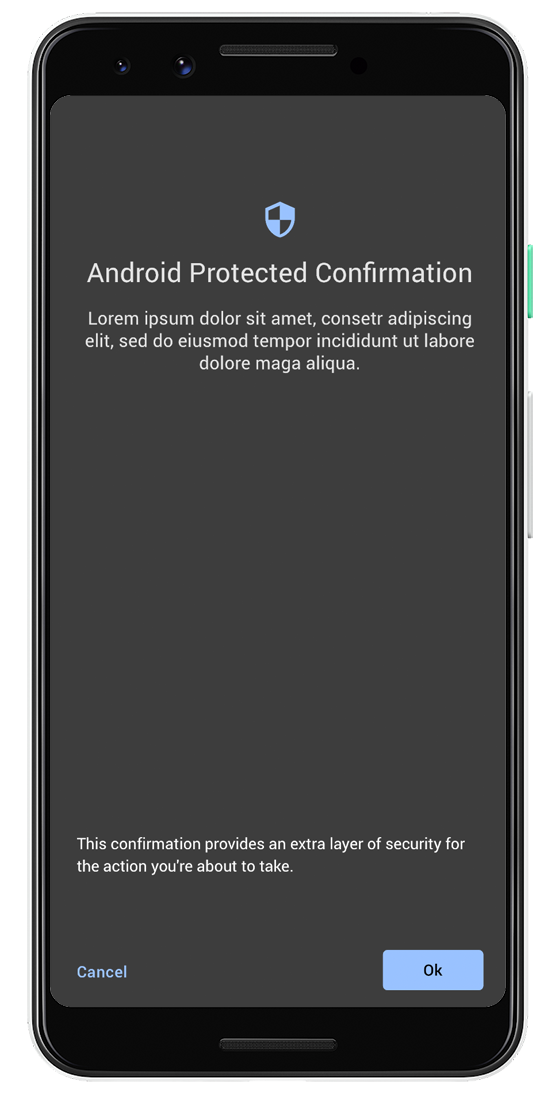
The inverted color accessibility only changes the color properties. All other
properties of the UI remain the same.
| Background color |
#000000 87% |
| Icon color |
#a1c2fa |
| Confirmation string color |
#000000 87% |
| Confirmation button color |
#a1c2fa |
| Cancel string color |
#a1c2fa |
| Header text color |
#ffffff |
| Developer text color |
#ffffff |
| Subheader text color |
#ffffff |
Content and code samples on this page are subject to the licenses described in the Content License. Java and OpenJDK are trademarks or registered trademarks of Oracle and/or its affiliates.
Last updated 2026-09-30 UTC.
[null,null,["Last updated 2026-09-30 UTC."],[],[]]