

本页面提供 SDV 用户偏好设置系统的架构指南,以及实现用户可控制的服务和客户端的说明。
架构概览
用户偏好设置系统将用户设置的存储和管理与这些设置的强制执行和应用分离。下表总结了关键架构术语:
| 功能 | 说明 | 角色 | 责任 |
|---|---|---|---|
| 用户可控制的服务 | 用于管理特定网域(例如暖通空调、汽车座椅、音频)的标准 SDV 服务软件包 | 提供其控制的硬件或子系统的功能和限制的预期状态。 |
|
| 用户偏好设置代理 | 中央编排器 | 提供集中式存储、用户个人资料管理和通知中心。 |
|
| 用户偏好设置客户端 | 提供用户界面的应用或服务,例如具有 HMI 或其他需要与用户偏好设置交互的逻辑的 IVI 应用 | 与用户互动、显示设置并启动更改请求。 |
|
实现用户可控制的服务
如需告知用户偏好设置代理哪些键存在、其数据类型、默认值和限制(例如最小值和最大值),您的服务软件包必须与
UserPreferencesRegistryService 接口交互。当您的服务启动时,它必须注册其公开的设置。当用户尝试修改设置(或切换用户时),代理会针对您的服务调用
RequestSettingsChange。
按照本部分中的步骤操作,让用户偏好设置(以及具有 HMI 的用户)控制您的服务。
在 VSIDL 文件中定义服务接口:
- 作为服务器,实现
com.sdv.google.user_preferences.user_controllable.UserControllableService。 这样,代理就可以向您发送更改请求。 - 作为客户端,使用
com.sdv.google.user_preferences.UserPreferencesRegistryService。这样,您的设置就会在启动时注册。
以下示例展示了用户可控制的服务
service_bundle.vsidl:service_bundle { name: "MyFeatureService" server { service: "com.sdv.google.user_preferences.user_controllable.UserControllableService" } client { service: "com.sdv.google.user_preferences.UserPreferencesRegistryService" } }- 作为服务器,实现
在键 proto
user_preferences_registry_service.proto中注册启动时的设置:- 连接到
UserPreferencesRegistryService。 - 创建
RegisterSettingsRequest的实例。 - 定义
SettingsGroup(设置的逻辑集合)的实例。 针对每个设置,定义:
*   **Key:** Unique string ID (for example, `TEMPERATURE`)
*   **Kind:** `PER_USER` (stored per user profile) or `SHARED`
    (global)
*   **Default value:** Initial value if no user preference exists
*   **Constraints:** (optional) Validation rules (for example, Min
    16, Max 32 for HVAC).
调用
RegisterSettings()。
以下示例采用概念性 Rust 编写:
let temperature_setting = SettingDefinition { name: "TEMPERATURE".to_string(), kind: SettingKind::PER_USER.into(), default_value: Value::Int64(22), // Default 22 degrees constraint: Some(Constraints::Int64Constraints(Int64Constraints { min_value: Some(16), max_value: Some(32), ..Default::default() })), ..Default::default() }; registry_client.RegisterSettings(&RegisterSettingsRequest { group_name: "HVAC".to_string(), version: "1.0".to_string(), settings_definitions: vec![temperature_setting], }).await?;- 连接到
在
user_controllable_service.proto中处理设置更改请求:- 实现
RequestSettingsChangeRPC。 - 验证请求的值在当前上下文中是否有效(例如,硬件是否已准备就绪)。
- 应用特定逻辑来应用更改(例如移动座椅、更改风扇转速)。
- 在
RequestSettingsChangeResponse中返回应用的值: - 如果您接受了更改,请返回新值。
- 如果您拒绝或限制了该值,请返回您设置(或保留)的值。
以下示例采用概念性 Rust 编写:
async fn RequestSettingsChange( &self, _caller_id: ServiceFqin, request: &RequestSettingsChangeRequest ) -> SdvResult<RequestSettingsChangeResponse> { let mut applied_settings = Vec::new(); for setting in &request.settings { if self.hardware.set_value(setting.key, setting.value).is_ok() { // Change accepted applied_settings.push(setting.clone()); } else { // Change rejected, return current actual value let current_val = self.hardware.get_value(setting.key); applied_settings.push(create_setting(setting.key, current_val)); } } Ok(RequestSettingsChangeResponse { settings: applied_settings, }) }- 实现
实现
FactoryResetRPC,将您的子系统恢复到默认状态:- 将所有设置重置为其默认值(如代码配置中所定义)。
- 针对注册表服务调用
UpdateSettings,以告知代理值已在外部更改(通过重置,而不是通过用户请求)。
向后兼容性和架构演变
用户可控制的服务定义的设置架构被视为公共接口。此接口由用户偏好设置代理和各种客户端(例如 HMI)使用,这些客户端可能具有不同的发布时间表。因此,保持严格的向后兼容性对于防止系统不稳定和客户端中断至关重要。
兼容的更改
用户可控制的服务应仅对其设置架构进行兼容的更改。这些更改可确保旧版客户端无需更新即可继续正常运行:
添加具有合理默认值的新可选设置:
- 此设置是可选的,因此客户端必须检查其是否存在,以支持不同版本的服务。
- 如果客户端尚未更新以识别此设置,则会忽略此设置。
- 如果不存在新设置的用户偏好设置,代理将使用提供的默认值。
不兼容的更改
以下更改被视为破坏性更改,并且是被禁止的,因为它们会立即损害旧版客户端:
移除现有设置。
更改现有设置的含义、单位或数据类型(例如,从表示摄氏温度的整数更改为表示帕斯卡压力的浮点数)。
更改现有设置的默认值。禁止更改默认值的主要原因是可能会导致持久性数据迁移复杂化。代理会根据服务的注册架构存储设置。更改默认值需要复杂的逻辑才能将所有现有用户个人资料迁移到新默认值,否则可能会为从未明确设置偏好的用户使用技术上不正确的值。
处理所需的破坏性更改
如果需要进行破坏性更改,服务不得 修改现有设置。在保持兼容性的同时管理此转换的方法主要位于用户可控制的服务逻辑中:
- 使用所需的新定义、键或单位创建新设置。
- 通过注册现有设置以实现兼容性,使其被弃用。在开发新客户端时使用此新设置。
- 建议新客户端在用户可控制的服务的业务逻辑中实现兼容性逻辑。
服务的 RequestSettingsChange 实现必须确保对一个设置的更改反映在其已弃用的对应设置中,并且对该对应设置的更改反映在该设置中。
兼容性逻辑示例:
服务弃用了旧设置
TEMPERATURE_C(摄氏度),并引入了TEMPERATURE_K(开尔文)。当代理发送更新新 设置的请求时:
服务收到
TEMPERATURE_K的请求(例如 295.15 K)。服务的逻辑会将其转换为摄氏度 (22°C),并在内部更新并保留这两个值,以保持旧版客户端的一致性。
当代理从旧版客户端发送已弃用设置的请求时:
- 服务收到
TEMPERATURE_C的请求(例如 24°C)。 - 服务会将其转换为开尔文 (297.15 K),并在内部更新并保留这两个值。
- 服务收到
这种双写策略可确保所有客户端(无论其发布时间表如何)都能读取一致且准确的数据,从而避免因外部发布不匹配而导致中断。
实现客户端
如需实现与用户偏好设置代理交互的客户端(例如 HMI),请执行以下操作:
定义您的客户端服务软件包,以与特定的用户偏好设置接口交互。在您的 VSIDL 文件中:
- 作为服务器,实现
com.sdv.google.user_preferences.view.ChangeNotifier,以使代理能够向您的客户端发送有关设置更改的实时通知。 - 作为客户端,使用
com.sdv.google.user_preferences.UserPreferencesManagementService请求设置修改并订阅更新。 - 作为客户端,使用
com.sdv.google.user_preferences.UserPreferencesAdminService管理用户个人资料(例如创建、选择、删除、恢复出厂设置)。
以下示例展示了客户端的
service_bundle.vsidl文件:service_bundle { name: "MyHmiClient" server { service: "com.sdv.google.user_preferences.view.ChangeNotifier" } client { service: "com.sdv.google.user_preferences.UserPreferencesManagementService" } client { service: "com.sdv.google.user_preferences.UserPreferencesAdminService" } }相应地添加授权政策。如需允许用户偏好设置代理进行通信,请为指定的服务器创建客户端。例如:
server { service: "com.sdv.google.user_preferences.view.ChangeNotifier" allow_all_channels: true } client { service: "com.sdv.google.user_preferences.UserPreferencesManagementService" allow_all_channels: true } client { service: "com.sdv.google.user_preferences.UserPreferencesAdminService" allow_all_channels: true }- 作为服务器,实现
您可以在
UserPreferencesManagementService中更改请求设置:- 连接到
UserPreferencesManagementService。 - 创建
RequestSettingsChangeRequest的实例,指定SettingsGroupId和所需的设置。 - 可选。将
ChangePersistencePolicy设置为PERSISTENT_CHANGE(默认)或NON_PERSISTENT_CHANGE。 - 调用
RequestSettingsChange()。
以下示例采用概念性 Rust 编写:
management_client.RequestSettingsChange(&RequestSettingsChangeRequest { settings_group_id: Some(SettingsGroupId { service_fqin: hvac_service_fqin.to_string(), name: "HVAC".to_string(), ..Default::default() }).into(), settings: vec![Setting { key: "TEMPERATURE".to_string(), value: Some(Value::Int64(24)), ..Default::default() }], change_persistence_policy: ChangePersistencePolicy::PERSISTENT_CHANGE.into(), ..Default::default() }).await?;- 连接到
使用
user_preferences_management_service.proto和change_notifier.proto订阅设置更改:- 在您的服务软件包中实现
ChangeNotifier接口中的OnSettingsChangeRPC。发生更改时,用户偏好设置代理会调用此方法。 - 连接到
UserPreferencesManagementService。 - 创建
SubscribeToSettingsChangeAndGetSettingsRequest,指定您要监控的SettingsGroupId。 - 如需返回设置的状态,然后通过
OnSettingsChange实现发送未来的更新,请调用SubscribeToSettingsChangeAndGetSettings()。
以下实现
ChangeNotifier接口的示例采用概念性 Rust 编写:#[async_trait] impl ChangeNotifier for MyHmiServiceImpl { async fn OnSettingsChange( &self, _caller_id: ServiceFqin, request: &OnSettingsChangeRequest, ) -> SdvResult<OnSettingsChangeResponse> { // Process the active_settings, pending_changes, and persisted_settings // Update your UI or internal state accordingly. info!("Received settings change for group: {}", request.settings_group_id.name); // ... Ok(OnSettingsChangeResponse::new()) } }以下订阅示例采用概念性 Rust 编写:
management_client.SubscribeToSettingsChangeAndGetSettings(&SubscribeToSettingsChangeAndGetSettingsRequest { settings_group_id: Some(SettingsGroupId { service_fqin: hvac_service_fqin.to_string(), name: "HVAC".to_string(), ..Default::default() }).into(), ..Default::default() }).await?;- 在您的服务软件包中实现
可选:管理用户个人资料的客户端(例如专用设置应用)可以使用
user_preferences_admin_service.proto与管理服务交互:- 连接到
UserPreferencesAdminService。 - 使用
CreateUser、SelectUser、DeleteUser、FactoryReset和ListUsers等 RPC 管理用户个人资料。
以下创建用户的示例采用概念性 Rust 编写:
admin_service_client.CreateUser(&CreateUserRequest { user: Some(User { id: 1, flags: UserFlags::DRIVER.value(), ..Default::default() }).into(), ..Default::default() }).await?;- 连接到
通过
user_preferences_admin_service.proto使用管理服务发现可用设置和用户:- 通过针对
UserPreferencesAdminService调用ListUsers()获取所有已注册用户的列表。 - 通过针对
UserPreferencesAdminService调用GetUserSettings(user_id)获取特定用户的设置。
以下列出用户和获取设置的示例采用概念性 Rust 编写:
// List all users let list_users_response = admin_service_client.ListUsers(&ListUsersRequest::new()).await?; info!("Available users: {:?}", list_users_response.users); // Get settings for a specific user (for example, user with ID 1) if let Some(user_id) = list_users_response.users.first().map(|u| u.id) { let get_settings_response = admin_service_client.GetUserSettings(&GetUserSettingsRequest { user_id, ..Default::default() }).await?; info!("Settings for user {}: {:?}", user_id, get_settings_response.groups); }- 通过针对
流程摘要
- 客户端启动并连接到代理的管理服务和管理服务。
- 客户端发现并订阅设置组,并显示初始状态。
- 客户端向代理发送
RequestSettingsChange。 - 代理向客户端发送
OnSettingsChange通知,其中包含更新后的设置和状态。
如需查看完整的有效示例,请参阅 @samples/user_preferences/v1/ 中的 HMIService。
实现代理
编排器启动的服务软件包实现了用户偏好设置代理。为方便起见,我们提供了一个参考实现。
此外,我们还提供了代理的示例服务软件包 user_preferences_sample.vsidl 文件:
package: "com.sdv.oem.user_preferences"

service_bundle {
    name: "UserPreferencesServiceBundle"
    server {
        service: "com.sdv.google.user_preferences.UserPreferencesAdminService"
    }
    server {
        service: "com.sdv.google.user_preferences.UserPreferencesManagementService"
    }
    server {
        service: "com.sdv.google.user_preferences.UserPreferencesRegistryService"
    }
    client {
        service: "com.sdv.google.user_preferences.view.ChangeNotifier"
    }
    client {
        service: "com.sdv.google.user_preferences.user_controllable.UserControllableService"
    }
}
该实现可以使用生成的中间件,并且应编译为 rust_ffi_shared,该中间件由实现用户偏好设置代理的服务软件包引用:
sdv_service_bundle_metadata {
  # This name must match the agent's Bundle Name
  name: "UserPreferencesServiceBundle"
  version_number: 1
  version_name: "1"

  native_library_path: "lib64/<USER-PREFERENCES-FFI-LIB>.so"

  orchestration_config_path: "etc/user_preferences_service_bundle/<USER-PREFERENCES-ORCHESTRATION>.textproto"

  authorization_policy_path: "etc/user_preferences_service_bundle/permissions.textproto"
}
客户端的 授权政策 .textproto 文件需要必要的权限:
client {
    service: "com.sdv.google.user_preferences.UserPreferencesManagementService"
    allow_all_channels: true
}

client {
    service: "com.sdv.google.user_preferences.UserPreferencesRegistryService"
    allow_all_channels: true
}

client {
    service: "com.sdv.google.user_preferences.UserPreferencesAdminService"
    allow_all_channels: true
}
附录:主要概念
本部分介绍了一些主要概念。
用户
每位车辆用户(User 类)都可以创建一个账号,用于存储其偏好设置。用户偏好设置仅支持车辆驾驶员的账号。
访客驾驶员可以创建临时账号,这些账号在使用一次后会自动删除。
message User {
  // Required.
  // A unique ID for the user.
  int32 id = 1;

  // Bit flags that define properties of user. Integer values have to be powers of 2 as they are used as
  // a bit mask.
  enum UserFlags {
    // Due to Protobuff requirement to have the first enum option set to 0,
    // Assign 0 to an unused flag
    UNSET = 0x0;
    // Marks the user as vehicle driver
    DRIVER = 0x01;
    // Ephemeral users have non-persistent state, once another user is selected
    // the profile is deleted automatically
    EPHEMERAL = 0x02;
  }

  // Required.
  // Bitmask for the user flags defined above
  int32 flags = 2;
}
设置组
设置组(SettingsGroup 类)用于整理和管理相关设置。
车辆中的每个可配置组件都会将其设置定义为组,这些组由表示为键值对的设置列表组成。例如,配备电动座椅的车辆可以为驾驶员座椅定义一个设置组,为前排乘客座椅定义另一个设置组,这两个组都包含名称相同的设置。
message SettingsGroup {
  // Required.
  // The identifier for this group.
  SettingsGroupId id = 1;

  // Required.
  // The version number of schema used by this setting group.
  string version = 2;

  // Required.
  // The list of settings within the setting group.
  repeated Setting settings = 3;
}
设置
设置消息(Setting 类)表示
SettingsGroup 中的单个设置。此消息由一个键(即设置的名称)和一个值(可以是多种类型之一)组成。
此示例展示了如何使用键和值表示设置:
// A key value pair representing a setting within a UserControllableService SettingsGroup.
message Setting {
  // Required.
  // A name that uniquely identifies a setting within a SettingsGroup.
  string key = 1;

  // Required.
  // New value of the setting.
  oneof value {
    bool bool = 2;
    float float = 3;
    int32 int32 = 4;
    int64 int64 = 5;
    bytes blob = 6;
    int32 enum = 7;
  }
}
设置定义
设置定义(SettingDefinition 类)充当设置组中各个设置的模板。它们指定设置的基本特征,例如设置是跨所有用户共享、特定于每个用户还是在外部管理(直通)。
重要的是,设置定义还会定义对设置值的任何限制,例如最小值和最大值、允许的增量或受限的选项集。这些限制可确保每个设置的数据完整性和一致性。
// The definition of a setting, along with its properties such as type and constraints
message SettingDefinition {
  // Required.
  SettingKind kind = 1;

  // Required.
  SettingWithConstraints setting_with_constraints = 2;
}

enum SettingKind {
  // A setting which is applied for all vehicle users.
  SHARED = 0;
  // Store the value of the setting for each vehicle user separately.
  PER_USER = 1;
  // UserControllableService is fully responsible for the storage of PASSTHROUGH setting.
  // User Preferences only notifies UserControllableService when the value is explicitly set by
  // user. User Preferences does not attempt to request changes based on user change or service
  // registration.
  PASSTHROUGH = 2;
};

message SettingWithConstraints {
  // Required
  Setting setting = 1;

  // Required.
  // Defines restrictions on the setting's value
  oneof constraints {
    FloatConstraints float_constraints = 2;
    Int32Constraints int32_constraints = 3;
    Int64Constraints int64_constraints = 4;
    EnumConstraints enum_constraints = 5;
  }
}

message Int32Constraints {
  // The minimum value that a setting can have.
  optional int32 min_value = 1;
  // The maximum value that a setting can have.
  optional int32 max_value = 2;
  // The step by which a setting's value can be increased or decreased.
  optional int32 step = 3;
}

message Int64Constraints {
  // The minimum value that a setting can have.
  optional int64 min_value = 1;
  // The maximum value that a setting can have.
  optional int64 max_value = 2;
  // The step by which a setting's value can be increased or decreased.
  optional int64 step = 3;
}

message FloatConstraints {
  // The minimum value that a setting can have.
  optional float min_value = 1;
  // The maximum value that a setting can have.
  optional float max_value = 2;
  // The step by which a setting's value can be increased or decreased.
  optional float step = 3;
}

message EnumConstraints {
  // Required.
  // List of unique values sorted in ascending order.
  repeated int32 possible_values = 1;
}
用户更新设置时的事件序列示例
此示例说明了当用户使用 Android Automotive OS (AAOS) 车载信息娱乐系统 (IVI) 更新设置时发生的事件序列:
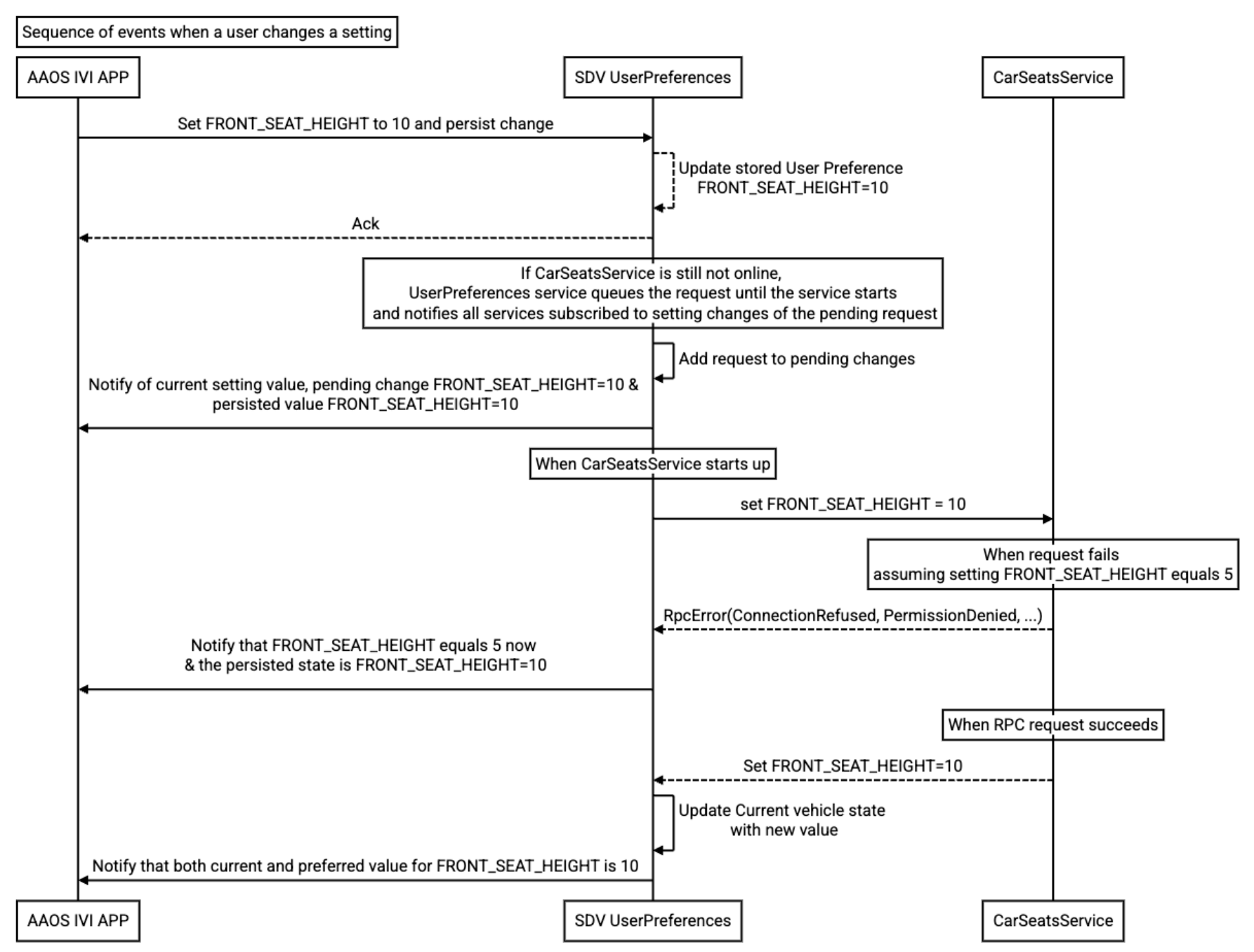
图 1. 用户更改设置时的事件。
车辆启动时的事件序列示例
此示例说明了 SDV 用户偏好设置在车辆启动时如何应用用户的首选设置:

图 2. 车辆启动时的事件。