

软件定义车辆 (SDV) 平台上的配置和校准服务 (ConCal) 可根据车辆规格、国家/地区法规和客户订购的功能来配置 SDV 服务。此服务是 SDV 平台的基本构建块,可让 OEM 通过配置在多辆汽车之间重复使用相同的服务代码,并支持从多个来源(例如在工厂、服务中心、云端)重新配置。
SDV 平台提供面向服务的 API,用于配置和校准特定车辆上的服务软件包。借助此接口,OEM 可以实现 OEM 特有的配置和校准逻辑。
配置和校准服务包括以下流程:
配置,涉及定义车辆的基本属性和行为,可能取决于多种因素,例如车辆位置、用户订购的选项或国家/地区法规。它确定了组件的交互方式,并规定了影响车辆整体功能的软件设置,例如软件变体、网络连接和初始运行参数。
校准,可在预配置范围内对系统参数进行微调。例如,校准可调整传感器和致动器的准确性,优化发动机性能以控制排放,并改进驾驶性能和安全系统响应。配置为车辆的功能设定了基本框架,而校准则是在该框架内优化车辆的行为。这两者对于确保车辆符合排放法规、最大限度地提高性能、增强安全性以及弥补随时间推移而出现的磨损至关重要。
通过提供标准 SDV 范围的 ConCal API,我们简化了 SDV 服务软件包的实现,避免了重新实现配置和校准功能以在不同 OEM 的不同车辆上运行的需求。
架构
每个服务包都可以拥有一个或多个配置制品。
配置制品
配置制品(配置)包含一个或多个配置参数及其值。配置是一种特定于服务的 protobuf 消息,其字段可以包含嵌套的 protobuf 消息(结构)、映射、数组、int、float、bool、字节或字符串参数。
// Example of a configuration message.
message SampleServiceBundleConfig
{
 bool bool_parameter = 1;
 int64 int_parameter = 2;
 float float_parameter = 3;
 string str_parameter = 4;
 repeated string list_parameter = 5;
 map<string, int32> map_parameter = 6;
 SomeNestedMessage nested_parameter = 7;
 SomeComplexMessage complex_parameter = 8;
 some.nested.package.SomeNestedMessage nested_package = 9;
 bytes bytes_parameter = 10;
}
配置标识符
每项配置都有一个唯一标识符。此标识符由服务软件包所有者的完全限定实例名称和配置名称组成。配置名称必须具有可读性,在每个服务包中都是唯一的,并且遵循服务包命名惯例中定义的命名标准,例如 shared、private、diagnostics 和 calibration。
限制条件:
- 实例名称必须以字母开头。
- 所有字符都必须是小写字母数字或连字符。
- 名称中的连字符不得连续出现多次。
- 配置名称不得以连字符结尾。
- 配置名称不得超过 48 个字符。
- 在同一虚拟机上,同一服务包的配置名称必须是唯一的。
在 26Q2 之前,配置 ID 的定义如下:
// Unique identifier for the config.
message ConfigId {
  // The FQIN of the service bundle that owns the configuration.
  com.sdv.google.sd_common.ServiceFqin service_fqin = 1;

  // The name of the config.
  string config_name = 2;
}
启动时的配置所有者仅知道其配置的架构及其默认值。为了根据当前车辆自定义服务包行为,所有者服务包必须注册其默认配置及其架构。
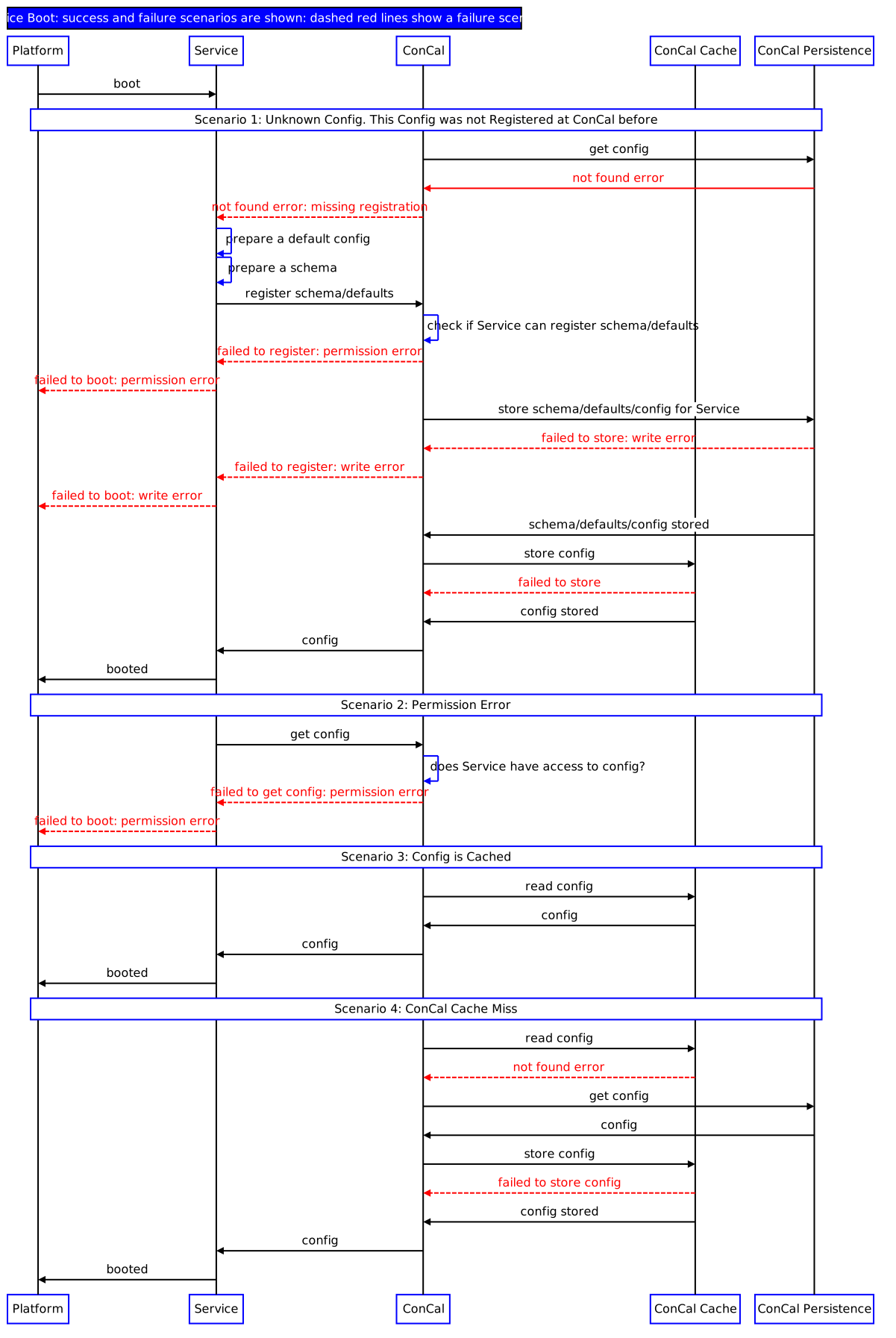
图 1. 注册默认配置和检索自定义配置。
这样,原始设备制造商 (OEM) 就可以一次性实现服务软件包,并在多辆汽车上执行这些软件包。
部署
ConCal 可以在 SDV 平台上维护一个或多个服务器实例。服务包应发现并使用最近的 ConCal 服务器。例如,如果每个 ECU 部署一个 ConCal,服务软件包应获得对在同一 ECU 上运行的 ConCal 实例的访问权限。这样,服务软件包就可以及时检索配置。如果 ConCal 实例没有请求的配置(因为它属于另一个 ConCal 的责任范围),则联系的 ConCal 服务器会从拥有该配置的 ConCal 实例请求该配置,并将其重定向到服务包。
配置自定义
能够将同一软件重复用于不同车辆是 SDV 的主要优势之一。软件只需开发一次,即可在多辆汽车上重复使用,并且我们可以根据车辆的具体情况调整软件的行为。这是 ConCal 的主要用途,它可在配置替换的帮助下,根据车辆属性计算服务配置。
ConfigOverride 是一个 protobuf 消息,用于描述如何针对特定车辆调整配置。它包含一个由提供方唯一定义的替换 ID、一个配置标识符和一个 ConfigOverrideKeyValuePair 列表。ConfigOverride 只能在更新过程中提供,并且只能由 OEM 建模的允许的服务提供。下面提供了这两种结构的 protobuf 定义。
// Key-value pair to update configuration.
message ConfigOverrideKeyValue {
  string key = 1;

  oneof value {
    string value_txtproto = 2;
    .google.protobuf.Any value_any = 3;
  }
}

// A collection of changes for a specific configuration which should be atomically applied.
message ConfigOverride {
  string override_id = 1;

  ConfigId config_id = 2;

  repeated ConfigOverrideKeyValue pairs = 3;
}
ConfigOverride 支持以下操作:
分配新值:最后一个值已弃用,并且参数已分配新值,例如为简单字段(int、string、float、bool、bytes)分配新值或重写复杂字段(例如映射、列表、结构或完整配置)。
移除或清理值:此操作适用于所有类型,包括消息、重复字段、映射、单向字段和配置本身。此操作可针对完整字段或消息执行,这意味着不支持移除映射中的特定键和重复字段中的各个元素。
向地图添加新值。
重写映射中现有键的值(如果键不存在,此操作也可以作为向映射添加新值来执行)。
使用 ConCal 配置服务包
本章介绍如何开发在运行时检索其配置的服务软件包。从可配置的软件包的角度来看,检索到的配置是默认的出厂设置,还是使用 ConCal 覆盖和校准流程进行的后续修改,完全是不透明的。
您可以在 system/software_defined_vehicle/samples/concal/src/concal_client 中找到本文档所依据的示例。
如需了解详情,请参阅服务包开发。
声明服务包所拥有的配置的类型
服务软件包拥有其检索的配置类型。这样,可配置的软件包就可以独立于持久性配置数据进行更新。
编写一个声明配置类型的 protobuf 文件(扩展名为
.proto):syntax = "proto3"; package android.sdv.demo.config; message RearViewCamera { string model = 1; uint64 horizontal_resolution = 2; uint64 vertical_resolution = 3; float x_axis_field_of_view = 4; float y_axis_field_of_view = 5; bool is_rgb = 6; }创建可生成运行时库的 build 目标,以允许检索配置类型。在
Android.bp文件中:rust_protobuf { name: "libsdvtestconcal_proto_rust", crate_name: "sdvtestconcal_proto_rust", protos: [ "rear_view_camera.proto", ], proto_flags: [ "-I external/protobuf/src", "-I .", ], source_stem: "sdvtestconcal_proto_rust", vendor_available: true, product_available: true, min_sdk_version: "35", }
为您的软件包生成 ConCal RPC 中间件代码
向服务软件包添加 VSIDL 声明:
package: "com.sdv.oem.sample.concal"

service_bundle {
  name: "SampleOemConCalClientServiceBundle"
  client {
    service: "com.sdv.google.concal.ConCalRegistrationService"
  }
}
此声明表示相应软件包是 ConCal 配置注册和检索服务的客户端。如需了解有关使用 VSIDLC 为软件包生成 RPC 客户端绑定的概览,请参阅 VSIDL 和中间件概览。
初始化用于检索 RPC 配置的中间件
在运行时,初始化 ConCal RPC 调用所需的中间件组件。在此示例中,我们在启动软件包时进行异步初始化。
pub struct ExampleConcalBundle {
    context: ContextRef,
    runtime: Option<Runtime>,
}

sdv::lifecycle::register_service_bundle!(ExampleConcalBundle);

impl ServiceBundle for ExampleConcalBundle {
    fn new(context: ContextRef) -> ExampleConcalBundle {
        info!("Creating {}.", context.get_self_fqin());

        ExampleConcalBundle { context, runtime: None }
    }

    fn on_start(&mut self) {
        let fqin = self.context.get_self_fqin();
        info!("Starting {}.", fqin);

        let runtime = Builder::new_multi_thread()
            .worker_threads(4)
            .thread_name("tokio-pool")
            .enable_all()
            .build()
            .unwrap();
        let context = self.context;
        runtime.spawn(async move {
            let registration_client = setup_register_config_rpc(context).await;
            /* main SB logic here */
        });
        self.runtime = Some(runtime);
    }

async fn setup_register_config_rpc(context: ContextRef) -> RegistrationClient {
    let sdv_comms = SdvComms { context };
    let sd = ServiceDiscoveryManager::new(context);
    let unit_name_args = UnitNameDiscoveryArgs::new_builder()
        .set_sdv_package_name("com.sdv.oem.sample.concal")
        .set_service_bundle_name("SampleOemConCalServiceBundle")
        .set_service_unit_name(RegistrationClient::DEFAULT_UNIT_NAME)
        .build()
        .unwrap();

    let mut unit_name_stream =
        sd.subscribe_service_unit_change_by_name(&unit_name_args).await.unwrap();

    // wait until RPC servers are registered, if server is not a custom agent
    while let Some(event) = unit_name_stream.next().await {
        if let ServiceUnitChangeEvent::Registered(sud) = event {
            let service_identity = sud.get_service_bundle_identity();
            let fqin = service_identity.get_fqin();
            if fqin.get_sdv_package_name() == "com.sdv.oem.sample.concal"
                && fqin.get_service_bundle_name() == "SampleOemConCalServiceBundle"
                && fqin.get_service_instance_name() == "default"
            {
                break;
            }
        }
    }

    let service_bundle =
        SampleOemConCalClientServiceBundle::new(Arc::new(sdv_comms)).await.unwrap();
    service_bundle
        .create_rpc_client::<RegistrationClient>(
            UnitName::builder()
                .package_name("com.sdv.oem.sample.concal")
                .bundle_name("SampleOemConCalServiceBundle")
                .service_unit_name(RegistrationClient::DEFAULT_UNIT_NAME)
                .build()
                .unwrap(),
            ClientOptions::default(),
        )
        .await
        .expect("Failed to create an RPC client")
}
其中:
- 在
on_start中,我们创建了一个 tokio 运行时并生成了一个 tokio 任务。任务在继续执行软件包主逻辑之前调用setup_register_rpc。 setup_register_rpc设置中间件 RPC 绑定。请注意,该示例并未假设 ConCal 功能由代理实现:服务器可能仅在启动软件包后才可用。因此,示例代码会等待使用 Service Discovery API 注册 RPC 服务器。
初始化配置
通过向 ConCal 服务器提供 ID、配置架构和默认的出厂配置值来注册配置制品。
如果首次调用注册,则会保留默认值。如果在后续的软件包启动时调用注册,系统将检索应用了 ConCal 替换项(如果有)的持久默认值。
无论制品是否已注册,ConCal 注册配置调用永远不会失败。
impl ServiceBundle for ExampleConcalBundle{
/* ... */
fn on_start(&mut self) {
/* ... */
runtime.spawn(async move {
let registration_client = setup_register_config_rpc(context).await;
sample_concal_main(fqin, registration_client).await
});
self.runtime = Some(runtime);
}
}
async fn sample_concal_main(
fqin: ServiceFqin,
registration_client: RegistrationClient,
) -> sdv::status::SdvResult<()> {
let config = get_rear_view_camera_factory_config();
let config_id = get_config_id(&fqin);
register_config(®istration_client, &config_id, &config).await;
/* ... */
}
fn get_rear_view_camera_factory_config() -> RearViewCamera {
RearViewCamera {
model: String::from("model 1"),
horizontal_resolution: 720,
vertical_resolution: 720,
x_axis_field_of_view: 70.0,
y_axis_field_of_view: 70.0,
is_rgb: false,
..Default::default()
}
}
fn get_config_id(fqin: &ServiceFqin) -> ConfigId {
ConfigId {
config_name: "config".to_string(),
service_fqin: MessageField::some(ProtoFqin {
vm_name: fqin.get_sdv_vm_name().to_string(),
package_name: fqin.get_sdv_package_name().to_string(),
service_name: fqin.get_service_bundle_name().to_string(),
instance_name: fqin.get_service_instance_name().to_string(),
..Default::default()
}),
..Default::default()
}
}
async fn register_config(
client: &RegistrationClient,
config_id: &ConfigId,
config: &RearViewCamera,
) {
let config_fd = FileDescriptorSet {
file: vec![RearViewCamera::descriptor().file_descriptor_proto().clone()],
..Default::default()
};
let config = Any::pack(config).expect("Failed to pack config");
let config_metadata = ConfigMetadata {
descriptor_set: MessageField::some(config_fd),
default_config: MessageField::some(config.clone()),
..Default::default()
};
client
.RegisterConfigMetadata(&RegisterConfigMetadataRequest {
config_id: MessageField::some(config_id.clone()),
metadata: MessageField::some(config_metadata),
config_version: String::from("1.0"),
..Default::default()
})
.await
.expect(
"RegisterConfigMetadata should not fail, even if configuration was registered before",
);
}
其中:
- 在
on_start中生成的任务在检索到 RPC 绑定后,会继续执行业务逻辑,调用sample_concal_main。 sample_concal_main首先注册一个配置制品。逻辑包含在register_config中。- 如需注册配置,软件包必须指定其 protobuf 类型、ID 和默认值。
config_fd是配置类型。拥有配置类型的软件包可确保始终检索到软件包所需的架构,包括 APEX 更新后的架构。- 该 ID 用作 ConCal 服务器内部持久性逻辑中的标识符。
- 默认值是在
get_rear_view_camera_factory_config中构建的。如果之前未持久保存任何值,则默认值为 ConCal 服务器持久保存的值。这表示系统指定出厂配置的方式之一。也可以采用其他设置。
检索配置
注册后,检索配置。由于配置之前已注册,因此此调用保证会成功。
async fn sample_concal_main(
fqin: ServiceFqin,
registration_client: RegistrationClient,
update_client: UpdateClient,
) -> sdv::status::SdvResult<()> {
let config = get_rear_view_camera_factory_config();
let config_id = get_config_id(&fqin);
register_config(®istration_client, &config_id, &config).await;
let config = get_config(®istration_client, &config_id).await;
info!("Retrieved configuration:\n{config:#?}");
// Onwards, use configuration in bundle's main business logic
/* ... */
}
async fn get_config(client: &RegistrationClient, config_id: &ConfigId) -> RearViewCamera {
let bytes = client
.GetConfig(&GetConfigRequest {
config_id: MessageField::some(config_id.clone()),
..Default::default()
})
.await
.expect("Get config does not fail, as config was registered before")
.config;
RearViewCamera::parse_from_bytes(&bytes).expect("parse_from_bytes failed")
}
其中:
对
GetConfigRequest的调用保证会成功,因为配置之前已由同一软件包注册。设置允许服务软件包以不透明的方式处理工厂配置和替换配置这两种情况:服务软件包业务逻辑保持不变。调用
GetConfigRequest会返回原始字节。函数get_config会继续将它们解析为预期的配置类型。