
Display Safety

Display Safety targets cockpit domain controllers and enables Android to power all displays in the car, including those with safety and availability requirements.

Cluster overview

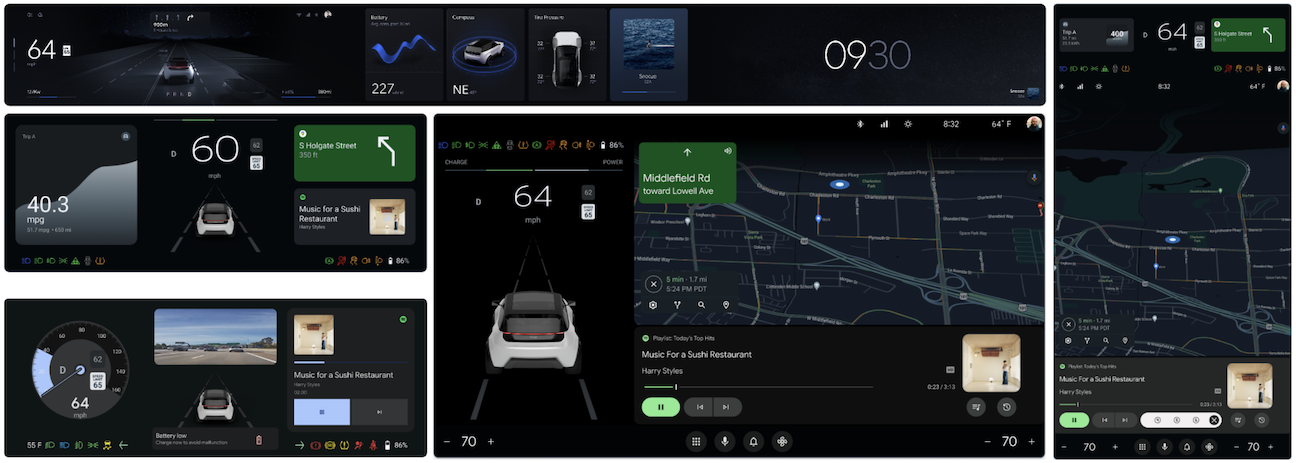
Figure 1. Cluster overview.

To learn more about GitHub, see Automotive Design for Compose.

Terminology

platform
A combination of hardware, hypervisor, operating system, and related libraries.
safety monitor
An app to monitor vehicle state and to validate that the respective visual information displays as intended to the user.

Display Safety components

Three major components make up Display Safety software:

  • DriverUI: An Android system app that renders an entire instrument cluster display, excluding safety or regulatory elements rendered by the HAR.

  • High availability renderer (HAR): A quality management process that renders display elements that must be present quickly after a cold boot and placeholder elements when Android is unavailable. HAR is portable and focuses on critical driving information.

  • Safety design toolchain: A set of tools to generate configurations for safety monitor implementations from the design source, to achieve the relevant ASIL-B safety goals.

All components use the design toolchain, Automotive Design for Compose, to verify that they are created from the same OEM design definition.

Display Safety components

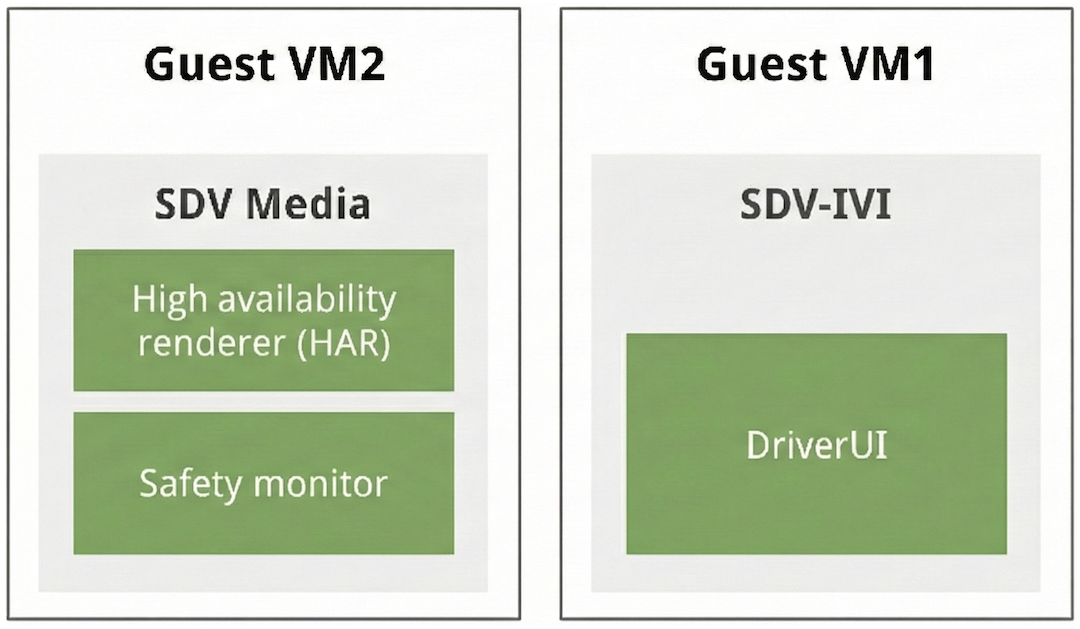
Figure 2. Display Safety components.

High availability renderer

The HAR is written in Rust and consists of these components:

  • Platform abstraction layer (PAL). Abstraction to interface with multiple subsystems including graphics, camera, audio, user input (such as steering wheel controls), vehicle data (also called signals or properties), vehicle configuration (for example, gas or EV, left or right-hand drive), and user preferences (for example, kph and mph).

  • Implementation of the PAL for the targeted platform.

  • HAR app, developed with the PAL.

Google defines the PAL and provides reference implementations of the PAL and the HAR app. The reference HAR app provides all the building blocks and includes a reference main loop. OEMs should customize the PAL implementation and the HAR app to suit their requirements. The HAR uses Impeller for rendering.

To learn more, see:

DriverUI

The cluster UI is typically placed behind the steering wheel in a separate display. OEMs gradually combine the cluster and the IVI. This combined UI is the DriverUI.

The DriverUI is an Android system app that renders an entire instrument cluster display, excluding safety relevant or regulatory elements rendered by the HAR. The DriverUI displays information related to media playback, telephone calls, maps, navigation, and other things, and is implemented using Automotive Design for Compose.

AAOS has two APIs for building instrument clusters. The Instrument Clusters API (also called Cluster 1) is in maintenance mode and OEMs are encouraged to migrate to the ClusterHomeManager API (also called Cluster 2).

Google provides reference implementations of the Cluster 1 and Cluster 2 APIs.

For more information, see DriverUI.

Blend HAR and DriverUI output

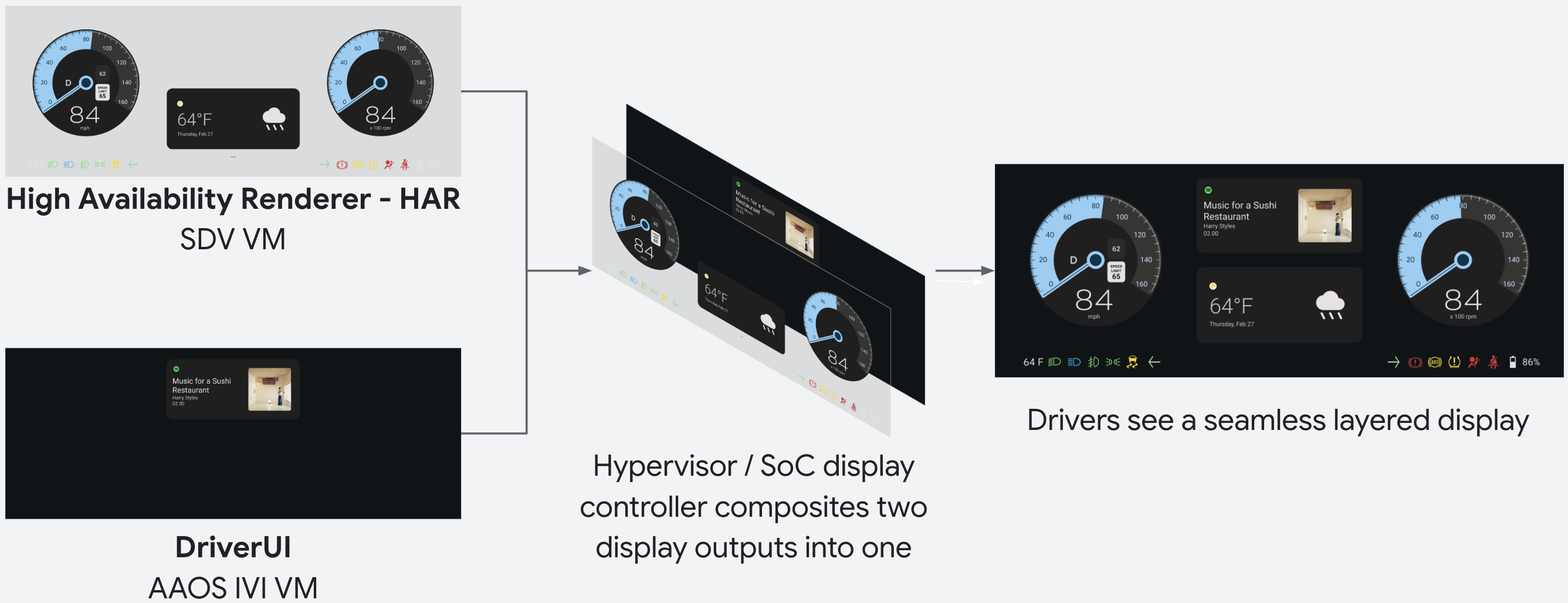
The HAR and the DriverUI use separate displays to render a UI. Both outputs are composited and displayed as one image to the DriverUI.

To achieve this, HAR controls the transparency of the areas where Android output displays based on receiving periodic heartbeat messages from the DriverUI to indicate that it's running.

When the DriverUI isn't running, HAR detects the lack of heartbeats and renders DriverUI areas opaque and displays placeholders. When the heartbeats are received, HAR removes the placeholders and sets the DriverUI areas to transparent.

The DriverUI and HAR communicate with each other using remote procedure calls (RPCs). The heartbeat message is an example of data sent over the RPC channel and consists of a timestamp as one of its fields.

gRPC is used for RPCs. On SDV, the SDV comms stack provides the SDV gateway client to discover and establish a channel from the DriverUI to the HAR.

HAR and DriverUI Composition

Figure 3. HAR and DriverUI composition.

Safety design toolchain

The Safety Design Toolchain is a series of tools for an OEM to use in sequence to deliver a Safety Monitor solution generated from a Figma design document.

The safety design compiler produces safety artifacts to drive subsequent code generation for building a safety monitor. This separation between design compilation and code generation lets the used code generator achieve an ISO-26262 TCL-3 rating.

Safety design toolchain workflow

Figure 4. Use the safety design toolchain.

After compiler artifacts are generated, the toolchain can generate a human-readable report. This report is a file that an OEM safety engineer can inspect to validate the artifacts generated from the Figma design.

Google provides a reference implementation of the safety monitor that isn't ASIL certified. OEMs should customize the safety monitor to meet their requirements and get their implementation certified.

To learn more, see Safety design toolchain.

Display Safety on SDV

You can build and run Display Safety on SDV. SDV is feature complete and uses two guest VMs to run a full Display Safety cluster.

Software defined vehicle

The Android Automotive OS (AAOS) software defined vehicle (SDV):

  • Requires two guest VMs to show the full cluster.
  • Runs HAR in SDV Media (also known as the rapid boot VM) in a guest VM.
  • Runs DriverUI in a separate guest VM that runs SDV-IVI VM.