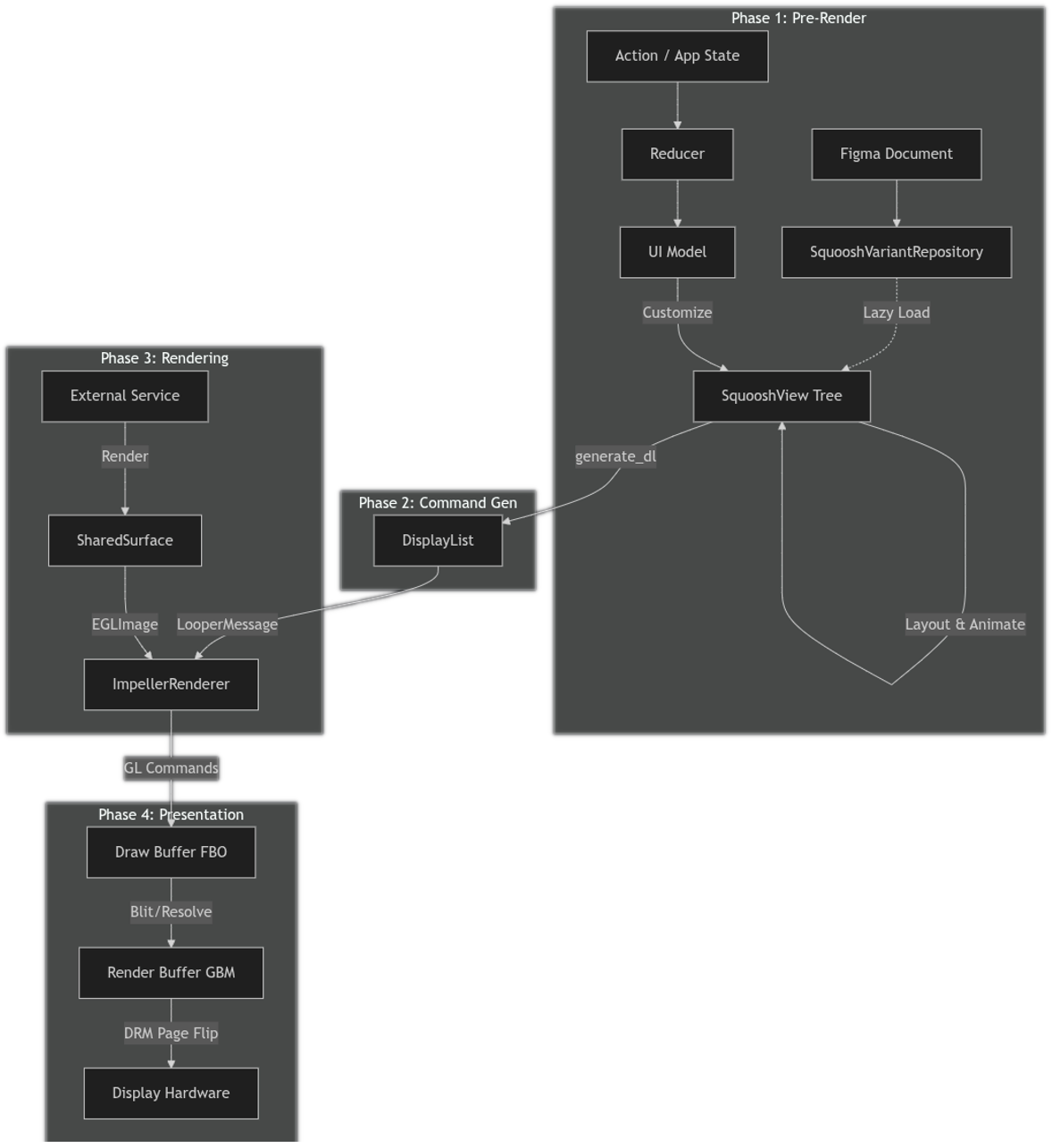

This page details the complete graphics pipeline of the high availability renderer (HAR), tracing the flow of data from a Figma design document to the final pixels displayed on the screen.
Overview
The pipeline converts high-level UI definitions into low-level graphics commands and efficiently presents them on hardware displays. The pipeline is designed for automotive safety-critical apps, emphasizing deterministic rendering, efficient state management, and robust interaction with platform graphics subsystems, such as Direct Rendering Manager (DRM) and Generic Buffer Management (GBM).
The pipeline can be divided into four main phases:
- Prerender: Processing the scene graph, applying customizations, and resolving layout.
- Command generation: Converting the resolved scene graph into a backend-agnostic display list.
- Rendering: Executing drawing commands using the Impeller graphics engine.
- Presentation: Managing framebuffers and synchronizing with display hardware.
Figure 1. HAR graphics flow.
Phase 1: Prerender
This phase transforms the static Figma design and dynamic app state into a fully resolved, in-memory UI tree ready for rendering. This phase runs on a dedicated reducer thread, separate from the main display loop.
1.1 DesignCompose foundation
The HAR pipeline is built upon the DesignCompose ecosystem.
- Source: The UI is designed in Figma and exported using the DesignCompose plugin.
- Definition: The output is an instance of
DesignComposeDefinition, a serialized representation of the design (nodes, styles, variants). - Data binding: The app's UI model uses procedural macros (for example,
#[Design(node = "#speed")]) to explicitly bind Rust struct fields to specific named nodes in the Figma document. This lets the app state automatically drive the properties of the visual elements.
The key components of this foundation are:
- Reducer: Acts as the central event loop, processing actions and updating
the current state. The framework provides
DefaultReducer, but a custom reducer implementation can be provided if needed. - Presenter: Bridges the current state to the UI model. The
Presentertrait is specified by theharryframework crate, and a reference implementation (UIModelPresenter) is provided in theharry-app-corecrate. - UI model: Generates customizations based on the current state. The
UI model code is generated using the
DesignDocumentmacro provided by thederive_customizationscrate. TheUIModelstruct in theharry-app-corecrate provides an example of this. - Squoosh: Provides the
SquooshViewdata structure and variant repository, used to render the UI according to the design. A serialized design document is loaded by thedc_bundlecrate from the DesignCompose library and converted to a tree ofSquooshViewstructs for efficient runtime performance.
1.2 Reducer loop
The pipeline is driven by actions. The framework specifies the Actions
enumerated type which defines internal actions used by the framework itself, but
also includes a CustomAction variant which enables users to define additional
app-specific actions (for example, UpdateVehicleSpeed or
ButtonPress).
The framework also provides the StateAction trait that
simplifies the implementation of actions that affect app state and optionally
generate side effects that are then passed back to the app from the
reducer for processing. The CustomActions enum in the harry-app-core crate
provides a detailed example of this.
This is a basic outline of the reducer loop:
- Action processing:
Reducerreceives an action and updates the current state. This is the raw data such as the current speed or which telltales (warning lights) are active. This might also generate side effects (for example, a signal play a chime when the seat belt light flashes). - Presentation:
Presentermaps the new state intoUIModel.UIModelis a view model, holding data specifically formatted for the UI (for example, formatting "120" speed to a string "65 mph"). - Customization generation: The UI model's
applymethod is called to generate a set ofRenderCustomizationinstances. These are explicit instructions for modifying the Figma design (for example, "Set text of node #speed to '65 mph'"). UpdatePolicyfor optimization: After each prerender pass, anUpdatePolicyvalue is returned, indicating when the next rendering update is required. If no state changes are pending and no animations are running,UpdatePolicysignals that no further updates are immediately needed. In such cases, the Reducer ceases generating new display lists, preventing unnecessary rendering cycles and conserving resources until a new action or event triggers a change.
1.3 View ingestion and repository initialization
The pipeline begins with a DesignComposeDefinition instance. This is the Figma
design document serialized by DesignCompose into a protocol buffer structure.
Initial load: At startup, the main design (specified by its root node) is converted from
DesignComposeDefinitioninto an initialSquooshViewtree. This is a one-time process.Repository:
SquooshVariantRepositorymanages reusable component variants and the initially loaded views.Lazy loading: To minimize startup time and memory usage, additional views (those not part of the initial root node tree) are lazily loaded from the document only when they're explicitly referenced and needed by the render logic (for example, during a list customization).
1.4 Customization pass
The SquooshView tree is traversed to apply the dynamic app state:
Variant swaps: Component instances are swapped with specific variants (for example, changing an icon representing the current drive mode from sport to eco) based on runtime logic.
List expansion: A single template item in Figma is replaced by a dynamic list of children. New unique IDs are generated for these children to verify a stable identity for animations.
Text and style overrides: Text content (for example, speed value) and styles (for example, opacity, color) are updated from the current state.
1.5 Variable resolution
Design tokens and variables defined in Figma or locally in the app are resolved.
- Binding:
SquooshViewproperties referencing variables (like colors or dimensions) are replaced with their concrete values for the current frame.
1.6 Layout computation
Dynamic layout:
DynamicLayoutcomputes the final position and size (bounds) of every node in theSquooshViewtree.Text layout:
TextHelperuses an implementation of theLayoutHelpertrait to calculate text metrics, wrapping, and shaping. This helps verify that text flows correctly within its constraints before rendering.
1.7 Dials and gauges
This is a specialized step for automotive UIs.
MeterData: If a node has meter data (defined in Figma), its geometry is dynamically altered based onmeter_value(for example, vehicle speed).- Arcs: The sweep angle is adjusted.
- Rotations: The rotation transform is calculated based on start and end angles.
- Progress bars: The width or height of a rectangle is scaled.
- Progress vectors: The length of a vector path is adjusted.
1.8 Animation
Diffing: The current
SquooshViewis compared withprevious_squoosh_viewfromPreRenderCache.Interpolation: If properties have changed,
Squooshcreates interpolators to smoothly transition values (for example, opacity or transform) over time.
Phase 2: Command generation
After the SquooshView tree is fully resolved and animated, it's converted into
a linear sequence of drawing commands.
The key component of this phase is the DisplayList crate:
generate_dl: This function recursively traverses theSquooshViewtree.Translation:
- Shapes and paths: Converted to
DisplayListEntrywith the appropriateDisplayListAppearancevariant (for example,RectorPath) - Text: Converted with
TextHelperto text drawing entries. - Transforms and clips: Converted to
PushTransform3DandPopTransform3DorPushClipRegionandPopClipRegionpairs to manage the drawing state stack. - Masking: Converted to
PushMaskLayerandPopMaskLayerpairs to create and blend layers correctly.
- Shapes and paths: Converted to
The final result is an instance of Vec<DisplayListEntry> that describes what
to draw, independent of how to draw it.
2.1 Handoff to looper
After the DisplayList is generated, the Reducer wraps it in an instance of
ViewDescriptor and sends it over a Rust MPSC channel (LooperMessage) to the
looper thread. The Looper is responsible for the rendering and display phases,
which prevents the Reducer thread from blocking the graphics pipeline.
Phase 3: Rendering
The platform-agnostic DisplayList is handed off to the rendering backend,
where abstract commands are translated into GPU instructions.
HAR uses Impeller, a rendering engine originally built for Flutter. Impeller is designed to solve the problem of frame rate glitches due to shader compilation by precompiling a small, efficient set of shaders at build time. This approach, combined with effective batching and a highly optimized backend, delivers:
- Deterministic performance: Virtually eliminates runtime shader compilation glitches.
- Fast startup: Reduces initialization overhead.
- Small footprint: Produces a compact binary size.
For a thorough introduction to Impeller's architecture, watch [Introducing Impeller - Flutter's new rendering engine][impeller-video]. Although the video discusses Flutter, these core benefits directly empower the HAR automotive stack.
The key components of the rendering phase are:
ImpellerRenderer: Converts the display list from the prerender phase into Impeller rendering commands.Impeller Rust API: Wraps the Impeller library for use in Rust (the
impellerandimpeller-rs-bindgencrates).TypographyContext: Manages font registration and text shaping.
3.1 Initialization and surface management
Context creation: The renderer initializes an instance of
impeller::Contextwith an OpenGL ES backend, passing a callback to resolve OpenGL ES function pointers from the platform's GL context.Wrapped FBO surface: Instead of creating its own window, Impeller renders into an existing OpenGL framebuffer object (FBO) provided by Phase 4. This is done by calling
Surface::create_wrapped_fbo.
3.2 Resource management
Images: Supports standard formats and KTX2 compressed textures. These are uploaded to GPU textures and managed by an internal
Resourcesstruct.Fonts: TrueType and OpenType fonts are loaded and registered with the
TypographyContextfor text rendering.External images: Specialized handling for external textures (for example, camera feeds and external 3D renderers) involves binding
EGLImageinstances or external OpenGL textures to ImpellerTextureobjects for zero-copy rendering.
3.3 Render pass
The render loop constructs an Impeller DisplayList instance (not to be
confused with the Vec<DisplayListEntry> generated by the prerender phase)
using DisplayListBuilder:
Clears the buffer and applies global transforms for DPI scaling and display rotation.
Iterates through the input
DisplayListEntryitems:- State:
save()andrestore()are used to push and pop transforms and clip regions. - Primitives:
RectandRoundedRectare drawn using standard paint operations. - Paths: Complex vector paths (including dynamic
Arcinstances) are built and drawn. - Text:
TextandStyledTextare rendered usingTypographyContext. - Images: Standard and external images are drawn using
draw_texture_rect.
- State:
Submits the built Impeller display list to the surface using
surface.draw_display_list(), generating the underlying GL commands.Calls
swap_buffers()on the underlying context to trigger Phase 4.
Phase 4: Presentation
This final phase handles the interaction with the display hardware to show the rendered frame. HAR uses a robust direct rendering path on Android Automotive OS (AAOS) Software-Defined Vehicle (SDV).
The key component of this phase is HarDirectRenderingContext (in the
har-gl-context crate).
4.1 Architecture
The presentation layer uses a double-buffered approach with an offscreen draw target:
Draw buffer: Offscreen FBO where Impeller renders the scene.
Resolve buffer (optional): Optional auxiliary buffer to support multisample anti-aliasing (MSAA)
- This can be enabled when needed by the underlying OpenGL ES implementation or configuration. In such cases, it serves as an intermediate target to resolve the multisampled draw buffer before blitting (bit block transferring) to the render buffer.
Render buffer: Generic buffer backed by a GBM object, which corresponds to the back buffer in a typical graphics swap chain.
Front buffer: GBM buffer that is scanned out to the display.
4.2 Swap chain
When swap_buffers is called, HAR follows these steps:
Blits the contents of the draw buffer to the render buffer (with an intermediate blit to the resolve buffer, if needed by the implementation).
Calls
glFlush()on the GL context, and creates an instance ofEGL_SYNC_NATIVE_FENCE_ANDROIDto track GPU completion.Builds a DRM atomic request to swap the render buffer to the screen. This request contains the GPU fence FD (called the in fence) to prevent the display controller from showing the render buffer before the GPU is finished drawing.
Simultaneously requests a new fence from DRM (called the out fence), in order to signal when the previous buffer (the front buffer for the prior frame) is no longer on screen.
Commits the atomic request using the nonblocking flag, to enable the main thread to continue while the graphics subsystems remain synchronized.
Stores the new out fence in the context so that HAR can wait for it to be signaled at the start of the
swap_buffersprocess on the subsequent frame. This prevents the GPU from drawing to a buffer that is still being displayed.
4.3 Direct mode setting
HAR interacts directly with the kernel using the DRM and Kernel Mode Setting (KMS) subsystems to configure the display resolution AAOS SDV, bypassing interactions with window managers like SurfaceFlinger (in specific configurations), allowing for exclusive and high-priority control of the display hardware.
4.4 External rendering
HAR supports delegating the rendering of specific UI elements (identified by tags in Figma) to external processes or threads. This is useful for integrating complex 3D scenes (for example, an ego car visualization from engines like Kanzi or Unity) or other content that requires a dedicated OpenGL context.
4.4.1 Key components
HarExternalRenderContext: A dedicated offscreen EGL context for the external service.SurfacePool: Manages a set ofLocalSurface(TextureplusEGLImage) buffers for double or triple buffering.SharedSurfaceExternalImage: A thread-safe wrapper for passingEGLImagehandles between the external service and the main renderer.
4.4.2 Workflow
The workflow follows this sequence:
The external service starts and registers itself with the main looper, identifying which Figma tags (for example,
#cluster/3d-car) it renders.The service waits for
RenderStartsignals from the looper to align its rendering with the VSYNC signal of the display.Offscreen, the service renders its content into a framebuffer provided by
SurfacePool.The service calls
swap_bufferson its context, which rotates the pool and makes the completed frame available as an instance ofSharedSurface.SharedSurfaceis wrapped inExternalImageand sent over a Rust MPSC channel to the looper.The main Impeller renderer (Phase 3) receives the external image. Instead of copying pixel data, it binds the underlying
EGLImagedirectly to a texture and draws it as part of the main scene, achieving zero-copy composition.
4.5 Development and testing platforms (har-platform-linux)
For development and testing purposes, HAR apps can target standard Linux desktop
environments and headless setups. These platforms are implemented in the
crates/reference/platforms/har-platform-linux crate.
Unlike the production AAOS SDV target, these platforms don't use the
direct-rendering subsystem of har-gl-context for display output. Instead,
they rely on standard Rust OpenGL crates:
Windowed mode: Uses
winitfor window management and event loops, andglutinfor creating OpenGL ES contexts and integrating with the windowing system.Headless mode: Uses the
har-gl-contextcrate to create an offscreen pbuffer context with the default EGL display. This enables rendering to an offscreen buffer without needing a visible window or direct display hardware access, primarily used for automated testing or backend processing.