

此内容介绍了高可用性渲染器 (HAR) 中的电铃播放。
一个 Audio crate 向 HAR 应用公开 AudioManager,后者控制电铃
播放。
为保持低延迟,播放线程在应用的整个生命周期内运行,在没有音频播放时处于空闲状态并让出资源。
术语
- 资产
AudioAsset与可播放音频有关。资产是应用运行时中常见的资产。- 设备
AudioDevice是指用于播放音频的单独总线。设备是与系统访问的硬件相关的最精细的单元。在标准 SDVM 实现中,AudioDevice是指单个高级 Linux 音频架构 (ALSA) PCM。- 在线播放
- 在设备上播放资产的实例。流从安排播放的那一刻起一直存在,直到完成、取消或以错误结束。
组件
图 1 显示了电铃的组件图:
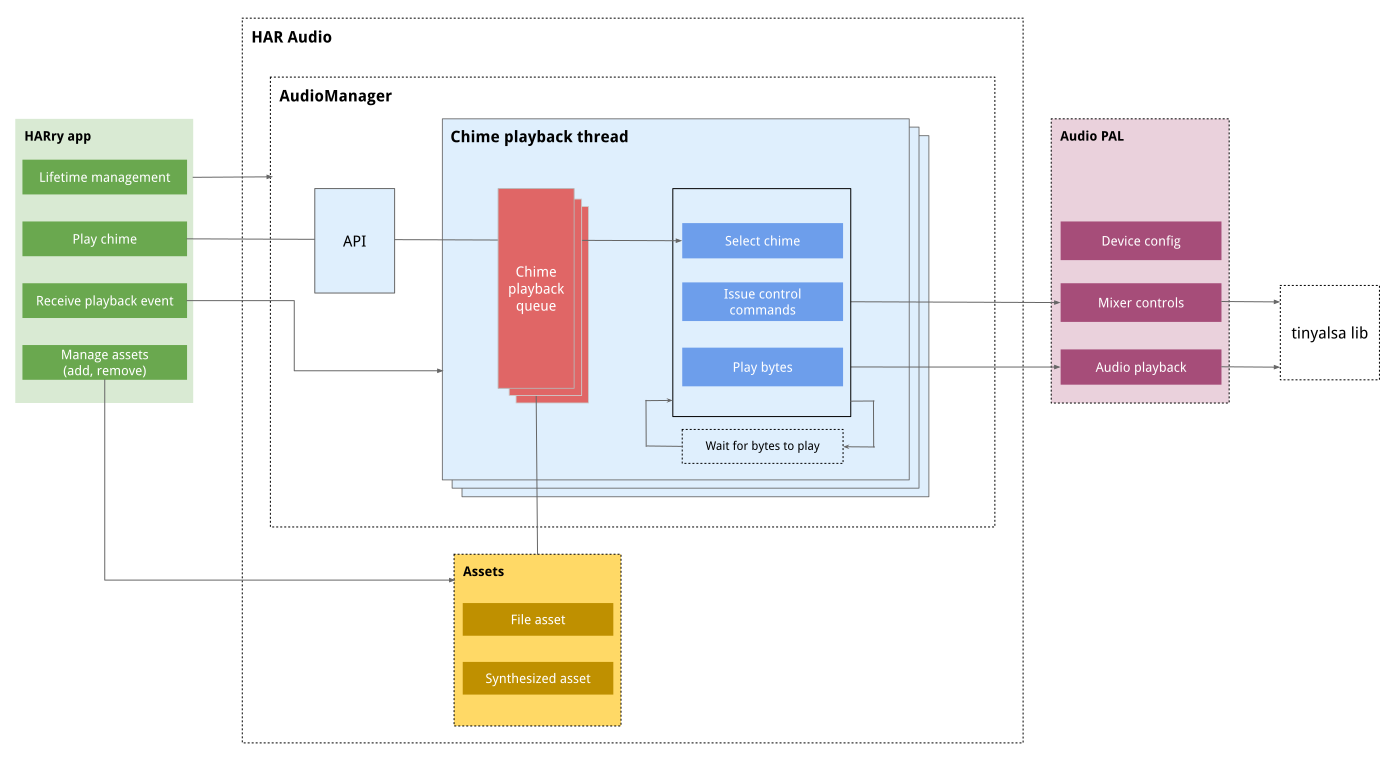
图 1. 组件图。
音频设备和 PCM
音频硬件配置遵循标准 HAR 平台抽象层设计,并且 har-platform-api 包含该配置。
HAR Audio crate 为 AudioDevice 定义了一个新结构,该结构为影响内部 HAR Audio crate
和播放的所有数据结构定义了字段。AudioDevice 还使用泛型来封装潜在的平台专用附加参数。对于 tinyalsa,PlatformAudioDevice 包含 ALSA PCM 的描述符和属性。
/// NOTE: The following code is a sample definition to help understanding, it is not a
/// representation of the final code/implementation.

AudioDevice<PlatformAudioDevice> {
  /// Internal HAR Identifier for the device.
  AudioDeviceID,

  /// The size (in bytes) for chunks of audio data to stream to the device.
  ChunkSize,

  /// Properties necessary to control volume (details in "Mixer control" section).
  VolumeControl,

  /// Properties necessary to control spatialization (details in "Mixer control"
  /// section).
  SpatialControl,

  /// Platform specific data for the AudioDevice.
  /// E.g. ALSA properties and reference to opened PCM.
  PlatformAudioDevice
}

/// Elaboration of the previously mentioned VolumeControl
VolumeControl {
  /// Identifier for the control used to change volume.
  ControlID,

  /// Mapping between Decibel and control values. (see Mixer control section)
  VolumeOutputIndex
}
音频资产
本部分介绍了如何配置和实现音频资产。
配置
初始 HAR 音频实现支持静态配置的音频资产。JSON 配置定义了哪些资产可用,以及哪些资产定义为 WAV 文件。
该实现还支持合成和流式传输的音频资产,但通过更通用的资产实现,该实现接受用于生成音频数据的函数。
实现
使用两个单独的构造(AudioAsset 和 AudioStream)实现资产。
AudioAsset 定义了资产的静态属性,以及用于存储与资产相关的潜在内部数据的容器。可以从 AudioAsset AudioStream 派生出 `AudioStream`,它是资产的单个可流式传输实例。AudioStream
包含与单个流播放相关的内部状态。
/// NOTE: The following code is a sample definition to help understanding, it is not a
/// representation of the final code/implementation.

/// Static properties and definition of an Asset.
AudioAsset {
  /// Perform optional initialization steps, e.g. load bytes from file into memory.
  /// Can also define lazy loading, to load data at first playback instead.
  fn initialize(LazyLoad);

  /// Create a new AudioStream from the asset.
  fn create_stream() -> AudioStream;

  /// More functions for metadata etc. of the asset.
  ...
}

/// Single streamable instance of an AudioAsset
AudioStream {
  /// Gets the next bytes to play from the Asset together with if the current chunk of
  /// bytes contains any control signals (e.g. fade-out).
  fn get_playback(num_bytes: usize) -> ([u8], ControlSignals);

  /// Gets playback Mode details used to handle special states of playback
  /// e.g. when a chime gets is interrupted and put in "fade-out" mode.
  fn playback_mode() -> PlaybackMode;

  /// [0.0, 1.0] indication of how much of the stream was played.
  fn progress() -> f32;

  /// Reset the stream, e.g. if it should play again.
  fn reset();

  /// Time of which the stream was created.
  fn created_at() -> Instant;

  /// Additional metadata etc. for the stream.
  ...
}
电铃播放
本部分介绍了用于播放电铃的 API 和过程。单个电铃播放称为“流” 。
流的生命周期
图 2 展示了流的生命周期:
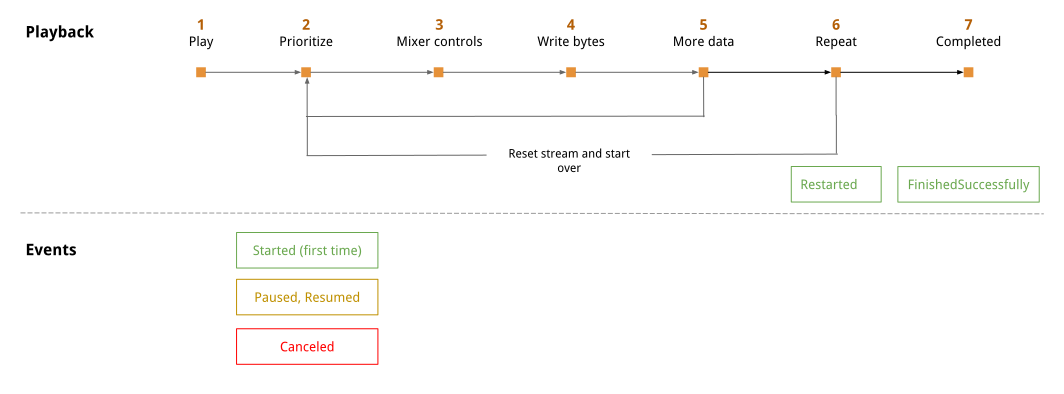
图 2. 流播放和事件。
图 2 介绍了以下步骤:
播放: 安排流播放。
确定优先级: 播放优先级决定是否执行以下操作:
- 立即播放电铃(第一个字节的 started 事件)
- 稍后播放电铃(paused 或 resumed 事件)
- 降低电铃的优先级(canceled 事件)
混音器控制: 如果需要,请根据配置的行为更新混音器控制。
写入字节: 将字节块写入
AudioDevice。更多数据: 如果流有更多数据,请返回第 2 步。
重复: 如果应重复流,请重置并返回第 2 步(restarted 事件)。
已完成: 流已成功完成(
FinishedSuccessfully事件)。
您可以随时使用暂停、恢复或停止调用来中断电铃。
电铃优先级
此逻辑设置电铃优先级:
播放模式替换。例如,淡出模式下的电铃始终被授予最高优先级,直到淡出完成。
指定的优先级。
如果优先级相同,则最近的电铃先播放。
当电铃的优先级相同时,AudioManager 会使用 enum 值进行实例化。
API
事件
如果在电铃开始时提供了事件通道,HAR Audio 会在播放期间发出多个事件。此示例中显示了受支持的事件:
/// NOTE: The following code is a sample definition to help understanding, it is not a
/// representation of the final code/implementation.

StreamBehaviors<PlatformStreamBehaviors> {
  /// What should happen if the stream is interrupted for a higher priority stream.
  /// e.g. pause-and-resume or cancel, will also define preference for fade-out.

  OverrunBehavior,
  /// Urgency, if interrupted streams are allowed to "fade-out", or if the stream should
  /// urgently disrupt any other playback.
  Optional<Urgency>,

  /// Priority for the stream (or minimum if not specified).
  Optional<StreamPriority>
  /// Descriptor if a stream should be played on repeat.
  Optional<RepeatBehavior>
  /// Volume, if the stream should play at a specific volume.
  Optional<Volume>
  /// Spatialization, if the stream should play with specific spatialization.
  Optional<Spatialization>

  /// Optional generic for future expandability of the API, or pass-through of platform
  /// specific Stream Behaviors
  Optional<PlatformStreamBehaviors>
}

/// Plays a chime on specified device with given behaviors. StreamEvents are delivered
/// using the provided event transmitter. This method won't wait for any events.
fn play(AudioDeviceID, AssetID, StreamBehaviors, Option<EventTransmitter>) -> StreamController

/// Object used to control a Stream.
StreamController {
  /// Gets the current state/metadata of a stream (e.g. ID, progress, playback_state).
  fn metadata() -> StreamMetadata

  /// Stops the stream.
  fn stop()

  /// Pauses a given stream, if the specified duration expires the stream is cancelled.
  /// Timeout is required to make sure there are no paused streams left indefinitely
  /// pending resumption.
  fn pause(TimeoutDuration)

  /// Resumes a paused stream.
  fn resume()

  /// Updates the spatialization of a playing stream.
  fn set_spatialization(Spatialization)

  /// Updates the volume of a playing stream.
  fn set_volume(Volume)
}
混音器控制
本部分介绍了如何控制音量和空间化。
卷
HAR 以毫贝为单位一致地定义音量。har-platform-api crate 处理从毫贝到控制信号的转换。
毫贝与硬件功率输出之间的关系是对数关系,并且在不同的硬件和扬声器设置之间差异很大。因此,
请在值之间提供配置,作为 AudioDevice
(音频设备和 PCM) 配置的一部分,并且必须在
调用平台层之前进行转换。
因此,PAL API 中的实现定义了两个函数。
fn set_volume_millibel(AudioDeviceID, Millibel) {
  /// Default implementation with conversion using DeviceConfig.
}

fn set_volume_control(AudioDeviceID, ControlValue);
set_volume_millibel 的默认实现使用为 AudioDevice 提供的配置,包括一组用于参考毫贝 - 控制的键值对,将毫贝转换为控制值,然后使用转换后的值调用 set_volume_control 函数。
此设计提供了一个默认值,并允许后续实现替换默认映射。
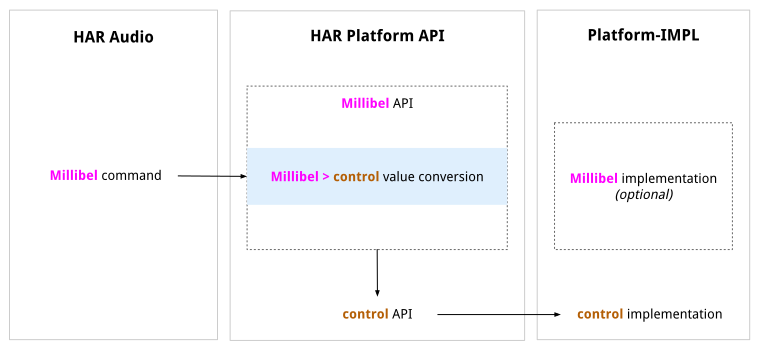
图 3. HAR 音频流。
空间化
Audio API 公开了用于控制音频数据应在哪个空间区域播放的功能。这些参数会传递到 PAL 层,并使用硬件控制在下游应用。选项在 PAL API 中定义为:
/// NOTE: The following code is a sample definition to help understanding, it is not a
/// representation of the final code/implementation.

enum Spatialization {
  Front,
  FrontLeft,
  FrontRight,
  Center, // No spatialization
  Rear,
  RearLeft,
  RearRight,
  Right,
  Left
}
混音器控制层级
您可以为资产和流定义音量和空间化。如果您定义了流优先级,则流会替换资产定义的控制。
线程管理
音频管理器为每个 AudioDevice 实例维护一个线程。每个线程都独立运行。AudioManager 和播放线程之间的交互使用按优先级排序的共享流队列。
ALSA 调用使用带轮询的 ASYNC 写入来确定何时消化数据。
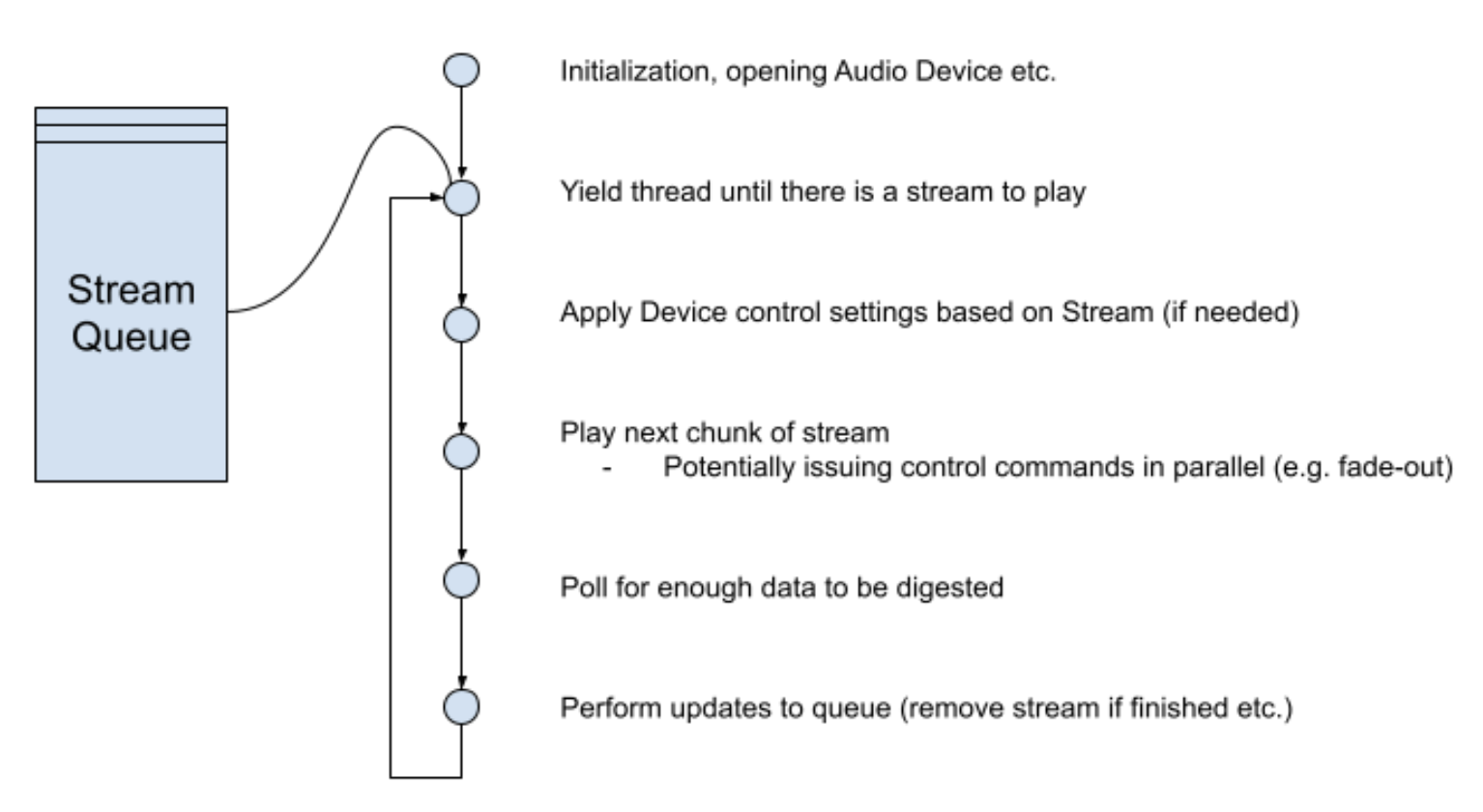
图 4. 线程管理序列。
轮询期间的控制信号
等待声卡消化字节时,可以发出控制信号。例如,更改音频的淡入淡出或空间化。轮询以获取音频设备的状态是在 AudioManager 级别配置的,或者默认为 1 毫秒。在每个轮询周期之后,播放线程会消化并发出任何定时控制命令。
缓冲区管理
为最大限度地缩短中断延迟时间,写入设备的缓冲区大小保持较小。将 TinyALSA 用作默认值时,缓冲区空间配置为与 startup_threshold 参数相同。TinyALSA 将默认值定义为整个分配的设备缓冲区
除以 2。
流中断
当流中断时,流会保持线程优先级,直到其写入到卡的数据被排空。因此,中断和新流之间会有一个过渡期。
例如, 如果 HAR 中的音频样本使用:
- 大小为 3,072
- 速率为 48,000
- 样本大小为 2
待处理缓冲区计算为 3,072 和 6,144 帧,这会导致 64 到 128 毫秒的中断延迟。生产实现需要较小的缓冲区。
错误管理和风险
本部分介绍了如何管理错误和潜在风险。
过时的流和队列饥饿
鉴于 AudioStream 可以暂停,并且播放只能从优先级最高的 AudioStream 实例进行,因此存在队列不断增长导致低优先级流饥饿的风险。
为避免这种情况,每个队列的大小都有限制,并且可以配置。超出此值时,优先级最低的流将被舍弃。
监控和提醒
在生产环境中,安全监控器会跟踪音频功能,以确保播放按预期进行。
AudioManager 监控特定于延迟时间的内部统计信息以及定义日志记录性能的标志。设置这些阈值后,当出现以下情况时,系统会为所有调试 build 生成警告日志:
- 安排播放和开始播放之间的时间超过
x毫秒。 - (对于未中断的流)资产长度和播放时间相差超过
y%。
设备已屏蔽
音频设备始终存在无响应的小风险,例如,如果它由系统中的另一个进程分配和写入。 鉴于播放在单独的线程中异步运行,并且电铃可以排队稍后播放,因此这对调用应用完全透明。
为检测到这一点,每当安排播放新电铃时,系统都会进行线程健康检查,如果播放线程的队列已填充,并且在过去一秒内未消化任何新字节,则返回错误。
出于未来的目的,可能需要尝试重启 / 打开设备,但对于初始实现,错误不应不可见。
代码结构
概括来讲,与电铃播放相关的代码存在于以下 crate 中:
CRATE: display-safety/crates/(harry-app|harry)
现有的 HAR 应用,用于发出播放电铃的调用。
NEW CRATE: display-safety/crates/audio
NEW:用于管理音频控制和播放的 crate(大部分功能都存在于此)。
CRATE: display-safety/crates/har-platform-api/audio
PAL,包括音频所需的所有系统调用。
CRATE: display-safety/crates/har-platform-(android|linux)/audio
使用 TinyALSA 进行播放的 tinyalsa-rs 调用。初始解决方案中未实现 QNX 支持,随着支持的平台越来越多,此支持也会不断增加。
TINYALSA PAL: display-safety/crates/tinyalsa-audio
用于播放的 TinyALSA 特定代码。Android 和 Linux 平台实现使用此代码。
CRATE: display-safety/crates/tinyalsa-rs
TinyALSA C 实现的 Rust 绑定
Rust 实现细节
一些具体的实现细节:
- 所有 API 函数都返回
Result<X, AudioError>,其中X是 () 或 返回值。 - 没有 API 函数标记为
unsafe。 - 互斥锁和同步机制是内部的,不会在
AudioManagerAPI 中公开。
所有权模型和 AudioManager
所有应用与音频系统的交互都通过
AudioManager或从AudioManager返回的对象进行。AudioManager是线程安全的。AudioManager在 HARry 应用中实例化一次,并Moved,以便Looper拥有所有权。AudioManager使用tokio_util::CancellationToken令牌来管理 其启动的播放线程,确保在AudioManager为Dropped时终止线程并释放资源。AudioManager不会明确阻止创建多个实例。如果存在多个实例,它会使用warn级别进行日志记录。
共享所有权
许多对象都具有共享所有权,这些对象使用独占访问权限进行封装和同步。这些机制不会在 AudioManager API 中公开,而是音频和 PAL 实现的内部机制。
AudioDevice- 每个打开(具有句柄)的硬件引用(例如 TinyALSA PCM)都具有独占访问权限。请参阅 SMP 设计。AudioStream实例在安排播放后具有独占访问权限,因为它们可以由应用控制,并且可以同时由播放线程访问。播放线程在播放期间不会持有锁,而是会创建要播放的下一个缓冲区的不可变快照,并且在消化下一个缓冲区之前不会考虑更改。
每个播放线程都有一个播放队列,即
AudioManager和播放线程之间的共享引用。因此,线程需要独占访问权限才能进行突变。没有流的线程会使用
Condvar变量进入空闲状态,以便 在检测到新数据时接收唤醒事件。此机制具有共享所有权。
依赖项
Crate 和音频 crate 旨在减少对未获准在 Android 源代码树中构建的 crate 的依赖。请参阅此包含的 crate列表。
Android 和 Linux 的下游平台实现依赖于
TinyALSA 和现有的显示安全 tinyalsa-rs crate。
质量属性
可靠性
虽然音频播放对安全保障至关重要,但此设计不涵盖安全监控的实现。请单独实现此功能,以验证硬件和生产环境中的音频播放可靠性。
可伸缩性
每个设备一个线程的方法旨在扩展到不同的硬件设置。鉴于每个线程主要处于空闲状态、等待数据或等待设备消化写入的数据,因此它不应占用处理器或对系统性能要求过高。
仅向单个设备播放数据的设计决策,以及用于所有进一步输出控制的混音器控制命令,可确保精确的输出由声音硬件处理,并且应针对未来的系统进行扩展。
延迟时间
延迟时间对于音频系统至关重要,因此在实现后,系统会为系统的延迟时间定义一组服务等级目标 (SLO)。为持续监控延迟时间的健康状况,系统日志中的监控不会满足所有调试 build 中定义的 SLO。
对于生产版本,监控数据会传递给音频实现之外的某些系统,而不是依赖于日志。
测试和测试策略
Crate 和音频 crate 均采用测试覆盖率设计。我们添加了一个模拟平台实现,以确认所有功能都经过测试。
硬件和绑定的复杂性使得平台实现无法进行广泛的测试覆盖。我们提供了示例实现,以便在硬件和 Cuttlefish 模拟器上手动测试解决方案。
文档
Audio crates/audio 中的 README.md 文件介绍了如何使用 AudioManager。crates/audio/examples 包含以下示例:
- 实现平台。
- 创建
AudioManager的实例。 - 播放
WavAsset。 - 重复播放自定义函数资产。
- 记录播放事件。