

健康状况监控器 (HM) 是一种在每个虚拟机 (VM) 上运行的 SDV 代理,用于跟踪服务软件包的状态、确定虚拟机的健康状况,并定期生成虚拟机健康状况报告。
OEM 定义的服务软件包必须监听 HM 报告的各种健康信号,并根据数据执行恢复操作。例如,如果 SDV 实例的服务软件包崩溃,可能需要重启或更新该实例。
您可以将 HM 代理配置为跟踪以下内容:
- 通过监控活跃性信号检测执行周期性任务的实体的活跃性状态。您可以为服务软件包实例和自定义 OEM 代理配置此监控。
- 服务包实例的恢复状态。您可以配置服务软件包,以便在崩溃时自动重启。HM 提供信号来监控此恢复过程。
- 通信服务质量
- SDV 和 OEM 自定义代理的活跃度
如需参考,请访问 //system/software_defined_vehicle/health_monitor/catalog/health_monitor.vsidl 查看完整的 VSIDL 目录(包括 proto 定义)。
术语
本页使用了以下术语。
使用 HM 子系统
如需使用 HM 功能,OEM 实现需要:
- 通过提供配置文件来配置健康监控系统,详情请参阅配置 HM 系统。
- 使用 OEM 定义的 HM 监听器服务软件包来监听 HM 输出并采取适当的操作。
- 开发可根据健康状况配置主动发布信号的服务软件包。通过此出版物,HM 可以评估自己的健康状况。如需了解详情,请参阅服务包开发指南。
配置 HM 系统
任何与 HM 相关的配置都属于以下配置类型之一:
- 全局的、针对每个虚拟机的健康状况配置
- 一种按服务包进行的健康状况配置,用于定义服务包中所有实例的健康状况参数
每个虚拟机的健康状况配置
在运行时,HM 代理需要虚拟机范围的健康状况配置:这是一个文本原型文件(扩展名为 .textproto),类型为 VMHealth,定义于 //system/software_defined_vehicle/health_monitor/catalog/health_monitoring_config.proto。虚拟机健康状况配置应位于使用启动时系统属性 androidboot.sdv.health_monitor.config_path 指定的路径中。或者,您也可以在运行时通过将 persist.sdv.health_monitor.config_path 系统属性设置为自定义路径来动态配置此属性。persist.* 设置的优先级高于 androidboot.* 设置。您必须重新启动设备,新配置才能生效。
通过虚拟机健康状况配置,您可以设置以下内容:
通过
period_ms报告虚拟机健康状况的周期。设置该值需要在更快地发出检测到健康违规行为的信号与 HM 子系统性能之间做出权衡。我们建议将值设置为 100 毫秒。要进行崩溃监控的代理(请参阅代理崩溃监控)。
//system/software_defined_vehicle/health_monitor/src/prod_configs/ 中提供了配置文件示例。以下是一个配置文件示例:
period_ms: 100
monitored_agent {
  agent_name: "sdv_dt_agent"
  binder_interface_name: "google.sdv.data_tunnel.IAgentService/default"
}
monitored_agent {
  agent_name: "sdv_rpc_agent"
  binder_interface_name: "google.sdv.rpc.IRpcAgent/default"
}
在此示例中,SDV DT 和 RPC 代理已配置为进行崩溃监控,并且虚拟机健康状况报告已配置为每 100 毫秒发布一次。
按服务包配置
您可以选择是否监控服务包实例的健康状况。如需选择启用,请将健康状况配置文件存储在服务软件包的 APEX 中,并在 sdv_service_bundles_manifest.textproto 中 sdv_service_bundle_metadata 的 health_config_path 字段中定义该文件的路径。如需详细了解服务包清单,请参阅服务包元数据。
健康状况配置文件是以下类型的 textproto 文件:
message ServiceBundleHealthConfiguration {
  // Required: An empty ServiceBundleHealthConfiguration is equivalent to no
   // implicit health monitoring or QoS monitoring configured.
  //
  // Key should contain the instance name that the `InstanceConfiguration` applies to.
  map<string, InstanceConfiguration> instance_config = 1;
}
对于每个实例,您都可以同时指定活跃度心跳配置和 QoS 配置:
// Service bundle *instance* configuration.
message InstanceConfiguration {
  // Optional.
  //
  // Instance health monitoring configuration. Monitors instance
  // general health. Well suited for bundles executing periodic tasks.
  optional HealthConfiguration health_config = 1;

  // Optional.
   //
   // Map defining the QoS monitoring profile of the instance.
   // The key (string) is the topic name of the specific QoS heartbeat
   // publication. Choose a meaningful topic name for
   // expressive HM reporting.
   //
   // Only one publisher should publish on this topic. The HM
   // agent ignores all publishers except the first one registered
   // by the service bundle instance configured for QoS monitoring.
   map<string, QosMonitoringConfiguration> qos_config = 2;
}
如需详细了解各项功能的配置,请参阅活跃度心跳监控和 QoS 监控。
聆听 HM 输出
您可以通过定期报告或 RPC API 监听 HM。
虚拟机健康状况报告
健康监控功能会生成高频的定期虚拟机健康报告,其中包含有关受监控实体的健康状态的简明信息。
VmHealth 的类型语法在 //system/software_defined_vehicle/health_monitor/catalog/health_topic.proto 中定义:
message VmHealth {
  // Required.
  // Describes if all monitored service bundles are healthy and report heartbeats on time.
  bool all_monitored_service_bundles_healthy = 1;

  // Required.
  // Describes if all service bundles which should be running on the VM are alive.
  bool all_service_bundles_alive = 2;

  // Required.
  // Indicates if QoS requirements for all service bundles which should be running
  // on the VM are satisfied.
  bool qos_violations_detected = 3;
}
OEM 定义的 HM 监听器服务软件包应监听 VMHealth 报告,并根据完整的系统架构采取适当的措施。潜在操作包括:
- 在虚拟机上运行诊断例程。
- 重启虚拟机。
- 运行遥测广告系列以确定原因。
- 更新系统或在系统出现故障时停止更新。
HM RPC API
虚拟机运行状况报告是一种针对频率和传输速度进行了优化的发布内容,可提供有关系统运行状况的广泛信息。
HM RPC API 可让 HM 监听器获取有关健康违规来源的详细信息。该接口在 //system/software_defined_vehicle/health_monitor/catalog/health_monitor_service.proto 中定义。
为方便起见,此处再现了该界面:
// RPC Interface of the VM Health Monitor Agent for querying details about the current VM
// health.
//
// An OEM-defined service bundle typically monitors the overall health of the SDV instance by listening to
// high-frequency `VMHealth` publication. If violations are detected, this RPC interface can
// be used to retrieve detailed information about the malfunctioning component.
service HealthMonitorService {
  // Returns the list of running SDV service bundles that were created or started
  // by the orchestrator on this VM.
  rpc ListAllServiceBundles(ListAllServiceBundlesRequest) returns (ListAllServiceBundlesResponse) {}

  // Returns the list of crashed SDV service bundles.
  rpc ListCrashingServiceBundles(ListCrashingServiceBundlesRequest)
      returns (ListCrashingServiceBundlesResponse) {}

  // Returns the list of recovering SDV service bundles.
  rpc ListRecoveringServiceBundles(ListRecoveringServiceBundlesRequest)
      returns (ListRecoveringServiceBundlesResponse) {}

  // Returns the list of monitored SDV service bundles, which registered for reporting
  // aliveness heartbeats but failed to report heartbeats on time.
  rpc ListUnhealthyMonitoredServiceBundles(ListUnhealthyMonitoredServiceBundlesRequest)
      returns (ListUnhealthyMonitoredServiceBundlesResponse) {}

  // Returns a list of QoS monitoring violations detected.
  // Provides a snapshot of the current system state.
  rpc ListQosViolations(ListQosViolationsRequest)
      returns (ListQosViolationsResponse) {}
}
功能详细说明
本部分更详细地介绍了 HM 的各个方面。
活跃度心跳监控
为服务软件包实例配置活跃性监控后,HM 会期望该实例发布定期心跳,以证明业务逻辑运行正常。此监控最适合执行周期性任务的服务捆绑包实例。此外,使用异步运行时的软件包可以使用活跃度监控来证明线程池未耗尽。
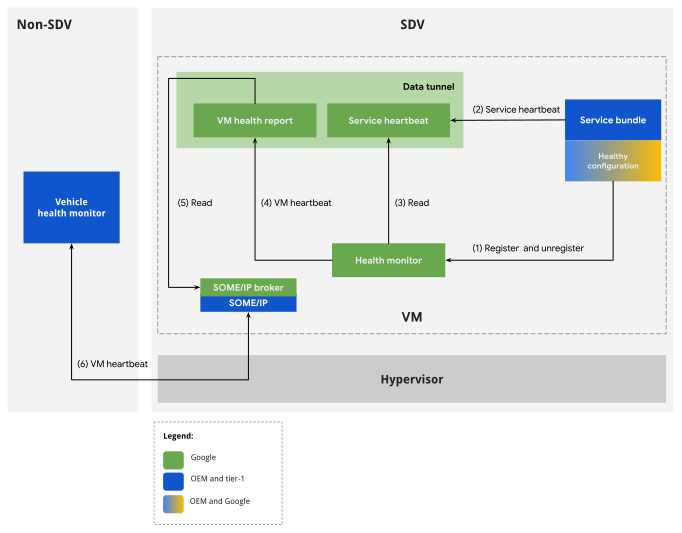
图 1. HM 活跃度监控流程。
配置
如需在服务软件包实例上启用活性 HB,请将 HealthConfiguration 的实例添加到软件包配置中的 health_config 字段。
活跃度心跳配置定义了一组预定的参数,用于确定评估服务周期性心跳信号的标准。如果服务心跳的特征偏离这些参数,则心跳会被归类为延迟,相应服务包会被归类为不健康,这可能表明运行状态不理想。
如果服务包根据其健康状况配置及时报告心跳,则会被视为健康状况良好。如果发生崩溃或系统负载过高,心跳可能会丢失或延迟,导致服务包被标记为不健康。在这种情况下,违规行为会显示在 VmHealth 报告中。
服务包开发者应在相应的 APEX 元数据中定义服务包的健康状况配置。健康状况配置定义了以下标准:
服务启动与首次检测到心跳之间允许的最大初始延迟时间。
SDV 服务软件包执行业务逻辑的周期,与发布服务心跳的周期相对应。
在 HM 认为服务包运行状况不佳之前,可以错过的周期数。
执行时间是指 SDV 服务软件包在发布服务心跳之前执行其业务逻辑所需的时间。
如果服务心跳延迟,服务包会生成健康状况违规。根据健康状况观测时间,可分为两种情况:
情形 1:未收到初始心跳。如果服务包启动与观测时间之间经过的时间超过允许的初始延迟时间,则该服务包会被视为运行状况不佳。
情形 2:已收到心跳。如果上次心跳与观测时间之间的时间差超过了阈值,则服务包会被视为健康状况不佳。此阈值的计算方法为:报告期(乘以期数)与任务时长的总和。
健康配置格式在 //system/software_defined_vehicle/health_monitor/catalog/health_config.proto 中定义:
package com.android.sdv.health;

// Service Bundle's configuration for health monitoring.
message HealthConfiguration {
  // Required.
  // Initial delay in milliseconds is the time between the service starts and its first heartbeat.
  optional uint64 initial_delay_ms = 2;

  // Required.
  // Period of reporting a heartbeat in milliseconds which corresponds to the periodicity of
  // executing a business logic by the SDV service. This value should be larger than 0.
  optional uint64 period_ms = 3;

  // Required.
  // The number of periods missing a heartbeat before the Health Monitor should consider the
  // service as unhealthy. This value should be larger than 0.
  optional uint64 num_periods = 4;

  // Required.
  // Duration of the business logic the SDV service bundle executes in milliseconds.
  optional uint64 task_duration_ms = 5;
}
运行时间注意事项
本部分提供了有关发布活跃度心跳和正确注册以进行监控的指南。
发布活跃度检测信号
服务软件包实例会生成包含时间戳的服务心跳消息。定期生成消息,通常在执行主要业务逻辑后立即生成。服务心跳表示服务软件包处于活跃状态。
要监控的 Bundle 实例对象需要创建 ServiceHeartbeat 类型的发布者,该类型可在 libhealth_api 库中使用:
 message ServiceHeartbeat {
   // Required.
   // The timestamp.
   .google.protobuf.Timestamp timestamp = 1;
 }
随意选择发布内容主题。HM 代理使用按消息类型进行的发现来检测发布。
通过相应服务软件包清单中关联的健康状况配置来配置活跃性监控时,HM 代理会期望在实例完成其 on_start 例程后立即发布 HB。我们建议将 on_start 保持在较短的时间内,以避免阻塞系统启动,因此请在 on_start 中启动的异步任务中发布心跳。
软件包开发者可以使用 initial_delay_ms 配置条目自定义预期首次心跳的时间。
软件包实例应继续发布检测信号,直到停止为止。当实例的 on_stop 例程完成时,该实例会被视为已停止。
特殊用例:显式注册到心跳监控
活跃度心跳监控中所述的行为(即心跳应介于 on_start 和 on_stop 之间)称为隐式活跃度监控。建议采用这种方式来使用该功能:它可简化软件包的业务逻辑,并确保始终监控软件包。
不过,在某些使用情形下,默认的监控周期可能会成为限制:
- 服务软件包实例包含在与
start和stop事件无关的时间间隔内定期运行的业务逻辑。可能仅在此自定义时间段内需要活跃度监控。 - HM 可在暂停和恢复期间准确跟踪 HB。因此,软件包可能需要在
on_stop之后继续受到监控。 - 自定义 OEM 代理可能未实现为服务软件包。因此,它们无法受益于隐式活跃度监控。不过,它们可能仍需要活性监控。
对于这些情况,HM 允许您绕过隐式注册,转而进行显式注册,以进行存活状态监控。如需使用显式注册,软件包实例必须通过不在软件包的清单中为特定实例添加 HealthConfiguration 类型的条目来选择停用隐式注册。然后,在运行时,bundle 实例应使用 //system/software_defined_vehicle/health_monitor/catalog/health_monitor_registration_service.proto 中定义的 RPC API 手动注册和取消注册监控。注册 RPC 调用成功后,系统会立即发布心跳。
如需查看实现示例,请参阅 //system/software_defined_vehicle/samples/health/stable/health_monitored_service_bundle/。
QoS 监控
服务质量 (QoS) 是对通信质量的衡量。HM 会监控发送的消息是否在传输过程中花费了过多的时间,或者在定期通信的情况下,是否未按所选频率收到消息。
SDV 提供了多种 Pub/Sub 和 RPC 通信方式。共同点是,所有通信方案都包含至少一个监听器。为了让 HM 监控通信,此监听服务软件包实例必须在每次收到感兴趣的消息时发布特殊的 QoS 心跳。
配置
如需启用通信的 QoS 监控,请先确定将发布 QoS 心跳的通信监听器。然后,对于已识别的服务软件包实例,在 qos_config 字段中向 QosMonitoringConfiguration 映射添加一个或多个主题。如需了解详情,请参阅按服务配置软件包。
主题是一个字符串,用于定义 HM 在运行时预期接收 QoS HB 的发布主题。监听软件包实例可以参与多次通信,并可以报告多个主题的 QoS HB。
主题应具有描述性,因为如果在运行时检测到 QoS 违规,它们会报告回 HM 监听器服务软件包。
QosMonitoringConfiguration 类型在 //system/software_defined_vehicle/health_monitor/catalog/health_config.proto 中定义:
message QosMonitoringConfiguration {
  // Optional - If absent, heartbeat frequency monitoring is disabled for this SB.
  //
  // The maximum allowable interval between consecutive heartbeats (in milliseconds).
  // A QoS frequency violation is triggered if the time elapsed between
  // two heartbeats exceeds this threshold.
  optional uint64 qos_period_threshold_ms = 1;

  // Optional - If absent, heartbeat latency monitoring is disabled for this SB.
  //
  // The maximum allowable interval between data publication and data processing timestamps (in milliseconds).
  // A QoS latency violation is triggered if the time elapsed between
  // data publication and data processing timestamps exceeds this threshold.
  optional uint64 qos_latency_threshold_ms = 2;
}
对于默认使用情形,强制执行这两种类型的 QoS 监控。在正常系统负载下,虚拟机内 Pub/Sub 通信的 qos_latency_threshold_ms 为 30 是合理的。
运行时间注意事项
与活跃度 HB 监控类似,通信监听软件包应发布一种心跳。在这种情况下,每当收到感兴趣的消息时,都应发布 QoS HB,而不是在业务逻辑执行结束时发布。
QoS HB 的类型为 QosHeartbeat,在 //system/software_defined_vehicle/health_monitor/catalog/qos_heartbeat.proto 中定义:
message QosHeartbeat {
  option (.sdv.vsidl.v1.publication) = {
    message_count: 2
    model: SINGLE_PUB
  };
  // Required.
  // Current timestamp at heartbeat transmission. The heartbeat should be sent
  // immediately after the listener receives the related QoS-monitored message.
  .google.protobuf.Timestamp timestamp = 1;

  // Required.
  // Timestamp corresponding to the creation time of the underlying data. This
  // implies that, in addition to the data of interest, the monitored message includes
  // a data creation timestamp field. The listener is responsible for routing this
  // timestamp to the QosHeartbeat upon receiving a QoS-monitored message.
  .google.protobuf.Timestamp data_timestamp = 2;
}
注册和取消注册 QoS HB 发布的时间对于准确监控至关重要。HM 预计这两个事件之间存在 QoS HB。当受监控的通信注册到 SDV 通信堆栈时,消息监听软件包应注册 QoS HB 发布。HM 可以使用可用性 API 来实现此目的。如需了解详情,请参阅确定服务可用性。
服务包恢复监控
服务软件包实例的恢复是在编排代理配置文件中配置的。如需全面了解此主题,请参阅服务捆绑包。HM 子系统会被动地观察恢复过程。检测到无法恢复软件包实例时,系统会将违规情况添加到 VMHealth 报告中。与其他 HM 监控功能不同,恢复监控是强制性的,且无法配置。
如果服务软件包实例未配置为恢复,则在首次崩溃时会生成健康状况违规。
服务软件包实例恢复旨在与心跳存活监控集成。当 HM 系统检测到软件包正在恢复时,在评估心跳时会更加宽松。在实践中,这种宽容意味着服务软件包在崩溃时无需采取任何额外的监控取消注册或注册步骤。
代理崩溃监控
HM 使用 binder linkToDeath 机制检测 SDV 代理的潜在崩溃。
您可以将崩溃监控配置为虚拟机健康状况配置的一部分(请参阅每个 SDV 实例 (VM) 的配置),具体来说是 monitored_agent 重复字段。此字段应包含 BinderServiceAgent 类型的条目:
message BinderServiceAgent {
  // agent_names must be unique across configuration
  // used for HM internal agent identification, and naming entries in HM dumpsys report
  string agent_name = 1;

  // Binder interface name/identifier, e.g: "google.sdv.data_tunnel.IAgentService/default"
  // HM Agent should have appropriate permissions to find the binder interface
  // see also `sdv_crash_monitored_service` selinux attribute
  string binder_interface_name = 2;
}
如果自定义代理公开了 binder 接口,也可以对其进行监控。如需监控自定义代理,请授予 HM SELinux 权限,以监听相应的 Binder 接口。
系统属性 ro.boot.sdv.health_monitor.agent_startup_timeout_sec 可以替换 HM 在启动后等待代理注册其 binder 接口的时长。除非自定义代理需要,否则默认值 3 秒是合适的。
服务包开发指南
本部分提供了有关如何使用服务包中的 HM 功能的分步指南,这与前面部分中的理论处理方法形成对比。这些指南所依据的最新参考样本是 qos_monitoring 样本。按照示例的 //system/software_defined_vehicle/samples/health/stable/qos_monitoring/README 进行操作,获得实践体验。
向服务包添加活跃度心跳监控
此方法是为服务软件包启用健康状况监控的最直接方式:
在名为
health_configuration.textproto的文件中,为软件包实例定义ServiceBundleHealthConfiguration的实例:# health_bundle_configuration.textproto instance_config { key: "instance1" value: { health_config { initial_delay_ms: 1000 period_ms: 500 num_periods: 2 task_duration_ms: 200 } # qos_config entries irrelevant for this dev guide qos_config { ... } } }将配置文件添加到服务软件包 APEX。在
Android.bp中:apex { name: "com.android.sdv.sample.oem.health.qos_monitoring", // ... prebuilts: [ // ... "com.android.sdv.sample.oem.health.qos_monitoring.health_config", ], } prebuilt_etc { name: "com.android.sdv.sample.oem.health.qos_monitoring.health_config", src: "health_configuration.textproto", filename: "health.textproto", // ... // Reduce prebuilt visibility to avoid adding it in another APEX. visibility: ["//system/software_defined_vehicle/samples/health/qos_monitoring/apex"], }将健康状况配置存储在 APEX 中,并在清单中设置
health_config_path:# sdv_service_bundles_manifest.textproto sdv_service_bundle_metadata { ... health_config_path: "etc/config/health_configuration.textproto" }在 VSIDL 定义中,确保软件包发布
com.android.sdv.health.ServiceHeartbeat:sdv_service_bundle { name: "SampleBundle" publisher { message: "com.android.sdv.health.ServiceHeartbeat" topic: "arbitrary-topic" capacity: 2 } }向软件包添加 SDV 权限,以便该软件包获得发布 HB 的授权:
  publisher {
    type: "com.android.sdv.health.ServiceHeartbeat"
  }
在代码中定期发布服务心跳,从
on_start开始:// ... fn on_start(&mut self) { // ... runtime.spawn(business_logic(self.context)) } async fn business_logic(context: ContextRef) -> SdvResult<()>{ // register HB publication let mw_comms = SdvComms { context }; let aliveness_hb_pub = create_publisher::<PublisherDescriptor<ServiceHeartbeat>>( &mw_comms, PublisherDescriptors::<ServiceHeartbeat>::ARBITRARY_TOPIC, ) .await?; loop{ // do business logic // ... // publish hb aliveness_hb_pub.publish(&ServiceHeartbeat { timestamp: MessageField(Some(Box::new(now.into()))), ..Default::default() })?; } }
特殊用例:显式注册
对于更特殊的用例,如果软件包需要针对自定义生命周期进行 HB 监控(例如,监控开始时间早于或结束时间晚于标准 STARTED 状态),您可以使用显式注册方法:
在 VSIDL 定义中,添加一个
com.android.sdv.health.HealthMonitorRegistrationService客户端:sdv_service_bundle { # ... client { service: "com.android.sdv.health.HealthMonitorRegistrationService" channel: "com-android-sdv-health-health-monitor-registration-service" } }添加了使用 aliveness HB 注册 RPC 的 SDV 权限:
  # ...
  client {
    service: "com.android.sdv.health.HealthMonitorRegistrationService"
    channel: "com-android-sdv-health-health-monitor-registration-service"
  }
通过 RPC 向 HM 注册,例如在
on_start或new中:let rpc_client = Self::new_client(comms).await?; let _ = rpc_client .RegisterConfiguration(&RegisterConfigurationRequest { config: Some(HealthConfiguration{ initial_delay_ms: 100, period_ms: 200, num_periods: 3, task_duration_ms: 40, special_fields: protobuf::SpecialFields::default(), }).into(), ..Default::default() }) .await .unwrap();发布 HB。
不再需要监控时,取消注册:
let _ = rpc_client
  .UnregisterConfiguration(&UnregisterConfigurationRequest { ..Default::default() })
  .await
  .unwrap();
向通信添加了 QoS 监控
验证服务软件包实例是否为 VSIDL 目录中名为
fog-light-status的主题的订阅者:subscriber { message: "QosMonitoredFogLightStatus" topic: "left-fog-light-status" }消息格式如下:
package com.android.sdv.sample.oem.health.qos_monitoring; import "google/protobuf/timestamp.proto"; message QosMonitoredFogLightStatus { // arbitrary fields related to business logic int32 status = 1; // A QoS-monitored message must include a timestamp field .google.protobuf.Timestamp timestamp = 2; }在包含 QoS 监控的
health_configuration.textproto文件中,为软件包实例定义ServiceBundleHealthConfiguration的实例:# health_bundle_configuration.textproto instance_config { key: "instance1" value: { # aliveness HB monitoring config irrelevant for this dev guide health_config { ... } qos_config { key: "qos-hb-right-fog-light-status" value { qos_period_threshold_ms: 100 qos_latency_threshold_ms: 50 } } } }key字段中选择的主题表明,QoS HB 将发布到此主题,从而可以监控名为fog-light-status的主题。将配置文件添加到服务软件包 APEX。在
Android.bp中:apex { name: "com.android.sdv.sample.oem.health.qos_monitoring", // ... prebuilts: [ // ... "com.android.sdv.sample.oem.health.qos_monitoring.health_config", ], } prebuilt_etc { name: "com.android.sdv.sample.oem.health.qos_monitoring.health_config", src: "health_configuration.textproto", filename: "health.textproto", // ... // Reduce prebuilt visibility to avoid adding it in another APEX. visibility: ["//system/software_defined_vehicle/samples/health/qos_monitoring/apex"], }将健康配置存储在 APEX 中,并在清单中设置
health_config_path:# sdv_service_bundles_manifest.textproto sdv_service_bundle_metadata { ... health_config_path: "etc/config/health_configuration.textproto" }在 VSIDL 定义中,确保相应软件包是
com.android.sdv.health.QosHeartbeat的发布者:sdv_service_bundle { name: "SampleBundle" publisher { message: "com.android.sdv.health.QosHeartbeat" topic: "qos-hb-right-fog-light-status" capacity: 2 } }向软件包添加 SDV 权限,以便该软件包获得发布 QoS HB 的授权:
publisher { message: "com.android.sdv.health.QosHeartbeat" topic: "qos-hb-right-fog-light-status" }仅当已注册受监控的通信时,才注册 QoS HB 发布。使用
libsdv_mw_clientlib中的可用性 API:// Wait for monitored communication to be available let comms = SdvComms{context}; let registration_stream = create_registration_event_stream( &comms, SubscriberDescriptors::<QosMonitoredFogLightStatus>::LEFT_FOG_LIGHT_STATUS, ).await?; let mut registration_stream = Box::pin(registration_stream.filter(|e|e==Availability::Available)); registration_stream.next().await; // only when available, create QoS HB publication: let qos_hb_pub = create_publisher( &comms, PublisherDescriptors::<QosHeartbeat>::QOS_HB_LEFT_FOG_LIGHT_STATUS, ).await?; // ...每次收到消息时都发布 QoS HB:
// ... use tap::Pipe; fn flatten_mw<T: Send>( s: impl Stream<Item = SdvResult<Vec<T>>> + Send + Unpin, ) -> impl Stream<Item = SdvResult<T>> + Send + Unpin { s.flat_map(|v| match v { Ok(v) => v.into_iter().map(Ok).pipe(stream::iter).left_stream(), Err(err) => Err(err).pipe(future::ready).pipe(stream::once).right_stream(), }) } { // ... let data_stream = create_observer( &comms, SubscriberDescriptors::<QosMonitoredFogLightStatus>::LEFT_FOG_LIGHT_STATUS, SubscribeOptions::default() ) .pipe(flatten_mw) .await?; while let Some(data) = data_stream.next().await { // publish QoS HB. Note how data.timestamp is used to populate the field qos_hb_pub.publish( &QosHeartbeat { timestamp: SystemTime::now(), data_timestamp: data.timestamp, ..Default::default() } ) // use data // ... } }如需停止 QoS 监控,请舍弃发布者对象:
// ...
drop(qos_hb_pub);
调试运行状况监控
出于调试和系统概览目的,请使用 dumpsys 工具监控虚拟机的健康状况监控状态:
adb shell dumpsys com.google.sdv.ISdvAgent/hm
报告详细说明了虚拟机健康状况报告配置、软件包配置和监控状态。以下是此类报告的示例:
AGENT NAME: SDV Agent dump - Health Monitor
AGENT FQIN: instance1:com.android.sdv.health.HealthMonitorServiceBundle/instance1
AGENT STATE: Started
----------------
----------------
INTERNAL STATE REPORTERS:

*NAME: VM health report period:
*REPORT:
100----------------
*NAME: Recovery monitor manager
*REPORT:

HEARTBEAT MONITORING:
NO ACTIVE MONITORS

QOS MONITORING:
NO ACTIVE MONITORS
RECOVERY MONITORING:
a. Agent monitoring:
MONITOR 0:
ID: Agent: sdv_vsidl_provider_agent
linked_binder: com.google.sdv.ISdvAgent/vsidl_provider
alive: true

MONITOR 1:
ID: Agent: sdv_someip_broker
linked_binder: com.google.sdv.ISdvAgent/someip_broker
alive: false

b. SB monitoring:
MONITOR 0:
ID: FQIN: instance1:com.android.sdv.test.orchestrator.OrchSampleInitialPowerState/sample-initial-power-state
Recovery State: Normal
Lifecycle State: Started
Health Status: Healthy
MONITOR 1:
ID: FQIN: instance1:com.android.sdv.sample.apex.provider.Provider/sample-provider-v1
Recovery State: Normal
Lifecycle State: Started
Health Status: Healthy
MONITOR 2:
ID: FQIN: instance1:com.sdv.google.display_safety.HarSdvVehicleDataPublisher/instance-1
Recovery State: Normal
Lifecycle State: Started
Health Status: Healthy
----------------
*NAME: Health monitor
*REPORT:
CURR TIMESTAMP(ns): 1775543863756836167
INTERNAL STATE:
background_thread running: true
should_run: true

----------------