

车载信息娱乐 (IVI) 系统上的软件定义车辆 (SDV) 网关有助于在 IVI 系统和远程 SDV 服务之间进行通信。通过网关,原始设备制造商 (OEM) Java 应用和原生服务(例如车辆硬件抽象层 [VHAL])可以与 SDV 服务进行交互。网关使用已建立的通信方法,包括服务注册、发现和远程过程调用 (RPC)。
此网关可满足特定的 AAOS SDV 项目要求,例如使用 SDV 数据隧道为属性信息启用 VHAL 参考实现。它还允许 IVI 上的 Java 和 Kotlin Android 应用使用 SDV Comms 堆栈、注册为服务、查找其他 SDV 服务并与之通信。
如需了解 SDV 网关代码位置和 SDV 网关客户端示例,请参阅代码位置。
SDV 网关集成模型
在 IVI 架构上通过 SDV 网关使用 SDV-IVI 通信
SDV 网关与 Java 应用、原生服务、SDV Comms 堆栈和车辆网络进行交互。图 1 展示了这些互动:
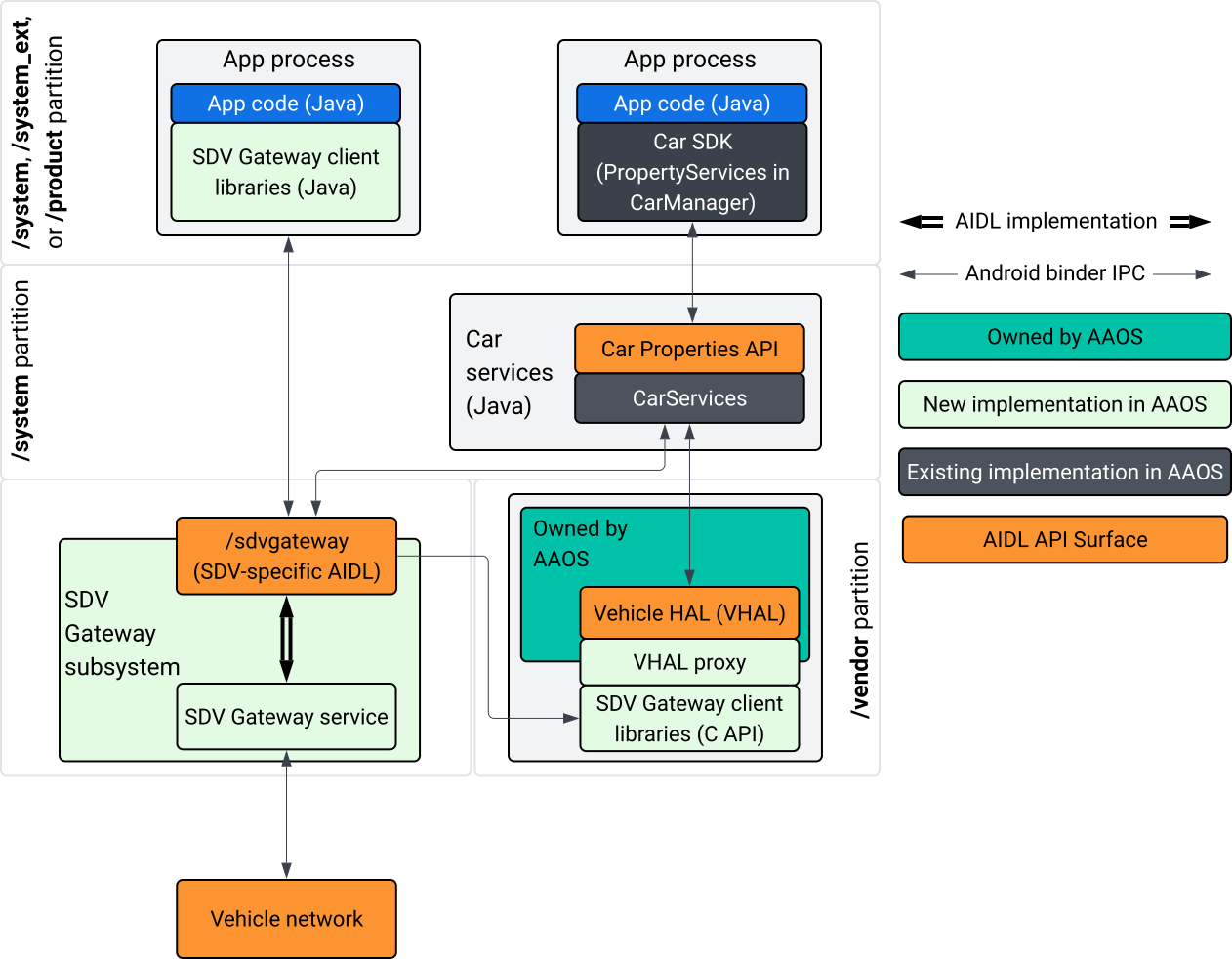
图 1. SDV 网关互动。
在此系统图中:
- 应用通过 SDV 网关的客户端服务与 SDV 网关进行交互。
- AAOS SDV SDK 为您提供:
- 用于进程间通信的 ISdvGateway AIDL API。
- 用于网络互动的通信库。
- 用于原生服务集成的便捷 C API。
- ISdvGateway AIDL API 由 SDV Gateway 服务和子系统实现。
- SDV 网关服务管理以下方面:
- 双向服务发现。
- 与远程 SDV 服务的通信。
- 核心业务逻辑。
- SDV 网关子系统连接到车辆网络。
- 原生服务(包括 VHAL 实现)可以直接使用 ISdvGateway AIDL API,也可以通过 SDK 的 C API 使用。
- VHAL 代理充当参考 VHAL 实现,并纳入 VSIDL 映射集成。
IVI 原生服务上 SDV 网关的集成模型
集成模型如图 2 所示:
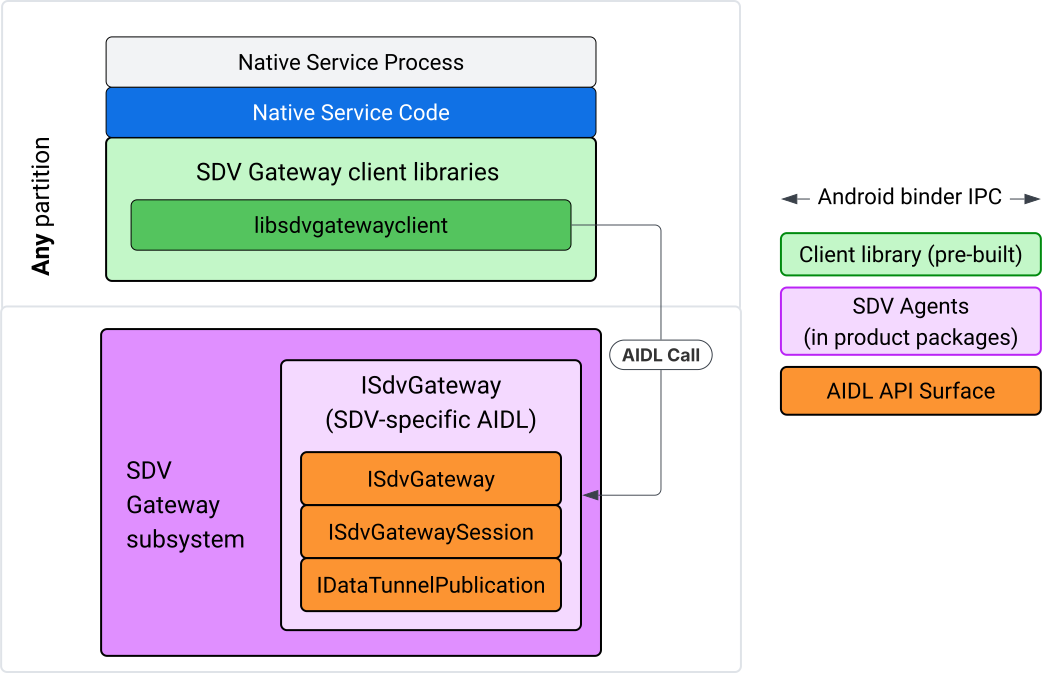
图 2. SDV 网关集成模型。
在 IVI 原生服务上使用 SDV 网关
图 3 展示了在 IVI 上使用 SDV 网关:
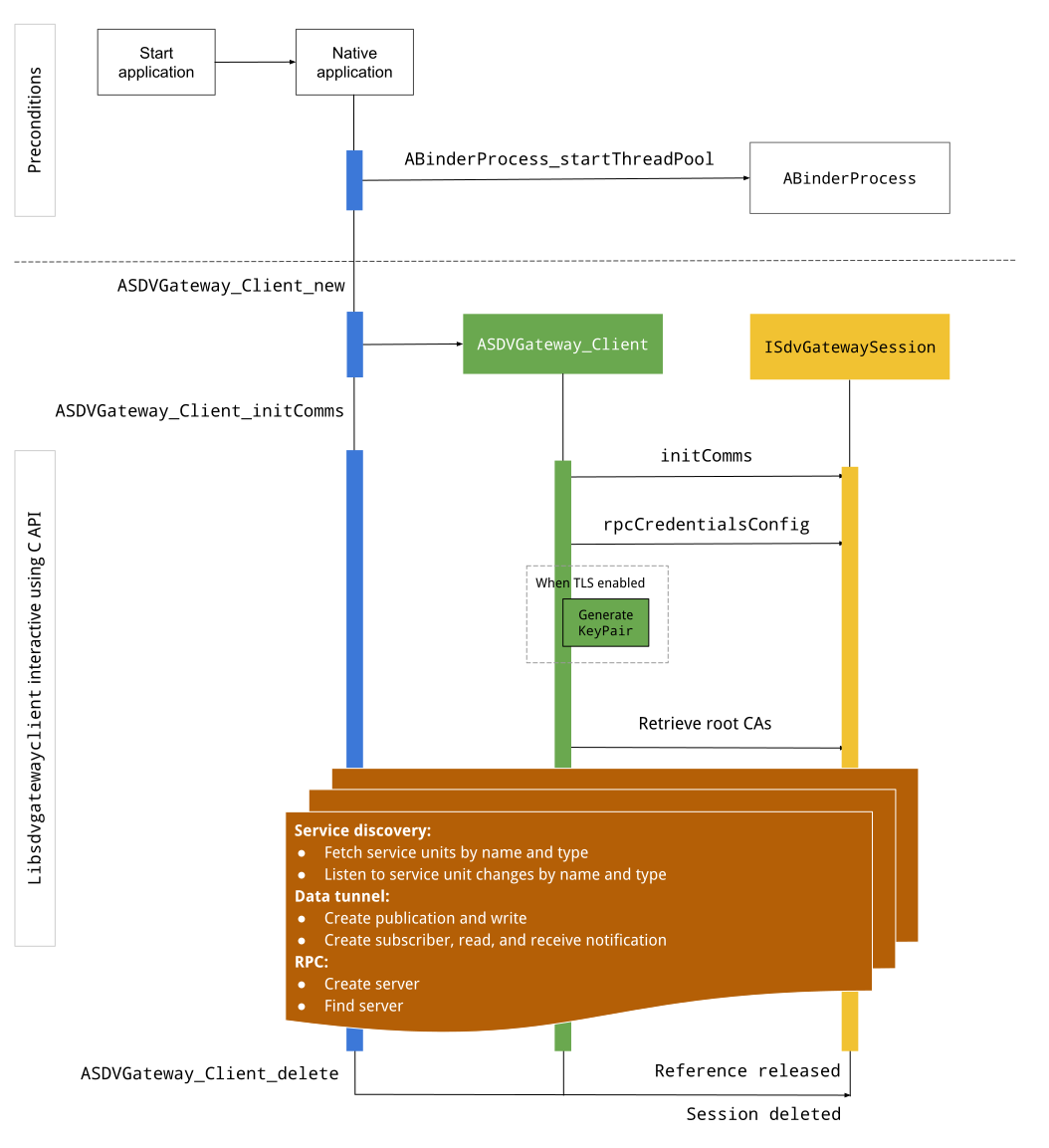
图 3. IVI 上的 SDV 网关。
前提条件
启动 Binder 线程池:
SDV 网关客户端库需要已启动的 Binder 线程池才能接收来自 Binder 服务的异步回调。
当 Binder 线程池未启动时,创建 SDV 网关客户端所需的 API 会失败。
添加原生网关客户端库
原生网关客户端库公开了一个 C API。添加 libsdvgatewayclient 的实例作为依赖项,以使用 C API:
cc_binary {
    name: "your_binary_name",
    srcs: ["main.cpp"],
    shared_libs: [
        "libsdvgatewayclient",
    ],
}
加载原生网关客户端
#include "libsdvgatewayclient.h"
创建原生客户端实例
ASDVGateway_Client* client;
ASDVGateway_StatusCode_t statusCode = ASDVGateway_Client_new(
     &client, /*outStatus*/nullptr);
创建客户端后,该客户端:
保存与网关服务的所有后续互动的状态。
充当与所有启用 SDV 的服务进行交互的上下文,并作为第一个参数传递给 C API 函数。
状态代码和错误消息
大多数 C API 函数都具有以下定义:
ASDVGateway_StatusCode_t ApiFunctionName(..., ASDVGateway_Status_t* outStatus);
如需评估成功情况,您可以检查返回的状态代码(类型为 ASDVGateway_StatusCode_t)。您还可以传递一个指向结构的指针,函数可以在其中填充状态代码和错误消息。该指针作为最后一个参数(名为 outStatus)传递。null 值表示不使用输出结构。
调用方必须为错误消息分配内存状态结构。状态结构可以同时包含状态代码和错误消息。您可以查看创建新客户端时检索错误消息的示例。
评估成效:
检查返回的状态代码,其类型为
ASDVGateway_StatusCode_t。传递一个指向结构的指针,该结构可供函数填充状态代码和错误消息。
- 该指针作为最后一个参数(名为
outStatus)传递。 - null 值表示不使用输出结构。
- 调用方必须为错误消息分配内存状态结构。
- 状态结构可以保存状态代码和错误消息。
- 该指针作为最后一个参数(名为
以下示例展示了如何检索新客户端的错误消息:
#include <iostream>
#include <array>

struct StatusWithErrorMsg : ASDVGateway_Status_t {
    StatusWithErrorMsg() {
        // Ensure the base struct pointers point to our internal buffer
        errorMessage = errorMessageBuffer.data();
        maxErrorMessageSize = errorMessageBuffer.size();

        // Good practice: Zero-initialize the buffer
        errorMessageBuffer.fill(0);
    }

    std::array<char, 256> errorMessageBuffer;
};

// --- Execution ---

ASDVGateway_Client* client = nullptr;
StatusWithErrorMsg status;

// Initialize the client
ASDVGateway_StatusCode_t statusCode = ASDVGateway_Client_new(&client, &status);

// Log Results
std::cout << "Returned statusCode:    " << statusCode << std::endl;
std::cout << "Status Struct Code:     " << status.statusCode << std::endl;
std::cout << "Status Error Message:   " << status.errorMessage << std::endl;
在此示例中:
状态结构中包含的状态代码与返回的状态代码具有相同的值。
错误消息最多只能包含
maxErrorMessageSize个字符(包括 null 终止字符\0)。如果未发生任何错误(状态代码为OK),则错误消息为空字符串。
初始通信
Init comms 使用 SDV Comm Stack 和 SDV Gateway 初始化调用方应用与其他应用之间的通信。可以在以下任一上下文中调用初始通信:
创建客户端后。
在任何数据隧道、RPC 或服务发现互动之前。
示例如下:
ASDVGateway_InitCommsParams_t params{
.packageName = "android.sdv.samples.gateway.client",
.serviceBundleName = "NativeTestApp",
.serviceInstanceName = "default",
};
// Initialize communications and capture the status code
ASDVGateway_StatusCode_t statusCode = ASDVGateway_Client_initComms(client, ¶ms, &status);
// Recommended check
if (statusCode != ASDVGateway_StatusCode_OK) {
std::cerr << "Failed to init comms: " << status.errorMessage << std::endl;
}
服务发现
当特定类型或名称的服务单元注册或取消注册时,您可以收到通知。回调函数在网关客户端拥有的线程中收到通知。此回调最初是在 C API 调用后立即触发的,其中包含所有已注册的服务单元。在初始触发后,通知会继续更新,直到显式取消注册监听器。
class NativeSdvGatewayTestApp {
public:
    static void ServiceUnitChangeListenerCallback(
        const ASDVGateway_ServiceUnitChangeEventType eventType,
        const ASDVGateway_ServiceUnitDefinition* serviceUnitDefinition,
        void* userData
    ) {
        auto* testApp = reinterpret_cast<NativeSdvGatewayTestApp*>(userData);

        if (testApp) {
            // Logic to react when services are registered or unregistered
            // e.g., testApp->handleServiceChange(eventType, serviceUnitDefinition);
        }
    }
};

// --- Listener Registration ---

// Ensure thisApp remains in scope as long as the listener is active
NativeSdvGatewayTestApp* thisApp = get_current_app_context();

ASDVGateway_UnitType_t unitType{
    .sdvPackageName     = "android.sdv.samples.sdv_gateway",
    .serviceBundleName  = "DtPublisher",
    .unitTypeName       = "TirePressure",
};

// Register the listener
ASDVGateway_Client_registerListenerForServiceUnitChangeByType(
    client,
    &unitType,
    NativeSdvGatewayTestApp::ServiceUnitChangeListenerCallback,
    static_cast<void*>(thisApp), // userData
    &listenerHandle,
    &status
);

// --- Cleanup ---

// Unregistering stops all notification to the callback function
ASDVGateway_Client_unregisterListenerForServiceUnitChangeByType(
    client,
    listenerHandle,
    &status
);
如需检索已注册的服务单元,而无需进一步通知,请使用 ASDVGateway_Client_fetchServiceUnitsByType 和 ASDVGateway_Client_fetchServiceUnitsByName API。
class NativeSdvGatewayTestApp {
public:
    /**
     * Callback triggered for each service unit found that matches the requested type.
     */
    static void FetchServiceUnitsCallback(
        const ASDVGateway_ServiceUnitDefinition* serviceUnitDefinition,
        void* userData
    ) {
        auto* app = reinterpret_cast<NativeSdvGatewayTestApp*>(userData);

        if (serviceUnitDefinition) {
            // The service unit is registered with service discovery.
            // Example: processServiceUnit(serviceUnitDefinition);
        }
    }
};

// --- Execution ---

ASDVGateway_UnitType_t unitType{
    .sdvPackageName     = "android.sdv.samples.sdv_gateway",
    .serviceBundleName  = "DtPublisher",
    .unitTypeName       = "TirePressure",
};

// Context used to differentiate between various fetchServiceUnits calls
void* userData = static_cast<void*>(thisApp);

ASDVGateway_Client_fetchServiceUnitsByType(
    client,
    &unitType,
    NativeSdvGatewayTestApp::FetchServiceUnitsCallback,
    userData,
    &status
);
在 ASDVGateway_Client_fetchServiceUnitsByType API 调用期间,回调会在调用者的线程中同步触发。使用 ASDVGateway_Client_fetchServiceUnitsByName 按名称(而非按服务单元类型)获取已注册的服务单元:
ASDVGateway_StatusCode_t ASDVGateway_Client_fetchServiceUnitsByName(
    // [in]  Opaque pointer to a client object.
    const ASDVGateway_Client* client,

    // [in]  Pointer to a structure containing the package name,
    //       service bundle name, and service unit name.
    const ASDVGateway_UnitNameDiscoveryArgs_t* unitName,

    // [in]  Callback function to be called for each service unit
    //       definition registered. Called synchronously in the
    //       caller's thread before the fetch completes.
    ASDVGateway_FetchServiceUnitsCallback callback,

    // [in]  Optional value passed back as a parameter of the callback.
    void* userData,

    // [out] Optional pointer to status structure for result
    //       codes and error messages.
    ASDVGateway_Status_t* outStatus
);
RPC 流程
网关客户端库可处理与其他启用 SDV 的应用通信的传输层安全协议 (TLS) 设置。具体而言,它会检索通信所需的 TLS 设置。TLS 使用情况的确定方式如下:
当 SDV 启动模式为
LOCKED时,系统会使用 TLS。当 SDV 启动模式为
UNLOCKED时,使用不安全的通信。使用 TLS 时,网关客户端库会生成一个仅应用进程知道的密钥对。客户端检索 RPC 凭据以创建 RPC 服务器或 RPC 客户端渠道。RPC 使用专用 SDV-RPC VLAN。 网关客户端库会在ASDVGateway_Client_initComms调用期间或之后调用 android_setprocnetwork,以将进程的默认网络切换到 SDV-RPC VLAN。
RPC 可用性
配置为在前期启动时启动的客户端可能会在 SDV-RPC VLAN 可用之前启动。在尝试创建任何 RPC 服务器或 RPC 客户端套接字之前,请检查 RPC 是否可用:
// Check if the RPC (Remote Procedure Call) service is available
bool isRpcAvailable = ASDVGateway_Client_isRpcAvailable(client);

if (isRpcAvailable) {
    // Proceed with RPC calls
} else {
    // Handle the case where RPC is not yet ready or available
}
或
// Check if the process is correctly bound to the SDV RPC Network Interface/VLAN
bool isRpcNetworkBound = ASDVGateway_Client_isProcessBoundToSdvRpcNetworkInterface(client);

if (!isRpcNetworkBound) {
    // Usually implies the process isn't running on the correct network interface
    // or the VLAN configuration is missing.
    std::cerr << "Warning: Process is not bound to the SDV RPC VLAN." << std::endl;
}
使用 ASDVGateway_Client_setClientNotificationCallback 为客户端事件设置监听器,以便在 RPC 可用性状态发生变化时收到通知。如果应用切换了进程的网络,则首选 ASDVGateway_Client_isProcessBoundToSdvRpcNetworkInterface,因为它会同时检查 RPC 是否可用以及进程是否绑定到 SDV-RPC VLAN。
切换进程的默认网络
您可能需要将进程的默认网络从 SDV-RPC VLAN 切换为打开套接字以建立互联网出站连接。调用 ASDVGateway_Client_unbindProcessFromSdvRpcNetworkInterface 和 ASDVGateway_Client_bindProcessToSdvRpcNetworkInterface 以取消绑定进程并将其重新绑定到 SDV-RPC VLAN。这两个调用就像全局开关一样,可为进程的所有线程切换套接字绑定的网络接口。
// 1. Unbind: Sockets return to the "default" network interface (e.g., wlan0, eth0)
ASDVGateway_StatusCode_t unbindStatus =
    ASDVGateway_Client_unbindProcessFromSdvRpcNetworkInterface(client, &status);

// 2. Bind: Sockets are now bound to the dedicated SDV-RPC VLAN
ASDVGateway_StatusCode_t bindStatus =
    ASDVGateway_Client_bindProcessToSdvRpcNetworkInterface(client, &status);

// Validation
if (bindStatus == ASDVGateway_StatusCode_OK) {
    // Sockets are successfully bound to the SDV-RPC VLAN
}
RPC 通知
设置客户端监听器,以接收有关 RPC 可用性变化和必须由 RPC 服务器接受的根证书更新的通知:
class NativeSdvGatewayTestApp {
public:
    static void ClientNotificationCallback(
        ASDVGateway_ClientNotificationType_t notificationType,
        void* userData
    ) {
        auto* testApp = reinterpret_cast<NativeSdvGatewayTestApp*>(userData);
        if (!testApp) return;

        switch (notificationType) {
            case ASDVGateway_ClientNotificationType_RootCertsChanged:
                std::cout << "onClientNotification: Root Certs Changed" << std::endl;
                // Handle certificate rotation logic here
                break;

            case ASDVGateway_ClientNotificationType_RpcAvailabilityChanged:
                std::cout << "onClientNotification: RPC Availability Changed" << std::endl;
                // Handle reconnection or UI updates here
                break;

            default:
                std::cout << "onClientNotification: Received Unknown Notification ("
                          << notificationType << ")" << std::endl;
                break;
        }
    }
};

// --- Registration ---

NativeSdvGatewayTestApp* thisApp = get_current_app_context();

// Register the notification callback to monitor system-level changes
ASDVGateway_StatusCode_t statusCode = ASDVGateway_Client_setClientNotificationCallback(
    client,
    NativeSdvGatewayTestApp::ClientNotificationCallback,
    static_cast<void*>(thisApp), // userData
    &status
);
RPC 服务器流程
您必须使用凭据来创建 RPC 服务器:
ASDVGateway_RpcCredentials_t* rpcCredentials = nullptr;

// Retrieve the credentials from the client
ASDVGateway_StatusCode_t statusCode = ASDVGateway_Client_rpcCredentials(client, &rpcCredentials, &status);

// Validation: Differentiating between an error and a deliberate "insecure mode"
if (status.statusCode != ASDVGateway_StatusCode_OK) {
    std::cerr << "Error retrieving credentials: " << status.errorMessage << std::endl;
    return;
}

// Logic for choosing Security Credentials
if (rpcCredentials == nullptr) {
    // If the call succeeded but credentials are null, the system expects insecure communication
    std::cout << "Configuring for Insecure Mode" << std::endl;
} else {
    std::cout << "Configuring for Secure Mode:" << std::endl;
    std::cout << "  Private Key: " << (rpcCredentials->privateKeyPem ? "Present" : "Missing") << std::endl;
    std::cout << "  RootCerts:   " << rpcCredentials->rootCertsPem << std::endl;
    std::cout << "  CertChain:   " << rpcCredentials->certChainPem << std::endl;
    std::cout << "  SAN:         " << rpcCredentials->subjectAlternativeName << std::endl;
}

// --- Cleanup ---

// Release the memory once the RPC server/client is initialized
if (rpcCredentials != nullptr) {
    ASDVGateway_Client_deleteRpcCredentials(client, rpcCredentials);
}
创建 RPC 服务器并知道其监听端口后,注册 RPC 服务器,以便它可以发现其他应用:
ASDVGateway_RegisterRpcServerParams_t params{
.serviceUnitName = "android-sdv-samples-sunroof-sunroof",
.unitType = ASDVGateway_UnitType_t{
.sdvPackageName = "android.sdv.samples.sunroof",
.serviceBundleName = "SunroofServer",
.unitTypeName = "Sunroof",
},
.listeningPort = listeningPort,
.serverUnitMetadata = ASDVGateway_ServerUnitMetadata_t{
.version = 1,
},
};
// Register the RPC server with the SDV Gateway
ASDVGateway_StatusCode_t statusCode = ASDVGateway_Client_registerRpcServer(
client,
¶ms,
&status
);
// Basic error handling
if (statusCode != ASDVGateway_StatusCode_OK) {
std::cerr << "Failed to register RPC server: " << status.errorMessage << std::endl;
}
当系统在运行时更新根证书时(例如,在虚拟机状态更改期间),RPC 服务器必须刷新其接受的证书列表:
使用
ASDVGateway_Client_setClientNotificationCallback为客户端事件设置监听器,以便在根证书更新时收到通知。调用
ASDVGateway_Client_rpcCredentials以获取更新后的根证书。
RPC 客户端流程
以下是 RPC 客户端的流程:
ASDVGateway_FindRpcServerByNameParams_t params{
.packageName = "android.sdv.samples.cluster",
.serviceBundleName = "ClusterServer",
.serviceUnitName = "android-sdv-samples-cluster-cluster",
};
ASDVGateway_SocketAddress_t socketAddress;
ASDVGateway_RpcCredentials_t* rpcCredentials = nullptr;
// Perform the lookup to find the server's location and security requirements
ASDVGateway_StatusCode_t statusCode = ASDVGateway_Client_findRpcServerByName(
mClient,
¶ms,
&socketAddress,
&rpcCredentials,
&status
);
// Mandatory check: Distinguish between system errors and intentional "Insecure Mode"
if (status.statusCode != ASDVGateway_StatusCode_OK) {
std::cerr << "Failed to find RPC server: " << status.errorMessage << std::endl;
return;
}
// Logic for establishing the RPC channel
if (rpcCredentials == nullptr) {
std::cout << "Connecting via Insecure Mode to "
<< socketAddress.address << ":" << socketAddress.port << std::endl;
} else {
std::cout << "Connecting via Secure Mode to "
<< socketAddress.address << ":" << socketAddress.port << std::endl;
std::cout << " RootCerts: " << rpcCredentials->rootCertsPem << std::endl;
std::cout << " SAN: " << rpcCredentials->subjectAlternativeName << std::endl;
// Note: privateKeyPem and certChainPem are typically used if the client
// needs to perform mutual TLS (mTLS).
}
// Cleanup: Release the credential memory once the RPC channel is established
if (rpcCredentials != nullptr) {
ASDVGateway_Client_deleteRpcCredentials(client, rpcCredentials);
}
创建发布者并发布消息
ASDVGateway_Client_createPublication API 用于通过 AIDL 接口向 SDV 网关注册发布商服务单元,并在应用进程中创建快速消息队列 (FMQ)。Binder 仅在设置 FMQ 时参与,但在写入消息时不会参与。然后,使用 ASDVGateway_Client_publishMessages API 将消息发布到创建的发布内容。这包括写入出版物的 FMQ 并通知已写入消息。
ASDVGateway_CreatePublicationParams_t params{
.serviceUnitName = "mirror-position-adjust-impl-1",
.unitType = ASDVGateway_UnitType_t{
.sdvPackageName = "android.sdv.samples.sdv_gateway",
.serviceBundleName = "DtPublisher",
.unitTypeName = "MirrorPositionAdjust",
},
.publisherUnitMetadata = ASDVGateway_PublisherUnitMetadata_t{
.version = 1,
.messageSizeBytes = 64,
.messageCount = 16,
},
};
ASDVGateway_PublicationMetadata_t metadata;
// 1. Create the Publication (allocates resources on the gateway)
ASDVGateway_StatusCode_t createStatus = ASDVGateway_Client_createPublication(
client,
¶ms,
&metadata,
&status
);
if (status.statusCode != ASDVGateway_StatusCode_OK) {
std::cerr << "Failed to create publication: " << status.errorMessage << std::endl;
return;
}
// 2. Publish Messages
// Note: serializedMessage should contain your encoded protobuf data
std::vector<uint8_t> serializedMessage;
ASDVGateway_Client_publishMessages(
client,
serializedMessage.data(),
serializedMessage.size(),
metadata.publicationId,
&status
);
创建具有通知监听器的订阅方
如需订阅发布内容并接收数据隧道通知(例如消息可用性),请使用 ASDVGateway_Client_subscribeToPublicationByName API。此 API 还会设置 FMQ 以读取已发布的消息。您可以在订阅过程中或之后配置通知回调。
#include <map>
#include <memory>
#include <iostream>

class NativeSdvGatewayTestApp {
public:
    struct SubscriptionContext {
        int32_t subscriptionId;
        std::string topicName;
        // Add other context-specific data here (e.g., counters, buffers)
    };

    /**
     * Callback triggered when new data is published to a subscribed topic.
     */
    static void SubscriptionNotificationCallback(
        const ASDVGateway_SubscriptionNotificationData_t* notification,
        void* userData
    ) {
        // The SDV Gateway client passes back the userData pointer.
        // We ensure validity by managing the lifecycle of SubscriptionContext
        // within the mSubscriptions map.
        auto* ctx = reinterpret_cast<SubscriptionContext*>(userData);

        if (ctx && notification) {
            // React to data being available for the subscription.
            // Example: handleIncomingData(notification->data, notification->size);
            std::cout << "Notification received for sub ID: " << ctx->subscriptionId << std::endl;
        }
    }

private:
    // Maps subscription handles/IDs to their respective contexts
    std::map<int32_t, std::unique_ptr<SubscriptionContext>> mSubscriptions;
};

// --- Usage ---
NativeSdvGatewayTestApp app;
订阅时,您可以在发布商的服务单元名称旁边指定其他选项。通过这些选项,您可以在订阅之前检索最近发布的消息,并定义通知之间的最短时间间隔。
ASDVGateway_SubscribeToPublicationByNameParams_t params{
.sdvVmName = "vm1",
.packageName = "test.package.impl.name",
.serviceBundleName = "TestBundleImpl",
.serviceUnitName = "GrpcServerImpl",
};
ASDVGateway_Subscriber_Options_t options{
// Ensure we receive the most recent message immediately upon subscribing
.flags = ASDVGATEWAY_SUBSCRIBER_OPTIONS_FLAG_FETCHLASTMESSAGE,
.minIntervalMs = 0, // No rate limiting; receive updates as they happen
};
// 1. Prepare the context for the callback
auto subCtx = std::make_unique<SubscriptionContext>();
ASDVGateway_PublicationMetadata_t metadata{};
// 2. Perform the subscription
ASDVGateway_StatusCode_t statusCode = ASDVGateway_Client_subscribeToPublicationByName(
client,
¶ms,
&options,
NativeSdvGatewayTestApp::SubscriptionNotificationCallback,
static_cast<void*>(subCtx.get()), // Pass the raw pointer as userData
&metadata,
&status
);
// 3. Validation and Lifecycle Management
if (status.statusCode != ASDVGateway_StatusCode_OK) {
// Error handling: subCtx will be automatically deleted here
std::cerr << "Subscription failed: " << status.errorMessage << std::endl;
return;
}
// Store the context using the publicationId as the key.
// Once moved, the map owns the lifetime of subCtx.
app.mSubscriptions.emplace(metadata.publicationId, std::move(subCtx));
使用 ASDVGateway_Client_readAvailableMessages API 从发布内容中读取消息:
uint32_t messagesAvailable = 0;

// 1. Check how many messages are waiting in the queue
ASDVGateway_StatusCode_t availStatus = ASDVGateway_Client_availableToRead(
    client,
    metadata.publicationId,
    &messagesAvailable,
    &status
);

if (status.statusCode != ASDVGateway_StatusCode_OK) {
    // Error handling for availability check
    return;
}

if (messagesAvailable == 0) {
    // No messages available for this publication at this time
    return;
}

// 2. Prepare the buffer
// metadata.messageSizeBytes was provided during the publication/subscription setup
std::vector<uint8_t> bytesForMessages;
bytesForMessages.resize(metadata.messageSizeBytes * messagesAvailable);

// 3. Read the messages from the Gateway into your local buffer
uint32_t actualMessageCount = 0; // Filled by the SDK with the number of messages read
ASDVGateway_StatusCode_t readStatus = ASDVGateway_Client_readAvailableMessages(
    client,
    metadata.publicationId,
    bytesForMessages.data(),
    bytesForMessages.size(),
    &actualMessageCount,
    &status
);

if (status.statusCode == ASDVGateway_StatusCode_OK) {
    // Successfully read 'actualMessageCount' messages
    // Process bytesForMessages...
}
如需在订阅后设置回调,请使用 ASDVGateway_Client_setNotificationCallbackForPublicationId API:
ASDVGateway_StatusCode_t ASDVGateway_Client_setNotificationCallbackForPublicationId(
    // [in]  Opaque pointer to the client object.
    const ASDVGateway_Client* client,

    // [in]  Identifies the specific publication to monitor.
    const int32_t publicationId,

    // [in]  Function pointer triggered when new data is available
    //       for the specified publication.
    ASDVGateway_SubscriptionNotificationCallback notificationCallback,

    // [in]  Optional user-defined context passed back to the callback.
    void* notificationCallbackUserData,

    // [out] Optional pointer to a status structure for result codes
    //       and error messages.
    ASDVGateway_Status_t* outStatus
);
设置 init 服务
首先,按照原生服务的身份中的说明,通过服务的 Android ID (AID) 为其分配服务身份。
假设您的服务名为 native_sdv_gateway_client_service,可执行文件位于 /vendor 分区中的 /vendor/bin/native_sdv_gateway_client_service,并且您使用 vendor_gateway_client 作为运行该服务的 Android ID (AID)。完成上述设置后,您可以定义以下 init 服务:
service native_sdv_gateway_client_service /vendor/bin/native_sdv_gateway_client_service
    class core
    user vendor_gateway_client
    group inet
    disabled
    oneshot
此配置使用以下参数:
vendor_gateway_client是为服务创建或选择的 AID。- SDV 网关客户端需要
group inet才能使用网络接口在 SDV 虚拟机之间进行通信。您可以在需要时添加其他群组。 - 此示例使用
disabled和oneshot。您可能需要调整服务的服务选项。在sdv_gateway之后启动服务。
为服务创建 SELinux 规则
如需使用 SDV 网关 API,您需要为该服务添加以下 SELinux 规则:
# Define the domain for the service
type native_sdv_gateway_client_service, domain;

# Define the executable file type on the vendor partition
type native_sdv_gateway_client_service_exec, exec_type, file_type, vendor_file_type;

# Macro to transition from 'init' to this service's domain upon execution
init_daemon_domain(native_sdv_gateway_client_service)

# Macro to grant the necessary permissions to communicate with the SDV Gateway
sdv_gateway_client_domain(native_sdv_gateway_client_service)
在 SELinux 规则中:
init_daemon_domain允许从init启动服务。sdv_gateway_client_domain提供与 SDV 网关交互所需的所有 SELinux 权限。以下行向可执行文件授予了这些规则:/vendor/bin/native_sdv_gateway_client_service u:object_r:native_sdv_gateway_client_service_exec:s0
代码示例
如需详细了解如何运行演示 C API 文档记录方式的原生代码示例,请参阅 system/software_defined_vehicle/samples/sdv_gateway/NativeSdvGatewayTestApp/README.md。
IVI Java 应用上的 SDV 网关
下图展示了 IVI 上 SDV 网关的互动模型:
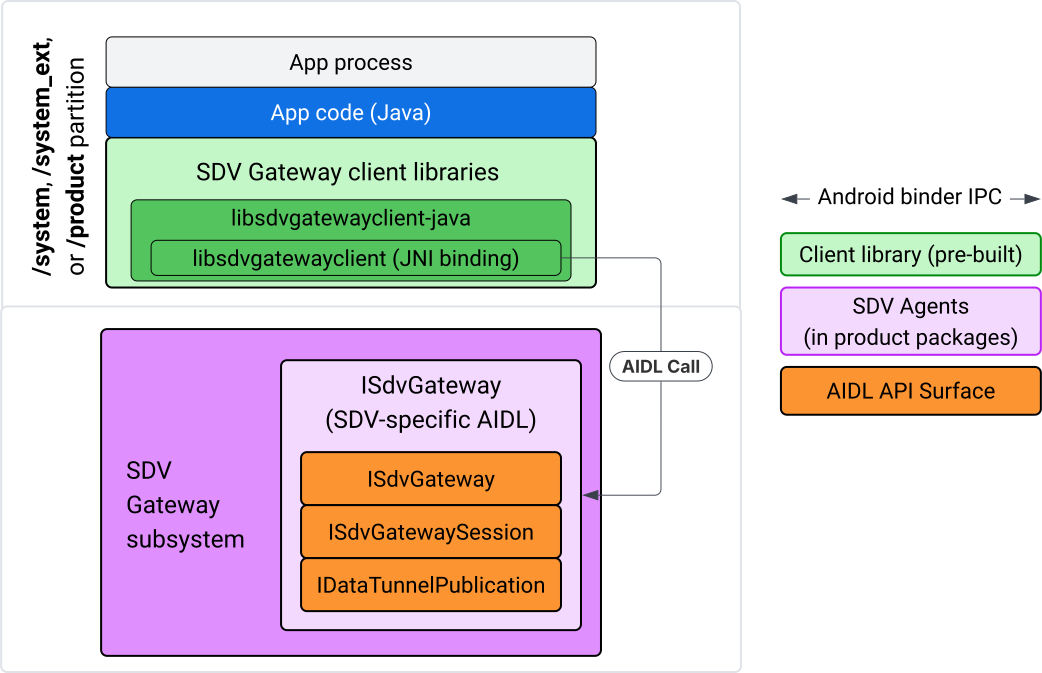
图 4. IVI Java 应用上的 SDV 网关。
具体而言,该模型:
- 将所有调用分派到 JNI 层。
- 粘合 Java 和 C API。
- 定义与
ISdvGateway的 AIDL 互动:- 初始通信
- 查找或创建 RPC 服务器
- 创建 Pub/Sub
- 执行服务发现数据隧道互动
- 接收通知(例如,有可用数据)
- 读取和写入消息(用于发布/订阅的 FMQ),以创建密钥对和 TLS 证书
包含网关客户端库
libsdvgatewayclient C API 的 Java 库和 JNI 封装容器安装在 IVI 目标平台上的 APEX 中。向 Java 库存根、必须在运行时使用的 Java 库以及包含 Java 库的必需 APEX 添加编译时依赖项。
android_app {
    name: "YourAppName",
    // ...
    static_libs: [
        "libsdvgatewayclient-java",
    ],
    libs: [
        "libsdvgatewayclient-java-sdk.stubs",
    ],
    uses_libs: [
        "libsdvgatewayclient-java-sdk",
    ],
    required: [
        "com.sdv.google.gateway.client",
    ],
    // ...
}
对于在 SDV 树之外构建的未捆绑应用,流程类似:
将生成的 Java 库桩 JAR 和支持 JAR 复制到应用库文件夹中以用于 RPC。有关详细信息,请参阅
system/software_defined_vehicle/sdv_gateway/libsdvgatewayclient_apex/README.md一文。将桩 JAR 添加为仅编译时依赖项。例如,更新 Gradle 配置以依赖于桩,方法是在
dependencies部分中添加compileOnly条目:dependencies { // The library supporting functions for SDK RPC. // Statically linked into the app APK. implementation(files("libs/libsdvgatewayclient-java.jar")) // Stub of the SDV-Gateway client library. // Used only for compilation; the real implementation is provided // by the com.sdv.google.gateway.client APEX at runtime. compileOnly(files("libs/libsdvgatewayclient-java-sdk.jar")) }将 Java 库添加到
AndroidManifest.xml文件的应用部分。<manifest xmlns:android="http://schemas.android.com/apk/res/android"> <application> <!-- Declares that this app requires the SDV Gateway client library. The 'android:required="true"' attribute ensures the app won't install/run if the library is missing from the system. --> <uses-library android:name="libsdvgatewayclient-java-sdk" android:required="true" /> </application> </manifest>
加载库
创建 SdvGatewayClient 对象(由客户端库提供):
import google.sdv.gateway.client.SdvGatewayClient;

// --- Inside your Activity, Service, or ViewModel ---

// Initialize the SDV Gateway Client
SdvGatewayClient gatewayClient = new SdvGatewayClient();
初始通信
使用应用名称作为服务软件包名称来调用 initComms():
// Define a unique name for your service bundle (usually constant)
private static final String SERVICE_BUNDLE_NAME = "MySdvServiceBundle";

// ... inside an Activity or Service context ...

try {
    // Initialize communications with the SDV Gateway
    // context.getPackageName() provides "android.sdv.samples.gateway.client" or similar
    gatewayClient.initComms(context.getPackageName(), SERVICE_BUNDLE_NAME);

    Log.i("SDV_GATEWAY", "Communications initialized successfully");
} catch (Exception e) {
    // Unlike the C API which uses status codes,
    // the Java SDK often throws exceptions for initialization failures.
    Log.e("SDV_GATEWAY", "Failed to initialize communications", e);
}
服务发现
Java API 包含以下方法:
在具有特定单元类型(或匹配特定名称)的服务单元注册或取消注册时收到通知。
列出具有特定单位类型的当前服务单位(或者匹配特定服务单位类型名称)。如需接收有关服务单元更改的通知,请创建一个监听器:
import google.sdv.gateway.client.ServiceUnitChangeListener;
import google.sdv.gateway.client.ServiceUnitChangeEventType;
import google.sdv.gateway.client.ServiceUnitDefinition;

// --- Implementation ---

ServiceUnitChangeListener listener = new ServiceUnitChangeListener() {
    @Override
    public void onServiceUnitChanged(
        ServiceUnitChangeEventType eventType,
        ServiceUnitDefinition serviceUnitDefinition
    ) {
        // This is triggered when services matching your criteria
        // are registered or unregistered on the vehicle network.
        if (eventType == ServiceUnitChangeEventType.REGISTERED) {
            // Handle new service discovery
        } else if (eventType == ServiceUnitChangeEventType.UNREGISTERED) {
            // Handle service removal
        }
    }
};
addListenerForServiceUnitChangeByName Java 方法会通知监听器:
// 1. Register the listener for a specific service unit by name
AutoCloseable handle = gatewayClient.addListenerForServiceUnitChangeByName(
    new UnitNameDiscoveryArgs(
        "",                                   // sdvVmName (empty for local/auto-discovery)
        "android.sdv.samples.cluster",        // sdvPackageName
        "ClusterServer",                      // serviceBundleName
        "android-sdv-samples-cluster-cluster" // serviceUnitName
    ),
    listener
);

// --- Later in the application lifecycle ---

// 2. To stop receiving notifications and clean up resources, close the handle.
try {
    if (handle != null) {
        handle.close();
    }
} catch (Exception e) {
    Log.e("SDV_GATEWAY", "Error while closing the listener handle", e);
}
或者,使用 addListenerForServiceUnitChangeByType Java 方法在具有指定单元类型的服务注册或取消注册时通知监听器:
// 1. Register a listener based on the Service Unit Type
AutoCloseable handle = gatewayClient.addListenerForServiceUnitChangeByType(
    new UnitType(
        "com.android.testapp.sdvcarmonitor", // sdvPackageName
        "SunroofRpcServer",                  // serviceBundleName
        "Sunroof"                            // unitTypeName
    ),
    listener
);

// --- Execution Loop / Lifecycle ---

// 2. To stop receiving notifications and clean up memory, close the handle.
// This effectively unregisters the listener from the SDV Gateway.
try {
    if (handle != null) {
        handle.close();
    }
} catch (Exception e) {
    Log.e("SDV_GATEWAY", "Failed to close the service unit listener handle", e);
}
对于 addListenerForServiceUnitChangeByName 和 addListenerForServiceUnitChangeByType,添加后,系统会通知监听器所有已注册的服务单元。如需仅按名称或类型获取已注册的服务单元,请使用 listServiceUnitsByName 和 listServiceUnitsByType Java API:
import google.sdv.gateway.client.ServiceUnitDefinition;
import google.sdv.gateway.client.UnitNameDiscoveryArgs;
import google.sdv.gateway.client.UnitType;

// --- 1. Synchronous Lookup by Specific Name ---
ServiceUnitDefinition[] definitionsByName = gatewayClient.listServiceUnitsByName(
    new UnitNameDiscoveryArgs(
        "",                                   // sdvVmName
        "android.sdv.samples.cluster",        // sdvPackageName
        "ClusterServer",                      // serviceBundleName
        "android-sdv-samples-cluster-cluster" // serviceUnitName
    )
);

// --- 2. Synchronous Lookup by Service Type ---
ServiceUnitDefinition[] definitionsByType = gatewayClient.listServiceUnitsByType(
    new UnitType(
        "com.android.testapp.sdvcarmonitor", // sdvPackageName
        "SunroofRpcServer",                  // serviceBundleName
        "Sunroof"                            // unitTypeName
    )
);

// Example processing
if (definitionsByType.length > 0) {
    ServiceUnitDefinition firstSunroof = definitionsByType[0];
    // Proceed to connect...
}
RPC 服务器流程
IVI 系统中的 SDV 网关客户端使用 Google 远程过程调用 (gRPC) 与 SDV 服务进行通信。这些互动依赖于 VSIDL 目录中的 proto 定义,这些定义与 SDV Core 上使用的定义一致或类似。对于 Java 应用,我们选择使用 gRPC-Java 实现。为应用服务器提供了一个示例服务器 proto 定义 sunroof.proto。
service Sunroof {
    /**
     * Retrieves the current state of the sunroof (e.g., position, tilt, status).
     *
     * @param .google.protobuf.Empty - No input parameters required.
     * @return SunroofStateResponse - The current telemetry data for the sunroof.
     */
    rpc GetSunroofState(.google.protobuf.Empty) returns (SunroofStateResponse) {}
}
链接到相应的 proto 库并定义服务:
import com.android.sdv.sdvgrpclibrary.SunroofGrpc;
import com.android.sdv.sdvgrpclibrary.SunroofStateResponse; // Assuming this is the generated class
import com.google.protobuf.Empty;
import io.grpc.stub.StreamObserver;

/**
 * Implementation of the Sunroof gRPC service.
 * This class handles the logic for the RPCs defined in your .proto file.
 */
static class SunroofGrpcImpl extends SunroofGrpc.SunroofImplBase {

    @Override
    public void getSunroofState(Empty request, StreamObserver<SunroofStateResponse> responseObserver) {
        // 1. Fetch current sunroof data (e.g., from a Hardware Abstraction Layer)
        int currentPosition = 50; // Example value: 50% open

        // 2. Build the Protobuf response message
        SunroofStateResponse response = SunroofStateResponse.newBuilder()
                .setPercentageOpen(currentPosition)
                .build();

        // 3. Send the response to the client using the observer
        responseObserver.onNext(response);

        // 4. Close the stream to signal that the RPC is finished
        responseObserver.onCompleted();
    }
}
注册具有安全和不安全通道凭据的 gRPC 服务器:
// 1. Define the type signature for the service
UnitType unitType = new UnitType(
    "com.android.testapp.sdvcarmonitor", // sdvPackageName
    "SunroofRpcServer",                  // serviceBundleName
    "Sunroof"                            // typeName (Unit Type)
);

// 2. Register the RPC server with the Gateway
// The gateway creates a mapping between the ServiceUnitName and your implementation.
server = gatewayClient.registerRpcServer(
    "SunroofRpcServerImpl-1",                       // serviceUnitName (Unique instance name)
    unitType,                                       // unitType defined earlier
    "SUNROOF_GRPC_SERVER_VALUE_HOLDER".getBytes(),  // appMetadataValueHolder (Static discovery data)
    1,                                              // appMetadataVersion
    new SunroofGrpcImpl()                           // The actual gRPC service implementation
);
在内部,客户端库会创建 gRPC 服务器对象 SdvGatewayClient.java,还会处理对根证书的更新:
// 1. Initialize credentials (Insecure for dev, TLS for production)
ServerCredentials serverCredentials = InsecureServerCredentials.create();

// 2. Build and start the OkHttp-based gRPC server
final int bindAnyPort = 0;
final Server server = OkHttpServerBuilder
    .forPort(bindAnyPort, serverCredentials)
    .addService(gRpcServerImplementation) // Your SunroofGrpcImpl
    .build()
    .start();

// The assigned port can now be retrieved using server.getPort()
int actualPort = server.getPort();

// 3. Prepare the JNI data structure
// This object mirrors the ASDVGateway_ServiceUnitDefinition_t C struct
JniServiceUnitDefinition definition = new JniServiceUnitDefinition();

// Fill the RPC service definition params (Port, Name, Type, etc.)
definition.setPort(actualPort);
definition.setServiceUnitName("SunroofRpcServerImpl-1");

// 4. Perform the cross-language call
// This jumps from Java -> JNI -> ASDVGateway_Client_registerRpcServer (C API)
mJniClient.nativeRegisterRpcServer(definition);
RPC 客户端流程
此代码示例提供了应用作为客户端连接到的服务器的服务器 proto 定义 (tpms.proto):
/**
 * The TPMS service provides real-time pressure and temperature
 * data for all tires on the vehicle.
 */
service Tpms {
    /**
     * Returns the full state of all monitored tires.
     */
    rpc GetTpmsState(.google.protobuf.Empty) returns (TpmsStateResponse) {}

    /**
     * A filtered query that returns only the tires
     * below the recommended pressure threshold.
     */
    rpc GetLowTires(.google.protobuf.Empty) returns (LowTiresResponse) {}
}
链接到相应的 proto 库:
import com.android.sdv.sdvgrpclibrary.TpmsGrpc;
import io.grpc.ManagedChannel;

// --- Inside your Client Application ---

// 1. Request a ManagedChannel from the Gateway for a specific service unit
ManagedChannel managedChannel = gatewayClient.connectToRpcServerByName(
    "",                                     // sdvVmName (empty for local/auto-lookup)
    "android.sdv.samples.cluster",          // packageName
    "ClusterServer",                        // serviceBundleName
    "android-sdv-samples-cluster-cluster"  // serviceUnitName
);

// 2. Use the channel to create a gRPC stub (e.g., for the TPMS service)
TpmsGrpc.TpmsBlockingStub tpmsStub = TpmsGrpc.newBlockingStub(managedChannel);

// 3. Now you can call RPC methods directly
// TpmsStateResponse response = tpmsStub.getTpmsState(Empty.getDefaultInstance());
在内部,系统会调用 ASDVGateway_Client_findRpcServerByName API 来查找 RPC 服务器。如果找到 RPC 服务器,则会以不安全模式创建受管理的渠道,或者指定使用 TLS 配置(与 RPC 服务器流程类似),具体取决于服务发现配置。应用使用 ManagedChannel 对象创建存根并调用服务器方法:
import com.android.sdv.sdvgrpclibrary.TpmsGrpc;
import com.android.sdv.sdvgrpclibrary.TpmsStateResponse;
import com.google.protobuf.Empty;
import io.grpc.stub.MetadataUtils;

// 1. Create a "Blocking Stub" from the existing ManagedChannel.
// We apply an interceptor to attach mandatory metadata (headers)
// required by the SDV Gateway for authorization.
TpmsGrpc.TpmsBlockingStub tpmsStub = TpmsGrpc.newBlockingStub(managedChannel)
    .withInterceptors(MetadataUtils.newAttachHeadersInterceptor(mMetadata));

// 2. Execute the RPC call.
// Because this is a "BlockingStub," the thread will wait here until
// the vehicle service responds or times out.
TpmsStateResponse tpmsStateResponse = tpmsStub.getTpmsState(Empty.getDefaultInstance());

// 3. Extract the domain-specific state object from the Protobuf response.
// 'newState' can now be used to update your UI or application logic.
newState = tpmsStateResponse.getTpmsState();
切换进程的默认网络
您可能需要将进程的默认网络从 SDV-RPC VLAN 切换为打开套接字以建立互联网出站连接。调用 unbindProcessFromSdvRpcNetworkInterface 和 bindProcessToSdvRpcNetworkInterface 以取消绑定进程并将其重新绑定到 SDV-RPC VLAN。这两个调用充当全局开关,用于切换套接字绑定到的网络接口,以供进程的所有线程使用。
// 1. Redirect all socket traffic from this process to the SDV-RPC VLAN.
// This call is required for making RPC calls or hosting RPC services for SDV.
gatewayClient.bindProcessToSdvRpcNetworkInterface();

// --- Process is now communicating over the SDV-RPC interface ---

// 2. Revert the process network binding back to the "default" interface.
// This allows the app to access internet resources again.
gatewayClient.unbindProcessFromSdvRpcNetworkInterface();
创建发布者并发布消息
// 1. Define the interface and type for the publication
UnitType unitType = new UnitType(
    "android.sdv.samples.tires.interface", // sdvPackageName
    "TirePressurePublisherInterface",      // serviceBundleName
    "TirePressure"                         // typeName
);

// 2. Configure the Publisher's buffer and message constraints
PublisherUnitMetadata publisherUnitMetadata = new PublisherUnitMetadata(
    1,   // version
    64,  // message size in bytes (fixed size for performance)
    128  // max message count (buffer depth)
);

// 3. Create the Publication instance through the Gateway
Publisher tirePublisher = gatewayClient.createPublication(
    "tire-pressure-service-unit-name",
    unitType,
    publisherUnitMetadata
);

// 4. Prepare and publish a message
// In a real app, you would encode your sensor data into this byte array
byte[] msg = new byte[publisherUnitMetadata.messageSizeBytes];

// ... fill msg with data ...

tirePublisher.publish(msg);
在内部,Java createPublication 和发布 API 依赖于原生 ASDVGateway_Client_createPublication 和 ASDVGateway_Client_readAvailableMessages API。如需详细了解 C API,请参阅在 IVI 原生服务中使用 SDV 网关。Publisher 对象提供了一个用于撰写消息和管理发布内容生命周期的上下文。
创建具有通知监听器的订阅者
Java API 允许将监听器作为参数传递给订阅发布方法,并返回 Subscription 对象。
当订阅的发布内容有数据可用时,系统会通知
Listener。Subscription用作上下文对象,可用于读取消息和关闭订阅。
// 1. Define the Listener to handle incoming data notifications
SubscriptionNotificationListener listener = new SubscriptionNotificationListener() {
    @Override
    public void onSubscriptionNotification(
        Subscription subscription,
        SubscriptionNotificationType notificationType
    ) {
        // Only process if the notification indicates new data is ready
        if (notificationType != SubscriptionNotificationType.DataAvailable) {
            return;
        }

        // Read the message from the subscription buffer
        byte[] content = subscription.readMessage();

        // Note: This callback often runs on a background thread provided by the SDK.
        // If you need to update the UI, use a Handler or View.post().
        processTireData(content);
    }
};

// 2. Subscribe to the publication by its unique name
Subscription tireSubscription = gatewayClient.subscribeToPublicationByName(
    "",                                  // sdvVmName (empty for auto-lookup)
    "android.sdv.samples.dt_publisher",  // packageName
    "SdvGatewayDtPublisher",             // serviceBundleName
    "tire",                              // serviceUnitName
    listener
);

// 3. Read Messages
// You can poll or register callbacks for new messages.
// When polling the message, call this method in a loop.
// When registering callbacks, call this method to get the message payload.
byte[] manualContent = tireSubscription.readMessage();
代码示例
监听器回调在由客户端管理的单个线程上调用,以最大限度地减少监听器内的处理,从而防止延迟接收其他订阅的通知。Java 层利用 C API 进行订阅管理、通知处理和消息检索。如需查看 API 用法演示,请参阅 system/software_defined_vehicle/samples/sdv_gateway/README.md 中的二进制文件内提供的 Java 应用示例。
所需权限
调用 SDV 网关客户端 API 不需要特殊权限,但您需要为应用应用适当的 SELinux 规则。
- 对于数据隧道订阅和发布,您不需要任何权限。
- 对于 SDV RPC,您需要以下权限:
android.permission.INTERNETandroid.permission.CONNECTIVITY_USE_RESTRICTED_NETWORKS
对于 android.permission.CONNECTIVITY_USE_RESTRICTED_NETWORKS,您还需要在与应用相同的分区中的 etc/permissions 下添加许可名单文件,例如,对于 SdvCarMonitorTestApp(软件包名称为 com.android.testapp.sdvcarmonitor),该文件如下所示:
<?xml version="1.0" encoding="utf-8"?>

<permissions>
    <privapp-permissions package="com.android.testapp.sdvcarmonitor">
        <permission name="android.permission.CONNECTIVITY_USE_RESTRICTED_NETWORKS"/>
    </privapp-permissions>
</permissions>
SELinux 规则
如需使用 SDV 网关 API,Java 应用需要与原生服务相同的权限。使用 sdv_gateway_client_domain() SELinux 宏授予这些权限:
sdv_gateway_client_domain(my_oem_sdv_gateway_client_app)
OEM 定义了允许使用 SDV 网关的 Java 应用的 my_oem_sdv_gateway_client_app 网域。仅从系统应用和特权应用使用 SDV 网关。
代码位置
在 system/software_defined_vehicle/sdv_gateway/ 中获取 SDV 网关的源代码。您可以获取以下方面的 SDV 网关示例:
- 客户端 C API:
system/software_defined_vehicle/samples/sdv_gateway/NativeSdvGatewayTestApp/ - 客户端 Java API:
system/software_defined_vehicle/samples/sdv_gateway/SdvCarMonitorTestApp/