

Orchestrator คือ Agent ของ SDV ในเครื่องที่ทำงานในเครื่องเสมือน (VM) แต่ละเครื่อง และมีกลไกในการควบคุมเวลาที่ควรสร้าง เริ่ม หยุด หรือทำลายแพ็กเกจบริการ ซึ่งทำได้ผ่านการกำหนดค่าการจัดเรียง โดยคุณจะต้องกำหนดชุดกฎที่ระบุเวลาและวิธีดำเนินการกับอินสแตนซ์แพ็กเกจบริการ กฎเหล่านี้อิงตามโหมดรถยนต์ โหมดพลังงาน และโหมดที่กำหนดเอง
คุณสามารถกำหนดค่า Orchestrator ใน APEX การกำหนดค่าหรือผ่านการกำหนดค่าต่อ VM ระบบการกำหนดค่าแบบกระจายนี้ช่วยให้สามารถอัปเดตส่วนต่างๆ ของแพ็กเกจบริการแต่ละรายการแยกกันได้ผ่าน Service Bundle Registry ดังที่แสดงที่นี่
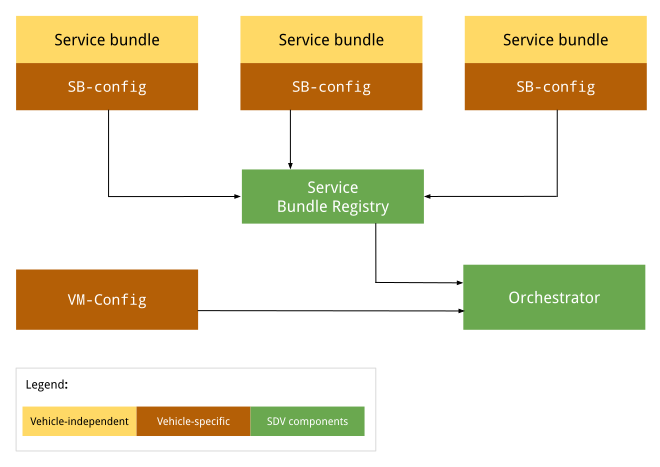
รูปที่ 1 แผนภาพการกำหนดค่า Orchestrator
การกำหนดค่าที่ไม่ขึ้นอยู่กับยานพาหนะจะไม่เปลี่ยนแปลงตาม OEM หรือยานพาหนะ การกำหนดค่าจะยังคงเหมือนเดิมในรถยนต์ทุกคันของ OEM แต่ละราย การกำหนดค่าเฉพาะยานพาหนะอาจแตกต่างกันไปในยานพาหนะแต่ละคันจาก OEM แต่ละราย แม้ว่าการกำหนดค่าอาจเหมือนกันสำหรับยานพาหนะทั้งหมดที่ผลิตโดย OEM รายหนึ่งๆ ก็ตาม
APEX การกำหนดค่า
ขณะรันไทม์ Orchestrator จะไปที่รีจิสทรีของแพ็กเกจบริการเพื่อดึงข้อมูลการจัดเรียง SDV สำหรับแพ็กเกจบริการแต่ละรายการ โดยโหลดและแยกวิเคราะห์การกำหนดค่าแต่ละรายการ ดูข้อมูลเพิ่มเติมได้ที่ข้อมูลเมตาของการจัดการ
การกำหนดค่าต่อ VM
เมื่อ Orchestrator เริ่มทำงาน ระบบจะโหลดและแยกวิเคราะห์การกำหนดค่า VM (หากมี) ระบบจะระบุ Absolute Path ไปยังไฟล์การกำหนดค่านี้ผ่านพร็อพเพอร์ตี้ของระบบ persist.sdv.orchestrator_config_path และ ro.boot.sdv.orchestrator_config_path
ระบบจะกำหนดเส้นทางไฟล์การกำหนดค่า VM เมื่อเปิดเครื่องตามลำดับชั้นต่อไปนี้
ระบบจะตรวจสอบพร็อพเพอร์ตี้
persist.sdv.orchestrator_config_pathหากมีค่า ระบบจะใช้เส้นทางนั้น ค่านี้จะคงอยู่ตลอดการรีบูตหรือตั้งค่าไว้ที่รันไทม์หาก
persist.sdv.orchestrator_config_pathว่างเปล่า ระบบจะตรวจสอบพร็อพเพอร์ตี้ro.boot.sdv.orchestrator_config_pathหากพร็อพเพอร์ตี้ro.boot.sdvมีค่า ระบบจะคัดลอกเส้นทางนั้นไปยังพร็อพเพอร์ตี้ persist และใช้สำหรับการเปิดเครื่องปัจจุบันและการเปิดเครื่องในอนาคตทั้งหมด (เว้นแต่จะถูกลบล้าง)
persist.sdv.orchestrator_config_path
persist.sdv.orchestrator_config_path เป็นพร็อพเพอร์ตี้หลักที่ตัวแทน SDV Orchestrator ใช้เพื่อรับเส้นทางไปยังไฟล์การกำหนดค่า พร็อพเพอร์ตี้นี้เป็นพร็อพเพอร์ตี้ถาวร ซึ่งหมายความว่าระบบจะบันทึกค่าของพร็อพเพอร์ตี้นี้ไว้แม้จะรีบูตอุปกรณ์ คุณสามารถเปลี่ยนค่าได้ในรันไทม์ ซึ่งเป็นประโยชน์สำหรับการทดสอบหรือสถานการณ์ที่เฉพาะเจาะจง (เช่น การทดสอบตั้งแต่ต้นจนจบ)
คุณสามารถตั้งค่าได้ในรันไทม์โดยใช้คำสั่ง setprop และในเวลาบิลด์โดยใช้ makefile (ที่มีนามสกุล .mk) หรือไฟล์สคริปต์ทรัพยากรที่มีนามสกุล .rc
ตั้งค่าพร็อพเพอร์ตี้ที่รันไทม์
การตั้งค่าพร็อพเพอร์ตี้ที่รันไทม์มีประโยชน์สำหรับการทดสอบหรือทำการเปลี่ยนแปลงชั่วคราว เนื่องจากระบบจะบันทึกค่าไว้ตลอดการรีบูต
adb root
adb shell setprop persist.sdv.orchestrator_config_path {$path_to_file}.textproto
ตั้งค่าพร็อพเพอร์ตี้ ณ เวลาบิลด์
หากต้องการตั้งค่าพร็อพเพอร์ตี้นี้เป็นส่วนหนึ่งของการกำหนดค่าบิลด์ของอุปกรณ์ ให้เพิ่มบรรทัดลงใน makefile ของผลิตภัณฑ์หรือบอร์ด ซึ่งเหมาะสำหรับการตั้งค่าเริ่มต้นสำหรับอิมเมจอุปกรณ์ใหม่
# Add this line to a product's or device's .mk file
PRODUCT_PROPERTY_OVERRIDES += persist.sdv.orchestrator_config_path={$path_to_file}.textproto
นอกจากนี้ คุณยังตั้งค่าพร็อพเพอร์ตี้นี้ภายในไฟล์สคริปต์ทรัพยากรได้ด้วย โดยทำดังนี้
# Add this line to an .rc file
on {$property}
    setprop persist.sdv.orchestrator_config_path {$path_to_file}.textproto
ro.boot.sdv.orchestrator_config_path
ro.boot.sdv.orchestrator_config_path เป็นพร็อพเพอร์ตี้แบบอ่านอย่างเดียวขณะเปิดเครื่องซึ่งใช้เพื่อระบุค่าเริ่มต้นสำหรับพร็อพเพอร์ตี้ persist.sdv.orchestrator_config_path หาก persist.sdv.orchestrator_config_path ว่างเปล่าเมื่อระบบ
บูต ระบบจะคัดลอกค่าของ ro.boot.sdv.orchestrator_config_path ไปยัง เมื่อตั้งค่า persist.sdv.orchestrator_config_path แล้ว พร็อพเพอร์ตี้นี้จะไม่เขียนทับในการเปิดเครื่องครั้งต่อๆ ไป
คุณสามารถตั้งค่า ro.boot.sdv.orchestrator_config_path โดยใช้ bootconfig หรือบรรทัดคำสั่งเคอร์เนล
รูปแบบไฟล์
กำหนดการกำหนดค่าการจัดการในรูปแบบ .textproto (เช่น ในข้อความที่มีโครงสร้าง) เพื่อให้โหลดการกำหนดค่าใหม่ได้ในรันไทม์
ไวยากรณ์การกำหนดค่า
ส่วนนี้จะอธิบายไวยากรณ์การกำหนดค่า
แพ็กเกจบริการ
แพ็กเกจบริการแต่ละรายการต้องกำหนดด้วยการกำหนดค่าแพ็กเกจบริการ ซึ่งจะระบุแพ็กเกจภายใน Orchestrator และใช้เพื่อจัดการวงจรของอินสแตนซ์แพ็กเกจ การกำหนดค่าแพ็กเกจบริการจะระบุสิ่งต่อไปนี้
InstanceToGroupMappingช่วยให้คุณรวมอินสแตนซ์ของแพ็กเกจบริการไว้ในกลุ่มเพื่อสร้างความสัมพันธ์ระหว่างอินสแตนซ์ของแพ็กเกจบริการเดียวกันได้InstancesStatesกำหนดสถานะต่างๆ สำหรับอินสแตนซ์แพ็กเกจบริการInstancesStateConfigurationกำหนดสถานะ (จากInstancesStates) ที่ต้องตั้งค่าอินสแตนซ์แพ็กเกจบริการหากเงื่อนไขประเมินเป็นtrueServiceBundleConfigมีข้อมูลเกี่ยวกับแพ็กเกจบริการที่เฉพาะเจาะจงและอินสแตนซ์ของแพ็กเกจ ซึ่งประกอบด้วยInstanceToGroupMappingและInstancesStateConfigurationที่เกี่ยวข้องสำหรับแพ็กเกจCustomModesกำหนดรายการโหมดที่กำหนดเองที่อนุญาตให้แพ็กเกจเผยแพร่ได้CustomModesใช้เพื่อป้องกันไม่ให้ Bundle ที่ไม่ได้รับอนุญาตแก้ไขค่าของโหมดที่กำหนดเอง ช่องนี้ไม่บังคับ เนื่องจากแพ็กเกจบริการอาจไม่เผยแพร่ไปยังโหมดที่กำหนดเองใดๆ ดูข้อมูลเพิ่มเติมได้ที่โหมดที่กำหนดเอง
การกำหนดค่าแพ็กเกจที่จำเป็น
การกำหนดค่า Bundle จะระบุแอตทริบิวต์ต่อไปนี้เป็นอย่างน้อย
service_bundle_config {
    package_name: "package_name"
    service_bundle_name: "service_bundle_name"

    instance: "instance_1"
    instance: "instance_n"
}
การประกาศนี้กำหนดอินสแตนซ์แพ็กเกจบริการ n รายการพร้อม FQIN ที่เกี่ยวข้อง ดังนี้
vm_name.package_name.service_bundle_name.instance_1
…
vm_name.package_name.service_bundle_name.instance_n
ไม่ได้ประกาศชื่อ VM ไว้อย่างชัดเจนในการกำหนดค่า เนื่องจากมีการกำหนดการกำหนดค่าต่อ VM ชื่อ VM จึงเป็นชื่อของ VM ที่มีการติดตั้งใช้งานไฟล์การกำหนดค่าเสมอ และตัวแทนการจัดการก็ทราบชื่อนี้อยู่แล้ว
กำหนดค่าอินสแตนซ์
การประกาศอินสแตนซ์แพ็กเกจบริการจะไม่มีผลใดๆ อินสแตนซ์ต้องได้รับการกำหนดค่าเพื่อให้ Orchestrator ดำเนินการได้ ตัวอย่างเช่น Orchestrator ต้องได้รับแจ้งว่าอินสแตนซ์ควรทำงานภายใต้เงื่อนไขใด (หรือสถานะใดของ VM หรือยานพาหนะ) หากต้องการกำหนดค่าอินสแตนซ์ ควรกำหนดสถานะการกำหนดค่าผ่านช่องทางต่อไปนี้
conditionคือนิพจน์ในสถานะ VM หรือยานพาหนะที่ควรประเมินinstances_statesคือชุดสถานะต่ออินสแตนซ์ที่ควรใช้หากเงื่อนไขประเมินเป็นtrue
ดูข้อมูลเพิ่มเติมได้ที่เงื่อนไข
service_bundle_config {
    package_name: "oem.package"
    service_bundle_name: "OemApplication"

    instance: "adaptive_light"
    instance: "reserve_light"

    state {
        condition {
            power_state: "ON"
        }

        instances_states {
            started: "adaptive_light"
            created: "reserve_light"
        }
    }
}
การแมปอินสแตนซ์กับกลุ่ม
นอกจากนี้ คุณยังกำหนดค่าอินสแตนซ์บริการได้โดยรวมไว้ในกลุ่มบริการ ในระดับการกำหนดค่าแพ็กเกจบริการ คุณสามารถเพิ่มอินสแตนซ์ลงในกลุ่มได้ จากนั้นคุณจะกำหนดค่ากลุ่มที่ระดับการกำหนดค่า VM ได้ ดูข้อมูลเพิ่มเติมได้ที่ส่วนถัดไปและแพ็กเกจบริการ
service_bundle_config {
    package_name: "oem.package"
    service_bundle_name: "OemApplication"

    instance: "fog_front_light"
    instance: "fog_rear_light"
    instance: "turn_signal_light"
    instance: "light_flasher_display"

    # Declare that fog_light contains fog_front_light and fog_rear_light.
    group_mapping {
        group: "fog_light"
        instance: "fog_front_light"
        instance: "fog_rear_light"
    }

    # Declare that flasher_light contains turn_signal_light and light_flasher_display.
    group_mapping {
        group: "flasher_light"
        instance: "turn_signal_light"
        instance: "light_flasher_display"
    }
}
สคีมา Proto
ตัวอย่างสคีมาโปรโตมีดังนี้
// Service bundle configuration.
//
// Defines service bundle data, its instances and configuration for instances
// states depending on the state of the system
message ServiceBundleConfig {
  // Required. Name of the service bundle.
  string service_bundle_name = 1;

  // Required. Package name of the service bundle.
  string package_name = 2;

  // Required. Service instances.
  repeated string instance = 3;

  // Configuration for instances states depending on the state of the system.
  repeated InstancesStateConfiguration state = 4;

  // Mapping of groups to their member service instances.
  repeated InstanceToGroupMapping group_mapping = 5;

  // Custom modes that this service bundle is allowed to set.
  repeated string custom_mode = 6;

  // Defines the retry policies for specific instances.
  // If multiple mappings target the same instance, the one with the highest `max_retries`
  // value takes precedence. This applies across all configuration files.
  repeated InstanceToRetryMapping retry_mapping = 7;
}

// Mapping of instances to their retry configuration.
message InstanceToRetryMapping {
  // Required.
  //
  // Name of the instances for which the given retry configuration is applied.
  repeated string instance = 1;

  // Required.
  //
  // The configuration that defines the restart and retry strategy for the instances.
  RetryConfiguration retry_config = 2;

  // Configuration for retry and restart.
  // This configuration is applied after a failure on a transition or after the bundle instance
  // has crashed. Upon a successful operation, the retry counter are reset to max_retries. This
  // configuration can be applied to any service bundle, not only the monitored ones. If the
  // configuration is not provided or none of the optional fields are filled, the default behavior
  // stated is applied (the value from `ro.boot.sdv.orchestrator.recovery.max_retries`
  // or zero if not set).
  message RetryConfiguration {
    // The number of times a retry/restart operation can be performed.
    // Defines the number of times the Orchestrator retries a transition
    // after a transient failure or after a bundle crash notification.
    // This applies to creating, starting and destroying operations.
    // The retry count resets to max_retries after a successful operation.
    // If not set, the default configured value in the
    // `ro.boot.sdv.orchestrator.recovery.max_retries` is used, or-if not set-
    // it fallbacks to zero.
    optional uint32 max_retries = 1;
  }
}

// Mapping of groups to their member service instances.
message InstanceToGroupMapping {
  // Required. Names of groups to which members are added.
  //
  // Group behavior is defined in VM configuration.
  repeated string group = 1;

  // Required. Names of instances to be included in the groups.
  //
  // Can reference only instance defined in the same config file.
  repeated string instance = 2;
}

// Describes the state the service instances should be in after the state is executed.
//
// If there is no valid configuration for the instance in the specific system state, such instance is transitioned to the "destroyed" state.
//
// For the GroupsStates definition to be useful, at least one item should be present in any of the fields.
message InstancesStates {
  // Names of the instances that must be in a "created" state.
  repeated string created = 1;

  // Names of the instances that must be in a "started" state, overrides "created" state.
  repeated string started = 2;

  // Names of the instances that must not run, overrides all other states.
  repeated string destroyed = 3;
}

// Configuration for instances states depending on the state of the system.
message InstancesStateConfiguration {
  // Condition for the system state under which the related instances states should be executed by Orchestrator.
  //
  // If omitted, the related instances states are always executed.
  Condition condition = 1;

  // Required. States of service bundle instances to be executed by Orchestrator if the condition is true.
  InstancesStates instances_states = 2;
}
การกำหนดค่าระดับ VM
การกำหนดค่า VM ช่วยให้สามารถกำหนดการแมปกลุ่มและการกำหนดค่าสำหรับกลุ่มได้ ซึ่งใช้เพื่อจำลองความสัมพันธ์ระหว่างแพ็กเกจบริการในระดับ VM จึงช่วยให้แก้ไขสถานะของแพ็กเกจบริการหลายรายการพร้อมกันได้อย่างยืดหยุ่น ระบบจะนำอินสแตนซ์ทั้งหมดของกลุ่มไปยังสถานะที่ระบุ
Orchestrator ไม่รับประกันลำดับการดำเนินการเปลี่ยนสถานะ Orchestrator จะโปรโมตแต่ละอินสแตนซ์ให้อยู่ในสถานะที่กำหนด
ระบบจะประกาศกลุ่มโดยนัยโดยใช้ชื่อ group ในส่วนการกำหนดค่าใดก็ได้ เช่น การแมปอินสแตนซ์กับกลุ่ม การแมปกลุ่มกับกลุ่ม และสถานะการกำหนดค่ากลุ่ม
การจับคู่กลุ่มกับกลุ่ม
กลุ่มสามารถมีกลุ่มอื่นๆ ได้ การประกาศว่า group_1 มี subgroup_2 จะเป็นการเพิ่มอินสแตนซ์บริการทั้งหมดจาก subgroup_2 ไปยัง group_1
เช่น
# Declare that body contains fog_light and flasher_light.
group_mapping {
    group: "body"
    subgroup: "fog_light"
    subgroup: "flasher_light"
}
กำหนดค่ากลุ่ม
การประกาศกลุ่มจะไม่มีผลใดๆ ต้องกำหนดค่ากลุ่มเพื่อให้ Orchestrator ดำเนินการได้ ตัวอย่างเช่น Orchestrator ต้องได้รับแจ้งว่ากลุ่มควรทำงานภายใต้เงื่อนไขหรือสถานะใดของ VM หรือยานพาหนะ
คุณสามารถกำหนดค่ากลุ่มการกำหนดค่าในลักษณะที่คล้ายกับอินสแตนซ์บริการได้ โดยใช้สถานะการกำหนดค่า ข้อแตกต่างเพียงอย่างเดียวคือการใช้ groups_states แทน instances_states ในไวยากรณ์ ดังนี้
state {
    condition {
        power_state: "ON"
    }

    groups_states {
        started: "Body"
        started: "Adas"
    }
}
สคีมา Proto
ตัวอย่างสคีมา Proto มีดังนี้
// VM configuration.
//
// Defines group-to-group mappings and configuration for groups
// states depending on the state of the system.
//
// Configurations of service bundles can also be defined in VM configuration (as well as in a separate configuration file).
message VmConfig {
  // Group to member groups mapping.
  repeated GroupToGroupMapping group_mapping = 1;

  // Configuration of group states.
  repeated GroupsStateConfiguration state = 2;

  // Required. We also allow to configure individual service bundles in the VM config, to simplify development and migration from the monolithic configuration.
  repeated ServiceBundleConfig service_bundle_config = 3;
}

// Mapping of groups to their member groups.
message GroupToGroupMapping {
  // Required. Names of groups to which members are added.
  repeated string group = 1;

  // Required. Names of member groups to be included in the groups.
  repeated string subgroup = 2;
}

// Describes the state the service instance groups should be in after the state is executed.
//
// If group configuration is valid in a specific system state, the configured state is applied to
// all group members. After that, the normal service instance configuration rules still apply:
// - "destroyed" > "started" > "created" precedence
// - not configured means the instance should be moved to the default state
//
// For the GroupsStates definition to be useful, at least one item should be present in any of the fields.
message GroupsStates {
  // Names of the groups that must be in a "created" state.
  repeated string created = 1;

  // Names of the groups that must be in a "started" state, overrides "created" state.
  repeated string started = 2;

  // Names of the groups that must not run, overrides all other states.
  repeated string destroyed = 3;
}

// Configuration for group states depending on the state of the system.
message GroupsStateConfiguration {
  // Condition for the system state under which the related group states should be executed by  Orchestrator.
  //
  // If omitted, the related groups states are always executed.
  Condition condition = 1;

  // Required. States of service bundle groups to be executed by Orchestrator if the condition  is true.
  GroupsStates groups_states = 2;
}
สถานะการกำหนดค่า
สถานะการกำหนดค่า (สถานะ) จะกำหนดเวลาที่อินสแตนซ์หรือกลุ่มบริการเริ่มต้น หยุด หรือถูกทำลาย และประกอบด้วย conditions และ instances_states (การกำหนดค่าแพ็กเกจ) และ groups_states (การกำหนดค่า VM)
เงื่อนไข
เงื่อนไขช่วยให้โมเดลมีเงื่อนไขบูลีน ซึ่งเมื่อประเมินเป็น true ระบบจะใช้สถานะอินสแตนซ์ที่กำหนด เงื่อนไขมีลักษณะดังนี้
นิพจน์บูลีนที่ซับซ้อนตามอำเภอใจ (สร้างขึ้นด้วยนิพจน์
andหรือnot) โดยอิงตามสัญญาณที่รองรับ เช่น พลังงาน ยานพาหนะ และโหมดที่กำหนดเอง(ไม่บังคับ) สถานะการกำหนดค่าที่ไม่มีเงื่อนไขจะทำงานอยู่เสมอ ซึ่งหมายความว่าระบบจะประเมินเป็น
true
สถานะอินสแตนซ์และสถานะกลุ่ม
instances_states และ groups_states มีลักษณะเหล่านี้
กำหนดสถานะที่จำเป็นสำหรับตัวแทนการจัดการเพื่อนำไปใช้กับอินสแตนซ์หรือกลุ่มที่ระบุ โดยที่สถานะคือ
activeเมื่อใช้สถานะกับกลุ่ม สถานะจะมีผลกับอินสแตนซ์แพ็กเกจบริการแต่ละรายการในกลุ่ม ไม่มีการกำหนดลำดับเมื่ออินสแตนซ์เข้าสู่สถานะดังกล่าว
รัฐที่รองรับ ได้แก่
startedหลังจากเรียกใช้Service::on_startcreatedหลังจากเรียกใช้
Service::newแต่ก่อนเรียกใช้Service::on_startหรือ
หลังจากเรียกใช้
Service::on_stopแต่ก่อนเรียกใช้Service::drop
destroyedหลังจากเรียกใช้Service::drop
ชุดกฎ
สถานะการกำหนดค่าอาจเป็นใช้งานอยู่หรือไม่ได้ใช้งานก็ได้ ทั้งนี้ขึ้นอยู่กับเงื่อนไข โดยสามารถเปิดใช้งานหลายสถานะพร้อมกันได้ทุกเมื่อ เมื่อตัวแทนการจัดการได้รับข้อมูลอัปเดตเกี่ยวกับสัญญาณ ระบบจะประเมินสถานะการกำหนดค่าทั้งหมดก่อนที่จะแก้ไขวงจรของแพ็กเกจบริการ ระบบจะประเมินสถานะอินสแตนซ์ของบริการตามกฎต่อไปนี้
เมื่อไม่มีสถานะที่ใช้งานอยู่ใดๆ ที่ใช้กับอินสแตนซ์บริการ ระบบจะทำลายอินสแตนซ์นั้น
เมื่อมีสถานะที่ใช้งานอยู่อย่างน้อย 1 สถานะ ลำดับความสำคัญต่อไปนี้จะมีผล
destroyedมีความสำคัญเหนือกว่าอย่างสมบูรณ์startedมีความสำคัญเหนือกว่าcreated
สคีมา Proto
ตัวอย่างสคีมา Proto มีดังนี้
// A root boolean condition.
message Condition {
  // Required.
  oneof root {
    // VPM power state condition.
    string power_state = 1;
    // VPM vehicle state condition.
    string vehicle_state = 2;
    // Custom mode state condition.
    CustomState custom_state = 3;
    // Negation of a nested condition.
    Condition not = 4;
    // Logical 'and' between conditions grouped in expression.
    Expression and = 5;
    // Logical 'or' between conditions grouped in expression.
    Expression or = 6;
  }
}

// Representation of Custom state condition.
//
// Custom mode(s) are defined by the OEM and are not standardized by the platform, in contrast with
// VPM modes (i.e. power and vehicle mode).
message CustomState {
  // Custom mode being checked.
  string mode = 1;
  // State of the custom mode.
  string state = 2;
}

// A set of conditions united under an 'and' or 'or' expression.
//
// Evaluation type ('and' or 'or') depends on the field in [Condition]/[Expression], where the
// expression is being used.
//
// At least one value in at least one of the fields is required.
message Expression {
  // VPM power state condition.
  repeated string power_state = 1;
  // VPM vehicle state condition.
  repeated string vehicle_state = 2;
  // Custom mode state condition.
  repeated CustomState custom_state = 3;
  // Negation of a nested condition.
  repeated Condition not = 4;
  // Logical 'and' between conditions grouped in expression.
  repeated Expression and = 5;
  // Logical 'or' between conditions grouped in expression.
  repeated Expression or = 6;
}
กลยุทธ์การกู้คืนและการรีสตาร์ทหลังเกิดข้อขัดข้อง
Orchestrator มีกลไกที่มีประสิทธิภาพในการจัดการข้อขัดข้องของแพ็กเกจบริการและความล้มเหลวในการเปลี่ยนผ่านวงจรชีวิต เนื่องจาก Orchestrator มีมุมมองแบบองค์รวมเกี่ยวกับสถานะของบริการและจัดการการเปลี่ยนโหมด จึงเป็นคอมโพเนนต์ที่เหมาะสมที่สุดในการใช้กลยุทธ์การรีสตาร์ทและลองใหม่ Lifecycle Manager (LM) จะรายงานข้อขัดข้องของแพ็กเกจบริการไปยัง Orchestrator ผ่านการแจ้งเตือนการสิ้นสุดของ Binder เพื่อหลีกเลี่ยงการเรียก Binder ที่ไม่จำเป็นไปยัง LM ทาง Orchestrator จะแคชสถานะล่าสุดของแต่ละแพ็กเกจ (ไม่ว่าจะสำเร็จหรือไม่) และจะไม่ใช้การเปลี่ยนสถานะซ้ำหากสถานะที่ทราบล่าสุดเหมือนกับสถานะใหม่ที่ขอ
ลองกำหนดค่าใหม่
คุณสามารถกำหนดกลยุทธ์การรีสตาร์ทและการลองใหม่ต่ออินสแตนซ์ในการกำหนดค่า Orchestrator โดยใช้ retry_mapping หากไม่ได้ตั้งค่า max_retries ในการกำหนดค่า ระบบจะนำค่าเริ่มต้นมาจากพร็อพเพอร์ตี้ระบบ ro.boot.sdv.orchestrator.recovery.max_retries หากไม่ได้ตั้งค่าพร็อพเพอร์ตี้นี้ ค่าจะกลับไปเป็น 0
max_retries: กำหนดจำนวนครั้งที่ Orchestrator จะลองเปลี่ยนสถานะอีกครั้งหลังจากเกิดความล้มเหลวชั่วคราวหรือการแจ้งเตือน Bundle ขัดข้อง ตัวนับการลองใหม่จะรีเซ็ตเป็นค่าmax_retriesหลังจากดำเนินการสำเร็จหรือเมื่อมีการประมวลผลโหมดใหม่ หากการแมปหลายรายการกำหนดเป้าหมายอินสแตนซ์เดียวกัน รายการที่มีmax_retriesสูงสุดจะมีลำดับความสำคัญเหนือกว่า
ตัวอย่างการกำหนดค่า
service_bundle_config {
  package_name: "oem.package"
  service_bundle_name: "OemApplication"
  instance: "fog_front_light"
  instance: "fog_rear_light"

  # Defines the restart configuration mapping for specific instances.
  retry_mapping {
    instance: "fog_front_light"
    instance: "fog_rear_light"
    retry_config {
      max_retries: 3
    }
  }
}
ลักษณะการกู้คืน
ตรรกะการรีสตาร์ทและการลองใหม่ของ Orchestrator จะจัดการสถานการณ์ความล้มเหลวหลายอย่างได้อย่างราบรื่น ดังนี้
- การขัดข้องระหว่างการทำงานปกติ: หากแพ็กเกจบริการขัดข้องขณะทำงาน Orchestrator จะใช้กลยุทธ์การรีสตาร์ทและพยายามนำแพ็กเกจกลับสู่สถานะที่ขอครั้งล่าสุดโดยอิงตามจำนวนครั้งที่เหลือในการลองใหม่
- ข้อขัดข้องระหว่างการเปลี่ยนโหมด: หาก Bundle ขัดข้องขณะบังคับใช้โหมดใหม่ ระบบจะจัดคิวคำขอรีสตาร์ทและประมวลผลในภายหลัง เมื่อประมวลผลคำขอแล้ว Orchestrator จะตรวจสอบสถานะล่าสุดของอินสแตนซ์และใช้การรีสตาร์ทเฉพาะในกรณีที่อินสแตนซ์ไม่ได้อยู่ในสถานะที่ขอครั้งล่าสุด (จากการเปลี่ยนโหมดครั้งล่าสุด)
- โหมดใหม่ระหว่างการกู้คืน: หาก Orchestrator ได้รับคำขอให้เปลี่ยนเป็นโหมดใหม่ขณะที่กำลังรีสตาร์ท Bundle (หรืออยู่ในคิวของอินสแตนซ์ที่จะรีสตาร์ท) ระบบจะยกเลิกการกู้คืนที่กำลังดำเนินอยู่ การเปลี่ยนโหมดใหม่จะเข้ามาแทนที่ และตัวนับการลองใหม่จะรีเซ็ตเพื่อให้สามารถลองใหม่ได้อีกครั้งสำหรับสถานะเป้าหมายใหม่
Orchestrator จะแยกความแตกต่างระหว่างข้อผิดพลาดประเภทต่างๆ ที่ Lifecycle Manager แสดงผลเพื่อกำหนดกลยุทธ์การลองใหม่ ดังนี้
- ข้อผิดพลาดชั่วคราว (
SERVICE_NOT_FOUND,OPERATION_FAILED,INTERNAL_ERROR): Orchestrator จะลองดำเนินการอีกครั้งโดยไม่ต้องดำเนินการล้างข้อมูลพิเศษใดๆ - ข้อผิดพลาดถาวร (
VALUE_CORRUPTED,INVALID_ARGUMENT): Orchestrator จะถือว่าแพ็กเกจบริการอาจอยู่ในสถานะเสียหายและพยายามหยุดอินสแตนซ์บริการก่อนที่จะลองดำเนินการอีกครั้งเพื่อให้แน่ใจว่ามีการรีสตาร์ทใหม่ทั้งหมด - ข้อผิดพลาดถาวร (
PERMISSION_DENIED): ระบบจะไม่ลองดำเนินการอีกครั้ง และถือว่าแพ็กเกจอยู่ในสถานะที่กู้คืนไม่ได้
หาก Lifecycle Manager ขัดข้อง กระบวนการทั้งหมดของแพ็กเกจบริการจะหายไป เนื่องจากไม่ทราบสถานะจริง Orchestrator จึงทำให้แต่ละอินสแตนซ์ไม่ถูกต้องและใช้กลยุทธ์การรีสตาร์ทกับการลองใหม่ที่เหลือเพื่อนำแต่ละอินสแตนซ์ไปยังสถานะที่ขอครั้งล่าสุด
เพื่อป้องกันไม่ให้เกิดลูปการกู้คืนแบบไม่สิ้นสุดสำหรับแพ็กเกจที่ขัดข้องหรือทำงานไม่สำเร็จซ้ำๆ ตัวนับการลองใหม่จะรีเซ็ตเป็น max_retries หลังจากที่การดำเนินการตามวงจรสำเร็จ หรือเมื่อมีการขอเปลี่ยนโหมดใหม่เท่านั้น หากแพ็กเกจพยายามอีกครั้งจนครบจำนวนครั้งเนื่องจากเกิดความล้มเหลวติดต่อกัน (เช่น การเปลี่ยนผ่านล้มเหลวตามด้วยข้อขัดข้อง) ระบบจะไม่รีสตาร์ทแพ็กเกจจนกว่าจะรีเซ็ตตัวนับการลองใหม่
การรายงานสถานะไปยังการตรวจเช็คสถานะ
Orchestrator จะแสดงอินเทอร์เฟซ Binder ภายในที่ Health Monitor (HM) ลงทะเบียนไว้ ซึ่งช่วยให้รับข้อมูลอัปเดตอย่างต่อเนื่องเกี่ยวกับสถานะของแพ็กเกจบริการทั้งหมดได้ Orchestrator จะรายงานทั้ง 2 อย่างต่อไปนี้ผ่านอินเทอร์เฟซนี้
- สถานะวงจร: สถานะที่ต้องการของอินสแตนซ์ตามการกำหนดค่าปัจจุบันและโหมดที่ใช้งานอยู่ (เช่น เริ่ม สร้าง หรือทำลาย)
- สถานะการกู้คืน: สถานะของการเข้าถึงสถานะวงจรที่ต้องการ ซึ่งระบุว่าอินสแตนซ์ทำงานอยู่ กำลังลองอีกครั้งหลังจากดำเนินการไม่สำเร็จ หรือกู้คืนไม่สำเร็จหลังจากลองอีกครั้งจนครบจำนวนครั้งแล้ว
ระบบจะรายงานข้อมูลนี้สำหรับอินสแตนซ์ทั้งหมด รวมถึงอินสแตนซ์ที่ไม่ได้ลงทะเบียนเพื่อรับการตรวจสอบฮาร์ตบีต HM จะใช้ข้อมูลนี้เพื่อใช้ API ในการรายงานสถานะของ VM ดูข้อมูลเพิ่มเติมได้ในHealth monitoring
ตัวอย่าง
ส่วนนี้จะแสดงตัวอย่างการกำหนดค่าสถานะที่มีเงื่อนไข
ตัวอย่างบริการพื้นฐาน
- ไม่มีเงื่อนไข จึงทำงานอยู่เสมอ
- เริ่มอินสแตนซ์บริการเดียว
state {
  # Note: This state has no condition, hence its actions are valid throughout the lifetime of the program
  instances_states { started: "ServiceBundleName" }
}
ตัวอย่างแอป HVAC
เงื่อนไข: ทำงานเมื่อ
custom_state != occupancy.OCCUPANCY_EMPTY ||
custom_state == preheat.PREHEAT_ON
ประกาศอินสแตนซ์บริการที่เกี่ยวข้องกับ HVAC หลายรายการเป็น
started
state {
  condition {
    or {
      # I.e. when the vehicle is occupied (for example, by _DRIVER / _NON_DRIVER / _PET)
      not {
        custom_state {
          mode: "occupancy"
          state: "OCCUPANCY_EMPTY"
        }
      }
      custom_state {
        mode: "preheat"
        state: "PREHEAT_ON"
      }
    }
  }

  # HVAC-related services
  instances_states {
    started: "HvacTemperatureCommand"
    started: "TempSensorDriverZone"
    started: "TempSensorPassengerZone"
    started: "RefrigerantLoop"
  }
}
ตัวอย่างการประหยัดพลังงาน
เงื่อนไข: ทำงานเมื่อ
custom_state == system_power.SYSTEM_POWER_LOW &&
custom_state == range_ext.RANGE_EXT_ON
สถานะนี้ถือเป็นสถานะประหยัดพลังงาน
ประกาศอินสแตนซ์บริการที่เกี่ยวข้องกับระบบปรับอากาศ (HVAC) 1 รายการเป็น
destroyedในตัวอย่างนี้ เมื่อโหมด
SYSTEM_POWER_LOWและRANGE_EXT_ONทำงานอยู่ แอป HVAC จะทำงานโดยไม่มีอินสแตนซ์บริการRefrigerantLoopดังนี้state { condition { and { custom_state { mode: "system_power" state: "SYSTEM_POWER_LOW" } custom_state { mode: "range_ext" state: "RANGE_EXT_ON" } } } # Disable services with high power consumption instances_states { destroyed: "RefrigerantLoop" } }
ตัวอย่างชีวิตบนเรือ
เงื่อนไข: ทำงานหาก
power_state == ON && vehicle_state == LIFE_ON_BOARDสถานะนี้สามารถมองได้ว่ามีคนอยู่ในรถและรถเปิดอยู่
ประกาศว่าเซ็นเซอร์อุณหภูมิกำลังทำงาน
เมื่อมีคนอยู่ในรถ ระบบจะตรวจสอบรายการต่างๆ เช่น อุณหภูมิ เพื่อความปลอดภัย
state {
  condition {
    and {
      power_state: "ON"
      vehicle_state: "LIFE_ON_BOARD"
    }
  }

  # Temperature monitoring services
  instances_states {
    started: "TempSensorDriverZone"
    started: "TempSensorPassengerZone"
  }
}
ตัวอย่าง
ส่วนนี้จะแสดงตัวอย่างแบบเต็มซึ่งประกอบด้วยข้อมูลต่อไปนี้
การกำหนดค่าโปรโตระดับแพ็กเกจบริการที่แนะนำแพ็กเกจบริการที่มี 2 อินสแตนซ์ โดยแต่ละอินสแตนซ์เป็นส่วนหนึ่งของกลุ่ม
การกำหนดค่าโปรโตระดับ VM ที่แนะนำตรรกะเพื่อโต้ตอบกับกลุ่มตามโหมด
การกำหนดค่าระดับแพ็กเกจบริการ
# proto-file: //system/software_defined_vehicle/orchestration/distributed_config/src/protos/service_bundle_config.proto
# proto-message: ServiceBundleConfig

package_name: "oem.package"
service_bundle_name: "OemApplication"
instance: "fog_front_light"
instance: "fog_rear_light"
instance: "turn_signal_light"
custom_mode: "FOG"
custom_mode: "TURN"

group_mapping {
    group: "fog_light"
    instance: "fog_front_light"
    instance: "fog_rear_light"
}

group_mapping {
    group: "flasher_light"
    instance: "turn_signal_light"
}

state {
    condition {
        power_state: "ON"
    }

    instances_states {
        created: "turn_signal_light"
        destroyed: "fog_front_light"
        destroyed: "fog_rear_light"
    }
}
การกำหนดค่าระดับ VM
# proto-file: //system/software_defined_vehicle/orchestration/distributed_config/src/protos/vm_config.proto
# proto-message: VmConfig

group_mapping {
    group: "lights"
    subgroup: "fog_light"
    subgroup: "flasher_light"
}

state {
    condition {
        custom_state {
            mode: "FOG"
            state: "ON"
        }
    }
    groups_states {
        started: "fog_light"
    }
}

state {
    condition {
        custom_state {
            mode: "TURN"
            state: "RIGHT"
        }
    }
    groups_states {
        started: "flasher_light"
    }
}

state {
    condition {
        vehicle_state: "SUSPEND_TO_RAM_ENTER"
    }
    groups_states {
        created: "lights"
    }
}
กำหนดค่าการทำงานพร้อมกันของการจัดการแพ็กเกจ
พร็อพเพอร์ตี้ระบบ ro.boot.sdv.max_bundles_management_threads เป็นพารามิเตอร์การปรับแต่งที่สำคัญสำหรับการควบคุมประสิทธิภาพและการใช้ทรัพยากรในระหว่างการดำเนินการวงจรของแพ็กเกจบริการ ซึ่งจะกำหนดระดับการทำงานพร้อมกันสูงสุดสำหรับธุรกรรมแพ็กเกจบริการ และส่งผลโดยตรงต่อบริการหลัก 2 รายการ ได้แก่
Orchestration Engine: บริการนี้จะอ่านพร็อพเพอร์ตี้เพื่อกำหนดจำนวนการเรียกพร้อมกัน (เช่น
startService,stopService) ที่ Orchestrator สามารถทำกับ Lifecycle Manager ได้ ซึ่งสำคัญต่อประสิทธิภาพระหว่างการเปิดเครื่องและการเปลี่ยนโหมดที่ Bundle จำนวนมากอาจเปลี่ยนสถานะพร้อมกันLifecycle Manager: บริการนี้ใช้ค่าของพร็อพเพอร์ตี้เพื่อคำนวณขนาดของพูลเธรด Binder ซึ่งมีหน้าที่จัดการคำขอขาเข้าทั้งหมด วิธีนี้ช่วยให้มั่นใจได้ว่า LM มีเทรดเพียงพอที่จะจัดการคำขอหลายรายการพร้อมกันจาก Orchestrator
หากไม่ได้ตั้งค่าพร็อพเพอร์ตี้นี้ ทั้ง 2 บริการจะมีค่าเริ่มต้นเป็น 12
วิธีการกำหนดค่า
คุณตั้งค่าพร็อพเพอร์ตี้ในไฟล์ BoardConfig.mk ของอุปกรณ์ได้โดยเพิ่มลงในตัวแปร BOARD_BOOTCONFIG ซึ่งจะช่วยให้มั่นใจว่าระบบจะใช้ค่านี้ทุกครั้งที่อุปกรณ์เปิดเครื่อง
BOARD_BOOTCONFIG += \
    androidboot.sdv.max_bundles_management_threads=8
หากต้องการเปลี่ยนค่าสำหรับอุปกรณ์ ให้แก้ไขบรรทัดนี้ในไฟล์ BoardConfig.mk ที่เหมาะสม แล้วสร้างใหม่
การเพิ่มประสิทธิภาพเวลาเปิดเครื่อง
ro.sdv.orchestrator.state.ready เป็นพร็อพเพอร์ตี้บูลีน write-once ซึ่งเป็นส่วนหนึ่งของกลยุทธ์การเพิ่มประสิทธิภาพเวลาเปิดเครื่อง ซึ่งบ่งบอกว่าตัวแทนการจัดระเบียบได้เริ่มต้นเสร็จสมบูรณ์แล้ว และพร้อมที่จะเริ่มจัดการวงจรของแพ็กเกจบริการ วัตถุประสงค์หลักคือการจัดลำดับความสำคัญของการเริ่มต้น Orchestrator และแพ็กเกจบริการที่มีการจัดการโดยการควบคุมลำดับการเริ่มต้นของตัวแทน SDV อื่นๆ
- ตั้งค่าโดย: Orchestration Agent
- เมื่อใด: หนึ่งครั้งในระหว่างลำดับการเปิดเครื่อง
- การใช้งาน: ระบบ init จะใช้พร็อพเพอร์ตี้นี้เพื่อควบคุมลำดับการเริ่มต้นระบบของเอเจนต์ SDV ส่วนใหญ่ (Updates Manager, VSIDL provider, Health Monitor, Service Discovery, Data Tunnel, RPC, VPM และ Telemetry) การเริ่ม Orchestrator ก่อนเวลาและให้ Agent อื่นๆ รอพร็อพเพอร์ตี้นี้จะช่วยให้ระบบมั่นใจได้ว่า Orchestrator จะเริ่มงานสำคัญในการเริ่มแพ็กเกจบริการได้โดยไม่ต้องแย่งทรัพยากรระบบ
ประสิทธิภาพ
ในระหว่างการเปิดเครื่องระบบ การเริ่ม Agent ทั้งหมดพร้อมกันอาจทำให้เกิดการแย่งชิงทรัพยากร ซึ่งจะทำให้กระบวนการเปิดเครื่องโดยรวมช้าลง เพื่อลดปัญหานี้ ระบบจะบังคับใช้ลำดับการเริ่มต้นตามลำดับโดยใช้พร็อพเพอร์ตี้ระบบ ดังนี้
- Service bundles registry: เริ่มต้นก่อนเพื่อโหลดข้อมูลเมตาของแพ็กเกจบริการทั้งหมด
- Lifecycle Manager และ Orchestrator: เอเจนต์หลักเหล่านี้จะเริ่มทำงานทันทีที่รีจิสทรีพร้อมใช้งาน การเริ่มต้นตั้งแต่เนิ่นๆ นี้มีความสำคัญอย่างยิ่ง เนื่องจากช่วยให้ Orchestrator เริ่มประเมินการกำหนดค่าและเตรียมพร้อมที่จะเริ่มแพ็กเกจบริการได้ทันที
- Agent SDV อื่นๆ: เริ่มต้นหลังจากที่ Orchestrator พร้อมแล้วเท่านั้น
ลำดับที่มีการควบคุมนี้ช่วยให้มั่นใจได้ว่า Orchestrator มีสิทธิ์ใช้ทรัพยากรระบบก่อนเพื่อเริ่มแพ็กเกจบริการโดยเร็วที่สุด ซึ่งจะช่วยให้การเริ่มต้นระบบเร็วขึ้น มีความแน่นอนมากขึ้น และมีประสิทธิภาพมากขึ้น
โหมดที่ใช้โดย Orchestrator
ตัวแทนการจัดการจะรักษาการสมัครใช้บริการที่ใช้งานอยู่สำหรับโหมดรถยนต์และโหมดพลังงานที่ส่งโดย VPM เมื่อสร้างการเชื่อมต่อเริ่มต้นระหว่าง Orchestrator กับระบบการจัดการยานพาหนะและพลังงาน (VPM) แล้ว Orchestrator จะตั้งค่าพร็อพเพอร์ตี้ระบบบูลีนต่อไปนี้เป็น true
sdv.orchestrator.bootup.power_mode.readysdv.orchestrator.bootup.vehicle_mode.ready
โดยใช้ไฟล์การกำหนดค่าเป็นข้อมูลอ้างอิง ตัวแทนการจัดการจะคำนวณชุดแพ็กเกจบริการที่ควรอยู่ในสถานะกำลังทำงานแบบไดนามิกตามค่าปัจจุบันของโหมดที่ได้รับ จากนั้น Orchestrator จะสื่อสารกับเครื่องมือจัดการวงจร โดยออกคำสั่งต่างๆ เพื่อปรับสถานะจริงของแพ็กเกจบริการให้สอดคล้องกับสถานะเป้าหมายที่คำนวณไว้
สถานะยานพาหนะและพลังงาน
ตัวแทนโหมดรถยนต์และการจัดการพลังงาน (VPM) ช่วยให้คอมโพเนนต์ SDV ได้รับข้อมูลเกี่ยวกับสถานะปัจจุบันของรถ เช่น โหมดการทำงาน (เช่น จอดหรือขับ) และสถานะพลังงาน (เช่น เปิดและระงับ) Orchestrator จะประเมินค่าเหล่านี้เพื่อกำหนดว่าควรเรียกใช้แพ็กเกจบริการใดตามการกำหนดค่า Orchestrator ดูข้อมูลเพิ่มเติมได้ที่การจัดการยานพาหนะและพลังงาน
โหมดที่กำหนดเอง
เนื่องจากมีรูปแบบยานพาหนะจำนวนมาก เราจึงไม่สามารถสร้างโมเดลรูปแบบยานพาหนะทั้งหมดได้ OEM แต่ละรายมีความต้องการที่แตกต่างกัน และการกำหนดมาตรฐานโหมดรถยนต์ไม่สามารถตอบสนองกรณีการใช้งานของ OEM ทั้งหมดได้ ด้วยเหตุนี้ เราจึงรองรับโหมดเฉพาะของ OEM ซึ่งเรียกว่าโหมดที่กำหนดเอง โหมดเหล่านี้จะไม่ขยายโหมดยานพาหนะและโหมดพลังงานที่มีอยู่ แต่จะให้วิธีกำหนดโหมดใหม่แทน
ฟังก์ชันการทำงาน:
ขอบเขตทั่วโลก: โหมดที่กำหนดเองจะมีผลทั่วโลก โดยมีผลกับ VM ทั้งหมดที่จัดการโดย Orchestrator ในลักษณะเดียวกัน
องค์ประกอบ: การเปลี่ยนแปลงโหมดที่กำหนดเองแต่ละรายการประกอบด้วย 2 องค์ประกอบ ได้แก่
ชื่อ: ตัวระบุที่ไม่ซ้ำกันซึ่ง OEM เลือกเพื่อแสดงถึงโหมดที่กำหนดเอง
ค่า: สถานะปัจจุบันของโหมดที่กำหนดเอง ซึ่งอาจเป็น
UNDEFINEDเมื่อไม่ได้ตั้งค่าไว้
บทบาท Orchestrator: Orchestrator จะทำหน้าที่เป็นตัวรับค่าโหมดที่กำหนดเองแบบพาสซีฟ
บทบาทของแพ็กเกจบริการ: แพ็กเกจบริการแต่ละรายการสามารถเป็นเจ้าของโหมดที่กำหนดเองได้หลายโหมด และสามารถเผยแพร่ค่าใหม่ไปยังโหมดใดก็ได้ ชุดบริการหลายชุดสามารถเป็นเจ้าของโหมดที่กำหนดเองเดียวกันได้ ซึ่งหมายความว่าโหมดที่กำหนดเองจะรับค่าใหม่จากแหล่งที่มาต่างๆ ได้
ความรับผิดชอบในการตรวจสอบ: OEM มีหน้าที่รับผิดชอบในการตรวจสอบว่าการเปลี่ยนสถานะถูกต้อง Orchestrator จะยอมรับค่าใหม่ทั้งหมด
ลักษณะโดยประมาณ:
จำนวนโดยประมาณ: โหมดพลังงานและโหมดยานพาหนะจะจัดการวงจรของแพ็กเกจบริการส่วนใหญ่ โดยมีโหมดที่กำหนดเองเป็นบทบาทเสริม เราคาดว่าจำนวนโหมดที่กำหนดเองจะอยู่ในหลักสิบ ไม่ใช่หลักร้อย
กำหนดเวลาโดยประมาณ: ระบบจะไม่ส่งโหมดเป็นระยะๆ แต่โหมดจะทำงานตามเหตุการณ์ โดยทริกเกอร์จากการดำเนินการที่เฉพาะเจาะจง เช่น การเปิดประตู การเริ่มลำดับการจอดรถ การเริ่มรอบการชาร์จ และเหตุการณ์อื่นๆ ที่คล้ายกันซึ่งมีความสำคัญตามที่ OEM กำหนด
การออกแบบโหมดที่กำหนดเองช่วยให้กำหนดและจัดการโหมดที่เฉพาะเจาะจงได้อย่างยืดหยุ่น ขณะเดียวกันก็ช่วยให้ Orchestrator ไม่ต้องคำนึงถึงตรรกะของเครื่องสถานะที่สำคัญ
โหมดที่รองรับ
เพื่อให้แน่ใจว่าแพ็กเกจบริการจะเผยแพร่ไปยังโหมดที่กำหนดเองที่ตนเป็นเจ้าของเท่านั้น แต่ละแพ็กเกจต้องประกาศรายการโหมดที่กำหนดเองที่ตนเป็นเจ้าของอย่างชัดเจนภายในการกำหนดค่า Orchestrator ซึ่งพร้อมใช้งานใน VM ในเครื่องที่มีรีจิสทรีแพ็กเกจบริการ ระบบจะทิ้งการพยายามเผยแพร่ไปยังโหมดที่กำหนดเองที่ไม่ได้ประกาศ
หากต้องการประกาศโหมดที่กำหนดเองซึ่งแพ็กเกจบริการได้รับอนุญาตให้เผยแพร่ (จึงเป็นเจ้าของ) สคีมาโปรโต service_bundle_config จะขยายด้วยสิ่งต่อไปนี้
// Service bundle configuration.
//
// Defines service bundle metadata, its instances, and configuration for instances
// lifecycle states depending on the state of the vehicle.
message ServiceBundleConfig {
      [...]

    // The list of custom modes that this service bundle publishes.
    repeated string custom_mode = 5;
}
กำหนดค่าแพ็กเกจตามโหมด
การกำหนดค่าโปรโต Orchestrator ที่มีอยู่ (คอมโพเนนต์ Condition) รองรับการจัดการแพ็กเกจบริการตามโหมดที่กำหนดเอง ดังนี้
message Condition {
  oneof root {
    string power_state = 1;
    string vehicle_state = 2;
    CustomState custom_state = 3;
    Condition not = 4;
    Expression and = 5;
    Expression or = 6;
  }
}

message CustomState {
  // Custom mode being checked.
  string mode = 1;
  // State of the custom mode.
  string state = 2;
}
ตัวอย่าง Proto
ตัวอย่างต่อไปนี้แสดงวิธีกำหนดค่าอินสแตนซ์ของแพ็กเกจบริการให้เริ่มต้นตามสถานะ TURN และ FOG
service_bundle_config {
package_name: "oem.package"
service_bundle_name: "OemApplication"
instance: "flasher_light"
// Service bundle is allowed to set values for the TURN mode
custom_mode: "TURN"
// Service bundle is allowed to set values for the FOG mode
custom_mode: "FOG"

state {
    condition {
        custom_state {
            mode: "TURN"
            state: "LEFT"
        }
    }
    instances_states {
        started: "flasher_light"
    }
}

state {
    condition {
        custom_state {
            mode: "FOG"
            state: "ON"
        }
    }
    // Group assumed to be defined containing all FOG lights instances.
    groups_states {
        started: "fog_lights"
    }
}

}
ตั้งค่าโหมดใหม่ที่กำหนดเอง
กระบวนการตั้งค่าโหมดที่กำหนดเองใหม่จะเริ่มต้นด้วยแพ็กเกจบริการ ซึ่งจะสื่อสารค่าที่ต้องการไปยัง Orchestrator ในเครื่องที่ทำงานบน VM เดียวกัน จากนั้น Orchestrator จะตรวจสอบว่าแพ็กเกจบริการมีสิทธิ์ที่จำเป็นในการเผยแพร่ไปยังโหมดที่กำหนดเองที่ระบุ โดยอ้างอิงการกำหนดค่าที่ระบุไว้ใน .textproto เพื่อพิจารณาว่าควรเผยแพร่ค่าไปยัง VM อื่นๆ หรือไม่ เมื่อเผยแพร่แล้ว Orchestrator แต่ละรายการจะตรวจสอบการกำหนดค่าเพื่อค้นหารายการแพ็กเกจบริการที่ควรเปลี่ยนสถานะ
RPC
Orchestrator แต่ละรายการที่ทำงานใน VM แต่ละเครื่องจะสร้างเซิร์ฟเวอร์ RPC เพื่อรอรับค่าโหมดที่กำหนดเองใหม่ ชุดบริการแต่ละชุดที่ต้องการอัปเดตโหมดที่กำหนดเองต้องสร้างไคลเอ็นต์ RPC ไปยังเซิร์ฟเวอร์ ระบบจะบังคับใช้ ACL เพื่อป้องกันไม่ให้แพ็กเกจที่ไม่ได้รับอนุญาตเชื่อมต่อกับเซิร์ฟเวอร์
คำจำกัดความของโปรโตคอลสำหรับการตั้งค่าใหม่ผ่าน RPC มีลักษณะดังตัวอย่างนี้
syntax = "proto3";

import "google/protobuf/timestamp.proto";

package com.sdv.google.Orchestrator;

// Representation of the request used by service bundles to update a custom mode.
// Service bundles are permitted to update only the custom modes specifically designated
// for them within the Orchestrator configuration.
message SetCustomStateRequest {
  // Required.
  // The name of the custom mode.
  // The mode string can not be longer than 56 characters and can only contain
  // letters, numbers, dashes, dots and underscores: [a-zA-Z0-9_-.].
  // No other special character nor spaces should be present in the mode.
  string mode = 1;

  // Required.
  // The new value for the custom mode.
  // The value string can not be longer than 56 characters and can only contain
  // letters, numbers, dashes, dots and underscores: [a-zA-Z0-9_-.].
  // No other special character nor spaces should be present in the value.
  string value = 2;

  // Required.
  // The timestamp in which the new custom mode value was set. This is used to
  // prevent race conditions whenever different service bundles in different
  // VMs want to set a new value for the same custom mode.
  // We use this timestamp to order the requests and we promise eventual
  // consistency: while temporary inconsistencies may occur, the system will
  // eventually converges to the correct state.
  .google.protobuf.Timestamp timestamp = 3;
}

// Representation of the set custom state response.
message SetCustomStateResponse {}

// Orchestrator interface for service bundles that update the value of a
// custom mode.
// When a new value is received, it is propagated to Orchestrators running on
// other VMs.
service CustomStateService {
  // Updates the value for the custom mode.
  // Returns the error:
  // - PermissionDenied: the service is not authorized to update the custom mode.
  // - InvalidArgument: the provided mode and/or value are not valid.
  rpc SetCustomState(SetCustomStateRequest) returns (SetCustomStateResponse) {};
}
การยกเลิกการเปลี่ยนสถานะพลังงาน
Orchestrator อนุญาตให้ยกเลิกการเปลี่ยนสถานะพลังงานที่กำลังดำเนินอยู่ผ่านโหมดพลังงาน SHUTDOWN_CANCELLED (ส่งโดย VPM ไปยัง Orchestrator)
ลองดูตัวอย่างการกำหนดค่า Orchestrator ต่อไปนี้
state {
    condition {
        power_state: "SUSPEND_TO_RAM_ENTER"
    }
    instances_states {
        started: "instance-1"
        started: "instance-2"
        started: "instance-3"
    }
}
เมื่อได้รับโหมด SHUTDOWN_CANCELLED จะมี 2 สถานการณ์หลักที่กำหนดลักษณะการทำงานของ Orchestrator ในทั้ง 2 กรณี ระบบจะเพิ่มโหมดพลังงาน SHUTDOWN_CANCELLED ต่อท้ายคิว จากนั้น SHUTDOWN_CANCELLED จะทำงานหลังจากที่ใช้องค์ประกอบที่อยู่ในคิวแล้ว
สถานการณ์ที่ 1: โหมดที่กำลังดำเนินการอยู่คือโหมดพลังงาน
หาก Orchestrator กำลังดำเนินการอัปเดตโหมดพลังงาน ระบบจะขอให้ยกเลิกโหมดที่กำลังดำเนินการอยู่ แม้ว่า Lifecycle Manager จะไม่รองรับการยกเลิกการเปลี่ยนที่อยู่ระหว่างดำเนินการโดยเนื้อแท้ แต่ Orchestrator จะตรวจสอบว่าไม่มีการเริ่มต้นคำขอแพ็กเกจบริการใหม่
ตัวอย่าง: หาก instance-1 จากการกำหนดค่าในตัวอย่างก่อนหน้าอยู่
ในกระบวนการเริ่มต้นเมื่อได้รับโหมด SHUTDOWN_CANCELLED
ระบบจะเริ่มการทำงาน instance-1 ให้เสร็จสมบูรณ์ อย่างไรก็ตาม instance-2 และ instance-3 จะไม่เปลี่ยนสถานะเป็น "เริ่มต้น"
สถานการณ์ที่ 2: มีโหมดพลังงานอยู่ในคิวการประมวลผล
ในกรณีที่ Orchestrator กำลังประมวลผลการอัปเดตโหมดที่ไม่ใช่โหมดพลังงาน และมีคำขอพลังงานในคิวของโหมดที่จะดำเนินการ ระบบจะนำการเปลี่ยนพลังงานออกจากคิว ซึ่งจะป้องกันไม่ให้มีการดำเนินการ
ตัวอย่าง: เมื่อใช้การกำหนดค่าในตัวอย่างก่อนหน้า หาก Orchestrator กำลังดำเนินการอัปเดตที่ไม่เกี่ยวข้องกับพลังงาน (เช่น การอัปเดตยานพาหนะ) และ SUSPEND_TO_RAM_ENTER อยู่ในคิว การรับ SHUTDOWN_CANCELLED จะส่งผลให้อินสแตนซ์ (instance-1, instance-2, instance-3) ไม่เริ่มทำงาน
ตัวอย่างการใช้งาน
แคตตาล็อกสำหรับไคลเอ็นต์ที่ต้องการใช้โค้ดที่สร้างโดยมิดเดิลแวร์เพื่อสร้างไคลเอ็นต์ไปยังเซิร์ฟเวอร์ RPC จะมีลักษณะดังตัวอย่างนี้
# proto-file: //system/software_defined_vehicle/vsidl/language/src/protos/sdv/vsidl/v1/syntax.proto
# proto-message: VsidlEntry

package: "package_name"

service_bundle {
    name: "service_bundle_name"

    client {
        service: "com.android.sdv.orchestrator.CustomStateService"
    }
}
เมื่อสร้างโค้ด คุณต้องเพิ่มทรัพยากร Dependency ลงในแคตตาล็อก Orchestrator ดังนี้
--dependency-catalog-path orchestration/engine/stable/vsidl/*
โค้ดฝั่งไคลเอ็นต์เพื่อส่งค่าใหม่จะมีลักษณะดังนี้
let fqin = ServiceFqin::builder()
        .sdv_vm_name("vm_name")
        .sdv_package_name("package_name")
        .service_bundle_name("service_bundle_name")
        .service_instance_name("instance_name")
        .build()
        .unwrap();
let context_ref = ContextRef::create(fqin);
let comms = Arc::new(SdvComms { context: context_ref });
// service_bundle_name is the bundle generated with middleware code that defines
// the RPC client to "com.android.sdv.orchestrator.CustomStateService".
let client = service_bundle_name::new(comms).await.unwrap();
let rpc_client = client
        .create_rpc_client::<Client>(
            UnitName::builder()
                .vm_name(comms.context.get_self_fqin().get_sdv_vm_name())
                .package_name("com.android.sdv.orchestrator")
                .bundle_name("OrchestratorServiceBundle")
                .service_unit_name(Client::DEFAULT_UNIT_NAME)
                .build()
                .unwrap(),
            ClientOptions::default(),
        )
        .await;
let client = Arc::new(rpc_client.unwrap());
let request = SetCustomStateRequest {
mode: custom_mode_name,
value: custom_mode_value,
timestamp: MessageField::some(Timestamp::now()),
..Default::default()
};
let result = client.SetCustomState(&request).await;
// Process result
เครื่องมือแก้ไขข้อบกพร่อง
ตัวแทน Orchestrator รองรับเครื่องมือ dumpsys คุณเรียกใช้ได้โดยเรียกใช้คำสั่งต่อไปนี้ในอินสแตนซ์ SDV ที่ทำงานอยู่
adb shell dumpsys com.google.sdv.ISdvAgent/orch
ใช้เครื่องมือนี้เพื่อแก้ไขข้อบกพร่องและรับข้อมูลเชิงลึกเกี่ยวกับสถานะภายในของตัวแทน Orchestrator ซึ่งจะแสดงข้อมูลต่อไปนี้
- สถานะโหมดปัจจุบัน: ดูโหมดยานพาหนะ โหมดพลังงาน และโหมดที่กำหนดเองที่ใช้งานอยู่
- ผู้เผยแพร่โหมดที่กำหนดเอง: ระบุบริการที่สามารถเผยแพร่โหมดที่กำหนดเอง (และโหมดใด)
- สถานะที่จำเป็นต่อบริการ: ดูสถานะของแพ็กเกจบริการแต่ละรายการตามเงื่อนไขที่กำหนดไว้ล่วงหน้าและโหมดปัจจุบัน ซึ่งจะช่วยวิเคราะห์สาเหตุที่บริการอาจไม่อยู่ในสถานะที่คาดไว้
- สถานะการบังคับใช้โหมด: ดูภาพรวมที่ชัดเจนของโหมดบังคับใช้ที่กำลังดำเนินการอยู่ หรือโหมดบังคับใช้ล่าสุดหากไม่มีโหมดใดที่กำลังดำเนินการอยู่
- คิวการบังคับใช้โหมด: ดูโหมดที่รอการบังคับใช้
เช่น
AGENT NAME: SDV Agent dump - Orchestrator
AGENT FQIN: instance1:com.android.sdv.orchestrator.OrchestratorServiceBundle/default
AGENT STATE: See orchestrator state below.
----------------
----------------
INTERNAL STATE REPORTERS:

*NAME: Configuration state
*REPORT:
Active modes:
MODE                          VALUE                         TIMESTAMP (scs, ns)
Power                         POWER_OFF_EXIT                -
Vehicle                       VEHICLE_ON                    -
Custom("CHARGING")            ON                            1750757590 (scs) 466507459 (ns)
Custom("TIRE_PRESSURE")       front-left                    1750757570 (scs) 554522995 (ns)

Modes allowed to publish by bundle (FQIN: modes):
com.android.sdv.sample.orchestration/CustomModeControlBundle: CHARGING, TIRE_PRESSURE

Requested state for instances:
STATE          FQIN
Started        com.android.sdv.sample.orchestration/CustomModeControlBundle/always-started-instance
Started        com.android.sdv.sample.orchestration/OrchestratedServiceBundle/my-instance
Started        com.sdv.oem.sample.diagnostics/DiagnosticsSampleWithDataItem/instance
Started        com.sdv.oem.sample.diagnostics/DiagnosticsSampleWithEvent/instance
Started        com.sdv.oem.user_preferences/UserPreferencesServiceBundle/default
----------------
*NAME: Engine state
*REPORT:
Last mode enforced was Custom("CHARGING") with value "ON"

Next modes to process: []
----------------
หากต้องการดูข้อมูลเพิ่มเติมเกี่ยวกับแพ็กเกจบริการแต่ละรายการที่จัดการโดย Orchestrator ให้ใช้ dumpsys ที่มีอยู่จาก Lifecycle Manager ดังนี้
dumpsys google.sdv.lifecycle.ILifecycleManager/default
ซึ่งจะแสดงข้อมูลโดยละเอียดเกี่ยวกับสถานะวงจรของแต่ละบริการ การรวมเอาต์พุต dumpsys ของ Orchestrator เข้ากับเอาต์พุตจาก Lifecycle Manager จะแสดงภาพรวมทั้งหมดของวงจรแพ็กเกจบริการใน VM