

تسهّل بوابة المركبة المحدّدة بالبرامج (SDV) على أنظمة الترفيه والمعلومات داخل المركبة (IVI) عملية التواصل بين أنظمة الترفيه والمعلومات داخل المركبة وخدمات المركبة المحدّدة بالبرامج عن بُعد. يتيح البوابة لتطبيقات Java الخاصة بمصنّع الأجهزة الأصلية (OEM) والخدمات الأصلية، مثل طبقة تجريد أجهزة المركبات (VHAL)، التفاعل مع خدمات SDV. تستخدم البوابة طرق الاتصال المحدّدة، بما في ذلك تسجيل الخدمة واكتشافها واستدعاء الإجراءات عن بُعد (RPC).
تستوفي هذه البوابة متطلبات محدّدة لمشروع AAOS SDV، مثل تفعيل تنفيذ مرجعي لواجهة VHAL باستخدام "نفق بيانات SDV" للحصول على معلومات حول الخصائص. ويتيح أيضًا لتطبيقات Android المستندة إلى Java وKotlin على نظام IVI استخدام حزمة SDV Comms، والتسجيل كخدمات، والعثور على خدمات SDV الأخرى، والتواصل معها.
للاطّلاع على مواقع رمز SDV Gateway وأمثلة على عملاء SDV Gateway، يُرجى الرجوع إلى مواقع الرمز.
نماذج دمج بوابة SDV
استخدام اتصالات SDV-IVI من خلال بوابة SDV على بنية IVI
يتفاعل SDV Gateway مع تطبيقات Java والخدمات الأصلية وحزمة SDV Comms وشبكة المركبة. يوضّح الشكل 1 هذه التفاعلات:
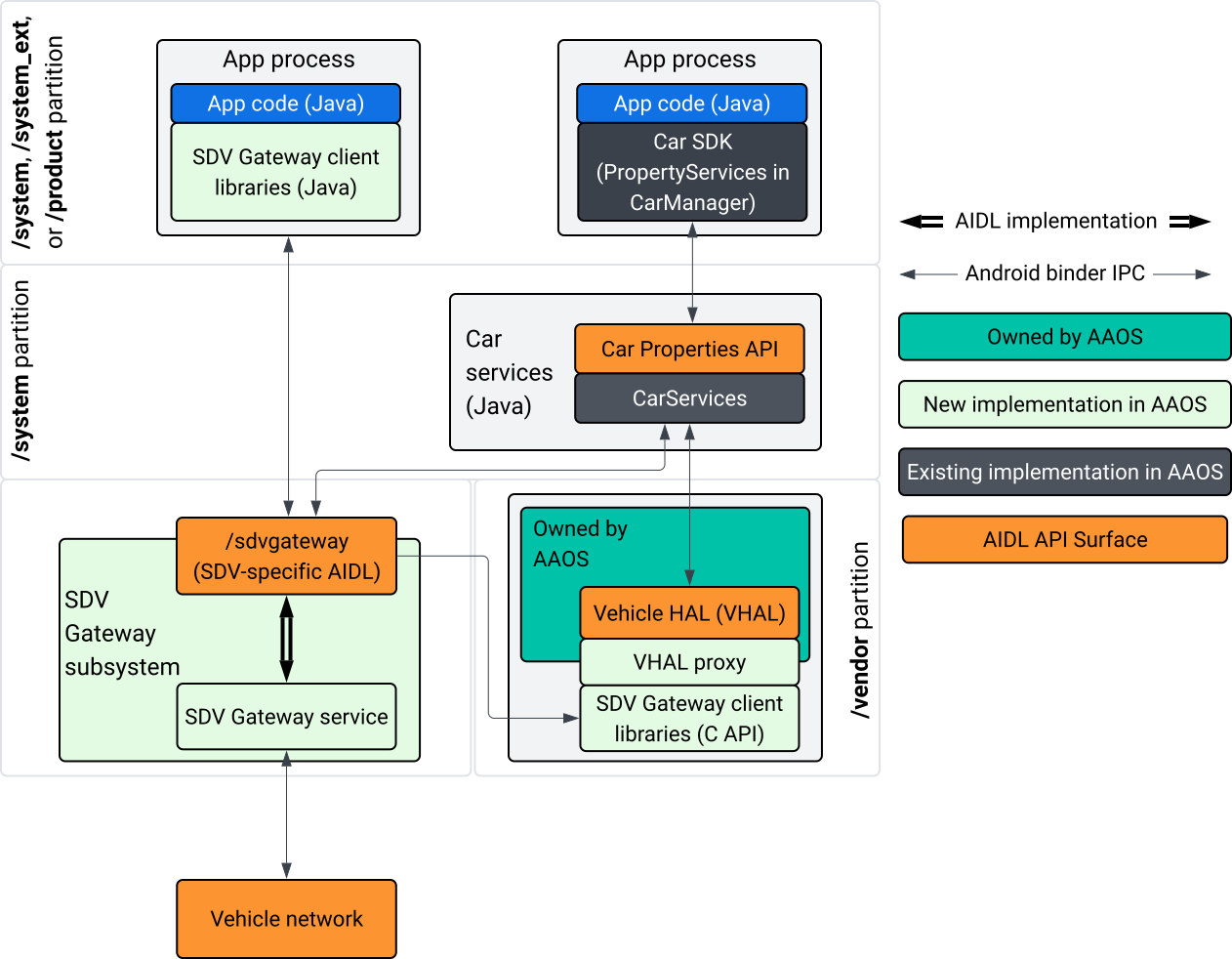
الشكل 1: تفاعلات "بوابة التحقّق من صحة الإعلانات" في "مساحة العرض المحدودة"
في مخطط النظام هذا:
- تتفاعل التطبيقات مع "بوابة SDV" من خلال خدمات العميل.
- توفّر لك حزمة تطوير البرامج (SDK) الخاصة بـ "المركبات المحدّدة البرامج" في نظام التشغيل Android Automotive ما يلي:
- واجهة برمجة تطبيقات ISdvGateway AIDL للتواصل البيني للعمليات
- مكتبات الاتصالات للتفاعل مع الشبكة
- واجهة برمجة تطبيقات C سهلة الاستخدام لدمج الخدمات الأصلية
- يتم تنفيذ واجهة برمجة التطبيقات ISdvGateway AIDL من خلال خدمة SDV Gateway والنظام الفرعي.
- تتولّى خدمة SDV Gateway إدارة ما يلي:
- اكتشاف الخدمات في اتجاهين
- التواصل مع خدمات SDV عن بُعد
- منطق العمل الأساسي
- يتصل نظام SDV Gateway الفرعي بشبكة المركبة.
- يمكن للخدمات الأصلية، بما في ذلك تنفيذ VHAL، استخدام واجهة برمجة التطبيقات ISdvGateway AIDL مباشرةً أو من خلال واجهة برمجة التطبيقات C الخاصة بحزمة SDK.
- يعمل وكيل VHAL كمرجع لتنفيذ VHAL، ويتضمّن عملية دمج ربط VSIDL.
نموذج الدمج لبوابة SDV على خدمة أصلية لنظام المعلومات والترفيه داخل المركبة
يوضّح الشكل 2 نموذج الدمج:
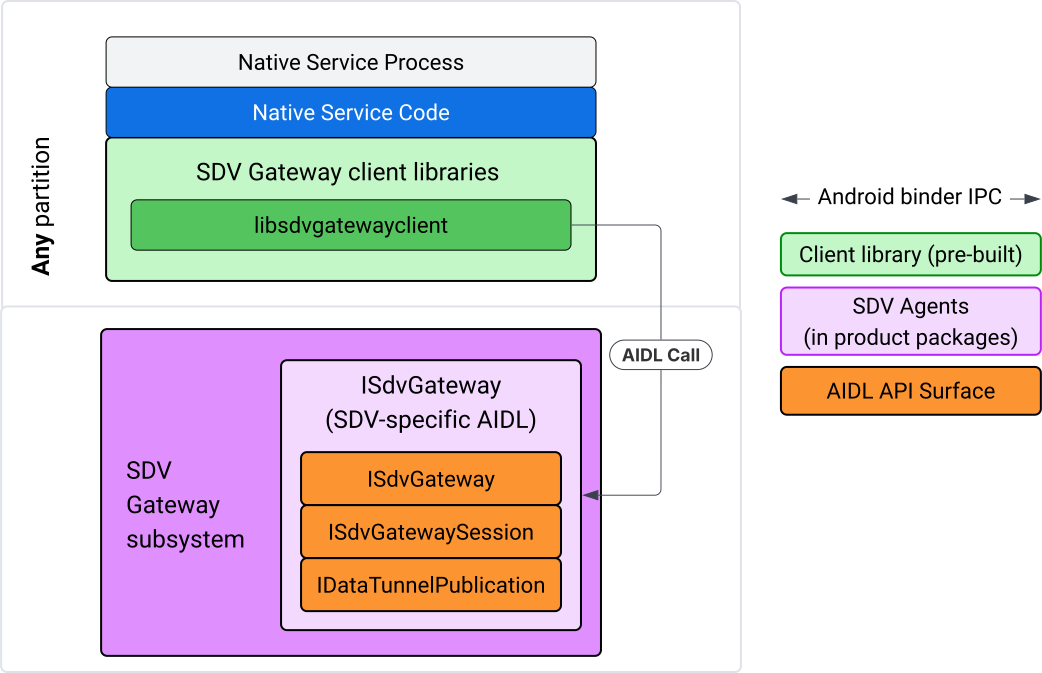
الشكل 2: نموذج دمج "بوابة التحقّق من صحة تصميم الإعلان"
استخدام SDV Gateway على خدمة أصلية لنظام المعلومات والترفيه داخل المركبة
يوضّح الشكل 3 استخدام "بوابة المركبات المحدّدة البرامج" في نظام المعلومات والترفيه داخل المركبة:
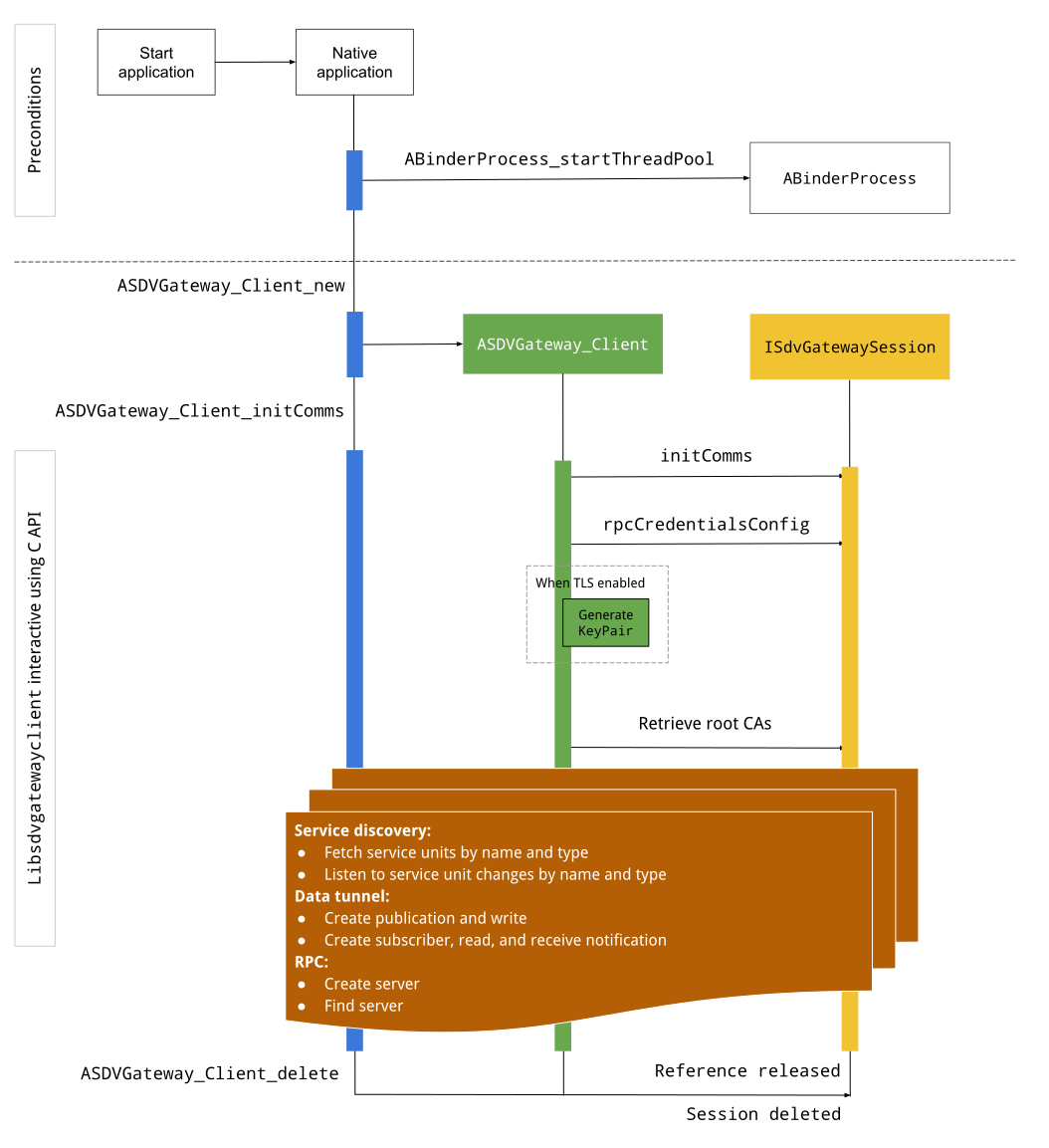
الشكل 3: بوابة SDV على نظام المعلومات والترفيه داخل المركبة
الشروط المُسبَقة
ابدأ مجموعة سلاسل Binder:
تتطلّب مكتبة عميل SDV Gateway مجموعة سلاسل Binder نشطة لتلقّي عمليات رد الاتصال غير المتزامنة من خدمات Binder.
يتعذّر إنشاء عميل SDV Gateway باستخدام واجهة برمجة التطبيقات المطلوبة عندما لا يتم بدء مجموعة سلاسل Binder.
تضمين مكتبة برامج عميل Gateway الأصلية
توفّر مكتبة Native Gateway Client واجهة برمجة تطبيقات C. أضِف مثيلاً من
libsdvgatewayclient كعنصر تابع لاستخدام واجهة برمجة التطبيقات C:
cc_binary {
    name: "your_binary_name",
    srcs: ["main.cpp"],
    shared_libs: [
        "libsdvgatewayclient",
    ],
}
تحميل برنامج Gateway
#include "libsdvgatewayclient.h"
إنشاء مثيل لبرنامج عميل أصلي
ASDVGateway_Client* client;
ASDVGateway_StatusCode_t statusCode = ASDVGateway_Client_new(
     &client, /*outStatus*/nullptr);
بعد إنشاء العميل، يمكنه إجراء ما يلي:
تحتفظ هذه السمة بالحالة لجميع التفاعلات اللاحقة مع خدمة Gateway.
تعمل كمرجع لجميع التفاعلات مع الخدمات الأخرى المتوافقة مع SDV، ويتم تمريرها كالمَعلمات الأولى إلى وظائف C API.
رموز الحالة ورسائل الخطأ
تتضمّن معظم دوال C API التعريف التالي:
ASDVGateway_StatusCode_t ApiFunctionName(..., ASDVGateway_Status_t* outStatus);
لتقييم النجاح، يمكنك فحص رمز الحالة الذي تم عرضه، وهو من النوع ASDVGateway_StatusCode_t. يمكنك أيضًا تمرير مؤشر إلى بنية يمكن للدالة ملء رمز الحالة ورسالة الخطأ فيها. يتم تمرير المؤشر كالمَعلمة الأخيرة، ويُطلق عليه الاسم outStatus. تعني القيمة الفارغة أنّه لا يتم استخدام بنية الإخراج.
يجب أن يخصّص المتصل بنية حالة الذاكرة لرسالة الخطأ. يمكن أن يحتوي هيكل الحالة على رمز الحالة ورسالة خطأ. يتوفّر مثال على استرداد رسالة الخطأ عند إنشاء عميل جديد.
لتقييم النجاح، اتّبِع الخطوات التالية:
افحص رمز الحالة الذي تم إرجاعه، وهو من النوع
ASDVGateway_StatusCode_t.مرِّر مؤشرًا إلى بنية يمكن للدالة ملء رمز الحالة ورسالة الخطأ فيها.
- يتم تمرير المؤشر كالمَعلمة الأخيرة، ويُطلق عليه الاسم
outStatus. - تعني القيمة الفارغة أنّه لا يتم استخدام بنية الإخراج.
- يجب أن يخصّص المتصل بنية حالة الذاكرة لرسالة الخطأ.
- يمكن أن يحتوي هيكل الحالة على رمز الحالة ورسالة خطأ.
- يتم تمرير المؤشر كالمَعلمة الأخيرة، ويُطلق عليه الاسم
في ما يلي نموذج يوضّح كيفية استرداد رسالة الخطأ لعميل جديد:
#include <iostream>
#include <array>

struct StatusWithErrorMsg : ASDVGateway_Status_t {
    StatusWithErrorMsg() {
        // Ensure the base struct pointers point to our internal buffer
        errorMessage = errorMessageBuffer.data();
        maxErrorMessageSize = errorMessageBuffer.size();

        // Good practice: Zero-initialize the buffer
        errorMessageBuffer.fill(0);
    }

    std::array<char, 256> errorMessageBuffer;
};

// --- Execution ---

ASDVGateway_Client* client = nullptr;
StatusWithErrorMsg status;

// Initialize the client
ASDVGateway_StatusCode_t statusCode = ASDVGateway_Client_new(&client, &status);

// Log Results
std::cout << "Returned statusCode:    " << statusCode << std::endl;
std::cout << "Status Struct Code:     " << status.statusCode << std::endl;
std::cout << "Status Error Message:   " << status.errorMessage << std::endl;
في هذا المثال:
يحتوي رمز الحالة الوارد في بنية الحالة على القيمة نفسها التي يتضمّنها رمز الحالة الذي تم عرضه.
يتم ملء رسالة الخطأ فقط إلى الحد الأقصى لعدد الأحرف
maxErrorMessageSize(بما في ذلك حرف الإنهاء الفارغ\0). إذا لم يحدث أي خطأ (رمز الحالة هوOK)، تكون رسالة الخطأ سلسلة فارغة.
Init comms
تعمل الدالة Init comms على بدء الاتصال بين تطبيق المتصل والتطبيقات الأخرى باستخدام حزمة الاتصال في "مركبة تطوير البرامج" وبوابة "مركبة تطوير البرامج". يمكن استدعاء عمليات الإعداد في السياقين التاليين::
بعد إنشاء العميل
قبل أي تفاعلات مع "نفق البيانات" أو "إجراءات استدعاء الإجراءات عن بُعد" أو "اكتشاف الخدمات"
وفي ما يلي مثال لذلك:
ASDVGateway_InitCommsParams_t params{
.packageName = "android.sdv.samples.gateway.client",
.serviceBundleName = "NativeTestApp",
.serviceInstanceName = "default",
};
// Initialize communications and capture the status code
ASDVGateway_StatusCode_t statusCode = ASDVGateway_Client_initComms(client, ¶ms, &status);
// Recommended check
if (statusCode != ASDVGateway_StatusCode_OK) {
std::cerr << "Failed to init comms: " << status.errorMessage << std::endl;
}
اكتشاف الخدمات
يمكنك تلقّي إشعارات عند تسجيل وحدات خدمة من نوع أو اسم معيّنَين أو إلغاء تسجيلها. يتم إعلام دالة رد الاتصال في سلسلة محادثات يملكها عميل البوابة. يتم تشغيل وظيفة رد الاتصال هذه في البداية مع جميع وحدات الخدمة المسجّلة بعد طلب البيانات من واجهة برمجة التطبيقات C مباشرةً. بعد التشغيل الأوّلي، تستمر الإشعارات في إرسال التحديثات إلى أن يتم إلغاء تسجيل المستمع بشكل صريح.
class NativeSdvGatewayTestApp {
public:
    static void ServiceUnitChangeListenerCallback(
        const ASDVGateway_ServiceUnitChangeEventType eventType,
        const ASDVGateway_ServiceUnitDefinition* serviceUnitDefinition,
        void* userData
    ) {
        auto* testApp = reinterpret_cast<NativeSdvGatewayTestApp*>(userData);

        if (testApp) {
            // Logic to react when services are registered or unregistered
            // e.g., testApp->handleServiceChange(eventType, serviceUnitDefinition);
        }
    }
};

// --- Listener Registration ---

// Ensure thisApp remains in scope as long as the listener is active
NativeSdvGatewayTestApp* thisApp = get_current_app_context();

ASDVGateway_UnitType_t unitType{
    .sdvPackageName     = "android.sdv.samples.sdv_gateway",
    .serviceBundleName  = "DtPublisher",
    .unitTypeName       = "TirePressure",
};

// Register the listener
ASDVGateway_Client_registerListenerForServiceUnitChangeByType(
    client,
    &unitType,
    NativeSdvGatewayTestApp::ServiceUnitChangeListenerCallback,
    static_cast<void*>(thisApp), // userData
    &listenerHandle,
    &status
);

// --- Cleanup ---

// Unregistering stops all notification to the callback function
ASDVGateway_Client_unregisterListenerForServiceUnitChangeByType(
    client,
    listenerHandle,
    &status
);
لاسترداد وحدات الخدمة المسجّلة بدون تلقّي إشعارات إضافية، استخدِم واجهتَي برمجة التطبيقات
ASDVGateway_Client_fetchServiceUnitsByType و
ASDVGateway_Client_fetchServiceUnitsByName.
class NativeSdvGatewayTestApp {
public:
    /**
     * Callback triggered for each service unit found that matches the requested type.
     */
    static void FetchServiceUnitsCallback(
        const ASDVGateway_ServiceUnitDefinition* serviceUnitDefinition,
        void* userData
    ) {
        auto* app = reinterpret_cast<NativeSdvGatewayTestApp*>(userData);

        if (serviceUnitDefinition) {
            // The service unit is registered with service discovery.
            // Example: processServiceUnit(serviceUnitDefinition);
        }
    }
};

// --- Execution ---

ASDVGateway_UnitType_t unitType{
    .sdvPackageName     = "android.sdv.samples.sdv_gateway",
    .serviceBundleName  = "DtPublisher",
    .unitTypeName       = "TirePressure",
};

// Context used to differentiate between various fetchServiceUnits calls
void* userData = static_cast<void*>(thisApp);

ASDVGateway_Client_fetchServiceUnitsByType(
    client,
    &unitType,
    NativeSdvGatewayTestApp::FetchServiceUnitsCallback,
    userData,
    &status
);
يتم تشغيل دالة ردّ الاتصال بشكل متزامن في سلسلة التعليمات البرمجية الخاصة بالمتصل أثناء طلب بيانات من واجهة برمجة التطبيقات ASDVGateway_Client_fetchServiceUnitsByType. استخدِم
ASDVGateway_Client_fetchServiceUnitsByName للحصول على وحدات الخدمة المسجَّلة
حسب الاسم بدلاً من نوع الوحدة:
ASDVGateway_StatusCode_t ASDVGateway_Client_fetchServiceUnitsByName(
    // [in]  Opaque pointer to a client object.
    const ASDVGateway_Client* client,

    // [in]  Pointer to a structure containing the package name,
    //       service bundle name, and service unit name.
    const ASDVGateway_UnitNameDiscoveryArgs_t* unitName,

    // [in]  Callback function to be called for each service unit
    //       definition registered. Called synchronously in the
    //       caller's thread before the fetch completes.
    ASDVGateway_FetchServiceUnitsCallback callback,

    // [in]  Optional value passed back as a parameter of the callback.
    void* userData,

    // [out] Optional pointer to status structure for result
    //       codes and error messages.
    ASDVGateway_Status_t* outStatus
);
مسار استدعاء الإجراء عن بُعد (RPC)
تتعامل مكتبة برامج Gateway مع إعدادات بروتوكول أمان طبقة النقل (TLS) الخاصة بالتواصل مع التطبيقات الأخرى المتوافقة مع "مساحة التخزين الآمنة". على وجه التحديد، يسترد هذا الإجراء إعدادات TLS المطلوبة للتواصل. في ما يلي كيفية تحديد استخدام TLS:
يتم استخدام بروتوكول أمان طبقة النقل (TLS) عندما يكون وضع التشغيل في "التحقّق من صحة الجهاز" هو
LOCKED.يتم استخدام الاتصال غير الآمن عندما يكون وضع التشغيل في "التحقّق من صحة التصميم" هو
UNLOCKED. عند استخدام TLS، تنشئ مكتبة عميل Gateway زوج مفاتيح لا يعرفه سوى عملية التطبيق. يستردّ العميل بيانات اعتماد استدعاء الإجراء عن بُعد لإنشاء خادم استدعاء إجراء عن بُعد أو قناة عميل لاستدعاء إجراء عن بُعد. تستخدم RPC شبكة VLAN مخصّصة لبروتوكول SDV-RPC. تستدعي مكتبة برامج Gateway android_setprocnetwork لتبديل الشبكة التلقائية للعملية إلى شبكة VLAN الخاصة باستدعاء الإجراء عن بُعد في "خدمة تصميم الإعلانات المراعية للخصوصية"، وذلك أثناء عملية استدعاءASDVGateway_Client_initCommsأو بعدها.
مدى توفّر استدعاء الإجراء عن بُعد (RPC)
قد يبدأ تشغيل أحد العملاء الذي تم ضبطه على البدء عند بدء التشغيل المبكر قبل أن تصبح شبكة VLAN الخاصة ببروتوكول SDV-RPC متاحة. تحقَّق من توفّر استدعاء الإجراء عن بُعد قبل محاولة إنشاء أي مآخذ توصيل لخادم استدعاء الإجراء عن بُعد أو لبرنامج عميل لاستدعاء الإجراء عن بُعد:
// Check if the RPC (Remote Procedure Call) service is available
bool isRpcAvailable = ASDVGateway_Client_isRpcAvailable(client);

if (isRpcAvailable) {
    // Proceed with RPC calls
} else {
    // Handle the case where RPC is not yet ready or available
}
أو
// Check if the process is correctly bound to the SDV RPC Network Interface/VLAN
bool isRpcNetworkBound = ASDVGateway_Client_isProcessBoundToSdvRpcNetworkInterface(client);

if (!isRpcNetworkBound) {
    // Usually implies the process isn't running on the correct network interface
    // or the VLAN configuration is missing.
    std::cerr << "Warning: Process is not bound to the SDV RPC VLAN." << std::endl;
}
اضبط أداة معالجة لأحداث العميل باستخدام
ASDVGateway_Client_setClientNotificationCallback لتلقّي إشعار عند تغيُّر حالة توفُّر RPC.
يُفضَّل استخدام ASDVGateway_Client_isProcessBoundToSdvRpcNetworkInterface إذا كان التطبيق يبدّل شبكة العملية لأنّه يتحقّق من توفّر RPC ومن ربط العملية بشبكة VLAN الخاصة بـ SDV-RPC.
تبديل الشبكة التلقائية للعملية
قد تحتاج إلى التبديل من شبكة VLAN الخاصة ببروتوكول SDV-RPC كشبكة تلقائية للعملية
لفتح مآخذ توصيل للاتصالات المرتبطة بالإنترنت. اتّصِل بالرقمين
ASDVGateway_Client_unbindProcessFromSdvRpcNetworkInterface و
ASDVGateway_Client_bindProcessToSdvRpcNetworkInterface لإلغاء ربط العملية وإعادة ربطها
بشبكة VLAN الخاصة ببروتوكول SDV-RPC. تعمل هاتان الدالتان كأدوات تبديل عامة، حيث تبدّلان واجهة الشبكة التي يتم ربط المقابس بها لجميع سلاسل العمليات.
// 1. Unbind: Sockets return to the "default" network interface (e.g., wlan0, eth0)
ASDVGateway_StatusCode_t unbindStatus =
    ASDVGateway_Client_unbindProcessFromSdvRpcNetworkInterface(client, &status);

// 2. Bind: Sockets are now bound to the dedicated SDV-RPC VLAN
ASDVGateway_StatusCode_t bindStatus =
    ASDVGateway_Client_bindProcessToSdvRpcNetworkInterface(client, &status);

// Validation
if (bindStatus == ASDVGateway_StatusCode_OK) {
    // Sockets are successfully bound to the SDV-RPC VLAN
}
إشعارات استدعاء إجراء عن بُعد (RPC)
اضبط أداة معالجة طلبات العميل لتلقّي إشعارات بالتغييرات في مدى توفّر الإجراء عن بُعد (RPC) ولتلقّي آخر الأخبار حول شهادات الجذر التي يجب أن يقبلها خادم الإجراء عن بُعد:
class NativeSdvGatewayTestApp {
public:
    static void ClientNotificationCallback(
        ASDVGateway_ClientNotificationType_t notificationType,
        void* userData
    ) {
        auto* testApp = reinterpret_cast<NativeSdvGatewayTestApp*>(userData);
        if (!testApp) return;

        switch (notificationType) {
            case ASDVGateway_ClientNotificationType_RootCertsChanged:
                std::cout << "onClientNotification: Root Certs Changed" << std::endl;
                // Handle certificate rotation logic here
                break;

            case ASDVGateway_ClientNotificationType_RpcAvailabilityChanged:
                std::cout << "onClientNotification: RPC Availability Changed" << std::endl;
                // Handle reconnection or UI updates here
                break;

            default:
                std::cout << "onClientNotification: Received Unknown Notification ("
                          << notificationType << ")" << std::endl;
                break;
        }
    }
};

// --- Registration ---

NativeSdvGatewayTestApp* thisApp = get_current_app_context();

// Register the notification callback to monitor system-level changes
ASDVGateway_StatusCode_t statusCode = ASDVGateway_Client_setClientNotificationCallback(
    client,
    NativeSdvGatewayTestApp::ClientNotificationCallback,
    static_cast<void*>(thisApp), // userData
    &status
);
مسار خادم RPC
يجب استخدام بيانات الاعتماد لإنشاء خادم RPC:
ASDVGateway_RpcCredentials_t* rpcCredentials = nullptr;

// Retrieve the credentials from the client
ASDVGateway_StatusCode_t statusCode = ASDVGateway_Client_rpcCredentials(client, &rpcCredentials, &status);

// Validation: Differentiating between an error and a deliberate "insecure mode"
if (status.statusCode != ASDVGateway_StatusCode_OK) {
    std::cerr << "Error retrieving credentials: " << status.errorMessage << std::endl;
    return;
}

// Logic for choosing Security Credentials
if (rpcCredentials == nullptr) {
    // If the call succeeded but credentials are null, the system expects insecure communication
    std::cout << "Configuring for Insecure Mode" << std::endl;
} else {
    std::cout << "Configuring for Secure Mode:" << std::endl;
    std::cout << "  Private Key: " << (rpcCredentials->privateKeyPem ? "Present" : "Missing") << std::endl;
    std::cout << "  RootCerts:   " << rpcCredentials->rootCertsPem << std::endl;
    std::cout << "  CertChain:   " << rpcCredentials->certChainPem << std::endl;
    std::cout << "  SAN:         " << rpcCredentials->subjectAlternativeName << std::endl;
}

// --- Cleanup ---

// Release the memory once the RPC server/client is initialized
if (rpcCredentials != nullptr) {
    ASDVGateway_Client_deleteRpcCredentials(client, rpcCredentials);
}
بعد إنشاء خادم RPC ومعرفة منفذ الاستماع الخاص به، سجِّل خادم RPC ليتمكّن من العثور على تطبيقات أخرى:
ASDVGateway_RegisterRpcServerParams_t params{
.serviceUnitName = "android-sdv-samples-sunroof-sunroof",
.unitType = ASDVGateway_UnitType_t{
.sdvPackageName = "android.sdv.samples.sunroof",
.serviceBundleName = "SunroofServer",
.unitTypeName = "Sunroof",
},
.listeningPort = listeningPort,
.serverUnitMetadata = ASDVGateway_ServerUnitMetadata_t{
.version = 1,
},
};
// Register the RPC server with the SDV Gateway
ASDVGateway_StatusCode_t statusCode = ASDVGateway_Client_registerRpcServer(
client,
¶ms,
&status
);
// Basic error handling
if (statusCode != ASDVGateway_StatusCode_OK) {
std::cerr << "Failed to register RPC server: " << status.errorMessage << std::endl;
}
عندما يحدّث النظام شهادات الجذر في وقت التشغيل (على سبيل المثال، أثناء تغييرات حالة الجهاز الافتراضي)، يجب أن تعيد خوادم RPC تحميل قائمة الشهادات المقبولة:
اضبط أداة معالجة لأحداث العميل باستخدام
ASDVGateway_Client_setClientNotificationCallbackلتلقّي إشعار عند تعديل شهادات الجذر.اتّصِل بالرقم
ASDVGateway_Client_rpcCredentialsللحصول على شهادات الجذر المعدَّلة.
مسار عميل استدعاء الإجراء عن بُعد (RPC)
في ما يلي تسلسل خطوات عميل RPC:
ASDVGateway_FindRpcServerByNameParams_t params{
.packageName = "android.sdv.samples.cluster",
.serviceBundleName = "ClusterServer",
.serviceUnitName = "android-sdv-samples-cluster-cluster",
};
ASDVGateway_SocketAddress_t socketAddress;
ASDVGateway_RpcCredentials_t* rpcCredentials = nullptr;
// Perform the lookup to find the server's location and security requirements
ASDVGateway_StatusCode_t statusCode = ASDVGateway_Client_findRpcServerByName(
mClient,
¶ms,
&socketAddress,
&rpcCredentials,
&status
);
// Mandatory check: Distinguish between system errors and intentional "Insecure Mode"
if (status.statusCode != ASDVGateway_StatusCode_OK) {
std::cerr << "Failed to find RPC server: " << status.errorMessage << std::endl;
return;
}
// Logic for establishing the RPC channel
if (rpcCredentials == nullptr) {
std::cout << "Connecting via Insecure Mode to "
<< socketAddress.address << ":" << socketAddress.port << std::endl;
} else {
std::cout << "Connecting via Secure Mode to "
<< socketAddress.address << ":" << socketAddress.port << std::endl;
std::cout << " RootCerts: " << rpcCredentials->rootCertsPem << std::endl;
std::cout << " SAN: " << rpcCredentials->subjectAlternativeName << std::endl;
// Note: privateKeyPem and certChainPem are typically used if the client
// needs to perform mutual TLS (mTLS).
}
// Cleanup: Release the credential memory once the RPC channel is established
if (rpcCredentials != nullptr) {
ASDVGateway_Client_deleteRpcCredentials(client, rpcCredentials);
}
إنشاء ناشر ونشر الرسائل
يتم استخدام واجهة برمجة التطبيقات ASDVGateway_Client_createPublication لتسجيل وحدة خدمة ناشر في SDV Gateway من خلال واجهة AIDL الخاصة بها وإنشاء "قائمة انتظار الرسائل السريعة" (FMQ) في عملية التطبيق. يتم استخدام Binder فقط لإعداد FMQ، وليس عند كتابة الرسائل. بعد ذلك، يتم استخدام واجهة برمجة التطبيقات ASDVGateway_Client_publishMessages لنشر الرسائل في المنشور الذي تم إنشاؤه. يتضمّن ذلك كتابة الرسائل إلى قائمة انتظار الرسائل السريعة (FMQ) الخاصة بالمنشور وإرسال إشعار بأنّه تمّت كتابة الرسائل.
ASDVGateway_CreatePublicationParams_t params{
.serviceUnitName = "mirror-position-adjust-impl-1",
.unitType = ASDVGateway_UnitType_t{
.sdvPackageName = "android.sdv.samples.sdv_gateway",
.serviceBundleName = "DtPublisher",
.unitTypeName = "MirrorPositionAdjust",
},
.publisherUnitMetadata = ASDVGateway_PublisherUnitMetadata_t{
.version = 1,
.messageSizeBytes = 64,
.messageCount = 16,
},
};
ASDVGateway_PublicationMetadata_t metadata;
// 1. Create the Publication (allocates resources on the gateway)
ASDVGateway_StatusCode_t createStatus = ASDVGateway_Client_createPublication(
client,
¶ms,
&metadata,
&status
);
if (status.statusCode != ASDVGateway_StatusCode_OK) {
std::cerr << "Failed to create publication: " << status.errorMessage << std::endl;
return;
}
// 2. Publish Messages
// Note: serializedMessage should contain your encoded protobuf data
std::vector<uint8_t> serializedMessage;
ASDVGateway_Client_publishMessages(
client,
serializedMessage.data(),
serializedMessage.size(),
metadata.publicationId,
&status
);
إنشاء أداة معالجة أحداث الإشعارات
للاشتراك في منشور وتلقّي إشعارات Data Tunnel (مثل توفّر الرسائل)، استخدِم واجهة برمجة التطبيقات ASDVGateway_Client_subscribeToPublicationByName. تُعدّ هذه الواجهة أيضًا قائمة انتظار الرسائل المضمونة (FMQ) لقراءة الرسائل المنشورة. يمكنك ضبط دالة ردّ اتصال للإشعارات إما أثناء عملية الاشتراك أو بعدها.
#include <map>
#include <memory>
#include <iostream>

class NativeSdvGatewayTestApp {
public:
    struct SubscriptionContext {
        int32_t subscriptionId;
        std::string topicName;
        // Add other context-specific data here (e.g., counters, buffers)
    };

    /**
     * Callback triggered when new data is published to a subscribed topic.
     */
    static void SubscriptionNotificationCallback(
        const ASDVGateway_SubscriptionNotificationData_t* notification,
        void* userData
    ) {
        // The SDV Gateway client passes back the userData pointer.
        // We ensure validity by managing the lifecycle of SubscriptionContext
        // within the mSubscriptions map.
        auto* ctx = reinterpret_cast<SubscriptionContext*>(userData);

        if (ctx && notification) {
            // React to data being available for the subscription.
            // Example: handleIncomingData(notification->data, notification->size);
            std::cout << "Notification received for sub ID: " << ctx->subscriptionId << std::endl;
        }
    }

private:
    // Maps subscription handles/IDs to their respective contexts
    std::map<int32_t, std::unique_ptr<SubscriptionContext>> mSubscriptions;
};

// --- Usage ---
NativeSdvGatewayTestApp app;
عند الاشتراك، يمكنك تحديد خيارات إضافية إلى جانب اسم وحدة الخدمة الخاصة بالناشر. تتيح لك هذه الخيارات استرداد الرسالة التي تم نشرها مؤخرًا قبل الاشتراك وتحديد الحد الأدنى للفاصل الزمني بين الإشعارات.
ASDVGateway_SubscribeToPublicationByNameParams_t params{
.sdvVmName = "vm1",
.packageName = "test.package.impl.name",
.serviceBundleName = "TestBundleImpl",
.serviceUnitName = "GrpcServerImpl",
};
ASDVGateway_Subscriber_Options_t options{
// Ensure we receive the most recent message immediately upon subscribing
.flags = ASDVGATEWAY_SUBSCRIBER_OPTIONS_FLAG_FETCHLASTMESSAGE,
.minIntervalMs = 0, // No rate limiting; receive updates as they happen
};
// 1. Prepare the context for the callback
auto subCtx = std::make_unique<SubscriptionContext>();
ASDVGateway_PublicationMetadata_t metadata{};
// 2. Perform the subscription
ASDVGateway_StatusCode_t statusCode = ASDVGateway_Client_subscribeToPublicationByName(
client,
¶ms,
&options,
NativeSdvGatewayTestApp::SubscriptionNotificationCallback,
static_cast<void*>(subCtx.get()), // Pass the raw pointer as userData
&metadata,
&status
);
// 3. Validation and Lifecycle Management
if (status.statusCode != ASDVGateway_StatusCode_OK) {
// Error handling: subCtx will be automatically deleted here
std::cerr << "Subscription failed: " << status.errorMessage << std::endl;
return;
}
// Store the context using the publicationId as the key.
// Once moved, the map owns the lifetime of subCtx.
app.mSubscriptions.emplace(metadata.publicationId, std::move(subCtx));
استخدِم واجهة برمجة التطبيقات ASDVGateway_Client_readAvailableMessages لقراءة الرسائل من المنشور:
uint32_t messagesAvailable = 0;

// 1. Check how many messages are waiting in the queue
ASDVGateway_StatusCode_t availStatus = ASDVGateway_Client_availableToRead(
    client,
    metadata.publicationId,
    &messagesAvailable,
    &status
);

if (status.statusCode != ASDVGateway_StatusCode_OK) {
    // Error handling for availability check
    return;
}

if (messagesAvailable == 0) {
    // No messages available for this publication at this time
    return;
}

// 2. Prepare the buffer
// metadata.messageSizeBytes was provided during the publication/subscription setup
std::vector<uint8_t> bytesForMessages;
bytesForMessages.resize(metadata.messageSizeBytes * messagesAvailable);

// 3. Read the messages from the Gateway into your local buffer
uint32_t actualMessageCount = 0; // Filled by the SDK with the number of messages read
ASDVGateway_StatusCode_t readStatus = ASDVGateway_Client_readAvailableMessages(
    client,
    metadata.publicationId,
    bytesForMessages.data(),
    bytesForMessages.size(),
    &actualMessageCount,
    &status
);

if (status.statusCode == ASDVGateway_StatusCode_OK) {
    // Successfully read 'actualMessageCount' messages
    // Process bytesForMessages...
}
لضبط دالة رد الاتصال بعد الاشتراك، استخدِم واجهة برمجة التطبيقات ASDVGateway_Client_setNotificationCallbackForPublicationId:
ASDVGateway_StatusCode_t ASDVGateway_Client_setNotificationCallbackForPublicationId(
    // [in]  Opaque pointer to the client object.
    const ASDVGateway_Client* client,

    // [in]  Identifies the specific publication to monitor.
    const int32_t publicationId,

    // [in]  Function pointer triggered when new data is available
    //       for the specified publication.
    ASDVGateway_SubscriptionNotificationCallback notificationCallback,

    // [in]  Optional user-defined context passed back to the callback.
    void* notificationCallbackUserData,

    // [out] Optional pointer to a status structure for result codes
    //       and error messages.
    ASDVGateway_Status_t* outStatus
);
إعداد خدمة init
أولاً، اتّبِع الخطوات الواردة في الهوية للخدمات الأصلية لتحديد هوية خدمة للخدمة من خلال معرّف Android (AID).
لنفترض أنّ اسم خدمتك هو native_sdv_gateway_client_service، وأنّ الملف التنفيذي يقع في القسم /vendor على /vendor/bin/native_sdv_gateway_client_service، وأنّك تستخدم vendor_gateway_client كـ المعرّف الإعلاني على Android (AID) لتشغيل الخدمة.
باستخدام هذا الإعداد، يمكنك تحديد خدمة بدء التشغيل التالية:
service native_sdv_gateway_client_service /vendor/bin/native_sdv_gateway_client_service
    class core
    user vendor_gateway_client
    group inet
    disabled
    oneshot
يستخدم هذا الإعداد المَعلمات التالية:
-
vendor_gateway_clientهو معرّف التطبيق الذي تم إنشاؤه أو اختياره للخدمة. group inetمطلوب لبرامج بوابة SDV من أجل استخدام واجهة الشبكة للتواصل بين الأجهزة الافتراضية SDV. يمكن إضافة مجموعات أخرى عند الحاجة.- يستخدم هذا المثال
disabledوoneshot. قد تحتاج إلى تعديل خيارات الخدمة. ابدأ الخدمة بعدsdv_gateway.
إنشاء قواعد SELinux للخدمة
لاستخدام واجهات برمجة تطبيقات SDV Gateway، تحتاج إلى قواعد SELinux التالية للخدمة:
# Define the domain for the service
type native_sdv_gateway_client_service, domain;

# Define the executable file type on the vendor partition
type native_sdv_gateway_client_service_exec, exec_type, file_type, vendor_file_type;

# Macro to transition from 'init' to this service's domain upon execution
init_daemon_domain(native_sdv_gateway_client_service)

# Macro to grant the necessary permissions to communicate with the SDV Gateway
sdv_gateway_client_domain(native_sdv_gateway_client_service)
في قواعد SELinux:
يسمح
init_daemon_domainببدء الخدمة منinit.توفّر
sdv_gateway_client_domainجميع أذونات SELinux اللازمة للتفاعل مع "بوابة التحقّق من صحة تصميم الأمان" (SDV Gateway). يمنح السطر التالي هذه القواعد للملف التنفيذي:/vendor/bin/native_sdv_gateway_client_service u:object_r:native_sdv_gateway_client_service_exec:s0
عيّنة تعليمات برمجية
لمزيد من المعلومات حول تشغيل نموذج الرمز البرمجي الأصلي الذي يوضّح كيفية توثيق واجهات برمجة التطبيقات C، يُرجى الاطّلاع على
system/software_defined_vehicle/samples/sdv_gateway/NativeSdvGatewayTestApp/README.md.
بوابة SDV على تطبيق IVI Java
يوضّح المخطّط التالي نموذج التفاعل لبوابة SDV على نظام المعلومات والترفيه داخل المركبة:
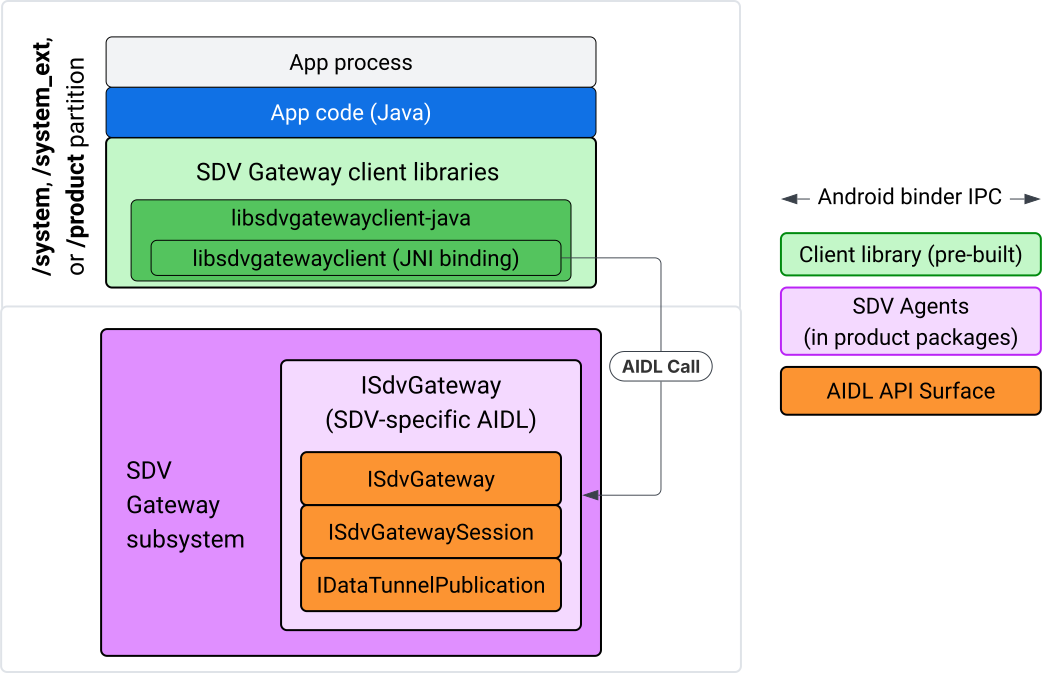
الشكل 4. بوابة SDV على تطبيق IVI Java
على وجه التحديد، يتيح النموذج ما يلي:
- يُرسِل جميع الطلبات إلى طبقة JNI.
- تدمج واجهة برمجة التطبيقات Java وC.
- تحدّد هذه السمة تفاعلات AIDL مع
ISdvGateway:- Init comms
- البحث عن خادم RPC أو إنشاؤه
- إنشاء نظام النشر والاشتراك
- تنفيذ تفاعلات "نفق البيانات" لاكتشاف الخدمات
- تلقّي إشعارات (مثل توفّر البيانات)
- قراءة الرسائل وكتابتها (FMQ للنشر/الاشتراك) لإنشاء مفاتيح التشفير وشهادات بروتوكول أمان طبقة النقل (TLS)
تضمين مكتبات برامج عميل Gateway
يتم تثبيت مكتبة Java وبرنامج تضمين JNI لواجهة برمجة التطبيقات libsdvgatewayclient C API في حزمة APEX على جهاز IVI المستهدف. أضِف عنصرًا تابعًا لوقت الترجمة إلى رمز Java الأساسي للمكتبة، ومكتبة Java التي يجب استخدامها في وقت التشغيل، وحزمة APEX المطلوبة التي تحتوي على مكتبة Java.
android_app {
    name: "YourAppName",
    // ...
    static_libs: [
        "libsdvgatewayclient-java",
    ],
    libs: [
        "libsdvgatewayclient-java-sdk.stubs",
    ],
    uses_libs: [
        "libsdvgatewayclient-java-sdk",
    ],
    required: [
        "com.sdv.google.gateway.client",
    ],
    // ...
}
في حال إنشاء تطبيق غير مجمَّع خارج شجرة SDV، تكون العملية مشابهة:
انسخ ملف JAR الخاص ببرنامج Java الأساسي الذي تم إنشاؤه وملف JAR الداعم لبروتوكول RPC في مجلد مكتبات التطبيق. للحصول على التفاصيل، يُرجى الاطّلاع على
system/software_defined_vehicle/sdv_gateway/libsdvgatewayclient_apex/README.md.أضِف ملف JAR الخاص بالنماذج كعنصر تابع مخصّص للتجميع فقط. على سبيل المثال، عدِّل إعدادات Gradle لتعتمد على العناصر الصورية من خلال إضافة إدخال
compileOnlyإلى القسمdependencies:dependencies { // The library supporting functions for SDK RPC. // Statically linked into the app APK. implementation(files("libs/libsdvgatewayclient-java.jar")) // Stub of the SDV-Gateway client library. // Used only for compilation; the real implementation is provided // by the com.sdv.google.gateway.client APEX at runtime. compileOnly(files("libs/libsdvgatewayclient-java-sdk.jar")) }أضِف مكتبة Java إلى قسم التطبيق في ملف
AndroidManifest.xml.<manifest xmlns:android="http://schemas.android.com/apk/res/android"> <application> <!-- Declares that this app requires the SDV Gateway client library. The 'android:required="true"' attribute ensures the app won't install/run if the library is missing from the system. --> <uses-library android:name="libsdvgatewayclient-java-sdk" android:required="true" /> </application> </manifest>
تحميل المكتبات
أنشئ عنصر SdvGatewayClient (توفّره مكتبة العميل):
import google.sdv.gateway.client.SdvGatewayClient;

// --- Inside your Activity, Service, or ViewModel ---

// Initialize the SDV Gateway Client
SdvGatewayClient gatewayClient = new SdvGatewayClient();
Init comms
اتّصِل بالرقم initComms() باستخدام اسم تطبيق كاسم لحزمة الخدمة:
// Define a unique name for your service bundle (usually constant)
private static final String SERVICE_BUNDLE_NAME = "MySdvServiceBundle";

// ... inside an Activity or Service context ...

try {
    // Initialize communications with the SDV Gateway
    // context.getPackageName() provides "android.sdv.samples.gateway.client" or similar
    gatewayClient.initComms(context.getPackageName(), SERVICE_BUNDLE_NAME);

    Log.i("SDV_GATEWAY", "Communications initialized successfully");
} catch (Exception e) {
    // Unlike the C API which uses status codes,
    // the Java SDK often throws exceptions for initialization failures.
    Log.e("SDV_GATEWAY", "Failed to initialize communications", e);
}
اكتشاف الخدمات
تحتوي واجهة برمجة تطبيقات Java على طرق لتنفيذ ما يلي:
تلقّي إشعارات عند تسجيل وحدات الخدمة بنوع وحدة معيّن (أو بدلاً من ذلك، مطابقة اسم معيّن) أو إلغاء تسجيلها
أدرِج وحدات الخدمة الحالية التي تتضمّن نوع وحدة معيّنًا (أو بدلاً من ذلك، ابحث عن اسم نوع وحدة خدمة معيّن). لتلقّي إشعارات بشأن التغييرات التي تطرأ على وحدة الخدمة، أنشئ أداة معالجة:
import google.sdv.gateway.client.ServiceUnitChangeListener;
import google.sdv.gateway.client.ServiceUnitChangeEventType;
import google.sdv.gateway.client.ServiceUnitDefinition;

// --- Implementation ---

ServiceUnitChangeListener listener = new ServiceUnitChangeListener() {
    @Override
    public void onServiceUnitChanged(
        ServiceUnitChangeEventType eventType,
        ServiceUnitDefinition serviceUnitDefinition
    ) {
        // This is triggered when services matching your criteria
        // are registered or unregistered on the vehicle network.
        if (eventType == ServiceUnitChangeEventType.REGISTERED) {
            // Handle new service discovery
        } else if (eventType == ServiceUnitChangeEventType.UNREGISTERED) {
            // Handle service removal
        }
    }
};
تُعلم طريقة addListenerForServiceUnitChangeByName Java المستمع بما يلي:
// 1. Register the listener for a specific service unit by name
AutoCloseable handle = gatewayClient.addListenerForServiceUnitChangeByName(
    new UnitNameDiscoveryArgs(
        "",                                   // sdvVmName (empty for local/auto-discovery)
        "android.sdv.samples.cluster",        // sdvPackageName
        "ClusterServer",                      // serviceBundleName
        "android-sdv-samples-cluster-cluster" // serviceUnitName
    ),
    listener
);

// --- Later in the application lifecycle ---

// 2. To stop receiving notifications and clean up resources, close the handle.
try {
    if (handle != null) {
        handle.close();
    }
} catch (Exception e) {
    Log.e("SDV_GATEWAY", "Error while closing the listener handle", e);
}
بدلاً من ذلك، استخدِم طريقة addListenerForServiceUnitChangeByType Java لإعلام المستمع عند تسجيل الخدمات التي تتضمّن نوع الوحدة المحدّد أو إلغاء تسجيلها:
// 1. Register a listener based on the Service Unit Type
AutoCloseable handle = gatewayClient.addListenerForServiceUnitChangeByType(
    new UnitType(
        "com.android.testapp.sdvcarmonitor", // sdvPackageName
        "SunroofRpcServer",                  // serviceBundleName
        "Sunroof"                            // unitTypeName
    ),
    listener
);

// --- Execution Loop / Lifecycle ---

// 2. To stop receiving notifications and clean up memory, close the handle.
// This effectively unregisters the listener from the SDV Gateway.
try {
    if (handle != null) {
        handle.close();
    }
} catch (Exception e) {
    Log.e("SDV_GATEWAY", "Failed to close the service unit listener handle", e);
}
بالنسبة إلى addListenerForServiceUnitChangeByName وaddListenerForServiceUnitChangeByType، بعد إضافة المستمع، يتم إعلامه بجميع وحدات الخدمة المسجّلة. للحصول على وحدات الخدمة المسجّلة فقط حسب الاسم أو النوع، استخدِم واجهات برمجة التطبيقات listServiceUnitsByName وlistServiceUnitsByType في Java:
import google.sdv.gateway.client.ServiceUnitDefinition;
import google.sdv.gateway.client.UnitNameDiscoveryArgs;
import google.sdv.gateway.client.UnitType;

// --- 1. Synchronous Lookup by Specific Name ---
ServiceUnitDefinition[] definitionsByName = gatewayClient.listServiceUnitsByName(
    new UnitNameDiscoveryArgs(
        "",                                   // sdvVmName
        "android.sdv.samples.cluster",        // sdvPackageName
        "ClusterServer",                      // serviceBundleName
        "android-sdv-samples-cluster-cluster" // serviceUnitName
    )
);

// --- 2. Synchronous Lookup by Service Type ---
ServiceUnitDefinition[] definitionsByType = gatewayClient.listServiceUnitsByType(
    new UnitType(
        "com.android.testapp.sdvcarmonitor", // sdvPackageName
        "SunroofRpcServer",                  // serviceBundleName
        "Sunroof"                            // unitTypeName
    )
);

// Example processing
if (definitionsByType.length > 0) {
    ServiceUnitDefinition firstSunroof = definitionsByType[0];
    // Proceed to connect...
}
مسار خادم RPC
يستخدم عملاء SDV Gateway في أنظمة IVI بروتوكول استدعاء الإجراءات عن بُعد من Google (gRPC) للتواصل مع خدمات SDV. تعتمد هذه التفاعلات على تعريفات البروتوكول من فهرس VSIDL، وهي تعريفات متطابقة أو مشابهة لتلك المستخدَمة في SDV Core. بالنسبة إلى تطبيقات Java، يتم اختيار تنفيذ gRPC-Java. يتم توفير تعريف أولي لخادم العيّنات، sunroof.proto، لخادم التطبيق.
service Sunroof {
    /**
     * Retrieves the current state of the sunroof (e.g., position, tilt, status).
     *
     * @param .google.protobuf.Empty - No input parameters required.
     * @return SunroofStateResponse - The current telemetry data for the sunroof.
     */
    rpc GetSunroofState(.google.protobuf.Empty) returns (SunroofStateResponse) {}
}
اربط مكتبة proto المناسبة وحدِّد الخدمة:
import com.android.sdv.sdvgrpclibrary.SunroofGrpc;
import com.android.sdv.sdvgrpclibrary.SunroofStateResponse; // Assuming this is the generated class
import com.google.protobuf.Empty;
import io.grpc.stub.StreamObserver;

/**
 * Implementation of the Sunroof gRPC service.
 * This class handles the logic for the RPCs defined in your .proto file.
 */
static class SunroofGrpcImpl extends SunroofGrpc.SunroofImplBase {

    @Override
    public void getSunroofState(Empty request, StreamObserver<SunroofStateResponse> responseObserver) {
        // 1. Fetch current sunroof data (e.g., from a Hardware Abstraction Layer)
        int currentPosition = 50; // Example value: 50% open

        // 2. Build the Protobuf response message
        SunroofStateResponse response = SunroofStateResponse.newBuilder()
                .setPercentageOpen(currentPosition)
                .build();

        // 3. Send the response to the client using the observer
        responseObserver.onNext(response);

        // 4. Close the stream to signal that the RPC is finished
        responseObserver.onCompleted();
    }
}
سجِّل خادم gRPC باستخدام بيانات اعتماد القناة الآمنة وغير الآمنة:
// 1. Define the type signature for the service
UnitType unitType = new UnitType(
    "com.android.testapp.sdvcarmonitor", // sdvPackageName
    "SunroofRpcServer",                  // serviceBundleName
    "Sunroof"                            // typeName (Unit Type)
);

// 2. Register the RPC server with the Gateway
// The gateway creates a mapping between the ServiceUnitName and your implementation.
server = gatewayClient.registerRpcServer(
    "SunroofRpcServerImpl-1",                       // serviceUnitName (Unique instance name)
    unitType,                                       // unitType defined earlier
    "SUNROOF_GRPC_SERVER_VALUE_HOLDER".getBytes(),  // appMetadataValueHolder (Static discovery data)
    1,                                              // appMetadataVersion
    new SunroofGrpcImpl()                           // The actual gRPC service implementation
);
داخليًا، تنشئ مكتبة العميل عنصر خادم gRPC، وهو SdvGatewayClient.java، وتتعامل أيضًا مع التحديثات على شهادات الجذر:
// 1. Initialize credentials (Insecure for dev, TLS for production)
ServerCredentials serverCredentials = InsecureServerCredentials.create();

// 2. Build and start the OkHttp-based gRPC server
final int bindAnyPort = 0;
final Server server = OkHttpServerBuilder
    .forPort(bindAnyPort, serverCredentials)
    .addService(gRpcServerImplementation) // Your SunroofGrpcImpl
    .build()
    .start();

// The assigned port can now be retrieved using server.getPort()
int actualPort = server.getPort();

// 3. Prepare the JNI data structure
// This object mirrors the ASDVGateway_ServiceUnitDefinition_t C struct
JniServiceUnitDefinition definition = new JniServiceUnitDefinition();

// Fill the RPC service definition params (Port, Name, Type, etc.)
definition.setPort(actualPort);
definition.setServiceUnitName("SunroofRpcServerImpl-1");

// 4. Perform the cross-language call
// This jumps from Java -> JNI -> ASDVGateway_Client_registerRpcServer (C API)
mJniClient.nativeRegisterRpcServer(definition);
مسار عميل استدعاء الإجراء عن بُعد (RPC)
يقدّم نموذج الرمز هذا تعريف بروتوكول الخادم (tpms.proto) للخادم الذي يتصل به التطبيق كعميل:
/**
 * The TPMS service provides real-time pressure and temperature
 * data for all tires on the vehicle.
 */
service Tpms {
    /**
     * Returns the full state of all monitored tires.
     */
    rpc GetTpmsState(.google.protobuf.Empty) returns (TpmsStateResponse) {}

    /**
     * A filtered query that returns only the tires
     * below the recommended pressure threshold.
     */
    rpc GetLowTires(.google.protobuf.Empty) returns (LowTiresResponse) {}
}
ربط المكتبة ببروتوكول proto المقابل:
import com.android.sdv.sdvgrpclibrary.TpmsGrpc;
import io.grpc.ManagedChannel;

// --- Inside your Client Application ---

// 1. Request a ManagedChannel from the Gateway for a specific service unit
ManagedChannel managedChannel = gatewayClient.connectToRpcServerByName(
    "",                                     // sdvVmName (empty for local/auto-lookup)
    "android.sdv.samples.cluster",          // packageName
    "ClusterServer",                        // serviceBundleName
    "android-sdv-samples-cluster-cluster"  // serviceUnitName
);

// 2. Use the channel to create a gRPC stub (e.g., for the TPMS service)
TpmsGrpc.TpmsBlockingStub tpmsStub = TpmsGrpc.newBlockingStub(managedChannel);

// 3. Now you can call RPC methods directly
// TpmsStateResponse response = tpmsStub.getTpmsState(Empty.getDefaultInstance());
يتم داخليًا استدعاء واجهة برمجة التطبيقات ASDVGateway_Client_findRpcServerByName للعثور على خادم RPC. في حال العثور على خادم RPC، يتم إنشاء القناة المُدارة في الوضع غير الآمن أو يتم تحديدها لاستخدام إعدادات TLS، بشكل مشابه لمسار خادم RPC، وذلك استنادًا إلى إعدادات "اكتشاف الخدمة". ينشئ التطبيق
النماذج باستخدام الكائن ManagedChannel ويستدعي طرق الخادم:
import com.android.sdv.sdvgrpclibrary.TpmsGrpc;
import com.android.sdv.sdvgrpclibrary.TpmsStateResponse;
import com.google.protobuf.Empty;
import io.grpc.stub.MetadataUtils;

// 1. Create a "Blocking Stub" from the existing ManagedChannel.
// We apply an interceptor to attach mandatory metadata (headers)
// required by the SDV Gateway for authorization.
TpmsGrpc.TpmsBlockingStub tpmsStub = TpmsGrpc.newBlockingStub(managedChannel)
    .withInterceptors(MetadataUtils.newAttachHeadersInterceptor(mMetadata));

// 2. Execute the RPC call.
// Because this is a "BlockingStub," the thread will wait here until
// the vehicle service responds or times out.
TpmsStateResponse tpmsStateResponse = tpmsStub.getTpmsState(Empty.getDefaultInstance());

// 3. Extract the domain-specific state object from the Protobuf response.
// 'newState' can now be used to update your UI or application logic.
newState = tpmsStateResponse.getTpmsState();
تبديل الشبكة التلقائية للعملية
قد تحتاج إلى التبديل من شبكة VLAN الخاصة ببروتوكول SDV-RPC كشبكة تلقائية للعملية
لفتح مآخذ توصيل للاتصالات المرتبطة بالإنترنت. اتّصِل بالرقمين
unbindProcessFromSdvRpcNetworkInterface و
bindProcessToSdvRpcNetworkInterface لإلغاء ربط العملية وإعادة ربطها بشبكة VLAN الخاصة ببروتوكول SDV-RPC. يعمل الاستدعاءان كمفاتيح تبديل عامة، حيث يبدّلان واجهة الشبكة التي يتم ربط المقابس بها لجميع سلاسل العمليات.
// 1. Redirect all socket traffic from this process to the SDV-RPC VLAN.
// This call is required for making RPC calls or hosting RPC services for SDV.
gatewayClient.bindProcessToSdvRpcNetworkInterface();

// --- Process is now communicating over the SDV-RPC interface ---

// 2. Revert the process network binding back to the "default" interface.
// This allows the app to access internet resources again.
gatewayClient.unbindProcessFromSdvRpcNetworkInterface();
إنشاء ناشر ونشر الرسائل
// 1. Define the interface and type for the publication
UnitType unitType = new UnitType(
    "android.sdv.samples.tires.interface", // sdvPackageName
    "TirePressurePublisherInterface",      // serviceBundleName
    "TirePressure"                         // typeName
);

// 2. Configure the Publisher's buffer and message constraints
PublisherUnitMetadata publisherUnitMetadata = new PublisherUnitMetadata(
    1,   // version
    64,  // message size in bytes (fixed size for performance)
    128  // max message count (buffer depth)
);

// 3. Create the Publication instance through the Gateway
Publisher tirePublisher = gatewayClient.createPublication(
    "tire-pressure-service-unit-name",
    unitType,
    publisherUnitMetadata
);

// 4. Prepare and publish a message
// In a real app, you would encode your sensor data into this byte array
byte[] msg = new byte[publisherUnitMetadata.messageSizeBytes];

// ... fill msg with data ...

tirePublisher.publish(msg);
داخليًا، تعتمد واجهتا برمجة التطبيقات Java createPublication وPublish على واجهتَي برمجة التطبيقات الأصلية ASDVGateway_Client_createPublication وASDVGateway_Client_readAvailableMessages. للحصول على معلومات تفصيلية حول واجهة برمجة التطبيقات C، يُرجى الاطّلاع على استخدام SDV Gateway على خدمة IVI أصلية. يوفّر العنصر
Publisher سياقًا لكتابة الرسائل وإدارة مراحل نشاط
المنشور.
إنشاء مشترك باستخدام أداة معالجة أحداث الإشعارات
تتيح واجهة برمجة التطبيقات Java API تمرير أداة معالجة كمعلَمة إلى طريقة الاشتراك في النشر، وتعرض كائن Subscription.
يتم إرسال إشعار إلى
Listenerعند توفّر بيانات للمنشور الذي تم الاشتراك فيه.يعمل
Subscriptionكعنصر سياق ويمكن استخدامه لقراءة الرسائل وإغلاق الاشتراك.
// 1. Define the Listener to handle incoming data notifications
SubscriptionNotificationListener listener = new SubscriptionNotificationListener() {
    @Override
    public void onSubscriptionNotification(
        Subscription subscription,
        SubscriptionNotificationType notificationType
    ) {
        // Only process if the notification indicates new data is ready
        if (notificationType != SubscriptionNotificationType.DataAvailable) {
            return;
        }

        // Read the message from the subscription buffer
        byte[] content = subscription.readMessage();

        // Note: This callback often runs on a background thread provided by the SDK.
        // If you need to update the UI, use a Handler or View.post().
        processTireData(content);
    }
};

// 2. Subscribe to the publication by its unique name
Subscription tireSubscription = gatewayClient.subscribeToPublicationByName(
    "",                                  // sdvVmName (empty for auto-lookup)
    "android.sdv.samples.dt_publisher",  // packageName
    "SdvGatewayDtPublisher",             // serviceBundleName
    "tire",                              // serviceUnitName
    listener
);

// 3. Read Messages
// You can poll or register callbacks for new messages.
// When polling the message, call this method in a loop.
// When registering callbacks, call this method to get the message payload.
byte[] manualContent = tireSubscription.readMessage();
عيّنة تعليمات برمجية
يتم استدعاء عمليات رد الاتصال الخاصة بمعالجة البيانات على سلسلة محادثات واحدة يديرها العميل لتقليل المعالجة داخل عمليات رد الاتصال، وذلك لتجنُّب حدوث تأخيرات في تلقّي الإشعارات الخاصة بالاشتراكات الأخرى. تستفيد طبقة Java من واجهة برمجة تطبيقات C لإدارة الاشتراكات ومعالجة الإشعارات واسترداد الرسائل. للاطّلاع على عرض توضيحي لطريقة استخدام واجهة برمجة التطبيقات، راجِع نموذج تطبيق Java المتوفّر في الملف الثنائي في system/software_defined_vehicle/samples/sdv_gateway/README.md.
الأذونات المطلوبة
لا يتطلّب استدعاء واجهة برمجة التطبيقات الخاصة ببرنامج SDV Gateway Client أي أذونات خاصة، ولكن عليك تطبيق قواعد SELinux المناسبة على تطبيقاتك.
- بالنسبة إلى الاشتراكات والمنشورات في "نفق البيانات"، لا تحتاج إلى أي أذونات.
- بالنسبة إلى إجراءات الاستدعاء عن بُعد (RPC) في "ميزة الخصوصية التفاضلية"، يجب أن تتوفّر لديك الأذونات التالية:
android.permission.INTERNETandroid.permission.CONNECTIVITY_USE_RESTRICTED_NETWORKS
بالنسبة إلى android.permission.CONNECTIVITY_USE_RESTRICTED_NETWORKS، تحتاج أيضًا إلى ملف قائمة مسموح بها ضمن etc/permissions في القسم نفسه الذي يوجد فيه تطبيقك، على سبيل المثال، بالنسبة إلى SdvCarMonitorTestApp (اسم الحزمة com.android.testapp.sdvcarmonitor)، يبدو الملف على النحو التالي:
<?xml version="1.0" encoding="utf-8"?>

<permissions>
    <privapp-permissions package="com.android.testapp.sdvcarmonitor">
        <permission name="android.permission.CONNECTIVITY_USE_RESTRICTED_NETWORKS"/>
    </privapp-permissions>
</permissions>
قواعد SELinux
لاستخدام واجهات برمجة تطبيقات SDV Gateway، تتطلّب تطبيقات Java الأذونات نفسها التي تتطلّبها الخدمات الأصلية. امنح هذه الأذونات باستخدام ماكرو sdv_gateway_client_domain()SELinux:
sdv_gateway_client_domain(my_oem_sdv_gateway_client_app)
يحدّد المصنّع الأصلي للجهاز my_oem_sdv_gateway_client_app نطاق تطبيقات Java
المسموح لها باستخدام "بوابة خدمة التحقّق من صحة الجهاز". يجب استخدام SDV Gateway من تطبيقات النظام والتطبيقات ذات الامتيازات فقط.
مواقع الرموز البرمجية
يمكنك الحصول على الرمز المصدر لبوابة SDV على الرابط system/software_defined_vehicle/sdv_gateway/. يمكنك الحصول على عيّنات من SDV Gateway لما يلي:
- Client C API:
system/software_defined_vehicle/samples/sdv_gateway/NativeSdvGatewayTestApp/ - واجهة برمجة تطبيقات Java للعميل:
system/software_defined_vehicle/samples/sdv_gateway/SdvCarMonitorTestApp/