

Gateway Software Defined Vehicle (SDV) di sistem In-Vehicle Infotainment (IVI) memfasilitasi komunikasi antara sistem IVI dan layanan SDV jarak jauh. Gateway memungkinkan aplikasi Java OEM dan layanan native, seperti VHAL, berinteraksi dengan layanan SDV. Gateway menggunakan metode komunikasi yang sudah ditetapkan, termasuk pendaftaran, penemuan, dan RPC layanan.
Gateway ini memenuhi persyaratan project SDV AAOS tertentu, seperti mengaktifkan penerapan referensi VHAL menggunakan SDV Data Tunnel untuk informasi properti. Selain itu, aplikasi Android Java dan Kotlin di IVI dapat menggunakan stack Comms SDV, mendaftar sebagai layanan, menemukan layanan SDV lainnya, dan berkomunikasi dengan layanan tersebut.
Untuk lokasi kode SDV Gateway dan contoh klien SDV Gateway, lihat Lokasi kode.
Model integrasi SDV Gateway
Menggunakan Komunikasi SDV-IVI melalui Gateway SDV pada arsitektur IVI
SDV Gateway berinteraksi dengan aplikasi Java, layanan native, stack Comms SDV, dan jaringan kendaraan. Gambar 1 mengilustrasikan interaksi ini:
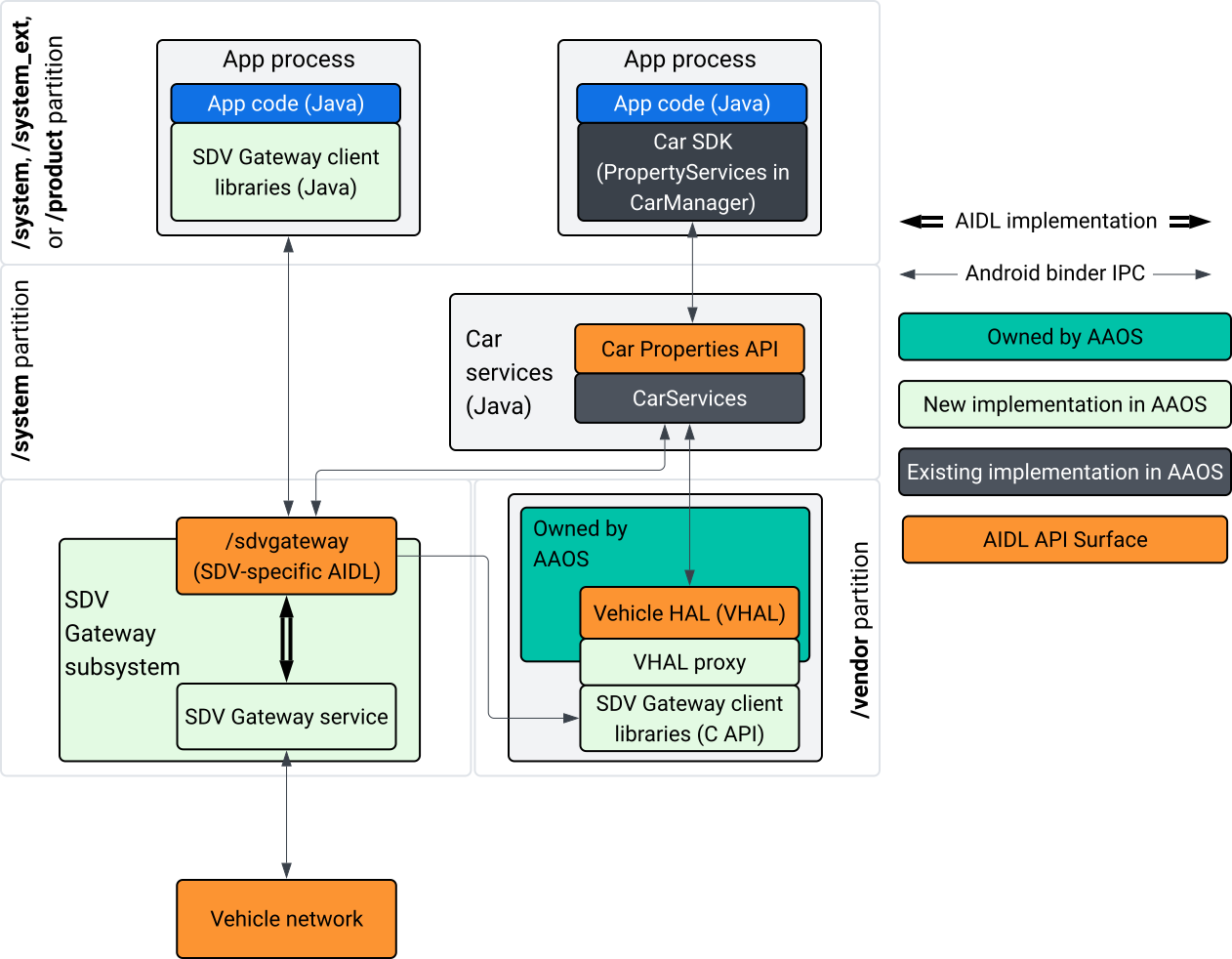
Gambar 1. Interaksi Gateway SDV.
Dalam diagram sistem ini:
- Aplikasi berinteraksi dengan Gateway SDV melalui layanan kliennya.
- AAOS SDV SDK menyediakan:
- ISdvGateway AIDL API untuk komunikasi antar-proses.
- Library komunikasi untuk interaksi jaringan.
- Convenience C API untuk integrasi layanan native.
- ISdvGateway AIDL API diimplementasikan oleh layanan dan subsistem SDV Gateway.
- Layanan SDV Gateway mengelola:
- Penemuan layanan dua arah.
- Komunikasi dengan layanan SDV jarak jauh.
- Logika bisnis inti.
- Subsistem Gateway SDV terhubung ke jaringan kendaraan.
- Layanan native, termasuk implementasi VHAL, dapat menggunakan ISdvGateway AIDL API secara langsung atau melalui C API SDK.
- Proxy VHAL berfungsi sebagai implementasi VHAL referensi, yang menggabungkan integrasi pemetaan VSIDL.
Model integrasi untuk Gateway SDV pada layanan native IVI
Model integrasi diilustrasikan dalam Gambar 2:
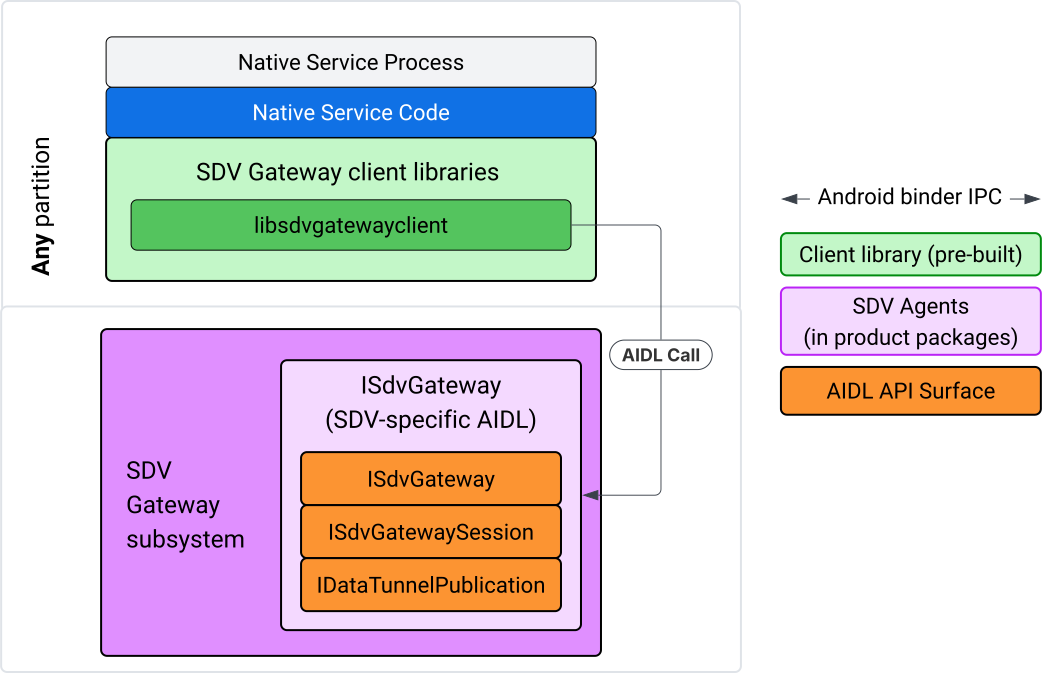
Gambar 2. Model integrasi Gateway SDV.
Menggunakan Gateway SDV pada layanan native IVI
Gambar 3 mengilustrasikan penggunaan Gateway SDV di IVI:
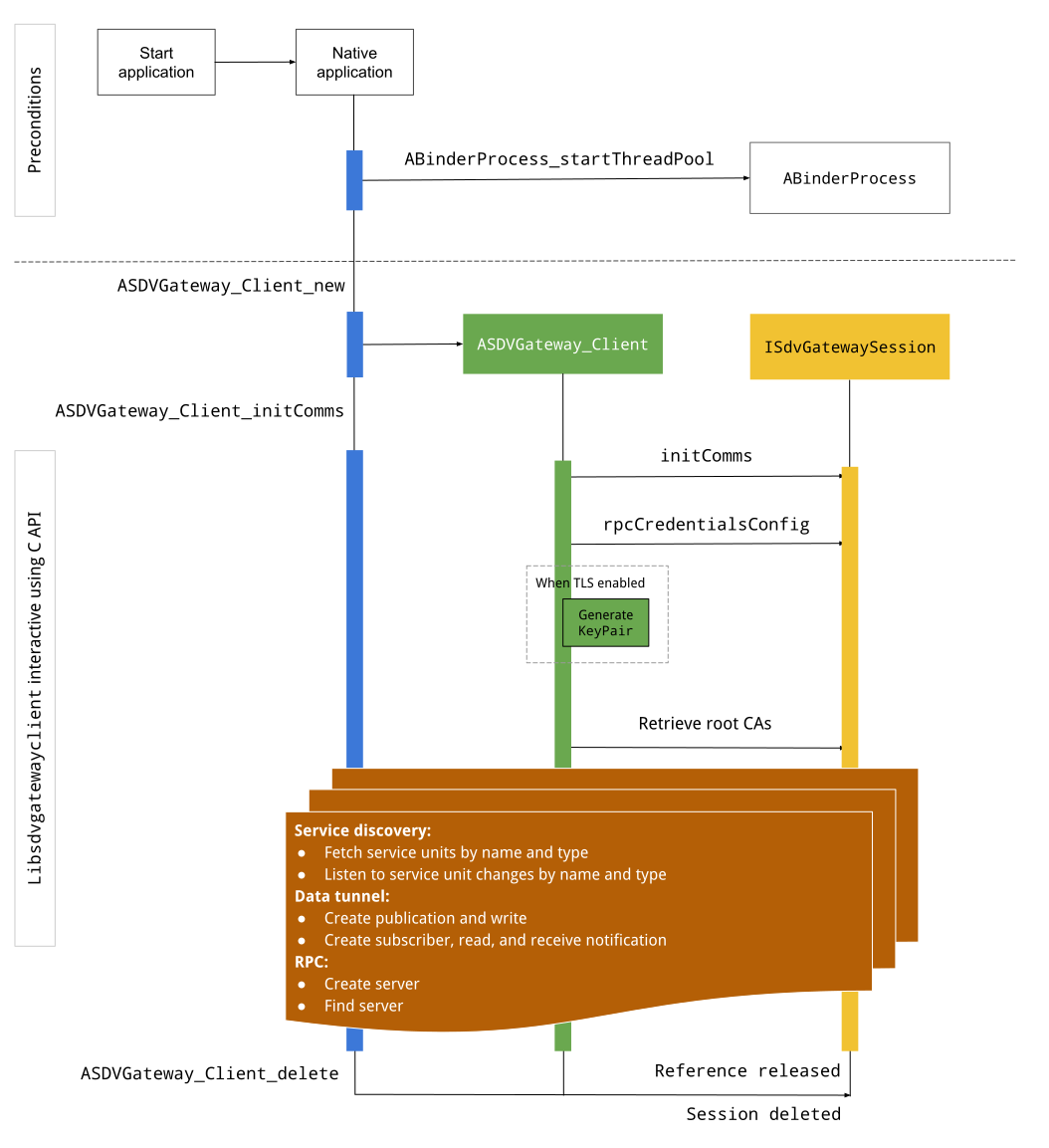
Gambar 3. Gateway SDV di IVI.
Prasyarat
Mulai kumpulan thread Binder:
Library klien SDV Gateway memerlukan kumpulan thread Binder yang dimulai untuk menerima callback asinkron dari layanan Binder.
API yang diperlukan untuk membuat klien Gateway SDV gagal saat kumpulan thread Binder tidak dimulai.
Menyertakan library klien Gateway native
Library Klien Native Gateway mengekspos C API. Tambahkan instance
libsdvgatewayclient sebagai dependensi untuk menggunakan C API:
cc_binary {
    name: "your_binary_name",
    srcs: ["main.cpp"],
    shared_libs: [
        "libsdvgatewayclient",
    ],
}
Memuat klien Gateway native
#include "libsdvgatewayclient.h"
Membuat instance klien native
ASDVGateway_Client* client;
ASDVGateway_StatusCode_t statusCode = ASDVGateway_Client_new(
     &client, /*outStatus*/nullptr);
Setelah klien dibuat, klien:
Menyimpan status untuk semua interaksi berikutnya dengan layanan Gateway.
Bertindak sebagai konteks semua interaksi dengan layanan lain yang kompatibel dengan SDV dan diteruskan sebagai parameter pertama ke fungsi C API.
Kode status dan pesan error
Sebagian besar fungsi C API memiliki definisi ini:
ASDVGateway_StatusCode_t ApiFunctionName(..., ASDVGateway_Status_t* outStatus);
Untuk mengevaluasi keberhasilan, Anda dapat memeriksa kode status yang ditampilkan, yang berjenis
ASDVGateway_StatusCode_t. Anda juga dapat meneruskan pointer ke struktur tempat fungsi dapat mengisi kode status dan pesan error. Pointer diteruskan sebagai parameter terakhir, yang diberi nama outStatus. Nilai null berarti struktur output tidak digunakan.
Pemanggil harus mengalokasikan struktur status memori untuk pesan error. Struktur status dapat menyimpan kode status dan pesan error. Contoh pengambilan pesan error saat membuat klien baru tersedia.
Untuk mengevaluasi keberhasilan:
Periksa kode status yang ditampilkan, yang berjenis
ASDVGateway_StatusCode_t.Teruskan pointer ke struktur tempat fungsi dapat mengisi kode status dan pesan error.
- Pointer diteruskan sebagai parameter terakhir, yang diberi nama
outStatus. - Nilai null berarti struktur output tidak digunakan.
- Pemanggil harus mengalokasikan struktur status memori untuk pesan error.
- Struktur status dapat menyimpan kode status dan pesan error.
- Pointer diteruskan sebagai parameter terakhir, yang diberi nama
Berikut adalah contoh yang menunjukkan cara mengambil pesan error untuk klien baru:
#include <iostream>
#include <array>

struct StatusWithErrorMsg : ASDVGateway_Status_t {
    StatusWithErrorMsg() {
        // Ensure the base struct pointers point to our internal buffer
        errorMessage = errorMessageBuffer.data();
        maxErrorMessageSize = errorMessageBuffer.size();

        // Good practice: Zero-initialize the buffer
        errorMessageBuffer.fill(0);
    }

    std::array<char, 256> errorMessageBuffer;
};

// --- Execution ---

ASDVGateway_Client* client = nullptr;
StatusWithErrorMsg status;

// Initialize the client
ASDVGateway_StatusCode_t statusCode = ASDVGateway_Client_new(&client, &status);

// Log Results
std::cout << "Returned statusCode:    " << statusCode << std::endl;
std::cout << "Status Struct Code:     " << status.statusCode << std::endl;
std::cout << "Status Error Message:   " << status.errorMessage << std::endl;
Dalam contoh ini:
Kode status yang ada dalam struktur status memiliki nilai yang sama dengan kode status yang ditampilkan.
Pesan error hanya diisi hingga batas
maxErrorMessageSizekarakter (termasuk karakter penghentian null\0). Jika tidak ada error (kode status adalahOK), pesan error adalah string kosong.
Komunikasi inisialisasi
Init comms menginisialisasi komunikasi antara aplikasi pemanggil dan aplikasi lain menggunakan SDV Comm Stack dan SDV Gateway. Komunikasi inisialisasi dapat dipanggil di kedua konteks ini::
Setelah klien dibuat.
Sebelum interaksi Data Tunnel, RPC, atau Penemuan Layanan.
Berikut contohnya:
ASDVGateway_InitCommsParams_t params{
.packageName = "android.sdv.samples.gateway.client",
.serviceBundleName = "NativeTestApp",
.serviceInstanceName = "default",
};
// Initialize communications and capture the status code
ASDVGateway_StatusCode_t statusCode = ASDVGateway_Client_initComms(client, ¶ms, &status);
// Recommended check
if (statusCode != ASDVGateway_StatusCode_OK) {
std::cerr << "Failed to init comms: " << status.errorMessage << std::endl;
}
Penemuan layanan
Anda dapat menerima notifikasi saat unit layanan dengan jenis atau nama tertentu didaftarkan atau dibatalkan pendaftarannya. Fungsi callback diberi tahu dalam thread yang dimiliki oleh klien gateway. Callback ini awalnya dipicu dengan semua unit layanan yang terdaftar tepat setelah panggilan API C. Setelah pemicu awal, notifikasi akan terus memberikan pembaruan hingga pendengar secara eksplisit membatalkan pendaftaran.
class NativeSdvGatewayTestApp {
public:
    static void ServiceUnitChangeListenerCallback(
        const ASDVGateway_ServiceUnitChangeEventType eventType,
        const ASDVGateway_ServiceUnitDefinition* serviceUnitDefinition,
        void* userData
    ) {
        auto* testApp = reinterpret_cast<NativeSdvGatewayTestApp*>(userData);

        if (testApp) {
            // Logic to react when services are registered or unregistered
            // e.g., testApp->handleServiceChange(eventType, serviceUnitDefinition);
        }
    }
};

// --- Listener Registration ---

// Ensure thisApp remains in scope as long as the listener is active
NativeSdvGatewayTestApp* thisApp = get_current_app_context();

ASDVGateway_UnitType_t unitType{
    .sdvPackageName     = "android.sdv.samples.sdv_gateway",
    .serviceBundleName  = "DtPublisher",
    .unitTypeName       = "TirePressure",
};

// Register the listener
ASDVGateway_Client_registerListenerForServiceUnitChangeByType(
    client,
    &unitType,
    NativeSdvGatewayTestApp::ServiceUnitChangeListenerCallback,
    static_cast<void*>(thisApp), // userData
    &listenerHandle,
    &status
);

// --- Cleanup ---

// Unregistering stops all notification to the callback function
ASDVGateway_Client_unregisterListenerForServiceUnitChangeByType(
    client,
    listenerHandle,
    &status
);
Untuk mengambil unit layanan terdaftar tanpa pemberitahuan lebih lanjut, gunakan API
ASDVGateway_Client_fetchServiceUnitsByType dan
ASDVGateway_Client_fetchServiceUnitsByName.
class NativeSdvGatewayTestApp {
public:
    /**
     * Callback triggered for each service unit found that matches the requested type.
     */
    static void FetchServiceUnitsCallback(
        const ASDVGateway_ServiceUnitDefinition* serviceUnitDefinition,
        void* userData
    ) {
        auto* app = reinterpret_cast<NativeSdvGatewayTestApp*>(userData);

        if (serviceUnitDefinition) {
            // The service unit is registered with service discovery.
            // Example: processServiceUnit(serviceUnitDefinition);
        }
    }
};

// --- Execution ---

ASDVGateway_UnitType_t unitType{
    .sdvPackageName     = "android.sdv.samples.sdv_gateway",
    .serviceBundleName  = "DtPublisher",
    .unitTypeName       = "TirePressure",
};

// Context used to differentiate between various fetchServiceUnits calls
void* userData = static_cast<void*>(thisApp);

ASDVGateway_Client_fetchServiceUnitsByType(
    client,
    &unitType,
    NativeSdvGatewayTestApp::FetchServiceUnitsCallback,
    userData,
    &status
);
Callback dipicu secara sinkron dalam thread pemanggil selama panggilan API ASDVGateway_Client_fetchServiceUnitsByType. Gunakan
ASDVGateway_Client_fetchServiceUnitsByName untuk mendapatkan unit layanan terdaftar
berdasarkan nama, bukan berdasarkan jenis unit:
ASDVGateway_StatusCode_t ASDVGateway_Client_fetchServiceUnitsByName(
    // [in]  Opaque pointer to a client object.
    const ASDVGateway_Client* client,

    // [in]  Pointer to a structure containing the package name,
    //       service bundle name, and service unit name.
    const ASDVGateway_UnitNameDiscoveryArgs_t* unitName,

    // [in]  Callback function to be called for each service unit
    //       definition registered. Called synchronously in the
    //       caller's thread before the fetch completes.
    ASDVGateway_FetchServiceUnitsCallback callback,

    // [in]  Optional value passed back as a parameter of the callback.
    void* userData,

    // [out] Optional pointer to status structure for result
    //       codes and error messages.
    ASDVGateway_Status_t* outStatus
);
Alur RPC
Library klien Gateway menangani setelan Transport Layer Security (TLS) untuk berkomunikasi dengan aplikasi lain yang kompatibel dengan SDV. Secara khusus, API ini mengambil setelan TLS yang diperlukan untuk komunikasi. Berikut cara menentukan penggunaan TLS:
TLS digunakan saat Mode Boot SDV adalah
LOCKED.Komunikasi Tidak Aman digunakan saat Mode Boot SDV adalah
UNLOCKED. Saat TLS digunakan, library klien Gateway menghasilkan pasangan kunci yang hanya diketahui oleh proses aplikasi. Klien mengambil kredensial RPC untuk membuat server RPC atau saluran klien RPC. RPC menggunakan VLAN SDV-RPC khusus. Library klien Gateway memanggil android_setprocnetwork untuk mengalihkan jaringan default proses ke VLAN SDV-RPC selama atau setelah panggilanASDVGateway_Client_initComms.
Ketersediaan RPC
Klien yang dikonfigurasi untuk dimulai saat booting awal dapat dimulai sebelum VLAN SDV-RPC tersedia. Periksa apakah RPC tersedia sebelum mencoba membuat soket server RPC atau klien RPC:
// Check if the RPC (Remote Procedure Call) service is available
bool isRpcAvailable = ASDVGateway_Client_isRpcAvailable(client);

if (isRpcAvailable) {
    // Proceed with RPC calls
} else {
    // Handle the case where RPC is not yet ready or available
}
atau
// Check if the process is correctly bound to the SDV RPC Network Interface/VLAN
bool isRpcNetworkBound = ASDVGateway_Client_isProcessBoundToSdvRpcNetworkInterface(client);

if (!isRpcNetworkBound) {
    // Usually implies the process isn't running on the correct network interface
    // or the VLAN configuration is missing.
    std::cerr << "Warning: Process is not bound to the SDV RPC VLAN." << std::endl;
}
Menetapkan pemroses untuk peristiwa klien menggunakan
ASDVGateway_Client_setClientNotificationCallback agar mendapatkan notifikasi saat status ketersediaan
RPC berubah.
ASDVGateway_Client_isProcessBoundToSdvRpcNetworkInterface lebih disukai jika
aplikasi mengalihkan jaringan proses karena memeriksa ketersediaan RPC dan proses terikat ke VLAN SDV-RPC.
Mengalihkan jaringan default proses
Anda mungkin perlu beralih dari VLAN SDV-RPC sebagai jaringan default proses
untuk membuka soket bagi koneksi yang terikat ke internet. Panggil
ASDVGateway_Client_unbindProcessFromSdvRpcNetworkInterface dan
ASDVGateway_Client_bindProcessToSdvRpcNetworkInterface untuk melepaskan dan mengikat kembali
proses ke VLAN SDV-RPC. Kedua panggilan ini bertindak seperti pengalihan global, mengalihkan antarmuka jaringan yang terikat ke soket untuk semua thread proses.
// 1. Unbind: Sockets return to the "default" network interface (e.g., wlan0, eth0)
ASDVGateway_StatusCode_t unbindStatus =
    ASDVGateway_Client_unbindProcessFromSdvRpcNetworkInterface(client, &status);

// 2. Bind: Sockets are now bound to the dedicated SDV-RPC VLAN
ASDVGateway_StatusCode_t bindStatus =
    ASDVGateway_Client_bindProcessToSdvRpcNetworkInterface(client, &status);

// Validation
if (bindStatus == ASDVGateway_StatusCode_OK) {
    // Sockets are successfully bound to the SDV-RPC VLAN
}
Notifikasi RPC
Tetapkan pemroses klien untuk menerima notifikasi perubahan ketersediaan RPC dan pembaruan sertifikat root yang harus diterima oleh server RPC:
class NativeSdvGatewayTestApp {
public:
    static void ClientNotificationCallback(
        ASDVGateway_ClientNotificationType_t notificationType,
        void* userData
    ) {
        auto* testApp = reinterpret_cast<NativeSdvGatewayTestApp*>(userData);
        if (!testApp) return;

        switch (notificationType) {
            case ASDVGateway_ClientNotificationType_RootCertsChanged:
                std::cout << "onClientNotification: Root Certs Changed" << std::endl;
                // Handle certificate rotation logic here
                break;

            case ASDVGateway_ClientNotificationType_RpcAvailabilityChanged:
                std::cout << "onClientNotification: RPC Availability Changed" << std::endl;
                // Handle reconnection or UI updates here
                break;

            default:
                std::cout << "onClientNotification: Received Unknown Notification ("
                          << notificationType << ")" << std::endl;
                break;
        }
    }
};

// --- Registration ---

NativeSdvGatewayTestApp* thisApp = get_current_app_context();

// Register the notification callback to monitor system-level changes
ASDVGateway_StatusCode_t statusCode = ASDVGateway_Client_setClientNotificationCallback(
    client,
    NativeSdvGatewayTestApp::ClientNotificationCallback,
    static_cast<void*>(thisApp), // userData
    &status
);
Alur server RPC
Anda harus menggunakan kredensial untuk membuat server RPC:
ASDVGateway_RpcCredentials_t* rpcCredentials = nullptr;

// Retrieve the credentials from the client
ASDVGateway_StatusCode_t statusCode = ASDVGateway_Client_rpcCredentials(client, &rpcCredentials, &status);

// Validation: Differentiating between an error and a deliberate "insecure mode"
if (status.statusCode != ASDVGateway_StatusCode_OK) {
    std::cerr << "Error retrieving credentials: " << status.errorMessage << std::endl;
    return;
}

// Logic for choosing Security Credentials
if (rpcCredentials == nullptr) {
    // If the call succeeded but credentials are null, the system expects insecure communication
    std::cout << "Configuring for Insecure Mode" << std::endl;
} else {
    std::cout << "Configuring for Secure Mode:" << std::endl;
    std::cout << "  Private Key: " << (rpcCredentials->privateKeyPem ? "Present" : "Missing") << std::endl;
    std::cout << "  RootCerts:   " << rpcCredentials->rootCertsPem << std::endl;
    std::cout << "  CertChain:   " << rpcCredentials->certChainPem << std::endl;
    std::cout << "  SAN:         " << rpcCredentials->subjectAlternativeName << std::endl;
}

// --- Cleanup ---

// Release the memory once the RPC server/client is initialized
if (rpcCredentials != nullptr) {
    ASDVGateway_Client_deleteRpcCredentials(client, rpcCredentials);
}
Setelah Anda membuat server RPC dan port pendengarnya diketahui, daftarkan server RPC agar dapat menemukan aplikasi lain:
ASDVGateway_RegisterRpcServerParams_t params{
.serviceUnitName = "android-sdv-samples-sunroof-sunroof",
.unitType = ASDVGateway_UnitType_t{
.sdvPackageName = "android.sdv.samples.sunroof",
.serviceBundleName = "SunroofServer",
.unitTypeName = "Sunroof",
},
.listeningPort = listeningPort,
.serverUnitMetadata = ASDVGateway_ServerUnitMetadata_t{
.version = 1,
},
};
// Register the RPC server with the SDV Gateway
ASDVGateway_StatusCode_t statusCode = ASDVGateway_Client_registerRpcServer(
client,
¶ms,
&status
);
// Basic error handling
if (statusCode != ASDVGateway_StatusCode_OK) {
std::cerr << "Failed to register RPC server: " << status.errorMessage << std::endl;
}
Saat sistem memperbarui sertifikat root saat runtime (misalnya, selama perubahan status VM), server RPC harus memuat ulang daftar sertifikat yang diterima:
Tetapkan pemroses untuk peristiwa klien menggunakan
ASDVGateway_Client_setClientNotificationCallbackuntuk mendapatkan notifikasi saat sertifikat root telah diperbarui.Panggil
ASDVGateway_Client_rpcCredentialsuntuk mendapatkan sertifikat root yang diperbarui.
Alur klien RPC
Berikut adalah alur untuk klien RPC:
ASDVGateway_FindRpcServerByNameParams_t params{
.packageName = "android.sdv.samples.cluster",
.serviceBundleName = "ClusterServer",
.serviceUnitName = "android-sdv-samples-cluster-cluster",
};
ASDVGateway_SocketAddress_t socketAddress;
ASDVGateway_RpcCredentials_t* rpcCredentials = nullptr;
// Perform the lookup to find the server's location and security requirements
ASDVGateway_StatusCode_t statusCode = ASDVGateway_Client_findRpcServerByName(
mClient,
¶ms,
&socketAddress,
&rpcCredentials,
&status
);
// Mandatory check: Distinguish between system errors and intentional "Insecure Mode"
if (status.statusCode != ASDVGateway_StatusCode_OK) {
std::cerr << "Failed to find RPC server: " << status.errorMessage << std::endl;
return;
}
// Logic for establishing the RPC channel
if (rpcCredentials == nullptr) {
std::cout << "Connecting via Insecure Mode to "
<< socketAddress.address << ":" << socketAddress.port << std::endl;
} else {
std::cout << "Connecting via Secure Mode to "
<< socketAddress.address << ":" << socketAddress.port << std::endl;
std::cout << " RootCerts: " << rpcCredentials->rootCertsPem << std::endl;
std::cout << " SAN: " << rpcCredentials->subjectAlternativeName << std::endl;
// Note: privateKeyPem and certChainPem are typically used if the client
// needs to perform mutual TLS (mTLS).
}
// Cleanup: Release the credential memory once the RPC channel is established
if (rpcCredentials != nullptr) {
ASDVGateway_Client_deleteRpcCredentials(client, rpcCredentials);
}
Membuat penayang dan memublikasikan pesan
API ASDVGateway_Client_createPublication digunakan untuk mendaftarkan unit layanan penayang dengan Gateway SDV melalui antarmuka AIDL-nya dan membuat Fast Message Queue (FMQ) dalam proses aplikasi. Binder hanya terlibat untuk menyiapkan
FMQ, tetapi tidak saat menulis pesan. API ASDVGateway_Client_publishMessages
kemudian digunakan untuk memublikasikan pesan ke publikasi yang dibuat. Hal ini melibatkan
penulisan ke FMQ publikasi dan pemberitahuan bahwa pesan telah ditulis.
ASDVGateway_CreatePublicationParams_t params{
.serviceUnitName = "mirror-position-adjust-impl-1",
.unitType = ASDVGateway_UnitType_t{
.sdvPackageName = "android.sdv.samples.sdv_gateway",
.serviceBundleName = "DtPublisher",
.unitTypeName = "MirrorPositionAdjust",
},
.publisherUnitMetadata = ASDVGateway_PublisherUnitMetadata_t{
.version = 1,
.messageSizeBytes = 64,
.messageCount = 16,
},
};
ASDVGateway_PublicationMetadata_t metadata;
// 1. Create the Publication (allocates resources on the gateway)
ASDVGateway_StatusCode_t createStatus = ASDVGateway_Client_createPublication(
client,
¶ms,
&metadata,
&status
);
if (status.statusCode != ASDVGateway_StatusCode_OK) {
std::cerr << "Failed to create publication: " << status.errorMessage << std::endl;
return;
}
// 2. Publish Messages
// Note: serializedMessage should contain your encoded protobuf data
std::vector<uint8_t> serializedMessage;
ASDVGateway_Client_publishMessages(
client,
serializedMessage.data(),
serializedMessage.size(),
metadata.publicationId,
&status
);
Membuat pelanggan dengan pemroses notifikasi
Untuk berlangganan publikasi dan menerima notifikasi Data Tunnel (seperti
ketersediaan pesan), gunakan ASDVGateway_Client_subscribeToPublicationByName
API. API ini juga menyiapkan FMQ untuk membaca pesan yang dipublikasikan. Anda dapat
mengonfigurasi callback notifikasi selama proses langganan atau
setelahnya.
#include <map>
#include <memory>
#include <iostream>

class NativeSdvGatewayTestApp {
public:
    struct SubscriptionContext {
        int32_t subscriptionId;
        std::string topicName;
        // Add other context-specific data here (e.g., counters, buffers)
    };

    /**
     * Callback triggered when new data is published to a subscribed topic.
     */
    static void SubscriptionNotificationCallback(
        const ASDVGateway_SubscriptionNotificationData_t* notification,
        void* userData
    ) {
        // The SDV Gateway client passes back the userData pointer.
        // We ensure validity by managing the lifecycle of SubscriptionContext
        // within the mSubscriptions map.
        auto* ctx = reinterpret_cast<SubscriptionContext*>(userData);

        if (ctx && notification) {
            // React to data being available for the subscription.
            // Example: handleIncomingData(notification->data, notification->size);
            std::cout << "Notification received for sub ID: " << ctx->subscriptionId << std::endl;
        }
    }

private:
    // Maps subscription handles/IDs to their respective contexts
    std::map<int32_t, std::unique_ptr<SubscriptionContext>> mSubscriptions;
};

// --- Usage ---
NativeSdvGatewayTestApp app;
Saat berlangganan, Anda dapat menentukan opsi tambahan bersama dengan nama unit layanan penayang. Opsi ini memungkinkan Anda mengambil pesan yang baru saja dipublikasikan sebelum berlangganan dan menentukan interval waktu minimum antara notifikasi.
ASDVGateway_SubscribeToPublicationByNameParams_t params{
.sdvVmName = "vm1",
.packageName = "test.package.impl.name",
.serviceBundleName = "TestBundleImpl",
.serviceUnitName = "GrpcServerImpl",
};
ASDVGateway_Subscriber_Options_t options{
// Ensure we receive the most recent message immediately upon subscribing
.flags = ASDVGATEWAY_SUBSCRIBER_OPTIONS_FLAG_FETCHLASTMESSAGE,
.minIntervalMs = 0, // No rate limiting; receive updates as they happen
};
// 1. Prepare the context for the callback
auto subCtx = std::make_unique<SubscriptionContext>();
ASDVGateway_PublicationMetadata_t metadata{};
// 2. Perform the subscription
ASDVGateway_StatusCode_t statusCode = ASDVGateway_Client_subscribeToPublicationByName(
client,
¶ms,
&options,
NativeSdvGatewayTestApp::SubscriptionNotificationCallback,
static_cast<void*>(subCtx.get()), // Pass the raw pointer as userData
&metadata,
&status
);
// 3. Validation and Lifecycle Management
if (status.statusCode != ASDVGateway_StatusCode_OK) {
// Error handling: subCtx will be automatically deleted here
std::cerr << "Subscription failed: " << status.errorMessage << std::endl;
return;
}
// Store the context using the publicationId as the key.
// Once moved, the map owns the lifetime of subCtx.
app.mSubscriptions.emplace(metadata.publicationId, std::move(subCtx));
Gunakan ASDVGateway_Client_readAvailableMessages API untuk membaca pesan dari
publikasi:
uint32_t messagesAvailable = 0;

// 1. Check how many messages are waiting in the queue
ASDVGateway_StatusCode_t availStatus = ASDVGateway_Client_availableToRead(
    client,
    metadata.publicationId,
    &messagesAvailable,
    &status
);

if (status.statusCode != ASDVGateway_StatusCode_OK) {
    // Error handling for availability check
    return;
}

if (messagesAvailable == 0) {
    // No messages available for this publication at this time
    return;
}

// 2. Prepare the buffer
// metadata.messageSizeBytes was provided during the publication/subscription setup
std::vector<uint8_t> bytesForMessages;
bytesForMessages.resize(metadata.messageSizeBytes * messagesAvailable);

// 3. Read the messages from the Gateway into your local buffer
uint32_t actualMessageCount = 0; // Filled by the SDK with the number of messages read
ASDVGateway_StatusCode_t readStatus = ASDVGateway_Client_readAvailableMessages(
    client,
    metadata.publicationId,
    bytesForMessages.data(),
    bytesForMessages.size(),
    &actualMessageCount,
    &status
);

if (status.statusCode == ASDVGateway_StatusCode_OK) {
    // Successfully read 'actualMessageCount' messages
    // Process bytesForMessages...
}
Untuk menyetel callback setelah berlangganan, gunakan
API ASDVGateway_Client_setNotificationCallbackForPublicationId:
ASDVGateway_StatusCode_t ASDVGateway_Client_setNotificationCallbackForPublicationId(
    // [in]  Opaque pointer to the client object.
    const ASDVGateway_Client* client,

    // [in]  Identifies the specific publication to monitor.
    const int32_t publicationId,

    // [in]  Function pointer triggered when new data is available
    //       for the specified publication.
    ASDVGateway_SubscriptionNotificationCallback notificationCallback,

    // [in]  Optional user-defined context passed back to the callback.
    void* notificationCallbackUserData,

    // [out] Optional pointer to a status structure for result codes
    //       and error messages.
    ASDVGateway_Status_t* outStatus
);
Menyiapkan layanan init
Pertama, ikuti Identity for native services untuk menetapkan identitas layanan ke layanan melalui ID Android (AID)-nya.
Misalkan layanan Anda bernama native_sdv_gateway_client_service, file
yang dapat dieksekusi berada di partisi /vendor di
/vendor/bin/native_sdv_gateway_client_service, dan Anda menggunakan
vendor_gateway_client sebagai ID Android (AID) untuk menjalankan layanan.
Dengan penyiapan tersebut, Anda dapat menentukan layanan init berikut:
service native_sdv_gateway_client_service /vendor/bin/native_sdv_gateway_client_service
    class core
    user vendor_gateway_client
    group inet
    disabled
    oneshot
Konfigurasi ini menggunakan parameter berikut:
vendor_gateway_clientadalah AID yang dibuat atau dipilih untuk layanan.group inetdiperlukan untuk klien gateway SDV agar dapat menggunakan antarmuka jaringan untuk berkomunikasi antar-VM SDV. Grup lain dapat ditambahkan jika diperlukan.- Contoh ini menggunakan
disableddanoneshot. Anda mungkin perlu menyesuaikan opsi layanan untuk layanan Anda. Mulai layanan setelahsdv_gateway.
Buat aturan SELinux untuk layanan
Untuk menggunakan SDV Gateway API, Anda memerlukan aturan SELinux berikut untuk layanan:
# Define the domain for the service
type native_sdv_gateway_client_service, domain;

# Define the executable file type on the vendor partition
type native_sdv_gateway_client_service_exec, exec_type, file_type, vendor_file_type;

# Macro to transition from 'init' to this service's domain upon execution
init_daemon_domain(native_sdv_gateway_client_service)

# Macro to grant the necessary permissions to communicate with the SDV Gateway
sdv_gateway_client_domain(native_sdv_gateway_client_service)
Dalam aturan SELinux:
init_daemon_domainmemungkinkan memulai layanan dariinit.sdv_gateway_client_domainmenyediakan semua izin SELinux yang diperlukan untuk berinteraksi dengan Gateway SDV. Baris berikut memberikan aturan ini ke dapat dieksekusi:/vendor/bin/native_sdv_gateway_client_service u:object_r:native_sdv_gateway_client_service_exec:s0
Contoh kode
Untuk mempelajari lebih lanjut cara menjalankan contoh kode native yang menunjukkan cara mendokumentasikan API C, lihat
system/software_defined_vehicle/samples/sdv_gateway/NativeSdvGatewayTestApp/README.md.
Gateway SDV di aplikasi IVI Java
Model interaksi untuk Gateway SDV di IVI diilustrasikan dalam diagram ini:
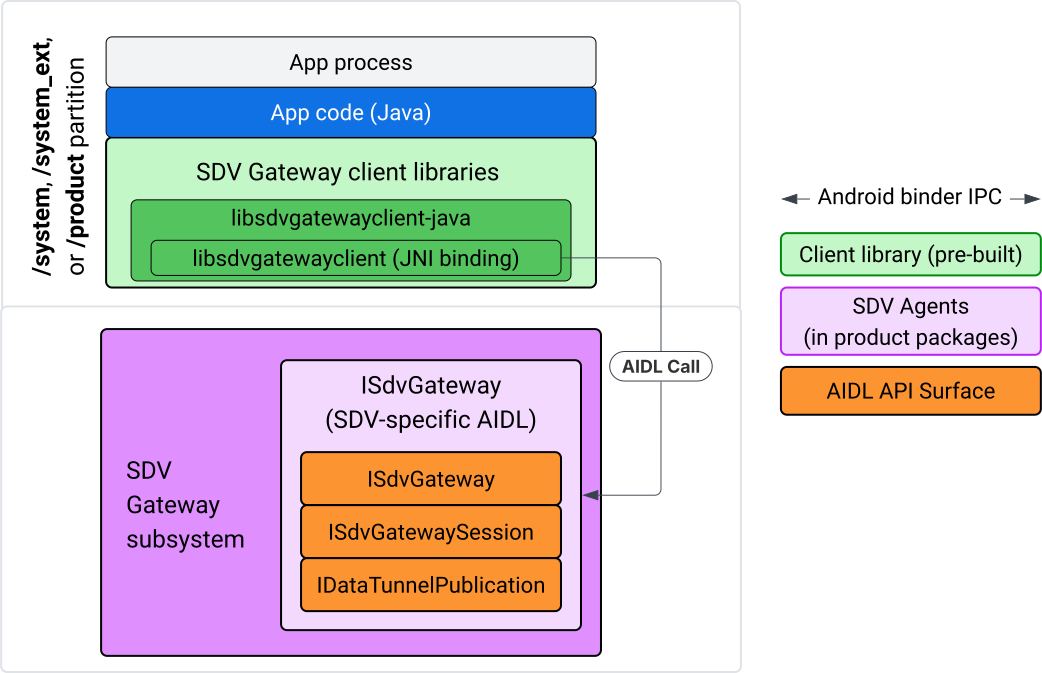
Gambar 4. Gateway SDV di aplikasi IVI Java.
Secara khusus, model:
- Mengirim semua panggilan ke lapisan JNI.
- Menggabungkan Java dan C API.
- Mendefinisikan interaksi AIDL dengan
ISdvGateway:- Komunikasi inisialisasi
- Menemukan atau membuat server RPC
- Buat pub/sub
- Melakukan interaksi Data Tunnel penemuan layanan
- Menerima notifikasi (misalnya, data tersedia)
- Membaca dan menulis pesan (FMQ untuk pub/sub) untuk pembuatan pasangan kunci dan sertifikat untuk TLS
Menyertakan library klien Gateway
Wrapper JNI dan library Java untuk libsdvgatewayclient C API diinstal di APEX pada target IVI. Tambahkan dependensi waktu kompilasi ke stub library Java, library Java yang harus digunakan saat runtime, dan APEX yang diperlukan yang berisi library Java.
android_app {
    name: "YourAppName",
    // ...
    static_libs: [
        "libsdvgatewayclient-java",
    ],
    libs: [
        "libsdvgatewayclient-java-sdk.stubs",
    ],
    uses_libs: [
        "libsdvgatewayclient-java-sdk",
    ],
    required: [
        "com.sdv.google.gateway.client",
    ],
    // ...
}
Dalam kasus aplikasi yang tidak digabungkan yang dibuat di luar hierarki SDV, prosesnya mirip:
Salin JAR stub library Java yang dihasilkan dan JAR pendukung untuk RPC di folder libs aplikasi. Untuk mengetahui detailnya, lihat
system/software_defined_vehicle/sdv_gateway/libsdvgatewayclient_apex/README.md.Tambahkan JAR stub sebagai dependensi khusus kompilasi. Misalnya, perbarui konfigurasi Gradle agar bergantung pada stub dengan menambahkan entri
compileOnlyke bagiandependencies:dependencies { // The library supporting functions for SDK RPC. // Statically linked into the app APK. implementation(files("libs/libsdvgatewayclient-java.jar")) // Stub of the SDV-Gateway client library. // Used only for compilation; the real implementation is provided // by the com.sdv.google.gateway.client APEX at runtime. compileOnly(files("libs/libsdvgatewayclient-java-sdk.jar")) }Tambahkan library Java ke bagian aplikasi pada file
AndroidManifest.xml.<manifest xmlns:android="http://schemas.android.com/apk/res/android"> <application> <!-- Declares that this app requires the SDV Gateway client library. The 'android:required="true"' attribute ensures the app won't install/run if the library is missing from the system. --> <uses-library android:name="libsdvgatewayclient-java-sdk" android:required="true" /> </application> </manifest>
Memuat library
Buat objek SdvGatewayClient (disediakan oleh library klien):
import google.sdv.gateway.client.SdvGatewayClient;

// --- Inside your Activity, Service, or ViewModel ---

// Initialize the SDV Gateway Client
SdvGatewayClient gatewayClient = new SdvGatewayClient();
Komunikasi inisialisasi
Panggil initComms() menggunakan nama aplikasi sebagai nama paket layanan:
// Define a unique name for your service bundle (usually constant)
private static final String SERVICE_BUNDLE_NAME = "MySdvServiceBundle";

// ... inside an Activity or Service context ...

try {
    // Initialize communications with the SDV Gateway
    // context.getPackageName() provides "android.sdv.samples.gateway.client" or similar
    gatewayClient.initComms(context.getPackageName(), SERVICE_BUNDLE_NAME);

    Log.i("SDV_GATEWAY", "Communications initialized successfully");
} catch (Exception e) {
    // Unlike the C API which uses status codes,
    // the Java SDK often throws exceptions for initialization failures.
    Log.e("SDV_GATEWAY", "Failed to initialize communications", e);
}
Penemuan layanan
Java API berisi metode untuk:
Mendapatkan notifikasi saat unit layanan dengan jenis unit tertentu (atau alternatifnya, cocok dengan nama tertentu) didaftarkan atau dibatalkan pendaftarannya.
Mencantumkan unit layanan saat ini dengan jenis unit tertentu (atau alternatifnya mencocokkan nama jenis unit layanan tertentu). Untuk mendapatkan notifikasi perubahan unit layanan, buat pemroses:
import google.sdv.gateway.client.ServiceUnitChangeListener;
import google.sdv.gateway.client.ServiceUnitChangeEventType;
import google.sdv.gateway.client.ServiceUnitDefinition;

// --- Implementation ---

ServiceUnitChangeListener listener = new ServiceUnitChangeListener() {
    @Override
    public void onServiceUnitChanged(
        ServiceUnitChangeEventType eventType,
        ServiceUnitDefinition serviceUnitDefinition
    ) {
        // This is triggered when services matching your criteria
        // are registered or unregistered on the vehicle network.
        if (eventType == ServiceUnitChangeEventType.REGISTERED) {
            // Handle new service discovery
        } else if (eventType == ServiceUnitChangeEventType.UNREGISTERED) {
            // Handle service removal
        }
    }
};
Metode Java addListenerForServiceUnitChangeByName akan memberi tahu pemroses:
// 1. Register the listener for a specific service unit by name
AutoCloseable handle = gatewayClient.addListenerForServiceUnitChangeByName(
    new UnitNameDiscoveryArgs(
        "",                                   // sdvVmName (empty for local/auto-discovery)
        "android.sdv.samples.cluster",        // sdvPackageName
        "ClusterServer",                      // serviceBundleName
        "android-sdv-samples-cluster-cluster" // serviceUnitName
    ),
    listener
);

// --- Later in the application lifecycle ---

// 2. To stop receiving notifications and clean up resources, close the handle.
try {
    if (handle != null) {
        handle.close();
    }
} catch (Exception e) {
    Log.e("SDV_GATEWAY", "Error while closing the listener handle", e);
}
Atau, gunakan metode Java addListenerForServiceUnitChangeByType untuk
memberi tahu pemroses saat layanan dengan jenis unit yang ditentukan didaftarkan
atau dibatalkan pendaftarannya:
// 1. Register a listener based on the Service Unit Type
AutoCloseable handle = gatewayClient.addListenerForServiceUnitChangeByType(
    new UnitType(
        "com.android.testapp.sdvcarmonitor", // sdvPackageName
        "SunroofRpcServer",                  // serviceBundleName
        "Sunroof"                            // unitTypeName
    ),
    listener
);

// --- Execution Loop / Lifecycle ---

// 2. To stop receiving notifications and clean up memory, close the handle.
// This effectively unregisters the listener from the SDV Gateway.
try {
    if (handle != null) {
        handle.close();
    }
} catch (Exception e) {
    Log.e("SDV_GATEWAY", "Failed to close the service unit listener handle", e);
}
Untuk addListenerForServiceUnitChangeByName dan
addListenerForServiceUnitChangeByType, setelah ditambahkan, pemroses
akan diberi tahu tentang semua unit layanan yang terdaftar. Untuk mendapatkan hanya unit layanan terdaftar
menurut nama atau jenis, gunakan listServiceUnitsByName dan listServiceUnitsByType
Java API:
import google.sdv.gateway.client.ServiceUnitDefinition;
import google.sdv.gateway.client.UnitNameDiscoveryArgs;
import google.sdv.gateway.client.UnitType;

// --- 1. Synchronous Lookup by Specific Name ---
ServiceUnitDefinition[] definitionsByName = gatewayClient.listServiceUnitsByName(
    new UnitNameDiscoveryArgs(
        "",                                   // sdvVmName
        "android.sdv.samples.cluster",        // sdvPackageName
        "ClusterServer",                      // serviceBundleName
        "android-sdv-samples-cluster-cluster" // serviceUnitName
    )
);

// --- 2. Synchronous Lookup by Service Type ---
ServiceUnitDefinition[] definitionsByType = gatewayClient.listServiceUnitsByType(
    new UnitType(
        "com.android.testapp.sdvcarmonitor", // sdvPackageName
        "SunroofRpcServer",                  // serviceBundleName
        "Sunroof"                            // unitTypeName
    )
);

// Example processing
if (definitionsByType.length > 0) {
    ServiceUnitDefinition firstSunroof = definitionsByType[0];
    // Proceed to connect...
}
Alur server RPC
Klien SDV Gateway dalam sistem IVI menggunakan remote procedure call (gRPC) Google untuk berkomunikasi dengan layanan SDV. Interaksi ini mengandalkan definisi proto
dari katalog VSIDL, yang konsisten atau serupa dengan yang
digunakan di SDV Core. Untuk aplikasi Java, gRPC-Java adalah penerapan yang dipilih. Definisi proto server contoh, sunroof.proto, disediakan untuk server aplikasi.
service Sunroof {
    /**
     * Retrieves the current state of the sunroof (e.g., position, tilt, status).
     *
     * @param .google.protobuf.Empty - No input parameters required.
     * @return SunroofStateResponse - The current telemetry data for the sunroof.
     */
    rpc GetSunroofState(.google.protobuf.Empty) returns (SunroofStateResponse) {}
}
Tautkan ke library proto yang sesuai dan tentukan layanan:
import com.android.sdv.sdvgrpclibrary.SunroofGrpc;
import com.android.sdv.sdvgrpclibrary.SunroofStateResponse; // Assuming this is the generated class
import com.google.protobuf.Empty;
import io.grpc.stub.StreamObserver;

/**
 * Implementation of the Sunroof gRPC service.
 * This class handles the logic for the RPCs defined in your .proto file.
 */
static class SunroofGrpcImpl extends SunroofGrpc.SunroofImplBase {

    @Override
    public void getSunroofState(Empty request, StreamObserver<SunroofStateResponse> responseObserver) {
        // 1. Fetch current sunroof data (e.g., from a Hardware Abstraction Layer)
        int currentPosition = 50; // Example value: 50% open

        // 2. Build the Protobuf response message
        SunroofStateResponse response = SunroofStateResponse.newBuilder()
                .setPercentageOpen(currentPosition)
                .build();

        // 3. Send the response to the client using the observer
        responseObserver.onNext(response);

        // 4. Close the stream to signal that the RPC is finished
        responseObserver.onCompleted();
    }
}
Daftarkan server gRPC dengan kredensial saluran yang aman dan tidak aman:
// 1. Define the type signature for the service
UnitType unitType = new UnitType(
    "com.android.testapp.sdvcarmonitor", // sdvPackageName
    "SunroofRpcServer",                  // serviceBundleName
    "Sunroof"                            // typeName (Unit Type)
);

// 2. Register the RPC server with the Gateway
// The gateway creates a mapping between the ServiceUnitName and your implementation.
server = gatewayClient.registerRpcServer(
    "SunroofRpcServerImpl-1",                       // serviceUnitName (Unique instance name)
    unitType,                                       // unitType defined earlier
    "SUNROOF_GRPC_SERVER_VALUE_HOLDER".getBytes(),  // appMetadataValueHolder (Static discovery data)
    1,                                              // appMetadataVersion
    new SunroofGrpcImpl()                           // The actual gRPC service implementation
);
Secara internal, library klien membuat objek server gRPC,
SdvGatewayClient.java, dan juga menangani update pada sertifikat root:
// 1. Initialize credentials (Insecure for dev, TLS for production)
ServerCredentials serverCredentials = InsecureServerCredentials.create();

// 2. Build and start the OkHttp-based gRPC server
final int bindAnyPort = 0;
final Server server = OkHttpServerBuilder
    .forPort(bindAnyPort, serverCredentials)
    .addService(gRpcServerImplementation) // Your SunroofGrpcImpl
    .build()
    .start();

// The assigned port can now be retrieved using server.getPort()
int actualPort = server.getPort();

// 3. Prepare the JNI data structure
// This object mirrors the ASDVGateway_ServiceUnitDefinition_t C struct
JniServiceUnitDefinition definition = new JniServiceUnitDefinition();

// Fill the RPC service definition params (Port, Name, Type, etc.)
definition.setPort(actualPort);
definition.setServiceUnitName("SunroofRpcServerImpl-1");

// 4. Perform the cross-language call
// This jumps from Java -> JNI -> ASDVGateway_Client_registerRpcServer (C API)
mJniClient.nativeRegisterRpcServer(definition);
Alur klien RPC
Contoh kode ini memberikan definisi proto server (tpms.proto) untuk
server yang dihubungkan aplikasi sebagai klien:
/**
 * The TPMS service provides real-time pressure and temperature
 * data for all tires on the vehicle.
 */
service Tpms {
    /**
     * Returns the full state of all monitored tires.
     */
    rpc GetTpmsState(.google.protobuf.Empty) returns (TpmsStateResponse) {}

    /**
     * A filtered query that returns only the tires
     * below the recommended pressure threshold.
     */
    rpc GetLowTires(.google.protobuf.Empty) returns (LowTiresResponse) {}
}
Tautkan ke library proto yang sesuai:
import com.android.sdv.sdvgrpclibrary.TpmsGrpc;
import io.grpc.ManagedChannel;

// --- Inside your Client Application ---

// 1. Request a ManagedChannel from the Gateway for a specific service unit
ManagedChannel managedChannel = gatewayClient.connectToRpcServerByName(
    "",                                     // sdvVmName (empty for local/auto-lookup)
    "android.sdv.samples.cluster",          // packageName
    "ClusterServer",                        // serviceBundleName
    "android-sdv-samples-cluster-cluster"  // serviceUnitName
);

// 2. Use the channel to create a gRPC stub (e.g., for the TPMS service)
TpmsGrpc.TpmsBlockingStub tpmsStub = TpmsGrpc.newBlockingStub(managedChannel);

// 3. Now you can call RPC methods directly
// TpmsStateResponse response = tpmsStub.getTpmsState(Empty.getDefaultInstance());
Secara internal, API ASDVGateway_Client_findRpcServerByName dipanggil untuk menemukan server RPC. Jika server RPC ditemukan, channel terkelola dibuat dalam mode tidak aman atau ditetapkan untuk menggunakan konfigurasi TLS, mirip dengan alur server RPC, bergantung pada konfigurasi Penemuan Layanan. Aplikasi membuat stub dengan objek ManagedChannel dan memanggil metode server:
import com.android.sdv.sdvgrpclibrary.TpmsGrpc;
import com.android.sdv.sdvgrpclibrary.TpmsStateResponse;
import com.google.protobuf.Empty;
import io.grpc.stub.MetadataUtils;

// 1. Create a "Blocking Stub" from the existing ManagedChannel.
// We apply an interceptor to attach mandatory metadata (headers)
// required by the SDV Gateway for authorization.
TpmsGrpc.TpmsBlockingStub tpmsStub = TpmsGrpc.newBlockingStub(managedChannel)
    .withInterceptors(MetadataUtils.newAttachHeadersInterceptor(mMetadata));

// 2. Execute the RPC call.
// Because this is a "BlockingStub," the thread will wait here until
// the vehicle service responds or times out.
TpmsStateResponse tpmsStateResponse = tpmsStub.getTpmsState(Empty.getDefaultInstance());

// 3. Extract the domain-specific state object from the Protobuf response.
// 'newState' can now be used to update your UI or application logic.
newState = tpmsStateResponse.getTpmsState();
Mengalihkan jaringan default proses
Anda mungkin perlu beralih dari VLAN SDV-RPC sebagai jaringan default proses
untuk membuka soket bagi koneksi yang terikat ke internet. Panggil
unbindProcessFromSdvRpcNetworkInterface dan
bindProcessToSdvRpcNetworkInterface untuk membatalkan dan mengikat ulang proses ke
VLAN SDV-RPC. Kedua panggilan ini bertindak sebagai tombol global, yang mengalihkan antarmuka jaringan yang terikat ke soket untuk semua thread proses.
// 1. Redirect all socket traffic from this process to the SDV-RPC VLAN.
// This call is required for making RPC calls or hosting RPC services for SDV.
gatewayClient.bindProcessToSdvRpcNetworkInterface();

// --- Process is now communicating over the SDV-RPC interface ---

// 2. Revert the process network binding back to the "default" interface.
// This allows the app to access internet resources again.
gatewayClient.unbindProcessFromSdvRpcNetworkInterface();
Membuat penayang dan memublikasikan pesan
// 1. Define the interface and type for the publication
UnitType unitType = new UnitType(
    "android.sdv.samples.tires.interface", // sdvPackageName
    "TirePressurePublisherInterface",      // serviceBundleName
    "TirePressure"                         // typeName
);

// 2. Configure the Publisher's buffer and message constraints
PublisherUnitMetadata publisherUnitMetadata = new PublisherUnitMetadata(
    1,   // version
    64,  // message size in bytes (fixed size for performance)
    128  // max message count (buffer depth)
);

// 3. Create the Publication instance through the Gateway
Publisher tirePublisher = gatewayClient.createPublication(
    "tire-pressure-service-unit-name",
    unitType,
    publisherUnitMetadata
);

// 4. Prepare and publish a message
// In a real app, you would encode your sensor data into this byte array
byte[] msg = new byte[publisherUnitMetadata.messageSizeBytes];

// ... fill msg with data ...

tirePublisher.publish(msg);
Secara internal, Java createPublication dan API publikasi mengandalkan API native ASDVGateway_Client_createPublication dan ASDVGateway_Client_readAvailableMessages. Untuk mengetahui informasi mendetail tentang C API, lihat Menggunakan SDV Gateway pada layanan native IVI. Objek
Publisher menyediakan konteks untuk menulis pesan dan mengelola siklus proses
publikasi.
Membuat pelanggan dengan pemroses notifikasi
Java API memungkinkan pemroses diteruskan sebagai parameter ke metode subscribe to
publication dan menampilkan objek Subscription.
Listenerakan diberi tahu saat data tersedia untuk publikasi yang diikuti.Subscriptionberfungsi sebagai objek konteks dan dapat digunakan untuk membaca pesan dan menutup langganan.
// 1. Define the Listener to handle incoming data notifications
SubscriptionNotificationListener listener = new SubscriptionNotificationListener() {
    @Override
    public void onSubscriptionNotification(
        Subscription subscription,
        SubscriptionNotificationType notificationType
    ) {
        // Only process if the notification indicates new data is ready
        if (notificationType != SubscriptionNotificationType.DataAvailable) {
            return;
        }

        // Read the message from the subscription buffer
        byte[] content = subscription.readMessage();

        // Note: This callback often runs on a background thread provided by the SDK.
        // If you need to update the UI, use a Handler or View.post().
        processTireData(content);
    }
};

// 2. Subscribe to the publication by its unique name
Subscription tireSubscription = gatewayClient.subscribeToPublicationByName(
    "",                                  // sdvVmName (empty for auto-lookup)
    "android.sdv.samples.dt_publisher",  // packageName
    "SdvGatewayDtPublisher",             // serviceBundleName
    "tire",                              // serviceUnitName
    listener
);

// 3. Read Messages
// You can poll or register callbacks for new messages.
// When polling the message, call this method in a loop.
// When registering callbacks, call this method to get the message payload.
byte[] manualContent = tireSubscription.readMessage();
Contoh kode
Callback pendengar dipanggil pada satu thread yang dikelola oleh klien untuk meminimalkan pemrosesan dalam pendengar guna mencegah penundaan dalam menerima notifikasi untuk langganan lainnya. Lapisan Java memanfaatkan C API untuk
pengelolaan langganan, penanganan notifikasi, dan pengambilan pesan. Untuk
demonstrasi penggunaan API, lihat contoh aplikasi Java yang disediakan dalam file biner
di system/software_defined_vehicle/samples/sdv_gateway/README.md.
Izin yang diperlukan
Memanggil API klien SDV Gateway tidak memerlukan izin khusus, tetapi Anda harus menerapkan Aturan SELinux yang tepat untuk aplikasi Anda.
- Untuk langganan dan publikasi tunnel data, Anda tidak memerlukan izin apa pun.
- Untuk SDV RPC, Anda memerlukan izin berikut:
android.permission.INTERNETandroid.permission.CONNECTIVITY_USE_RESTRICTED_NETWORKS
Untuk android.permission.CONNECTIVITY_USE_RESTRICTED_NETWORKS, Anda juga memerlukan
file daftar yang diizinkan di etc/permissions dalam partisi yang sama dengan aplikasi Anda, misalnya, untuk SdvCarMonitorTestApp (nama paket
com.android.testapp.sdvcarmonitor), file akan terlihat seperti:
<?xml version="1.0" encoding="utf-8"?>

<permissions>
    <privapp-permissions package="com.android.testapp.sdvcarmonitor">
        <permission name="android.permission.CONNECTIVITY_USE_RESTRICTED_NETWORKS"/>
    </privapp-permissions>
</permissions>
Aturan SELinux
Untuk menggunakan SDV Gateway API, aplikasi Java memerlukan izin yang sama dengan layanan
native. Berikan izin ini menggunakan makro SELinux sdv_gateway_client_domain():
sdv_gateway_client_domain(my_oem_sdv_gateway_client_app)
OEM menentukan domain my_oem_sdv_gateway_client_app untuk aplikasi Java yang diizinkan menggunakan Gateway SDV. Gunakan Gateway SDV hanya dari aplikasi sistem dan aplikasi istimewa.
Lokasi kode
Dapatkan kode sumber untuk SDV Gateway di
system/software_defined_vehicle/sdv_gateway/. Anda bisa mendapatkan contoh Gateway SDV untuk:
- Client C API:
system/software_defined_vehicle/samples/sdv_gateway/NativeSdvGatewayTestApp/ - Client Java API:
system/software_defined_vehicle/samples/sdv_gateway/SdvCarMonitorTestApp/