

Il gateway Software Defined Vehicle (SDV) sui sistemi di infotainment in-vehicle (IVI) facilita la comunicazione tra i sistemi IVI e i servizi SDV remoti. Il gateway consente alle app Java del produttore di apparecchiature originali (OEM) e ai servizi nativi, come il livello di astrazione hardware del veicolo (VHAL), di interagire con i servizi SDV. Il gateway utilizza metodi di comunicazione consolidati, tra cui registrazione, rilevamento e chiamate di procedura remota (RPC) del servizio.
Questo gateway soddisfa requisiti specifici del progetto AAOS SDV, ad esempio l'attivazione di un'implementazione di riferimento VHAL utilizzando SDV Data Tunnel per le informazioni sulle proprietà. Consente anche alle app per Android in Java e Kotlin su IVI di utilizzare lo stack SDV Comms, registrarsi come servizi, trovare altri servizi SDV e comunicare con loro.
Per le posizioni del codice del gateway SDV e gli esempi di client del gateway SDV, vedi Posizioni del codice.
Modelli di integrazione del gateway SDV
Utilizzare SDV-IVI Comms tramite SDV Gateway sull'architettura IVI
SDV Gateway interagisce con app Java, servizi nativi, lo stack SDV Comms e la rete del veicolo. La Figura 1 illustra queste interazioni:
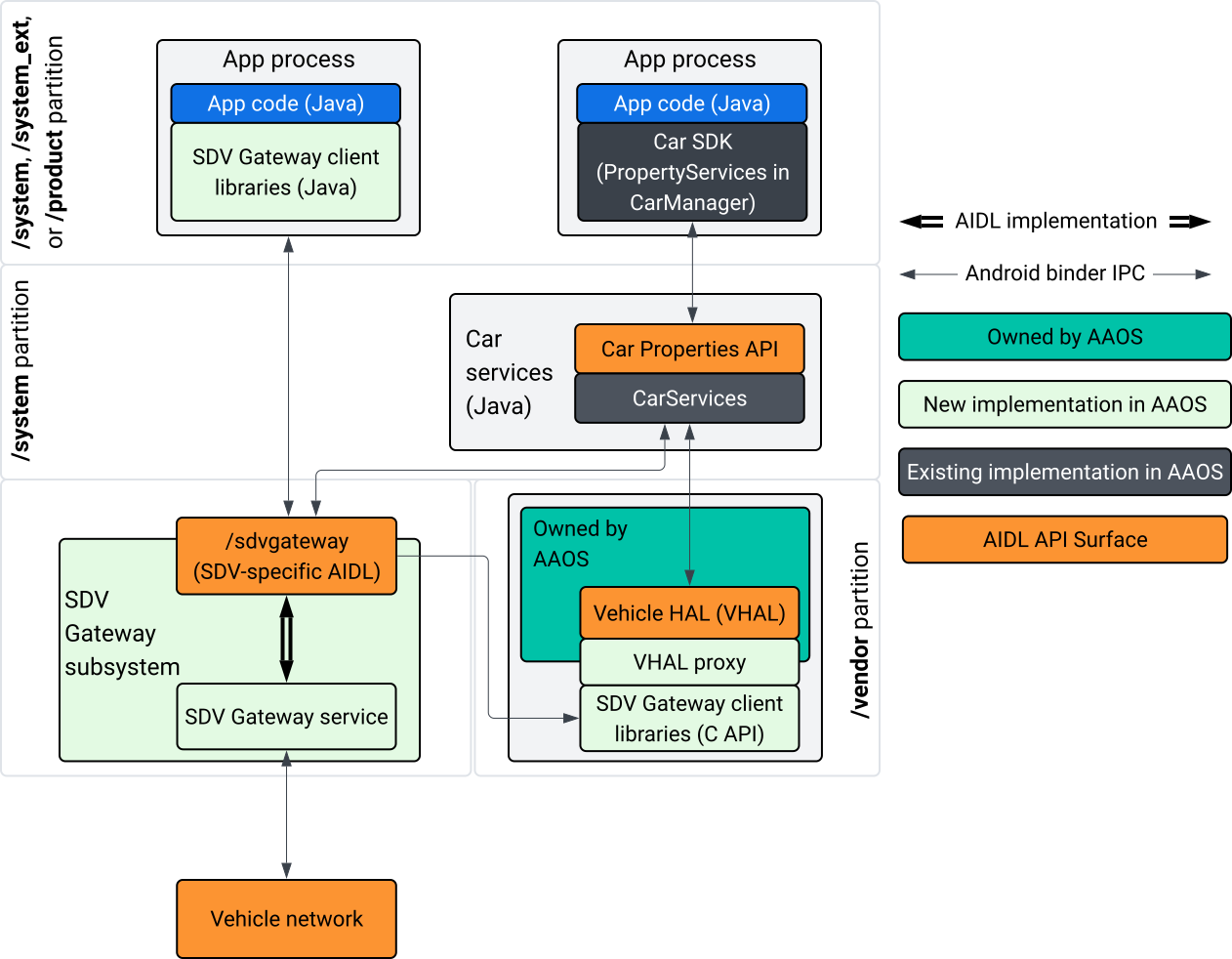
Figura 1. Interazioni con il gateway SDV.
In questo diagramma del sistema:
- Le app interagiscono con SDV Gateway tramite i suoi servizi client.
- L'SDK AAOS SDV ti offre:
- API AIDL ISdvGateway per la comunicazione tra processi.
- Librerie di comunicazione per l'interazione di rete.
- API C di convenienza per l'integrazione nativa dei servizi.
- L'API AIDL ISdvGateway è implementata dal servizio e dal sottosistema SDV Gateway.
- Il servizio SDV Gateway gestisce:
- Service Discovery bidirezionale.
- Comunicazione con i servizi SDV remoti.
- Logica di business principale.
- Il sottosistema SDV Gateway si connette alla rete del veicolo.
- I servizi nativi, inclusa l'implementazione di VHAL, possono utilizzare l'API ISdvGateway AIDL direttamente o tramite l'API C dell'SDK.
- Il proxy VHAL funge da implementazione VHAL di riferimento, incorporando l'integrazione della mappatura VSIDL.
Modello di integrazione per SDV Gateway su un servizio nativo IVI
Il modello di integrazione è illustrato nella Figura 2:
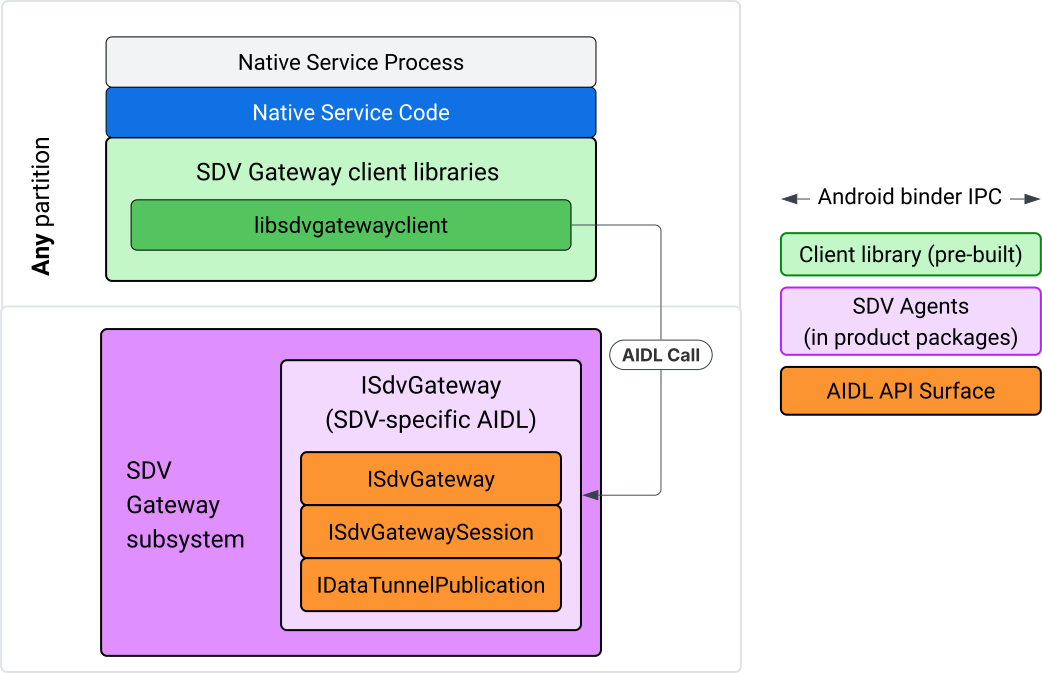
Figura 2. Modello di integrazione del gateway SDV.
Utilizzare SDV Gateway su un servizio nativo IVI
La Figura 3 illustra l'utilizzo del gateway SDV su IVI:
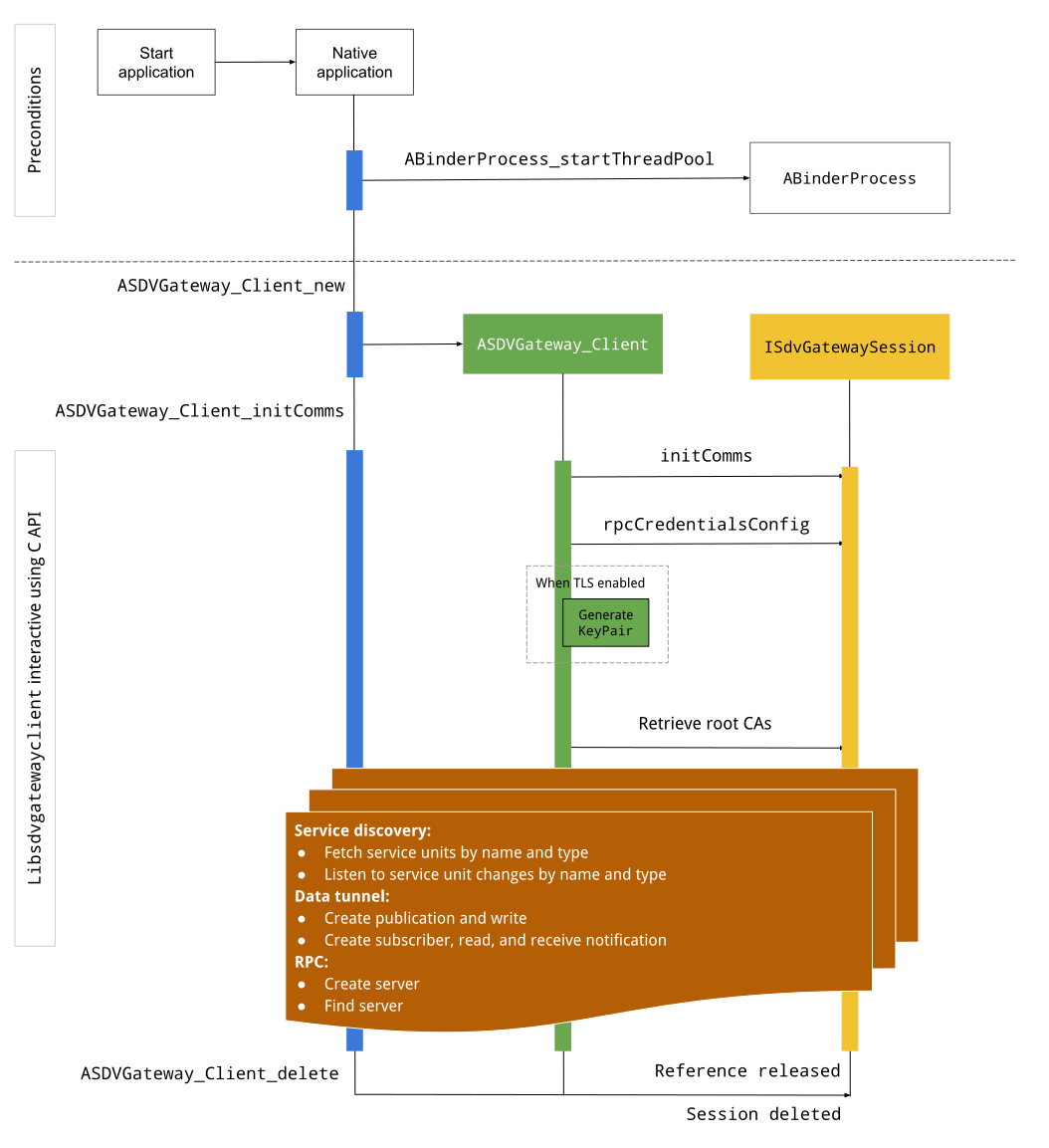
Figura 3. SDV Gateway su IVI.
Condizioni preliminari
Avvia il pool di thread Binder:
La libreria client SDV Gateway richiede un pool di thread Binder avviato per ricevere callback asincroni dai servizi Binder.
L'API necessaria per creare un client SDV Gateway non funziona quando non viene avviato un pool di thread Binder.
Includi la libreria client nativa di Gateway
La libreria client Native Gateway espone un'API C. Aggiungi un'istanza di
libsdvgatewayclient come dipendenza per utilizzare l'API C:
cc_binary {
    name: "your_binary_name",
    srcs: ["main.cpp"],
    shared_libs: [
        "libsdvgatewayclient",
    ],
}
Caricare il client nativo di Gateway
#include "libsdvgatewayclient.h"
Crea un'istanza client nativa
ASDVGateway_Client* client;
ASDVGateway_StatusCode_t statusCode = ASDVGateway_Client_new(
     &client, /*outStatus*/nullptr);
Dopo la creazione, il cliente:
Contiene lo stato di tutte le interazioni successive con il servizio Gateway.
Funge da contesto di tutte le interazioni con altri servizi abilitati per SDV e viene passato come primo parametro alle funzioni dell'API C.
Codici di stato e messaggi di errore
La maggior parte delle funzioni dell'API C ha questa definizione:
ASDVGateway_StatusCode_t ApiFunctionName(..., ASDVGateway_Status_t* outStatus);
Per valutare la riuscita dell'operazione, puoi esaminare il codice di stato restituito, che è di tipo ASDVGateway_StatusCode_t. Puoi anche passare un puntatore a una struttura
in cui la funzione può inserire il codice di stato e un messaggio di errore. Il puntatore viene
trasmesso come ultimo parametro, denominato outStatus. Un valore nullo indica che la
struttura di output non viene utilizzata.
Il chiamante deve allocare la struttura dello stato della memoria per il messaggio di errore. La struttura dello stato può contenere sia il codice di stato che un messaggio di errore. È disponibile un esempio di recupero del messaggio di errore durante la creazione di un nuovo cliente.
Per valutare l'esito positivo:
Ispeziona il codice di stato restituito, che è di tipo
ASDVGateway_StatusCode_t.Passa un puntatore a una struttura in cui la funzione può inserire il codice di stato e un messaggio di errore.
- Il puntatore viene passato come ultimo parametro, denominato
outStatus. - Un valore nullo indica che la struttura di output non viene utilizzata.
- Il chiamante deve allocare la struttura dello stato della memoria per il messaggio di errore.
- La struttura dello stato può contenere il codice di stato e un messaggio di errore.
- Il puntatore viene passato come ultimo parametro, denominato
Ecco un esempio che mostra come recuperare il messaggio di errore per un nuovo client:
#include <iostream>
#include <array>

struct StatusWithErrorMsg : ASDVGateway_Status_t {
    StatusWithErrorMsg() {
        // Ensure the base struct pointers point to our internal buffer
        errorMessage = errorMessageBuffer.data();
        maxErrorMessageSize = errorMessageBuffer.size();

        // Good practice: Zero-initialize the buffer
        errorMessageBuffer.fill(0);
    }

    std::array<char, 256> errorMessageBuffer;
};

// --- Execution ---

ASDVGateway_Client* client = nullptr;
StatusWithErrorMsg status;

// Initialize the client
ASDVGateway_StatusCode_t statusCode = ASDVGateway_Client_new(&client, &status);

// Log Results
std::cout << "Returned statusCode:    " << statusCode << std::endl;
std::cout << "Status Struct Code:     " << status.statusCode << std::endl;
std::cout << "Status Error Message:   " << status.errorMessage << std::endl;
In questo esempio:
Il codice di stato contenuto nella struttura dello stato ha lo stesso valore del codice di stato restituito.
Il messaggio di errore viene compilato solo fino al limite di
maxErrorMessageSizecaratteri (incluso il carattere di terminazione null\0). Se non si verifica alcun errore (il codice di stato èOK), il messaggio di errore è una stringa vuota.
Init comms
Init comms inizializza la comunicazione tra l'app chiamante e altre app utilizzando SDV Comm Stack e SDV Gateway. Init comms can be called in both of these contexts::
Dopo la creazione del cliente.
Prima di qualsiasi interazione con Data Tunnel, RPC o Service Discovery.
Ecco un esempio:
ASDVGateway_InitCommsParams_t params{
.packageName = "android.sdv.samples.gateway.client",
.serviceBundleName = "NativeTestApp",
.serviceInstanceName = "default",
};
// Initialize communications and capture the status code
ASDVGateway_StatusCode_t statusCode = ASDVGateway_Client_initComms(client, ¶ms, &status);
// Recommended check
if (statusCode != ASDVGateway_StatusCode_OK) {
std::cerr << "Failed to init comms: " << status.errorMessage << std::endl;
}
Service Discovery
Puoi ricevere notifiche quando vengono registrate o annullate le registrazioni di unità di servizio di un tipo o nome specifico. La funzione di callback viene notificata in un thread di proprietà del client gateway. Questo callback viene inizialmente attivato con tutte le unità di servizio registrate subito dopo la chiamata all'API C. Dopo il trigger iniziale, le notifiche continuano con gli aggiornamenti finché il listener non viene annullato esplicitamente.
class NativeSdvGatewayTestApp {
public:
    static void ServiceUnitChangeListenerCallback(
        const ASDVGateway_ServiceUnitChangeEventType eventType,
        const ASDVGateway_ServiceUnitDefinition* serviceUnitDefinition,
        void* userData
    ) {
        auto* testApp = reinterpret_cast<NativeSdvGatewayTestApp*>(userData);

        if (testApp) {
            // Logic to react when services are registered or unregistered
            // e.g., testApp->handleServiceChange(eventType, serviceUnitDefinition);
        }
    }
};

// --- Listener Registration ---

// Ensure thisApp remains in scope as long as the listener is active
NativeSdvGatewayTestApp* thisApp = get_current_app_context();

ASDVGateway_UnitType_t unitType{
    .sdvPackageName     = "android.sdv.samples.sdv_gateway",
    .serviceBundleName  = "DtPublisher",
    .unitTypeName       = "TirePressure",
};

// Register the listener
ASDVGateway_Client_registerListenerForServiceUnitChangeByType(
    client,
    &unitType,
    NativeSdvGatewayTestApp::ServiceUnitChangeListenerCallback,
    static_cast<void*>(thisApp), // userData
    &listenerHandle,
    &status
);

// --- Cleanup ---

// Unregistering stops all notification to the callback function
ASDVGateway_Client_unregisterListenerForServiceUnitChangeByType(
    client,
    listenerHandle,
    &status
);
Per recuperare le unità di servizio registrate senza ulteriori notifiche, utilizza le API ASDVGateway_Client_fetchServiceUnitsByType e ASDVGateway_Client_fetchServiceUnitsByName.
class NativeSdvGatewayTestApp {
public:
    /**
     * Callback triggered for each service unit found that matches the requested type.
     */
    static void FetchServiceUnitsCallback(
        const ASDVGateway_ServiceUnitDefinition* serviceUnitDefinition,
        void* userData
    ) {
        auto* app = reinterpret_cast<NativeSdvGatewayTestApp*>(userData);

        if (serviceUnitDefinition) {
            // The service unit is registered with service discovery.
            // Example: processServiceUnit(serviceUnitDefinition);
        }
    }
};

// --- Execution ---

ASDVGateway_UnitType_t unitType{
    .sdvPackageName     = "android.sdv.samples.sdv_gateway",
    .serviceBundleName  = "DtPublisher",
    .unitTypeName       = "TirePressure",
};

// Context used to differentiate between various fetchServiceUnits calls
void* userData = static_cast<void*>(thisApp);

ASDVGateway_Client_fetchServiceUnitsByType(
    client,
    &unitType,
    NativeSdvGatewayTestApp::FetchServiceUnitsCallback,
    userData,
    &status
);
Il callback viene attivato in modo sincrono nel thread del chiamante durante la
chiamata API ASDVGateway_Client_fetchServiceUnitsByType. Utilizza
ASDVGateway_Client_fetchServiceUnitsByName per ottenere le unità di servizio registrate
per nome anziché per tipo di unità:
ASDVGateway_StatusCode_t ASDVGateway_Client_fetchServiceUnitsByName(
    // [in]  Opaque pointer to a client object.
    const ASDVGateway_Client* client,

    // [in]  Pointer to a structure containing the package name,
    //       service bundle name, and service unit name.
    const ASDVGateway_UnitNameDiscoveryArgs_t* unitName,

    // [in]  Callback function to be called for each service unit
    //       definition registered. Called synchronously in the
    //       caller's thread before the fetch completes.
    ASDVGateway_FetchServiceUnitsCallback callback,

    // [in]  Optional value passed back as a parameter of the callback.
    void* userData,

    // [out] Optional pointer to status structure for result
    //       codes and error messages.
    ASDVGateway_Status_t* outStatus
);
Flusso RPC
La libreria client del gateway gestisce le impostazioni TLS (Transport Layer Security) per la comunicazione con altre app abilitate per SDV. In particolare, recupera le impostazioni TLS necessarie per la comunicazione. Ecco come viene determinato l'utilizzo di TLS:
TLS viene utilizzato quando la modalità di avvio SDV è
LOCKED.La comunicazione non sicura viene utilizzata quando la modalità di avvio SDV è
UNLOCKED. Quando viene utilizzato TLS, la libreria client Gateway genera una coppia di chiavi nota solo al processo dell'app. Il client recupera le credenziali RPC per creare un server RPC o un canale client RPC. RPC utilizza una VLAN SDV-RPC dedicata. La libreria client Gateway chiama android_setprocnetwork per cambiare la rete predefinita del processo con la VLAN SDV-RPC durante o dopo la chiamataASDVGateway_Client_initComms.
Disponibilità RPC
Un client configurato per avviarsi nella fase iniziale di avvio potrebbe avviarsi prima che la VLAN SDV-RPC sia disponibile. Verifica che RPC sia disponibile prima di tentare di creare socket server RPC o client RPC:
// Check if the RPC (Remote Procedure Call) service is available
bool isRpcAvailable = ASDVGateway_Client_isRpcAvailable(client);

if (isRpcAvailable) {
    // Proceed with RPC calls
} else {
    // Handle the case where RPC is not yet ready or available
}
o
// Check if the process is correctly bound to the SDV RPC Network Interface/VLAN
bool isRpcNetworkBound = ASDVGateway_Client_isProcessBoundToSdvRpcNetworkInterface(client);

if (!isRpcNetworkBound) {
    // Usually implies the process isn't running on the correct network interface
    // or the VLAN configuration is missing.
    std::cerr << "Warning: Process is not bound to the SDV RPC VLAN." << std::endl;
}
Imposta un listener per gli eventi client utilizzando
ASDVGateway_Client_setClientNotificationCallback per ricevere una notifica quando lo stato di disponibilità
dell'RPC cambia.
ASDVGateway_Client_isProcessBoundToSdvRpcNetworkInterface è preferito se l'app cambia la rete del processo perché verifica sia che RPC sia disponibile sia che il processo sia associato alla VLAN SDV-RPC.
Cambia la rete predefinita del processo
Potresti dover passare dalla VLAN SDV-RPC come rete predefinita del processo
per aprire i socket per le connessioni destinate a internet. Chiama
ASDVGateway_Client_unbindProcessFromSdvRpcNetworkInterface e
ASDVGateway_Client_bindProcessToSdvRpcNetworkInterface per annullare e ripetere l'associazione
del processo alla VLAN SDV-RPC. Le due chiamate fungono da interruttori globali,
cambiando l'interfaccia di rete a cui sono associati i socket per tutti i thread del
processo.
// 1. Unbind: Sockets return to the "default" network interface (e.g., wlan0, eth0)
ASDVGateway_StatusCode_t unbindStatus =
    ASDVGateway_Client_unbindProcessFromSdvRpcNetworkInterface(client, &status);

// 2. Bind: Sockets are now bound to the dedicated SDV-RPC VLAN
ASDVGateway_StatusCode_t bindStatus =
    ASDVGateway_Client_bindProcessToSdvRpcNetworkInterface(client, &status);

// Validation
if (bindStatus == ASDVGateway_StatusCode_OK) {
    // Sockets are successfully bound to the SDV-RPC VLAN
}
Notifiche RPC
Imposta il listener client per ricevere notifiche relative alle modifiche alla disponibilità RPC e agli aggiornamenti dei certificati radice che devono essere accettati da un server RPC:
class NativeSdvGatewayTestApp {
public:
    static void ClientNotificationCallback(
        ASDVGateway_ClientNotificationType_t notificationType,
        void* userData
    ) {
        auto* testApp = reinterpret_cast<NativeSdvGatewayTestApp*>(userData);
        if (!testApp) return;

        switch (notificationType) {
            case ASDVGateway_ClientNotificationType_RootCertsChanged:
                std::cout << "onClientNotification: Root Certs Changed" << std::endl;
                // Handle certificate rotation logic here
                break;

            case ASDVGateway_ClientNotificationType_RpcAvailabilityChanged:
                std::cout << "onClientNotification: RPC Availability Changed" << std::endl;
                // Handle reconnection or UI updates here
                break;

            default:
                std::cout << "onClientNotification: Received Unknown Notification ("
                          << notificationType << ")" << std::endl;
                break;
        }
    }
};

// --- Registration ---

NativeSdvGatewayTestApp* thisApp = get_current_app_context();

// Register the notification callback to monitor system-level changes
ASDVGateway_StatusCode_t statusCode = ASDVGateway_Client_setClientNotificationCallback(
    client,
    NativeSdvGatewayTestApp::ClientNotificationCallback,
    static_cast<void*>(thisApp), // userData
    &status
);
Flusso del server RPC
Devi utilizzare le credenziali per creare il server RPC:
ASDVGateway_RpcCredentials_t* rpcCredentials = nullptr;

// Retrieve the credentials from the client
ASDVGateway_StatusCode_t statusCode = ASDVGateway_Client_rpcCredentials(client, &rpcCredentials, &status);

// Validation: Differentiating between an error and a deliberate "insecure mode"
if (status.statusCode != ASDVGateway_StatusCode_OK) {
    std::cerr << "Error retrieving credentials: " << status.errorMessage << std::endl;
    return;
}

// Logic for choosing Security Credentials
if (rpcCredentials == nullptr) {
    // If the call succeeded but credentials are null, the system expects insecure communication
    std::cout << "Configuring for Insecure Mode" << std::endl;
} else {
    std::cout << "Configuring for Secure Mode:" << std::endl;
    std::cout << "  Private Key: " << (rpcCredentials->privateKeyPem ? "Present" : "Missing") << std::endl;
    std::cout << "  RootCerts:   " << rpcCredentials->rootCertsPem << std::endl;
    std::cout << "  CertChain:   " << rpcCredentials->certChainPem << std::endl;
    std::cout << "  SAN:         " << rpcCredentials->subjectAlternativeName << std::endl;
}

// --- Cleanup ---

// Release the memory once the RPC server/client is initialized
if (rpcCredentials != nullptr) {
    ASDVGateway_Client_deleteRpcCredentials(client, rpcCredentials);
}
Dopo aver creato il server RPC e il relativo porta di ascolto, registra il server RPC in modo che possa rilevare altre app:
ASDVGateway_RegisterRpcServerParams_t params{
.serviceUnitName = "android-sdv-samples-sunroof-sunroof",
.unitType = ASDVGateway_UnitType_t{
.sdvPackageName = "android.sdv.samples.sunroof",
.serviceBundleName = "SunroofServer",
.unitTypeName = "Sunroof",
},
.listeningPort = listeningPort,
.serverUnitMetadata = ASDVGateway_ServerUnitMetadata_t{
.version = 1,
},
};
// Register the RPC server with the SDV Gateway
ASDVGateway_StatusCode_t statusCode = ASDVGateway_Client_registerRpcServer(
client,
¶ms,
&status
);
// Basic error handling
if (statusCode != ASDVGateway_StatusCode_OK) {
std::cerr << "Failed to register RPC server: " << status.errorMessage << std::endl;
}
Quando il sistema aggiorna i certificati radice in fase di runtime (ad esempio, durante le modifiche dello stato della VM), i server RPC devono aggiornare l'elenco dei certificati accettati:
Imposta un listener per gli eventi client utilizzando
ASDVGateway_Client_setClientNotificationCallbackper ricevere una notifica quando i certificati radice sono stati aggiornati.Chiama il numero
ASDVGateway_Client_rpcCredentialsper ricevere i certificati root aggiornati.
Flusso client RPC
Ecco il flusso per il client RPC:
ASDVGateway_FindRpcServerByNameParams_t params{
.packageName = "android.sdv.samples.cluster",
.serviceBundleName = "ClusterServer",
.serviceUnitName = "android-sdv-samples-cluster-cluster",
};
ASDVGateway_SocketAddress_t socketAddress;
ASDVGateway_RpcCredentials_t* rpcCredentials = nullptr;
// Perform the lookup to find the server's location and security requirements
ASDVGateway_StatusCode_t statusCode = ASDVGateway_Client_findRpcServerByName(
mClient,
¶ms,
&socketAddress,
&rpcCredentials,
&status
);
// Mandatory check: Distinguish between system errors and intentional "Insecure Mode"
if (status.statusCode != ASDVGateway_StatusCode_OK) {
std::cerr << "Failed to find RPC server: " << status.errorMessage << std::endl;
return;
}
// Logic for establishing the RPC channel
if (rpcCredentials == nullptr) {
std::cout << "Connecting via Insecure Mode to "
<< socketAddress.address << ":" << socketAddress.port << std::endl;
} else {
std::cout << "Connecting via Secure Mode to "
<< socketAddress.address << ":" << socketAddress.port << std::endl;
std::cout << " RootCerts: " << rpcCredentials->rootCertsPem << std::endl;
std::cout << " SAN: " << rpcCredentials->subjectAlternativeName << std::endl;
// Note: privateKeyPem and certChainPem are typically used if the client
// needs to perform mutual TLS (mTLS).
}
// Cleanup: Release the credential memory once the RPC channel is established
if (rpcCredentials != nullptr) {
ASDVGateway_Client_deleteRpcCredentials(client, rpcCredentials);
}
Crea un publisher e pubblica messaggi
L'API ASDVGateway_Client_createPublication viene utilizzata per registrare un'unità di servizio del publisher con SDV Gateway tramite la sua interfaccia AIDL e creare una Fast Message Queue (FMQ) nel processo dell'app. Binder viene utilizzato solo per configurare
FMQ, ma non per scrivere messaggi. L'API ASDVGateway_Client_publishMessages
viene quindi utilizzata per pubblicare messaggi nella pubblicazione creata. Ciò comporta
la scrittura nel FMQ della pubblicazione e la notifica che sono stati scritti dei messaggi.
ASDVGateway_CreatePublicationParams_t params{
.serviceUnitName = "mirror-position-adjust-impl-1",
.unitType = ASDVGateway_UnitType_t{
.sdvPackageName = "android.sdv.samples.sdv_gateway",
.serviceBundleName = "DtPublisher",
.unitTypeName = "MirrorPositionAdjust",
},
.publisherUnitMetadata = ASDVGateway_PublisherUnitMetadata_t{
.version = 1,
.messageSizeBytes = 64,
.messageCount = 16,
},
};
ASDVGateway_PublicationMetadata_t metadata;
// 1. Create the Publication (allocates resources on the gateway)
ASDVGateway_StatusCode_t createStatus = ASDVGateway_Client_createPublication(
client,
¶ms,
&metadata,
&status
);
if (status.statusCode != ASDVGateway_StatusCode_OK) {
std::cerr << "Failed to create publication: " << status.errorMessage << std::endl;
return;
}
// 2. Publish Messages
// Note: serializedMessage should contain your encoded protobuf data
std::vector<uint8_t> serializedMessage;
ASDVGateway_Client_publishMessages(
client,
serializedMessage.data(),
serializedMessage.size(),
metadata.publicationId,
&status
);
Creare un abbonato con il listener di notifiche
Per abbonarti a una pubblicazione e ricevere notifiche di Data Tunnel (ad esempio
la disponibilità dei messaggi), utilizza l'API ASDVGateway_Client_subscribeToPublicationByName. Questa API configura anche FMQ per la lettura dei messaggi pubblicati. Puoi
configurare un callback di notifica durante la procedura di abbonamento o
in un secondo momento.
#include <map>
#include <memory>
#include <iostream>

class NativeSdvGatewayTestApp {
public:
    struct SubscriptionContext {
        int32_t subscriptionId;
        std::string topicName;
        // Add other context-specific data here (e.g., counters, buffers)
    };

    /**
     * Callback triggered when new data is published to a subscribed topic.
     */
    static void SubscriptionNotificationCallback(
        const ASDVGateway_SubscriptionNotificationData_t* notification,
        void* userData
    ) {
        // The SDV Gateway client passes back the userData pointer.
        // We ensure validity by managing the lifecycle of SubscriptionContext
        // within the mSubscriptions map.
        auto* ctx = reinterpret_cast<SubscriptionContext*>(userData);

        if (ctx && notification) {
            // React to data being available for the subscription.
            // Example: handleIncomingData(notification->data, notification->size);
            std::cout << "Notification received for sub ID: " << ctx->subscriptionId << std::endl;
        }
    }

private:
    // Maps subscription handles/IDs to their respective contexts
    std::map<int32_t, std::unique_ptr<SubscriptionContext>> mSubscriptions;
};

// --- Usage ---
NativeSdvGatewayTestApp app;
Al momento della sottoscrizione, puoi specificare opzioni aggiuntive insieme al nome dell'unità di servizio del publisher. Queste opzioni ti consentono di recuperare il messaggio pubblicato più di recente prima dell'iscrizione e definire l'intervallo di tempo minimo tra le notifiche.
ASDVGateway_SubscribeToPublicationByNameParams_t params{
.sdvVmName = "vm1",
.packageName = "test.package.impl.name",
.serviceBundleName = "TestBundleImpl",
.serviceUnitName = "GrpcServerImpl",
};
ASDVGateway_Subscriber_Options_t options{
// Ensure we receive the most recent message immediately upon subscribing
.flags = ASDVGATEWAY_SUBSCRIBER_OPTIONS_FLAG_FETCHLASTMESSAGE,
.minIntervalMs = 0, // No rate limiting; receive updates as they happen
};
// 1. Prepare the context for the callback
auto subCtx = std::make_unique<SubscriptionContext>();
ASDVGateway_PublicationMetadata_t metadata{};
// 2. Perform the subscription
ASDVGateway_StatusCode_t statusCode = ASDVGateway_Client_subscribeToPublicationByName(
client,
¶ms,
&options,
NativeSdvGatewayTestApp::SubscriptionNotificationCallback,
static_cast<void*>(subCtx.get()), // Pass the raw pointer as userData
&metadata,
&status
);
// 3. Validation and Lifecycle Management
if (status.statusCode != ASDVGateway_StatusCode_OK) {
// Error handling: subCtx will be automatically deleted here
std::cerr << "Subscription failed: " << status.errorMessage << std::endl;
return;
}
// Store the context using the publicationId as the key.
// Once moved, the map owns the lifetime of subCtx.
app.mSubscriptions.emplace(metadata.publicationId, std::move(subCtx));
Utilizza l'API ASDVGateway_Client_readAvailableMessages per leggere i messaggi della pubblicazione:
uint32_t messagesAvailable = 0;

// 1. Check how many messages are waiting in the queue
ASDVGateway_StatusCode_t availStatus = ASDVGateway_Client_availableToRead(
    client,
    metadata.publicationId,
    &messagesAvailable,
    &status
);

if (status.statusCode != ASDVGateway_StatusCode_OK) {
    // Error handling for availability check
    return;
}

if (messagesAvailable == 0) {
    // No messages available for this publication at this time
    return;
}

// 2. Prepare the buffer
// metadata.messageSizeBytes was provided during the publication/subscription setup
std::vector<uint8_t> bytesForMessages;
bytesForMessages.resize(metadata.messageSizeBytes * messagesAvailable);

// 3. Read the messages from the Gateway into your local buffer
uint32_t actualMessageCount = 0; // Filled by the SDK with the number of messages read
ASDVGateway_StatusCode_t readStatus = ASDVGateway_Client_readAvailableMessages(
    client,
    metadata.publicationId,
    bytesForMessages.data(),
    bytesForMessages.size(),
    &actualMessageCount,
    &status
);

if (status.statusCode == ASDVGateway_StatusCode_OK) {
    // Successfully read 'actualMessageCount' messages
    // Process bytesForMessages...
}
Per impostare il callback dopo la sottoscrizione, utilizza l'API
ASDVGateway_Client_setNotificationCallbackForPublicationId:
ASDVGateway_StatusCode_t ASDVGateway_Client_setNotificationCallbackForPublicationId(
    // [in]  Opaque pointer to the client object.
    const ASDVGateway_Client* client,

    // [in]  Identifies the specific publication to monitor.
    const int32_t publicationId,

    // [in]  Function pointer triggered when new data is available
    //       for the specified publication.
    ASDVGateway_SubscriptionNotificationCallback notificationCallback,

    // [in]  Optional user-defined context passed back to the callback.
    void* notificationCallbackUserData,

    // [out] Optional pointer to a status structure for result codes
    //       and error messages.
    ASDVGateway_Status_t* outStatus
);
Configura il servizio init
Innanzitutto, segui la procedura descritta in Identità per i servizi nativi per assegnare un'identità di servizio al servizio tramite il suo ID Android (AID).
Supponiamo che il tuo servizio si chiami native_sdv_gateway_client_service, che l'eseguibile si trovi nella partizione /vendor in /vendor/bin/native_sdv_gateway_client_service e che tu utilizzi vendor_gateway_client come ID Android (AID) per l'esecuzione del servizio.
Con questa configurazione, puoi definire il seguente servizio init:
service native_sdv_gateway_client_service /vendor/bin/native_sdv_gateway_client_service
    class core
    user vendor_gateway_client
    group inet
    disabled
    oneshot
Questa configurazione utilizza i seguenti parametri:
vendor_gateway_clientè l'ID applicazione creato o selezionato per il servizio.group inetè necessario per i client gateway SDV per utilizzare l'interfaccia di rete per la comunicazione tra le VM SDV. Se necessario, è possibile aggiungere altri gruppi.- Questo esempio utilizza
disabledeoneshot. Potresti dover modificare le opzioni di servizio per il tuo servizio. Avvia il servizio dopo le oresdv_gateway.
Crea regole SELinux per il servizio
Per utilizzare le API SDV Gateway, devi disporre delle seguenti regole SELinux per il servizio:
# Define the domain for the service
type native_sdv_gateway_client_service, domain;

# Define the executable file type on the vendor partition
type native_sdv_gateway_client_service_exec, exec_type, file_type, vendor_file_type;

# Macro to transition from 'init' to this service's domain upon execution
init_daemon_domain(native_sdv_gateway_client_service)

# Macro to grant the necessary permissions to communicate with the SDV Gateway
sdv_gateway_client_domain(native_sdv_gateway_client_service)
Nelle regole SELinux:
init_daemon_domainconsente di avviare il servizio dainit.sdv_gateway_client_domainfornisce tutte le autorizzazioni SELinux necessarie per interagire con il gateway SDV. La seguente riga concede queste regole all'eseguibile:/vendor/bin/native_sdv_gateway_client_service u:object_r:native_sdv_gateway_client_service_exec:s0
Esempio di codice
Per scoprire di più sull'esecuzione dell'esempio di codice nativo che mostra come sono documentate le API C, consulta system/software_defined_vehicle/samples/sdv_gateway/NativeSdvGatewayTestApp/README.md.
SDV Gateway nell'app IVI Java
Il modello di interazione per un gateway SDV su IVI è illustrato in questo diagramma:
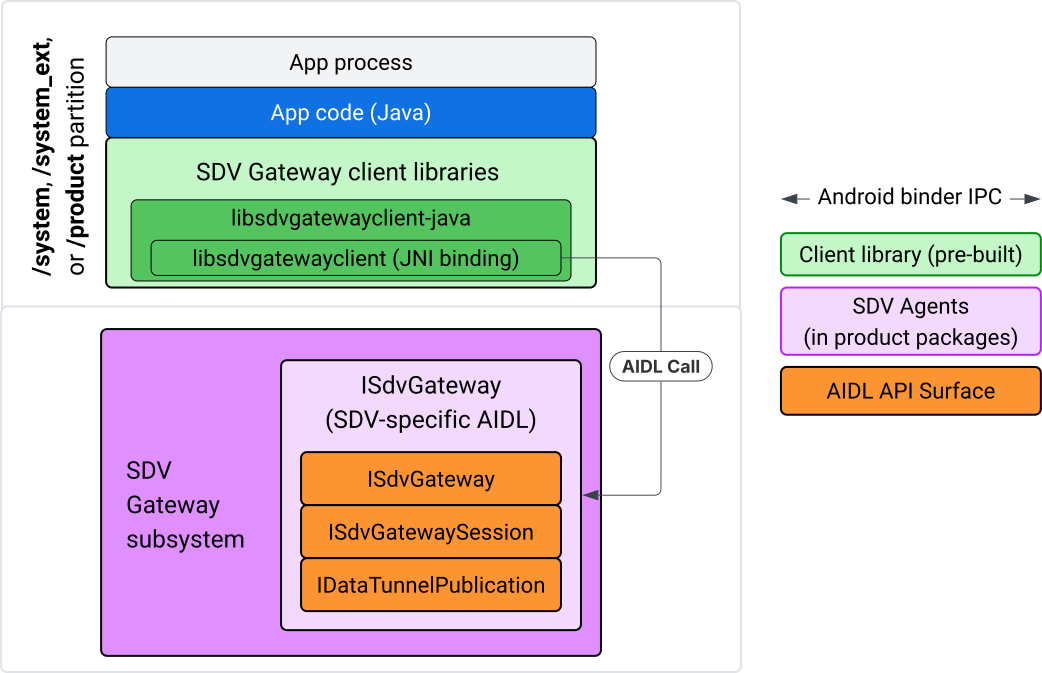
Figura 4. SDV Gateway nell'app Java IVI.
Nello specifico, il modello:
- Invia tutte le chiamate al livello JNI.
- Colla l'API Java e C.
- Definisce le interazioni AIDL con
ISdvGateway:- Init comms
- Trova o crea il server RPC
- Crea la pubblicazione/sottoscrizione
- Eseguire interazioni Data Tunnel di Service Discovery
- Ricevere notifiche (ad esempio, dati disponibili)
- Leggi e scrivi messaggi (FMQ per Pub/Sub) per la creazione di coppie di chiavi e certificati per TLS
Includere le librerie client di Gateway
La libreria Java e il wrapper JNI per l'API C libsdvgatewayclient sono
installati in un APEX sulla destinazione IVI. Aggiungi una dipendenza in fase di compilazione allo stub della libreria Java, alla libreria Java da utilizzare in fase di runtime e all'APEX richiesto contenente la libreria Java.
android_app {
    name: "YourAppName",
    // ...
    static_libs: [
        "libsdvgatewayclient-java",
    ],
    libs: [
        "libsdvgatewayclient-java-sdk.stubs",
    ],
    uses_libs: [
        "libsdvgatewayclient-java-sdk",
    ],
    required: [
        "com.sdv.google.gateway.client",
    ],
    // ...
}
Nel caso di un'app non raggruppata creata al di fuori della struttura SDV, la procedura è simile:
Copia lo stub JAR della libreria Java generato e il JAR di supporto per RPC nella cartella delle librerie dell'app. Per maggiori dettagli, vedi
system/software_defined_vehicle/sdv_gateway/libsdvgatewayclient_apex/README.md.Aggiungi il file JAR degli stub come dipendenza solo per la compilazione. Ad esempio, aggiorna le configurazioni Gradle in modo che dipendano dagli stub aggiungendo una voce
compileOnlyalla sezionedependencies:dependencies { // The library supporting functions for SDK RPC. // Statically linked into the app APK. implementation(files("libs/libsdvgatewayclient-java.jar")) // Stub of the SDV-Gateway client library. // Used only for compilation; the real implementation is provided // by the com.sdv.google.gateway.client APEX at runtime. compileOnly(files("libs/libsdvgatewayclient-java-sdk.jar")) }Aggiungi la libreria Java alla sezione dell'app del file
AndroidManifest.xml.<manifest xmlns:android="http://schemas.android.com/apk/res/android"> <application> <!-- Declares that this app requires the SDV Gateway client library. The 'android:required="true"' attribute ensures the app won't install/run if the library is missing from the system. --> <uses-library android:name="libsdvgatewayclient-java-sdk" android:required="true" /> </application> </manifest>
Carica le librerie
Crea un oggetto SdvGatewayClient (fornito dalla libreria client):
import google.sdv.gateway.client.SdvGatewayClient;

// --- Inside your Activity, Service, or ViewModel ---

// Initialize the SDV Gateway Client
SdvGatewayClient gatewayClient = new SdvGatewayClient();
Init comms
Chiama initComms() utilizzando il nome di un'app come nome del pacchetto di servizi:
// Define a unique name for your service bundle (usually constant)
private static final String SERVICE_BUNDLE_NAME = "MySdvServiceBundle";

// ... inside an Activity or Service context ...

try {
    // Initialize communications with the SDV Gateway
    // context.getPackageName() provides "android.sdv.samples.gateway.client" or similar
    gatewayClient.initComms(context.getPackageName(), SERVICE_BUNDLE_NAME);

    Log.i("SDV_GATEWAY", "Communications initialized successfully");
} catch (Exception e) {
    // Unlike the C API which uses status codes,
    // the Java SDK often throws exceptions for initialization failures.
    Log.e("SDV_GATEWAY", "Failed to initialize communications", e);
}
Service Discovery
L'API Java contiene metodi per:
Ricevi una notifica quando vengono registrate o annullate le registrazioni di unità di servizio con un tipo di unità specifico (o in alternativa corrispondono a un nome specifico).
Elenca le unità di servizio attuali con un tipo di unità specifico (o in alternativa corrispondi a un nome di tipo di unità di servizio specifico). Per ricevere una notifica delle modifiche all'unità di servizio, crea un listener:
import google.sdv.gateway.client.ServiceUnitChangeListener;
import google.sdv.gateway.client.ServiceUnitChangeEventType;
import google.sdv.gateway.client.ServiceUnitDefinition;

// --- Implementation ---

ServiceUnitChangeListener listener = new ServiceUnitChangeListener() {
    @Override
    public void onServiceUnitChanged(
        ServiceUnitChangeEventType eventType,
        ServiceUnitDefinition serviceUnitDefinition
    ) {
        // This is triggered when services matching your criteria
        // are registered or unregistered on the vehicle network.
        if (eventType == ServiceUnitChangeEventType.REGISTERED) {
            // Handle new service discovery
        } else if (eventType == ServiceUnitChangeEventType.UNREGISTERED) {
            // Handle service removal
        }
    }
};
Il metodo Java addListenerForServiceUnitChangeByName notifica al listener:
// 1. Register the listener for a specific service unit by name
AutoCloseable handle = gatewayClient.addListenerForServiceUnitChangeByName(
    new UnitNameDiscoveryArgs(
        "",                                   // sdvVmName (empty for local/auto-discovery)
        "android.sdv.samples.cluster",        // sdvPackageName
        "ClusterServer",                      // serviceBundleName
        "android-sdv-samples-cluster-cluster" // serviceUnitName
    ),
    listener
);

// --- Later in the application lifecycle ---

// 2. To stop receiving notifications and clean up resources, close the handle.
try {
    if (handle != null) {
        handle.close();
    }
} catch (Exception e) {
    Log.e("SDV_GATEWAY", "Error while closing the listener handle", e);
}
In alternativa, utilizza il metodo Java addListenerForServiceUnitChangeByType per
notificare al listener quando i servizi con il tipo di unità specificato vengono registrati
o annullati:
// 1. Register a listener based on the Service Unit Type
AutoCloseable handle = gatewayClient.addListenerForServiceUnitChangeByType(
    new UnitType(
        "com.android.testapp.sdvcarmonitor", // sdvPackageName
        "SunroofRpcServer",                  // serviceBundleName
        "Sunroof"                            // unitTypeName
    ),
    listener
);

// --- Execution Loop / Lifecycle ---

// 2. To stop receiving notifications and clean up memory, close the handle.
// This effectively unregisters the listener from the SDV Gateway.
try {
    if (handle != null) {
        handle.close();
    }
} catch (Exception e) {
    Log.e("SDV_GATEWAY", "Failed to close the service unit listener handle", e);
}
Per addListenerForServiceUnitChangeByName e
addListenerForServiceUnitChangeByType, dopo l'aggiunta, il listener
riceve una notifica di tutte le unità di servizio registrate. Per ottenere solo le unità di servizio registrate
per nome o tipo, utilizza le API Java listServiceUnitsByName e listServiceUnitsByType:
import google.sdv.gateway.client.ServiceUnitDefinition;
import google.sdv.gateway.client.UnitNameDiscoveryArgs;
import google.sdv.gateway.client.UnitType;

// --- 1. Synchronous Lookup by Specific Name ---
ServiceUnitDefinition[] definitionsByName = gatewayClient.listServiceUnitsByName(
    new UnitNameDiscoveryArgs(
        "",                                   // sdvVmName
        "android.sdv.samples.cluster",        // sdvPackageName
        "ClusterServer",                      // serviceBundleName
        "android-sdv-samples-cluster-cluster" // serviceUnitName
    )
);

// --- 2. Synchronous Lookup by Service Type ---
ServiceUnitDefinition[] definitionsByType = gatewayClient.listServiceUnitsByType(
    new UnitType(
        "com.android.testapp.sdvcarmonitor", // sdvPackageName
        "SunroofRpcServer",                  // serviceBundleName
        "Sunroof"                            // unitTypeName
    )
);

// Example processing
if (definitionsByType.length > 0) {
    ServiceUnitDefinition firstSunroof = definitionsByType[0];
    // Proceed to connect...
}
Flusso del server RPC
I client SDV Gateway all'interno dei sistemi IVI utilizzano la chiamata di procedura remota (gRPC) di Google
per la comunicazione con i servizi SDV. Queste interazioni si basano su definizioni proto
del catalogo VSIDL, coerenti o simili a quelle
utilizzate in SDV Core. Per le app Java, gRPC-Java è l'implementazione scelta. Per un server delle app viene fornita una definizione proto di esempio del server, sunroof.proto.
service Sunroof {
    /**
     * Retrieves the current state of the sunroof (e.g., position, tilt, status).
     *
     * @param .google.protobuf.Empty - No input parameters required.
     * @return SunroofStateResponse - The current telemetry data for the sunroof.
     */
    rpc GetSunroofState(.google.protobuf.Empty) returns (SunroofStateResponse) {}
}
Collega la libreria proto corrispondente e definisci il servizio:
import com.android.sdv.sdvgrpclibrary.SunroofGrpc;
import com.android.sdv.sdvgrpclibrary.SunroofStateResponse; // Assuming this is the generated class
import com.google.protobuf.Empty;
import io.grpc.stub.StreamObserver;

/**
 * Implementation of the Sunroof gRPC service.
 * This class handles the logic for the RPCs defined in your .proto file.
 */
static class SunroofGrpcImpl extends SunroofGrpc.SunroofImplBase {

    @Override
    public void getSunroofState(Empty request, StreamObserver<SunroofStateResponse> responseObserver) {
        // 1. Fetch current sunroof data (e.g., from a Hardware Abstraction Layer)
        int currentPosition = 50; // Example value: 50% open

        // 2. Build the Protobuf response message
        SunroofStateResponse response = SunroofStateResponse.newBuilder()
                .setPercentageOpen(currentPosition)
                .build();

        // 3. Send the response to the client using the observer
        responseObserver.onNext(response);

        // 4. Close the stream to signal that the RPC is finished
        responseObserver.onCompleted();
    }
}
Registra il server gRPC con le credenziali del canale sicuro e non sicuro:
// 1. Define the type signature for the service
UnitType unitType = new UnitType(
    "com.android.testapp.sdvcarmonitor", // sdvPackageName
    "SunroofRpcServer",                  // serviceBundleName
    "Sunroof"                            // typeName (Unit Type)
);

// 2. Register the RPC server with the Gateway
// The gateway creates a mapping between the ServiceUnitName and your implementation.
server = gatewayClient.registerRpcServer(
    "SunroofRpcServerImpl-1",                       // serviceUnitName (Unique instance name)
    unitType,                                       // unitType defined earlier
    "SUNROOF_GRPC_SERVER_VALUE_HOLDER".getBytes(),  // appMetadataValueHolder (Static discovery data)
    1,                                              // appMetadataVersion
    new SunroofGrpcImpl()                           // The actual gRPC service implementation
);
Internamente, la libreria client crea l'oggetto server gRPC, SdvGatewayClient.java, e gestisce anche gli aggiornamenti ai certificati radice:
// 1. Initialize credentials (Insecure for dev, TLS for production)
ServerCredentials serverCredentials = InsecureServerCredentials.create();

// 2. Build and start the OkHttp-based gRPC server
final int bindAnyPort = 0;
final Server server = OkHttpServerBuilder
    .forPort(bindAnyPort, serverCredentials)
    .addService(gRpcServerImplementation) // Your SunroofGrpcImpl
    .build()
    .start();

// The assigned port can now be retrieved using server.getPort()
int actualPort = server.getPort();

// 3. Prepare the JNI data structure
// This object mirrors the ASDVGateway_ServiceUnitDefinition_t C struct
JniServiceUnitDefinition definition = new JniServiceUnitDefinition();

// Fill the RPC service definition params (Port, Name, Type, etc.)
definition.setPort(actualPort);
definition.setServiceUnitName("SunroofRpcServerImpl-1");

// 4. Perform the cross-language call
// This jumps from Java -> JNI -> ASDVGateway_Client_registerRpcServer (C API)
mJniClient.nativeRegisterRpcServer(definition);
Flusso client RPC
Questo esempio di codice fornisce la definizione del proto del server (tpms.proto) per il server a cui l'app si connette come client:
/**
 * The TPMS service provides real-time pressure and temperature
 * data for all tires on the vehicle.
 */
service Tpms {
    /**
     * Returns the full state of all monitored tires.
     */
    rpc GetTpmsState(.google.protobuf.Empty) returns (TpmsStateResponse) {}

    /**
     * A filtered query that returns only the tires
     * below the recommended pressure threshold.
     */
    rpc GetLowTires(.google.protobuf.Empty) returns (LowTiresResponse) {}
}
Collega alla libreria proto corrispondente:
import com.android.sdv.sdvgrpclibrary.TpmsGrpc;
import io.grpc.ManagedChannel;

// --- Inside your Client Application ---

// 1. Request a ManagedChannel from the Gateway for a specific service unit
ManagedChannel managedChannel = gatewayClient.connectToRpcServerByName(
    "",                                     // sdvVmName (empty for local/auto-lookup)
    "android.sdv.samples.cluster",          // packageName
    "ClusterServer",                        // serviceBundleName
    "android-sdv-samples-cluster-cluster"  // serviceUnitName
);

// 2. Use the channel to create a gRPC stub (e.g., for the TPMS service)
TpmsGrpc.TpmsBlockingStub tpmsStub = TpmsGrpc.newBlockingStub(managedChannel);

// 3. Now you can call RPC methods directly
// TpmsStateResponse response = tpmsStub.getTpmsState(Empty.getDefaultInstance());
Internamente, viene chiamata l'API ASDVGateway_Client_findRpcServerByName per trovare
il server RPC. Se viene trovato il server RPC, il canale gestito viene creato in modalità non sicura o designato per utilizzare la configurazione TLS, in modo simile al flusso del server RPC, a seconda della configurazione di Service Discovery. L'app crea
gli stub con l'oggetto ManagedChannel e chiama i metodi del server:
import com.android.sdv.sdvgrpclibrary.TpmsGrpc;
import com.android.sdv.sdvgrpclibrary.TpmsStateResponse;
import com.google.protobuf.Empty;
import io.grpc.stub.MetadataUtils;

// 1. Create a "Blocking Stub" from the existing ManagedChannel.
// We apply an interceptor to attach mandatory metadata (headers)
// required by the SDV Gateway for authorization.
TpmsGrpc.TpmsBlockingStub tpmsStub = TpmsGrpc.newBlockingStub(managedChannel)
    .withInterceptors(MetadataUtils.newAttachHeadersInterceptor(mMetadata));

// 2. Execute the RPC call.
// Because this is a "BlockingStub," the thread will wait here until
// the vehicle service responds or times out.
TpmsStateResponse tpmsStateResponse = tpmsStub.getTpmsState(Empty.getDefaultInstance());

// 3. Extract the domain-specific state object from the Protobuf response.
// 'newState' can now be used to update your UI or application logic.
newState = tpmsStateResponse.getTpmsState();
Cambia la rete predefinita del processo
Potresti dover passare dalla VLAN SDV-RPC come rete predefinita del processo
per aprire i socket per le connessioni destinate a internet. Chiama
unbindProcessFromSdvRpcNetworkInterface e
bindProcessToSdvRpcNetworkInterface per annullare l'associazione e riassociare il processo alla
VLAN SDV-RPC. Le due chiamate fungono da interruttori globali, cambiando l'interfaccia di rete a cui sono associati i socket per tutti i thread del processo.
// 1. Redirect all socket traffic from this process to the SDV-RPC VLAN.
// This call is required for making RPC calls or hosting RPC services for SDV.
gatewayClient.bindProcessToSdvRpcNetworkInterface();

// --- Process is now communicating over the SDV-RPC interface ---

// 2. Revert the process network binding back to the "default" interface.
// This allows the app to access internet resources again.
gatewayClient.unbindProcessFromSdvRpcNetworkInterface();
Crea un publisher e pubblica messaggi
// 1. Define the interface and type for the publication
UnitType unitType = new UnitType(
    "android.sdv.samples.tires.interface", // sdvPackageName
    "TirePressurePublisherInterface",      // serviceBundleName
    "TirePressure"                         // typeName
);

// 2. Configure the Publisher's buffer and message constraints
PublisherUnitMetadata publisherUnitMetadata = new PublisherUnitMetadata(
    1,   // version
    64,  // message size in bytes (fixed size for performance)
    128  // max message count (buffer depth)
);

// 3. Create the Publication instance through the Gateway
Publisher tirePublisher = gatewayClient.createPublication(
    "tire-pressure-service-unit-name",
    unitType,
    publisherUnitMetadata
);

// 4. Prepare and publish a message
// In a real app, you would encode your sensor data into this byte array
byte[] msg = new byte[publisherUnitMetadata.messageSizeBytes];

// ... fill msg with data ...

tirePublisher.publish(msg);
A livello interno, le API Java createPublication e di pubblicazione si basano sulle API native
ASDVGateway_Client_createPublication e
ASDVGateway_Client_readAvailableMessages. Per informazioni dettagliate sull'API C, consulta Utilizzare SDV Gateway su un servizio nativo IVI. L'oggetto
Publisher fornisce un contesto per la scrittura dei messaggi e la gestione del
ciclo di vita della pubblicazione.
Crea un abbonato con il listener di notifiche
L'API Java consente di passare un listener come parametro al metodo di iscrizione alla pubblicazione e restituisce un oggetto Subscription.
Listenerriceve una notifica quando sono disponibili dati per la pubblicazione a cui ha effettuato l'iscrizione.Subscriptionfunge da oggetto di contesto e può essere utilizzato per leggere i messaggi e chiudere l'abbonamento.
// 1. Define the Listener to handle incoming data notifications
SubscriptionNotificationListener listener = new SubscriptionNotificationListener() {
    @Override
    public void onSubscriptionNotification(
        Subscription subscription,
        SubscriptionNotificationType notificationType
    ) {
        // Only process if the notification indicates new data is ready
        if (notificationType != SubscriptionNotificationType.DataAvailable) {
            return;
        }

        // Read the message from the subscription buffer
        byte[] content = subscription.readMessage();

        // Note: This callback often runs on a background thread provided by the SDK.
        // If you need to update the UI, use a Handler or View.post().
        processTireData(content);
    }
};

// 2. Subscribe to the publication by its unique name
Subscription tireSubscription = gatewayClient.subscribeToPublicationByName(
    "",                                  // sdvVmName (empty for auto-lookup)
    "android.sdv.samples.dt_publisher",  // packageName
    "SdvGatewayDtPublisher",             // serviceBundleName
    "tire",                              // serviceUnitName
    listener
);

// 3. Read Messages
// You can poll or register callbacks for new messages.
// When polling the message, call this method in a loop.
// When registering callbacks, call this method to get the message payload.
byte[] manualContent = tireSubscription.readMessage();
Esempio di codice
I callback dei listener vengono richiamati su un singolo thread gestito dal client per
ridurre al minimo l'elaborazione all'interno dei listener per evitare ritardi nella ricezione
delle notifiche per altri abbonamenti. Il livello Java utilizza un'API C per la gestione degli abbonamenti, la gestione delle notifiche e il recupero dei messaggi. Per una
dimostrazione dell'utilizzo dell'API, consulta l'esempio di app Java fornito nel file binario
all'indirizzo system/software_defined_vehicle/samples/sdv_gateway/README.md.
Autorizzazioni obbligatorie
La chiamata all'API client SDV Gateway non richiede autorizzazioni speciali, ma devi applicare le regole SELinux appropriate per le tue app.
- Per gli abbonamenti e le pubblicazioni dei tunnel di dati, non sono necessarie autorizzazioni.
- Per SDV RPC, devi disporre delle seguenti autorizzazioni:
android.permission.INTERNETandroid.permission.CONNECTIVITY_USE_RESTRICTED_NETWORKS
Per android.permission.CONNECTIVITY_USE_RESTRICTED_NETWORKS, devi anche avere un
file di lista consentita in etc/permissions nella stessa partizione dell'app, ad esempio per
SdvCarMonitorTestApp (nome pacchetto
com.android.testapp.sdvcarmonitor), il file ha il seguente aspetto:
<?xml version="1.0" encoding="utf-8"?>

<permissions>
    <privapp-permissions package="com.android.testapp.sdvcarmonitor">
        <permission name="android.permission.CONNECTIVITY_USE_RESTRICTED_NETWORKS"/>
    </privapp-permissions>
</permissions>
Regole SELinux
Per utilizzare le API SDV Gateway, le app Java richiedono le stesse autorizzazioni dei servizi nativi. Concedi queste autorizzazioni utilizzando la macro SELinux sdv_gateway_client_domain():
sdv_gateway_client_domain(my_oem_sdv_gateway_client_app)
L'OEM definisce il dominio my_oem_sdv_gateway_client_app per le app Java
autorizzate a utilizzare SDV Gateway. Utilizza SDV Gateway solo da app di sistema e con privilegi.
Posizioni del codice
Recupera il codice sorgente del gateway SDV all'indirizzo
system/software_defined_vehicle/sdv_gateway/. Puoi ottenere esempi di SDV Gateway
per:
- API client C:
system/software_defined_vehicle/samples/sdv_gateway/NativeSdvGatewayTestApp/ - API Java client:
system/software_defined_vehicle/samples/sdv_gateway/SdvCarMonitorTestApp/