

車載インフォテインメント(IVI)システムのソフトウェア定義車両(SDV)Gateway は、IVI システムとリモート SDV サービス間の通信を容易にします。ゲートウェイを使用すると、相手先ブランド製品製造企業(OEM)の Java アプリや、車両 Hardware Abstraction Layer(VHAL)などのネイティブ サービスが SDV サービスとやり取りできます。ゲートウェイは、サービス登録、検出、リモート プロシージャ コール(RPC)などの確立された通信方法を使用します。
このゲートウェイは、プロパティ情報に SDV データ トンネルを使用して VHAL 参照実装を有効にするなど、特定の AAOS SDV プロジェクトの要件を満たします。また、IVI 上の Java および Kotlin Android アプリが SDV Comms スタックを使用し、サービスとして登録し、他の SDV サービスを見つけて通信することも可能にします。
SDV Gateway のコードの場所と SDV Gateway クライアントの例については、コードの場所をご覧ください。
SDV Gateway の統合モデル
IVI アーキテクチャの SDV ゲートウェイを介して SDV-IVI Comms を使用する
SDV ゲートウェイは、Java アプリ、ネイティブ サービス、SDV Comms スタック、車両ネットワークとやり取りします。図 1 は、これらのインタラクションを示しています。
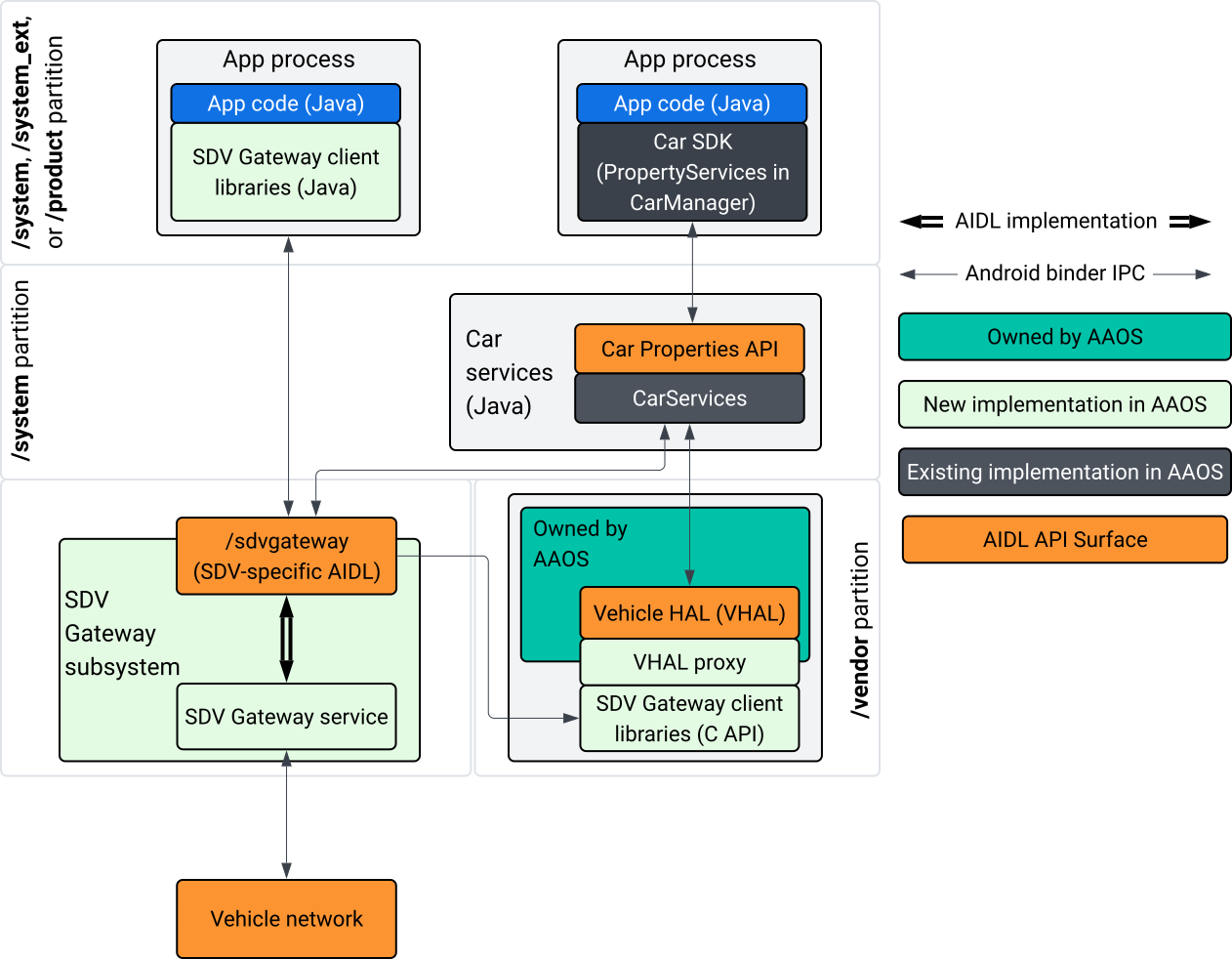
図 1. SDV Gateway のインタラクション。
このシステム図では:
- アプリは、クライアント サービスを介して SDV Gateway とやり取りします。
- AAOS SDV SDK は、次の機能を提供します。
- プロセス間通信用の ISdvGateway AIDL API。
- ネットワーク インタラクション用の Comms ライブラリ。
- ネイティブ サービス統合用の便利な C API。
- ISdvGateway AIDL API は、SDV Gateway サービスとサブシステムによって実装されます。
- SDV Gateway サービスは次のものを管理します。
- 双方向サービス ディスカバリ。
- リモート SDV サービスとの通信。
- コア ビジネス ロジック。
- SDV Gateway サブシステムは車両ネットワークに接続します。
- VHAL 実装などのネイティブ サービスは、ISdvGateway AIDL API を直接使用するか、SDK の C API を介して使用できます。
- VHAL プロキシは、VSIDL マッピング統合を組み込んだリファレンス VHAL 実装として機能します。
IVI ネイティブ サービス上の SDV Gateway の統合モデル
統合モデルを図 2 に示します。
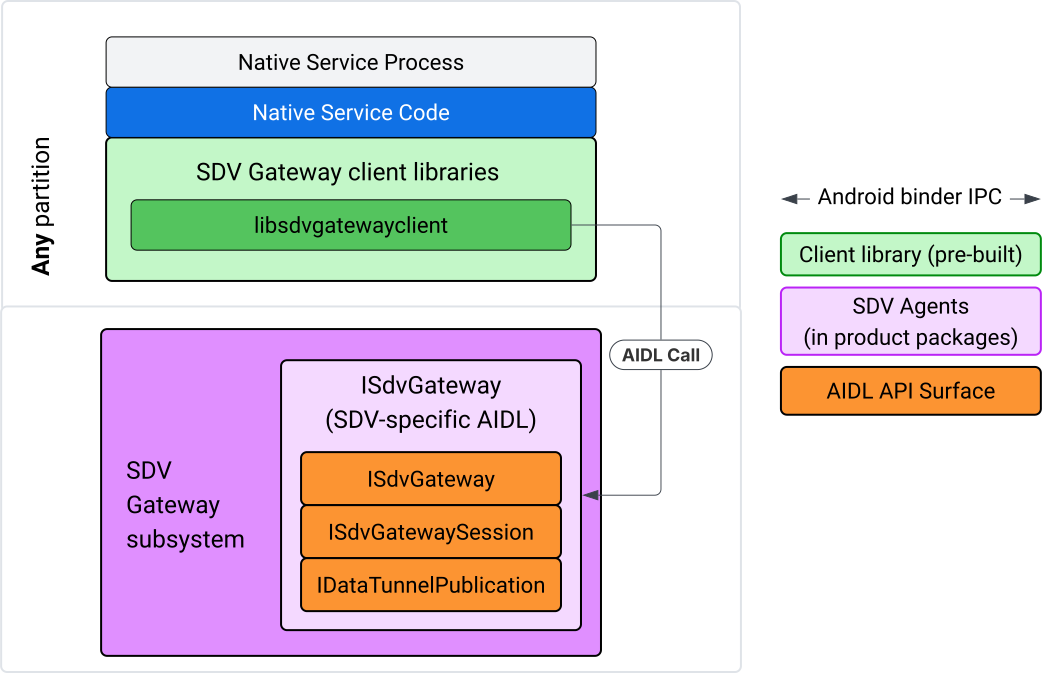
図 2. SDV Gateway 統合モデル。
IVI ネイティブ サービスで SDV Gateway を使用する
図 3 は、IVI での SDV ゲートウェイの使用を示しています。
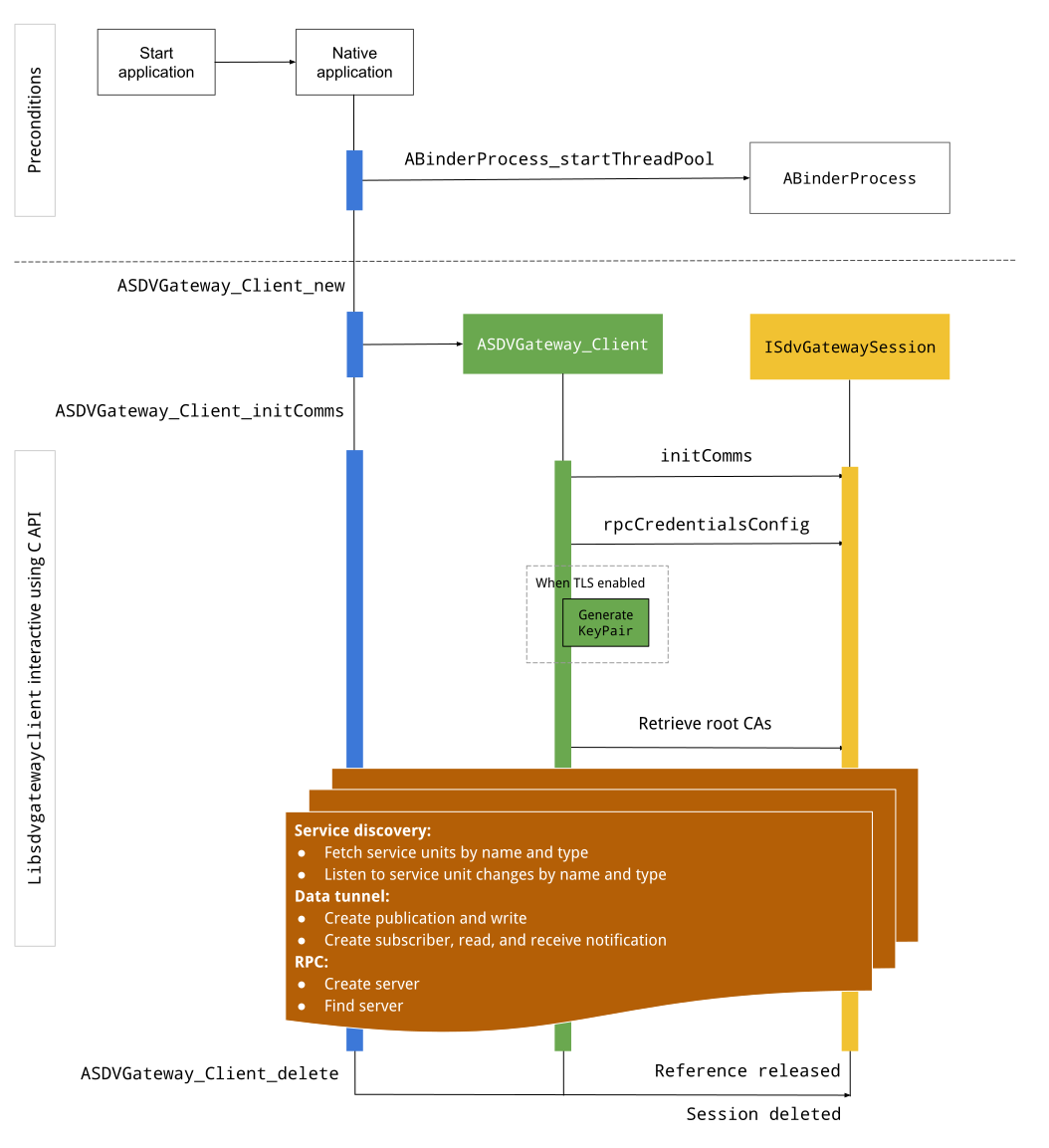
図 3. IVI の SDV ゲートウェイ。
前提条件
Binder スレッドプールを開始します。
SDV Gateway クライアント ライブラリは、Binder サービスから非同期コールバックを受信するために、開始された Binder スレッド プールを必要とします。
Binder スレッド プールが開始されていない場合、SDV Gateway クライアントの作成に必要な API が失敗します。
ネイティブ Gateway クライアント ライブラリを含める
Native Gateway クライアント ライブラリは C API を公開します。C API を使用するには、libsdvgatewayclient のインスタンスを依存関係として追加します。
cc_binary {
    name: "your_binary_name",
    srcs: ["main.cpp"],
    shared_libs: [
        "libsdvgatewayclient",
    ],
}
ネイティブ Gateway クライアントを読み込む
#include "libsdvgatewayclient.h"
ネイティブ クライアント インスタンスを作成する
ASDVGateway_Client* client;
ASDVGateway_StatusCode_t statusCode = ASDVGateway_Client_new(
     &client, /*outStatus*/nullptr);
クライアントが作成されると、クライアントは次のようになります。
Gateway サービスとの後続のすべてのインタラクションの状態を保持します。
他の SDV 対応サービスとのすべてのインタラクションのコンテキストとして機能し、C API 関数の最初のパラメータとして渡されます。
ステータス コードとエラー メッセージ
ほとんどの C API 関数は次のように定義されています。
ASDVGateway_StatusCode_t ApiFunctionName(..., ASDVGateway_Status_t* outStatus);
成功を評価するには、返されたステータス コード(ASDVGateway_StatusCode_t 型)を調べます。関数がステータス コードとエラー メッセージを入力できる構造体へのポインタを渡すこともできます。ポインタは、outStatus という名前の最後のパラメータとして渡されます。null 値は、出力構造が使用されていないことを意味します。
呼び出し元は、エラー メッセージのメモリ ステータス構造を割り当てる必要があります。ステータス構造には、ステータス コードとエラー メッセージの両方を保持できます。新しいクライアントの作成時にエラー メッセージを取得する例をご覧ください。
成果を評価するには:
返されたステータス コード(
ASDVGateway_StatusCode_t型)を調べます。関数がステータス コードとエラー メッセージを入力できる構造体へのポインタを渡します。
- ポインタは、
outStatusという名前の最後のパラメータとして渡されます。 - null 値は、出力構造が使用されていないことを意味します。
- 呼び出し元は、エラー メッセージのメモリ ステータス構造を割り当てる必要があります。
- ステータス構造には、ステータス コードとエラー メッセージを保持できます。
- ポインタは、
新しいクライアントのエラー メッセージを取得する方法を示すサンプルを次に示します。
#include <iostream>
#include <array>

struct StatusWithErrorMsg : ASDVGateway_Status_t {
    StatusWithErrorMsg() {
        // Ensure the base struct pointers point to our internal buffer
        errorMessage = errorMessageBuffer.data();
        maxErrorMessageSize = errorMessageBuffer.size();

        // Good practice: Zero-initialize the buffer
        errorMessageBuffer.fill(0);
    }

    std::array<char, 256> errorMessageBuffer;
};

// --- Execution ---

ASDVGateway_Client* client = nullptr;
StatusWithErrorMsg status;

// Initialize the client
ASDVGateway_StatusCode_t statusCode = ASDVGateway_Client_new(&client, &status);

// Log Results
std::cout << "Returned statusCode:    " << statusCode << std::endl;
std::cout << "Status Struct Code:     " << status.statusCode << std::endl;
std::cout << "Status Error Message:   " << status.errorMessage << std::endl;
この例では、次のようになります。
ステータス構造に含まれるステータス コードは、返されたステータス コードと同じ値です。
エラー メッセージは、
maxErrorMessageSize文字数制限まで(null 終端文字\0を含む)入力されます。エラーが発生しなかった場合(ステータス コードがOKの場合)、エラー メッセージは空の文字列になります。
初期対応
Init comms は、SDV Comm Stack と SDV Gateway を使用して、呼び出し元アプリと他のアプリ間の通信を初期化します。Init comms は、次の両方のコンテキストで呼び出すことができます。
クライアントの作成後。
Data Tunnel、RPC、Service Discovery のインタラクションの前。
次の例をご覧ください。
ASDVGateway_InitCommsParams_t params{
.packageName = "android.sdv.samples.gateway.client",
.serviceBundleName = "NativeTestApp",
.serviceInstanceName = "default",
};
// Initialize communications and capture the status code
ASDVGateway_StatusCode_t statusCode = ASDVGateway_Client_initComms(client, ¶ms, &status);
// Recommended check
if (statusCode != ASDVGateway_StatusCode_OK) {
std::cerr << "Failed to init comms: " << status.errorMessage << std::endl;
}
サービス ディスカバリ
特定のタイプまたは名前のサービスユニットが登録または登録解除されたときに通知を受け取ることができます。コールバック関数は、ゲートウェイ クライアントが所有するスレッドで通知されます。このコールバックは、C API 呼び出しの直後に登録されたすべてのサービス ユニットで最初にトリガーされます。最初のトリガーの後、リスナーが明示的に登録解除されるまで、通知は更新を続けます。
class NativeSdvGatewayTestApp {
public:
    static void ServiceUnitChangeListenerCallback(
        const ASDVGateway_ServiceUnitChangeEventType eventType,
        const ASDVGateway_ServiceUnitDefinition* serviceUnitDefinition,
        void* userData
    ) {
        auto* testApp = reinterpret_cast<NativeSdvGatewayTestApp*>(userData);

        if (testApp) {
            // Logic to react when services are registered or unregistered
            // e.g., testApp->handleServiceChange(eventType, serviceUnitDefinition);
        }
    }
};

// --- Listener Registration ---

// Ensure thisApp remains in scope as long as the listener is active
NativeSdvGatewayTestApp* thisApp = get_current_app_context();

ASDVGateway_UnitType_t unitType{
    .sdvPackageName     = "android.sdv.samples.sdv_gateway",
    .serviceBundleName  = "DtPublisher",
    .unitTypeName       = "TirePressure",
};

// Register the listener
ASDVGateway_Client_registerListenerForServiceUnitChangeByType(
    client,
    &unitType,
    NativeSdvGatewayTestApp::ServiceUnitChangeListenerCallback,
    static_cast<void*>(thisApp), // userData
    &listenerHandle,
    &status
);

// --- Cleanup ---

// Unregistering stops all notification to the callback function
ASDVGateway_Client_unregisterListenerForServiceUnitChangeByType(
    client,
    listenerHandle,
    &status
);
登録済みのサービス単位を通知なしで取得するには、ASDVGateway_Client_fetchServiceUnitsByType API と ASDVGateway_Client_fetchServiceUnitsByName API を使用します。
class NativeSdvGatewayTestApp {
public:
    /**
     * Callback triggered for each service unit found that matches the requested type.
     */
    static void FetchServiceUnitsCallback(
        const ASDVGateway_ServiceUnitDefinition* serviceUnitDefinition,
        void* userData
    ) {
        auto* app = reinterpret_cast<NativeSdvGatewayTestApp*>(userData);

        if (serviceUnitDefinition) {
            // The service unit is registered with service discovery.
            // Example: processServiceUnit(serviceUnitDefinition);
        }
    }
};

// --- Execution ---

ASDVGateway_UnitType_t unitType{
    .sdvPackageName     = "android.sdv.samples.sdv_gateway",
    .serviceBundleName  = "DtPublisher",
    .unitTypeName       = "TirePressure",
};

// Context used to differentiate between various fetchServiceUnits calls
void* userData = static_cast<void*>(thisApp);

ASDVGateway_Client_fetchServiceUnitsByType(
    client,
    &unitType,
    NativeSdvGatewayTestApp::FetchServiceUnitsCallback,
    userData,
    &status
);
コールバックは、ASDVGateway_Client_fetchServiceUnitsByType API 呼び出し中に呼び出し元のスレッドで同期的にトリガーされます。ASDVGateway_Client_fetchServiceUnitsByName を使用して、ユニットタイプではなく名前で登録済みサービス ユニットを取得します。
ASDVGateway_StatusCode_t ASDVGateway_Client_fetchServiceUnitsByName(
    // [in]  Opaque pointer to a client object.
    const ASDVGateway_Client* client,

    // [in]  Pointer to a structure containing the package name,
    //       service bundle name, and service unit name.
    const ASDVGateway_UnitNameDiscoveryArgs_t* unitName,

    // [in]  Callback function to be called for each service unit
    //       definition registered. Called synchronously in the
    //       caller's thread before the fetch completes.
    ASDVGateway_FetchServiceUnitsCallback callback,

    // [in]  Optional value passed back as a parameter of the callback.
    void* userData,

    // [out] Optional pointer to status structure for result
    //       codes and error messages.
    ASDVGateway_Status_t* outStatus
);
RPC フロー
Gateway クライアント ライブラリは、他の SDV 対応アプリとの通信の Transport Layer Security(TLS)設定を処理します。具体的には、通信に必要な TLS 設定を取得します。TLS の使用状況は次のようにして判断されます。
SDV ブートモードが
LOCKEDの場合、TLS が使用されます。SDV ブートモードが
UNLOCKEDの場合、安全でない通信が使用されます。TLS が使用されている場合、Gateway クライアント ライブラリは、アプリプロセスのみが認識する鍵ペアを生成します。クライアントは RPC 認証情報を取得して、RPC サーバーまたは RPC クライアント チャネルを作成します。RPC は専用の SDV-RPC VLAN を使用します。Gateway クライアント ライブラリは、ASDVGateway_Client_initComms呼び出し中または呼び出し後に android_setprocnetwork を呼び出して、プロセスのデフォルト ネットワークを SDV-RPC VLAN に切り替えます。
RPC の可用性
アーリーブートで開始するように構成されたクライアントは、SDV-RPC VLAN が利用可能になる前に開始される可能性があります。RPC サーバーまたは RPC クライアント ソケットを作成する前に、RPC が利用可能であることを確認します。
// Check if the RPC (Remote Procedure Call) service is available
bool isRpcAvailable = ASDVGateway_Client_isRpcAvailable(client);

if (isRpcAvailable) {
    // Proceed with RPC calls
} else {
    // Handle the case where RPC is not yet ready or available
}
または
// Check if the process is correctly bound to the SDV RPC Network Interface/VLAN
bool isRpcNetworkBound = ASDVGateway_Client_isProcessBoundToSdvRpcNetworkInterface(client);

if (!isRpcNetworkBound) {
    // Usually implies the process isn't running on the correct network interface
    // or the VLAN configuration is missing.
    std::cerr << "Warning: Process is not bound to the SDV RPC VLAN." << std::endl;
}
ASDVGateway_Client_setClientNotificationCallback を使用してクライアント イベントのリスナーを設定し、RPC の可用性ステータスが変更されたときに通知を受け取ります。アプリがプロセスのネットワークを切り替える場合、ASDVGateway_Client_isProcessBoundToSdvRpcNetworkInterface が推奨されます。これは、RPC が利用可能であることと、プロセスが SDV-RPC VLAN にバインドされていることの両方を確認するためです。
プロセスのデフォルト ネットワークを切り替える
インターネット バウンド接続のソケットを開くには、プロセスのデフォルト ネットワークとして SDV-RPC VLAN から切り替える必要がある場合があります。ASDVGateway_Client_unbindProcessFromSdvRpcNetworkInterface と ASDVGateway_Client_bindProcessToSdvRpcNetworkInterface を呼び出して、プロセスを SDV-RPC VLAN にバインド解除して再バインドします。この 2 つの呼び出しはグローバル スイッチのように機能し、プロセスのすべてのスレッドでソケットがバインドされているネットワーク インターフェースを切り替えます。
// 1. Unbind: Sockets return to the "default" network interface (e.g., wlan0, eth0)
ASDVGateway_StatusCode_t unbindStatus =
    ASDVGateway_Client_unbindProcessFromSdvRpcNetworkInterface(client, &status);

// 2. Bind: Sockets are now bound to the dedicated SDV-RPC VLAN
ASDVGateway_StatusCode_t bindStatus =
    ASDVGateway_Client_bindProcessToSdvRpcNetworkInterface(client, &status);

// Validation
if (bindStatus == ASDVGateway_StatusCode_OK) {
    // Sockets are successfully bound to the SDV-RPC VLAN
}
RPC 通知
RPC の可用性の変更と、RPC サーバーで受け入れる必要があるルート証明書の更新に関する通知を受け取るようにクライアント リスナーを設定します。
class NativeSdvGatewayTestApp {
public:
    static void ClientNotificationCallback(
        ASDVGateway_ClientNotificationType_t notificationType,
        void* userData
    ) {
        auto* testApp = reinterpret_cast<NativeSdvGatewayTestApp*>(userData);
        if (!testApp) return;

        switch (notificationType) {
            case ASDVGateway_ClientNotificationType_RootCertsChanged:
                std::cout << "onClientNotification: Root Certs Changed" << std::endl;
                // Handle certificate rotation logic here
                break;

            case ASDVGateway_ClientNotificationType_RpcAvailabilityChanged:
                std::cout << "onClientNotification: RPC Availability Changed" << std::endl;
                // Handle reconnection or UI updates here
                break;

            default:
                std::cout << "onClientNotification: Received Unknown Notification ("
                          << notificationType << ")" << std::endl;
                break;
        }
    }
};

// --- Registration ---

NativeSdvGatewayTestApp* thisApp = get_current_app_context();

// Register the notification callback to monitor system-level changes
ASDVGateway_StatusCode_t statusCode = ASDVGateway_Client_setClientNotificationCallback(
    client,
    NativeSdvGatewayTestApp::ClientNotificationCallback,
    static_cast<void*>(thisApp), // userData
    &status
);
RPC サーバーのフロー
認証情報を使用して RPC サーバーを作成する必要があります。
ASDVGateway_RpcCredentials_t* rpcCredentials = nullptr;

// Retrieve the credentials from the client
ASDVGateway_StatusCode_t statusCode = ASDVGateway_Client_rpcCredentials(client, &rpcCredentials, &status);

// Validation: Differentiating between an error and a deliberate "insecure mode"
if (status.statusCode != ASDVGateway_StatusCode_OK) {
    std::cerr << "Error retrieving credentials: " << status.errorMessage << std::endl;
    return;
}

// Logic for choosing Security Credentials
if (rpcCredentials == nullptr) {
    // If the call succeeded but credentials are null, the system expects insecure communication
    std::cout << "Configuring for Insecure Mode" << std::endl;
} else {
    std::cout << "Configuring for Secure Mode:" << std::endl;
    std::cout << "  Private Key: " << (rpcCredentials->privateKeyPem ? "Present" : "Missing") << std::endl;
    std::cout << "  RootCerts:   " << rpcCredentials->rootCertsPem << std::endl;
    std::cout << "  CertChain:   " << rpcCredentials->certChainPem << std::endl;
    std::cout << "  SAN:         " << rpcCredentials->subjectAlternativeName << std::endl;
}

// --- Cleanup ---

// Release the memory once the RPC server/client is initialized
if (rpcCredentials != nullptr) {
    ASDVGateway_Client_deleteRpcCredentials(client, rpcCredentials);
}
RPC サーバーを作成し、そのリスニング ポートがわかったら、他のアプリが検出できるように RPC サーバーを登録します。
ASDVGateway_RegisterRpcServerParams_t params{
.serviceUnitName = "android-sdv-samples-sunroof-sunroof",
.unitType = ASDVGateway_UnitType_t{
.sdvPackageName = "android.sdv.samples.sunroof",
.serviceBundleName = "SunroofServer",
.unitTypeName = "Sunroof",
},
.listeningPort = listeningPort,
.serverUnitMetadata = ASDVGateway_ServerUnitMetadata_t{
.version = 1,
},
};
// Register the RPC server with the SDV Gateway
ASDVGateway_StatusCode_t statusCode = ASDVGateway_Client_registerRpcServer(
client,
¶ms,
&status
);
// Basic error handling
if (statusCode != ASDVGateway_StatusCode_OK) {
std::cerr << "Failed to register RPC server: " << status.errorMessage << std::endl;
}
システムが実行時にルート証明書を更新する場合(VM の状態変更時など)、RPC サーバーは承認済み証明書のリストを更新する必要があります。
ASDVGateway_Client_setClientNotificationCallbackを使用してクライアント イベントのリスナーを設定し、ルート証明書が更新されたときに通知を受け取ります。ASDVGateway_Client_rpcCredentialsを呼び出して、更新されたルート証明書を取得します。
RPC クライアント フロー
RPC クライアントのフローは次のとおりです。
ASDVGateway_FindRpcServerByNameParams_t params{
.packageName = "android.sdv.samples.cluster",
.serviceBundleName = "ClusterServer",
.serviceUnitName = "android-sdv-samples-cluster-cluster",
};
ASDVGateway_SocketAddress_t socketAddress;
ASDVGateway_RpcCredentials_t* rpcCredentials = nullptr;
// Perform the lookup to find the server's location and security requirements
ASDVGateway_StatusCode_t statusCode = ASDVGateway_Client_findRpcServerByName(
mClient,
¶ms,
&socketAddress,
&rpcCredentials,
&status
);
// Mandatory check: Distinguish between system errors and intentional "Insecure Mode"
if (status.statusCode != ASDVGateway_StatusCode_OK) {
std::cerr << "Failed to find RPC server: " << status.errorMessage << std::endl;
return;
}
// Logic for establishing the RPC channel
if (rpcCredentials == nullptr) {
std::cout << "Connecting via Insecure Mode to "
<< socketAddress.address << ":" << socketAddress.port << std::endl;
} else {
std::cout << "Connecting via Secure Mode to "
<< socketAddress.address << ":" << socketAddress.port << std::endl;
std::cout << " RootCerts: " << rpcCredentials->rootCertsPem << std::endl;
std::cout << " SAN: " << rpcCredentials->subjectAlternativeName << std::endl;
// Note: privateKeyPem and certChainPem are typically used if the client
// needs to perform mutual TLS (mTLS).
}
// Cleanup: Release the credential memory once the RPC channel is established
if (rpcCredentials != nullptr) {
ASDVGateway_Client_deleteRpcCredentials(client, rpcCredentials);
}
パブリッシャーを作成してメッセージをパブリッシュする
ASDVGateway_Client_createPublication API は、AIDL インターフェースを介してパブリッシャー サービス ユニットを SDV Gateway に登録し、アプリプロセスで高速メッセージ キュー(FMQ)を作成するために使用されます。Binder は FMQ の設定にのみ関与し、メッセージの書き込みには関与しません。次に、ASDVGateway_Client_publishMessages API を使用して、作成したパブリケーションにメッセージをパブリッシュします。これには、パブリケーションの FMQ への書き込みと、メッセージが書き込まれたことの通知が含まれます。
ASDVGateway_CreatePublicationParams_t params{
.serviceUnitName = "mirror-position-adjust-impl-1",
.unitType = ASDVGateway_UnitType_t{
.sdvPackageName = "android.sdv.samples.sdv_gateway",
.serviceBundleName = "DtPublisher",
.unitTypeName = "MirrorPositionAdjust",
},
.publisherUnitMetadata = ASDVGateway_PublisherUnitMetadata_t{
.version = 1,
.messageSizeBytes = 64,
.messageCount = 16,
},
};
ASDVGateway_PublicationMetadata_t metadata;
// 1. Create the Publication (allocates resources on the gateway)
ASDVGateway_StatusCode_t createStatus = ASDVGateway_Client_createPublication(
client,
¶ms,
&metadata,
&status
);
if (status.statusCode != ASDVGateway_StatusCode_OK) {
std::cerr << "Failed to create publication: " << status.errorMessage << std::endl;
return;
}
// 2. Publish Messages
// Note: serializedMessage should contain your encoded protobuf data
std::vector<uint8_t> serializedMessage;
ASDVGateway_Client_publishMessages(
client,
serializedMessage.data(),
serializedMessage.size(),
metadata.publicationId,
&status
);
通知リスナーを使用してサブスクライバーを作成する
パブリケーションを登録してデータ トンネルの通知(メッセージの利用可能性など)を受け取るには、ASDVGateway_Client_subscribeToPublicationByName API を使用します。この API は、公開されたメッセージを読み取るための FMQ も設定します。通知コールバックは、サブスクリプション プロセス中またはその後に構成できます。
#include <map>
#include <memory>
#include <iostream>

class NativeSdvGatewayTestApp {
public:
    struct SubscriptionContext {
        int32_t subscriptionId;
        std::string topicName;
        // Add other context-specific data here (e.g., counters, buffers)
    };

    /**
     * Callback triggered when new data is published to a subscribed topic.
     */
    static void SubscriptionNotificationCallback(
        const ASDVGateway_SubscriptionNotificationData_t* notification,
        void* userData
    ) {
        // The SDV Gateway client passes back the userData pointer.
        // We ensure validity by managing the lifecycle of SubscriptionContext
        // within the mSubscriptions map.
        auto* ctx = reinterpret_cast<SubscriptionContext*>(userData);

        if (ctx && notification) {
            // React to data being available for the subscription.
            // Example: handleIncomingData(notification->data, notification->size);
            std::cout << "Notification received for sub ID: " << ctx->subscriptionId << std::endl;
        }
    }

private:
    // Maps subscription handles/IDs to their respective contexts
    std::map<int32_t, std::unique_ptr<SubscriptionContext>> mSubscriptions;
};

// --- Usage ---
NativeSdvGatewayTestApp app;
サブスクライブする際に、パブリッシャーのサービス単位名とともに追加オプションを指定できます。これらのオプションを使用すると、サブスクライブする前に最新の公開済みメッセージを取得し、通知間の最小時間間隔を定義できます。
ASDVGateway_SubscribeToPublicationByNameParams_t params{
.sdvVmName = "vm1",
.packageName = "test.package.impl.name",
.serviceBundleName = "TestBundleImpl",
.serviceUnitName = "GrpcServerImpl",
};
ASDVGateway_Subscriber_Options_t options{
// Ensure we receive the most recent message immediately upon subscribing
.flags = ASDVGATEWAY_SUBSCRIBER_OPTIONS_FLAG_FETCHLASTMESSAGE,
.minIntervalMs = 0, // No rate limiting; receive updates as they happen
};
// 1. Prepare the context for the callback
auto subCtx = std::make_unique<SubscriptionContext>();
ASDVGateway_PublicationMetadata_t metadata{};
// 2. Perform the subscription
ASDVGateway_StatusCode_t statusCode = ASDVGateway_Client_subscribeToPublicationByName(
client,
¶ms,
&options,
NativeSdvGatewayTestApp::SubscriptionNotificationCallback,
static_cast<void*>(subCtx.get()), // Pass the raw pointer as userData
&metadata,
&status
);
// 3. Validation and Lifecycle Management
if (status.statusCode != ASDVGateway_StatusCode_OK) {
// Error handling: subCtx will be automatically deleted here
std::cerr << "Subscription failed: " << status.errorMessage << std::endl;
return;
}
// Store the context using the publicationId as the key.
// Once moved, the map owns the lifetime of subCtx.
app.mSubscriptions.emplace(metadata.publicationId, std::move(subCtx));
ASDVGateway_Client_readAvailableMessages API を使用して、パブリケーションからメッセージを読み取ります。
uint32_t messagesAvailable = 0;

// 1. Check how many messages are waiting in the queue
ASDVGateway_StatusCode_t availStatus = ASDVGateway_Client_availableToRead(
    client,
    metadata.publicationId,
    &messagesAvailable,
    &status
);

if (status.statusCode != ASDVGateway_StatusCode_OK) {
    // Error handling for availability check
    return;
}

if (messagesAvailable == 0) {
    // No messages available for this publication at this time
    return;
}

// 2. Prepare the buffer
// metadata.messageSizeBytes was provided during the publication/subscription setup
std::vector<uint8_t> bytesForMessages;
bytesForMessages.resize(metadata.messageSizeBytes * messagesAvailable);

// 3. Read the messages from the Gateway into your local buffer
uint32_t actualMessageCount = 0; // Filled by the SDK with the number of messages read
ASDVGateway_StatusCode_t readStatus = ASDVGateway_Client_readAvailableMessages(
    client,
    metadata.publicationId,
    bytesForMessages.data(),
    bytesForMessages.size(),
    &actualMessageCount,
    &status
);

if (status.statusCode == ASDVGateway_StatusCode_OK) {
    // Successfully read 'actualMessageCount' messages
    // Process bytesForMessages...
}
登録後にコールバックを設定するには、ASDVGateway_Client_setNotificationCallbackForPublicationId API を使用します。
ASDVGateway_StatusCode_t ASDVGateway_Client_setNotificationCallbackForPublicationId(
    // [in]  Opaque pointer to the client object.
    const ASDVGateway_Client* client,

    // [in]  Identifies the specific publication to monitor.
    const int32_t publicationId,

    // [in]  Function pointer triggered when new data is available
    //       for the specified publication.
    ASDVGateway_SubscriptionNotificationCallback notificationCallback,

    // [in]  Optional user-defined context passed back to the callback.
    void* notificationCallbackUserData,

    // [out] Optional pointer to a status structure for result codes
    //       and error messages.
    ASDVGateway_Status_t* outStatus
);
init サービスを設定する
まず、ネイティブ サービスの ID に沿って、Android ID(AID)を介してサービスにサービス ID を割り当てます。
サービスの名前が native_sdv_gateway_client_service で、実行可能ファイルが /vendor パーティションの /vendor/bin/native_sdv_gateway_client_service にあり、サービスを実行するための Android ID(AID)として vendor_gateway_client を使用しているとします。この設定で、次の初期化サービスを定義できます。
service native_sdv_gateway_client_service /vendor/bin/native_sdv_gateway_client_service
    class core
    user vendor_gateway_client
    group inet
    disabled
    oneshot
この構成では、次のパラメータを使用します。
vendor_gateway_clientは、サービス用に作成または選択された AID です。group inetは、SDV ゲートウェイ クライアントがネットワーク インターフェースを使用して SDV VM 間の通信を行うために必要です。必要に応じて他のグループを追加できます。- この例では、
disabledとoneshotを使用します。サービスのサービス オプションの調整が必要になることがあります。sdv_gatewayの後にサービスを開始します。
サービスの SELinux ルールを作成する
SDV Gateway API を使用するには、サービスに次の SELinux ルールが必要です。
# Define the domain for the service
type native_sdv_gateway_client_service, domain;

# Define the executable file type on the vendor partition
type native_sdv_gateway_client_service_exec, exec_type, file_type, vendor_file_type;

# Macro to transition from 'init' to this service's domain upon execution
init_daemon_domain(native_sdv_gateway_client_service)

# Macro to grant the necessary permissions to communicate with the SDV Gateway
sdv_gateway_client_domain(native_sdv_gateway_client_service)
SELinux ルールでは:
init_daemon_domainを使用すると、initからサービスを開始できます。sdv_gateway_client_domainは、SDV Gateway とのやり取りに必要なすべての SELinux 権限を提供します。次の行は、これらのルールを実行可能ファイルに付与します。/vendor/bin/native_sdv_gateway_client_service u:object_r:native_sdv_gateway_client_service_exec:s0
コードサンプル
C API のドキュメント化方法を示すネイティブ コードサンプルを実行する方法については、system/software_defined_vehicle/samples/sdv_gateway/NativeSdvGatewayTestApp/README.md をご覧ください。
IVI Java アプリの SDV ゲートウェイ
IVI の SDV Gateway のインタラクション モデルを次の図に示します。
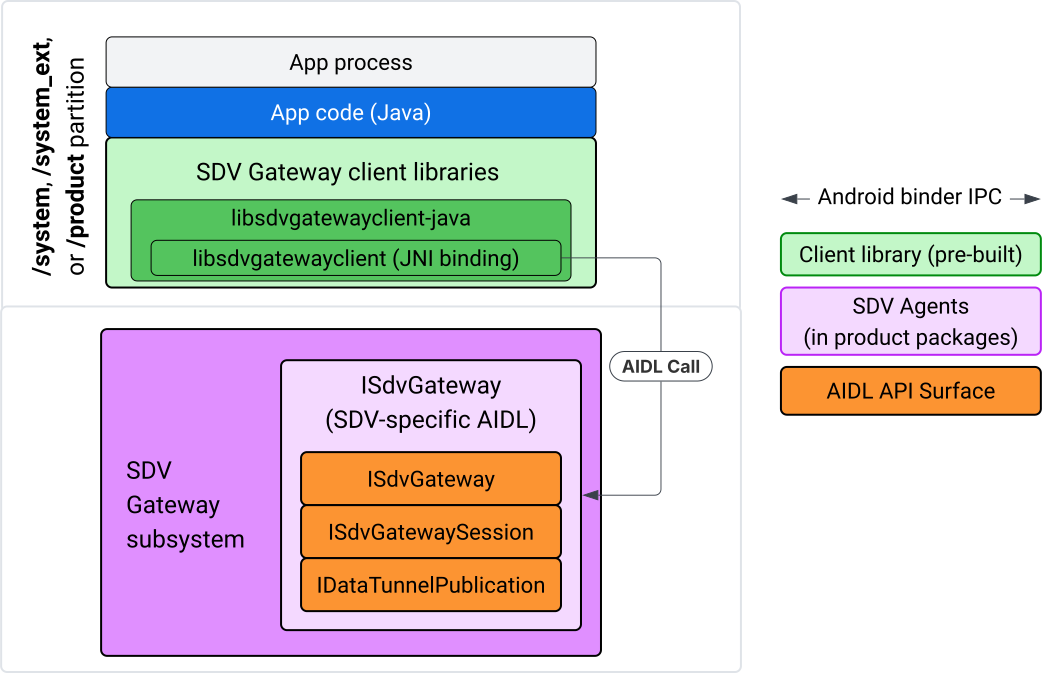
図 4. IVI Java アプリの SDV Gateway。
具体的には、このモデルは次のことを行います。
- すべての呼び出しを JNI レイヤにディスパッチします。
- Java API と C API を接続します。
ISdvGatewayとの AIDL インタラクションを定義します。- 初期対応
- RPC サーバーを見つけるか作成する
- pub/sub を作成する
- サービス ディスカバリのデータ トンネル インタラクションを実行する
- 通知を受け取る(データが利用可能になった場合など)
- 鍵ペアの作成と TLS の証明書に関するメッセージ(Pub/Sub の FMQ)を読み書きする
Gateway クライアント ライブラリを含める
libsdvgatewayclient C API の Java ライブラリと JNI ラッパーは、IVI ターゲットの APEX にインストールされます。コンパイル時の依存関係を、Java ライブラリ スタブ、実行時に使用する必要がある Java ライブラリ、Java ライブラリを含む必須の APEX に追加します。
android_app {
    name: "YourAppName",
    // ...
    static_libs: [
        "libsdvgatewayclient-java",
    ],
    libs: [
        "libsdvgatewayclient-java-sdk.stubs",
    ],
    uses_libs: [
        "libsdvgatewayclient-java-sdk",
    ],
    required: [
        "com.sdv.google.gateway.client",
    ],
    // ...
}
SDV ツリーの外部でビルドされたバンドルされていないアプリの場合、プロセスは次のようになります。
生成された Java ライブラリ スタブ JAR と RPC 用のサポート JAR をアプリの libs フォルダにコピーします。詳しくは、
system/software_defined_vehicle/sdv_gateway/libsdvgatewayclient_apex/README.mdをご覧ください。スタブ JAR をコンパイル専用の依存関係として追加します。たとえば、
dependenciesセクションにcompileOnlyエントリを追加して、スタブに依存するように Gradle 構成を更新します。dependencies { // The library supporting functions for SDK RPC. // Statically linked into the app APK. implementation(files("libs/libsdvgatewayclient-java.jar")) // Stub of the SDV-Gateway client library. // Used only for compilation; the real implementation is provided // by the com.sdv.google.gateway.client APEX at runtime. compileOnly(files("libs/libsdvgatewayclient-java-sdk.jar")) }AndroidManifest.xmlファイルのアプリ セクションに Java ライブラリを追加します。<manifest xmlns:android="http://schemas.android.com/apk/res/android"> <application> <!-- Declares that this app requires the SDV Gateway client library. The 'android:required="true"' attribute ensures the app won't install/run if the library is missing from the system. --> <uses-library android:name="libsdvgatewayclient-java-sdk" android:required="true" /> </application> </manifest>
ライブラリを読み込む
SdvGatewayClient オブジェクト(クライアント ライブラリによって提供)を作成します。
import google.sdv.gateway.client.SdvGatewayClient;

// --- Inside your Activity, Service, or ViewModel ---

// Initialize the SDV Gateway Client
SdvGatewayClient gatewayClient = new SdvGatewayClient();
初期対応
アプリ名をサービス バンドル名として使用して initComms() を呼び出します。
// Define a unique name for your service bundle (usually constant)
private static final String SERVICE_BUNDLE_NAME = "MySdvServiceBundle";

// ... inside an Activity or Service context ...

try {
    // Initialize communications with the SDV Gateway
    // context.getPackageName() provides "android.sdv.samples.gateway.client" or similar
    gatewayClient.initComms(context.getPackageName(), SERVICE_BUNDLE_NAME);

    Log.i("SDV_GATEWAY", "Communications initialized successfully");
} catch (Exception e) {
    // Unlike the C API which uses status codes,
    // the Java SDK often throws exceptions for initialization failures.
    Log.e("SDV_GATEWAY", "Failed to initialize communications", e);
}
サービス ディスカバリ
Java API には、次のメソッドが含まれています。
特定のユニットタイプ(または特定の名前)のサービスユニットが登録または登録解除されたときに通知を受け取ります。
特定の単位タイプで現在のサービス単位を一覧表示します(または、特定のサービス単位タイプ名に一致させます)。サービス ユニットの変更を通知するには、リスナーを作成します。
import google.sdv.gateway.client.ServiceUnitChangeListener;
import google.sdv.gateway.client.ServiceUnitChangeEventType;
import google.sdv.gateway.client.ServiceUnitDefinition;

// --- Implementation ---

ServiceUnitChangeListener listener = new ServiceUnitChangeListener() {
    @Override
    public void onServiceUnitChanged(
        ServiceUnitChangeEventType eventType,
        ServiceUnitDefinition serviceUnitDefinition
    ) {
        // This is triggered when services matching your criteria
        // are registered or unregistered on the vehicle network.
        if (eventType == ServiceUnitChangeEventType.REGISTERED) {
            // Handle new service discovery
        } else if (eventType == ServiceUnitChangeEventType.UNREGISTERED) {
            // Handle service removal
        }
    }
};
addListenerForServiceUnitChangeByName Java メソッドはリスナーに通知します。
// 1. Register the listener for a specific service unit by name
AutoCloseable handle = gatewayClient.addListenerForServiceUnitChangeByName(
    new UnitNameDiscoveryArgs(
        "",                                   // sdvVmName (empty for local/auto-discovery)
        "android.sdv.samples.cluster",        // sdvPackageName
        "ClusterServer",                      // serviceBundleName
        "android-sdv-samples-cluster-cluster" // serviceUnitName
    ),
    listener
);

// --- Later in the application lifecycle ---

// 2. To stop receiving notifications and clean up resources, close the handle.
try {
    if (handle != null) {
        handle.close();
    }
} catch (Exception e) {
    Log.e("SDV_GATEWAY", "Error while closing the listener handle", e);
}
または、addListenerForServiceUnitChangeByType Java メソッドを使用して、指定された単位タイプのサービスが登録または登録解除されたときにリスナーに通知します。
// 1. Register a listener based on the Service Unit Type
AutoCloseable handle = gatewayClient.addListenerForServiceUnitChangeByType(
    new UnitType(
        "com.android.testapp.sdvcarmonitor", // sdvPackageName
        "SunroofRpcServer",                  // serviceBundleName
        "Sunroof"                            // unitTypeName
    ),
    listener
);

// --- Execution Loop / Lifecycle ---

// 2. To stop receiving notifications and clean up memory, close the handle.
// This effectively unregisters the listener from the SDV Gateway.
try {
    if (handle != null) {
        handle.close();
    }
} catch (Exception e) {
    Log.e("SDV_GATEWAY", "Failed to close the service unit listener handle", e);
}
addListenerForServiceUnitChangeByName と addListenerForServiceUnitChangeByType の場合、追加後、リスナーは登録されたすべてのサービス ユニットについて通知されます。名前またはタイプで登録済みのサービス単位のみを取得するには、listServiceUnitsByName と listServiceUnitsByType の Java API を使用します。
import google.sdv.gateway.client.ServiceUnitDefinition;
import google.sdv.gateway.client.UnitNameDiscoveryArgs;
import google.sdv.gateway.client.UnitType;

// --- 1. Synchronous Lookup by Specific Name ---
ServiceUnitDefinition[] definitionsByName = gatewayClient.listServiceUnitsByName(
    new UnitNameDiscoveryArgs(
        "",                                   // sdvVmName
        "android.sdv.samples.cluster",        // sdvPackageName
        "ClusterServer",                      // serviceBundleName
        "android-sdv-samples-cluster-cluster" // serviceUnitName
    )
);

// --- 2. Synchronous Lookup by Service Type ---
ServiceUnitDefinition[] definitionsByType = gatewayClient.listServiceUnitsByType(
    new UnitType(
        "com.android.testapp.sdvcarmonitor", // sdvPackageName
        "SunroofRpcServer",                  // serviceBundleName
        "Sunroof"                            // unitTypeName
    )
);

// Example processing
if (definitionsByType.length > 0) {
    ServiceUnitDefinition firstSunroof = definitionsByType[0];
    // Proceed to connect...
}
RPC サーバーのフロー
IVI システム内の SDV Gateway クライアントは、SDV サービスとの通信に Google リモート プロシージャ コール(gRPC)を使用します。これらのインタラクションは、VSIDL カタログの proto 定義に依存しています。これは、SDV Core で使用されるものと一貫性があるか、類似しています。Java アプリの場合、gRPC-Java が選択された実装です。アプリサーバー用に、サンプル サーバー プロト定義 sunroof.proto が用意されています。
service Sunroof {
    /**
     * Retrieves the current state of the sunroof (e.g., position, tilt, status).
     *
     * @param .google.protobuf.Empty - No input parameters required.
     * @return SunroofStateResponse - The current telemetry data for the sunroof.
     */
    rpc GetSunroofState(.google.protobuf.Empty) returns (SunroofStateResponse) {}
}
対応する proto ライブラリにリンクして、サービスを定義します。
import com.android.sdv.sdvgrpclibrary.SunroofGrpc;
import com.android.sdv.sdvgrpclibrary.SunroofStateResponse; // Assuming this is the generated class
import com.google.protobuf.Empty;
import io.grpc.stub.StreamObserver;

/**
 * Implementation of the Sunroof gRPC service.
 * This class handles the logic for the RPCs defined in your .proto file.
 */
static class SunroofGrpcImpl extends SunroofGrpc.SunroofImplBase {

    @Override
    public void getSunroofState(Empty request, StreamObserver<SunroofStateResponse> responseObserver) {
        // 1. Fetch current sunroof data (e.g., from a Hardware Abstraction Layer)
        int currentPosition = 50; // Example value: 50% open

        // 2. Build the Protobuf response message
        SunroofStateResponse response = SunroofStateResponse.newBuilder()
                .setPercentageOpen(currentPosition)
                .build();

        // 3. Send the response to the client using the observer
        responseObserver.onNext(response);

        // 4. Close the stream to signal that the RPC is finished
        responseObserver.onCompleted();
    }
}
安全なチャネルと安全でないチャネルの認証情報を使用して gRPC サーバーを登録します。
// 1. Define the type signature for the service
UnitType unitType = new UnitType(
    "com.android.testapp.sdvcarmonitor", // sdvPackageName
    "SunroofRpcServer",                  // serviceBundleName
    "Sunroof"                            // typeName (Unit Type)
);

// 2. Register the RPC server with the Gateway
// The gateway creates a mapping between the ServiceUnitName and your implementation.
server = gatewayClient.registerRpcServer(
    "SunroofRpcServerImpl-1",                       // serviceUnitName (Unique instance name)
    unitType,                                       // unitType defined earlier
    "SUNROOF_GRPC_SERVER_VALUE_HOLDER".getBytes(),  // appMetadataValueHolder (Static discovery data)
    1,                                              // appMetadataVersion
    new SunroofGrpcImpl()                           // The actual gRPC service implementation
);
内部的には、クライアント ライブラリは gRPC サーバー オブジェクト SdvGatewayClient.java を作成し、ルート証明書の更新も処理します。
// 1. Initialize credentials (Insecure for dev, TLS for production)
ServerCredentials serverCredentials = InsecureServerCredentials.create();

// 2. Build and start the OkHttp-based gRPC server
final int bindAnyPort = 0;
final Server server = OkHttpServerBuilder
    .forPort(bindAnyPort, serverCredentials)
    .addService(gRpcServerImplementation) // Your SunroofGrpcImpl
    .build()
    .start();

// The assigned port can now be retrieved using server.getPort()
int actualPort = server.getPort();

// 3. Prepare the JNI data structure
// This object mirrors the ASDVGateway_ServiceUnitDefinition_t C struct
JniServiceUnitDefinition definition = new JniServiceUnitDefinition();

// Fill the RPC service definition params (Port, Name, Type, etc.)
definition.setPort(actualPort);
definition.setServiceUnitName("SunroofRpcServerImpl-1");

// 4. Perform the cross-language call
// This jumps from Java -> JNI -> ASDVGateway_Client_registerRpcServer (C API)
mJniClient.nativeRegisterRpcServer(definition);
RPC クライアント フロー
このコードサンプルは、アプリがクライアントとして接続するサーバーのサーバー proto 定義(tpms.proto)を提供します。
/**
 * The TPMS service provides real-time pressure and temperature
 * data for all tires on the vehicle.
 */
service Tpms {
    /**
     * Returns the full state of all monitored tires.
     */
    rpc GetTpmsState(.google.protobuf.Empty) returns (TpmsStateResponse) {}

    /**
     * A filtered query that returns only the tires
     * below the recommended pressure threshold.
     */
    rpc GetLowTires(.google.protobuf.Empty) returns (LowTiresResponse) {}
}
対応する proto ライブラリにリンクします。
import com.android.sdv.sdvgrpclibrary.TpmsGrpc;
import io.grpc.ManagedChannel;

// --- Inside your Client Application ---

// 1. Request a ManagedChannel from the Gateway for a specific service unit
ManagedChannel managedChannel = gatewayClient.connectToRpcServerByName(
    "",                                     // sdvVmName (empty for local/auto-lookup)
    "android.sdv.samples.cluster",          // packageName
    "ClusterServer",                        // serviceBundleName
    "android-sdv-samples-cluster-cluster"  // serviceUnitName
);

// 2. Use the channel to create a gRPC stub (e.g., for the TPMS service)
TpmsGrpc.TpmsBlockingStub tpmsStub = TpmsGrpc.newBlockingStub(managedChannel);

// 3. Now you can call RPC methods directly
// TpmsStateResponse response = tpmsStub.getTpmsState(Empty.getDefaultInstance());
内部的には、ASDVGateway_Client_findRpcServerByName API が呼び出されて RPC サーバーが検索されます。RPC サーバーが見つかった場合、サービス ディスカバリの構成に応じて、RPC サーバー フローと同様に、マネージド チャネルが安全でないモードで作成されるか、TLS 構成を使用するように指定されます。アプリは ManagedChannel オブジェクトを使用してスタブを作成し、サーバー メソッドを呼び出します。
import com.android.sdv.sdvgrpclibrary.TpmsGrpc;
import com.android.sdv.sdvgrpclibrary.TpmsStateResponse;
import com.google.protobuf.Empty;
import io.grpc.stub.MetadataUtils;

// 1. Create a "Blocking Stub" from the existing ManagedChannel.
// We apply an interceptor to attach mandatory metadata (headers)
// required by the SDV Gateway for authorization.
TpmsGrpc.TpmsBlockingStub tpmsStub = TpmsGrpc.newBlockingStub(managedChannel)
    .withInterceptors(MetadataUtils.newAttachHeadersInterceptor(mMetadata));

// 2. Execute the RPC call.
// Because this is a "BlockingStub," the thread will wait here until
// the vehicle service responds or times out.
TpmsStateResponse tpmsStateResponse = tpmsStub.getTpmsState(Empty.getDefaultInstance());

// 3. Extract the domain-specific state object from the Protobuf response.
// 'newState' can now be used to update your UI or application logic.
newState = tpmsStateResponse.getTpmsState();
プロセスのデフォルト ネットワークを切り替える
インターネット バウンド接続のソケットを開くには、プロセスのデフォルト ネットワークとして SDV-RPC VLAN から切り替える必要がある場合があります。unbindProcessFromSdvRpcNetworkInterface と bindProcessToSdvRpcNetworkInterface を呼び出して、プロセスを SDV-RPC VLAN からバインド解除し、再度バインドします。この 2 つの呼び出しはグローバル スイッチとして機能し、プロセスのすべてのスレッドでソケットがバインドされているネットワーク インターフェースを切り替えます。
// 1. Redirect all socket traffic from this process to the SDV-RPC VLAN.
// This call is required for making RPC calls or hosting RPC services for SDV.
gatewayClient.bindProcessToSdvRpcNetworkInterface();

// --- Process is now communicating over the SDV-RPC interface ---

// 2. Revert the process network binding back to the "default" interface.
// This allows the app to access internet resources again.
gatewayClient.unbindProcessFromSdvRpcNetworkInterface();
パブリッシャーを作成してメッセージをパブリッシュする
// 1. Define the interface and type for the publication
UnitType unitType = new UnitType(
    "android.sdv.samples.tires.interface", // sdvPackageName
    "TirePressurePublisherInterface",      // serviceBundleName
    "TirePressure"                         // typeName
);

// 2. Configure the Publisher's buffer and message constraints
PublisherUnitMetadata publisherUnitMetadata = new PublisherUnitMetadata(
    1,   // version
    64,  // message size in bytes (fixed size for performance)
    128  // max message count (buffer depth)
);

// 3. Create the Publication instance through the Gateway
Publisher tirePublisher = gatewayClient.createPublication(
    "tire-pressure-service-unit-name",
    unitType,
    publisherUnitMetadata
);

// 4. Prepare and publish a message
// In a real app, you would encode your sensor data into this byte array
byte[] msg = new byte[publisherUnitMetadata.messageSizeBytes];

// ... fill msg with data ...

tirePublisher.publish(msg);
内部的には、Java の createPublication API と publish API はネイティブの ASDVGateway_Client_createPublication API と ASDVGateway_Client_readAvailableMessages API に依存しています。C API の詳細については、IVI ネイティブ サービスで SDV Gateway を使用するをご覧ください。Publisher オブジェクトは、メッセージの書き込みとパブリケーションのライフサイクルの管理のコンテキストを提供します。
通知リスナーを使用してサブスクライバーを作成する
Java API では、リスナーをパブリケーションのサブスクライブ メソッドのパラメータとして渡すことができ、Subscription オブジェクトが返されます。
Listenerは、登録したパブリケーションのデータが利用可能になると通知されます。Subscriptionはコンテキスト オブジェクトとして機能し、メッセージの読み取りとサブスクリプションの終了に使用できます。
// 1. Define the Listener to handle incoming data notifications
SubscriptionNotificationListener listener = new SubscriptionNotificationListener() {
    @Override
    public void onSubscriptionNotification(
        Subscription subscription,
        SubscriptionNotificationType notificationType
    ) {
        // Only process if the notification indicates new data is ready
        if (notificationType != SubscriptionNotificationType.DataAvailable) {
            return;
        }

        // Read the message from the subscription buffer
        byte[] content = subscription.readMessage();

        // Note: This callback often runs on a background thread provided by the SDK.
        // If you need to update the UI, use a Handler or View.post().
        processTireData(content);
    }
};

// 2. Subscribe to the publication by its unique name
Subscription tireSubscription = gatewayClient.subscribeToPublicationByName(
    "",                                  // sdvVmName (empty for auto-lookup)
    "android.sdv.samples.dt_publisher",  // packageName
    "SdvGatewayDtPublisher",             // serviceBundleName
    "tire",                              // serviceUnitName
    listener
);

// 3. Read Messages
// You can poll or register callbacks for new messages.
// When polling the message, call this method in a loop.
// When registering callbacks, call this method to get the message payload.
byte[] manualContent = tireSubscription.readMessage();
コードサンプル
リスナー コールバックは、クライアントが管理する単一のスレッドで呼び出されます。これにより、リスナー内の処理が最小限に抑えられ、他のサブスクリプションの通知の受信が遅れるのを防ぐことができます。Java レイヤは、サブスクリプション管理、通知処理、メッセージ取得に C API を利用します。API の使用例については、system/software_defined_vehicle/samples/sdv_gateway/README.md のバイナリ ファイルで提供されている Java アプリのサンプルをご覧ください。
必要な権限
SDV Gateway クライアント API の呼び出しに特別な権限は必要ありませんが、アプリに適切な SELinux ルールを適用する必要があります。
- データ トンネルのサブスクリプションとパブリケーションには権限は必要ありません。
- SDV RPC には、次の権限が必要です。
android.permission.INTERNETandroid.permission.CONNECTIVITY_USE_RESTRICTED_NETWORKS
android.permission.CONNECTIVITY_USE_RESTRICTED_NETWORKS の場合、アプリと同じパーティションの etc/permissions に許可リスト ファイルも必要です。たとえば、SdvCarMonitorTestApp(パッケージ名 com.android.testapp.sdvcarmonitor)の場合、ファイルは次のようになります。
<?xml version="1.0" encoding="utf-8"?>

<permissions>
    <privapp-permissions package="com.android.testapp.sdvcarmonitor">
        <permission name="android.permission.CONNECTIVITY_USE_RESTRICTED_NETWORKS"/>
    </privapp-permissions>
</permissions>
SELinux ルール
SDV Gateway API を使用するには、Java アプリにネイティブ サービスと同じ権限が必要です。sdv_gateway_client_domain() SELinux マクロを使用して、これらの権限を付与します。
sdv_gateway_client_domain(my_oem_sdv_gateway_client_app)
OEM は、SDV Gateway の使用を許可する Java アプリの my_oem_sdv_gateway_client_app ドメインを定義します。SDV Gateway はシステムアプリと特権アプリからのみ使用します。
コードの場所
SDV Gateway のソースコードは system/software_defined_vehicle/sdv_gateway/ で入手できます。SDV Gateway のサンプルは、次の方法で取得できます。
- クライアント C API:
system/software_defined_vehicle/samples/sdv_gateway/NativeSdvGatewayTestApp/ - クライアント Java API:
system/software_defined_vehicle/samples/sdv_gateway/SdvCarMonitorTestApp/