

차량용 인포테인먼트 (IVI) 시스템의 소프트웨어 정의 차량 (SDV) 게이트웨이는 IVI 시스템과 원격 SDV 서비스 간의 통신을 지원합니다. 게이트웨이를 사용하면 차량 하드웨어 추상화 계층(VHAL)과 같은 OEM Java 앱과 네이티브 서비스가 SDV 서비스와 상호작용할 수 있습니다. 게이트웨이는 서비스 등록, 검색, 원격 프로시저 호출 (RPC) 등 설정된 통신 방법을 사용합니다.
이 게이트웨이는 속성 정보를 위해 SDV 데이터 터널을 사용하여 VHAL 참조 구현을 지원하는 등 특정 AAOS SDV 프로젝트 요구사항을 충족합니다. 또한 IVI의 Java 및 Kotlin Android 앱이 SDV Comms 스택을 사용하고, 서비스로 등록하고, 다른 SDV 서비스를 찾아 통신할 수 있습니다.
SDV 게이트웨이 코드 위치와 SDV 게이트웨이 클라이언트 예시는 코드 위치를 참고하세요.
SDV 게이트웨이 통합 모델
IVI 아키텍처에서 SDV 게이트웨이를 통해 SDV-IVI Comms 사용
SDV 게이트웨이는 Java 앱, 네이티브 서비스, SDV Comms 스택, 차량 네트워크와 상호작용합니다. 그림 1은 이러한 상호작용을 보여줍니다.
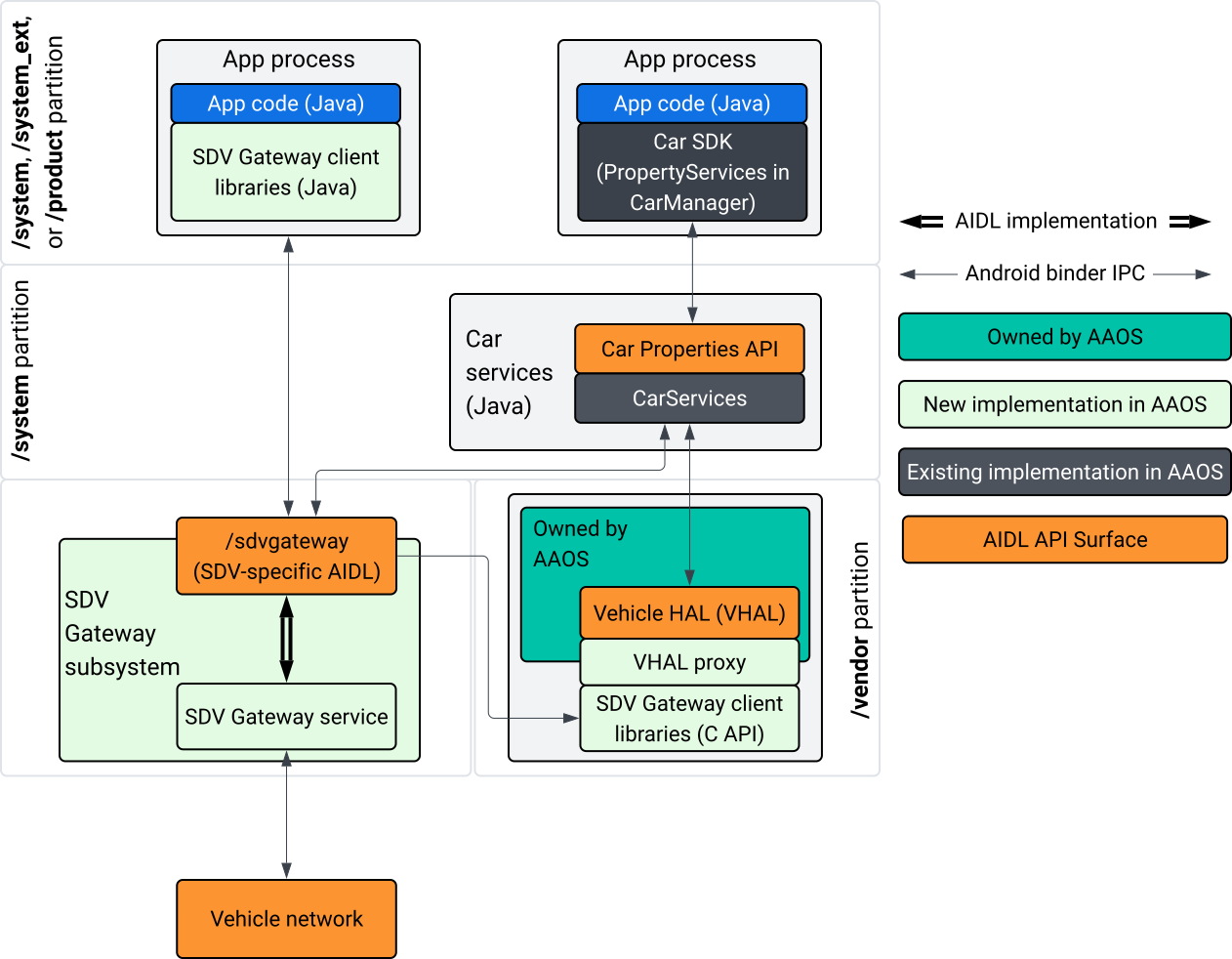
그림 1. SDV 게이트웨이 상호작용
이 시스템 다이어그램에서
- 앱은 클라이언트 서비스를 통해 SDV 게이트웨이와 상호작용합니다.
- AAOS SDV SDK는 다음을 제공합니다.
- 프로세스 간 통신을 위한 ISdvGateway AIDL API
- 네트워크 상호작용을 위한 통신 라이브러리
- 네이티브 서비스 통합을 위한 편의 C API
- ISdvGateway AIDL API는 SDV 게이트웨이 서비스와 하위 시스템에 의해 구현됩니다.
- SDV 게이트웨이 서비스는 다음을 관리합니다.
- 양방향 서비스 검색
- 원격 SDV 서비스와의 통신
- 핵심 비즈니스 로직
- SDV 게이트웨이 하위 시스템은 차량 네트워크에 연결됩니다.
- VHAL 구현을 비롯한 네이티브 서비스는 ISdvGateway AIDL API를 직접 사용하거나 SDK의 C API를 통해 사용할 수 있습니다.
- VHAL 프록시는 VSIDL 매핑 통합을 통합하는 참조 VHAL 구현 역할을 합니다.
IVI 네이티브 서비스의 SDV 게이트웨이 통합 모델
통합 모델은 그림 2에 설명되어 있습니다.
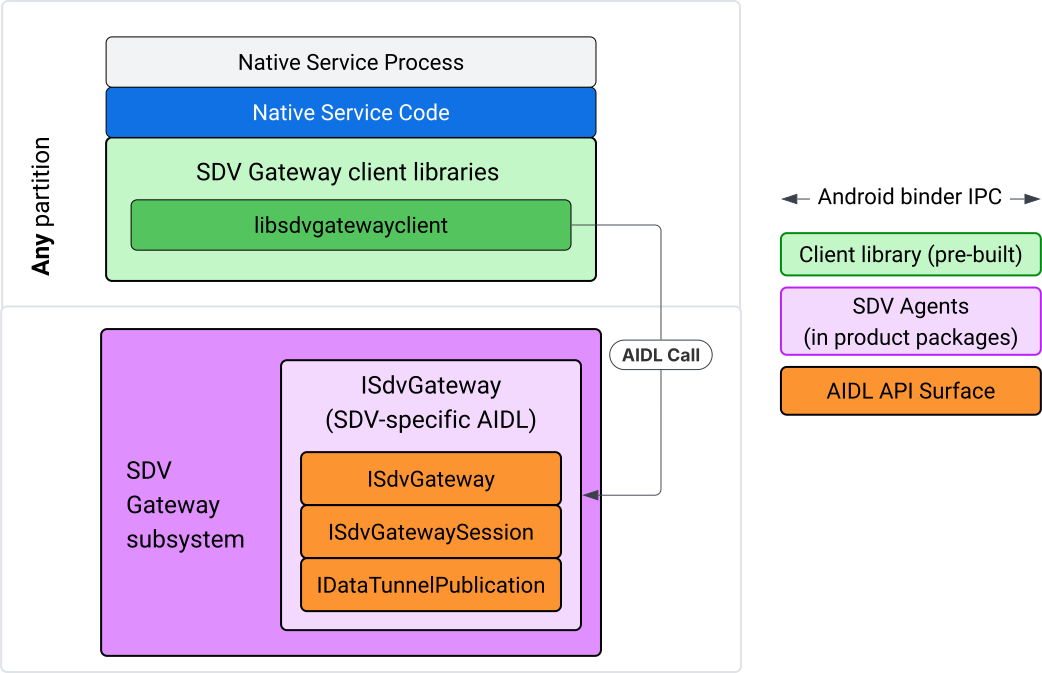
그림 2. SDV 게이트웨이 통합 모델입니다.
IVI 네이티브 서비스에서 SDV 게이트웨이 사용
그림 3은 IVI에서 SDV 게이트웨이 사용을 보여줍니다.
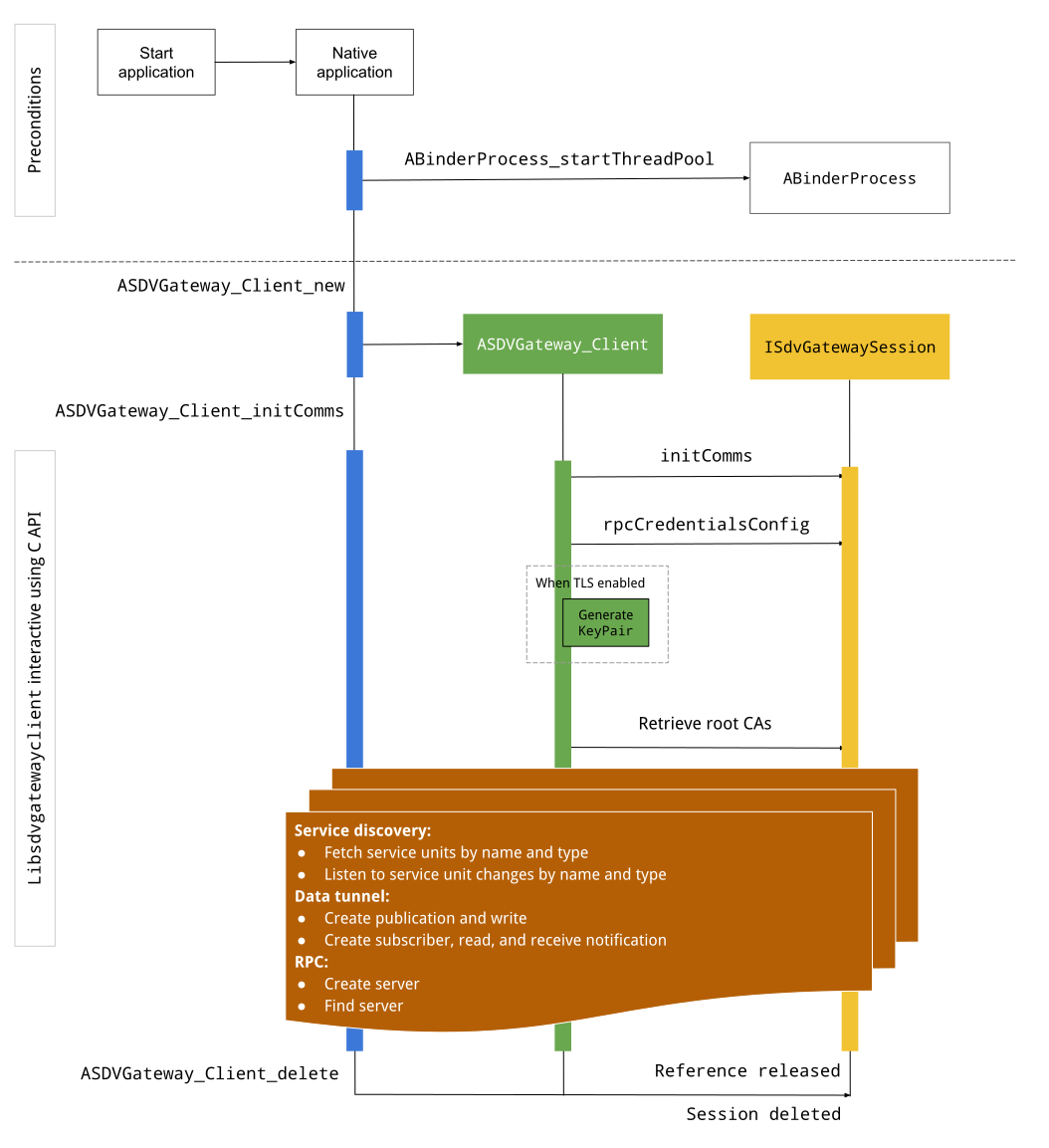
그림 3. IVI의 SDV 게이트웨이
전제조건
바인더 스레드 풀을 시작합니다.
SDV 게이트웨이 클라이언트 라이브러리는 바인더 서비스에서 비동기 콜백을 수신하기 위해 시작된 바인더 스레드 풀이 필요합니다.
바인더 스레드 풀이 시작되지 않으면 SDV 게이트웨이 클라이언트를 만드는 데 필요한 API가 실패합니다.
네이티브 게이트웨이 클라이언트 라이브러리 포함
네이티브 게이트웨이 클라이언트 라이브러리는 C API를 노출합니다. C API를 사용하려면 libsdvgatewayclient 인스턴스를 종속 항목으로 추가합니다.
cc_binary {
    name: "your_binary_name",
    srcs: ["main.cpp"],
    shared_libs: [
        "libsdvgatewayclient",
    ],
}
네이티브 게이트웨이 클라이언트 로드
#include "libsdvgatewayclient.h"
네이티브 클라이언트 인스턴스 만들기
ASDVGateway_Client* client;
ASDVGateway_StatusCode_t statusCode = ASDVGateway_Client_new(
     &client, /*outStatus*/nullptr);
클라이언트가 생성된 후 클라이언트는 다음을 수행합니다.
게이트웨이 서비스와의 모든 후속 상호작용의 상태를 보유합니다.
다른 SDV 지원 서비스와의 모든 상호작용의 컨텍스트 역할을 하며 C API 함수에 첫 번째 매개변수로 전달됩니다.
상태 코드 및 오류 메시지
대부분의 C API 함수는 다음과 같이 정의됩니다.
ASDVGateway_StatusCode_t ApiFunctionName(..., ASDVGateway_Status_t* outStatus);
성공 여부를 평가하려면 ASDVGateway_StatusCode_t 유형인 반환된 상태 코드를 검사하면 됩니다. 함수가 상태 코드와 오류 메시지를 채울 수 있는 구조체에 대한 포인터를 전달할 수도 있습니다. 포인터는 outStatus라는 이름의 마지막 매개변수로 전달됩니다. null 값은 출력 구조가 사용되지 않음을 의미합니다.
호출자는 오류 메시지의 메모리 상태 구조를 할당해야 합니다. 상태 구조는 상태 코드와 오류 메시지를 모두 보유할 수 있습니다. 새 클라이언트를 만들 때 오류 메시지를 가져오는 예가 있습니다.
성공을 평가하려면 다음 단계를 따르세요.
반환된 상태 코드(
ASDVGateway_StatusCode_t유형)를 검사합니다.함수가 상태 코드와 오류 메시지를 채울 수 있는 구조체에 대한 포인터를 전달합니다.
- 포인터는
outStatus라는 이름의 마지막 매개변수로 전달됩니다. - null 값은 출력 구조가 사용되지 않음을 의미합니다.
- 호출자는 오류 메시지의 메모리 상태 구조를 할당해야 합니다.
- 상태 구조는 상태 코드와 오류 메시지를 보유할 수 있습니다.
- 포인터는
다음은 새 클라이언트의 오류 메시지를 가져오는 방법을 보여주는 샘플입니다.
#include <iostream>
#include <array>

struct StatusWithErrorMsg : ASDVGateway_Status_t {
    StatusWithErrorMsg() {
        // Ensure the base struct pointers point to our internal buffer
        errorMessage = errorMessageBuffer.data();
        maxErrorMessageSize = errorMessageBuffer.size();

        // Good practice: Zero-initialize the buffer
        errorMessageBuffer.fill(0);
    }

    std::array<char, 256> errorMessageBuffer;
};

// --- Execution ---

ASDVGateway_Client* client = nullptr;
StatusWithErrorMsg status;

// Initialize the client
ASDVGateway_StatusCode_t statusCode = ASDVGateway_Client_new(&client, &status);

// Log Results
std::cout << "Returned statusCode:    " << statusCode << std::endl;
std::cout << "Status Struct Code:     " << status.statusCode << std::endl;
std::cout << "Status Error Message:   " << status.errorMessage << std::endl;
예를 들면 다음과 같습니다.
상태 구조에 포함된 상태 코드는 반환된 상태 코드와 값이 동일합니다.
오류 메시지는
maxErrorMessageSize문자 제한 (null 종료 문자\0포함)까지만 채워집니다. 오류가 발생하지 않으면(상태 코드가OK) 오류 메시지는 빈 문자열입니다.
커뮤니케이션 초기화
Init comms는 SDV Comm Stack과 SDV Gateway를 사용하여 호출자 앱과 다른 앱 간의 통신을 초기화합니다. init comms는 다음 두 컨텍스트에서 호출할 수 있습니다.
클라이언트가 생성된 후
데이터 터널, RPC 또는 서비스 검색 상호작용 전
예를 들면 다음과 같습니다.
ASDVGateway_InitCommsParams_t params{
.packageName = "android.sdv.samples.gateway.client",
.serviceBundleName = "NativeTestApp",
.serviceInstanceName = "default",
};
// Initialize communications and capture the status code
ASDVGateway_StatusCode_t statusCode = ASDVGateway_Client_initComms(client, ¶ms, &status);
// Recommended check
if (statusCode != ASDVGateway_StatusCode_OK) {
std::cerr << "Failed to init comms: " << status.errorMessage << std::endl;
}
서비스 검색
특정 유형 또는 이름의 서비스 단위가 등록되거나 등록 해제될 때 알림을 받을 수 있습니다. 콜백 함수는 게이트웨이 클라이언트가 소유한 스레드에서 알림을 받습니다. 이 콜백은 C API 호출 직후 등록된 모든 서비스 단위로 처음 트리거됩니다. 초기 트리거 후 리스너가 명시적으로 등록 해제될 때까지 업데이트가 포함된 알림이 계속됩니다.
class NativeSdvGatewayTestApp {
public:
    static void ServiceUnitChangeListenerCallback(
        const ASDVGateway_ServiceUnitChangeEventType eventType,
        const ASDVGateway_ServiceUnitDefinition* serviceUnitDefinition,
        void* userData
    ) {
        auto* testApp = reinterpret_cast<NativeSdvGatewayTestApp*>(userData);

        if (testApp) {
            // Logic to react when services are registered or unregistered
            // e.g., testApp->handleServiceChange(eventType, serviceUnitDefinition);
        }
    }
};

// --- Listener Registration ---

// Ensure thisApp remains in scope as long as the listener is active
NativeSdvGatewayTestApp* thisApp = get_current_app_context();

ASDVGateway_UnitType_t unitType{
    .sdvPackageName     = "android.sdv.samples.sdv_gateway",
    .serviceBundleName  = "DtPublisher",
    .unitTypeName       = "TirePressure",
};

// Register the listener
ASDVGateway_Client_registerListenerForServiceUnitChangeByType(
    client,
    &unitType,
    NativeSdvGatewayTestApp::ServiceUnitChangeListenerCallback,
    static_cast<void*>(thisApp), // userData
    &listenerHandle,
    &status
);

// --- Cleanup ---

// Unregistering stops all notification to the callback function
ASDVGateway_Client_unregisterListenerForServiceUnitChangeByType(
    client,
    listenerHandle,
    &status
);
추가 알림 없이 등록된 서비스 단위를 가져오려면 ASDVGateway_Client_fetchServiceUnitsByType 및 ASDVGateway_Client_fetchServiceUnitsByName API를 사용하세요.
class NativeSdvGatewayTestApp {
public:
    /**
     * Callback triggered for each service unit found that matches the requested type.
     */
    static void FetchServiceUnitsCallback(
        const ASDVGateway_ServiceUnitDefinition* serviceUnitDefinition,
        void* userData
    ) {
        auto* app = reinterpret_cast<NativeSdvGatewayTestApp*>(userData);

        if (serviceUnitDefinition) {
            // The service unit is registered with service discovery.
            // Example: processServiceUnit(serviceUnitDefinition);
        }
    }
};

// --- Execution ---

ASDVGateway_UnitType_t unitType{
    .sdvPackageName     = "android.sdv.samples.sdv_gateway",
    .serviceBundleName  = "DtPublisher",
    .unitTypeName       = "TirePressure",
};

// Context used to differentiate between various fetchServiceUnits calls
void* userData = static_cast<void*>(thisApp);

ASDVGateway_Client_fetchServiceUnitsByType(
    client,
    &unitType,
    NativeSdvGatewayTestApp::FetchServiceUnitsCallback,
    userData,
    &status
);
콜백은 ASDVGateway_Client_fetchServiceUnitsByType API 호출 중에 호출자 스레드에서 동기적으로 트리거됩니다. ASDVGateway_Client_fetchServiceUnitsByName을 사용하여 단위 유형 대신 이름으로 등록된 서비스 단위를 가져옵니다.
ASDVGateway_StatusCode_t ASDVGateway_Client_fetchServiceUnitsByName(
    // [in]  Opaque pointer to a client object.
    const ASDVGateway_Client* client,

    // [in]  Pointer to a structure containing the package name,
    //       service bundle name, and service unit name.
    const ASDVGateway_UnitNameDiscoveryArgs_t* unitName,

    // [in]  Callback function to be called for each service unit
    //       definition registered. Called synchronously in the
    //       caller's thread before the fetch completes.
    ASDVGateway_FetchServiceUnitsCallback callback,

    // [in]  Optional value passed back as a parameter of the callback.
    void* userData,

    // [out] Optional pointer to status structure for result
    //       codes and error messages.
    ASDVGateway_Status_t* outStatus
);
RPC 흐름
게이트웨이 클라이언트 라이브러리는 다른 SDV 지원 앱과의 통신을 위한 전송 계층 보안 (TLS) 설정을 처리합니다. 구체적으로 통신에 필요한 TLS 설정을 가져옵니다. TLS 사용량은 다음과 같이 결정됩니다.
SDV 부팅 모드가
LOCKED인 경우 TLS가 사용됩니다.SDV 부팅 모드가
UNLOCKED인 경우 안전하지 않은 통신이 사용됩니다. TLS를 사용하는 경우 게이트웨이 클라이언트 라이브러리는 앱 프로세스에만 알려진 키 쌍을 생성합니다. 클라이언트는 RPC 사용자 인증 정보를 검색하여 RPC 서버 또는 RPC 클라이언트 채널을 만듭니다. RPC는 전용 SDV-RPC VLAN을 사용합니다. 게이트웨이 클라이언트 라이브러리는ASDVGateway_Client_initComms호출 중 또는 호출 후에 프로세스의 기본 네트워크를 SDV-RPC VLAN으로 전환하기 위해 android_setprocnetwork를 호출합니다.
RPC 사용 가능 여부
초기 부팅 시 시작하도록 구성된 클라이언트는 SDV-RPC VLAN이 제공되기 전에 시작될 수 있습니다. RPC 서버 또는 RPC 클라이언트 소켓을 만들기 전에 RPC가 사용 가능한지 확인합니다.
// Check if the RPC (Remote Procedure Call) service is available
bool isRpcAvailable = ASDVGateway_Client_isRpcAvailable(client);

if (isRpcAvailable) {
    // Proceed with RPC calls
} else {
    // Handle the case where RPC is not yet ready or available
}
또는
// Check if the process is correctly bound to the SDV RPC Network Interface/VLAN
bool isRpcNetworkBound = ASDVGateway_Client_isProcessBoundToSdvRpcNetworkInterface(client);

if (!isRpcNetworkBound) {
    // Usually implies the process isn't running on the correct network interface
    // or the VLAN configuration is missing.
    std::cerr << "Warning: Process is not bound to the SDV RPC VLAN." << std::endl;
}
ASDVGateway_Client_setClientNotificationCallback를 사용하여 클라이언트 이벤트 리스너를 설정하여 RPC 사용 가능 상태가 변경될 때 알림을 받습니다.
앱이 프로세스의 네트워크를 전환하는 경우
가 RPC를 사용할 수 있는지와 프로세스가 SDV-RPC VLAN에 바인드되었는지 모두 확인하므로 ASDVGateway_Client_isProcessBoundToSdvRpcNetworkInterface를 사용하는 것이 좋습니다.
프로세스의 기본 네트워크 전환
인터넷 바운드 연결을 위한 소켓을 열려면 프로세스의 기본 네트워크를 SDV-RPC VLAN에서 전환해야 할 수 있습니다. ASDVGateway_Client_unbindProcessFromSdvRpcNetworkInterface 및 ASDVGateway_Client_bindProcessToSdvRpcNetworkInterface를 호출하여 프로세스를 SDV-RPC VLAN에 바인딩 해제하고 다시 바인딩합니다. 두 호출은 전역 스위치처럼 작동하여 프로세스의 모든 스레드에 소켓이 바인드된 네트워크 인터페이스를 전환합니다.
// 1. Unbind: Sockets return to the "default" network interface (e.g., wlan0, eth0)
ASDVGateway_StatusCode_t unbindStatus =
    ASDVGateway_Client_unbindProcessFromSdvRpcNetworkInterface(client, &status);

// 2. Bind: Sockets are now bound to the dedicated SDV-RPC VLAN
ASDVGateway_StatusCode_t bindStatus =
    ASDVGateway_Client_bindProcessToSdvRpcNetworkInterface(client, &status);

// Validation
if (bindStatus == ASDVGateway_StatusCode_OK) {
    // Sockets are successfully bound to the SDV-RPC VLAN
}
RPC 알림
RPC 가용성 변경사항과 RPC 서버에서 수락해야 하는 루트 인증서 업데이트에 관한 알림을 수신하도록 클라이언트 리스너를 설정합니다.
class NativeSdvGatewayTestApp {
public:
    static void ClientNotificationCallback(
        ASDVGateway_ClientNotificationType_t notificationType,
        void* userData
    ) {
        auto* testApp = reinterpret_cast<NativeSdvGatewayTestApp*>(userData);
        if (!testApp) return;

        switch (notificationType) {
            case ASDVGateway_ClientNotificationType_RootCertsChanged:
                std::cout << "onClientNotification: Root Certs Changed" << std::endl;
                // Handle certificate rotation logic here
                break;

            case ASDVGateway_ClientNotificationType_RpcAvailabilityChanged:
                std::cout << "onClientNotification: RPC Availability Changed" << std::endl;
                // Handle reconnection or UI updates here
                break;

            default:
                std::cout << "onClientNotification: Received Unknown Notification ("
                          << notificationType << ")" << std::endl;
                break;
        }
    }
};

// --- Registration ---

NativeSdvGatewayTestApp* thisApp = get_current_app_context();

// Register the notification callback to monitor system-level changes
ASDVGateway_StatusCode_t statusCode = ASDVGateway_Client_setClientNotificationCallback(
    client,
    NativeSdvGatewayTestApp::ClientNotificationCallback,
    static_cast<void*>(thisApp), // userData
    &status
);
RPC 서버 흐름
인증 정보를 사용하여 RPC 서버를 만들어야 합니다.
ASDVGateway_RpcCredentials_t* rpcCredentials = nullptr;

// Retrieve the credentials from the client
ASDVGateway_StatusCode_t statusCode = ASDVGateway_Client_rpcCredentials(client, &rpcCredentials, &status);

// Validation: Differentiating between an error and a deliberate "insecure mode"
if (status.statusCode != ASDVGateway_StatusCode_OK) {
    std::cerr << "Error retrieving credentials: " << status.errorMessage << std::endl;
    return;
}

// Logic for choosing Security Credentials
if (rpcCredentials == nullptr) {
    // If the call succeeded but credentials are null, the system expects insecure communication
    std::cout << "Configuring for Insecure Mode" << std::endl;
} else {
    std::cout << "Configuring for Secure Mode:" << std::endl;
    std::cout << "  Private Key: " << (rpcCredentials->privateKeyPem ? "Present" : "Missing") << std::endl;
    std::cout << "  RootCerts:   " << rpcCredentials->rootCertsPem << std::endl;
    std::cout << "  CertChain:   " << rpcCredentials->certChainPem << std::endl;
    std::cout << "  SAN:         " << rpcCredentials->subjectAlternativeName << std::endl;
}

// --- Cleanup ---

// Release the memory once the RPC server/client is initialized
if (rpcCredentials != nullptr) {
    ASDVGateway_Client_deleteRpcCredentials(client, rpcCredentials);
}
RPC 서버를 만들고 수신 포트를 알게 되면 다른 앱을 검색할 수 있도록 RPC 서버를 등록합니다.
ASDVGateway_RegisterRpcServerParams_t params{
.serviceUnitName = "android-sdv-samples-sunroof-sunroof",
.unitType = ASDVGateway_UnitType_t{
.sdvPackageName = "android.sdv.samples.sunroof",
.serviceBundleName = "SunroofServer",
.unitTypeName = "Sunroof",
},
.listeningPort = listeningPort,
.serverUnitMetadata = ASDVGateway_ServerUnitMetadata_t{
.version = 1,
},
};
// Register the RPC server with the SDV Gateway
ASDVGateway_StatusCode_t statusCode = ASDVGateway_Client_registerRpcServer(
client,
¶ms,
&status
);
// Basic error handling
if (statusCode != ASDVGateway_StatusCode_OK) {
std::cerr << "Failed to register RPC server: " << status.errorMessage << std::endl;
}
시스템이 런타임에 루트 인증서를 업데이트하는 경우 (예: VM 상태 변경 중) RPC 서버는 허용된 인증서 목록을 새로고침해야 합니다.
ASDVGateway_Client_setClientNotificationCallback를 사용하여 클라이언트 이벤트 리스너를 설정하여 루트 인증서가 업데이트될 때 알림을 받습니다.ASDVGateway_Client_rpcCredentials를 호출하여 업데이트된 루트 인증서를 가져옵니다.
RPC 클라이언트 흐름
RPC 클라이언트의 흐름은 다음과 같습니다.
ASDVGateway_FindRpcServerByNameParams_t params{
.packageName = "android.sdv.samples.cluster",
.serviceBundleName = "ClusterServer",
.serviceUnitName = "android-sdv-samples-cluster-cluster",
};
ASDVGateway_SocketAddress_t socketAddress;
ASDVGateway_RpcCredentials_t* rpcCredentials = nullptr;
// Perform the lookup to find the server's location and security requirements
ASDVGateway_StatusCode_t statusCode = ASDVGateway_Client_findRpcServerByName(
mClient,
¶ms,
&socketAddress,
&rpcCredentials,
&status
);
// Mandatory check: Distinguish between system errors and intentional "Insecure Mode"
if (status.statusCode != ASDVGateway_StatusCode_OK) {
std::cerr << "Failed to find RPC server: " << status.errorMessage << std::endl;
return;
}
// Logic for establishing the RPC channel
if (rpcCredentials == nullptr) {
std::cout << "Connecting via Insecure Mode to "
<< socketAddress.address << ":" << socketAddress.port << std::endl;
} else {
std::cout << "Connecting via Secure Mode to "
<< socketAddress.address << ":" << socketAddress.port << std::endl;
std::cout << " RootCerts: " << rpcCredentials->rootCertsPem << std::endl;
std::cout << " SAN: " << rpcCredentials->subjectAlternativeName << std::endl;
// Note: privateKeyPem and certChainPem are typically used if the client
// needs to perform mutual TLS (mTLS).
}
// Cleanup: Release the credential memory once the RPC channel is established
if (rpcCredentials != nullptr) {
ASDVGateway_Client_deleteRpcCredentials(client, rpcCredentials);
}
게시자 생성 및 메시지 게시
ASDVGateway_Client_createPublication API는 AIDL 인터페이스를 통해 SDV 게이트웨이에 게시자 서비스 단위를 등록하고 앱 프로세스에서 빠른 메시지 대기열 (FMQ)을 만드는 데 사용됩니다. 바인더는 FMQ를 설정할 때만 관련이 있고 메시지를 쓸 때는 관련이 없습니다. 그런 다음 ASDVGateway_Client_publishMessages API를 사용하여 생성된 간행물에 메시지를 게시합니다. 여기에는 게시의 FMQ에 작성하고 메시지가 작성되었음을 알리는 작업이 포함됩니다.
ASDVGateway_CreatePublicationParams_t params{
.serviceUnitName = "mirror-position-adjust-impl-1",
.unitType = ASDVGateway_UnitType_t{
.sdvPackageName = "android.sdv.samples.sdv_gateway",
.serviceBundleName = "DtPublisher",
.unitTypeName = "MirrorPositionAdjust",
},
.publisherUnitMetadata = ASDVGateway_PublisherUnitMetadata_t{
.version = 1,
.messageSizeBytes = 64,
.messageCount = 16,
},
};
ASDVGateway_PublicationMetadata_t metadata;
// 1. Create the Publication (allocates resources on the gateway)
ASDVGateway_StatusCode_t createStatus = ASDVGateway_Client_createPublication(
client,
¶ms,
&metadata,
&status
);
if (status.statusCode != ASDVGateway_StatusCode_OK) {
std::cerr << "Failed to create publication: " << status.errorMessage << std::endl;
return;
}
// 2. Publish Messages
// Note: serializedMessage should contain your encoded protobuf data
std::vector<uint8_t> serializedMessage;
ASDVGateway_Client_publishMessages(
client,
serializedMessage.data(),
serializedMessage.size(),
metadata.publicationId,
&status
);
알림 리스너로 구독자 만들기
게시를 구독하고 데이터 터널 알림 (예: 메시지 사용 가능 여부)을 수신하려면 ASDVGateway_Client_subscribeToPublicationByName API를 사용하세요. 이 API는 게시된 메시지를 읽기 위한 FMQ도 설정합니다. 구독 프로세스 중에 또는 나중에 알림 콜백을 구성할 수 있습니다.
#include <map>
#include <memory>
#include <iostream>

class NativeSdvGatewayTestApp {
public:
    struct SubscriptionContext {
        int32_t subscriptionId;
        std::string topicName;
        // Add other context-specific data here (e.g., counters, buffers)
    };

    /**
     * Callback triggered when new data is published to a subscribed topic.
     */
    static void SubscriptionNotificationCallback(
        const ASDVGateway_SubscriptionNotificationData_t* notification,
        void* userData
    ) {
        // The SDV Gateway client passes back the userData pointer.
        // We ensure validity by managing the lifecycle of SubscriptionContext
        // within the mSubscriptions map.
        auto* ctx = reinterpret_cast<SubscriptionContext*>(userData);

        if (ctx && notification) {
            // React to data being available for the subscription.
            // Example: handleIncomingData(notification->data, notification->size);
            std::cout << "Notification received for sub ID: " << ctx->subscriptionId << std::endl;
        }
    }

private:
    // Maps subscription handles/IDs to their respective contexts
    std::map<int32_t, std::unique_ptr<SubscriptionContext>> mSubscriptions;
};

// --- Usage ---
NativeSdvGatewayTestApp app;
구독 시 게시자의 서비스 단위 이름과 함께 추가 옵션을 지정할 수 있습니다. 이러한 옵션을 사용하면 구독하기 전에 가장 최근에 게시된 메시지를 가져오고 알림 간의 최소 시간 간격을 정의할 수 있습니다.
ASDVGateway_SubscribeToPublicationByNameParams_t params{
.sdvVmName = "vm1",
.packageName = "test.package.impl.name",
.serviceBundleName = "TestBundleImpl",
.serviceUnitName = "GrpcServerImpl",
};
ASDVGateway_Subscriber_Options_t options{
// Ensure we receive the most recent message immediately upon subscribing
.flags = ASDVGATEWAY_SUBSCRIBER_OPTIONS_FLAG_FETCHLASTMESSAGE,
.minIntervalMs = 0, // No rate limiting; receive updates as they happen
};
// 1. Prepare the context for the callback
auto subCtx = std::make_unique<SubscriptionContext>();
ASDVGateway_PublicationMetadata_t metadata{};
// 2. Perform the subscription
ASDVGateway_StatusCode_t statusCode = ASDVGateway_Client_subscribeToPublicationByName(
client,
¶ms,
&options,
NativeSdvGatewayTestApp::SubscriptionNotificationCallback,
static_cast<void*>(subCtx.get()), // Pass the raw pointer as userData
&metadata,
&status
);
// 3. Validation and Lifecycle Management
if (status.statusCode != ASDVGateway_StatusCode_OK) {
// Error handling: subCtx will be automatically deleted here
std::cerr << "Subscription failed: " << status.errorMessage << std::endl;
return;
}
// Store the context using the publicationId as the key.
// Once moved, the map owns the lifetime of subCtx.
app.mSubscriptions.emplace(metadata.publicationId, std::move(subCtx));
ASDVGateway_Client_readAvailableMessages API를 사용하여 게시에서 메시지를 읽습니다.
uint32_t messagesAvailable = 0;

// 1. Check how many messages are waiting in the queue
ASDVGateway_StatusCode_t availStatus = ASDVGateway_Client_availableToRead(
    client,
    metadata.publicationId,
    &messagesAvailable,
    &status
);

if (status.statusCode != ASDVGateway_StatusCode_OK) {
    // Error handling for availability check
    return;
}

if (messagesAvailable == 0) {
    // No messages available for this publication at this time
    return;
}

// 2. Prepare the buffer
// metadata.messageSizeBytes was provided during the publication/subscription setup
std::vector<uint8_t> bytesForMessages;
bytesForMessages.resize(metadata.messageSizeBytes * messagesAvailable);

// 3. Read the messages from the Gateway into your local buffer
uint32_t actualMessageCount = 0; // Filled by the SDK with the number of messages read
ASDVGateway_StatusCode_t readStatus = ASDVGateway_Client_readAvailableMessages(
    client,
    metadata.publicationId,
    bytesForMessages.data(),
    bytesForMessages.size(),
    &actualMessageCount,
    &status
);

if (status.statusCode == ASDVGateway_StatusCode_OK) {
    // Successfully read 'actualMessageCount' messages
    // Process bytesForMessages...
}
구독 후 콜백을 설정하려면 ASDVGateway_Client_setNotificationCallbackForPublicationId API를 사용하세요.
ASDVGateway_StatusCode_t ASDVGateway_Client_setNotificationCallbackForPublicationId(
    // [in]  Opaque pointer to the client object.
    const ASDVGateway_Client* client,

    // [in]  Identifies the specific publication to monitor.
    const int32_t publicationId,

    // [in]  Function pointer triggered when new data is available
    //       for the specified publication.
    ASDVGateway_SubscriptionNotificationCallback notificationCallback,

    // [in]  Optional user-defined context passed back to the callback.
    void* notificationCallbackUserData,

    // [out] Optional pointer to a status structure for result codes
    //       and error messages.
    ASDVGateway_Status_t* outStatus
);
init 서비스 설정
먼저 네이티브 서비스 ID에 따라 Android ID (AID)를 통해 서비스에 서비스 ID를 할당합니다.
서비스 이름이 native_sdv_gateway_client_service이고 실행 파일이 /vendor/bin/native_sdv_gateway_client_service의 /vendor 파티션에 있으며 vendor_gateway_client을 서비스 실행을 위한 Android ID (AID)로 사용한다고 가정합니다.
이 설정으로 다음 init 서비스를 정의할 수 있습니다.
service native_sdv_gateway_client_service /vendor/bin/native_sdv_gateway_client_service
    class core
    user vendor_gateway_client
    group inet
    disabled
    oneshot
이 구성에서는 다음 매개변수를 사용합니다.
vendor_gateway_client은 서비스에 대해 생성되거나 선택된 AID입니다.group inet는 SDV VM 간 통신을 위해 네트워크 인터페이스를 사용하는 SDV 게이트웨이 클라이언트에 필요합니다. 필요한 경우 다른 그룹을 추가할 수 있습니다.- 이 예시에서는
disabled및oneshot가 사용됩니다. 서비스의 서비스 옵션을 조정해야 할 수도 있습니다.sdv_gateway후에 서비스를 시작합니다.
서비스의 SELinux 규칙 만들기
SDV 게이트웨이 API를 사용하려면 서비스에 다음 SELinux 규칙이 필요합니다.
# Define the domain for the service
type native_sdv_gateway_client_service, domain;

# Define the executable file type on the vendor partition
type native_sdv_gateway_client_service_exec, exec_type, file_type, vendor_file_type;

# Macro to transition from 'init' to this service's domain upon execution
init_daemon_domain(native_sdv_gateway_client_service)

# Macro to grant the necessary permissions to communicate with the SDV Gateway
sdv_gateway_client_domain(native_sdv_gateway_client_service)
SELinux 규칙에서 다음을 실행합니다.
init_daemon_domain를 사용하면init에서 서비스를 시작할 수 있습니다.sdv_gateway_client_domain는 SDV 게이트웨이와 상호작용하는 데 필요한 모든 SELinux 권한을 제공합니다. 다음 줄은 실행 파일에 이러한 규칙을 부여합니다./vendor/bin/native_sdv_gateway_client_service u:object_r:native_sdv_gateway_client_service_exec:s0
코드 샘플
C API가 문서화되는 방법을 보여주는 네이티브 코드 샘플 실행에 관해 자세히 알아보려면 system/software_defined_vehicle/samples/sdv_gateway/NativeSdvGatewayTestApp/README.md를 참고하세요.
IVI Java 앱의 SDV 게이트웨이
IVI의 SDV 게이트웨이 상호작용 모델은 다음 다이어그램에 나와 있습니다.
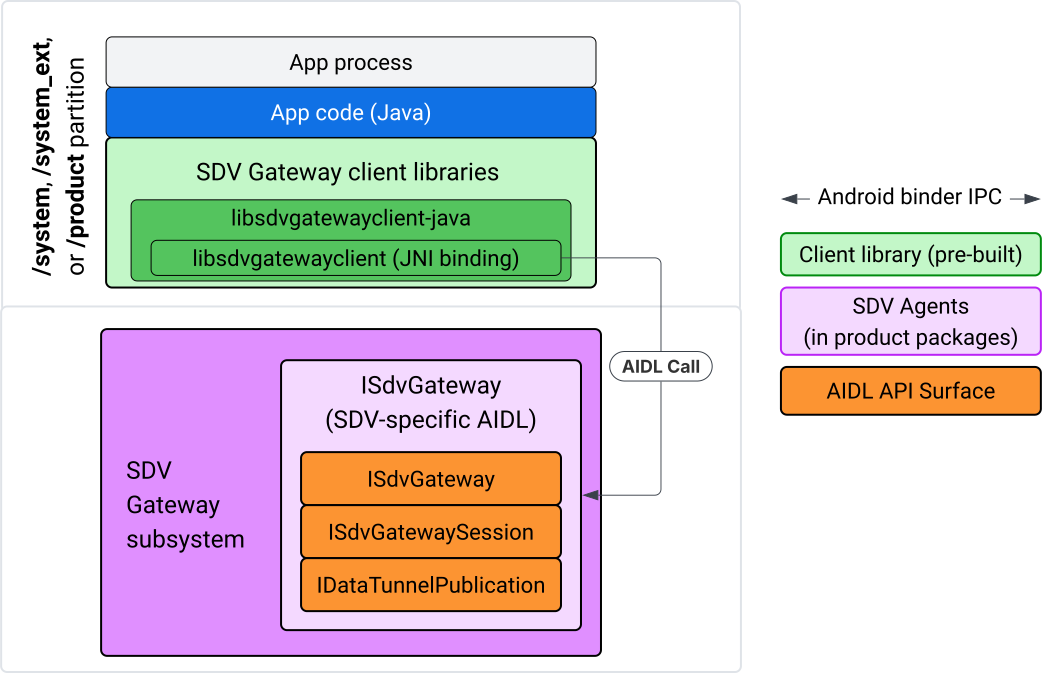
그림 4. IVI Java 앱의 SDV 게이트웨이
구체적으로 모델은 다음을 충족해야 합니다.
- JNI 레이어로 모든 호출을 디스패치합니다.
- Java와 C API를 연결합니다.
ISdvGateway와의 AIDL 상호작용을 정의합니다.- 커뮤니케이션 초기화
- RPC 서버 찾기 또는 만들기
- Pub/Sub 만들기
- 서비스 검색 데이터 터널 상호작용 실행
- 알림 수신 (예: 데이터 사용 가능)
- 키 쌍 생성 및 TLS 인증서용 메시지 (게시/구독용 FMQ) 읽기 및 쓰기
게이트웨이 클라이언트 라이브러리 포함
libsdvgatewayclient C API용 Java 라이브러리와 JNI 래퍼는 IVI 타겟의 APEX에 설치됩니다. 컴파일 시간 종속 항목을 Java 라이브러리 스텁, 런타임에 사용해야 하는 Java 라이브러리, Java 라이브러리가 포함된 필수 APEX에 추가합니다.
android_app {
    name: "YourAppName",
    // ...
    static_libs: [
        "libsdvgatewayclient-java",
    ],
    libs: [
        "libsdvgatewayclient-java-sdk.stubs",
    ],
    uses_libs: [
        "libsdvgatewayclient-java-sdk",
    ],
    required: [
        "com.sdv.google.gateway.client",
    ],
    // ...
}
SDV 트리 외부에서 빌드된 번들 해제 앱의 경우 프로세스는 다음과 유사합니다.
생성된 Java 라이브러리 스텁 JAR와 앱 libs 폴더의 RPC 지원 JAR을 복사합니다. 자세한 내용은
system/software_defined_vehicle/sdv_gateway/libsdvgatewayclient_apex/README.md를 참고하세요.스텁 JAR을 컴파일 전용 종속 항목으로 추가합니다. 예를 들어
dependencies섹션에compileOnly항목을 추가하여 스텁에 종속되도록 Gradle 구성을 업데이트합니다.dependencies { // The library supporting functions for SDK RPC. // Statically linked into the app APK. implementation(files("libs/libsdvgatewayclient-java.jar")) // Stub of the SDV-Gateway client library. // Used only for compilation; the real implementation is provided // by the com.sdv.google.gateway.client APEX at runtime. compileOnly(files("libs/libsdvgatewayclient-java-sdk.jar")) }AndroidManifest.xml파일의 앱 섹션에 Java 라이브러리를 추가합니다.<manifest xmlns:android="http://schemas.android.com/apk/res/android"> <application> <!-- Declares that this app requires the SDV Gateway client library. The 'android:required="true"' attribute ensures the app won't install/run if the library is missing from the system. --> <uses-library android:name="libsdvgatewayclient-java-sdk" android:required="true" /> </application> </manifest>
라이브러리 로드
클라이언트 라이브러리에서 제공하는 SdvGatewayClient 객체를 만듭니다.
import google.sdv.gateway.client.SdvGatewayClient;

// --- Inside your Activity, Service, or ViewModel ---

// Initialize the SDV Gateway Client
SdvGatewayClient gatewayClient = new SdvGatewayClient();
커뮤니케이션 초기화
앱 이름을 서비스 번들 이름으로 사용하여 initComms()를 호출합니다.
// Define a unique name for your service bundle (usually constant)
private static final String SERVICE_BUNDLE_NAME = "MySdvServiceBundle";

// ... inside an Activity or Service context ...

try {
    // Initialize communications with the SDV Gateway
    // context.getPackageName() provides "android.sdv.samples.gateway.client" or similar
    gatewayClient.initComms(context.getPackageName(), SERVICE_BUNDLE_NAME);

    Log.i("SDV_GATEWAY", "Communications initialized successfully");
} catch (Exception e) {
    // Unlike the C API which uses status codes,
    // the Java SDK often throws exceptions for initialization failures.
    Log.e("SDV_GATEWAY", "Failed to initialize communications", e);
}
서비스 검색
Java API에는 다음 작업을 실행하는 메서드가 포함되어 있습니다.
특정 단위 유형의 서비스 단위가 등록되거나 등록 해제될 때 알림을 받습니다 (또는 특정 이름과 일치).
특정 단위 유형의 현재 서비스 단위를 나열합니다 (또는 특정 서비스 단위 유형 이름을 일치시킴). 서비스 단위 변경사항에 대한 알림을 받으려면 리스너를 만드세요.
import google.sdv.gateway.client.ServiceUnitChangeListener;
import google.sdv.gateway.client.ServiceUnitChangeEventType;
import google.sdv.gateway.client.ServiceUnitDefinition;

// --- Implementation ---

ServiceUnitChangeListener listener = new ServiceUnitChangeListener() {
    @Override
    public void onServiceUnitChanged(
        ServiceUnitChangeEventType eventType,
        ServiceUnitDefinition serviceUnitDefinition
    ) {
        // This is triggered when services matching your criteria
        // are registered or unregistered on the vehicle network.
        if (eventType == ServiceUnitChangeEventType.REGISTERED) {
            // Handle new service discovery
        } else if (eventType == ServiceUnitChangeEventType.UNREGISTERED) {
            // Handle service removal
        }
    }
};
addListenerForServiceUnitChangeByName Java 메서드는 리스너에게 알립니다.
// 1. Register the listener for a specific service unit by name
AutoCloseable handle = gatewayClient.addListenerForServiceUnitChangeByName(
    new UnitNameDiscoveryArgs(
        "",                                   // sdvVmName (empty for local/auto-discovery)
        "android.sdv.samples.cluster",        // sdvPackageName
        "ClusterServer",                      // serviceBundleName
        "android-sdv-samples-cluster-cluster" // serviceUnitName
    ),
    listener
);

// --- Later in the application lifecycle ---

// 2. To stop receiving notifications and clean up resources, close the handle.
try {
    if (handle != null) {
        handle.close();
    }
} catch (Exception e) {
    Log.e("SDV_GATEWAY", "Error while closing the listener handle", e);
}
또는 addListenerForServiceUnitChangeByType Java 메서드를 사용하여 지정된 단위 유형의 서비스가 등록되거나 등록 취소될 때 리스너에 알립니다.
// 1. Register a listener based on the Service Unit Type
AutoCloseable handle = gatewayClient.addListenerForServiceUnitChangeByType(
    new UnitType(
        "com.android.testapp.sdvcarmonitor", // sdvPackageName
        "SunroofRpcServer",                  // serviceBundleName
        "Sunroof"                            // unitTypeName
    ),
    listener
);

// --- Execution Loop / Lifecycle ---

// 2. To stop receiving notifications and clean up memory, close the handle.
// This effectively unregisters the listener from the SDV Gateway.
try {
    if (handle != null) {
        handle.close();
    }
} catch (Exception e) {
    Log.e("SDV_GATEWAY", "Failed to close the service unit listener handle", e);
}
addListenerForServiceUnitChangeByName 및 addListenerForServiceUnitChangeByType의 경우 추가된 후 리스너에게 등록된 모든 서비스 단위가 알림으로 전송됩니다. 이름 또는 유형별로 등록된 서비스 단위만 가져오려면 listServiceUnitsByName 및 listServiceUnitsByType Java API를 사용하세요.
import google.sdv.gateway.client.ServiceUnitDefinition;
import google.sdv.gateway.client.UnitNameDiscoveryArgs;
import google.sdv.gateway.client.UnitType;

// --- 1. Synchronous Lookup by Specific Name ---
ServiceUnitDefinition[] definitionsByName = gatewayClient.listServiceUnitsByName(
    new UnitNameDiscoveryArgs(
        "",                                   // sdvVmName
        "android.sdv.samples.cluster",        // sdvPackageName
        "ClusterServer",                      // serviceBundleName
        "android-sdv-samples-cluster-cluster" // serviceUnitName
    )
);

// --- 2. Synchronous Lookup by Service Type ---
ServiceUnitDefinition[] definitionsByType = gatewayClient.listServiceUnitsByType(
    new UnitType(
        "com.android.testapp.sdvcarmonitor", // sdvPackageName
        "SunroofRpcServer",                  // serviceBundleName
        "Sunroof"                            // unitTypeName
    )
);

// Example processing
if (definitionsByType.length > 0) {
    ServiceUnitDefinition firstSunroof = definitionsByType[0];
    // Proceed to connect...
}
RPC 서버 흐름
IVI 시스템 내 SDV 게이트웨이 클라이언트는 Google 리모트 프로시저 콜 (gRPC)을 사용하여 SDV 서비스와 통신합니다. 이러한 상호작용은 VSIDL 카탈로그의 프로토 정의에 의존하며 이는 SDV 코어에서 사용되는 정의와 일관되거나 유사합니다. Java 앱의 경우 gRPC-Java가 선택된 구현입니다. 샘플 서버 프로토 정의 sunroof.proto이 앱 서버에 제공됩니다.
service Sunroof {
    /**
     * Retrieves the current state of the sunroof (e.g., position, tilt, status).
     *
     * @param .google.protobuf.Empty - No input parameters required.
     * @return SunroofStateResponse - The current telemetry data for the sunroof.
     */
    rpc GetSunroofState(.google.protobuf.Empty) returns (SunroofStateResponse) {}
}
해당 proto 라이브러리에 연결하고 서비스를 정의합니다.
import com.android.sdv.sdvgrpclibrary.SunroofGrpc;
import com.android.sdv.sdvgrpclibrary.SunroofStateResponse; // Assuming this is the generated class
import com.google.protobuf.Empty;
import io.grpc.stub.StreamObserver;

/**
 * Implementation of the Sunroof gRPC service.
 * This class handles the logic for the RPCs defined in your .proto file.
 */
static class SunroofGrpcImpl extends SunroofGrpc.SunroofImplBase {

    @Override
    public void getSunroofState(Empty request, StreamObserver<SunroofStateResponse> responseObserver) {
        // 1. Fetch current sunroof data (e.g., from a Hardware Abstraction Layer)
        int currentPosition = 50; // Example value: 50% open

        // 2. Build the Protobuf response message
        SunroofStateResponse response = SunroofStateResponse.newBuilder()
                .setPercentageOpen(currentPosition)
                .build();

        // 3. Send the response to the client using the observer
        responseObserver.onNext(response);

        // 4. Close the stream to signal that the RPC is finished
        responseObserver.onCompleted();
    }
}
보안 채널 사용자 인증 정보와 비보안 채널 사용자 인증 정보로 gRPC 서버를 등록합니다.
// 1. Define the type signature for the service
UnitType unitType = new UnitType(
    "com.android.testapp.sdvcarmonitor", // sdvPackageName
    "SunroofRpcServer",                  // serviceBundleName
    "Sunroof"                            // typeName (Unit Type)
);

// 2. Register the RPC server with the Gateway
// The gateway creates a mapping between the ServiceUnitName and your implementation.
server = gatewayClient.registerRpcServer(
    "SunroofRpcServerImpl-1",                       // serviceUnitName (Unique instance name)
    unitType,                                       // unitType defined earlier
    "SUNROOF_GRPC_SERVER_VALUE_HOLDER".getBytes(),  // appMetadataValueHolder (Static discovery data)
    1,                                              // appMetadataVersion
    new SunroofGrpcImpl()                           // The actual gRPC service implementation
);
내부적으로 클라이언트 라이브러리는 gRPC 서버 객체 SdvGatewayClient.java를 만들고 루트 인증서 업데이트도 처리합니다.
// 1. Initialize credentials (Insecure for dev, TLS for production)
ServerCredentials serverCredentials = InsecureServerCredentials.create();

// 2. Build and start the OkHttp-based gRPC server
final int bindAnyPort = 0;
final Server server = OkHttpServerBuilder
    .forPort(bindAnyPort, serverCredentials)
    .addService(gRpcServerImplementation) // Your SunroofGrpcImpl
    .build()
    .start();

// The assigned port can now be retrieved using server.getPort()
int actualPort = server.getPort();

// 3. Prepare the JNI data structure
// This object mirrors the ASDVGateway_ServiceUnitDefinition_t C struct
JniServiceUnitDefinition definition = new JniServiceUnitDefinition();

// Fill the RPC service definition params (Port, Name, Type, etc.)
definition.setPort(actualPort);
definition.setServiceUnitName("SunroofRpcServerImpl-1");

// 4. Perform the cross-language call
// This jumps from Java -> JNI -> ASDVGateway_Client_registerRpcServer (C API)
mJniClient.nativeRegisterRpcServer(definition);
RPC 클라이언트 흐름
이 코드 샘플은 앱이 클라이언트로 연결되는 서버의 서버 프로토 정의 (tpms.proto)를 제공합니다.
/**
 * The TPMS service provides real-time pressure and temperature
 * data for all tires on the vehicle.
 */
service Tpms {
    /**
     * Returns the full state of all monitored tires.
     */
    rpc GetTpmsState(.google.protobuf.Empty) returns (TpmsStateResponse) {}

    /**
     * A filtered query that returns only the tires
     * below the recommended pressure threshold.
     */
    rpc GetLowTires(.google.protobuf.Empty) returns (LowTiresResponse) {}
}
해당하는 proto 라이브러리에 연결합니다.
import com.android.sdv.sdvgrpclibrary.TpmsGrpc;
import io.grpc.ManagedChannel;

// --- Inside your Client Application ---

// 1. Request a ManagedChannel from the Gateway for a specific service unit
ManagedChannel managedChannel = gatewayClient.connectToRpcServerByName(
    "",                                     // sdvVmName (empty for local/auto-lookup)
    "android.sdv.samples.cluster",          // packageName
    "ClusterServer",                        // serviceBundleName
    "android-sdv-samples-cluster-cluster"  // serviceUnitName
);

// 2. Use the channel to create a gRPC stub (e.g., for the TPMS service)
TpmsGrpc.TpmsBlockingStub tpmsStub = TpmsGrpc.newBlockingStub(managedChannel);

// 3. Now you can call RPC methods directly
// TpmsStateResponse response = tpmsStub.getTpmsState(Empty.getDefaultInstance());
내부적으로 ASDVGateway_Client_findRpcServerByName API가 호출되어 RPC 서버를 찾습니다. RPC 서버가 발견되면 서비스 검색 구성에 따라 관리 채널이 보안되지 않은 모드로 생성되거나 RPC 서버 흐름과 유사하게 TLS 구성을 사용하도록 지정됩니다. 앱은 ManagedChannel 객체로 스텁을 만들고 서버 메서드를 호출합니다.
import com.android.sdv.sdvgrpclibrary.TpmsGrpc;
import com.android.sdv.sdvgrpclibrary.TpmsStateResponse;
import com.google.protobuf.Empty;
import io.grpc.stub.MetadataUtils;

// 1. Create a "Blocking Stub" from the existing ManagedChannel.
// We apply an interceptor to attach mandatory metadata (headers)
// required by the SDV Gateway for authorization.
TpmsGrpc.TpmsBlockingStub tpmsStub = TpmsGrpc.newBlockingStub(managedChannel)
    .withInterceptors(MetadataUtils.newAttachHeadersInterceptor(mMetadata));

// 2. Execute the RPC call.
// Because this is a "BlockingStub," the thread will wait here until
// the vehicle service responds or times out.
TpmsStateResponse tpmsStateResponse = tpmsStub.getTpmsState(Empty.getDefaultInstance());

// 3. Extract the domain-specific state object from the Protobuf response.
// 'newState' can now be used to update your UI or application logic.
newState = tpmsStateResponse.getTpmsState();
프로세스의 기본 네트워크 전환
인터넷 바운드 연결을 위한 소켓을 열려면 프로세스의 기본 네트워크를 SDV-RPC VLAN에서 전환해야 할 수 있습니다. unbindProcessFromSdvRpcNetworkInterface 및 bindProcessToSdvRpcNetworkInterface를 호출하여 프로세스를 SDV-RPC VLAN에 바인딩 해제하고 다시 바인딩합니다. 두 호출은 전역 스위치 역할을 하여 프로세스의 모든 스레드에 소켓이 바인드된 네트워크 인터페이스를 전환합니다.
// 1. Redirect all socket traffic from this process to the SDV-RPC VLAN.
// This call is required for making RPC calls or hosting RPC services for SDV.
gatewayClient.bindProcessToSdvRpcNetworkInterface();

// --- Process is now communicating over the SDV-RPC interface ---

// 2. Revert the process network binding back to the "default" interface.
// This allows the app to access internet resources again.
gatewayClient.unbindProcessFromSdvRpcNetworkInterface();
게시자 생성 및 메시지 게시
// 1. Define the interface and type for the publication
UnitType unitType = new UnitType(
    "android.sdv.samples.tires.interface", // sdvPackageName
    "TirePressurePublisherInterface",      // serviceBundleName
    "TirePressure"                         // typeName
);

// 2. Configure the Publisher's buffer and message constraints
PublisherUnitMetadata publisherUnitMetadata = new PublisherUnitMetadata(
    1,   // version
    64,  // message size in bytes (fixed size for performance)
    128  // max message count (buffer depth)
);

// 3. Create the Publication instance through the Gateway
Publisher tirePublisher = gatewayClient.createPublication(
    "tire-pressure-service-unit-name",
    unitType,
    publisherUnitMetadata
);

// 4. Prepare and publish a message
// In a real app, you would encode your sensor data into this byte array
byte[] msg = new byte[publisherUnitMetadata.messageSizeBytes];

// ... fill msg with data ...

tirePublisher.publish(msg);
내부적으로 Java createPublication 및 게시 API는 네이티브 ASDVGateway_Client_createPublication 및 ASDVGateway_Client_readAvailableMessages API를 사용합니다. C API에 관한 자세한 내용은 IVI 네이티브 서비스에서 SDV 게이트웨이 사용을 참고하세요. Publisher 객체는 메시지를 작성하고 게시의 수명 주기를 관리하기 위한 컨텍스트를 제공합니다.
알림 리스너로 구독자 만들기
Java API를 사용하면 리스너를 게시 구독 메서드에 매개변수로 전달하고 Subscription 객체를 반환할 수 있습니다.
Listener는 구독한 게시의 데이터를 사용할 수 있을 때 알림을 받습니다.Subscription는 컨텍스트 객체 역할을 하며 메시지를 읽고 구독을 닫는 데 사용할 수 있습니다.
// 1. Define the Listener to handle incoming data notifications
SubscriptionNotificationListener listener = new SubscriptionNotificationListener() {
    @Override
    public void onSubscriptionNotification(
        Subscription subscription,
        SubscriptionNotificationType notificationType
    ) {
        // Only process if the notification indicates new data is ready
        if (notificationType != SubscriptionNotificationType.DataAvailable) {
            return;
        }

        // Read the message from the subscription buffer
        byte[] content = subscription.readMessage();

        // Note: This callback often runs on a background thread provided by the SDK.
        // If you need to update the UI, use a Handler or View.post().
        processTireData(content);
    }
};

// 2. Subscribe to the publication by its unique name
Subscription tireSubscription = gatewayClient.subscribeToPublicationByName(
    "",                                  // sdvVmName (empty for auto-lookup)
    "android.sdv.samples.dt_publisher",  // packageName
    "SdvGatewayDtPublisher",             // serviceBundleName
    "tire",                              // serviceUnitName
    listener
);

// 3. Read Messages
// You can poll or register callbacks for new messages.
// When polling the message, call this method in a loop.
// When registering callbacks, call this method to get the message payload.
byte[] manualContent = tireSubscription.readMessage();
코드 샘플
리스너 콜백은 클라이언트에서 관리하는 단일 스레드에서 호출되어 리스너 내 처리를 최소화하여 다른 구독의 알림 수신이 지연되지 않도록 합니다. Java 레이어는 구독 관리, 알림 처리, 메시지 검색을 위해 C API를 활용합니다. API 사용 데모는 system/software_defined_vehicle/samples/sdv_gateway/README.md의 바이너리 파일에 제공된 Java 앱 샘플을 참고하세요.
필수 권한
SDV 게이트웨이 클라이언트 API를 호출하는 데는 특별한 권한이 필요하지 않지만 앱에 적절한 SELinux 규칙을 적용해야 합니다.
- 데이터 터널 구독 및 게시의 경우 권한이 필요하지 않습니다.
- SDV RPC의 경우 다음 권한이 필요합니다.
android.permission.INTERNETandroid.permission.CONNECTIVITY_USE_RESTRICTED_NETWORKS
android.permission.CONNECTIVITY_USE_RESTRICTED_NETWORKS의 경우 앱과 동일한 파티션의 etc/permissions 아래에 허용 목록 파일도 필요합니다. 예를 들어 SdvCarMonitorTestApp (패키지 이름 com.android.testapp.sdvcarmonitor)의 경우 파일은 다음과 같습니다.
<?xml version="1.0" encoding="utf-8"?>

<permissions>
    <privapp-permissions package="com.android.testapp.sdvcarmonitor">
        <permission name="android.permission.CONNECTIVITY_USE_RESTRICTED_NETWORKS"/>
    </privapp-permissions>
</permissions>
SELinux 규칙
SDV 게이트웨이 API를 사용하려면 Java 앱에 네이티브 서비스와 동일한 권한이 필요합니다. sdv_gateway_client_domain() SELinux 매크로를 사용하여 이러한 권한을 부여합니다.
sdv_gateway_client_domain(my_oem_sdv_gateway_client_app)
OEM은 SDV 게이트웨이를 사용할 수 있는 Java 앱의 my_oem_sdv_gateway_client_app 도메인을 정의합니다. 시스템 및 권한이 있는 앱에서만 SDV 게이트웨이를 사용해야 합니다.
코드 위치
system/software_defined_vehicle/sdv_gateway/에서 SDV 게이트웨이의 소스 코드를 가져옵니다. 다음의 SDV 게이트웨이 샘플을 가져올 수 있습니다.
- 클라이언트 C API:
system/software_defined_vehicle/samples/sdv_gateway/NativeSdvGatewayTestApp/ - 클라이언트 Java API:
system/software_defined_vehicle/samples/sdv_gateway/SdvCarMonitorTestApp/