

Brama pojazdu definiowanego przez oprogramowanie (SDV) w samochodowych systemach multimedialnych (IVI) ułatwia komunikację między systemami IVI a zdalnymi usługami SDV. Brama umożliwia aplikacjom Java OEM i usługom natywnym, takim jak VHAL, interakcję z usługami SDV. Brama korzysta z ustalonych metod komunikacji, w tym rejestracji usług, wykrywania i RPC.
Ta brama spełnia określone wymagania projektu AAOS SDV, takie jak włączenie implementacji referencyjnej VHAL przy użyciu tunelu danych SDV w celu uzyskania informacji o właściwościach. Umożliwia też aplikacjom na Androida napisanym w Javie i Kotlinie na IVI korzystanie ze stosu SDV Comms, rejestrowanie się jako usługi, wyszukiwanie innych usług SDV i komunikowanie się z nimi.
Lokalizacje kodu SDV Gateway i przykładowych klientów SDV Gateway znajdziesz w sekcji Lokalizacje kodu.
Modele integracji bramy SDV
Używanie komunikacji SDV-IVI za pomocą bramy SDV w architekturze IVI
Brama SDV współpracuje z aplikacjami Java, usługami natywnymi, stosem komunikacyjnym SDV i siecią pojazdu. Rysunek 1 ilustruje te interakcje:
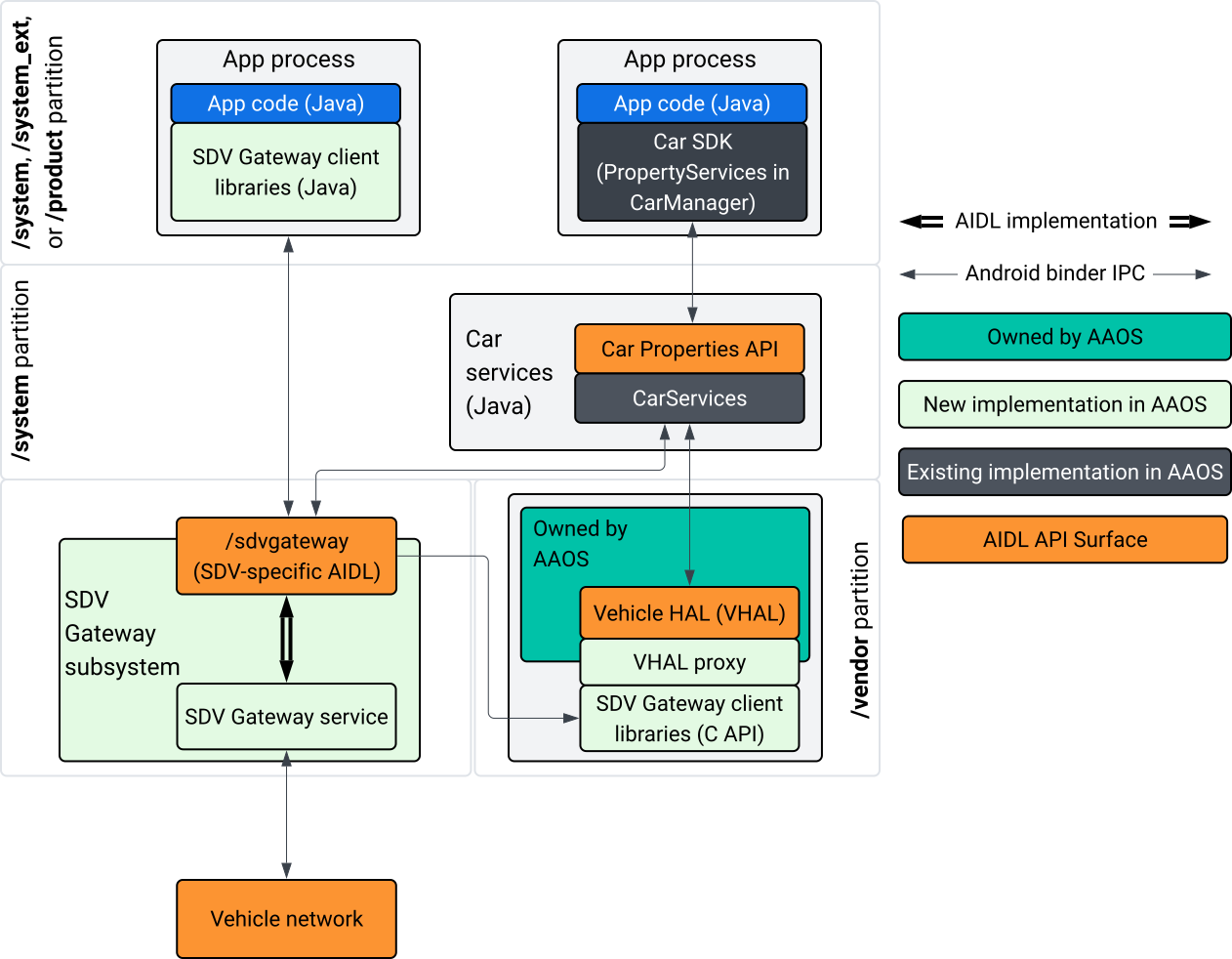
Rysunek 1. Interakcje z bramą SDV.
Na tym diagramie systemu:
- Aplikacje wchodzą w interakcję z bramą SDV za pomocą usług klienta.
- Pakiet AAOS SDV SDK zapewnia:
- Interfejs ISdvGateway AIDL API do komunikacji między procesami.
- Biblioteki komunikacyjne do interakcji z siecią.
- Wygodny interfejs C API do integracji usług natywnych.
- Interfejs ISdvGateway AIDL API jest implementowany przez usługę i podsystem SDV Gateway.
- Usługa SDV Gateway zarządza:
- dwukierunkowe wykrywanie usług,
- Komunikacja ze zdalnymi usługami SDV.
- podstawową logikę biznesową,
- Podsystem bramy SDV łączy się z siecią pojazdu.
- Usługi natywne, w tym implementacja VHAL, mogą korzystać z interfejsu ISdvGateway AIDL bezpośrednio lub za pomocą interfejsu C pakietu SDK.
- Serwer proxy VHAL służy jako referencyjna implementacja VHAL, która obejmuje integrację mapowania VSIDL.
Model integracji bramy SDV w usłudze natywnej IVI
Model integracji przedstawia rysunek 2:
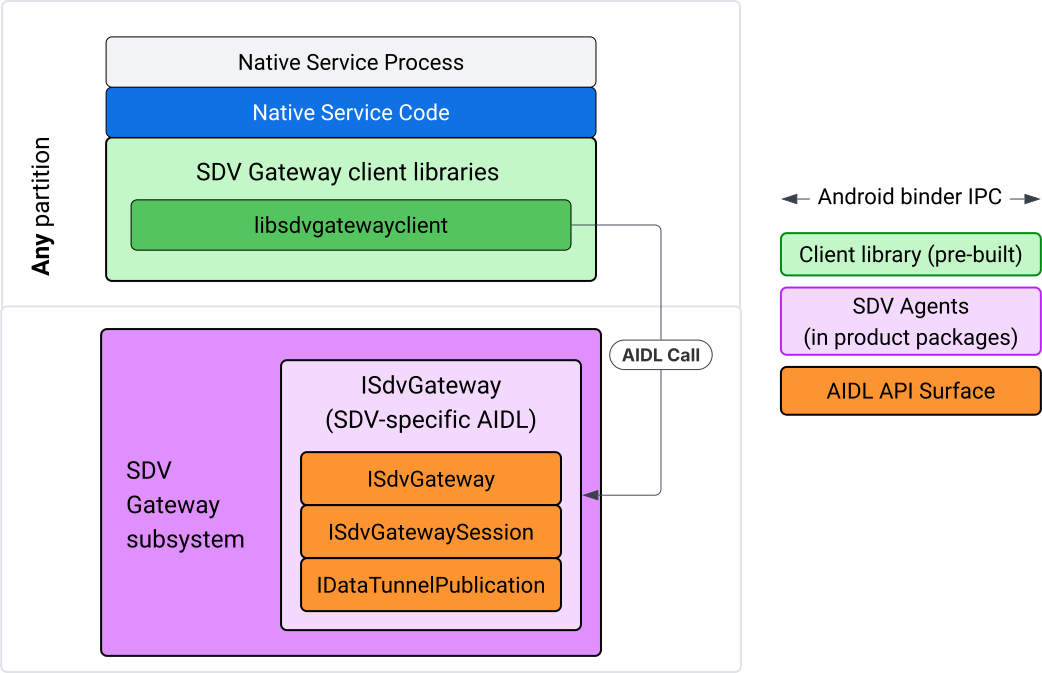
Rysunek 2. Model integracji SDV Gateway.
Używanie bramy SDV w natywnej usłudze IVI
Rysunek 3 przedstawia użycie bramy SDV w systemie IVI:
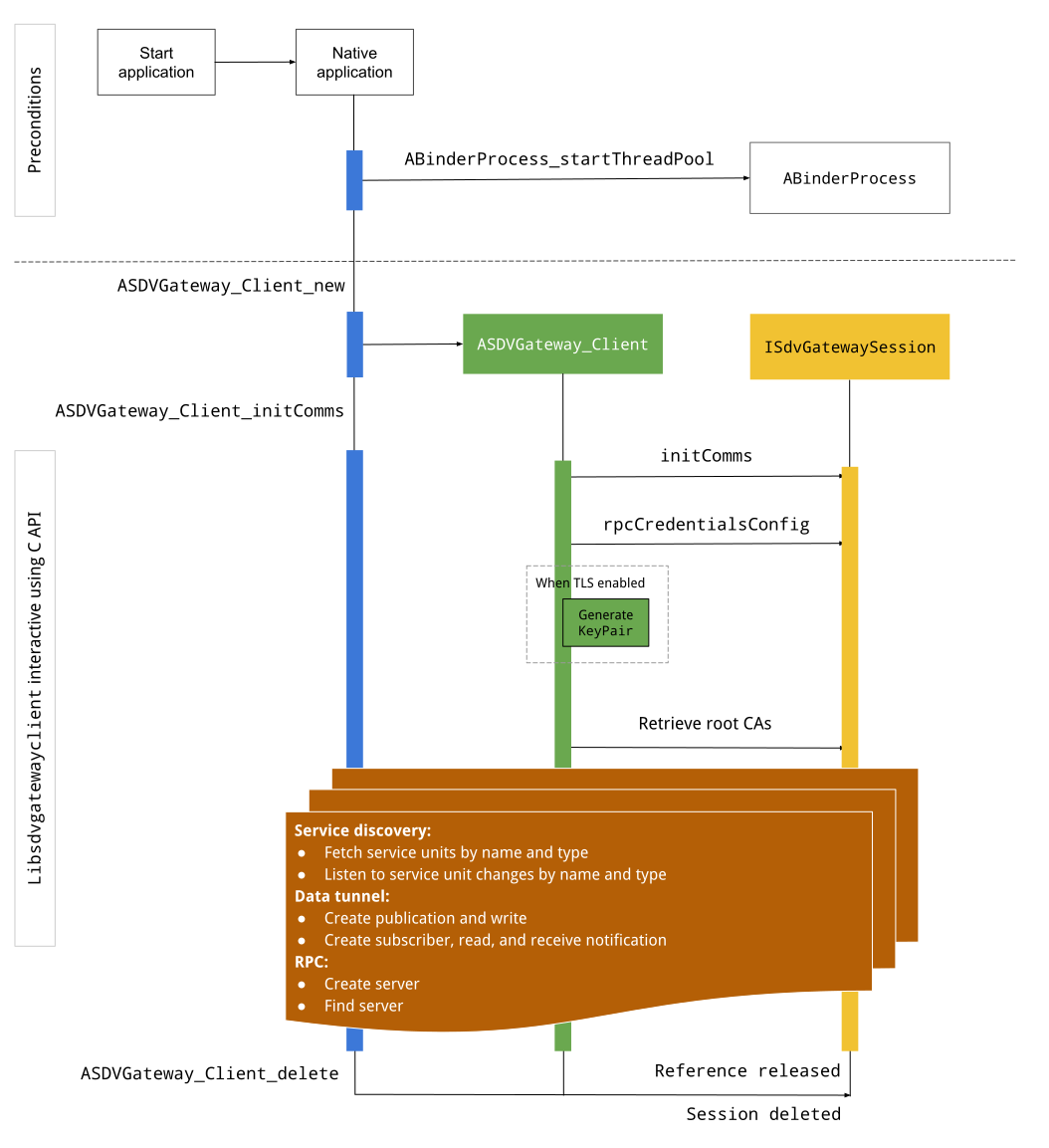
Rysunek 3. Brama SDV w systemie IVI.
Warunki wstępne
Uruchom pulę wątków Binder:
Biblioteka klienta SDV Gateway wymaga uruchomionego puli wątków Binder, aby odbierać asynchroniczne wywołania zwrotne z usług Binder.
Interfejs API potrzebny do utworzenia klienta bramy SDV nie działa, gdy nie jest uruchomiona pula wątków Binder.
Dołączanie natywnej biblioteki klienta Gateway
Biblioteka klienta Native Gateway udostępnia interfejs C API. Dodaj instancję libsdvgatewayclient jako zależność, aby używać interfejsu C API:
cc_binary {
    name: "your_binary_name",
    srcs: ["main.cpp"],
    shared_libs: [
        "libsdvgatewayclient",
    ],
}
Wczytywanie natywnego klienta bramy
#include "libsdvgatewayclient.h"
Tworzenie instancji klienta natywnego
ASDVGateway_Client* client;
ASDVGateway_StatusCode_t statusCode = ASDVGateway_Client_new(
     &client, /*outStatus*/nullptr);
Po utworzeniu klienta:
Przechowuje stan wszystkich kolejnych interakcji z usługą Gateway.
Działa jako kontekst wszystkich interakcji z innymi usługami obsługującymi SDV i jest przekazywany jako pierwszy parametr do funkcji interfejsu C API.
Kody stanu i komunikaty o błędach
Większość funkcji interfejsu C API ma taką definicję:
ASDVGateway_StatusCode_t ApiFunctionName(..., ASDVGateway_Status_t* outStatus);
Aby ocenić powodzenie, możesz sprawdzić zwrócony kod stanu, który jest typu ASDVGateway_StatusCode_t. Możesz też przekazać wskaźnik do struktury, w której funkcja może wypełnić kod stanu i komunikat o błędzie. Wskaźnik jest przekazywany jako ostatni parametr o nazwie outStatus. Wartość null oznacza, że struktura wyjściowa nie jest używana.
Wywołujący musi przydzielić strukturę stanu pamięci dla komunikatu o błędzie. Struktura stanu może zawierać zarówno kod stanu, jak i komunikat o błędzie. Dostępny jest przykład pobierania komunikatu o błędzie podczas tworzenia nowego klienta.
Aby ocenić, czy wyniki są korzystne:
Sprawdź zwrócony kod stanu, który jest typu
ASDVGateway_StatusCode_t.Przekaż wskaźnik do struktury, w której funkcja może wypełnić kod stanu i komunikat o błędzie.
- Wskaźnik jest przekazywany jako ostatni parametr o nazwie
outStatus. - Wartość null oznacza, że struktura wyjściowa nie jest używana.
- Wywołujący musi przydzielić strukturę stanu pamięci dla komunikatu o błędzie.
- Struktura stanu może zawierać kod stanu i komunikat o błędzie.
- Wskaźnik jest przekazywany jako ostatni parametr o nazwie
Oto przykład, który pokazuje, jak pobrać komunikat o błędzie dla nowego klienta:
#include <iostream>
#include <array>

struct StatusWithErrorMsg : ASDVGateway_Status_t {
    StatusWithErrorMsg() {
        // Ensure the base struct pointers point to our internal buffer
        errorMessage = errorMessageBuffer.data();
        maxErrorMessageSize = errorMessageBuffer.size();

        // Good practice: Zero-initialize the buffer
        errorMessageBuffer.fill(0);
    }

    std::array<char, 256> errorMessageBuffer;
};

// --- Execution ---

ASDVGateway_Client* client = nullptr;
StatusWithErrorMsg status;

// Initialize the client
ASDVGateway_StatusCode_t statusCode = ASDVGateway_Client_new(&client, &status);

// Log Results
std::cout << "Returned statusCode:    " << statusCode << std::endl;
std::cout << "Status Struct Code:     " << status.statusCode << std::endl;
std::cout << "Status Error Message:   " << status.errorMessage << std::endl;
W tym przykładzie:
Kod stanu zawarty w strukturze stanu ma taką samą wartość jak zwrócony kod stanu.
Komunikat o błędzie jest wypełniany tylko do limitu
maxErrorMessageSizeznaków (włącznie ze znakiem null\0). Jeśli nie wystąpi żaden błąd (kod stanu toOK), komunikat o błędzie jest pustym ciągiem znaków.
Inicjowanie komunikacji
Funkcja Init comms inicjuje komunikację między aplikacją wywołującą a innymi aplikacjami za pomocą stosu komunikacyjnego SDV i bramy SDV. Funkcję inicjowania komunikacji można wywołać w obu tych kontekstach:
Po utworzeniu klienta.
Przed jakąkolwiek interakcją z tunelami danych, RPC lub wykrywaniem usług.
Oto przykład:
ASDVGateway_InitCommsParams_t params{
.packageName = "android.sdv.samples.gateway.client",
.serviceBundleName = "NativeTestApp",
.serviceInstanceName = "default",
};
// Initialize communications and capture the status code
ASDVGateway_StatusCode_t statusCode = ASDVGateway_Client_initComms(client, ¶ms, &status);
// Recommended check
if (statusCode != ASDVGateway_StatusCode_OK) {
std::cerr << "Failed to init comms: " << status.errorMessage << std::endl;
}
Wykrywanie usług
Możesz otrzymywać powiadomienia, gdy jednostki usług określonego typu lub o określonej nazwie zostaną zarejestrowane lub wyrejestrowane. Funkcja wywołania zwrotnego jest powiadamiana w wątku należącym do klienta bramy. To wywołanie zwrotne jest początkowo wywoływane ze wszystkimi jednostkami usługi zarejestrowanymi bezpośrednio po wywołaniu interfejsu C API. Po początkowym wywołaniu powiadomienia są nadal wysyłane z aktualizacjami, dopóki detektor nie zostanie wyraźnie wyrejestrowany.
class NativeSdvGatewayTestApp {
public:
    static void ServiceUnitChangeListenerCallback(
        const ASDVGateway_ServiceUnitChangeEventType eventType,
        const ASDVGateway_ServiceUnitDefinition* serviceUnitDefinition,
        void* userData
    ) {
        auto* testApp = reinterpret_cast<NativeSdvGatewayTestApp*>(userData);

        if (testApp) {
            // Logic to react when services are registered or unregistered
            // e.g., testApp->handleServiceChange(eventType, serviceUnitDefinition);
        }
    }
};

// --- Listener Registration ---

// Ensure thisApp remains in scope as long as the listener is active
NativeSdvGatewayTestApp* thisApp = get_current_app_context();

ASDVGateway_UnitType_t unitType{
    .sdvPackageName     = "android.sdv.samples.sdv_gateway",
    .serviceBundleName  = "DtPublisher",
    .unitTypeName       = "TirePressure",
};

// Register the listener
ASDVGateway_Client_registerListenerForServiceUnitChangeByType(
    client,
    &unitType,
    NativeSdvGatewayTestApp::ServiceUnitChangeListenerCallback,
    static_cast<void*>(thisApp), // userData
    &listenerHandle,
    &status
);

// --- Cleanup ---

// Unregistering stops all notification to the callback function
ASDVGateway_Client_unregisterListenerForServiceUnitChangeByType(
    client,
    listenerHandle,
    &status
);
Aby pobrać zarejestrowane jednostki usług bez dodatkowych powiadomień, użyj interfejsów API ASDVGateway_Client_fetchServiceUnitsByType i ASDVGateway_Client_fetchServiceUnitsByName.
class NativeSdvGatewayTestApp {
public:
    /**
     * Callback triggered for each service unit found that matches the requested type.
     */
    static void FetchServiceUnitsCallback(
        const ASDVGateway_ServiceUnitDefinition* serviceUnitDefinition,
        void* userData
    ) {
        auto* app = reinterpret_cast<NativeSdvGatewayTestApp*>(userData);

        if (serviceUnitDefinition) {
            // The service unit is registered with service discovery.
            // Example: processServiceUnit(serviceUnitDefinition);
        }
    }
};

// --- Execution ---

ASDVGateway_UnitType_t unitType{
    .sdvPackageName     = "android.sdv.samples.sdv_gateway",
    .serviceBundleName  = "DtPublisher",
    .unitTypeName       = "TirePressure",
};

// Context used to differentiate between various fetchServiceUnits calls
void* userData = static_cast<void*>(thisApp);

ASDVGateway_Client_fetchServiceUnitsByType(
    client,
    &unitType,
    NativeSdvGatewayTestApp::FetchServiceUnitsCallback,
    userData,
    &status
);
Wywołanie zwrotne jest wywoływane synchronicznie w wątku wywołującego podczas wywołania interfejsu API ASDVGateway_Client_fetchServiceUnitsByType. Użyj
ASDVGateway_Client_fetchServiceUnitsByName, aby uzyskać zarejestrowane jednostki usługi
według nazwy zamiast według typu jednostki:
ASDVGateway_StatusCode_t ASDVGateway_Client_fetchServiceUnitsByName(
    // [in]  Opaque pointer to a client object.
    const ASDVGateway_Client* client,

    // [in]  Pointer to a structure containing the package name,
    //       service bundle name, and service unit name.
    const ASDVGateway_UnitNameDiscoveryArgs_t* unitName,

    // [in]  Callback function to be called for each service unit
    //       definition registered. Called synchronously in the
    //       caller's thread before the fetch completes.
    ASDVGateway_FetchServiceUnitsCallback callback,

    // [in]  Optional value passed back as a parameter of the callback.
    void* userData,

    // [out] Optional pointer to status structure for result
    //       codes and error messages.
    ASDVGateway_Status_t* outStatus
);
Przepływ RPC
Biblioteka klienta Gateway obsługuje ustawienia protokołu TLS (Transport Layer Security) w przypadku komunikacji z innymi aplikacjami obsługującymi SDV. Pobiera on w szczególności ustawienia TLS wymagane do komunikacji. Sposób określania wykorzystania protokołu TLS:
Protokół TLS jest używany, gdy tryb rozruchu SDV to
LOCKED.Komunikacja niezabezpieczona jest używana, gdy tryb rozruchu SDV to
UNLOCKED. Gdy używany jest protokół TLS, biblioteka klienta Gateway generuje parę kluczy, która jest znana tylko procesowi aplikacji. Klient pobiera dane logowania RPC, aby utworzyć serwer RPC lub kanał klienta RPC. RPC korzysta z dedykowanej sieci VLAN SDV-RPC. Biblioteka klienta Gateway wywołuje funkcję android_setprocnetwork, aby przełączyć domyślną sieć procesu na sieć VLAN SDV-RPC w trakcie wywołaniaASDVGateway_Client_initCommslub po nim.
Dostępność RPC
Klient skonfigurowany do uruchamiania na wczesnym etapie rozruchu może uruchomić się przed udostępnieniem sieci VLAN SDV-RPC. Przed próbą utworzenia gniazd serwera RPC lub klienta RPC sprawdź, czy RPC jest dostępny:
// Check if the RPC (Remote Procedure Call) service is available
bool isRpcAvailable = ASDVGateway_Client_isRpcAvailable(client);

if (isRpcAvailable) {
    // Proceed with RPC calls
} else {
    // Handle the case where RPC is not yet ready or available
}
lub
// Check if the process is correctly bound to the SDV RPC Network Interface/VLAN
bool isRpcNetworkBound = ASDVGateway_Client_isProcessBoundToSdvRpcNetworkInterface(client);

if (!isRpcNetworkBound) {
    // Usually implies the process isn't running on the correct network interface
    // or the VLAN configuration is missing.
    std::cerr << "Warning: Process is not bound to the SDV RPC VLAN." << std::endl;
}
Ustaw detektor zdarzeń klienta za pomocą funkcji
ASDVGateway_Client_setClientNotificationCallback, aby otrzymywać powiadomienia o zmianach stanu dostępności RPC.
ASDVGateway_Client_isProcessBoundToSdvRpcNetworkInterface jest preferowane, jeśli aplikacja przełącza sieć procesu, ponieważ sprawdza zarówno dostępność RPC, jak i powiązanie procesu z siecią VLAN SDV-RPC.
Przełączanie sieci domyślnej procesu
Aby otworzyć gniazda dla połączeń wychodzących do internetu, może być konieczne przełączenie się z sieci VLAN SDV-RPC jako domyślnej sieci procesu. Wywołaj
ASDVGateway_Client_unbindProcessFromSdvRpcNetworkInterface i
ASDVGateway_Client_bindProcessToSdvRpcNetworkInterface, aby odłączyć i ponownie połączyć
proces z siecią VLAN SDV-RPC. Te 2 wywołania działają jak globalne przełączniki, które przełączają interfejs sieciowy, do którego gniazda są powiązane, dla wszystkich wątków procesu.
// 1. Unbind: Sockets return to the "default" network interface (e.g., wlan0, eth0)
ASDVGateway_StatusCode_t unbindStatus =
    ASDVGateway_Client_unbindProcessFromSdvRpcNetworkInterface(client, &status);

// 2. Bind: Sockets are now bound to the dedicated SDV-RPC VLAN
ASDVGateway_StatusCode_t bindStatus =
    ASDVGateway_Client_bindProcessToSdvRpcNetworkInterface(client, &status);

// Validation
if (bindStatus == ASDVGateway_StatusCode_OK) {
    // Sockets are successfully bound to the SDV-RPC VLAN
}
Powiadomienia RPC
Ustaw odbiornik klienta, aby otrzymywać powiadomienia o zmianach dostępności RPC i aktualizacjach certyfikatów głównych, które muszą być akceptowane przez serwer RPC:
class NativeSdvGatewayTestApp {
public:
    static void ClientNotificationCallback(
        ASDVGateway_ClientNotificationType_t notificationType,
        void* userData
    ) {
        auto* testApp = reinterpret_cast<NativeSdvGatewayTestApp*>(userData);
        if (!testApp) return;

        switch (notificationType) {
            case ASDVGateway_ClientNotificationType_RootCertsChanged:
                std::cout << "onClientNotification: Root Certs Changed" << std::endl;
                // Handle certificate rotation logic here
                break;

            case ASDVGateway_ClientNotificationType_RpcAvailabilityChanged:
                std::cout << "onClientNotification: RPC Availability Changed" << std::endl;
                // Handle reconnection or UI updates here
                break;

            default:
                std::cout << "onClientNotification: Received Unknown Notification ("
                          << notificationType << ")" << std::endl;
                break;
        }
    }
};

// --- Registration ---

NativeSdvGatewayTestApp* thisApp = get_current_app_context();

// Register the notification callback to monitor system-level changes
ASDVGateway_StatusCode_t statusCode = ASDVGateway_Client_setClientNotificationCallback(
    client,
    NativeSdvGatewayTestApp::ClientNotificationCallback,
    static_cast<void*>(thisApp), // userData
    &status
);
Przepływ serwera RPC
Aby utworzyć serwer RPC, musisz użyć danych logowania:
ASDVGateway_RpcCredentials_t* rpcCredentials = nullptr;

// Retrieve the credentials from the client
ASDVGateway_StatusCode_t statusCode = ASDVGateway_Client_rpcCredentials(client, &rpcCredentials, &status);

// Validation: Differentiating between an error and a deliberate "insecure mode"
if (status.statusCode != ASDVGateway_StatusCode_OK) {
    std::cerr << "Error retrieving credentials: " << status.errorMessage << std::endl;
    return;
}

// Logic for choosing Security Credentials
if (rpcCredentials == nullptr) {
    // If the call succeeded but credentials are null, the system expects insecure communication
    std::cout << "Configuring for Insecure Mode" << std::endl;
} else {
    std::cout << "Configuring for Secure Mode:" << std::endl;
    std::cout << "  Private Key: " << (rpcCredentials->privateKeyPem ? "Present" : "Missing") << std::endl;
    std::cout << "  RootCerts:   " << rpcCredentials->rootCertsPem << std::endl;
    std::cout << "  CertChain:   " << rpcCredentials->certChainPem << std::endl;
    std::cout << "  SAN:         " << rpcCredentials->subjectAlternativeName << std::endl;
}

// --- Cleanup ---

// Release the memory once the RPC server/client is initialized
if (rpcCredentials != nullptr) {
    ASDVGateway_Client_deleteRpcCredentials(client, rpcCredentials);
}
Gdy utworzysz serwer RPC i będzie znany jego port nasłuchiwania, zarejestruj serwer RPC, aby mógł wykrywać inne aplikacje:
ASDVGateway_RegisterRpcServerParams_t params{
.serviceUnitName = "android-sdv-samples-sunroof-sunroof",
.unitType = ASDVGateway_UnitType_t{
.sdvPackageName = "android.sdv.samples.sunroof",
.serviceBundleName = "SunroofServer",
.unitTypeName = "Sunroof",
},
.listeningPort = listeningPort,
.serverUnitMetadata = ASDVGateway_ServerUnitMetadata_t{
.version = 1,
},
};
// Register the RPC server with the SDV Gateway
ASDVGateway_StatusCode_t statusCode = ASDVGateway_Client_registerRpcServer(
client,
¶ms,
&status
);
// Basic error handling
if (statusCode != ASDVGateway_StatusCode_OK) {
std::cerr << "Failed to register RPC server: " << status.errorMessage << std::endl;
}
Gdy system aktualizuje certyfikaty główne w czasie działania (np. podczas zmian stanu maszyny wirtualnej), serwery RPC muszą odświeżyć listę akceptowanych certyfikatów:
Ustaw detektor zdarzeń klienta za pomocą funkcji
ASDVGateway_Client_setClientNotificationCallback, aby otrzymywać powiadomienia o aktualizacji certyfikatów głównych.Zadzwoń pod numer
ASDVGateway_Client_rpcCredentials, aby uzyskać zaktualizowane certyfikaty główne.
Wzorzec przeglądania klienta RPC
Oto przepływ w przypadku klienta RPC:
ASDVGateway_FindRpcServerByNameParams_t params{
.packageName = "android.sdv.samples.cluster",
.serviceBundleName = "ClusterServer",
.serviceUnitName = "android-sdv-samples-cluster-cluster",
};
ASDVGateway_SocketAddress_t socketAddress;
ASDVGateway_RpcCredentials_t* rpcCredentials = nullptr;
// Perform the lookup to find the server's location and security requirements
ASDVGateway_StatusCode_t statusCode = ASDVGateway_Client_findRpcServerByName(
mClient,
¶ms,
&socketAddress,
&rpcCredentials,
&status
);
// Mandatory check: Distinguish between system errors and intentional "Insecure Mode"
if (status.statusCode != ASDVGateway_StatusCode_OK) {
std::cerr << "Failed to find RPC server: " << status.errorMessage << std::endl;
return;
}
// Logic for establishing the RPC channel
if (rpcCredentials == nullptr) {
std::cout << "Connecting via Insecure Mode to "
<< socketAddress.address << ":" << socketAddress.port << std::endl;
} else {
std::cout << "Connecting via Secure Mode to "
<< socketAddress.address << ":" << socketAddress.port << std::endl;
std::cout << " RootCerts: " << rpcCredentials->rootCertsPem << std::endl;
std::cout << " SAN: " << rpcCredentials->subjectAlternativeName << std::endl;
// Note: privateKeyPem and certChainPem are typically used if the client
// needs to perform mutual TLS (mTLS).
}
// Cleanup: Release the credential memory once the RPC channel is established
if (rpcCredentials != nullptr) {
ASDVGateway_Client_deleteRpcCredentials(client, rpcCredentials);
}
Tworzenie wydawcy i publikowanie wiadomości
Interfejs ASDVGateway_Client_createPublication API służy do rejestrowania jednostki usługi wydawcy w SDV Gateway za pomocą interfejsu AIDL i tworzenia w procesie aplikacji kolejki Fast Message Queue (FMQ). Binder jest używany tylko do konfigurowania FMQ, a nie do pisania wiadomości. Następnie interfejs ASDVGateway_Client_publishMessages API służy do publikowania wiadomości w utworzonej publikacji. Obejmuje to wysłanie wiadomości do kolejki FMQ publikacji i powiadomienie o tym, że wiadomości zostały zapisane.
ASDVGateway_CreatePublicationParams_t params{
.serviceUnitName = "mirror-position-adjust-impl-1",
.unitType = ASDVGateway_UnitType_t{
.sdvPackageName = "android.sdv.samples.sdv_gateway",
.serviceBundleName = "DtPublisher",
.unitTypeName = "MirrorPositionAdjust",
},
.publisherUnitMetadata = ASDVGateway_PublisherUnitMetadata_t{
.version = 1,
.messageSizeBytes = 64,
.messageCount = 16,
},
};
ASDVGateway_PublicationMetadata_t metadata;
// 1. Create the Publication (allocates resources on the gateway)
ASDVGateway_StatusCode_t createStatus = ASDVGateway_Client_createPublication(
client,
¶ms,
&metadata,
&status
);
if (status.statusCode != ASDVGateway_StatusCode_OK) {
std::cerr << "Failed to create publication: " << status.errorMessage << std::endl;
return;
}
// 2. Publish Messages
// Note: serializedMessage should contain your encoded protobuf data
std::vector<uint8_t> serializedMessage;
ASDVGateway_Client_publishMessages(
client,
serializedMessage.data(),
serializedMessage.size(),
metadata.publicationId,
&status
);
Tworzenie subskrybenta z detektorem powiadomień
Aby zasubskrybować publikację i otrzymywać powiadomienia z Data Tunnel (np. o dostępności wiadomości), użyj ASDVGateway_Client_subscribeToPublicationByNameinterfejsu API. Ten interfejs API konfiguruje też FMQ do odczytywania opublikowanych wiadomości. Wywołanie zwrotne powiadomienia możesz skonfigurować podczas subskrypcji lub później.
#include <map>
#include <memory>
#include <iostream>

class NativeSdvGatewayTestApp {
public:
    struct SubscriptionContext {
        int32_t subscriptionId;
        std::string topicName;
        // Add other context-specific data here (e.g., counters, buffers)
    };

    /**
     * Callback triggered when new data is published to a subscribed topic.
     */
    static void SubscriptionNotificationCallback(
        const ASDVGateway_SubscriptionNotificationData_t* notification,
        void* userData
    ) {
        // The SDV Gateway client passes back the userData pointer.
        // We ensure validity by managing the lifecycle of SubscriptionContext
        // within the mSubscriptions map.
        auto* ctx = reinterpret_cast<SubscriptionContext*>(userData);

        if (ctx && notification) {
            // React to data being available for the subscription.
            // Example: handleIncomingData(notification->data, notification->size);
            std::cout << "Notification received for sub ID: " << ctx->subscriptionId << std::endl;
        }
    }

private:
    // Maps subscription handles/IDs to their respective contexts
    std::map<int32_t, std::unique_ptr<SubscriptionContext>> mSubscriptions;
};

// --- Usage ---
NativeSdvGatewayTestApp app;
Podczas subskrypcji możesz określić dodatkowe opcje obok nazwy jednostki usługi wydawcy. Te opcje umożliwiają pobranie ostatnio opublikowanej wiadomości przed subskrypcją i określenie minimalnego odstępu czasu między powiadomieniami.
ASDVGateway_SubscribeToPublicationByNameParams_t params{
.sdvVmName = "vm1",
.packageName = "test.package.impl.name",
.serviceBundleName = "TestBundleImpl",
.serviceUnitName = "GrpcServerImpl",
};
ASDVGateway_Subscriber_Options_t options{
// Ensure we receive the most recent message immediately upon subscribing
.flags = ASDVGATEWAY_SUBSCRIBER_OPTIONS_FLAG_FETCHLASTMESSAGE,
.minIntervalMs = 0, // No rate limiting; receive updates as they happen
};
// 1. Prepare the context for the callback
auto subCtx = std::make_unique<SubscriptionContext>();
ASDVGateway_PublicationMetadata_t metadata{};
// 2. Perform the subscription
ASDVGateway_StatusCode_t statusCode = ASDVGateway_Client_subscribeToPublicationByName(
client,
¶ms,
&options,
NativeSdvGatewayTestApp::SubscriptionNotificationCallback,
static_cast<void*>(subCtx.get()), // Pass the raw pointer as userData
&metadata,
&status
);
// 3. Validation and Lifecycle Management
if (status.statusCode != ASDVGateway_StatusCode_OK) {
// Error handling: subCtx will be automatically deleted here
std::cerr << "Subscription failed: " << status.errorMessage << std::endl;
return;
}
// Store the context using the publicationId as the key.
// Once moved, the map owns the lifetime of subCtx.
app.mSubscriptions.emplace(metadata.publicationId, std::move(subCtx));
Użyj interfejsu ASDVGateway_Client_readAvailableMessages API, aby odczytać wiadomości z publikacji:
uint32_t messagesAvailable = 0;

// 1. Check how many messages are waiting in the queue
ASDVGateway_StatusCode_t availStatus = ASDVGateway_Client_availableToRead(
    client,
    metadata.publicationId,
    &messagesAvailable,
    &status
);

if (status.statusCode != ASDVGateway_StatusCode_OK) {
    // Error handling for availability check
    return;
}

if (messagesAvailable == 0) {
    // No messages available for this publication at this time
    return;
}

// 2. Prepare the buffer
// metadata.messageSizeBytes was provided during the publication/subscription setup
std::vector<uint8_t> bytesForMessages;
bytesForMessages.resize(metadata.messageSizeBytes * messagesAvailable);

// 3. Read the messages from the Gateway into your local buffer
uint32_t actualMessageCount = 0; // Filled by the SDK with the number of messages read
ASDVGateway_StatusCode_t readStatus = ASDVGateway_Client_readAvailableMessages(
    client,
    metadata.publicationId,
    bytesForMessages.data(),
    bytesForMessages.size(),
    &actualMessageCount,
    &status
);

if (status.statusCode == ASDVGateway_StatusCode_OK) {
    // Successfully read 'actualMessageCount' messages
    // Process bytesForMessages...
}
Aby ustawić wywołanie zwrotne po zasubskrybowaniu, użyj interfejsu API ASDVGateway_Client_setNotificationCallbackForPublicationId:
ASDVGateway_StatusCode_t ASDVGateway_Client_setNotificationCallbackForPublicationId(
    // [in]  Opaque pointer to the client object.
    const ASDVGateway_Client* client,

    // [in]  Identifies the specific publication to monitor.
    const int32_t publicationId,

    // [in]  Function pointer triggered when new data is available
    //       for the specified publication.
    ASDVGateway_SubscriptionNotificationCallback notificationCallback,

    // [in]  Optional user-defined context passed back to the callback.
    void* notificationCallbackUserData,

    // [out] Optional pointer to a status structure for result codes
    //       and error messages.
    ASDVGateway_Status_t* outStatus
);
Konfigurowanie usługi init
Najpierw postępuj zgodnie z instrukcjami w sekcji Tożsamość w przypadku usług natywnych, aby przypisać tożsamość usługi do usługi za pomocą jej identyfikatora Androida (AID).
Załóżmy, że usługa nazywa się native_sdv_gateway_client_service, plik wykonywalny znajduje się na partycji /vendor w lokalizacji /vendor/bin/native_sdv_gateway_client_service, a do uruchomienia usługi używasz vendor_gateway_client jako identyfikatora Androida (AID).
W takiej konfiguracji możesz zdefiniować tę usługę inicjującą:
service native_sdv_gateway_client_service /vendor/bin/native_sdv_gateway_client_service
    class core
    user vendor_gateway_client
    group inet
    disabled
    oneshot
Ta konfiguracja używa tych parametrów:
vendor_gateway_clientto identyfikator AID utworzony lub wybrany dla usługi.group inetjest wymagany w przypadku klientów bramy SDV, którzy używają interfejsu sieciowego do komunikacji między maszynami wirtualnymi SDV. W razie potrzeby można dodać inne grupy.- W tym przykładzie użyto znaczników
disabledioneshot. Może być konieczne dostosowanie opcji usługi. Uruchom usługę posdv_gateway.
Tworzenie reguł SELinux dla usługi
Aby korzystać z interfejsów API bramy SDV, musisz mieć te reguły SELinux dla usługi:
# Define the domain for the service
type native_sdv_gateway_client_service, domain;

# Define the executable file type on the vendor partition
type native_sdv_gateway_client_service_exec, exec_type, file_type, vendor_file_type;

# Macro to transition from 'init' to this service's domain upon execution
init_daemon_domain(native_sdv_gateway_client_service)

# Macro to grant the necessary permissions to communicate with the SDV Gateway
sdv_gateway_client_domain(native_sdv_gateway_client_service)
W regułach SELinux:
init_daemon_domainumożliwia rozpoczęcie korzystania z usługi odinit.sdv_gateway_client_domainzapewnia wszystkie niezbędne uprawnienia SELinux do interakcji z bramą SDV. Poniższy wiersz przyznaje te reguły plikowi wykonywalnemu:/vendor/bin/native_sdv_gateway_client_service u:object_r:native_sdv_gateway_client_service_exec:s0
Przykładowy kod
Więcej informacji o uruchamianiu przykładowego kodu natywnego, który pokazuje, jak udokumentowane są interfejsy API C, znajdziesz w system/software_defined_vehicle/samples/sdv_gateway/NativeSdvGatewayTestApp/README.md.
Brama SDV w aplikacji IVI Java
Model interakcji w przypadku bramy SDV w systemie IVI przedstawia ten diagram:
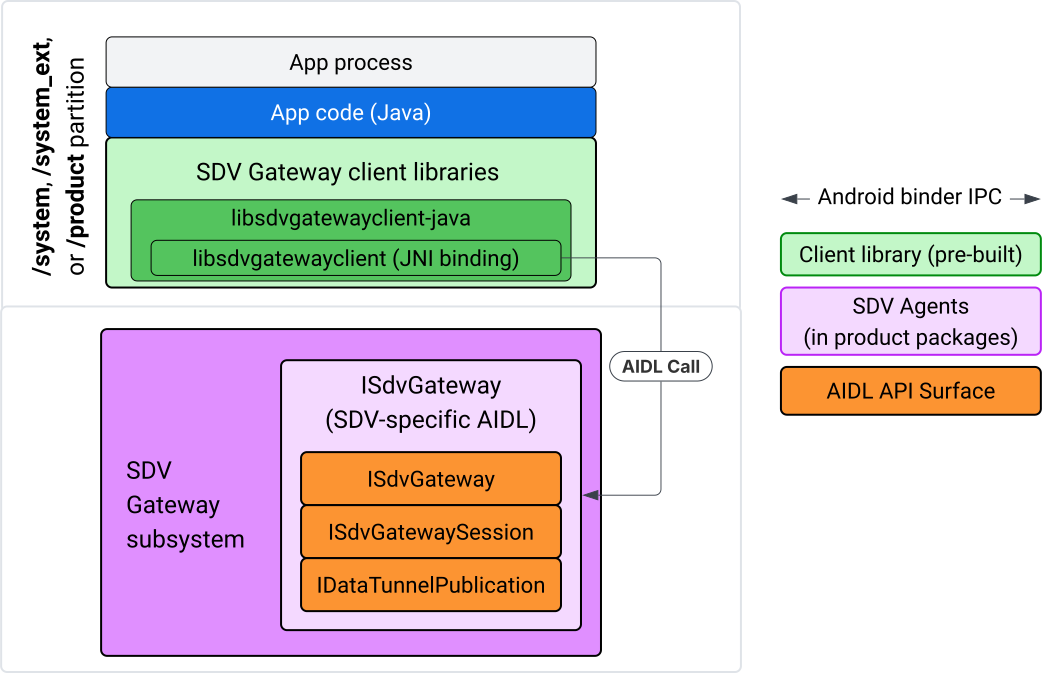
Rysunek 4. Brama SDV w aplikacji IVI Java.
W szczególności model:
- Przekazuje wszystkie wywołania do warstwy JNI.
- Łączy interfejsy API w Javie i C.
- Określa interakcje AIDL z
ISdvGateway:- Inicjowanie komunikacji
- Znajdź lub utwórz serwer RPC
- Tworzenie Pub/Sub
- Wykonywanie interakcji z tunelowaniem danych w ramach wykrywania usług
- Otrzymywanie powiadomień (np. o dostępności danych)
- Odczytywanie i zapisywanie wiadomości (FMQ dla Pub/Sub) na potrzeby tworzenia pary kluczy i certyfikatów TLS
Uwzględnianie bibliotek klienta Gateway
Biblioteka Java i otoczka JNI dla libsdvgatewayclient interfejsu C API są instalowane w APEX na urządzeniu docelowym IVI. Dodaj zależność czasu kompilacji do stuba biblioteki Java, biblioteki Java, która musi być używana w czasie działania, i wymaganego pakietu APEX zawierającego bibliotekę Java.
android_app {
    name: "YourAppName",
    // ...
    static_libs: [
        "libsdvgatewayclient-java",
    ],
    libs: [
        "libsdvgatewayclient-java-sdk.stubs",
    ],
    uses_libs: [
        "libsdvgatewayclient-java-sdk",
    ],
    required: [
        "com.sdv.google.gateway.client",
    ],
    // ...
}
W przypadku aplikacji niepowiązanej, która została utworzona poza drzewem SDV, proces jest podobny:
Skopiuj wygenerowany plik JAR z biblioteką Java i pomocniczy plik JAR dla RPC do folderu bibliotek aplikacji. Więcej informacji znajdziesz w sekcji
system/software_defined_vehicle/sdv_gateway/libsdvgatewayclient_apex/README.md.Dodaj plik JAR ze stubami jako zależność tylko do kompilacji. Na przykład zaktualizuj konfiguracje Gradle, aby były zależne od stubów, dodając wpis
compileOnlydo sekcjidependencies:dependencies { // The library supporting functions for SDK RPC. // Statically linked into the app APK. implementation(files("libs/libsdvgatewayclient-java.jar")) // Stub of the SDV-Gateway client library. // Used only for compilation; the real implementation is provided // by the com.sdv.google.gateway.client APEX at runtime. compileOnly(files("libs/libsdvgatewayclient-java-sdk.jar")) }Dodaj bibliotekę Javy do sekcji aplikacji w pliku
AndroidManifest.xml.<manifest xmlns:android="http://schemas.android.com/apk/res/android"> <application> <!-- Declares that this app requires the SDV Gateway client library. The 'android:required="true"' attribute ensures the app won't install/run if the library is missing from the system. --> <uses-library android:name="libsdvgatewayclient-java-sdk" android:required="true" /> </application> </manifest>
Wczytywanie bibliotek
Utwórz obiekt SdvGatewayClient (udostępniany przez bibliotekę klienta):
import google.sdv.gateway.client.SdvGatewayClient;

// --- Inside your Activity, Service, or ViewModel ---

// Initialize the SDV Gateway Client
SdvGatewayClient gatewayClient = new SdvGatewayClient();
Inicjowanie komunikacji
Wywołaj initComms(), używając nazwy aplikacji jako nazwy pakietu usług:
// Define a unique name for your service bundle (usually constant)
private static final String SERVICE_BUNDLE_NAME = "MySdvServiceBundle";

// ... inside an Activity or Service context ...

try {
    // Initialize communications with the SDV Gateway
    // context.getPackageName() provides "android.sdv.samples.gateway.client" or similar
    gatewayClient.initComms(context.getPackageName(), SERVICE_BUNDLE_NAME);

    Log.i("SDV_GATEWAY", "Communications initialized successfully");
} catch (Exception e) {
    // Unlike the C API which uses status codes,
    // the Java SDK often throws exceptions for initialization failures.
    Log.e("SDV_GATEWAY", "Failed to initialize communications", e);
}
Wykrywanie usług
Interfejs Java API zawiera metody, które umożliwiają:
Otrzymuj powiadomienia, gdy jednostki usługi o określonym typie (lub alternatywnie o określonej nazwie) są rejestrowane lub wyrejestrowywane.
Wyświetl listę bieżących jednostek usług o określonym typie (lub alternatywnie dopasuj nazwę określonego typu jednostki usługi). Aby otrzymywać powiadomienia o zmianach jednostki usługi, utwórz odbiornik:
import google.sdv.gateway.client.ServiceUnitChangeListener;
import google.sdv.gateway.client.ServiceUnitChangeEventType;
import google.sdv.gateway.client.ServiceUnitDefinition;

// --- Implementation ---

ServiceUnitChangeListener listener = new ServiceUnitChangeListener() {
    @Override
    public void onServiceUnitChanged(
        ServiceUnitChangeEventType eventType,
        ServiceUnitDefinition serviceUnitDefinition
    ) {
        // This is triggered when services matching your criteria
        // are registered or unregistered on the vehicle network.
        if (eventType == ServiceUnitChangeEventType.REGISTERED) {
            // Handle new service discovery
        } else if (eventType == ServiceUnitChangeEventType.UNREGISTERED) {
            // Handle service removal
        }
    }
};
Metoda Java addListenerForServiceUnitChangeByName powiadamia słuchacza:
// 1. Register the listener for a specific service unit by name
AutoCloseable handle = gatewayClient.addListenerForServiceUnitChangeByName(
    new UnitNameDiscoveryArgs(
        "",                                   // sdvVmName (empty for local/auto-discovery)
        "android.sdv.samples.cluster",        // sdvPackageName
        "ClusterServer",                      // serviceBundleName
        "android-sdv-samples-cluster-cluster" // serviceUnitName
    ),
    listener
);

// --- Later in the application lifecycle ---

// 2. To stop receiving notifications and clean up resources, close the handle.
try {
    if (handle != null) {
        handle.close();
    }
} catch (Exception e) {
    Log.e("SDV_GATEWAY", "Error while closing the listener handle", e);
}
Możesz też użyć metody Java addListenerForServiceUnitChangeByType, aby powiadomić odbiorcę, gdy usługi o określonym typie jednostki zostaną zarejestrowane lub wyrejestrowane:
// 1. Register a listener based on the Service Unit Type
AutoCloseable handle = gatewayClient.addListenerForServiceUnitChangeByType(
    new UnitType(
        "com.android.testapp.sdvcarmonitor", // sdvPackageName
        "SunroofRpcServer",                  // serviceBundleName
        "Sunroof"                            // unitTypeName
    ),
    listener
);

// --- Execution Loop / Lifecycle ---

// 2. To stop receiving notifications and clean up memory, close the handle.
// This effectively unregisters the listener from the SDV Gateway.
try {
    if (handle != null) {
        handle.close();
    }
} catch (Exception e) {
    Log.e("SDV_GATEWAY", "Failed to close the service unit listener handle", e);
}
W przypadku addListenerForServiceUnitChangeByName i addListenerForServiceUnitChangeByType po dodaniu słuchacz otrzymuje powiadomienia o wszystkich zarejestrowanych jednostkach usługi. Aby uzyskać tylko zarejestrowane jednostki usług według nazwy lub typu, użyj interfejsów API języka Java listServiceUnitsByName i listServiceUnitsByType:
import google.sdv.gateway.client.ServiceUnitDefinition;
import google.sdv.gateway.client.UnitNameDiscoveryArgs;
import google.sdv.gateway.client.UnitType;

// --- 1. Synchronous Lookup by Specific Name ---
ServiceUnitDefinition[] definitionsByName = gatewayClient.listServiceUnitsByName(
    new UnitNameDiscoveryArgs(
        "",                                   // sdvVmName
        "android.sdv.samples.cluster",        // sdvPackageName
        "ClusterServer",                      // serviceBundleName
        "android-sdv-samples-cluster-cluster" // serviceUnitName
    )
);

// --- 2. Synchronous Lookup by Service Type ---
ServiceUnitDefinition[] definitionsByType = gatewayClient.listServiceUnitsByType(
    new UnitType(
        "com.android.testapp.sdvcarmonitor", // sdvPackageName
        "SunroofRpcServer",                  // serviceBundleName
        "Sunroof"                            // unitTypeName
    )
);

// Example processing
if (definitionsByType.length > 0) {
    ServiceUnitDefinition firstSunroof = definitionsByType[0];
    // Proceed to connect...
}
Przepływ serwera RPC
Klienty SDV Gateway w systemach IVI używają zdalnego wywołania procedury Google (gRPC) do komunikacji z usługami SDV. Te interakcje opierają się na definicjach protokołów z katalogu VSIDL, które są zgodne lub podobne do tych używanych w SDV Core. W przypadku aplikacji Java wybraną implementacją jest gRPC-Java. Przykładowa definicja protokołu serwera, sunroof.proto, jest dostępna dla serwera aplikacji.
service Sunroof {
    /**
     * Retrieves the current state of the sunroof (e.g., position, tilt, status).
     *
     * @param .google.protobuf.Empty - No input parameters required.
     * @return SunroofStateResponse - The current telemetry data for the sunroof.
     */
    rpc GetSunroofState(.google.protobuf.Empty) returns (SunroofStateResponse) {}
}
Połącz z odpowiednią biblioteką proto i zdefiniuj usługę:
import com.android.sdv.sdvgrpclibrary.SunroofGrpc;
import com.android.sdv.sdvgrpclibrary.SunroofStateResponse; // Assuming this is the generated class
import com.google.protobuf.Empty;
import io.grpc.stub.StreamObserver;

/**
 * Implementation of the Sunroof gRPC service.
 * This class handles the logic for the RPCs defined in your .proto file.
 */
static class SunroofGrpcImpl extends SunroofGrpc.SunroofImplBase {

    @Override
    public void getSunroofState(Empty request, StreamObserver<SunroofStateResponse> responseObserver) {
        // 1. Fetch current sunroof data (e.g., from a Hardware Abstraction Layer)
        int currentPosition = 50; // Example value: 50% open

        // 2. Build the Protobuf response message
        SunroofStateResponse response = SunroofStateResponse.newBuilder()
                .setPercentageOpen(currentPosition)
                .build();

        // 3. Send the response to the client using the observer
        responseObserver.onNext(response);

        // 4. Close the stream to signal that the RPC is finished
        responseObserver.onCompleted();
    }
}
Zarejestruj serwer gRPC za pomocą bezpiecznych i niebezpiecznych danych logowania do kanału:
// 1. Define the type signature for the service
UnitType unitType = new UnitType(
    "com.android.testapp.sdvcarmonitor", // sdvPackageName
    "SunroofRpcServer",                  // serviceBundleName
    "Sunroof"                            // typeName (Unit Type)
);

// 2. Register the RPC server with the Gateway
// The gateway creates a mapping between the ServiceUnitName and your implementation.
server = gatewayClient.registerRpcServer(
    "SunroofRpcServerImpl-1",                       // serviceUnitName (Unique instance name)
    unitType,                                       // unitType defined earlier
    "SUNROOF_GRPC_SERVER_VALUE_HOLDER".getBytes(),  // appMetadataValueHolder (Static discovery data)
    1,                                              // appMetadataVersion
    new SunroofGrpcImpl()                           // The actual gRPC service implementation
);
Wewnętrznie biblioteka klienta tworzy obiekt serwera gRPC,
SdvGatewayClient.java, a także obsługuje aktualizacje certyfikatów głównych:
// 1. Initialize credentials (Insecure for dev, TLS for production)
ServerCredentials serverCredentials = InsecureServerCredentials.create();

// 2. Build and start the OkHttp-based gRPC server
final int bindAnyPort = 0;
final Server server = OkHttpServerBuilder
    .forPort(bindAnyPort, serverCredentials)
    .addService(gRpcServerImplementation) // Your SunroofGrpcImpl
    .build()
    .start();

// The assigned port can now be retrieved using server.getPort()
int actualPort = server.getPort();

// 3. Prepare the JNI data structure
// This object mirrors the ASDVGateway_ServiceUnitDefinition_t C struct
JniServiceUnitDefinition definition = new JniServiceUnitDefinition();

// Fill the RPC service definition params (Port, Name, Type, etc.)
definition.setPort(actualPort);
definition.setServiceUnitName("SunroofRpcServerImpl-1");

// 4. Perform the cross-language call
// This jumps from Java -> JNI -> ASDVGateway_Client_registerRpcServer (C API)
mJniClient.nativeRegisterRpcServer(definition);
Wzorzec przeglądania klienta RPC
Ten przykładowy kod zawiera definicję protokołu serwera (tpms.proto), z którym aplikacja łączy się jako klient:
/**
 * The TPMS service provides real-time pressure and temperature
 * data for all tires on the vehicle.
 */
service Tpms {
    /**
     * Returns the full state of all monitored tires.
     */
    rpc GetTpmsState(.google.protobuf.Empty) returns (TpmsStateResponse) {}

    /**
     * A filtered query that returns only the tires
     * below the recommended pressure threshold.
     */
    rpc GetLowTires(.google.protobuf.Empty) returns (LowTiresResponse) {}
}
Połącz z odpowiednią biblioteką proto:
import com.android.sdv.sdvgrpclibrary.TpmsGrpc;
import io.grpc.ManagedChannel;

// --- Inside your Client Application ---

// 1. Request a ManagedChannel from the Gateway for a specific service unit
ManagedChannel managedChannel = gatewayClient.connectToRpcServerByName(
    "",                                     // sdvVmName (empty for local/auto-lookup)
    "android.sdv.samples.cluster",          // packageName
    "ClusterServer",                        // serviceBundleName
    "android-sdv-samples-cluster-cluster"  // serviceUnitName
);

// 2. Use the channel to create a gRPC stub (e.g., for the TPMS service)
TpmsGrpc.TpmsBlockingStub tpmsStub = TpmsGrpc.newBlockingStub(managedChannel);

// 3. Now you can call RPC methods directly
// TpmsStateResponse response = tpmsStub.getTpmsState(Empty.getDefaultInstance());
Wewnętrznie wywoływany jest interfejs ASDVGateway_Client_findRpcServerByName API, aby znaleźć serwer RPC. Jeśli serwer RPC zostanie znaleziony, kanał zarządzany zostanie utworzony w trybie niezabezpieczonym lub będzie używać konfiguracji TLS, podobnie jak w przypadku przepływu serwera RPC, w zależności od konfiguracji wykrywania usług. Aplikacja tworzy stuby z obiektem ManagedChannel i wywołuje metody serwera:
import com.android.sdv.sdvgrpclibrary.TpmsGrpc;
import com.android.sdv.sdvgrpclibrary.TpmsStateResponse;
import com.google.protobuf.Empty;
import io.grpc.stub.MetadataUtils;

// 1. Create a "Blocking Stub" from the existing ManagedChannel.
// We apply an interceptor to attach mandatory metadata (headers)
// required by the SDV Gateway for authorization.
TpmsGrpc.TpmsBlockingStub tpmsStub = TpmsGrpc.newBlockingStub(managedChannel)
    .withInterceptors(MetadataUtils.newAttachHeadersInterceptor(mMetadata));

// 2. Execute the RPC call.
// Because this is a "BlockingStub," the thread will wait here until
// the vehicle service responds or times out.
TpmsStateResponse tpmsStateResponse = tpmsStub.getTpmsState(Empty.getDefaultInstance());

// 3. Extract the domain-specific state object from the Protobuf response.
// 'newState' can now be used to update your UI or application logic.
newState = tpmsStateResponse.getTpmsState();
Przełączanie sieci domyślnej procesu
Aby otworzyć gniazda dla połączeń wychodzących do internetu, może być konieczne przełączenie się z sieci VLAN SDV-RPC jako domyślnej sieci procesu. Wywołaj funkcje
unbindProcessFromSdvRpcNetworkInterface i
bindProcessToSdvRpcNetworkInterface, aby odłączyć i ponownie połączyć proces z siecią VLAN SDV-RPC. Te 2 wywołania działają jak globalne przełączniki, które zmieniają interfejs sieciowy, do którego są powiązane gniazda, we wszystkich wątkach procesu.
// 1. Redirect all socket traffic from this process to the SDV-RPC VLAN.
// This call is required for making RPC calls or hosting RPC services for SDV.
gatewayClient.bindProcessToSdvRpcNetworkInterface();

// --- Process is now communicating over the SDV-RPC interface ---

// 2. Revert the process network binding back to the "default" interface.
// This allows the app to access internet resources again.
gatewayClient.unbindProcessFromSdvRpcNetworkInterface();
Tworzenie wydawcy i publikowanie wiadomości
// 1. Define the interface and type for the publication
UnitType unitType = new UnitType(
    "android.sdv.samples.tires.interface", // sdvPackageName
    "TirePressurePublisherInterface",      // serviceBundleName
    "TirePressure"                         // typeName
);

// 2. Configure the Publisher's buffer and message constraints
PublisherUnitMetadata publisherUnitMetadata = new PublisherUnitMetadata(
    1,   // version
    64,  // message size in bytes (fixed size for performance)
    128  // max message count (buffer depth)
);

// 3. Create the Publication instance through the Gateway
Publisher tirePublisher = gatewayClient.createPublication(
    "tire-pressure-service-unit-name",
    unitType,
    publisherUnitMetadata
);

// 4. Prepare and publish a message
// In a real app, you would encode your sensor data into this byte array
byte[] msg = new byte[publisherUnitMetadata.messageSizeBytes];

// ... fill msg with data ...

tirePublisher.publish(msg);
Wewnętrznie interfejsy API Java createPublication i publish korzystają z natywnych interfejsów API ASDVGateway_Client_createPublication i ASDVGateway_Client_readAvailableMessages. Szczegółowe informacje o interfejsie C API znajdziesz w artykule Korzystanie z SDV Gateway w natywnej usłudze IVI. Obiekt
Publisher zapewnia kontekst do pisania wiadomości i zarządzania cyklem życia publikacji.
Tworzenie subskrybenta z detektorem powiadomień
Interfejs Java API umożliwia przekazywanie odbiornika jako parametru do metody subskrypcji publikacji i zwraca obiekt Subscription.
Listenerotrzymuje powiadomienie, gdy dane są dostępne w subskrybowanej publikacji.Subscriptiondziała jako obiekt kontekstowy i może służyć do odczytywania wiadomości oraz zamykania subskrypcji.
// 1. Define the Listener to handle incoming data notifications
SubscriptionNotificationListener listener = new SubscriptionNotificationListener() {
    @Override
    public void onSubscriptionNotification(
        Subscription subscription,
        SubscriptionNotificationType notificationType
    ) {
        // Only process if the notification indicates new data is ready
        if (notificationType != SubscriptionNotificationType.DataAvailable) {
            return;
        }

        // Read the message from the subscription buffer
        byte[] content = subscription.readMessage();

        // Note: This callback often runs on a background thread provided by the SDK.
        // If you need to update the UI, use a Handler or View.post().
        processTireData(content);
    }
};

// 2. Subscribe to the publication by its unique name
Subscription tireSubscription = gatewayClient.subscribeToPublicationByName(
    "",                                  // sdvVmName (empty for auto-lookup)
    "android.sdv.samples.dt_publisher",  // packageName
    "SdvGatewayDtPublisher",             // serviceBundleName
    "tire",                              // serviceUnitName
    listener
);

// 3. Read Messages
// You can poll or register callbacks for new messages.
// When polling the message, call this method in a loop.
// When registering callbacks, call this method to get the message payload.
byte[] manualContent = tireSubscription.readMessage();
Przykładowy kod
Wywołania zwrotne odbiorcy są wywoływane w jednym wątku zarządzanym przez klienta, aby zminimalizować przetwarzanie w odbiorcach i zapobiec opóźnieniom w otrzymywaniu powiadomień o innych subskrypcjach. Warstwa Java korzysta z interfejsu C API do zarządzania subskrypcjami, obsługi powiadomień i pobierania wiadomości. Przykładową aplikację w języku Java, która pokazuje, jak korzystać z interfejsu API, znajdziesz w pliku binarnym pod adresem system/software_defined_vehicle/samples/sdv_gateway/README.md.
Wymagane uprawnienia
Wywoływanie interfejsu SDV Gateway API po stronie klienta nie wymaga specjalnych uprawnień, ale musisz zastosować odpowiednie reguły SELinux w przypadku swoich aplikacji.
- W przypadku subskrypcji i publikacji tuneli danych nie potrzebujesz żadnych uprawnień.
- W przypadku wywołania SDV RPC potrzebujesz tych uprawnień:
android.permission.INTERNETandroid.permission.CONNECTIVITY_USE_RESTRICTED_NETWORKS
W przypadku android.permission.CONNECTIVITY_USE_RESTRICTED_NETWORKS potrzebujesz też pliku z listą dozwolonych w folderze etc/permissions w tej samej partycji co aplikacja. Na przykład w przypadku aplikacji SdvCarMonitorTestApp (nazwa pakietu com.android.testapp.sdvcarmonitor) plik wygląda tak:
<?xml version="1.0" encoding="utf-8"?>

<permissions>
    <privapp-permissions package="com.android.testapp.sdvcarmonitor">
        <permission name="android.permission.CONNECTIVITY_USE_RESTRICTED_NETWORKS"/>
    </privapp-permissions>
</permissions>
Reguły SELinux
Aby korzystać z interfejsów SDV Gateway API, aplikacje w języku Java wymagają tych samych uprawnień co usługi natywne. Przyznaj te uprawnienia za pomocą makra SELinux sdv_gateway_client_domain():
sdv_gateway_client_domain(my_oem_sdv_gateway_client_app)
Producent OEM określa domenę my_oem_sdv_gateway_client_app dla aplikacji Java, które mogą korzystać z bramy SDV. Bramy SDV można używać tylko w aplikacjach systemowych i uprzywilejowanych.
Lokalizacje kodu
Pobierz kod źródłowy bramy SDV na stronie system/software_defined_vehicle/sdv_gateway/. Przykłady bramy SDV możesz pobrać w przypadku:
- Interfejs API klienta C:
system/software_defined_vehicle/samples/sdv_gateway/NativeSdvGatewayTestApp/ - Interfejs API klienta Java:
system/software_defined_vehicle/samples/sdv_gateway/SdvCarMonitorTestApp/