

O gateway de veículo definido por software (SDV, na sigla em inglês) em sistemas de infoentretenimento no veículo (IVI, na sigla em inglês) facilita a comunicação entre sistemas de IVI e serviços remotos de SDV. O gateway permite que apps Java de fabricantes de equipamentos originais (OEMs) e serviços nativos, como a camada de abstração de hardware do veículo (VHAL), interajam com serviços de SDV. O gateway usa métodos de comunicação estabelecidos, incluindo registro, descoberta e chamadas de procedimento remoto (RPCs) de serviços.
Esse gateway atende a requisitos específicos do projeto SDV do AAOS, como a ativação de uma implementação de referência da VHAL usando o SDV Data Tunnel para informações de propriedades. Ele também permite que apps Android Java e Kotlin no IVI usem a pilha SDV Comms, se registrem como serviços, encontrem outros serviços SDV e se comuniquem com eles.
Para ver os locais do código do gateway SDV e exemplos de clientes do gateway SDV, consulte Locais do código.
Modelos de integração do gateway SDV
Usar comunicações SDV-IVI pelo gateway SDV na arquitetura IVI
O gateway SDV interage com apps Java, serviços nativos, a pilha de comunicações SDV e a rede do veículo. A Figura 1 ilustra essas interações:
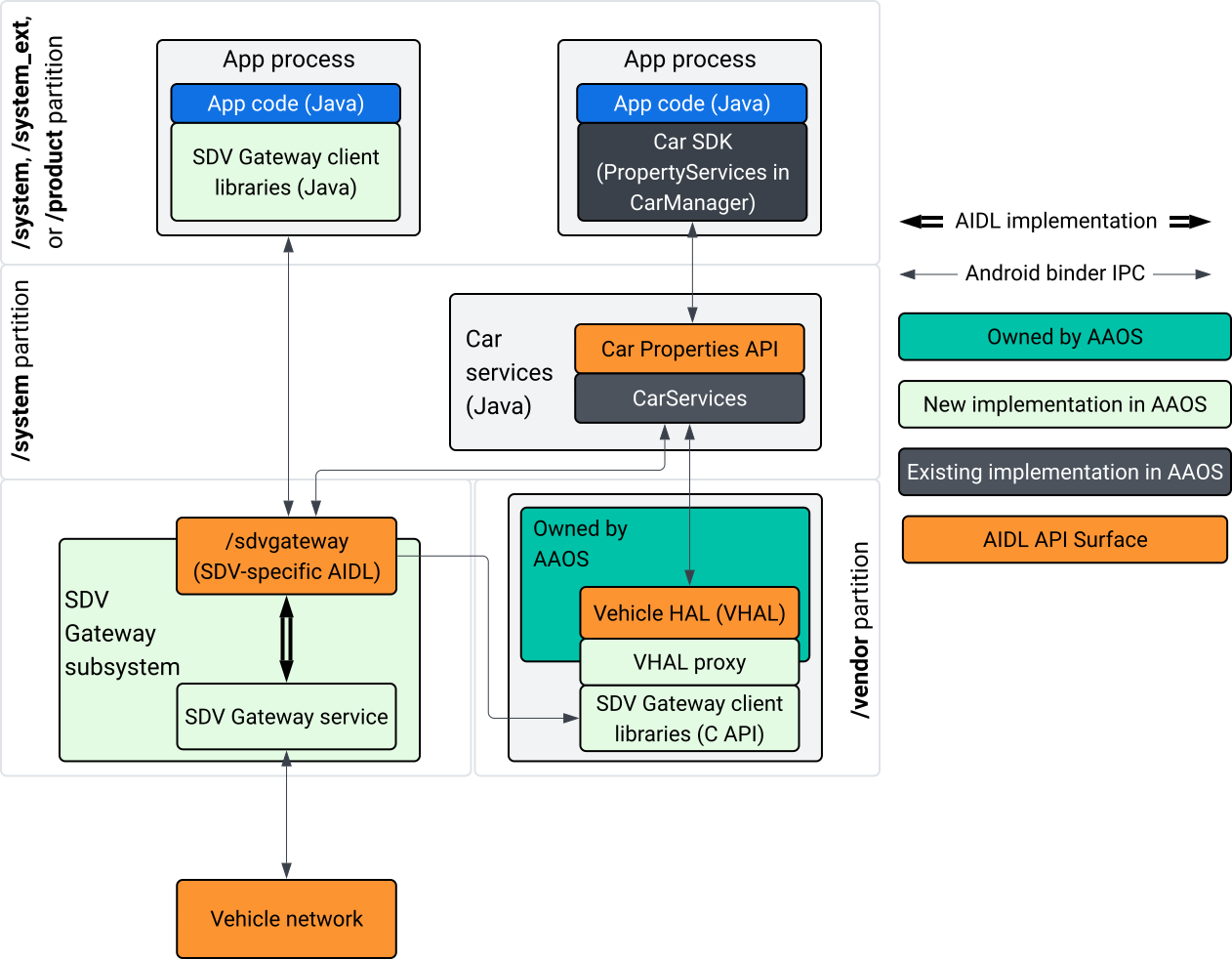
Figura 1. Interações com o gateway SDV.
Neste diagrama do sistema:
- Os apps interagem com o gateway SDV pelos serviços de cliente dele.
- O SDK do SDV do AAOS oferece:
- API AIDL ISdvGateway para comunicação entre processos.
- Bibliotecas de comunicação para interação de rede.
- API C de conveniência para integração de serviços nativos.
- A API AIDL ISdvGateway é implementada pelo serviço e subsistema do SDV Gateway.
- O serviço SDV Gateway gerencia:
- Descoberta de serviços bidirecional.
- Comunicação com serviços SDV remotos.
- Lógica de negócios principal.
- O subsistema do gateway SDV se conecta à rede veicular.
- Os serviços nativos, incluindo a implementação da VHAL, podem usar a API ISdvGateway AIDL diretamente ou pela API C do SDK.
- O proxy da VHAL serve como uma implementação de referência da VHAL, incorporando a integração do mapeamento VSIDL.
Modelo de integração para o gateway SDV em um serviço nativo de IVI
O modelo de integração é ilustrado na Figura 2:
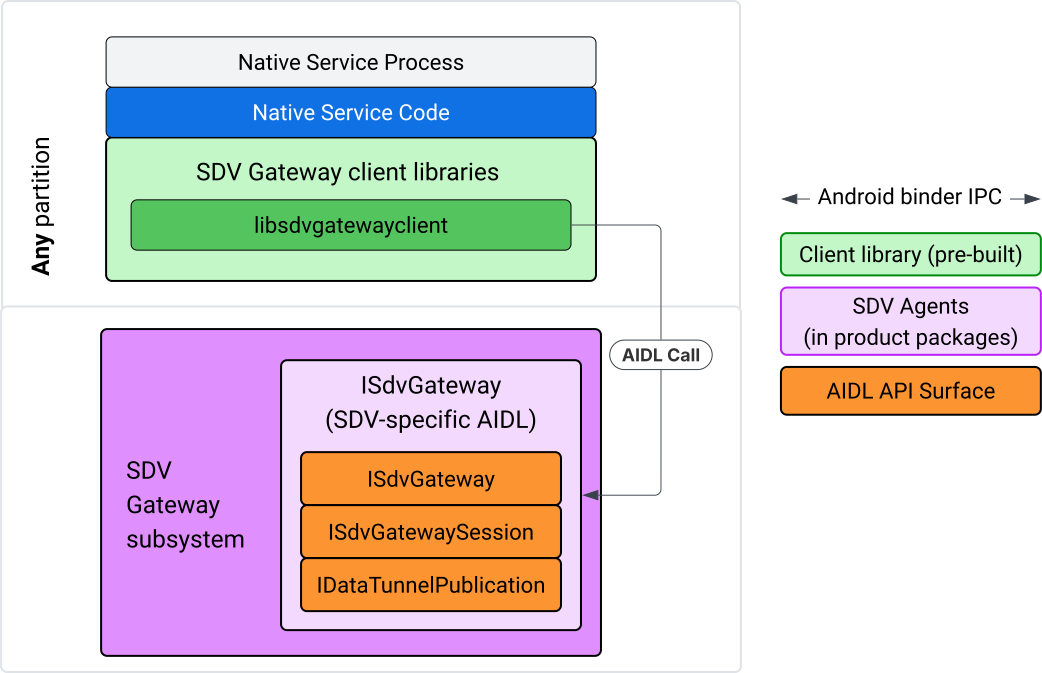
Figura 2. Modelo de integração do gateway SDV.
Usar o SDV Gateway em um serviço nativo de IVI
A Figura 3 ilustra o uso do gateway SDV no IVI:
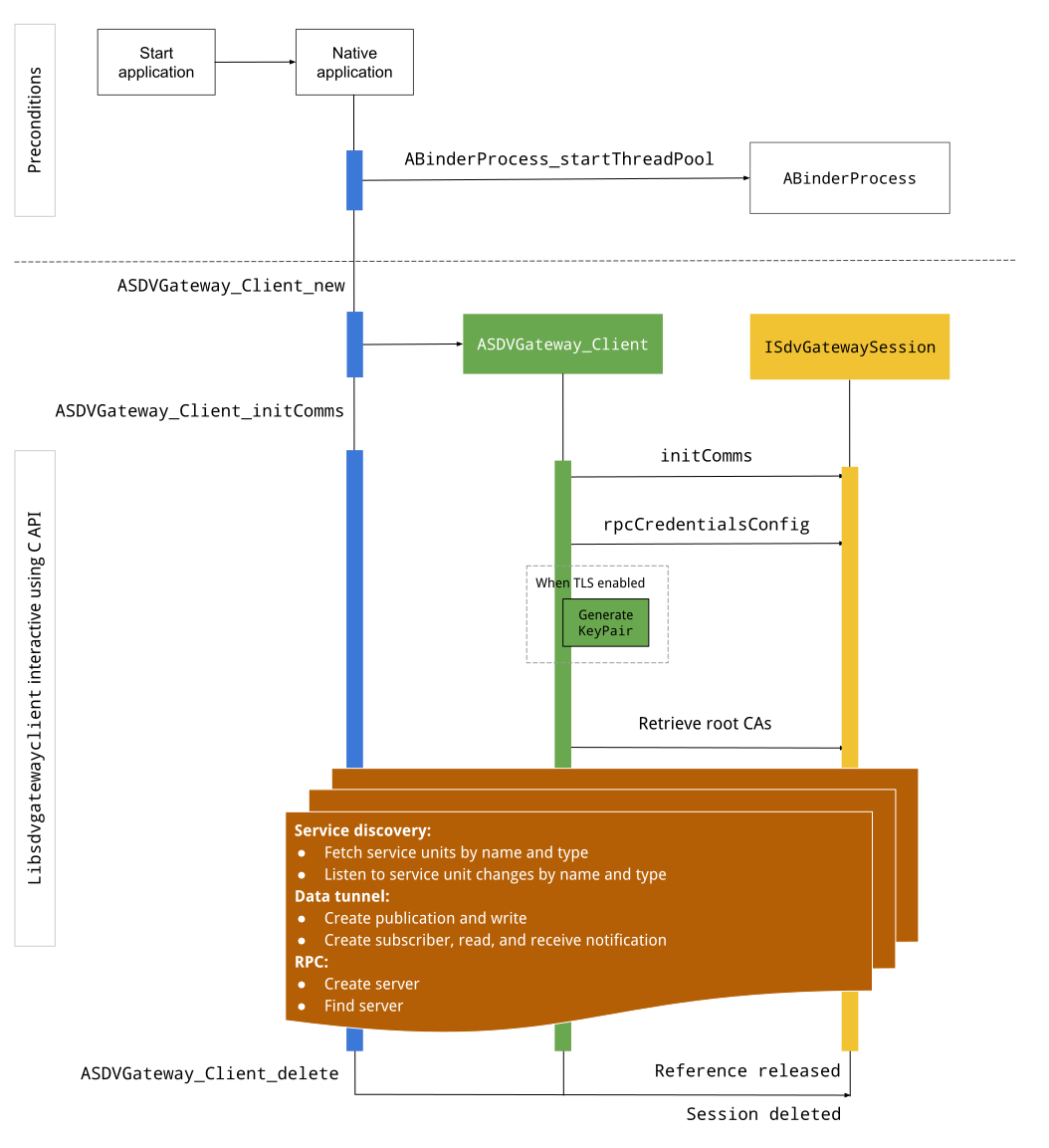
Figura 3. Gateway SDV no IVI.
Preconditions
Inicie o pool de linhas de execução do Binder:
A biblioteca de cliente do SDV Gateway exige um pool de encadeamentos do Binder iniciado para receber callbacks assíncronos dos serviços do Binder.
A API necessária para criar um cliente de gateway SDV falha quando um pool de threads do Binder não é iniciado.
Incluir a biblioteca de cliente nativa do gateway
A biblioteca de cliente do Native Gateway expõe uma API C. Adicione uma instância de
libsdvgatewayclient como uma dependência para usar a API C:
cc_binary {
    name: "your_binary_name",
    srcs: ["main.cpp"],
    shared_libs: [
        "libsdvgatewayclient",
    ],
}
Carregar o cliente do gateway nativo
#include "libsdvgatewayclient.h"
Criar uma instância de cliente nativo
ASDVGateway_Client* client;
ASDVGateway_StatusCode_t statusCode = ASDVGateway_Client_new(
     &client, /*outStatus*/nullptr);
Depois que o cliente é criado, ele:
Mantém o estado de todas as interações subsequentes com o serviço de gateway.
Atua como o contexto de todas as interações com outros serviços ativados para SDV e é transmitido como o primeiro parâmetro para as funções da API C.
Códigos de status e mensagens de erro
A maioria das funções da API C tem esta definição:
ASDVGateway_StatusCode_t ApiFunctionName(..., ASDVGateway_Status_t* outStatus);
Para avaliar o sucesso, inspecione o código de status retornado, que é do tipo ASDVGateway_StatusCode_t. Também é possível transmitir um ponteiro para uma estrutura
em que a função pode preencher o código de status e uma mensagem de erro. O ponteiro é transmitido como o último parâmetro, chamado outStatus. Um valor nulo significa que a
estrutura de saída não é usada.
O autor da chamada precisa alocar a estrutura de status da memória para a mensagem de erro. A estrutura de status pode conter o código de status e uma mensagem de erro. Um exemplo de como recuperar a mensagem de erro ao criar um novo cliente está disponível.
Para avaliar o sucesso:
Inspecione o código de status retornado, que é do tipo
ASDVGateway_StatusCode_t.Transmita um ponteiro para uma estrutura em que a função pode preencher o código de status e uma mensagem de erro.
- O ponteiro é transmitido como o último parâmetro, chamado
outStatus. - Um valor nulo significa que a estrutura de saída não é usada.
- O autor da chamada precisa alocar a estrutura de status da memória para a mensagem de erro.
- A estrutura de status pode conter o código de status e uma mensagem de erro.
- O ponteiro é transmitido como o último parâmetro, chamado
Confira um exemplo que mostra como recuperar a mensagem de erro de um novo cliente:
#include <iostream>
#include <array>

struct StatusWithErrorMsg : ASDVGateway_Status_t {
    StatusWithErrorMsg() {
        // Ensure the base struct pointers point to our internal buffer
        errorMessage = errorMessageBuffer.data();
        maxErrorMessageSize = errorMessageBuffer.size();

        // Good practice: Zero-initialize the buffer
        errorMessageBuffer.fill(0);
    }

    std::array<char, 256> errorMessageBuffer;
};

// --- Execution ---

ASDVGateway_Client* client = nullptr;
StatusWithErrorMsg status;

// Initialize the client
ASDVGateway_StatusCode_t statusCode = ASDVGateway_Client_new(&client, &status);

// Log Results
std::cout << "Returned statusCode:    " << statusCode << std::endl;
std::cout << "Status Struct Code:     " << status.statusCode << std::endl;
std::cout << "Status Error Message:   " << status.errorMessage << std::endl;
Neste exemplo:
O código de status contido na estrutura de status tem o mesmo valor do código de status retornado.
A mensagem de erro é preenchida apenas até o limite de
maxErrorMessageSizecaracteres, incluindo o caractere de encerramento nulo\0. Se nenhum erro ocorrer (código de statusOK), a mensagem de erro será uma string vazia.
Init comms
O comando "init comms" inicializa a comunicação entre o app de chamada e outros apps usando a pilha de comunicação do SDV e o gateway do SDV. As comunicações de inicialização podem ser chamadas em ambos os contextos:
Depois que o cliente é criado.
Antes de qualquer interação de túnel de dados, RPC ou descoberta de serviços.
Veja um exemplo:
ASDVGateway_InitCommsParams_t params{
.packageName = "android.sdv.samples.gateway.client",
.serviceBundleName = "NativeTestApp",
.serviceInstanceName = "default",
};
// Initialize communications and capture the status code
ASDVGateway_StatusCode_t statusCode = ASDVGateway_Client_initComms(client, ¶ms, &status);
// Recommended check
if (statusCode != ASDVGateway_StatusCode_OK) {
std::cerr << "Failed to init comms: " << status.errorMessage << std::endl;
}
Descoberta de serviços
Você pode receber notificações quando unidades de serviço de um tipo ou nome específico são registradas ou canceladas. A função de callback é notificada em uma linha de execução pertencente ao cliente do gateway. Esse callback é acionado inicialmente com todas as unidades de serviço registradas logo após a chamada de API C. Depois do gatilho inicial, as notificações continuam com atualizações até que o listener seja explicitamente cancelado.
class NativeSdvGatewayTestApp {
public:
    static void ServiceUnitChangeListenerCallback(
        const ASDVGateway_ServiceUnitChangeEventType eventType,
        const ASDVGateway_ServiceUnitDefinition* serviceUnitDefinition,
        void* userData
    ) {
        auto* testApp = reinterpret_cast<NativeSdvGatewayTestApp*>(userData);

        if (testApp) {
            // Logic to react when services are registered or unregistered
            // e.g., testApp->handleServiceChange(eventType, serviceUnitDefinition);
        }
    }
};

// --- Listener Registration ---

// Ensure thisApp remains in scope as long as the listener is active
NativeSdvGatewayTestApp* thisApp = get_current_app_context();

ASDVGateway_UnitType_t unitType{
    .sdvPackageName     = "android.sdv.samples.sdv_gateway",
    .serviceBundleName  = "DtPublisher",
    .unitTypeName       = "TirePressure",
};

// Register the listener
ASDVGateway_Client_registerListenerForServiceUnitChangeByType(
    client,
    &unitType,
    NativeSdvGatewayTestApp::ServiceUnitChangeListenerCallback,
    static_cast<void*>(thisApp), // userData
    &listenerHandle,
    &status
);

// --- Cleanup ---

// Unregistering stops all notification to the callback function
ASDVGateway_Client_unregisterListenerForServiceUnitChangeByType(
    client,
    listenerHandle,
    &status
);
Para recuperar as unidades de serviço registradas sem mais notificações, use as APIs
ASDVGateway_Client_fetchServiceUnitsByType e
ASDVGateway_Client_fetchServiceUnitsByName.
class NativeSdvGatewayTestApp {
public:
    /**
     * Callback triggered for each service unit found that matches the requested type.
     */
    static void FetchServiceUnitsCallback(
        const ASDVGateway_ServiceUnitDefinition* serviceUnitDefinition,
        void* userData
    ) {
        auto* app = reinterpret_cast<NativeSdvGatewayTestApp*>(userData);

        if (serviceUnitDefinition) {
            // The service unit is registered with service discovery.
            // Example: processServiceUnit(serviceUnitDefinition);
        }
    }
};

// --- Execution ---

ASDVGateway_UnitType_t unitType{
    .sdvPackageName     = "android.sdv.samples.sdv_gateway",
    .serviceBundleName  = "DtPublisher",
    .unitTypeName       = "TirePressure",
};

// Context used to differentiate between various fetchServiceUnits calls
void* userData = static_cast<void*>(thisApp);

ASDVGateway_Client_fetchServiceUnitsByType(
    client,
    &unitType,
    NativeSdvGatewayTestApp::FetchServiceUnitsCallback,
    userData,
    &status
);
O callback é acionado de forma síncrona na linha de execução do autor da chamada durante a
chamada de API ASDVGateway_Client_fetchServiceUnitsByType. Use
ASDVGateway_Client_fetchServiceUnitsByName para receber as unidades de serviço registradas
pelo nome em vez do tipo de unidade:
ASDVGateway_StatusCode_t ASDVGateway_Client_fetchServiceUnitsByName(
    // [in]  Opaque pointer to a client object.
    const ASDVGateway_Client* client,

    // [in]  Pointer to a structure containing the package name,
    //       service bundle name, and service unit name.
    const ASDVGateway_UnitNameDiscoveryArgs_t* unitName,

    // [in]  Callback function to be called for each service unit
    //       definition registered. Called synchronously in the
    //       caller's thread before the fetch completes.
    ASDVGateway_FetchServiceUnitsCallback callback,

    // [in]  Optional value passed back as a parameter of the callback.
    void* userData,

    // [out] Optional pointer to status structure for result
    //       codes and error messages.
    ASDVGateway_Status_t* outStatus
);
Fluxo de RPC
A biblioteca de cliente do gateway processa as configurações de Transport Layer Security (TLS) para comunicação com outros apps compatíveis com SDV. Especificamente, ele recupera as configurações de TLS necessárias para a comunicação. Veja como o uso do TLS é determinado:
O TLS é usado quando o modo de inicialização do SDV é
LOCKED.A comunicação insegura é usada quando o modo de inicialização do SDV é
UNLOCKED. Quando o TLS é usado, a biblioteca de cliente do gateway gera um par de chaves conhecido apenas pelo processo do app. O cliente recupera as credenciais de RPC para criar um servidor RPC ou um canal de cliente RPC. O RPC usa uma VLAN SDV-RPC dedicada. A biblioteca de cliente do gateway chama android_setprocnetwork para alternar a rede padrão do processo para a VLAN SDV-RPC durante ou após a chamadaASDVGateway_Client_initComms.
Disponibilidade de RPC
Um cliente configurado para iniciar na inicialização antecipada pode ser iniciado antes que a VLAN SDV-RPC esteja disponível. Verifique se a RPC está disponível antes de tentar criar qualquer servidor ou soquete de cliente RPC:
// Check if the RPC (Remote Procedure Call) service is available
bool isRpcAvailable = ASDVGateway_Client_isRpcAvailable(client);

if (isRpcAvailable) {
    // Proceed with RPC calls
} else {
    // Handle the case where RPC is not yet ready or available
}
ou
// Check if the process is correctly bound to the SDV RPC Network Interface/VLAN
bool isRpcNetworkBound = ASDVGateway_Client_isProcessBoundToSdvRpcNetworkInterface(client);

if (!isRpcNetworkBound) {
    // Usually implies the process isn't running on the correct network interface
    // or the VLAN configuration is missing.
    std::cerr << "Warning: Process is not bound to the SDV RPC VLAN." << std::endl;
}
Defina um listener para eventos do cliente usando
ASDVGateway_Client_setClientNotificationCallback para receber uma notificação quando o status de
disponibilidade de RPC mudar.
ASDVGateway_Client_isProcessBoundToSdvRpcNetworkInterface é preferível se o
app mudar a rede do processo, porque ele verifica se a RPC está
disponível e se o processo está vinculado à VLAN SDV-RPC.
Mudar a rede padrão do processo
Talvez seja necessário mudar da VLAN SDV-RPC como a rede padrão do processo
para abrir sockets para conexões vinculadas à Internet. Chame
ASDVGateway_Client_unbindProcessFromSdvRpcNetworkInterface e
ASDVGateway_Client_bindProcessToSdvRpcNetworkInterface para desvincular e revincular
o processo à VLAN SDV-RPC. As duas chamadas funcionam como chaves globais, mudando a interface de rede a que os soquetes estão vinculados para todas as linhas de execução do processo.
// 1. Unbind: Sockets return to the "default" network interface (e.g., wlan0, eth0)
ASDVGateway_StatusCode_t unbindStatus =
    ASDVGateway_Client_unbindProcessFromSdvRpcNetworkInterface(client, &status);

// 2. Bind: Sockets are now bound to the dedicated SDV-RPC VLAN
ASDVGateway_StatusCode_t bindStatus =
    ASDVGateway_Client_bindProcessToSdvRpcNetworkInterface(client, &status);

// Validation
if (bindStatus == ASDVGateway_StatusCode_OK) {
    // Sockets are successfully bound to the SDV-RPC VLAN
}
Notificações de RPC
Defina o listener do cliente para receber notificações sobre mudanças na disponibilidade de RPC e atualizações nos certificados raiz que precisam ser aceitas por um servidor RPC:
class NativeSdvGatewayTestApp {
public:
    static void ClientNotificationCallback(
        ASDVGateway_ClientNotificationType_t notificationType,
        void* userData
    ) {
        auto* testApp = reinterpret_cast<NativeSdvGatewayTestApp*>(userData);
        if (!testApp) return;

        switch (notificationType) {
            case ASDVGateway_ClientNotificationType_RootCertsChanged:
                std::cout << "onClientNotification: Root Certs Changed" << std::endl;
                // Handle certificate rotation logic here
                break;

            case ASDVGateway_ClientNotificationType_RpcAvailabilityChanged:
                std::cout << "onClientNotification: RPC Availability Changed" << std::endl;
                // Handle reconnection or UI updates here
                break;

            default:
                std::cout << "onClientNotification: Received Unknown Notification ("
                          << notificationType << ")" << std::endl;
                break;
        }
    }
};

// --- Registration ---

NativeSdvGatewayTestApp* thisApp = get_current_app_context();

// Register the notification callback to monitor system-level changes
ASDVGateway_StatusCode_t statusCode = ASDVGateway_Client_setClientNotificationCallback(
    client,
    NativeSdvGatewayTestApp::ClientNotificationCallback,
    static_cast<void*>(thisApp), // userData
    &status
);
Fluxo do servidor RPC
É necessário usar credenciais para criar o servidor RPC:
ASDVGateway_RpcCredentials_t* rpcCredentials = nullptr;

// Retrieve the credentials from the client
ASDVGateway_StatusCode_t statusCode = ASDVGateway_Client_rpcCredentials(client, &rpcCredentials, &status);

// Validation: Differentiating between an error and a deliberate "insecure mode"
if (status.statusCode != ASDVGateway_StatusCode_OK) {
    std::cerr << "Error retrieving credentials: " << status.errorMessage << std::endl;
    return;
}

// Logic for choosing Security Credentials
if (rpcCredentials == nullptr) {
    // If the call succeeded but credentials are null, the system expects insecure communication
    std::cout << "Configuring for Insecure Mode" << std::endl;
} else {
    std::cout << "Configuring for Secure Mode:" << std::endl;
    std::cout << "  Private Key: " << (rpcCredentials->privateKeyPem ? "Present" : "Missing") << std::endl;
    std::cout << "  RootCerts:   " << rpcCredentials->rootCertsPem << std::endl;
    std::cout << "  CertChain:   " << rpcCredentials->certChainPem << std::endl;
    std::cout << "  SAN:         " << rpcCredentials->subjectAlternativeName << std::endl;
}

// --- Cleanup ---

// Release the memory once the RPC server/client is initialized
if (rpcCredentials != nullptr) {
    ASDVGateway_Client_deleteRpcCredentials(client, rpcCredentials);
}
Depois de criar o servidor RPC e saber a porta de escuta, registre-o para que ele possa descobrir outros apps:
ASDVGateway_RegisterRpcServerParams_t params{
.serviceUnitName = "android-sdv-samples-sunroof-sunroof",
.unitType = ASDVGateway_UnitType_t{
.sdvPackageName = "android.sdv.samples.sunroof",
.serviceBundleName = "SunroofServer",
.unitTypeName = "Sunroof",
},
.listeningPort = listeningPort,
.serverUnitMetadata = ASDVGateway_ServerUnitMetadata_t{
.version = 1,
},
};
// Register the RPC server with the SDV Gateway
ASDVGateway_StatusCode_t statusCode = ASDVGateway_Client_registerRpcServer(
client,
¶ms,
&status
);
// Basic error handling
if (statusCode != ASDVGateway_StatusCode_OK) {
std::cerr << "Failed to register RPC server: " << status.errorMessage << std::endl;
}
Quando o sistema atualiza os certificados raiz no tempo de execução (por exemplo, durante mudanças de estado da VM), os servidores RPC precisam atualizar a lista de certificados aceitos:
Defina um listener para eventos do cliente usando
ASDVGateway_Client_setClientNotificationCallbackpara receber notificações quando os certificados raiz forem atualizados.Chame
ASDVGateway_Client_rpcCredentialspara receber os certificados raiz atualizados.
Fluxo do cliente RPC
Este é o fluxo do cliente RPC:
ASDVGateway_FindRpcServerByNameParams_t params{
.packageName = "android.sdv.samples.cluster",
.serviceBundleName = "ClusterServer",
.serviceUnitName = "android-sdv-samples-cluster-cluster",
};
ASDVGateway_SocketAddress_t socketAddress;
ASDVGateway_RpcCredentials_t* rpcCredentials = nullptr;
// Perform the lookup to find the server's location and security requirements
ASDVGateway_StatusCode_t statusCode = ASDVGateway_Client_findRpcServerByName(
mClient,
¶ms,
&socketAddress,
&rpcCredentials,
&status
);
// Mandatory check: Distinguish between system errors and intentional "Insecure Mode"
if (status.statusCode != ASDVGateway_StatusCode_OK) {
std::cerr << "Failed to find RPC server: " << status.errorMessage << std::endl;
return;
}
// Logic for establishing the RPC channel
if (rpcCredentials == nullptr) {
std::cout << "Connecting via Insecure Mode to "
<< socketAddress.address << ":" << socketAddress.port << std::endl;
} else {
std::cout << "Connecting via Secure Mode to "
<< socketAddress.address << ":" << socketAddress.port << std::endl;
std::cout << " RootCerts: " << rpcCredentials->rootCertsPem << std::endl;
std::cout << " SAN: " << rpcCredentials->subjectAlternativeName << std::endl;
// Note: privateKeyPem and certChainPem are typically used if the client
// needs to perform mutual TLS (mTLS).
}
// Cleanup: Release the credential memory once the RPC channel is established
if (rpcCredentials != nullptr) {
ASDVGateway_Client_deleteRpcCredentials(client, rpcCredentials);
}
Criar um publisher e publicar mensagens
A API ASDVGateway_Client_createPublication é usada para registrar uma unidade de serviço
de editora com o gateway SDV pela interface AIDL e criar uma fila de
mensagens rápidas (FMQ) no processo do app. O Binder só é usado para configurar a
FMQ, mas não ao gravar mensagens. A API ASDVGateway_Client_publishMessages
é usada para publicar mensagens na publicação criada. Isso envolve
gravar na FMQ da publicação e notificar que as mensagens foram gravadas.
ASDVGateway_CreatePublicationParams_t params{
.serviceUnitName = "mirror-position-adjust-impl-1",
.unitType = ASDVGateway_UnitType_t{
.sdvPackageName = "android.sdv.samples.sdv_gateway",
.serviceBundleName = "DtPublisher",
.unitTypeName = "MirrorPositionAdjust",
},
.publisherUnitMetadata = ASDVGateway_PublisherUnitMetadata_t{
.version = 1,
.messageSizeBytes = 64,
.messageCount = 16,
},
};
ASDVGateway_PublicationMetadata_t metadata;
// 1. Create the Publication (allocates resources on the gateway)
ASDVGateway_StatusCode_t createStatus = ASDVGateway_Client_createPublication(
client,
¶ms,
&metadata,
&status
);
if (status.statusCode != ASDVGateway_StatusCode_OK) {
std::cerr << "Failed to create publication: " << status.errorMessage << std::endl;
return;
}
// 2. Publish Messages
// Note: serializedMessage should contain your encoded protobuf data
std::vector<uint8_t> serializedMessage;
ASDVGateway_Client_publishMessages(
client,
serializedMessage.data(),
serializedMessage.size(),
metadata.publicationId,
&status
);
Criar um assinante com listener de notificação
Para assinar uma publicação e receber notificações do Data Tunnel (como
disponibilidade de mensagens), use a API ASDVGateway_Client_subscribeToPublicationByName. Essa API também configura a FMQ para ler mensagens publicadas. É possível
configurar um callback de notificação durante o processo de assinatura ou
depois.
#include <map>
#include <memory>
#include <iostream>

class NativeSdvGatewayTestApp {
public:
    struct SubscriptionContext {
        int32_t subscriptionId;
        std::string topicName;
        // Add other context-specific data here (e.g., counters, buffers)
    };

    /**
     * Callback triggered when new data is published to a subscribed topic.
     */
    static void SubscriptionNotificationCallback(
        const ASDVGateway_SubscriptionNotificationData_t* notification,
        void* userData
    ) {
        // The SDV Gateway client passes back the userData pointer.
        // We ensure validity by managing the lifecycle of SubscriptionContext
        // within the mSubscriptions map.
        auto* ctx = reinterpret_cast<SubscriptionContext*>(userData);

        if (ctx && notification) {
            // React to data being available for the subscription.
            // Example: handleIncomingData(notification->data, notification->size);
            std::cout << "Notification received for sub ID: " << ctx->subscriptionId << std::endl;
        }
    }

private:
    // Maps subscription handles/IDs to their respective contexts
    std::map<int32_t, std::unique_ptr<SubscriptionContext>> mSubscriptions;
};

// --- Usage ---
NativeSdvGatewayTestApp app;
Ao assinar, você pode especificar outras opções além do nome da unidade de serviço do editor. Com essas opções, é possível recuperar a mensagem publicada mais recentemente antes de se inscrever e definir o intervalo de tempo mínimo entre as notificações.
ASDVGateway_SubscribeToPublicationByNameParams_t params{
.sdvVmName = "vm1",
.packageName = "test.package.impl.name",
.serviceBundleName = "TestBundleImpl",
.serviceUnitName = "GrpcServerImpl",
};
ASDVGateway_Subscriber_Options_t options{
// Ensure we receive the most recent message immediately upon subscribing
.flags = ASDVGATEWAY_SUBSCRIBER_OPTIONS_FLAG_FETCHLASTMESSAGE,
.minIntervalMs = 0, // No rate limiting; receive updates as they happen
};
// 1. Prepare the context for the callback
auto subCtx = std::make_unique<SubscriptionContext>();
ASDVGateway_PublicationMetadata_t metadata{};
// 2. Perform the subscription
ASDVGateway_StatusCode_t statusCode = ASDVGateway_Client_subscribeToPublicationByName(
client,
¶ms,
&options,
NativeSdvGatewayTestApp::SubscriptionNotificationCallback,
static_cast<void*>(subCtx.get()), // Pass the raw pointer as userData
&metadata,
&status
);
// 3. Validation and Lifecycle Management
if (status.statusCode != ASDVGateway_StatusCode_OK) {
// Error handling: subCtx will be automatically deleted here
std::cerr << "Subscription failed: " << status.errorMessage << std::endl;
return;
}
// Store the context using the publicationId as the key.
// Once moved, the map owns the lifetime of subCtx.
app.mSubscriptions.emplace(metadata.publicationId, std::move(subCtx));
Use a API ASDVGateway_Client_readAvailableMessages para ler mensagens da publicação:
uint32_t messagesAvailable = 0;

// 1. Check how many messages are waiting in the queue
ASDVGateway_StatusCode_t availStatus = ASDVGateway_Client_availableToRead(
    client,
    metadata.publicationId,
    &messagesAvailable,
    &status
);

if (status.statusCode != ASDVGateway_StatusCode_OK) {
    // Error handling for availability check
    return;
}

if (messagesAvailable == 0) {
    // No messages available for this publication at this time
    return;
}

// 2. Prepare the buffer
// metadata.messageSizeBytes was provided during the publication/subscription setup
std::vector<uint8_t> bytesForMessages;
bytesForMessages.resize(metadata.messageSizeBytes * messagesAvailable);

// 3. Read the messages from the Gateway into your local buffer
uint32_t actualMessageCount = 0; // Filled by the SDK with the number of messages read
ASDVGateway_StatusCode_t readStatus = ASDVGateway_Client_readAvailableMessages(
    client,
    metadata.publicationId,
    bytesForMessages.data(),
    bytesForMessages.size(),
    &actualMessageCount,
    &status
);

if (status.statusCode == ASDVGateway_StatusCode_OK) {
    // Successfully read 'actualMessageCount' messages
    // Process bytesForMessages...
}
Para definir o callback após a inscrição, use a API
ASDVGateway_Client_setNotificationCallbackForPublicationId:
ASDVGateway_StatusCode_t ASDVGateway_Client_setNotificationCallbackForPublicationId(
    // [in]  Opaque pointer to the client object.
    const ASDVGateway_Client* client,

    // [in]  Identifies the specific publication to monitor.
    const int32_t publicationId,

    // [in]  Function pointer triggered when new data is available
    //       for the specified publication.
    ASDVGateway_SubscriptionNotificationCallback notificationCallback,

    // [in]  Optional user-defined context passed back to the callback.
    void* notificationCallbackUserData,

    // [out] Optional pointer to a status structure for result codes
    //       and error messages.
    ASDVGateway_Status_t* outStatus
);
Configurar o serviço init
Primeiro, siga Identidade para serviços nativos para atribuir uma identidade de serviço ao serviço usando o ID do Android (AID).
Suponha que seu serviço se chame native_sdv_gateway_client_service, que o
executável esteja localizado na partição /vendor em
/vendor/bin/native_sdv_gateway_client_service e que você use
vendor_gateway_client como o ID do Android (AID) para executar o serviço.
Com essa configuração, é possível definir o seguinte serviço de inicialização:
service native_sdv_gateway_client_service /vendor/bin/native_sdv_gateway_client_service
    class core
    user vendor_gateway_client
    group inet
    disabled
    oneshot
Essa configuração usa os seguintes parâmetros:
vendor_gateway_clienté o AID criado ou selecionado para o serviço.group ineté necessário para clientes de gateway SDV usarem a interface de rede para comunicação entre VMs SDV. Outros grupos podem ser adicionados quando necessário.- Este exemplo usa
disabledeoneshot. Talvez seja necessário ajustar as opções de serviço. Inicie o serviço depois desdv_gateway.
Criar regras do SELinux para o serviço
Para usar as APIs do SDV Gateway, você precisa das seguintes regras do SELinux para o serviço:
# Define the domain for the service
type native_sdv_gateway_client_service, domain;

# Define the executable file type on the vendor partition
type native_sdv_gateway_client_service_exec, exec_type, file_type, vendor_file_type;

# Macro to transition from 'init' to this service's domain upon execution
init_daemon_domain(native_sdv_gateway_client_service)

# Macro to grant the necessary permissions to communicate with the SDV Gateway
sdv_gateway_client_domain(native_sdv_gateway_client_service)
Nas regras do SELinux:
O
init_daemon_domainpermite iniciar o serviço doinit.O
sdv_gateway_client_domainfornece todas as permissões necessárias do SELinux para interagir com o gateway SDV. A linha a seguir concede essas regras ao executável:/vendor/bin/native_sdv_gateway_client_service u:object_r:native_sdv_gateway_client_service_exec:s0
Exemplo de código
Para saber mais sobre como executar o exemplo de código nativo que demonstra como as APIs C
são documentadas, consulte
system/software_defined_vehicle/samples/sdv_gateway/NativeSdvGatewayTestApp/README.md.
Gateway SDV no app IVI Java
O modelo de interação para um gateway SDV em IVI é ilustrado neste diagrama:
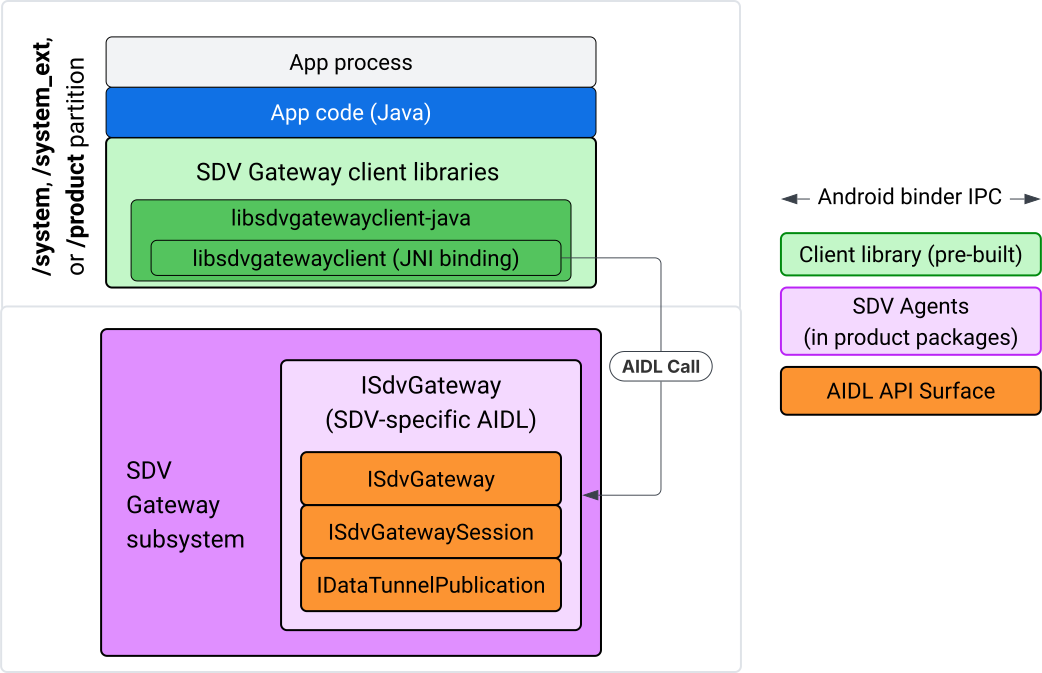
Figura 4. Gateway SDV no app IVI Java.
Especificamente, o modelo:
- Envia todas as chamadas para a camada JNI.
- Faz a junção das APIs Java e C.
- Define interações da AIDL com o
ISdvGateway:- Init comms
- Encontrar ou criar o servidor RPC
- Criar o Pub/Sub
- Realizar interações de túnel de dados de descoberta de serviços
- Receber notificações (por exemplo, dados disponíveis)
- Ler e gravar mensagens (FMQ para pub/sub) para criação de par de chaves e certificados para TLS
Incluir bibliotecas de cliente do Gateway
A biblioteca Java e o wrapper JNI para a API C libsdvgatewayclient são
instalados em um APEX no destino IVI. Adicione uma dependência de tempo de compilação ao
stub da biblioteca Java, à biblioteca Java que precisa ser usada no tempo de execução e ao
APEX necessário que contém a biblioteca Java.
android_app {
    name: "YourAppName",
    // ...
    static_libs: [
        "libsdvgatewayclient-java",
    ],
    libs: [
        "libsdvgatewayclient-java-sdk.stubs",
    ],
    uses_libs: [
        "libsdvgatewayclient-java-sdk",
    ],
    required: [
        "com.sdv.google.gateway.client",
    ],
    // ...
}
No caso de um app não agrupado criado fora da árvore do SDV, o processo é semelhante:
Copie o stub JAR da biblioteca Java gerada e o JAR de suporte para RPC na pasta libs do app. Para mais detalhes, consulte
system/software_defined_vehicle/sdv_gateway/libsdvgatewayclient_apex/README.md.Adicione o JAR de stubs como uma dependência somente de compilação. Por exemplo, atualize as configurações do Gradle para depender dos stubs adicionando uma entrada
compileOnlyà seçãodependencies:dependencies { // The library supporting functions for SDK RPC. // Statically linked into the app APK. implementation(files("libs/libsdvgatewayclient-java.jar")) // Stub of the SDV-Gateway client library. // Used only for compilation; the real implementation is provided // by the com.sdv.google.gateway.client APEX at runtime. compileOnly(files("libs/libsdvgatewayclient-java-sdk.jar")) }Adicione a biblioteca Java à seção do app no arquivo
AndroidManifest.xml.<manifest xmlns:android="http://schemas.android.com/apk/res/android"> <application> <!-- Declares that this app requires the SDV Gateway client library. The 'android:required="true"' attribute ensures the app won't install/run if the library is missing from the system. --> <uses-library android:name="libsdvgatewayclient-java-sdk" android:required="true" /> </application> </manifest>
Carregar bibliotecas
Crie um objeto SdvGatewayClient (fornecido pela biblioteca de cliente):
import google.sdv.gateway.client.SdvGatewayClient;

// --- Inside your Activity, Service, or ViewModel ---

// Initialize the SDV Gateway Client
SdvGatewayClient gatewayClient = new SdvGatewayClient();
Init comms
Chame initComms() usando um nome de app como o nome do pacote de serviço:
// Define a unique name for your service bundle (usually constant)
private static final String SERVICE_BUNDLE_NAME = "MySdvServiceBundle";

// ... inside an Activity or Service context ...

try {
    // Initialize communications with the SDV Gateway
    // context.getPackageName() provides "android.sdv.samples.gateway.client" or similar
    gatewayClient.initComms(context.getPackageName(), SERVICE_BUNDLE_NAME);

    Log.i("SDV_GATEWAY", "Communications initialized successfully");
} catch (Exception e) {
    // Unlike the C API which uses status codes,
    // the Java SDK often throws exceptions for initialization failures.
    Log.e("SDV_GATEWAY", "Failed to initialize communications", e);
}
Descoberta de serviços
A API Java contém métodos para:
Receber uma notificação quando unidades de serviço com um tipo específico (ou, alternativamente, corresponder a um nome específico) forem registradas ou canceladas.
Liste as unidades de serviço atuais com um tipo de unidade específico ou, alternativamente, corresponda a um nome de tipo de unidade de serviço específico. Para receber notificações sobre mudanças na unidade de serviço, crie um listener:
import google.sdv.gateway.client.ServiceUnitChangeListener;
import google.sdv.gateway.client.ServiceUnitChangeEventType;
import google.sdv.gateway.client.ServiceUnitDefinition;

// --- Implementation ---

ServiceUnitChangeListener listener = new ServiceUnitChangeListener() {
    @Override
    public void onServiceUnitChanged(
        ServiceUnitChangeEventType eventType,
        ServiceUnitDefinition serviceUnitDefinition
    ) {
        // This is triggered when services matching your criteria
        // are registered or unregistered on the vehicle network.
        if (eventType == ServiceUnitChangeEventType.REGISTERED) {
            // Handle new service discovery
        } else if (eventType == ServiceUnitChangeEventType.UNREGISTERED) {
            // Handle service removal
        }
    }
};
O método Java addListenerForServiceUnitChangeByName notifica o listener:
// 1. Register the listener for a specific service unit by name
AutoCloseable handle = gatewayClient.addListenerForServiceUnitChangeByName(
    new UnitNameDiscoveryArgs(
        "",                                   // sdvVmName (empty for local/auto-discovery)
        "android.sdv.samples.cluster",        // sdvPackageName
        "ClusterServer",                      // serviceBundleName
        "android-sdv-samples-cluster-cluster" // serviceUnitName
    ),
    listener
);

// --- Later in the application lifecycle ---

// 2. To stop receiving notifications and clean up resources, close the handle.
try {
    if (handle != null) {
        handle.close();
    }
} catch (Exception e) {
    Log.e("SDV_GATEWAY", "Error while closing the listener handle", e);
}
Outra opção é usar o método Java addListenerForServiceUnitChangeByType para
notificar o listener quando os serviços com o tipo de unidade especificado são registrados
ou cancelados:
// 1. Register a listener based on the Service Unit Type
AutoCloseable handle = gatewayClient.addListenerForServiceUnitChangeByType(
    new UnitType(
        "com.android.testapp.sdvcarmonitor", // sdvPackageName
        "SunroofRpcServer",                  // serviceBundleName
        "Sunroof"                            // unitTypeName
    ),
    listener
);

// --- Execution Loop / Lifecycle ---

// 2. To stop receiving notifications and clean up memory, close the handle.
// This effectively unregisters the listener from the SDV Gateway.
try {
    if (handle != null) {
        handle.close();
    }
} catch (Exception e) {
    Log.e("SDV_GATEWAY", "Failed to close the service unit listener handle", e);
}
Para addListenerForServiceUnitChangeByName e
addListenerForServiceUnitChangeByType, depois de adicionado, o listener é
notificado de todas as unidades de serviço registradas. Para receber apenas unidades de serviço registradas por nome ou tipo, use as APIs Java listServiceUnitsByName e listServiceUnitsByType:
import google.sdv.gateway.client.ServiceUnitDefinition;
import google.sdv.gateway.client.UnitNameDiscoveryArgs;
import google.sdv.gateway.client.UnitType;

// --- 1. Synchronous Lookup by Specific Name ---
ServiceUnitDefinition[] definitionsByName = gatewayClient.listServiceUnitsByName(
    new UnitNameDiscoveryArgs(
        "",                                   // sdvVmName
        "android.sdv.samples.cluster",        // sdvPackageName
        "ClusterServer",                      // serviceBundleName
        "android-sdv-samples-cluster-cluster" // serviceUnitName
    )
);

// --- 2. Synchronous Lookup by Service Type ---
ServiceUnitDefinition[] definitionsByType = gatewayClient.listServiceUnitsByType(
    new UnitType(
        "com.android.testapp.sdvcarmonitor", // sdvPackageName
        "SunroofRpcServer",                  // serviceBundleName
        "Sunroof"                            // unitTypeName
    )
);

// Example processing
if (definitionsByType.length > 0) {
    ServiceUnitDefinition firstSunroof = definitionsByType[0];
    // Proceed to connect...
}
Fluxo do servidor RPC
Os clientes do gateway SDV em sistemas IVI usam a chamada de procedimento remoto (gRPC) do Google
para comunicação com serviços SDV. Essas interações dependem de definições de proto do catálogo VSIDL, que são consistentes ou semelhantes às usadas no SDV Core. Para apps Java, o gRPC-Java é a implementação escolhida. Uma
definição de proto de servidor de amostra, sunroof.proto, é fornecida para um servidor de apps.
service Sunroof {
    /**
     * Retrieves the current state of the sunroof (e.g., position, tilt, status).
     *
     * @param .google.protobuf.Empty - No input parameters required.
     * @return SunroofStateResponse - The current telemetry data for the sunroof.
     */
    rpc GetSunroofState(.google.protobuf.Empty) returns (SunroofStateResponse) {}
}
Vincule à biblioteca proto correspondente e defina o serviço:
import com.android.sdv.sdvgrpclibrary.SunroofGrpc;
import com.android.sdv.sdvgrpclibrary.SunroofStateResponse; // Assuming this is the generated class
import com.google.protobuf.Empty;
import io.grpc.stub.StreamObserver;

/**
 * Implementation of the Sunroof gRPC service.
 * This class handles the logic for the RPCs defined in your .proto file.
 */
static class SunroofGrpcImpl extends SunroofGrpc.SunroofImplBase {

    @Override
    public void getSunroofState(Empty request, StreamObserver<SunroofStateResponse> responseObserver) {
        // 1. Fetch current sunroof data (e.g., from a Hardware Abstraction Layer)
        int currentPosition = 50; // Example value: 50% open

        // 2. Build the Protobuf response message
        SunroofStateResponse response = SunroofStateResponse.newBuilder()
                .setPercentageOpen(currentPosition)
                .build();

        // 3. Send the response to the client using the observer
        responseObserver.onNext(response);

        // 4. Close the stream to signal that the RPC is finished
        responseObserver.onCompleted();
    }
}
Registre o servidor gRPC com credenciais de canal seguro e não seguro:
// 1. Define the type signature for the service
UnitType unitType = new UnitType(
    "com.android.testapp.sdvcarmonitor", // sdvPackageName
    "SunroofRpcServer",                  // serviceBundleName
    "Sunroof"                            // typeName (Unit Type)
);

// 2. Register the RPC server with the Gateway
// The gateway creates a mapping between the ServiceUnitName and your implementation.
server = gatewayClient.registerRpcServer(
    "SunroofRpcServerImpl-1",                       // serviceUnitName (Unique instance name)
    unitType,                                       // unitType defined earlier
    "SUNROOF_GRPC_SERVER_VALUE_HOLDER".getBytes(),  // appMetadataValueHolder (Static discovery data)
    1,                                              // appMetadataVersion
    new SunroofGrpcImpl()                           // The actual gRPC service implementation
);
Internamente, a biblioteca de cliente cria o objeto do servidor gRPC, SdvGatewayClient.java, e também processa atualizações nos certificados raiz:
// 1. Initialize credentials (Insecure for dev, TLS for production)
ServerCredentials serverCredentials = InsecureServerCredentials.create();

// 2. Build and start the OkHttp-based gRPC server
final int bindAnyPort = 0;
final Server server = OkHttpServerBuilder
    .forPort(bindAnyPort, serverCredentials)
    .addService(gRpcServerImplementation) // Your SunroofGrpcImpl
    .build()
    .start();

// The assigned port can now be retrieved using server.getPort()
int actualPort = server.getPort();

// 3. Prepare the JNI data structure
// This object mirrors the ASDVGateway_ServiceUnitDefinition_t C struct
JniServiceUnitDefinition definition = new JniServiceUnitDefinition();

// Fill the RPC service definition params (Port, Name, Type, etc.)
definition.setPort(actualPort);
definition.setServiceUnitName("SunroofRpcServerImpl-1");

// 4. Perform the cross-language call
// This jumps from Java -> JNI -> ASDVGateway_Client_registerRpcServer (C API)
mJniClient.nativeRegisterRpcServer(definition);
Fluxo do cliente RPC
Este exemplo de código fornece a definição do proto do servidor (tpms.proto) para o
servidor a que o app se conecta como cliente:
/**
 * The TPMS service provides real-time pressure and temperature
 * data for all tires on the vehicle.
 */
service Tpms {
    /**
     * Returns the full state of all monitored tires.
     */
    rpc GetTpmsState(.google.protobuf.Empty) returns (TpmsStateResponse) {}

    /**
     * A filtered query that returns only the tires
     * below the recommended pressure threshold.
     */
    rpc GetLowTires(.google.protobuf.Empty) returns (LowTiresResponse) {}
}
Vincule à biblioteca proto correspondente:
import com.android.sdv.sdvgrpclibrary.TpmsGrpc;
import io.grpc.ManagedChannel;

// --- Inside your Client Application ---

// 1. Request a ManagedChannel from the Gateway for a specific service unit
ManagedChannel managedChannel = gatewayClient.connectToRpcServerByName(
    "",                                     // sdvVmName (empty for local/auto-lookup)
    "android.sdv.samples.cluster",          // packageName
    "ClusterServer",                        // serviceBundleName
    "android-sdv-samples-cluster-cluster"  // serviceUnitName
);

// 2. Use the channel to create a gRPC stub (e.g., for the TPMS service)
TpmsGrpc.TpmsBlockingStub tpmsStub = TpmsGrpc.newBlockingStub(managedChannel);

// 3. Now you can call RPC methods directly
// TpmsStateResponse response = tpmsStub.getTpmsState(Empty.getDefaultInstance());
Internamente, a API ASDVGateway_Client_findRpcServerByName é chamada para encontrar o servidor RPC. Se o servidor RPC for encontrado, o canal gerenciado será criado no
modo inseguro ou designado para usar a configuração TLS, de maneira semelhante ao fluxo do servidor
RPC, dependendo da configuração do Service Discovery. O app cria
os stubs com o objeto ManagedChannel e chama métodos do servidor:
import com.android.sdv.sdvgrpclibrary.TpmsGrpc;
import com.android.sdv.sdvgrpclibrary.TpmsStateResponse;
import com.google.protobuf.Empty;
import io.grpc.stub.MetadataUtils;

// 1. Create a "Blocking Stub" from the existing ManagedChannel.
// We apply an interceptor to attach mandatory metadata (headers)
// required by the SDV Gateway for authorization.
TpmsGrpc.TpmsBlockingStub tpmsStub = TpmsGrpc.newBlockingStub(managedChannel)
    .withInterceptors(MetadataUtils.newAttachHeadersInterceptor(mMetadata));

// 2. Execute the RPC call.
// Because this is a "BlockingStub," the thread will wait here until
// the vehicle service responds or times out.
TpmsStateResponse tpmsStateResponse = tpmsStub.getTpmsState(Empty.getDefaultInstance());

// 3. Extract the domain-specific state object from the Protobuf response.
// 'newState' can now be used to update your UI or application logic.
newState = tpmsStateResponse.getTpmsState();
Mudar a rede padrão do processo
Talvez seja necessário mudar da VLAN SDV-RPC como a rede padrão do processo
para abrir sockets para conexões vinculadas à Internet. Chame
unbindProcessFromSdvRpcNetworkInterface e
bindProcessToSdvRpcNetworkInterface para desvincular e revincular o processo à
VLAN SDV-RPC. As duas chamadas atuam como chaves globais, alternando a interface de rede a que os soquetes estão vinculados para todas as linhas de execução do processo.
// 1. Redirect all socket traffic from this process to the SDV-RPC VLAN.
// This call is required for making RPC calls or hosting RPC services for SDV.
gatewayClient.bindProcessToSdvRpcNetworkInterface();

// --- Process is now communicating over the SDV-RPC interface ---

// 2. Revert the process network binding back to the "default" interface.
// This allows the app to access internet resources again.
gatewayClient.unbindProcessFromSdvRpcNetworkInterface();
Criar um publisher e publicar mensagens
// 1. Define the interface and type for the publication
UnitType unitType = new UnitType(
    "android.sdv.samples.tires.interface", // sdvPackageName
    "TirePressurePublisherInterface",      // serviceBundleName
    "TirePressure"                         // typeName
);

// 2. Configure the Publisher's buffer and message constraints
PublisherUnitMetadata publisherUnitMetadata = new PublisherUnitMetadata(
    1,   // version
    64,  // message size in bytes (fixed size for performance)
    128  // max message count (buffer depth)
);

// 3. Create the Publication instance through the Gateway
Publisher tirePublisher = gatewayClient.createPublication(
    "tire-pressure-service-unit-name",
    unitType,
    publisherUnitMetadata
);

// 4. Prepare and publish a message
// In a real app, you would encode your sensor data into this byte array
byte[] msg = new byte[publisherUnitMetadata.messageSizeBytes];

// ... fill msg with data ...

tirePublisher.publish(msg);
Internamente, as APIs Java createPublication e de publicação dependem das APIs nativas
ASDVGateway_Client_createPublication e
ASDVGateway_Client_readAvailableMessages. Para informações detalhadas sobre a API C, consulte Usar o SDV Gateway em um serviço nativo de IVI. O objeto
Publisher fornece um contexto para escrever mensagens e gerenciar o
ciclo de vida da publicação.
Criar um assinante com listener de notificação
A API Java permite que um listener seja transmitido como um parâmetro para o método de inscrição em
publicação e retorna um objeto Subscription.
Listenerrecebe uma notificação quando os dados estão disponíveis para a publicação inscrita.Subscriptionatua como um objeto de contexto e pode ser usado para ler mensagens e fechar a assinatura.
// 1. Define the Listener to handle incoming data notifications
SubscriptionNotificationListener listener = new SubscriptionNotificationListener() {
    @Override
    public void onSubscriptionNotification(
        Subscription subscription,
        SubscriptionNotificationType notificationType
    ) {
        // Only process if the notification indicates new data is ready
        if (notificationType != SubscriptionNotificationType.DataAvailable) {
            return;
        }

        // Read the message from the subscription buffer
        byte[] content = subscription.readMessage();

        // Note: This callback often runs on a background thread provided by the SDK.
        // If you need to update the UI, use a Handler or View.post().
        processTireData(content);
    }
};

// 2. Subscribe to the publication by its unique name
Subscription tireSubscription = gatewayClient.subscribeToPublicationByName(
    "",                                  // sdvVmName (empty for auto-lookup)
    "android.sdv.samples.dt_publisher",  // packageName
    "SdvGatewayDtPublisher",             // serviceBundleName
    "tire",                              // serviceUnitName
    listener
);

// 3. Read Messages
// You can poll or register callbacks for new messages.
// When polling the message, call this method in a loop.
// When registering callbacks, call this method to get the message payload.
byte[] manualContent = tireSubscription.readMessage();
Exemplo de código
Os callbacks do listener são invocados em uma única linha de execução gerenciada pelo cliente para minimizar o processamento nos listeners e evitar atrasos no recebimento de notificações de outras assinaturas. A camada Java usa uma API C para
gerenciamento de assinaturas, processamento de notificações e recuperação de mensagens. Para uma demonstração do uso da API, consulte o exemplo de app Java fornecido no arquivo binário em system/software_defined_vehicle/samples/sdv_gateway/README.md.
Permissões necessárias
Chamar a API do cliente do gateway SDV não exige permissões especiais, mas você precisa aplicar as regras do SELinux adequadas aos seus apps.
- Para assinaturas e publicações de túnel de dados, não é necessário ter permissões.
- Para SDV RPC, você precisa das seguintes permissões:
android.permission.INTERNETandroid.permission.CONNECTIVITY_USE_RESTRICTED_NETWORKS
Para android.permission.CONNECTIVITY_USE_RESTRICTED_NETWORKS, você também precisa de um
arquivo de lista de permissões em etc/permissions na mesma partição do seu app. Por
exemplo, para o SdvCarMonitorTestApp (nome do pacote
com.android.testapp.sdvcarmonitor), o arquivo fica assim:
<?xml version="1.0" encoding="utf-8"?>

<permissions>
    <privapp-permissions package="com.android.testapp.sdvcarmonitor">
        <permission name="android.permission.CONNECTIVITY_USE_RESTRICTED_NETWORKS"/>
    </privapp-permissions>
</permissions>
Regras do SELinux
Para usar as APIs do gateway SDV, os apps Java precisam das mesmas permissões dos serviços
nativos. Conceda essas permissões usando a macro sdv_gateway_client_domain()
do SELinux:
sdv_gateway_client_domain(my_oem_sdv_gateway_client_app)
O OEM define o domínio my_oem_sdv_gateway_client_app para os apps Java
autorizados a usar o gateway SDV. Use o gateway SDV apenas em apps do sistema e
privilegiados.
Locais de código
Acesse o código-fonte do gateway SDV em
system/software_defined_vehicle/sdv_gateway/. Você pode acessar exemplos do gateway SDV para:
- API C do cliente:
system/software_defined_vehicle/samples/sdv_gateway/NativeSdvGatewayTestApp/ - API Java do cliente:
system/software_defined_vehicle/samples/sdv_gateway/SdvCarMonitorTestApp/