

Araç içi bilgi-eğlence (IVI) sistemlerindeki yazılımla tanımlanan araç (SDV) ağ geçidi, IVI sistemleri ile uzaktan SDV hizmetleri arasındaki iletişimi kolaylaştırır. Ağ Geçidi, OEM Java uygulamalarının ve VHAL gibi yerel hizmetlerin SDV hizmetleriyle etkileşimde bulunmasına olanak tanır. Ağ geçidi, hizmet kaydı, keşif ve RPC dahil olmak üzere yerleşik iletişim yöntemlerini kullanır.
Bu ağ geçidi, mülk bilgileri için SDV Veri Tüneli'ni kullanarak VHAL referans uygulamasının etkinleştirilmesi gibi belirli AAOS SDV proje gereksinimlerini karşılar. Ayrıca, IVI'daki Java ve Kotlin Android uygulamalarının SDV Comms yığınını kullanmasına, hizmet olarak kaydolmasına, diğer SDV hizmetlerini bulmasına ve onlarla iletişim kurmasına da olanak tanır.
SDV Gateway kod konumları ve örnek SDV Gateway istemcileri için Kod konumları bölümüne bakın.
SDV Gateway entegrasyon modelleri
IVI mimarisinde SDV Gateway üzerinden SDV-IVI Comms'u kullanma
SDV Gateway, Java uygulamaları, yerel hizmetler, SDV Comms yığını ve araç ağıyla etkileşime girer. Şekil 1'de bu etkileşimler gösterilmektedir:
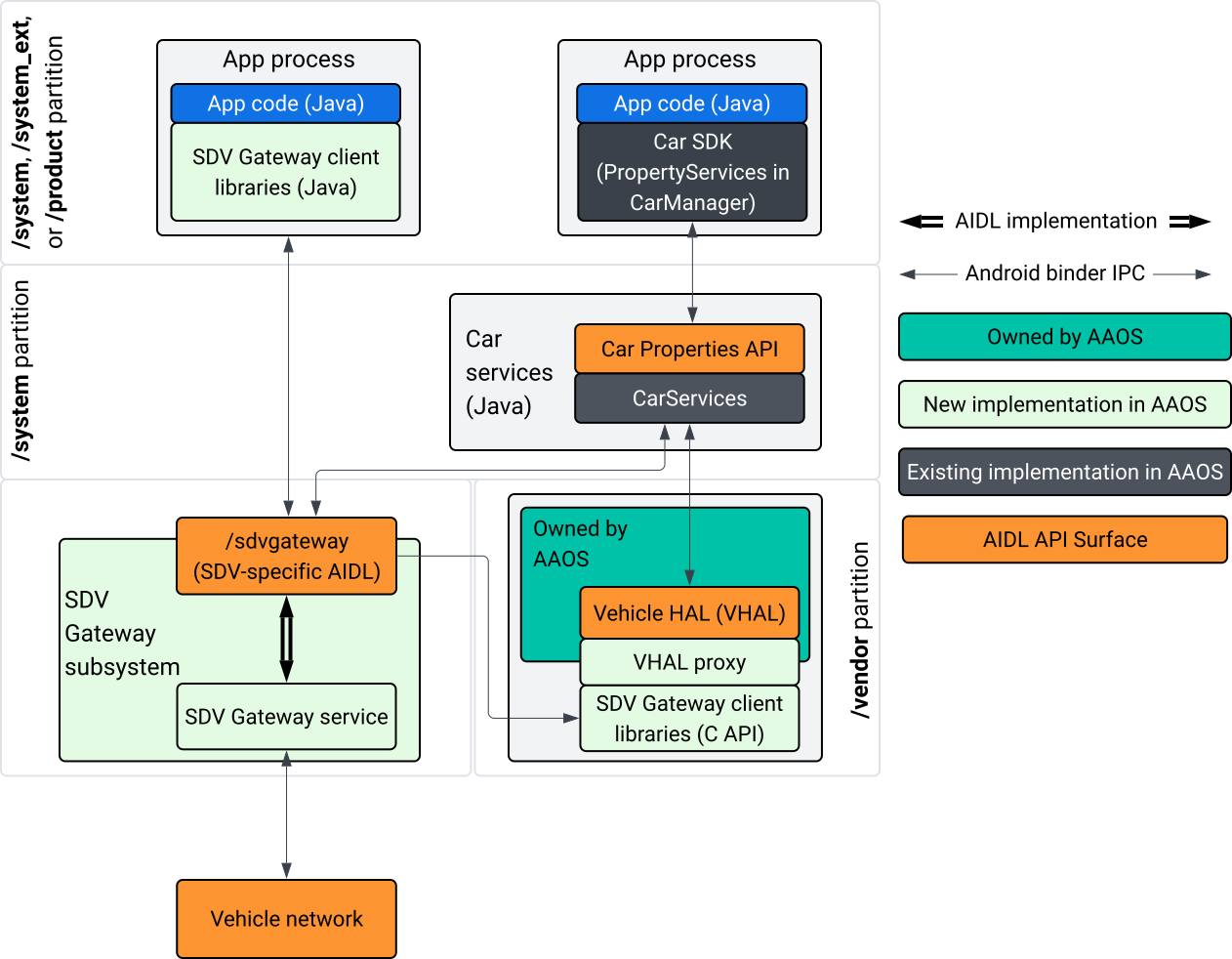
Şekil 1. SDV Gateway etkileşimleri.
Bu sistem diyagramında:
- Uygulamalar, istemci hizmetleri aracılığıyla SDV Ağ Geçidi ile etkileşime girer.
- AAOS SDV SDK'sı size şunları sağlar:
- İşlemler arası iletişim için ISdvGateway AIDL API'si.
- Ağ etkileşimi için iletişim kitaplıkları.
- Yerel hizmet entegrasyonu için kolaylık sağlayan C API'si.
- ISdvGateway AIDL API, SDV Gateway hizmeti ve alt sistemi tarafından uygulanır.
- SDV Gateway hizmeti şunları yönetir:
- İki yönlü hizmet keşfi.
- Uzak SDV hizmetleriyle iletişim
- Temel iş mantığı.
- SDV Gateway alt sistemi, araç ağına bağlanır.
- VHAL uygulaması da dahil olmak üzere yerel hizmetler, ISdvGateway AIDL API'yi doğrudan veya SDK'nın C API'si aracılığıyla kullanabilir.
- VHAL proxy'si, VSIDL eşleme entegrasyonunu içeren bir referans VHAL uygulaması olarak işlev görür.
IVI yerel hizmetinde SDV Gateway için entegrasyon modeli
Entegrasyon modeli Şekil 2'de gösterilmektedir:
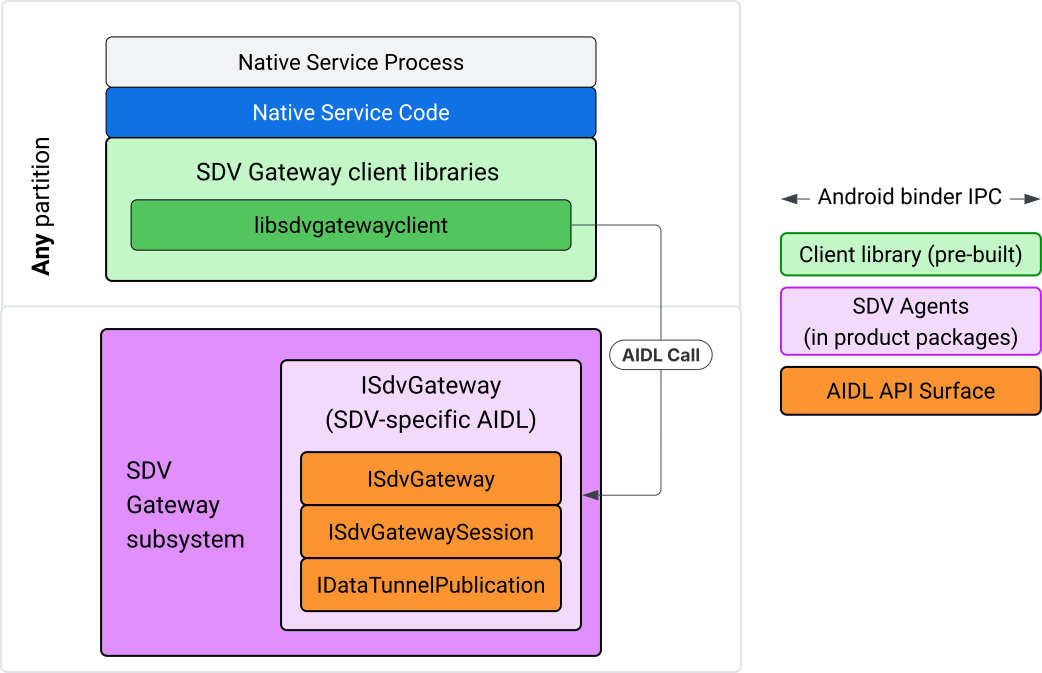
Şekil 2. SDV Gateway entegrasyon modeli.
IVI yerel hizmetinde SDV Gateway'i kullanma
Şekil 3'te IVI'de SDV Ağ Geçidi'nin kullanımı gösterilmektedir:
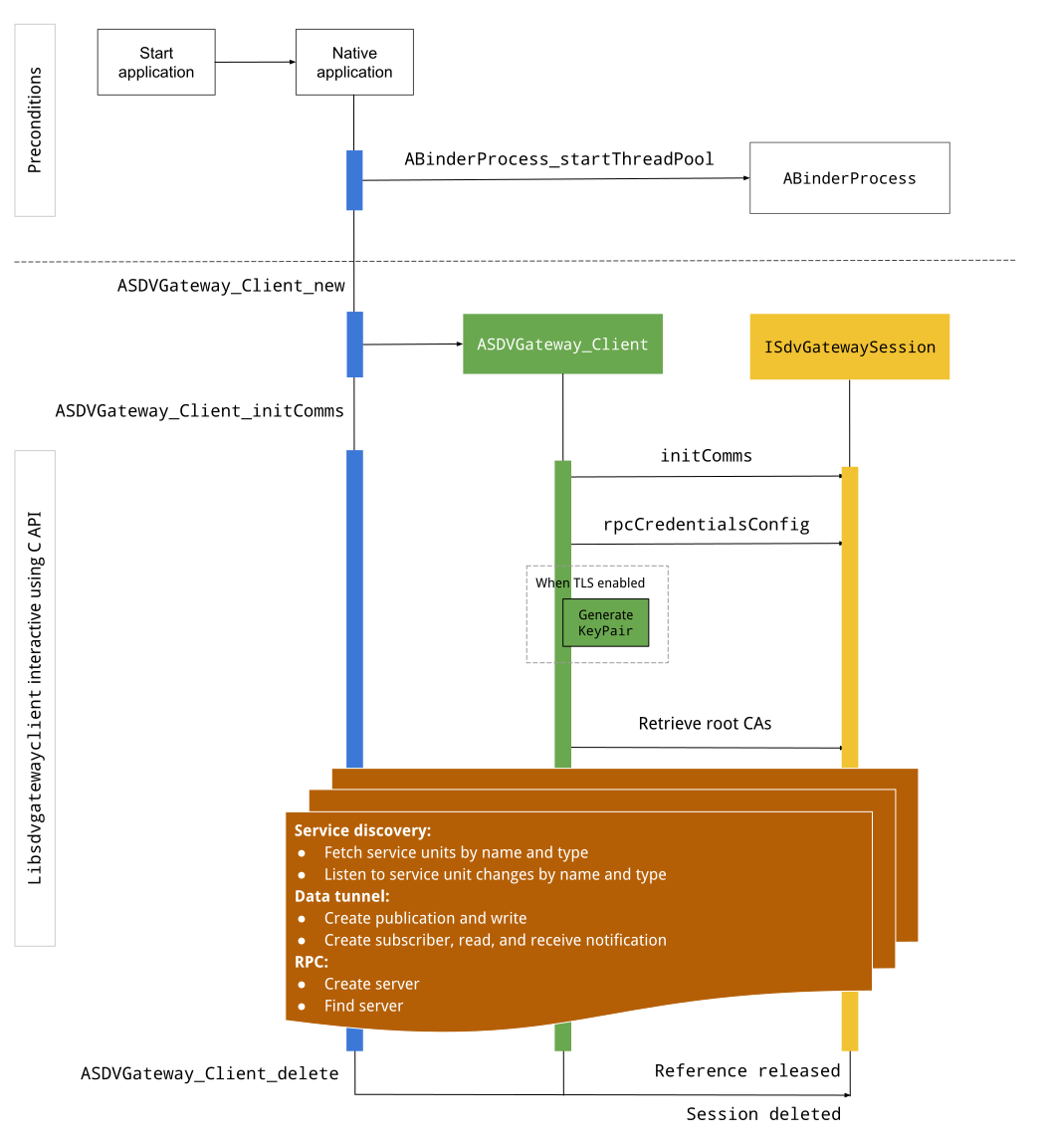
Şekil 3. IVI'de SDV Gateway.
Ön koşullar
Binder iş parçacığı havuzunu başlatın:
SDV Gateway istemci kitaplığı, Binder hizmetlerinden eşzamansız geri çağırmalar almak için başlatılmış bir Binder iş parçacığı havuzu gerektirir.
Bir Binder iş parçacığı havuzu başlatılmadığında SDV Ağ Geçidi istemcisi oluşturmak için gereken API başarısız olur.
Yerel Ağ Geçidi istemci kitaplığını dahil etme
Native Gateway İstemci kitaplığı bir C API'si sunar. C API'yi kullanmak için bağımlılık olarak libsdvgatewayclient örneği ekleyin:
cc_binary {
    name: "your_binary_name",
    srcs: ["main.cpp"],
    shared_libs: [
        "libsdvgatewayclient",
    ],
}
Yerel ağ geçidi istemcisini yükleme
#include "libsdvgatewayclient.h"
Yerel istemci örneği oluşturma
ASDVGateway_Client* client;
ASDVGateway_StatusCode_t statusCode = ASDVGateway_Client_new(
     &client, /*outStatus*/nullptr);
Müşteri oluşturulduktan sonra:
Ağ Geçidi hizmetiyle yapılan tüm sonraki etkileşimler için durumu tutar.
SDV'nin etkin olduğu diğer hizmetlerle yapılan tüm etkileşimlerin bağlamı olarak işlev görür ve C API işlevlerine ilk parametreler olarak iletilir.
Durum kodları ve hata mesajları
Çoğu C API işlevi şu tanıma sahiptir:
ASDVGateway_StatusCode_t ApiFunctionName(..., ASDVGateway_Status_t* outStatus);
Başarıyı değerlendirmek için ASDVGateway_StatusCode_t türünde olan döndürülen durum kodunu inceleyebilirsiniz. Ayrıca, işlevin durum kodunu ve hata mesajını doldurabileceği bir yapıya işaretçi de iletebilirsiniz. İşaretçi, outStatus adlı son parametre olarak aktarılır. Boş değer, çıkış yapısının kullanılmadığı anlamına gelir.
Arayan, hata mesajı için bellek durumu yapısını ayırmalıdır. Durum yapısı hem durum kodunu hem de hata mesajını içerebilir. Yeni bir istemci oluştururken hata mesajını alma örneği mevcuttur.
Başarıyı değerlendirmek için:
Döndürülen durum kodunu inceleyin. Bu kod,
ASDVGateway_StatusCode_ttüründedir.İşlevin durum kodunu ve hata mesajını doldurabileceği bir yapıya işaretçi iletin.
- İşaretçi,
outStatusadlı son parametre olarak aktarılır. - Boş değer, çıktı yapısının kullanılmadığı anlamına gelir.
- Arayan, hata mesajı için bellek durumu yapısını ayırmalıdır.
- Durum yapısı, durum kodunu ve hata mesajını içerebilir.
- İşaretçi,
Yeni bir istemci için hata mesajının nasıl alınacağını gösteren bir örneği aşağıda bulabilirsiniz:
#include <iostream>
#include <array>

struct StatusWithErrorMsg : ASDVGateway_Status_t {
    StatusWithErrorMsg() {
        // Ensure the base struct pointers point to our internal buffer
        errorMessage = errorMessageBuffer.data();
        maxErrorMessageSize = errorMessageBuffer.size();

        // Good practice: Zero-initialize the buffer
        errorMessageBuffer.fill(0);
    }

    std::array<char, 256> errorMessageBuffer;
};

// --- Execution ---

ASDVGateway_Client* client = nullptr;
StatusWithErrorMsg status;

// Initialize the client
ASDVGateway_StatusCode_t statusCode = ASDVGateway_Client_new(&client, &status);

// Log Results
std::cout << "Returned statusCode:    " << statusCode << std::endl;
std::cout << "Status Struct Code:     " << status.statusCode << std::endl;
std::cout << "Status Error Message:   " << status.errorMessage << std::endl;
Bu örnekte:
Durum yapısında bulunan durum kodu, döndürülen durum koduyla aynı değere sahip.
Hata mesajı yalnızca
maxErrorMessageSizekarakter sınırına kadar (null sonlandırma karakteri\0dahil) doldurulur. Hata oluşmazsa (durum koduOKise) hata mesajı boş bir dizedir.
İlk iletişimler
Init comms, arayan uygulama ile SDV Comm Stack ve SDV Gateway'i kullanan diğer uygulamalar arasındaki iletişimi başlatır. İletişimi başlatma işlevi, bu bağlamların her ikisinde de çağrılabilir:
İstemci oluşturulduktan sonra.
Veri tüneli, RPC veya hizmet keşfi etkileşimlerinden önce.
Örneğin:
ASDVGateway_InitCommsParams_t params{
.packageName = "android.sdv.samples.gateway.client",
.serviceBundleName = "NativeTestApp",
.serviceInstanceName = "default",
};
// Initialize communications and capture the status code
ASDVGateway_StatusCode_t statusCode = ASDVGateway_Client_initComms(client, ¶ms, &status);
// Recommended check
if (statusCode != ASDVGateway_StatusCode_OK) {
std::cerr << "Failed to init comms: " << status.errorMessage << std::endl;
}
Hizmet keşfi
Belirli bir tür veya ada sahip hizmet birimleri kaydedildiğinde ya da kaydı silindiğinde bildirim alabilirsiniz. Geri çağırma işlevi, ağ geçidi istemcisine ait bir iş parçacığında bildirilir. Bu geri çağırma, başlangıçta C API çağrısından hemen sonra kaydedilen tüm hizmet birimleriyle tetiklenir. İlk tetikleyiciden sonra, dinleyici açıkça kaydı silene kadar bildirimler güncellemelerle devam eder.
class NativeSdvGatewayTestApp {
public:
    static void ServiceUnitChangeListenerCallback(
        const ASDVGateway_ServiceUnitChangeEventType eventType,
        const ASDVGateway_ServiceUnitDefinition* serviceUnitDefinition,
        void* userData
    ) {
        auto* testApp = reinterpret_cast<NativeSdvGatewayTestApp*>(userData);

        if (testApp) {
            // Logic to react when services are registered or unregistered
            // e.g., testApp->handleServiceChange(eventType, serviceUnitDefinition);
        }
    }
};

// --- Listener Registration ---

// Ensure thisApp remains in scope as long as the listener is active
NativeSdvGatewayTestApp* thisApp = get_current_app_context();

ASDVGateway_UnitType_t unitType{
    .sdvPackageName     = "android.sdv.samples.sdv_gateway",
    .serviceBundleName  = "DtPublisher",
    .unitTypeName       = "TirePressure",
};

// Register the listener
ASDVGateway_Client_registerListenerForServiceUnitChangeByType(
    client,
    &unitType,
    NativeSdvGatewayTestApp::ServiceUnitChangeListenerCallback,
    static_cast<void*>(thisApp), // userData
    &listenerHandle,
    &status
);

// --- Cleanup ---

// Unregistering stops all notification to the callback function
ASDVGateway_Client_unregisterListenerForServiceUnitChangeByType(
    client,
    listenerHandle,
    &status
);
Kayıtlı hizmet birimlerini başka bildirimler olmadan almak için ASDVGateway_Client_fetchServiceUnitsByType ve ASDVGateway_Client_fetchServiceUnitsByName API'lerini kullanın.
class NativeSdvGatewayTestApp {
public:
    /**
     * Callback triggered for each service unit found that matches the requested type.
     */
    static void FetchServiceUnitsCallback(
        const ASDVGateway_ServiceUnitDefinition* serviceUnitDefinition,
        void* userData
    ) {
        auto* app = reinterpret_cast<NativeSdvGatewayTestApp*>(userData);

        if (serviceUnitDefinition) {
            // The service unit is registered with service discovery.
            // Example: processServiceUnit(serviceUnitDefinition);
        }
    }
};

// --- Execution ---

ASDVGateway_UnitType_t unitType{
    .sdvPackageName     = "android.sdv.samples.sdv_gateway",
    .serviceBundleName  = "DtPublisher",
    .unitTypeName       = "TirePressure",
};

// Context used to differentiate between various fetchServiceUnits calls
void* userData = static_cast<void*>(thisApp);

ASDVGateway_Client_fetchServiceUnitsByType(
    client,
    &unitType,
    NativeSdvGatewayTestApp::FetchServiceUnitsCallback,
    userData,
    &status
);
Geri çağırma, ASDVGateway_Client_fetchServiceUnitsByType API çağrısı sırasında arayanın iş parçacığında eşzamanlı olarak tetiklenir. Kayıtlı hizmet birimlerini birim türüne göre değil, ada göre almak için ASDVGateway_Client_fetchServiceUnitsByName kullanın:
ASDVGateway_StatusCode_t ASDVGateway_Client_fetchServiceUnitsByName(
    // [in]  Opaque pointer to a client object.
    const ASDVGateway_Client* client,

    // [in]  Pointer to a structure containing the package name,
    //       service bundle name, and service unit name.
    const ASDVGateway_UnitNameDiscoveryArgs_t* unitName,

    // [in]  Callback function to be called for each service unit
    //       definition registered. Called synchronously in the
    //       caller's thread before the fetch completes.
    ASDVGateway_FetchServiceUnitsCallback callback,

    // [in]  Optional value passed back as a parameter of the callback.
    void* userData,

    // [out] Optional pointer to status structure for result
    //       codes and error messages.
    ASDVGateway_Status_t* outStatus
);
RPC akışı
Gateway istemci kitaplığı, SDV'nin etkin olduğu diğer uygulamalarla iletişim için Taşıma Katmanı Güvenliği (TLS) ayarlarını yönetir. Özellikle iletişim için gerekli TLS ayarlarını alır. TLS kullanımı şu şekilde belirlenir:
SDV Boot Mode
LOCKEDolduğunda TLS kullanılır.SDV Boot Mode
UNLOCKEDolduğunda güvenli olmayan iletişim kullanılır. TLS kullanıldığında Gateway istemci kitaplığı, yalnızca uygulama süreci tarafından bilinen bir anahtar çifti oluşturur. İstemci, bir UPÇ sunucusu veya UPÇ istemci kanalı oluşturmak için UPÇ kimlik bilgilerini alır. RPC, özel bir SDV-RPC VLAN'ı kullanır. Ağ geçidi istemci kitaplığı,ASDVGateway_Client_initCommsçağrısı sırasında veya sonrasında işlemin varsayılan ağını SDV-RPC VLAN'ına geçirmek için android_setprocnetwork'ü çağırır.
RPC kullanılabilirliği
Erken başlatılacak şekilde yapılandırılmış bir istemci, SDV-RPC VLAN'ı kullanılabilir duruma gelmeden önce başlatılabilir. Herhangi bir UPÇ sunucusu veya UPÇ istemci soketi oluşturmaya çalışmadan önce UPÇ'nin kullanılabilir olduğunu kontrol edin:
// Check if the RPC (Remote Procedure Call) service is available
bool isRpcAvailable = ASDVGateway_Client_isRpcAvailable(client);

if (isRpcAvailable) {
    // Proceed with RPC calls
} else {
    // Handle the case where RPC is not yet ready or available
}
veya
// Check if the process is correctly bound to the SDV RPC Network Interface/VLAN
bool isRpcNetworkBound = ASDVGateway_Client_isProcessBoundToSdvRpcNetworkInterface(client);

if (!isRpcNetworkBound) {
    // Usually implies the process isn't running on the correct network interface
    // or the VLAN configuration is missing.
    std::cerr << "Warning: Process is not bound to the SDV RPC VLAN." << std::endl;
}
RPC kullanılabilirlik durumu değiştiğinde bildirim almak için ASDVGateway_Client_setClientNotificationCallback kullanarak istemci etkinlikleri için bir işleyici ayarlayın.
Uygulama, işlemin ağını değiştiriyorsa ASDVGateway_Client_isProcessBoundToSdvRpcNetworkInterface tercih edilir. Çünkü bu işlev hem RPC'nin kullanılabilir olduğunu hem de işlemin SDV-RPC VLAN'ına bağlı olduğunu kontrol eder.
Sürecin varsayılan ağını değiştirme
İnternete bağlı bağlantılar için soket açmak üzere işlemin varsayılan ağı olarak SDV-RPC VLAN'dan geçiş yapmanız gerekebilir. İşlemi SDV-RPC VLAN'ına bağlamayı kaldırmak ve yeniden bağlamak için ASDVGateway_Client_unbindProcessFromSdvRpcNetworkInterface ve ASDVGateway_Client_bindProcessToSdvRpcNetworkInterface işlevlerini çağırın. İki çağrı, küresel anahtarlar gibi davranarak işlemin tüm iş parçacıkları için soketlerin bağlı olduğu ağ arayüzünü değiştirir.
// 1. Unbind: Sockets return to the "default" network interface (e.g., wlan0, eth0)
ASDVGateway_StatusCode_t unbindStatus =
    ASDVGateway_Client_unbindProcessFromSdvRpcNetworkInterface(client, &status);

// 2. Bind: Sockets are now bound to the dedicated SDV-RPC VLAN
ASDVGateway_StatusCode_t bindStatus =
    ASDVGateway_Client_bindProcessToSdvRpcNetworkInterface(client, &status);

// Validation
if (bindStatus == ASDVGateway_StatusCode_OK) {
    // Sockets are successfully bound to the SDV-RPC VLAN
}
RPC bildirimleri
İstemci dinleyiciyi, UPÇ kullanılabilirliğindeki değişikliklerle ilgili bildirimleri ve bir UPÇ sunucusu tarafından kabul edilmesi gereken kök sertifikalardaki güncellemeleri alacak şekilde ayarlayın:
class NativeSdvGatewayTestApp {
public:
    static void ClientNotificationCallback(
        ASDVGateway_ClientNotificationType_t notificationType,
        void* userData
    ) {
        auto* testApp = reinterpret_cast<NativeSdvGatewayTestApp*>(userData);
        if (!testApp) return;

        switch (notificationType) {
            case ASDVGateway_ClientNotificationType_RootCertsChanged:
                std::cout << "onClientNotification: Root Certs Changed" << std::endl;
                // Handle certificate rotation logic here
                break;

            case ASDVGateway_ClientNotificationType_RpcAvailabilityChanged:
                std::cout << "onClientNotification: RPC Availability Changed" << std::endl;
                // Handle reconnection or UI updates here
                break;

            default:
                std::cout << "onClientNotification: Received Unknown Notification ("
                          << notificationType << ")" << std::endl;
                break;
        }
    }
};

// --- Registration ---

NativeSdvGatewayTestApp* thisApp = get_current_app_context();

// Register the notification callback to monitor system-level changes
ASDVGateway_StatusCode_t statusCode = ASDVGateway_Client_setClientNotificationCallback(
    client,
    NativeSdvGatewayTestApp::ClientNotificationCallback,
    static_cast<void*>(thisApp), // userData
    &status
);
RPC sunucu akışı
RPC sunucusu oluşturmak için kimlik bilgilerini kullanmanız gerekir:
ASDVGateway_RpcCredentials_t* rpcCredentials = nullptr;

// Retrieve the credentials from the client
ASDVGateway_StatusCode_t statusCode = ASDVGateway_Client_rpcCredentials(client, &rpcCredentials, &status);

// Validation: Differentiating between an error and a deliberate "insecure mode"
if (status.statusCode != ASDVGateway_StatusCode_OK) {
    std::cerr << "Error retrieving credentials: " << status.errorMessage << std::endl;
    return;
}

// Logic for choosing Security Credentials
if (rpcCredentials == nullptr) {
    // If the call succeeded but credentials are null, the system expects insecure communication
    std::cout << "Configuring for Insecure Mode" << std::endl;
} else {
    std::cout << "Configuring for Secure Mode:" << std::endl;
    std::cout << "  Private Key: " << (rpcCredentials->privateKeyPem ? "Present" : "Missing") << std::endl;
    std::cout << "  RootCerts:   " << rpcCredentials->rootCertsPem << std::endl;
    std::cout << "  CertChain:   " << rpcCredentials->certChainPem << std::endl;
    std::cout << "  SAN:         " << rpcCredentials->subjectAlternativeName << std::endl;
}

// --- Cleanup ---

// Release the memory once the RPC server/client is initialized
if (rpcCredentials != nullptr) {
    ASDVGateway_Client_deleteRpcCredentials(client, rpcCredentials);
}
UPÇ sunucusunu oluşturup dinleme bağlantı noktasını öğrendikten sonra, diğer uygulamaları bulabilmesi için UPÇ sunucusunu kaydedin:
ASDVGateway_RegisterRpcServerParams_t params{
.serviceUnitName = "android-sdv-samples-sunroof-sunroof",
.unitType = ASDVGateway_UnitType_t{
.sdvPackageName = "android.sdv.samples.sunroof",
.serviceBundleName = "SunroofServer",
.unitTypeName = "Sunroof",
},
.listeningPort = listeningPort,
.serverUnitMetadata = ASDVGateway_ServerUnitMetadata_t{
.version = 1,
},
};
// Register the RPC server with the SDV Gateway
ASDVGateway_StatusCode_t statusCode = ASDVGateway_Client_registerRpcServer(
client,
¶ms,
&status
);
// Basic error handling
if (statusCode != ASDVGateway_StatusCode_OK) {
std::cerr << "Failed to register RPC server: " << status.errorMessage << std::endl;
}
Sistem, kök sertifikaları çalışma zamanında (örneğin, VM durum değişiklikleri sırasında) güncellediğinde RPC sunucularının kabul edilen sertifikalar listesini yenilemesi gerekir:
Kök sertifikalar güncellendiğinde bildirim almak için
ASDVGateway_Client_setClientNotificationCallbackkullanarak istemci etkinlikleri için bir dinleyici ayarlayın.Güncellenmiş kök sertifikaları almak için
ASDVGateway_Client_rpcCredentialsnumaralı telefonu arayın.
RPC istemci akışı
RPC istemcisinin akışı aşağıda verilmiştir:
ASDVGateway_FindRpcServerByNameParams_t params{
.packageName = "android.sdv.samples.cluster",
.serviceBundleName = "ClusterServer",
.serviceUnitName = "android-sdv-samples-cluster-cluster",
};
ASDVGateway_SocketAddress_t socketAddress;
ASDVGateway_RpcCredentials_t* rpcCredentials = nullptr;
// Perform the lookup to find the server's location and security requirements
ASDVGateway_StatusCode_t statusCode = ASDVGateway_Client_findRpcServerByName(
mClient,
¶ms,
&socketAddress,
&rpcCredentials,
&status
);
// Mandatory check: Distinguish between system errors and intentional "Insecure Mode"
if (status.statusCode != ASDVGateway_StatusCode_OK) {
std::cerr << "Failed to find RPC server: " << status.errorMessage << std::endl;
return;
}
// Logic for establishing the RPC channel
if (rpcCredentials == nullptr) {
std::cout << "Connecting via Insecure Mode to "
<< socketAddress.address << ":" << socketAddress.port << std::endl;
} else {
std::cout << "Connecting via Secure Mode to "
<< socketAddress.address << ":" << socketAddress.port << std::endl;
std::cout << " RootCerts: " << rpcCredentials->rootCertsPem << std::endl;
std::cout << " SAN: " << rpcCredentials->subjectAlternativeName << std::endl;
// Note: privateKeyPem and certChainPem are typically used if the client
// needs to perform mutual TLS (mTLS).
}
// Cleanup: Release the credential memory once the RPC channel is established
if (rpcCredentials != nullptr) {
ASDVGateway_Client_deleteRpcCredentials(client, rpcCredentials);
}
Yayıncı oluşturma ve mesaj yayınlama
ASDVGateway_Client_createPublication API, bir yayıncı hizmet birimini AIDL arayüzü aracılığıyla SDV Gateway'e kaydetmek ve uygulama sürecinde bir Fast Message Queue (FMQ) oluşturmak için kullanılır. Binder yalnızca FMQ'yu ayarlamak için kullanılır, mesaj yazarken kullanılmaz. Ardından, oluşturulan yayına mesaj yayınlamak için ASDVGateway_Client_publishMessages API'si kullanılır. Bu işlemde, yayının FMQ'suna yazılır ve mesajların yazıldığı bildirilir.
ASDVGateway_CreatePublicationParams_t params{
.serviceUnitName = "mirror-position-adjust-impl-1",
.unitType = ASDVGateway_UnitType_t{
.sdvPackageName = "android.sdv.samples.sdv_gateway",
.serviceBundleName = "DtPublisher",
.unitTypeName = "MirrorPositionAdjust",
},
.publisherUnitMetadata = ASDVGateway_PublisherUnitMetadata_t{
.version = 1,
.messageSizeBytes = 64,
.messageCount = 16,
},
};
ASDVGateway_PublicationMetadata_t metadata;
// 1. Create the Publication (allocates resources on the gateway)
ASDVGateway_StatusCode_t createStatus = ASDVGateway_Client_createPublication(
client,
¶ms,
&metadata,
&status
);
if (status.statusCode != ASDVGateway_StatusCode_OK) {
std::cerr << "Failed to create publication: " << status.errorMessage << std::endl;
return;
}
// 2. Publish Messages
// Note: serializedMessage should contain your encoded protobuf data
std::vector<uint8_t> serializedMessage;
ASDVGateway_Client_publishMessages(
client,
serializedMessage.data(),
serializedMessage.size(),
metadata.publicationId,
&status
);
Bildirim dinleyiciye sahip bir abone oluşturma
Bir yayına abone olmak ve Data Tunnel bildirimleri (ör. mesaj kullanılabilirliği) almak için ASDVGateway_Client_subscribeToPublicationByName API'sini kullanın. Bu API, yayınlanan mesajları okumak için FMQ'yu da ayarlar. Abonelik işlemi sırasında veya sonrasında bir bildirim geri çağırma işlevi yapılandırabilirsiniz.
#include <map>
#include <memory>
#include <iostream>

class NativeSdvGatewayTestApp {
public:
    struct SubscriptionContext {
        int32_t subscriptionId;
        std::string topicName;
        // Add other context-specific data here (e.g., counters, buffers)
    };

    /**
     * Callback triggered when new data is published to a subscribed topic.
     */
    static void SubscriptionNotificationCallback(
        const ASDVGateway_SubscriptionNotificationData_t* notification,
        void* userData
    ) {
        // The SDV Gateway client passes back the userData pointer.
        // We ensure validity by managing the lifecycle of SubscriptionContext
        // within the mSubscriptions map.
        auto* ctx = reinterpret_cast<SubscriptionContext*>(userData);

        if (ctx && notification) {
            // React to data being available for the subscription.
            // Example: handleIncomingData(notification->data, notification->size);
            std::cout << "Notification received for sub ID: " << ctx->subscriptionId << std::endl;
        }
    }

private:
    // Maps subscription handles/IDs to their respective contexts
    std::map<int32_t, std::unique_ptr<SubscriptionContext>> mSubscriptions;
};

// --- Usage ---
NativeSdvGatewayTestApp app;
Abone olurken yayıncının hizmet birimi adının yanı sıra ek seçenekler belirtebilirsiniz. Bu seçenekler, abone olmadan önce en son yayınlanan mesajı almanıza ve bildirimler arasındaki minimum zaman aralığını tanımlamanıza olanak tanır.
ASDVGateway_SubscribeToPublicationByNameParams_t params{
.sdvVmName = "vm1",
.packageName = "test.package.impl.name",
.serviceBundleName = "TestBundleImpl",
.serviceUnitName = "GrpcServerImpl",
};
ASDVGateway_Subscriber_Options_t options{
// Ensure we receive the most recent message immediately upon subscribing
.flags = ASDVGATEWAY_SUBSCRIBER_OPTIONS_FLAG_FETCHLASTMESSAGE,
.minIntervalMs = 0, // No rate limiting; receive updates as they happen
};
// 1. Prepare the context for the callback
auto subCtx = std::make_unique<SubscriptionContext>();
ASDVGateway_PublicationMetadata_t metadata{};
// 2. Perform the subscription
ASDVGateway_StatusCode_t statusCode = ASDVGateway_Client_subscribeToPublicationByName(
client,
¶ms,
&options,
NativeSdvGatewayTestApp::SubscriptionNotificationCallback,
static_cast<void*>(subCtx.get()), // Pass the raw pointer as userData
&metadata,
&status
);
// 3. Validation and Lifecycle Management
if (status.statusCode != ASDVGateway_StatusCode_OK) {
// Error handling: subCtx will be automatically deleted here
std::cerr << "Subscription failed: " << status.errorMessage << std::endl;
return;
}
// Store the context using the publicationId as the key.
// Once moved, the map owns the lifetime of subCtx.
app.mSubscriptions.emplace(metadata.publicationId, std::move(subCtx));
Yayınlardaki mesajları okumak için ASDVGateway_Client_readAvailableMessages API'yi kullanın:
uint32_t messagesAvailable = 0;

// 1. Check how many messages are waiting in the queue
ASDVGateway_StatusCode_t availStatus = ASDVGateway_Client_availableToRead(
    client,
    metadata.publicationId,
    &messagesAvailable,
    &status
);

if (status.statusCode != ASDVGateway_StatusCode_OK) {
    // Error handling for availability check
    return;
}

if (messagesAvailable == 0) {
    // No messages available for this publication at this time
    return;
}

// 2. Prepare the buffer
// metadata.messageSizeBytes was provided during the publication/subscription setup
std::vector<uint8_t> bytesForMessages;
bytesForMessages.resize(metadata.messageSizeBytes * messagesAvailable);

// 3. Read the messages from the Gateway into your local buffer
uint32_t actualMessageCount = 0; // Filled by the SDK with the number of messages read
ASDVGateway_StatusCode_t readStatus = ASDVGateway_Client_readAvailableMessages(
    client,
    metadata.publicationId,
    bytesForMessages.data(),
    bytesForMessages.size(),
    &actualMessageCount,
    &status
);

if (status.statusCode == ASDVGateway_StatusCode_OK) {
    // Successfully read 'actualMessageCount' messages
    // Process bytesForMessages...
}
Abonelikten sonra geri çağırmayı ayarlamak için ASDVGateway_Client_setNotificationCallbackForPublicationId API'sini kullanın:
ASDVGateway_StatusCode_t ASDVGateway_Client_setNotificationCallbackForPublicationId(
    // [in]  Opaque pointer to the client object.
    const ASDVGateway_Client* client,

    // [in]  Identifies the specific publication to monitor.
    const int32_t publicationId,

    // [in]  Function pointer triggered when new data is available
    //       for the specified publication.
    ASDVGateway_SubscriptionNotificationCallback notificationCallback,

    // [in]  Optional user-defined context passed back to the callback.
    void* notificationCallbackUserData,

    // [out] Optional pointer to a status structure for result codes
    //       and error messages.
    ASDVGateway_Status_t* outStatus
);
Init hizmetini ayarlama
Öncelikle, Yerel hizmetler için kimlik başlıklı makaledeki adımları uygulayarak hizmetin Android kimliği (AID) aracılığıyla hizmete hizmet kimliği atayın.
Hizmetinizin native_sdv_gateway_client_service olarak adlandırıldığını, yürütülebilir dosyanın /vendor bölümünde /vendor/bin/native_sdv_gateway_client_service konumunda bulunduğunu ve hizmeti çalıştırmak için vendor_gateway_client'ü Android kimliği (AID) olarak kullandığınızı varsayalım.
Bu kurulumla aşağıdaki init hizmetini tanımlayabilirsiniz:
service native_sdv_gateway_client_service /vendor/bin/native_sdv_gateway_client_service
    class core
    user vendor_gateway_client
    group inet
    disabled
    oneshot
Bu yapılandırmada aşağıdaki parametreler kullanılır:
vendor_gateway_client, hizmet için oluşturulan veya seçilen AID'dir.group inet, SDV sanal makineleri arasında iletişim kurmak için ağ arayüzünü kullanan SDV ağ geçidi istemcileri için gereklidir. Gerekirse başka gruplar eklenebilir.- Bu örnekte
disabledveoneshotkullanılmaktadır. Hizmetiniz için hizmet seçeneklerini ayarlamanız gerekebilir. Hizmetisdv_gatewaytarihinden sonra başlatın.
Hizmet için SELinux kuralları oluşturma
SDV Gateway API'lerini kullanmak için hizmetle ilgili aşağıdaki SELinux kurallarına ihtiyacınız vardır:
# Define the domain for the service
type native_sdv_gateway_client_service, domain;

# Define the executable file type on the vendor partition
type native_sdv_gateway_client_service_exec, exec_type, file_type, vendor_file_type;

# Macro to transition from 'init' to this service's domain upon execution
init_daemon_domain(native_sdv_gateway_client_service)

# Macro to grant the necessary permissions to communicate with the SDV Gateway
sdv_gateway_client_domain(native_sdv_gateway_client_service)
SELinux kurallarında:
init_daemon_domain, hizmetininitüzerinden başlatılmasına izin verir.sdv_gateway_client_domain, SDV Ağ Geçidi ile etkileşim için gerekli tüm SELinux izinlerini sağlar. Aşağıdaki satır, yürütülebilir dosyaya bu kuralları verir:/vendor/bin/native_sdv_gateway_client_service u:object_r:native_sdv_gateway_client_service_exec:s0
Kod örneği
CAP'lerin nasıl belgelendiğini gösteren yerel kod örneğini çalıştırma hakkında daha fazla bilgi edinmek için system/software_defined_vehicle/samples/sdv_gateway/NativeSdvGatewayTestApp/README.md bölümüne bakın.
IVI Java uygulamasında SDV Gateway
IVI'deki bir SDV Ağ Geçidi için etkileşim modeli bu diyagramda gösterilmektedir:
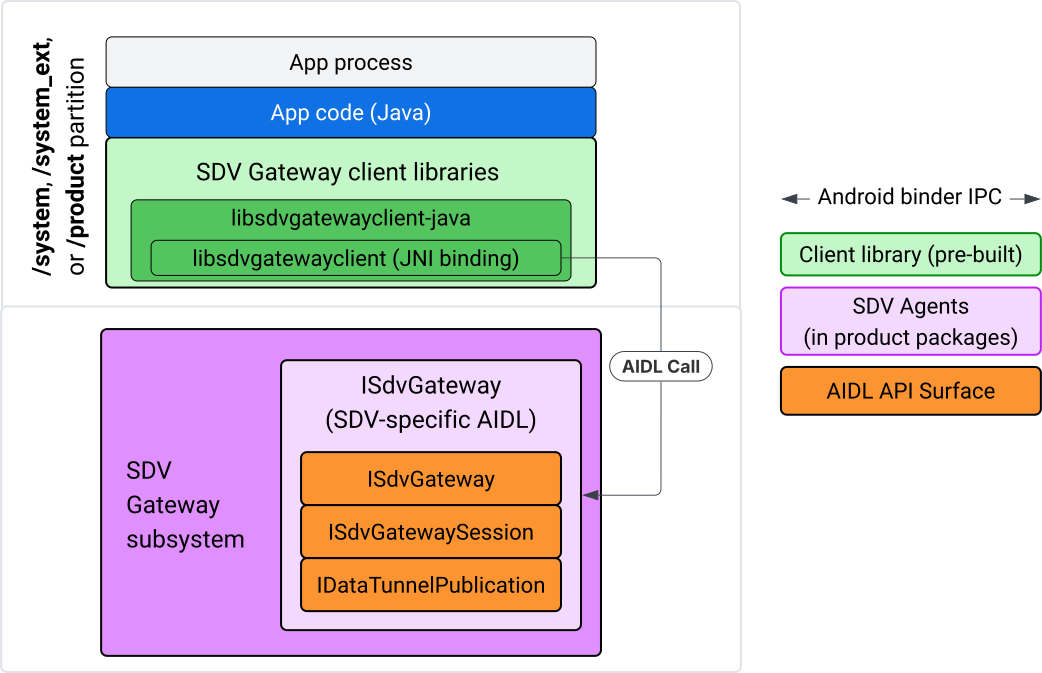
Şekil 4. IVI Java uygulamasında SDV Ağ Geçidi.
Model özellikle:
- Tüm aramaları JNI katmanına gönderir.
- Java ve C API'sini birleştirir.
ISdvGatewayile AIDL etkileşimlerini tanımlar:- Başlatma iletişimi
- UPÇ sunucusunu bulma veya oluşturma
- Pub/Sub'ı oluşturma
- Hizmet keşfi veri tüneli etkileşimlerini gerçekleştirme
- Bildirim alma (ör. veriler kullanılabilir)
- Anahtar çifti oluşturma ve TLS için sertifikalar için mesajları okuma ve yazma (pub/sub için FMQ)
Gateway istemci kitaplıklarını dahil etme
libsdvgatewayclient C API'si için Java kitaplığı ve JNI sarmalayıcısı, IVI hedefindeki bir APEX'e yüklenir. Java kitaplığı kaba koduna, çalışma zamanında kullanılması gereken Java kitaplığına ve Java kitaplığını içeren gerekli APEX'e derleme süresi bağımlılığı ekleyin.
android_app {
    name: "YourAppName",
    // ...
    static_libs: [
        "libsdvgatewayclient-java",
    ],
    libs: [
        "libsdvgatewayclient-java-sdk.stubs",
    ],
    uses_libs: [
        "libsdvgatewayclient-java-sdk",
    ],
    required: [
        "com.sdv.google.gateway.client",
    ],
    // ...
}
SDV ağacının dışında oluşturulan paketlenmemiş bir uygulama söz konusu olduğunda süreç benzerdir:
Oluşturulan Java kitaplığı kaba kod JAR'ını ve RPC için destekleyici JAR'ı uygulama kitaplıkları klasörüne kopyalayın. Ayrıntılı bilgi için
system/software_defined_vehicle/sdv_gateway/libsdvgatewayclient_apex/README.mdbaşlıklı makaleyi inceleyin.Stubs JAR'ı yalnızca derleme bağımlılığı olarak ekleyin. Örneğin,
compileOnlybölümünedependenciesgirişi ekleyerek Gradle yapılandırmalarını saplara bağlı olacak şekilde güncelleyin:dependencies { // The library supporting functions for SDK RPC. // Statically linked into the app APK. implementation(files("libs/libsdvgatewayclient-java.jar")) // Stub of the SDV-Gateway client library. // Used only for compilation; the real implementation is provided // by the com.sdv.google.gateway.client APEX at runtime. compileOnly(files("libs/libsdvgatewayclient-java-sdk.jar")) }Java kitaplığını
AndroidManifest.xmldosyasının uygulama bölümüne ekleyin.<manifest xmlns:android="http://schemas.android.com/apk/res/android"> <application> <!-- Declares that this app requires the SDV Gateway client library. The 'android:required="true"' attribute ensures the app won't install/run if the library is missing from the system. --> <uses-library android:name="libsdvgatewayclient-java-sdk" android:required="true" /> </application> </manifest>
Kitaplıkları yükleme
SdvGatewayClient nesnesi oluşturun (istemci kitaplığı tarafından sağlanır):
import google.sdv.gateway.client.SdvGatewayClient;

// --- Inside your Activity, Service, or ViewModel ---

// Initialize the SDV Gateway Client
SdvGatewayClient gatewayClient = new SdvGatewayClient();
Başlatma iletişimi
Hizmet paketi adı olarak uygulama adını kullanarak initComms() işlevini çağırın:
// Define a unique name for your service bundle (usually constant)
private static final String SERVICE_BUNDLE_NAME = "MySdvServiceBundle";

// ... inside an Activity or Service context ...

try {
    // Initialize communications with the SDV Gateway
    // context.getPackageName() provides "android.sdv.samples.gateway.client" or similar
    gatewayClient.initComms(context.getPackageName(), SERVICE_BUNDLE_NAME);

    Log.i("SDV_GATEWAY", "Communications initialized successfully");
} catch (Exception e) {
    // Unlike the C API which uses status codes,
    // the Java SDK often throws exceptions for initialization failures.
    Log.e("SDV_GATEWAY", "Failed to initialize communications", e);
}
Hizmet keşfi
Java API, aşağıdaki işlemleri yapmaya yarayan yöntemler içerir:
Belirli bir birim türüne sahip (veya alternatif olarak belirli bir adla eşleşen) hizmet birimleri kaydedildiğinde ya da kaydı silindiğinde bildirim alın.
Belirli bir birim türüne sahip mevcut hizmet birimlerini listeleyin (veya alternatif olarak belirli bir hizmet birimi türü adıyla eşleştirin). Hizmet birimi değişikliklerinden haberdar olmak için bir dinleyici oluşturun:
import google.sdv.gateway.client.ServiceUnitChangeListener;
import google.sdv.gateway.client.ServiceUnitChangeEventType;
import google.sdv.gateway.client.ServiceUnitDefinition;

// --- Implementation ---

ServiceUnitChangeListener listener = new ServiceUnitChangeListener() {
    @Override
    public void onServiceUnitChanged(
        ServiceUnitChangeEventType eventType,
        ServiceUnitDefinition serviceUnitDefinition
    ) {
        // This is triggered when services matching your criteria
        // are registered or unregistered on the vehicle network.
        if (eventType == ServiceUnitChangeEventType.REGISTERED) {
            // Handle new service discovery
        } else if (eventType == ServiceUnitChangeEventType.UNREGISTERED) {
            // Handle service removal
        }
    }
};
addListenerForServiceUnitChangeByName Java yöntemi, işleyiciye bildirim gönderir:
// 1. Register the listener for a specific service unit by name
AutoCloseable handle = gatewayClient.addListenerForServiceUnitChangeByName(
    new UnitNameDiscoveryArgs(
        "",                                   // sdvVmName (empty for local/auto-discovery)
        "android.sdv.samples.cluster",        // sdvPackageName
        "ClusterServer",                      // serviceBundleName
        "android-sdv-samples-cluster-cluster" // serviceUnitName
    ),
    listener
);

// --- Later in the application lifecycle ---

// 2. To stop receiving notifications and clean up resources, close the handle.
try {
    if (handle != null) {
        handle.close();
    }
} catch (Exception e) {
    Log.e("SDV_GATEWAY", "Error while closing the listener handle", e);
}
Alternatif olarak, belirtilen birim türüne sahip hizmetler kaydedildiğinde veya kaydı silindiğinde dinleyiciyi bilgilendirmek için addListenerForServiceUnitChangeByType Java yöntemini kullanın:
// 1. Register a listener based on the Service Unit Type
AutoCloseable handle = gatewayClient.addListenerForServiceUnitChangeByType(
    new UnitType(
        "com.android.testapp.sdvcarmonitor", // sdvPackageName
        "SunroofRpcServer",                  // serviceBundleName
        "Sunroof"                            // unitTypeName
    ),
    listener
);

// --- Execution Loop / Lifecycle ---

// 2. To stop receiving notifications and clean up memory, close the handle.
// This effectively unregisters the listener from the SDV Gateway.
try {
    if (handle != null) {
        handle.close();
    }
} catch (Exception e) {
    Log.e("SDV_GATEWAY", "Failed to close the service unit listener handle", e);
}
addListenerForServiceUnitChangeByName ve addListenerForServiceUnitChangeByType için dinleyici, eklendikten sonra tüm kayıtlı hizmet birimleri hakkında bilgilendirilir. Yalnızca kayıtlı hizmet birimlerini ada veya türe göre almak için listServiceUnitsByName ve listServiceUnitsByType Java API'lerini kullanın:
import google.sdv.gateway.client.ServiceUnitDefinition;
import google.sdv.gateway.client.UnitNameDiscoveryArgs;
import google.sdv.gateway.client.UnitType;

// --- 1. Synchronous Lookup by Specific Name ---
ServiceUnitDefinition[] definitionsByName = gatewayClient.listServiceUnitsByName(
    new UnitNameDiscoveryArgs(
        "",                                   // sdvVmName
        "android.sdv.samples.cluster",        // sdvPackageName
        "ClusterServer",                      // serviceBundleName
        "android-sdv-samples-cluster-cluster" // serviceUnitName
    )
);

// --- 2. Synchronous Lookup by Service Type ---
ServiceUnitDefinition[] definitionsByType = gatewayClient.listServiceUnitsByType(
    new UnitType(
        "com.android.testapp.sdvcarmonitor", // sdvPackageName
        "SunroofRpcServer",                  // serviceBundleName
        "Sunroof"                            // unitTypeName
    )
);

// Example processing
if (definitionsByType.length > 0) {
    ServiceUnitDefinition firstSunroof = definitionsByType[0];
    // Proceed to connect...
}
RPC sunucu akışı
IVI sistemlerindeki SDV Gateway istemcileri, SDV hizmetleriyle iletişim için Google uzak prosedür çağrısını (gRPC) kullanır. Bu etkileşimler, VSIDL kataloğundaki proto tanımlarına dayanır. Bu tanımlar, SDV Core'da kullanılanlarla tutarlıdır veya benzerdir. Java uygulamaları için gRPC-Java, seçilen uygulamadır. Uygulama sunucusu için örnek bir sunucu proto tanımı (sunroof.proto) sağlanır.
service Sunroof {
    /**
     * Retrieves the current state of the sunroof (e.g., position, tilt, status).
     *
     * @param .google.protobuf.Empty - No input parameters required.
     * @return SunroofStateResponse - The current telemetry data for the sunroof.
     */
    rpc GetSunroofState(.google.protobuf.Empty) returns (SunroofStateResponse) {}
}
İlgili proto kitaplığına göre bağlantı oluşturun ve hizmeti tanımlayın:
import com.android.sdv.sdvgrpclibrary.SunroofGrpc;
import com.android.sdv.sdvgrpclibrary.SunroofStateResponse; // Assuming this is the generated class
import com.google.protobuf.Empty;
import io.grpc.stub.StreamObserver;

/**
 * Implementation of the Sunroof gRPC service.
 * This class handles the logic for the RPCs defined in your .proto file.
 */
static class SunroofGrpcImpl extends SunroofGrpc.SunroofImplBase {

    @Override
    public void getSunroofState(Empty request, StreamObserver<SunroofStateResponse> responseObserver) {
        // 1. Fetch current sunroof data (e.g., from a Hardware Abstraction Layer)
        int currentPosition = 50; // Example value: 50% open

        // 2. Build the Protobuf response message
        SunroofStateResponse response = SunroofStateResponse.newBuilder()
                .setPercentageOpen(currentPosition)
                .build();

        // 3. Send the response to the client using the observer
        responseObserver.onNext(response);

        // 4. Close the stream to signal that the RPC is finished
        responseObserver.onCompleted();
    }
}
gRPC sunucusunu güvenli ve güvenli olmayan kanal kimlik bilgileriyle kaydedin:
// 1. Define the type signature for the service
UnitType unitType = new UnitType(
    "com.android.testapp.sdvcarmonitor", // sdvPackageName
    "SunroofRpcServer",                  // serviceBundleName
    "Sunroof"                            // typeName (Unit Type)
);

// 2. Register the RPC server with the Gateway
// The gateway creates a mapping between the ServiceUnitName and your implementation.
server = gatewayClient.registerRpcServer(
    "SunroofRpcServerImpl-1",                       // serviceUnitName (Unique instance name)
    unitType,                                       // unitType defined earlier
    "SUNROOF_GRPC_SERVER_VALUE_HOLDER".getBytes(),  // appMetadataValueHolder (Static discovery data)
    1,                                              // appMetadataVersion
    new SunroofGrpcImpl()                           // The actual gRPC service implementation
);
İstemci kitaplığı, dahili olarak gRPC sunucu nesnesi SdvGatewayClient.java oluşturur ve kök sertifikalardaki güncellemeleri de işler:
// 1. Initialize credentials (Insecure for dev, TLS for production)
ServerCredentials serverCredentials = InsecureServerCredentials.create();

// 2. Build and start the OkHttp-based gRPC server
final int bindAnyPort = 0;
final Server server = OkHttpServerBuilder
    .forPort(bindAnyPort, serverCredentials)
    .addService(gRpcServerImplementation) // Your SunroofGrpcImpl
    .build()
    .start();

// The assigned port can now be retrieved using server.getPort()
int actualPort = server.getPort();

// 3. Prepare the JNI data structure
// This object mirrors the ASDVGateway_ServiceUnitDefinition_t C struct
JniServiceUnitDefinition definition = new JniServiceUnitDefinition();

// Fill the RPC service definition params (Port, Name, Type, etc.)
definition.setPort(actualPort);
definition.setServiceUnitName("SunroofRpcServerImpl-1");

// 4. Perform the cross-language call
// This jumps from Java -> JNI -> ASDVGateway_Client_registerRpcServer (C API)
mJniClient.nativeRegisterRpcServer(definition);
RPC istemci akışı
Bu kod örneği, uygulamanın istemci olarak bağlandığı sunucu için sunucu proto tanımını (tpms.proto) sağlar:
/**
 * The TPMS service provides real-time pressure and temperature
 * data for all tires on the vehicle.
 */
service Tpms {
    /**
     * Returns the full state of all monitored tires.
     */
    rpc GetTpmsState(.google.protobuf.Empty) returns (TpmsStateResponse) {}

    /**
     * A filtered query that returns only the tires
     * below the recommended pressure threshold.
     */
    rpc GetLowTires(.google.protobuf.Empty) returns (LowTiresResponse) {}
}
İlgili proto kitaplığına karşı bağlantı oluşturun:
import com.android.sdv.sdvgrpclibrary.TpmsGrpc;
import io.grpc.ManagedChannel;

// --- Inside your Client Application ---

// 1. Request a ManagedChannel from the Gateway for a specific service unit
ManagedChannel managedChannel = gatewayClient.connectToRpcServerByName(
    "",                                     // sdvVmName (empty for local/auto-lookup)
    "android.sdv.samples.cluster",          // packageName
    "ClusterServer",                        // serviceBundleName
    "android-sdv-samples-cluster-cluster"  // serviceUnitName
);

// 2. Use the channel to create a gRPC stub (e.g., for the TPMS service)
TpmsGrpc.TpmsBlockingStub tpmsStub = TpmsGrpc.newBlockingStub(managedChannel);

// 3. Now you can call RPC methods directly
// TpmsStateResponse response = tpmsStub.getTpmsState(Empty.getDefaultInstance());
RPC sunucusunu bulmak için dahili olarak ASDVGateway_Client_findRpcServerByName API'si çağrılır. RPC sunucusu bulunursa yönetilen kanal, Hizmet Bulma yapılandırmasına bağlı olarak RPC sunucusu akışına benzer şekilde güvenli olmayan modda oluşturulur veya TLS yapılandırmasını kullanacak şekilde belirlenir. Uygulama, ManagedChannel nesnesiyle saplamalar oluşturur ve sunucu yöntemlerini çağırır:
import com.android.sdv.sdvgrpclibrary.TpmsGrpc;
import com.android.sdv.sdvgrpclibrary.TpmsStateResponse;
import com.google.protobuf.Empty;
import io.grpc.stub.MetadataUtils;

// 1. Create a "Blocking Stub" from the existing ManagedChannel.
// We apply an interceptor to attach mandatory metadata (headers)
// required by the SDV Gateway for authorization.
TpmsGrpc.TpmsBlockingStub tpmsStub = TpmsGrpc.newBlockingStub(managedChannel)
    .withInterceptors(MetadataUtils.newAttachHeadersInterceptor(mMetadata));

// 2. Execute the RPC call.
// Because this is a "BlockingStub," the thread will wait here until
// the vehicle service responds or times out.
TpmsStateResponse tpmsStateResponse = tpmsStub.getTpmsState(Empty.getDefaultInstance());

// 3. Extract the domain-specific state object from the Protobuf response.
// 'newState' can now be used to update your UI or application logic.
newState = tpmsStateResponse.getTpmsState();
Sürecin varsayılan ağını değiştirme
İnternete bağlı bağlantılar için soket açmak üzere işlemin varsayılan ağı olarak SDV-RPC VLAN'dan geçiş yapmanız gerekebilir. İşlemi SDV-RPC VLAN'ına bağlamayı kaldırmak ve yeniden bağlamak için unbindProcessFromSdvRpcNetworkInterface ve bindProcessToSdvRpcNetworkInterface işlevlerini çağırın. İki çağrı, küresel anahtarlar gibi davranarak işlemin tüm iş parçacıkları için yuvaların bağlı olduğu ağ arayüzünü değiştirir.
// 1. Redirect all socket traffic from this process to the SDV-RPC VLAN.
// This call is required for making RPC calls or hosting RPC services for SDV.
gatewayClient.bindProcessToSdvRpcNetworkInterface();

// --- Process is now communicating over the SDV-RPC interface ---

// 2. Revert the process network binding back to the "default" interface.
// This allows the app to access internet resources again.
gatewayClient.unbindProcessFromSdvRpcNetworkInterface();
Yayıncı oluşturma ve mesaj yayınlama
// 1. Define the interface and type for the publication
UnitType unitType = new UnitType(
    "android.sdv.samples.tires.interface", // sdvPackageName
    "TirePressurePublisherInterface",      // serviceBundleName
    "TirePressure"                         // typeName
);

// 2. Configure the Publisher's buffer and message constraints
PublisherUnitMetadata publisherUnitMetadata = new PublisherUnitMetadata(
    1,   // version
    64,  // message size in bytes (fixed size for performance)
    128  // max message count (buffer depth)
);

// 3. Create the Publication instance through the Gateway
Publisher tirePublisher = gatewayClient.createPublication(
    "tire-pressure-service-unit-name",
    unitType,
    publisherUnitMetadata
);

// 4. Prepare and publish a message
// In a real app, you would encode your sensor data into this byte array
byte[] msg = new byte[publisherUnitMetadata.messageSizeBytes];

// ... fill msg with data ...

tirePublisher.publish(msg);
Java createPublication ve yayınlama API'leri, dahili olarak yerel ASDVGateway_Client_createPublication ve ASDVGateway_Client_readAvailableMessages API'lerini kullanır. C API hakkında ayrıntılı bilgi için IVI yerel hizmetinde SDV Gateway'i kullanma başlıklı makaleyi inceleyin. Publisher nesnesi, mesaj yazma ve yayının yaşam döngüsünü yönetme bağlamı sağlar.
Bildirim dinleyici ile abone oluşturma
Java API, dinleyicinin yayına abone olma yöntemine parametre olarak iletilmesine olanak tanır ve Subscription nesnesi döndürür.
Abone olunan yayın için veri kullanıma sunulduğunda
Listenerbilgilendirilir.Subscription, bağlam nesnesi olarak işlev görür ve mesajları okumak ile aboneliği kapatmak için kullanılabilir.
// 1. Define the Listener to handle incoming data notifications
SubscriptionNotificationListener listener = new SubscriptionNotificationListener() {
    @Override
    public void onSubscriptionNotification(
        Subscription subscription,
        SubscriptionNotificationType notificationType
    ) {
        // Only process if the notification indicates new data is ready
        if (notificationType != SubscriptionNotificationType.DataAvailable) {
            return;
        }

        // Read the message from the subscription buffer
        byte[] content = subscription.readMessage();

        // Note: This callback often runs on a background thread provided by the SDK.
        // If you need to update the UI, use a Handler or View.post().
        processTireData(content);
    }
};

// 2. Subscribe to the publication by its unique name
Subscription tireSubscription = gatewayClient.subscribeToPublicationByName(
    "",                                  // sdvVmName (empty for auto-lookup)
    "android.sdv.samples.dt_publisher",  // packageName
    "SdvGatewayDtPublisher",             // serviceBundleName
    "tire",                              // serviceUnitName
    listener
);

// 3. Read Messages
// You can poll or register callbacks for new messages.
// When polling the message, call this method in a loop.
// When registering callbacks, call this method to get the message payload.
byte[] manualContent = tireSubscription.readMessage();
Kod örneği
Dinleyici geri çağırmaları, diğer aboneliklerle ilgili bildirimlerin alınmasında gecikmeleri önlemek için dinleyicilerdeki işlemeyi en aza indirmek amacıyla istemci tarafından yönetilen tek bir iş parçacığında çağrılır. Java katmanı, abonelik yönetimi, bildirim işleme ve mesaj alma için bir C API'sinden yararlanır. API kullanımının gösterimi için system/software_defined_vehicle/samples/sdv_gateway/README.md adresindeki ikili program dosyasında sağlanan Java uygulaması örneğine bakın.
Gerekli izinler
SDV Gateway istemci API'sini çağırmak için özel izinler gerekmez ancak uygulamalarınız için uygun SELinux kurallarını uygulamanız gerekir.
- Veri tüneli abonelikleri ve yayınları için herhangi bir izne ihtiyacınız yoktur.
- SDV RPC için aşağıdaki izinlere ihtiyacınız vardır:
android.permission.INTERNETandroid.permission.CONNECTIVITY_USE_RESTRICTED_NETWORKS
android.permission.CONNECTIVITY_USE_RESTRICTED_NETWORKS için uygulamanızla aynı bölümde etc/permissions altında bir izin verilenler listesi dosyası da gerekir. Örneğin, SdvCarMonitorTestApp (paket adı com.android.testapp.sdvcarmonitor) için dosya şu şekilde görünür:
<?xml version="1.0" encoding="utf-8"?>

<permissions>
    <privapp-permissions package="com.android.testapp.sdvcarmonitor">
        <permission name="android.permission.CONNECTIVITY_USE_RESTRICTED_NETWORKS"/>
    </privapp-permissions>
</permissions>
SELinux kuralları
SDV Gateway API'lerini kullanmak için Java uygulamalarının, yerel hizmetlerle aynı izinlere sahip olması gerekir. sdv_gateway_client_domain()
SELinux makrosunu kullanarak bu izinleri verin:
sdv_gateway_client_domain(my_oem_sdv_gateway_client_app)
OEM, SDV ağ geçidini kullanmasına izin verilen Java uygulamaları için my_oem_sdv_gateway_client_app alanını tanımlar. SDV Gateway'i yalnızca sistem ve ayrıcalıklı uygulamalardan kullanın.
Kod konumları
SDV Gateway'in kaynak kodunu system/software_defined_vehicle/sdv_gateway/ adresinden edinin. Aşağıdakiler için SDV Gateway örnekleri alabilirsiniz:
- Client C API:
system/software_defined_vehicle/samples/sdv_gateway/NativeSdvGatewayTestApp/ - İstemci Java API'si:
system/software_defined_vehicle/samples/sdv_gateway/SdvCarMonitorTestApp/