
This page presents several mechanisms that Android OEMs can use to have a shared system image (SSI) across product lines. It also proposes a procedure for basing an OEM-owned SSI on an AOSP-built generic system image (GSI).
Background
The Android Open Source Project (AOSP) framework complies with Mainline architecture to maintain backward compatibility with older vendor implementations. For example, a Generic System Image (GSI) built from Android 10 AOSP sources can run on any Treble-compliant device running Android 8 or higher.
Mainline achieves this by splitting Android into two distinct parts: the hardware-specific vendor implementation and the generic Android OS framework. Each component is installed in a separate partition—the vendor partition for hardware-specific software and the system partition for the generic OS. A versioned interface, called the vendor interface (VINTF), is enforced between them. This partitioning system lets OEMs modify the system partition without touching the vendor partition, and the other way around.
Historically, SoC vendors and OEMs heavily modified the Android framework version shipped on consumer devices (for details, see Life of an Android Release). Because these framework extensions were rarely designed with backward compatibility in mind, device-specific modifications dramatically increased the complexity and financial cost of subsequent OS upgrades. In Android 10 (API level 29) and lower, the ecosystem lacked a clear, standardized architecture that lets partners build modular extensions to the Android framework.
This page outlines how SoC vendors and OEMs can build a shared system image (SSI). An SSI is a unified framework image built from Android OS sources that can be reused across multiple devices. By maintaining clean backward compatibility with vendor implementations through this partitioned architecture, an SSI significantly lowers the cost and complexity of Android OS upgrades.
For implementation details, see Suggested steps for GSI-based SSI. The steps are modular; depending on your architecture, you can choose to implement specific stages (such as Step 1: Inherit generic_system.mk for OEM system image (OEM GSI)) rather than all stages.
SSI overview
With SSI, product-specific software components and OEM extensions are placed in
a new /product partition. The components in the /product partition use a
well-defined, stable interface to interact with components in the /system
partition. OEMs can either choose to build one SSI, or to have a small number of
SSIs for use across multiple device SKUs. When a new version of the Android OS
is released, OEMs invest only once in updating their SSIs to the latest
Android release. They can reuse the SSIs to update multiple devices without
updating the /product partition.
OEMs and SoC vendors can build SSIs that include custom features and modifications. The mechanisms and best practices provided on this page are intended for OEMs to use to reach these key goals:
- Reuse the SSI across multiple device SKUs.
- Update the Android system with the modular extensions to make OS upgrades more straightforward.
The core idea of separating product-specific components into the product partition is similar to Mainline separating SoC-specific components into the vendor partition. A product interface (similar to VINTF) allows communication between SSI and the product partition. With respect to SSI, the term components describes all the resources, binaries, texts, and libraries that are installed to images, which become partitions.
Partitions around SSI
Figure 1 shows partitions around SSI, and the versioned interfaces across the partitions and policies on the interfaces. This section explains each of the partitions and interfaces in detail.
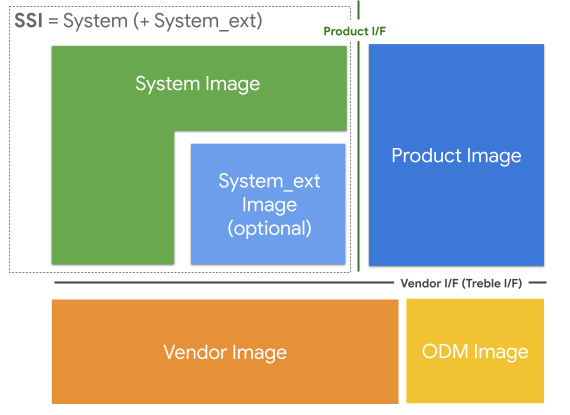
Figure 1. Partitions and interfaces around SSI.
Images and partitions
The information in this section distinguishes between the terms image and partition.
- An image is a conceptual piece of software that can be updated independently.
- A partition is a physical storage location that can be updated independently.
The sections in Figure 1 are defined as follows:
SSI: An image that's common to an OEM, and which can exist across multiple devices. It doesn't have any hardware-specific or product-specific components. Everything in a given SSI is, by definition, shared among all devices using that SSI. The SSI is composed of either a single
/systemimage, or a/systemand the/system_extpartitions.Product image: A collection of product- or device-specific components that represent OEM customizations and extensions to the Android OS. Put SoC-specific components in the
/vendorpartition. SoC vendors can also use the/productpartition for appropriate components, such as SoC-independent ones. For example, if an SoC vendor provides an SoC-independent component to their OEM customers (that's optional to ship with the product), the SoC vendor can place that component in the product image. The location of a component is determined by its purpose and not its ownership.Vendor image: A collection of SoC-specific components.
ODM image: A collection of board-specific components that aren't provided by the SoC. Typically the SoC vendor owns the vendor image, while the device maker owns the ODM image. When there is no separate
/odmpartition, both the SoC vendor and ODM images are merged together in the/vendorpartition.
The /system_ext partition
The /system_ext partition is optional. Use this partition for any
custom features and extensions that are tightly coupled with AOSP-based
components. This partition is assumed to be the OEM-specific extension to the
/system partition, without an interface defined across the two partitions.
Components in the /system_ext partition can make private API calls into the
/system partition, and components in the /system partition can make private
API calls into the /system_ext partition.
Because the two partitions are tightly coupled, both partitions are upgraded
together when a new Android version is released. A /system_ext partition
created for the previous release of Android doesn't need to be compatible with
the /system partition in the next Android release.
To install a module to the /system_ext partition, add system_ext_specific:
true to the Android.bp file. On devices that don't have a /system_ext
partition, install such modules to the ./system_ext subdirectory in the
/system partition.
History: The original design goal of the /system_ext partition was to
place all OEM-specific components, regardless of whether they're common, in the
/product partition. However, moving them all at once wasn't feasible,
especially when some components had a tight coupling with the /system
partition. To move a tightly coupled component to the /product partition, the
product interface must be extended. This often required the component itself to
be extensively refactored, which consumes a lot of time and effort. The
/system_ext partition started as a place to temporarily host those components
that aren't ready to be moved to the /product partition. The goal of the SSI
was to eventually eliminate the /system_ext partition.
However, the /system_ext partition is useful for keeping the /system
partition as close to AOSP as possible. With SSI, most of the upgrade effort is
spent on the components in the /system and the /system_ext partitions. When
the system image is built from sources that are as similar as possible to those
in AOSP, you can focus the upgrade effort on the system_ext image.
Interfaces between images
Two main interfaces for vendor and product images exist around SSI:
Vendor Interface (VINTF): VINTF is the interface to the components that reside in the vendor and the ODM images. Components in the product and system images can only interact with the vendor and ODM images through this interface. For example, a vendor image can't depend on a private part of the system image, and the other way around. This is defined in the Treble architecture (now part of the broader Mainline architecture), which splits the images into system and vendor partitions. The interface is described using the following mechanisms:
- HIDL (Passthrough HAL is available only for
systemandsystem_extmodules) - Stable AIDL
- Configurations
- System properties API
- Config file schema API
- VNDK
- Android SDK APIs
- Java SDK library
- HIDL (Passthrough HAL is available only for
Product interfaces: The product interface is the interface between SSI and the product image. Defining a stable interface decouples the product components from the system components in an SSI.
Enable SSI
This section explains how to support SSI in Android 11 and higher.
Unbundle components
To unbundle the /product partition from the system components, the /product
partition must have the same enforcement policy as the /vendor partition that
was already unbundled with Mainline.
- Built-in interfaces: The built-in modules in the
/productpartition must be unbundled from the other partitions. The only allowed dependencies from the product modules are some VNDK libraries (including LLNDK) from the/systempartition. JNI libraries that the product apps depend on must be NDK libraries. - Java interfaces: The Java (app) modules in the
/productpartition can't use hidden APIs, because they're unstable. These modules must use only public APIs and system APIs from the/systempartition, and Java SDK libraries in the/systemor/system_extpartition. You can define Java SDK libraries for custom APIs.
Enforce product interfaces
To make sure that the /product partition is unbundled, OEMs can have their
devices enforce the product interfaces by setting
PRODUCT_PRODUCT_VNDK_VERSION:= current for built-in modules, and
PRODUCT_ENFORCE_PRODUCT_PARTITION_INTERFACE:= true for Java modules. These
variables are automatically set if the PRODUCT_SHIPPING_API_LEVEL of the
device is greater than or equal to 30. For detailed information, see
Enforce product partition interfaces.
Suggested steps for GSI-based SSI
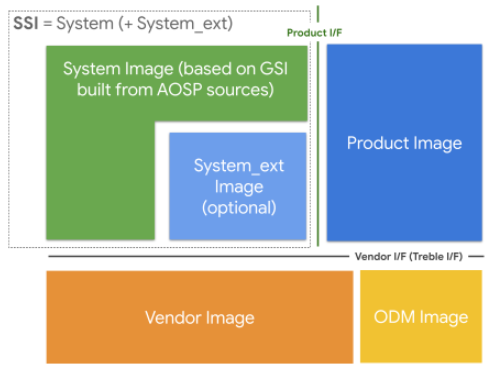
Figure 2. Suggested partitions for GSI-based SSI.
A generic system image (GSI) is the system image that's built directly from AOSP. It's used for the compliance tests (for example, CTS-on-GSI) and as a reference platform that app developers can use to test the compatibility of their apps when they don't have a real device running the required version of Android.
OEMs can also use GSI to make their SSI. As explained in Images and
partitions, SSI consists of the system image for the AOSP-defined components
and the system_ext image for the OEM-defined components. When GSI is used as
the system image, the OEM can focus on the system_ext image for the upgrade.
This section provides guidance to OEMs who want to modularize their
customizations into the /system_ext and /product partitions while using an
AOSP or near-AOSP system image. If OEMs build the system image from AOSP
sources, then they can substitute the system image that they build with the GSI
provided by AOSP. However, OEMs don't need to reach the final step (using GSI as
it is) all at once.
Step 1: Inherit generic_system.mk for OEM system image (OEM GSI)
By inheriting generic_system.mk (which was named mainline_system.mk in
Android 11, and renamed to generic_system.mk in AOSP), the system image (OEM
GSI) includes all the files that the AOSP GSI has. These files can be modified
by OEMs, so that the OEM GSI can contain the OEM proprietary files in addition
to the AOSP GSI files.
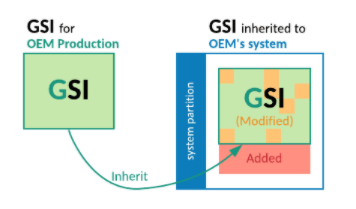
Figure 3. Inherit generic_system.mk for OEM's system image.
Step 2: Make the OEM GSI have the same list of files with the AOSP GSI
The OEM GSI can't have additional files at this stage, so move OEM-proprietary
files to the system_ext or product partitions.
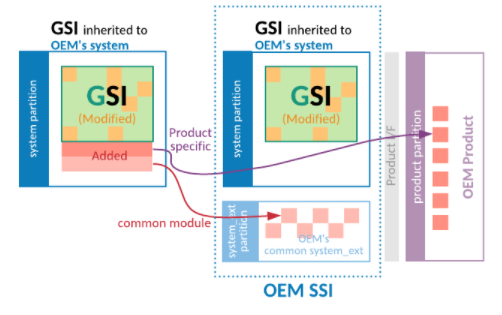
Figure 4. Move added files out of the OEM GSI.
Step 3: Define an allowlist to limit the modified files in the OEM GSI
To check the modified files, OEMs can use the compare_images tool, and
compare the AOSP GSI with the OEM GSI. Obtain the AOSP GSI from the AOSP lunch
target generic_system_*.
By running the compare_images tool periodically with the allowlist
parameter, you can monitor the differences outside the allowed list. This
prevents additional modifications to the OEM GSI.
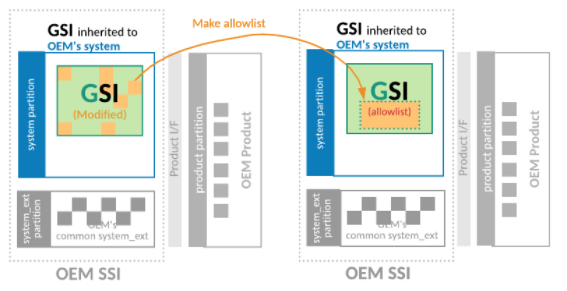
Figure 5. Define allowlist to reduce the modified files list in the OEM GSI.
Step 4: Make the OEM GSI have the same binaries as the AOSP GSI
Cleaning up the allowlist allows OEMs to use the AOSP GSI as the system image for their own products. To clean up the allowlist, OEMs can either abandon their changes in the OEM GSI, or upstream their changes to AOSP so that the AOSP GSI includes their changes.
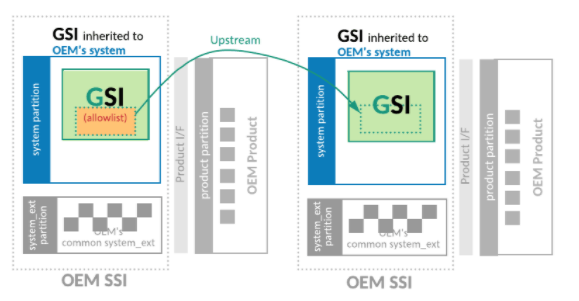
Figure 6. Make the OEM GSI have the same binaries as the AOSP GSI.
Define SSI
OEMs can use the following guidance to define their SSI.
Protect the /system partition at build time
To avoid any product-specific changes in the /system partition and define the
OEM GSI, OEMs can use a makefile macro called require-artifacts-in-path
to prevent any declaration of system modules after the macro is called. See the
example in Step 1: Create makefile and enable artifact path check.
OEMs can define a list to allow product-specific modules to be installed in the
/system partition temporarily. However, the list must be empty to make the OEM
GSI common to all of the OEM's products. This process is for defining the OEM
GSI and can be independent from the steps for the AOSP GSI.
Make the /system_ext partition common
The /system_ext partition might differ between devices, because it can have
device-specific, system-bundled modules. Because the SSI consists of /system
and /system_ext partitions, the differences in the /system_ext partition
hinder OEMs from defining an SSI. OEMs can have their own SSI and can share that
SSI among multiple devices by removing any differences and making the
/system_ext partition common.
This section gives recommendations for making the /system_ext partition
common.
Expose hidden APIs in the system partition
Many product-specific apps can't be installed in the product partition because they use hidden APIs, which are prohibited in the product partition. To move device-specific apps to the product partition, remove the use of hidden APIs.
The preferred way to remove hidden APIs from the apps is to find the alternative public or system APIs to replace them. If there are no APIs to replace the hidden APIs, OEMs can contribute to AOSP to define the new system APIs for their devices.
Alternatively, OEMs can define custom APIs by creating their own Java SDK
library in the /system_ext partition. This library can use hidden APIs
in the system partition and can provide the APIs to the apps in the product or
vendor partition. OEMs must freeze the product-facing APIs for backward
compatibility.
Replace SKU-specific app disabling
Android 16 deprecated and removed the legacy mechanism for selectively disabling
APKs based on hardware SKU using framework resource overlays
(config_disableApksUnlessMatchedSku_apk_list and
config_disableApkUnlessMatchedSku_skus_list). For details, see
aosp/3444399.
The recommended replacement is to use the install-in-user-type system
configuration within SKU-specific directories. This approach prevents the
package from being installed for any user on a specific SKU, rather than just
disabling it post-installation.
Include all APKs (the superset of all potential apps for all SKUs in your system image) in the image, typically in the
/productpartition.Ensure the device SKU is set correctly in the
ro.boot.hardware.skusystem property (used by the system to identify the device SKU at boot time).Create SKU-specific sysconfig subdirectories under
/product/etc/sysconfig/using the naming conventionsku_<SKU_NAME>. The system automatically loads configurations from the directory that matches thero.boot.hardware.skuproperty. Example path:/product/etc/sysconfig/sku_basic_model/.Configure app installation prevention. Inside the SKU-specific directory, create an XML configuration file (for example,
disabled_apps.xml) and use the<do-not-install-in>tag to exclude specific packages.
XML example (/product/etc/sysconfig/sku_basic_model/disabled_apps.xml):
<?xml version="1.0" encoding="utf-8"?>
<config>
    <!-- Prevents this package from being installed for ANY user on this SKU -->
    <install-in-user-type package="com.example.premium.feature.app" >
        <do-not-install-in user-type="FULL" />
        <do-not-install-in user-type="SYSTEM" />
    </install-in-user-type>
</config>
Here's a comparison of the two methods:
| Feature | Android 15 and lower | Android 16 and higher |
|---|---|---|
| Configuration method | Framework resource overlays | SystemConfig XML files |
| Logic location | config.xml (resource overlay) |
/product/etc/sysconfig/sku_<name>/ |
| Outcome | Disables app using PackageManager | Prevents app installation for the user |
| Robustness | Can be re-enabled by system services | Package is never installed for the user |
For cases requiring more granular control (that is, disabling an app that is
normally installed by default across all SKUs), Android also supports
disabled-in-sku and enabled-in-sku-override tags in sysconfig:
<disabled-in-sku package="com.example.app" />disables the app globally.<enabled-in-sku-override package="com.example.app" />re-enables the app for a specific SKU when placed in the correspondingsku_<name>directory.
Define RRO instead of using static resource overlay
A static resource overlay manipulates the overlaid packages. However, it can impede defining an SSI, so ensure that properties for RRO are turned on and set properly. By setting the properties as follows, OEMs can have all auto-generated overlays as RROs.
PRODUCT_ENFORCE_RRO_TARGETS := *
PRODUCT_ENFORCE_RRO_EXCLUDED_OVERLAYS := # leave it empty
If a detailed configuration is required, define an RRO manually instead of
relying on an auto-generated one. For detailed information, see
Change the value of an app's resources at runtime. OEMs also can define
conditional RROs that depend on the system properties by using the
android:requiredSystemPropertyName and android:requiredSystemPropertyValue
attributes.
Frequently asked questions (FAQ)
The following are frequently asked questions about SSI.
Can I define multiple SSIs?
It depends on the commonality and characteristics of devices (or device group).
OEMs can try to make the system_ext partition common, as described in
Make the system_ext partition common. If a device group has many
differences, then it's better to define multiple SSIs.
Can I remove modules from generic_system.mk that conflict with my implementation?
No. GSI has a minimum set of bootable and testable modules. If you think a
module isn't essential, file a bug to update the generic_system.mk file.