

एसडीवी प्लैटफ़ॉर्म, एपीआई का एक सेट उपलब्ध कराता है. इसका इस्तेमाल, ओईएम के Diagnostics Manager और एसडीवी सेवा बंडलों के बीच किया जाता है. साथ ही, यह ओईएम के डाइग्नोस्टिक्स के इस्तेमाल के उदाहरणों के लिए, यूटिलिटी और सामान्य प्लैटफ़ॉर्म की सुविधाएं भी उपलब्ध कराता है. एसडीवी, वाहन से जुड़ी सेवाओं, और OEM को दी जाने वाली टेक्नोलॉजी के लिए, परफ़ॉर्मेंस की जानकारी देना ज़रूरी है. ऐसा इसलिए, क्योंकि परफ़ॉर्मेंस की जानकारी देने वाला स्टैक, वाहन के किसी भी ऑपरेटिंग सिस्टम का एक ज़रूरी कॉम्पोनेंट होता है.
ओईएम, Diagnostics Manager के इंस्टेंस डिप्लॉय करते हैं. आम तौर पर, हर ईसीयू या हर वीएम के लिए एक इंस्टेंस डिप्लॉय किया जाता है. ये इंस्टेंस, सिस्टम पर SDV सेवा बंडलों के साथ कम्यूनिकेट करके, डाइग्नोस्टिक्स क्लाइंट से मिले अनुरोधों को मैनेज करते हैं. इसके लिए, SDV स्टैंडर्ड डाइग्नोस्टिक्स एपीआई, यूटिलिटी, और ओईएम डाइग्नोस्टिक्स के इस्तेमाल के मामलों के लिए प्लैटफ़ॉर्म की पूरी सहायता उपलब्ध कराता है. हमारा लक्ष्य है:
- इस कुकी का इस्तेमाल, ओईएम को यूडीएस स्टैंडर्ड के मुताबिक Diagnostics Manager को लागू करने की अनुमति देने के लिए किया जाता है.
- इस कुकी से Diagnostics Manager को, SDV सेवा बंडलों को टेस्टर के अनुरोध सौंपने की अनुमति मिलती है.
- SDV सेवा बंडलों को, वाहन के हिसाब से डाइग्नोस्टिक्स डेटा दिखाने की अनुमति दें.
इसके लिए, SDV, एपीआई का एक सेट उपलब्ध कराता है. इससे SDV सेवा बंडल (तीसरे पक्ष की ओर से उपलब्ध कराए जा सकते हैं) और ओईएम के डायग्नोस्टिक्स स्टैक के बीच इंटरैक्शन को स्टैंडर्ड बनाया जा सकता है.
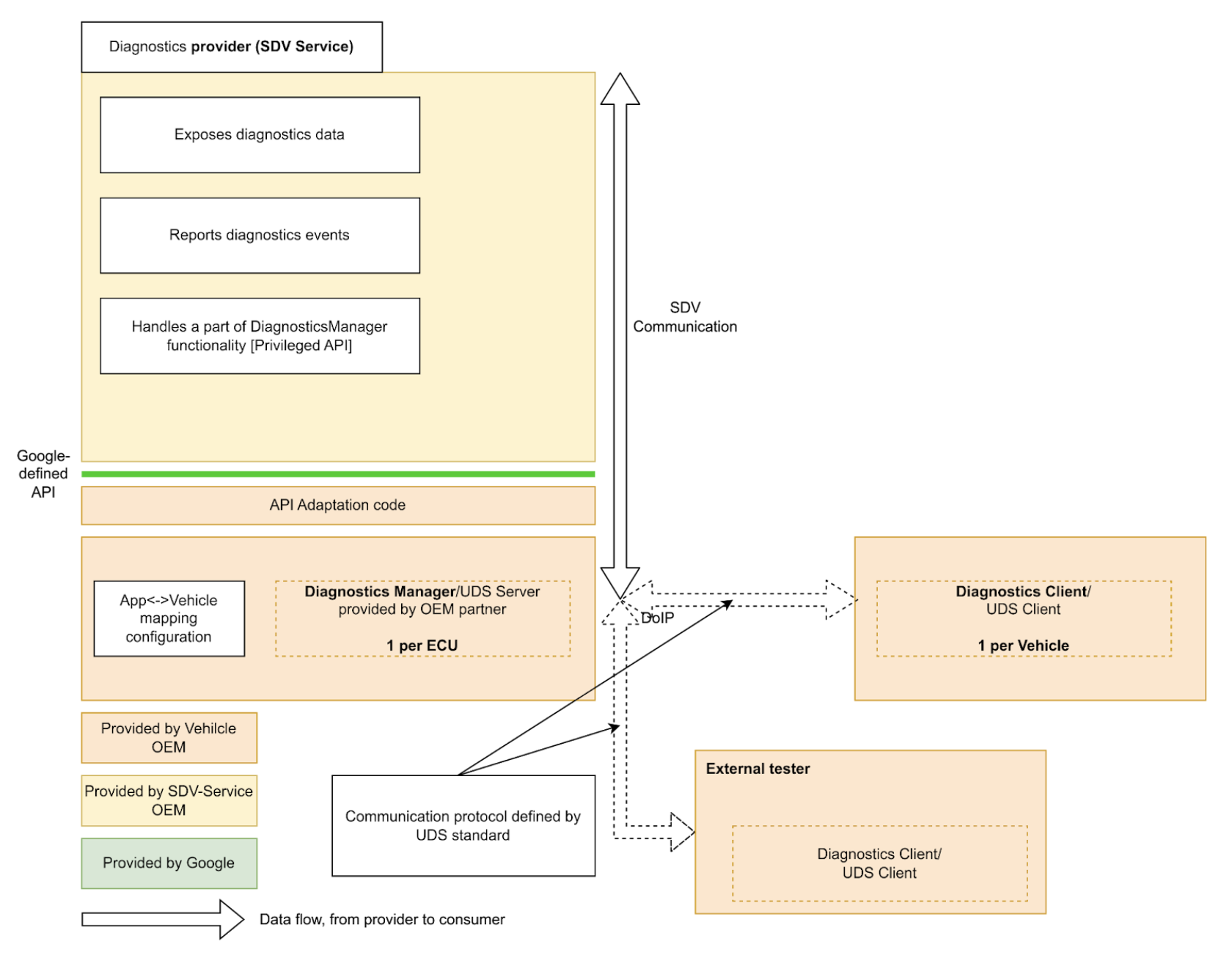
SDV सेवा बंडल, डाइग्नोस्टिक्स डेटा और इकाइयां दिखा सकते हैं. साथ ही, डाइग्नोस्टिक्स की सुविधा लागू कर सकते हैं और डाइग्नोस्टिक्स मैनेजर को गड़बड़ियों की जानकारी दे सकते हैं.
एसडीवी के लिए स्टैंडर्ड डाइग्नोस्टिक्स एपीआई उपलब्ध कराकर, हम एसडीवी सेवा बंडलों को लागू करने की प्रोसेस को आसान बनाते हैं. इससे अलग-अलग ओईएम के अलग-अलग वाहनों पर डाइग्नोस्टिक्स को फिर से लागू करने की ज़रूरत नहीं पड़ती.
Diagnostics Services API
SDV Diagnostics API, यहां दी गई सेवाओं के बारे में बताता है. ये सेवाएं, खास यूडीएस (आईएसओ 14229-1) सेवाओं से जुड़ी हैं:
service AuthenticationService: 0x29 (पुष्टि करना). यह क्लाइंट को ऐसा तरीका उपलब्ध कराता है जिसकी मदद से वह पाबंदी वाले डेटा या सेवाओं को ऐक्सेस करने के लिए, अपनी पहचान की पुष्टि कर सकता है.service DataItemService: 0x22 (ReadDataByIdentifier) और 0x2E (WriteDataByIdentifier). इससे, डीआईडी से पहचाने गए डेटा एलिमेंट को पढ़ने और लिखने की अनुमति मिलती है.service EcuResetService: 0x11 (ECUReset). इससे टेस्टर, ईसीयू को रीसेट करने का अनुरोध कर सकता है.service FileTransferService: 0x34 (RequestDownload), 0x35 (RequestUpload), 0x36 (TransferData), 0x37 (RequestTransferExit), और 0x38 (RequestFileTransfer). यह कुकी, फ़ाइलें डाउनलोड और अपलोड करने की प्रोसेस को शुरू और प्रोसेस करती है.service IoControlService: 0x2F (InputOutputControlByIdentifier). इससे बाहरी टेस्टर को, सिस्टम के इनपुट और आउटपुट को कंट्रोल करने की अनुमति मिलती है, ताकि वे टेस्टिंग कर सकें.service RoutineControlService: 0x31 (RoutineControl). इससे टेस्टर, एसडीवी सेवाओं के ज़रिए लागू की गई कुछ खास रूटीन (फ़ंक्शन) को शुरू और बंद कर सकता है. साथ ही, उनके नतीजे पाने का अनुरोध कर सकता है.service SecurityAccessService: 0x27 (SecurityAccess). यह कुकी, सीड और कुंजी के उस एक्सचेंज को मैनेज करती है जो सुरक्षा के कुछ खास लेवल को अनलॉक करने के लिए ज़रूरी होता है.
SDV Diagnostics API, AUTOSAR के Diagnostic Event Manager (AUTOSAR_SWS_DiagnosticEventManager) के आधार पर service FaultListenerService और message Event को भी तय करता है. इससे ऐप्लिकेशन, गड़बड़ियों और डाइग्नोस्टिक इवेंट की जानकारी दे पाते हैं.
इसके अलावा, service DiagnosticsManagerService एक एसडीवी प्लैटफ़ॉर्म सेवा को तय करता है. इससे अन्य सेवाएं, मौजूदा डाइग्नोस्टिक्स कनेक्शन के पैरामीटर (सोर्स पता, टारगेट पता) और सेशन टाइप के बारे में क्वेरी कर सकती हैं.
सर्विस बंडल के लिए डेवलपर गाइड
सेवा बंडल डेवलपर के तौर पर, diagnostics_declaration और यहां दिए गए सर्वर को .vsidl फ़ाइल में तय किया जा सकता है:
service_bundle {
    name: "<BUNDLE-NAME>"
    ...
    server {
        service: "com.sdv.google.diagnostics.data_item.DataItemService"
    }
    server {
        service: "com.sdv.google.diagnostics.routine_control.RoutineControlService"
    }
    server {
        service: "com.sdv.google.diagnostics.io_control.IoControlService"
    }
    server {
        service: "com.sdv.google.diagnostics.fault.FaultListenerService"
    }
    ...
    diagnostics_declaration {
        data_item {
            ...
        }

        routine {
            ...
        }

        event {
            ...
        }

        io_control {
            ...
        }
    }
    ...
}
DiagnosticsDeclaration मैसेज को इस तरह परिभाषित किया गया है:
package sdv.diagnostics.v1;

message DiagnosticsDeclaration {
  // Diagnostics data item declaration.
  //
  // See com.sdv.google.diagnostics.data_item.DataItemService service.
  message DataItem {
    // Required. Id of the data item.
    string id = 1;

    // Required. Fully qualified name of the message that defines a structure of
    // the data item.
    string message_name = 2;

    // Flag that indicates whether the data item is writable by the Diagnostics
    // Manager.
    //
    // Effectively, this indicates whether the call to DataItemService::Write,
    // is supported for this data item id.
    bool is_writable = 3;
  }

  // Declaration of diagnostics data for input/output control.
  //
  // See com.sdv.google.diagnostics.io_control.IoControl service.
  message InputOutputControlData {
    // Id of the input/output control data.
    string id = 1;

    // Fully qualified name of the message that defines a structure of the data.
    string message_name = 2;
  }

  // Declaration of diagnostics routine.
  //
  // See com.sdv.google.diagnostics.routine_control.RoutineControl.
  message Routine {
    // Information about routine control method.
    message Method {
      // Fully qualified name of the request message.
      string request = 1;

      // Fully qualified name of the response message.
      string response = 2;
    }

    // Id of the routine.
    string id = 1;

    // Information about routine start method.
    //
    // See com.sdv.google.diagnostics.routine_control.RoutineControl::Start.
    Method start = 2;

    // Information about routine stop method.
    //
    // See com.sdv.google.diagnostics.routine_control.RoutineControl::Stop.
    Method stop = 3;

    // Information about routine result method.
    //
    // See
    // com.sdv.google.diagnostics.routine_control.RoutineControl::RequestResult.
    Method result = 4;
  }

  // Declaration of diagnostics event and corresponding fault listener.
  //
  // See com.sdv.google.diagnostics.event.Event.
  // See com.sdv.google.diagnostics.fault.FaultListener.
  message Event {
    // Id of the event.
    string id = 1;

    // Fully qualified message name of the event's extended data message.
    string extended_data_message_name = 2;

    // Fault status changes which service wants to be notified of.
    //
    // See com.sdv.google.diagnostics.fault.FaultListener.StatusMask.
    uint32 fault_listener_mask = 3;

    // User-defined service unit name of a corresponding event publisher.
    string service_unit_name = 4;
  }

  // Diagnostic data items exposed by the service bundle.
  repeated DataItem data_item = 1;

  // Diagnostic data exposed for input/output control by the service bundle.
  repeated InputOutputControlData io_control = 2;

  // Diagnostic routines exposed by the service bundle.
  repeated Routine routine = 3;

  // Diagnostic events sent by the service bundle.
  repeated Event event = 4;
}
अगर ऊपर दिए गए (service_bundle ब्लॉक में diagnostics_declaration शामिल है) को कैटलॉग में तय किया गया है, तो vsidl_rc_generator, हर सेवा बंडल के लिए prebuilt_etc टारगेट जनरेट करता है. यह उन सर्वर और diagnostics_declaration के लिए होता है जो ऊपर दिए गए हैं:
prebuilt_etc {
    name: "<APEX-NAME>.<BUNDLE-NAME>-diag-config.binpb",
    filename: "DiagService-diag-config.binpb",
    sub_dir: "vsidl_provider",
    src: ":generate_vsidl_files_single_bundle_<APEX-NAME>.<BUNDLE-NAME>{diagnostics-config.binpb}",
    installable: false,
}
इन टारगेट को, prebuilts के साथ दिए गए ऐपेक्स डेफ़िनिशन ब्लॉक में जोड़ना ज़रूरी है. इसके लिए, prebuilts ब्लॉक के ऊपर अपने-आप जनरेट हुए कमेंट-ब्लॉक में दिए गए निर्देशों का पालन करें:prebuilt_etc {}
apex {
    name: "<APEX-NAME>",
    ...
    prebuilts: [
        ...
        "<APEX-NAME>.<BUNDLE-NAME>-diag-config.binpb",
        ...
    ],
    ...
}
आपको इन टारगेट को, बंडल की sdv_service_bundle_metadata एंट्री के diagnostics_config_path फ़ील्ड में भी जोड़ना होगा. यह एंट्री, sdv_service_bundles_manifest.textproto फ़ाइल में मौजूद होनी चाहिए. इसके अलावा, आपको सेवा बंडल और डाइग्नोस्टिक्स मैनेजर सेवा के बीच आरपीसी कम्यूनिकेशन चालू करने के लिए, अनुमति देने से जुड़ी नीतियां तय करनी होंगी:
sdv_service_bundle_metadata {
  name: "<BUNDLE-NAME>"
  ...
  diagnostics_config_path: "etc/vsidl_provider/<BUNDLE-NAME>-diag-config.binpb"
  authorization_policy_path: "etc/authz/permissions.textproto"
  ...
}
permissions.textproto फ़ाइल में दी गई अनुमतियों से, क्लाइंट या सर्वर की भूमिकाओं के बारे में पता चलना चाहिए. उदाहरण के लिए, अगर सेवा बंडल में गड़बड़ी की जानकारी वाला डेटा आइटम लागू किया जाता है, तो:
server {
    service: "com.sdv.google.diagnostics.data_item.DataItemService"
    allow_all_channels: true
}
Platform Developer Guide
प्लैटफ़ॉर्म डेवलपर के तौर पर, ओईएम को Diagnostics Manager Agent rust_binary टारगेट को लागू करना होगा:
rust_binary {
    name: "<DIAGNOSTICS-AGENT-BINARY-EXECUTABLE-NAME>",
    ...
    product_specific: true,
    ...
}
इसके अलावा, बिल्ड फ़ाइलों में, इस वैरिएबल को सेट/बदला जाना चाहिए:
SDV_DIAGNOSTICS_AGENT_MODULE := <DIAGNOSTICS-AGENT-BINARY-EXECUTABLE-NAME>
आसानी के लिए, libsdv_uds_serde_v1 लाइब्रेरी का इस्तेमाल Proto ↔ UDS ट्रांसलेशन के लिए किया जा सकता है. साथ ही, VSIDL Provider Library का इस्तेमाल रिफ़्लेक्शन के लिए किया जा सकता है.
डाइग्नोस्टिक्स एजेंट .vsidl फ़ाइल में यह कॉन्टेंट होना चाहिए:
package: "com.sdv.oem.diagnostics"

service_bundle {
    name: "DiagnosticsAgent"

    server {
        service: "com.sdv.google.diagnostics.DiagnosticsManagerService"
    }

    client {
        service: "com.sdv.google.diagnostics.data_item.DataItemService"
    }

    client {
        service: "com.sdv.google.diagnostics.routine_control.RoutineControlService"
    }

    client {
        service: "com.sdv.google.diagnostics.io_control.IoControlService"
    }

    client {
        service: "com.sdv.google.diagnostics.fault.FaultListenerService"
    }

    client {
        service: "com.sdv.google.diagnostics.ecu_reset.EcuResetService"
    }

    client {
        service: "com.sdv.google.diagnostics.security_access.SecurityAccessService"
    }

    client {
        service: "com.sdv.google.diagnostics.authentication.AuthenticationService"
    }

    client {
        service: "com.sdv.google.diagnostics.file_transfer.FileTransferService"
    }
}
Diagnostics Manager Agent एक बाइनरी एक्ज़ीक्यूटेबल है. इसलिए, बंडल के sdv_service_bundle_metadata को सिर्फ़ कॉन्फ़िगरेशन के तौर पर तय किया जाता है:
sdv_service_bundle_metadata {
    # This name must match the agent's Bundle Name
    name: "DiagnosticsAgent"
    version_number: 1
    version_name: "1"

    # Reference the manifest itself to mark this as a config-only declaration.
    native_library_path: "etc/sdv_service_bundles_manifest.textproto"

    authorization_policy_path: "etc/authz/permissions.textproto"
}
डाइग्नोस्टिक्स एजेंट की अनुमति से जुड़ी नीति में, उन सेवाओं के लिए अनुमतियां तय की जानी चाहिए जिनके साथ यह इंटरैक्ट करता है. उदाहरण के लिए, अगर यह फ़ाइल ट्रांसफ़र करने की सेवा को कॉल करता है, तो:
client {
    service: "com.sdv.google.diagnostics.file_transfer.FileTransferService"
    allow_all_channels: true
}