

Platform SDV menyediakan serangkaian API yang akan digunakan antara Pengelola Diagnostik yang disediakan OEM dan paket layanan SDV, serta utilitas dan kemampuan platform umum untuk mendukung kasus penggunaan diagnostik OEM. Diagnostik sangat penting untuk upaya SDV, layanan otomotif, dan teknologi yang kami berikan kepada OEM karena tumpukan diagnostik adalah komponen penting dari sistem operasi otomotif.
OEM men-deploy instance Pengelola Diagnostik (biasanya satu per ECU atau satu per VM) untuk menangani permintaan dari klien diagnostik dengan berkomunikasi dengan paket layanan SDV di sistem. Untuk melakukannya, SDV menyediakan serangkaian API diagnostik standar, utilitas, dan dukungan platform secara keseluruhan untuk kasus penggunaan diagnostik OEM. Tujuan kami adalah:
- Memungkinkan OEM menerapkan Pengelola Diagnostik sesuai dengan standar UDS.
- Memungkinkan Pengelola Diagnostik mendelegasikan permintaan penguji ke paket layanan SDV.
- Memungkinkan paket layanan SDV mengekspos data diagnostik dengan cara yang tidak bergantung pada kendaraan.
Untuk mencapai hal ini, SDV menyediakan serangkaian API untuk menstandarkan interaksi antara paket layanan SDV (yang berpotensi disediakan oleh pihak ketiga) dan penerapan tumpukan diagnostik OEM.
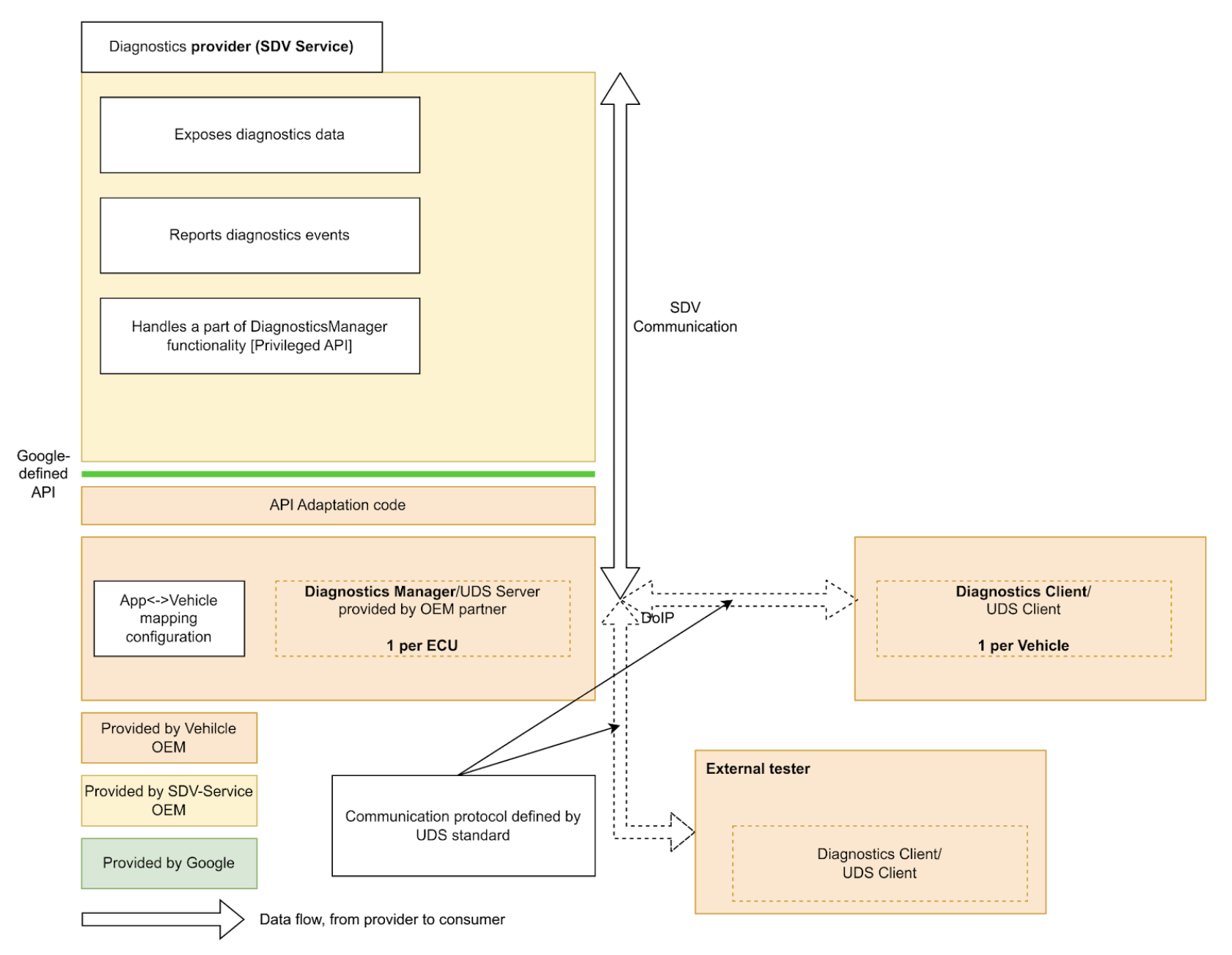
Paket layanan SDV dapat mengekspos data dan entity diagnostik, menerapkan fungsi diagnostik, dan melaporkan malfungsi ke Pengelola Diagnostik.
Dengan menyediakan API diagnostik standar di seluruh SDV, kami menyederhanakan penerapan paket layanan SDV, sehingga tidak perlu menerapkan kembali diagnostik untuk dijalankan di berbagai kendaraan dari berbagai OEM.
API Layanan Diagnostik
SDV Diagnostics API menentukan layanan berikut, yang sesuai dengan layanan UDS (ISO 14229-1) tertentu:
service AuthenticationService: 0x29 (Authentication). Layanan ini menyediakan mekanisme bagi klien untuk membuktikan identitasnya guna mengakses data atau layanan yang dibatasi.service DataItemService: 0x22 (ReadDataByIdentifier) dan 0x2E (WriteDataByIdentifier). Layanan ini memungkinkan pembacaan dan penulisan elemen data yang diidentifikasi oleh DID.service EcuResetService: 0x11 (ECUReset). Layanan ini memungkinkan penguji meminta reset ECU.service FileTransferService: 0x34 (RequestDownload), 0x35 (RequestUpload), 0x36 (TransferData), 0x37 (RequestTransferExit), dan 0x38 (RequestFileTransfer). Layanan ini menangani inisiasi dan pemrosesan download dan upload file.service IoControlService: 0x2F (InputOutputControlByIdentifier). Layanan ini memungkinkan penguji eksternal mengontrol input dan output sistem untuk tujuan pengujian.service RoutineControlService: 0x31 (RoutineControl). Layanan ini memungkinkan penguji memulai, menghentikan, dan meminta hasil untuk rutinitas (fungsi) tertentu yang diterapkan oleh layanan SDV.service SecurityAccessService: 0x27 (SecurityAccess). Layanan ini mengelola pertukaran seed-and-key yang diperlukan untuk membuka kunci tingkat keamanan tertentu.
SDV Diagnostics API juga menentukan
service FaultListenerService dan message Event berdasarkan Diagnostic Event Manager AUTOSAR (AUTOSAR_SWS_DiagnosticEventManager), yang memungkinkan
aplikasi melaporkan peristiwa dan malfungsi diagnostik.
Selain itu, service DiagnosticsManagerService menentukan layanan platform SDV yang memungkinkan layanan lain untuk membuat kueri parameter koneksi diagnostik saat ini (Alamat Sumber, Alamat Target) dan jenis sesi.
Panduan Developer Paket Layanan
Sebagai developer paket layanan, diagnostics_declaration dan server berikut dapat ditentukan dalam file .vsidl yang sesuai:
service_bundle {
    name: "<BUNDLE-NAME>"
    ...
    server {
        service: "com.sdv.google.diagnostics.data_item.DataItemService"
    }
    server {
        service: "com.sdv.google.diagnostics.routine_control.RoutineControlService"
    }
    server {
        service: "com.sdv.google.diagnostics.io_control.IoControlService"
    }
    server {
        service: "com.sdv.google.diagnostics.fault.FaultListenerService"
    }
    ...
    diagnostics_declaration {
        data_item {
            ...
        }

        routine {
            ...
        }

        event {
            ...
        }

        io_control {
            ...
        }
    }
    ...
}
Pesan DiagnosticsDeclaration ditentukan sebagai:
package sdv.diagnostics.v1;

message DiagnosticsDeclaration {
  // Diagnostics data item declaration.
  //
  // See com.sdv.google.diagnostics.data_item.DataItemService service.
  message DataItem {
    // Required. Id of the data item.
    string id = 1;

    // Required. Fully qualified name of the message that defines a structure of
    // the data item.
    string message_name = 2;

    // Flag that indicates whether the data item is writable by the Diagnostics
    // Manager.
    //
    // Effectively, this indicates whether the call to DataItemService::Write,
    // is supported for this data item id.
    bool is_writable = 3;
  }

  // Declaration of diagnostics data for input/output control.
  //
  // See com.sdv.google.diagnostics.io_control.IoControl service.
  message InputOutputControlData {
    // Id of the input/output control data.
    string id = 1;

    // Fully qualified name of the message that defines a structure of the data.
    string message_name = 2;
  }

  // Declaration of diagnostics routine.
  //
  // See com.sdv.google.diagnostics.routine_control.RoutineControl.
  message Routine {
    // Information about routine control method.
    message Method {
      // Fully qualified name of the request message.
      string request = 1;

      // Fully qualified name of the response message.
      string response = 2;
    }

    // Id of the routine.
    string id = 1;

    // Information about routine start method.
    //
    // See com.sdv.google.diagnostics.routine_control.RoutineControl::Start.
    Method start = 2;

    // Information about routine stop method.
    //
    // See com.sdv.google.diagnostics.routine_control.RoutineControl::Stop.
    Method stop = 3;

    // Information about routine result method.
    //
    // See
    // com.sdv.google.diagnostics.routine_control.RoutineControl::RequestResult.
    Method result = 4;
  }

  // Declaration of diagnostics event and corresponding fault listener.
  //
  // See com.sdv.google.diagnostics.event.Event.
  // See com.sdv.google.diagnostics.fault.FaultListener.
  message Event {
    // Id of the event.
    string id = 1;

    // Fully qualified message name of the event's extended data message.
    string extended_data_message_name = 2;

    // Fault status changes which service wants to be notified of.
    //
    // See com.sdv.google.diagnostics.fault.FaultListener.StatusMask.
    uint32 fault_listener_mask = 3;

    // User-defined service unit name of a corresponding event publisher.
    string service_unit_name = 4;
  }

  // Diagnostic data items exposed by the service bundle.
  repeated DataItem data_item = 1;

  // Diagnostic data exposed for input/output control by the service bundle.
  repeated InputOutputControlData io_control = 2;

  // Diagnostic routines exposed by the service bundle.
  repeated Routine routine = 3;

  // Diagnostic events sent by the service bundle.
  repeated Event event = 4;
}
Jika blok di atas (service_bundle yang berisi diagnostics_declaration) ditentukan dalam katalog, vsidl_rc_generator akan menghasilkan target prebuilt_etc untuk setiap paket layanan yang mendeklarasikan server dan diagnostics_declaration di atas:
prebuilt_etc {
    name: "<APEX-NAME>.<BUNDLE-NAME>-diag-config.binpb",
    filename: "DiagService-diag-config.binpb",
    sub_dir: "vsidl_provider",
    src: ":generate_vsidl_files_single_bundle_<APEX-NAME>.<BUNDLE-NAME>{diagnostics-config.binpb}",
    installable: false,
}
Target ini HARUS ditambahkan ke prebuilts dari blok definisi apex yang sesuai seperti yang ditunjukkan oleh blok komentar yang dibuat otomatis di atas blok prebuilt_etc {}:
apex {
    name: "<APEX-NAME>",
    ...
    prebuilts: [
        ...
        "<APEX-NAME>.<BUNDLE-NAME>-diag-config.binpb",
        ...
    ],
    ...
}
Anda juga harus menambahkan target ini di kolom diagnostics_config_path dari entri sdv_service_bundle_metadata paket file sdv_service_bundles_manifest.textproto yang sesuai. Selain itu, Anda harus menentukan kebijakan otorisasi untuk mengaktifkan komunikasi RPC antara paket layanan dan layanan pengelola diagnostik:
sdv_service_bundle_metadata {
  name: "<BUNDLE-NAME>"
  ...
  diagnostics_config_path: "etc/vsidl_provider/<BUNDLE-NAME>-diag-config.binpb"
  authorization_policy_path: "etc/authz/permissions.textproto"
  ...
}
Izin dalam file permissions.textproto harus menentukan peran klien atau server. Misalnya, jika paket layanan menerapkan item data diagnostik:
server {
    service: "com.sdv.google.diagnostics.data_item.DataItemService"
    allow_all_channels: true
}
Panduan Developer Platform
Sebagai developer platform, OEM HARUS menerapkan target rust_binary Pengelola Diagnostik:
rust_binary {
    name: "<DIAGNOSTICS-AGENT-BINARY-EXECUTABLE-NAME>",
    ...
    product_specific: true,
    ...
}
Selain itu, dalam file build, variabel berikut harus
ditetapkan/ditimpa:
SDV_DIAGNOSTICS_AGENT_MODULE := <DIAGNOSTICS-AGENT-BINARY-EXECUTABLE-NAME>
Untuk kemudahan, library libsdv_uds_serde_v1 dapat digunakan untuk
terjemahan Proto ↔ UDS, dan VSIDL Provider Library untuk refleksi.
File .vsidl agen diagnostik harus memiliki konten berikut:
package: "com.sdv.oem.diagnostics"

service_bundle {
    name: "DiagnosticsAgent"

    server {
        service: "com.sdv.google.diagnostics.DiagnosticsManagerService"
    }

    client {
        service: "com.sdv.google.diagnostics.data_item.DataItemService"
    }

    client {
        service: "com.sdv.google.diagnostics.routine_control.RoutineControlService"
    }

    client {
        service: "com.sdv.google.diagnostics.io_control.IoControlService"
    }

    client {
        service: "com.sdv.google.diagnostics.fault.FaultListenerService"
    }

    client {
        service: "com.sdv.google.diagnostics.ecu_reset.EcuResetService"
    }

    client {
        service: "com.sdv.google.diagnostics.security_access.SecurityAccessService"
    }

    client {
        service: "com.sdv.google.diagnostics.authentication.AuthenticationService"
    }

    client {
        service: "com.sdv.google.diagnostics.file_transfer.FileTransferService"
    }
}
Karena Pengelola Diagnostik adalah executable biner, paket
sdv_service_bundle_metadata ditentukan sebagai deklarasi khusus konfigurasi:
sdv_service_bundle_metadata {
    # This name must match the agent's Bundle Name
    name: "DiagnosticsAgent"
    version_number: 1
    version_name: "1"

    # Reference the manifest itself to mark this as a config-only declaration.
    native_library_path: "etc/sdv_service_bundles_manifest.textproto"

    authorization_policy_path: "etc/authz/permissions.textproto"
}
Kebijakan otorisasi agen diagnostik harus menentukan izin untuk layanan yang berinteraksi dengannya. Misalnya, jika memanggil layanan Transfer File:
client {
    service: "com.sdv.google.diagnostics.file_transfer.FileTransferService"
    allow_all_channels: true
}