

Nền tảng SDV cung cấp một bộ API để dùng giữa Trình quản lý chẩn đoán do OEM cung cấp và các gói dịch vụ SDV, cũng như các tiện ích và chức năng chung của nền tảng để hỗ trợ các trường hợp sử dụng chẩn đoán của OEM. Chẩn đoán là yếu tố cần thiết cho các nỗ lực về SDV, dịch vụ và công nghệ ô tô mà chúng tôi cung cấp cho các OEM vì ngăn xếp chẩn đoán là một thành phần thiết yếu của mọi hệ điều hành ô tô.
OEM triển khai các phiên bản Trình quản lý chẩn đoán (thường là một phiên bản cho mỗi ECU hoặc một phiên bản cho mỗi VM) để xử lý các yêu cầu từ ứng dụng chẩn đoán bằng cách giao tiếp với các gói dịch vụ SDV trên hệ thống. Để làm như vậy, SDV cung cấp một bộ API chẩn đoán tiêu chuẩn, các tiện ích và khả năng hỗ trợ nền tảng tổng thể cho các trường hợp sử dụng chẩn đoán của OEM. Mục tiêu của chúng tôi là:
- Cho phép các OEM triển khai Trình quản lý chẩn đoán theo tiêu chuẩn UDS.
- Cho phép Trình quản lý chẩn đoán uỷ quyền các yêu cầu của người kiểm thử cho các gói dịch vụ SDV.
- Cho phép các gói dịch vụ SDV hiển thị dữ liệu chẩn đoán theo cách độc lập với xe.
Để đạt được điều này, SDV cung cấp một bộ API để chuẩn hoá các hoạt động tương tác giữa các gói dịch vụ SDV (có thể do bên thứ ba cung cấp) và việc triển khai ngăn xếp chẩn đoán của OEM.
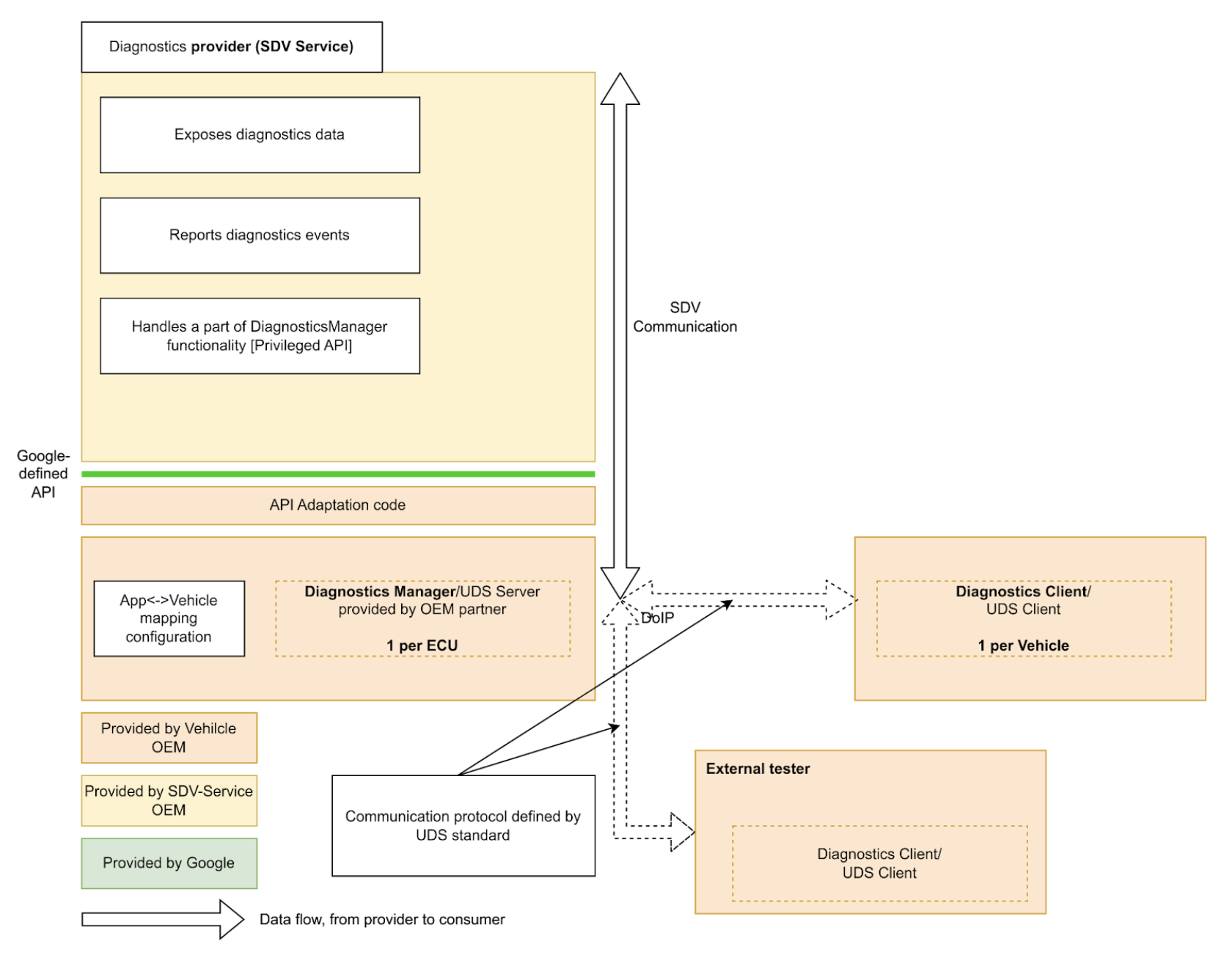
Các gói dịch vụ SDV có thể hiển thị dữ liệu và thực thể chẩn đoán, triển khai chức năng chẩn đoán và báo cáo sự cố cho Trình quản lý chẩn đoán.
Bằng cách cung cấp một API chẩn đoán tiêu chuẩn trên toàn SDV, chúng tôi đơn giản hoá việc triển khai các gói dịch vụ SDV, tránh nhu cầu triển khai lại quy trình chẩn đoán để chạy trên nhiều loại xe của nhiều OEM.
Diagnostics Services API
SDV Diagnostics API xác định các dịch vụ sau, tương ứng với các dịch vụ UDS (ISO 14229-1) cụ thể:
service AuthenticationService: 0x29 (Xác thực). Nó cung cấp một cơ chế để máy khách chứng minh danh tính của mình nhằm truy cập vào dữ liệu hoặc dịch vụ bị hạn chế.service DataItemService: 0x22 (ReadDataByIdentifier) và 0x2E (WriteDataByIdentifier). Nó cho phép đọc và ghi các phần tử dữ liệu được xác định bằng DID.service EcuResetService: 0x11 (ECUReset). Thao tác này cho phép người kiểm thử yêu cầu đặt lại ECU.service FileTransferService: 0x34 (RequestDownload), 0x35 (RequestUpload), 0x36 (TransferData), 0x37 (RequestTransferExit) và 0x38 (RequestFileTransfer). Nó xử lý việc bắt đầu và xử lý quá trình tải tệp xuống và tải tệp lên.service IoControlService: 0x2F (InputOutputControlByIdentifier). Công cụ này cho phép người kiểm thử bên ngoài kiểm soát các đầu vào và đầu ra của hệ thống cho mục đích kiểm thử.service RoutineControlService: 0x31 (RoutineControl). Công cụ này cho phép người kiểm thử bắt đầu, dừng và yêu cầu kết quả cho các quy trình (hàm) cụ thể do các dịch vụ SDV triển khai.service SecurityAccessService: 0x27 (SecurityAccess). Thư viện này quản lý quá trình trao đổi khoá và hạt giống cần thiết để mở khoá các cấp độ bảo mật cụ thể.
SDV Diagnostics API ngoài ra còn xác định service FaultListenerService và message Event dựa trên Trình quản lý sự kiện chẩn đoán (AUTOSAR_SWS_DiagnosticEventManager) của AUTOSAR, cho phép các ứng dụng báo cáo sự kiện chẩn đoán và sự cố.
Ngoài ra, service DiagnosticsManagerService còn xác định một dịch vụ nền tảng SDV cho phép các dịch vụ khác truy vấn các thông số kết nối chẩn đoán hiện tại (Địa chỉ nguồn, Địa chỉ đích) và loại phiên.
Hướng dẫn cho nhà phát triển về gói dịch vụ
Là nhà phát triển gói dịch vụ, bạn có thể xác định diagnostics_declaration và các máy chủ sau đây trong tệp .vsidl tương ứng:
service_bundle {
    name: "<BUNDLE-NAME>"
    ...
    server {
        service: "com.sdv.google.diagnostics.data_item.DataItemService"
    }
    server {
        service: "com.sdv.google.diagnostics.routine_control.RoutineControlService"
    }
    server {
        service: "com.sdv.google.diagnostics.io_control.IoControlService"
    }
    server {
        service: "com.sdv.google.diagnostics.fault.FaultListenerService"
    }
    ...
    diagnostics_declaration {
        data_item {
            ...
        }

        routine {
            ...
        }

        event {
            ...
        }

        io_control {
            ...
        }
    }
    ...
}
Thông báo DiagnosticsDeclaration được xác định là:
package sdv.diagnostics.v1;

message DiagnosticsDeclaration {
  // Diagnostics data item declaration.
  //
  // See com.sdv.google.diagnostics.data_item.DataItemService service.
  message DataItem {
    // Required. Id of the data item.
    string id = 1;

    // Required. Fully qualified name of the message that defines a structure of
    // the data item.
    string message_name = 2;

    // Flag that indicates whether the data item is writable by the Diagnostics
    // Manager.
    //
    // Effectively, this indicates whether the call to DataItemService::Write,
    // is supported for this data item id.
    bool is_writable = 3;
  }

  // Declaration of diagnostics data for input/output control.
  //
  // See com.sdv.google.diagnostics.io_control.IoControl service.
  message InputOutputControlData {
    // Id of the input/output control data.
    string id = 1;

    // Fully qualified name of the message that defines a structure of the data.
    string message_name = 2;
  }

  // Declaration of diagnostics routine.
  //
  // See com.sdv.google.diagnostics.routine_control.RoutineControl.
  message Routine {
    // Information about routine control method.
    message Method {
      // Fully qualified name of the request message.
      string request = 1;

      // Fully qualified name of the response message.
      string response = 2;
    }

    // Id of the routine.
    string id = 1;

    // Information about routine start method.
    //
    // See com.sdv.google.diagnostics.routine_control.RoutineControl::Start.
    Method start = 2;

    // Information about routine stop method.
    //
    // See com.sdv.google.diagnostics.routine_control.RoutineControl::Stop.
    Method stop = 3;

    // Information about routine result method.
    //
    // See
    // com.sdv.google.diagnostics.routine_control.RoutineControl::RequestResult.
    Method result = 4;
  }

  // Declaration of diagnostics event and corresponding fault listener.
  //
  // See com.sdv.google.diagnostics.event.Event.
  // See com.sdv.google.diagnostics.fault.FaultListener.
  message Event {
    // Id of the event.
    string id = 1;

    // Fully qualified message name of the event's extended data message.
    string extended_data_message_name = 2;

    // Fault status changes which service wants to be notified of.
    //
    // See com.sdv.google.diagnostics.fault.FaultListener.StatusMask.
    uint32 fault_listener_mask = 3;

    // User-defined service unit name of a corresponding event publisher.
    string service_unit_name = 4;
  }

  // Diagnostic data items exposed by the service bundle.
  repeated DataItem data_item = 1;

  // Diagnostic data exposed for input/output control by the service bundle.
  repeated InputOutputControlData io_control = 2;

  // Diagnostic routines exposed by the service bundle.
  repeated Routine routine = 3;

  // Diagnostic events sent by the service bundle.
  repeated Event event = 4;
}
Nếu phần trên (khối service_bundle chứa diagnostics_declaration) được xác định trong danh mục, vsidl_rc_generator sẽ tạo các mục tiêu prebuilt_etc cho mọi gói dịch vụ khai báo các máy chủ và diagnostics_declaration ở trên:
prebuilt_etc {
    name: "<APEX-NAME>.<BUNDLE-NAME>-diag-config.binpb",
    filename: "DiagService-diag-config.binpb",
    sub_dir: "vsidl_provider",
    src: ":generate_vsidl_files_single_bundle_<APEX-NAME>.<BUNDLE-NAME>{diagnostics-config.binpb}",
    installable: false,
}
Bạn PHẢI thêm các mục tiêu này vào prebuilts của khối định nghĩa apex tương ứng như được chỉ ra bằng khối nhận xét được tạo tự động tương ứng ở phía trên khối prebuilt_etc {}:
apex {
    name: "<APEX-NAME>",
    ...
    prebuilts: [
        ...
        "<APEX-NAME>.<BUNDLE-NAME>-diag-config.binpb",
        ...
    ],
    ...
}
Bạn cũng phải thêm các mục tiêu này vào trường diagnostics_config_path của mục nhập sdv_service_bundle_metadata trong gói của tệp sdv_service_bundles_manifest.textproto tương ứng. Ngoài ra, bạn phải chỉ định các chính sách uỷ quyền để bật giao tiếp RPC giữa gói dịch vụ và dịch vụ trình quản lý chẩn đoán:
sdv_service_bundle_metadata {
  name: "<BUNDLE-NAME>"
  ...
  diagnostics_config_path: "etc/vsidl_provider/<BUNDLE-NAME>-diag-config.binpb"
  authorization_policy_path: "etc/authz/permissions.textproto"
  ...
}
Các quyền trong tệp permissions.textproto phải xác định vai trò của máy khách hoặc máy chủ. Ví dụ: nếu gói dịch vụ triển khai một mục dữ liệu chẩn đoán:
server {
    service: "com.sdv.google.diagnostics.data_item.DataItemService"
    allow_all_channels: true
}
Hướng dẫn cho nhà phát triển nền tảng
Là nhà phát triển nền tảng, các OEM PHẢI triển khai mục tiêu Diagnostics Manager Agent rust_binary:
rust_binary {
    name: "<DIAGNOSTICS-AGENT-BINARY-EXECUTABLE-NAME>",
    ...
    product_specific: true,
    ...
}
Ngoài ra, trong các tệp bản dựng, bạn phải đặt/ghi đè biến sau:
SDV_DIAGNOSTICS_AGENT_MODULE := <DIAGNOSTICS-AGENT-BINARY-EXECUTABLE-NAME>
Để thuận tiện, bạn có thể dùng thư viện libsdv_uds_serde_v1 để dịch Proto ↔ UDS và Thư viện nhà cung cấp VSIDL để phản chiếu.
Tệp .vsidl của tác nhân chẩn đoán phải có nội dung sau:
package: "com.sdv.oem.diagnostics"

service_bundle {
    name: "DiagnosticsAgent"

    server {
        service: "com.sdv.google.diagnostics.DiagnosticsManagerService"
    }

    client {
        service: "com.sdv.google.diagnostics.data_item.DataItemService"
    }

    client {
        service: "com.sdv.google.diagnostics.routine_control.RoutineControlService"
    }

    client {
        service: "com.sdv.google.diagnostics.io_control.IoControlService"
    }

    client {
        service: "com.sdv.google.diagnostics.fault.FaultListenerService"
    }

    client {
        service: "com.sdv.google.diagnostics.ecu_reset.EcuResetService"
    }

    client {
        service: "com.sdv.google.diagnostics.security_access.SecurityAccessService"
    }

    client {
        service: "com.sdv.google.diagnostics.authentication.AuthenticationService"
    }

    client {
        service: "com.sdv.google.diagnostics.file_transfer.FileTransferService"
    }
}
Vì Diagnostics Manager Agent là một tệp thực thi nhị phân, nên sdv_service_bundle_metadata của gói được xác định là một khai báo chỉ dành cho cấu hình:
sdv_service_bundle_metadata {
    # This name must match the agent's Bundle Name
    name: "DiagnosticsAgent"
    version_number: 1
    version_name: "1"

    # Reference the manifest itself to mark this as a config-only declaration.
    native_library_path: "etc/sdv_service_bundles_manifest.textproto"

    authorization_policy_path: "etc/authz/permissions.textproto"
}
Chính sách uỷ quyền của tác nhân chẩn đoán phải xác định các quyền cho những dịch vụ mà tác nhân này tương tác. Ví dụ: nếu nó gọi dịch vụ Chuyển tệp:
client {
    service: "com.sdv.google.diagnostics.file_transfer.FileTransferService"
    allow_all_channels: true
}