

更新管理器会为其虚拟机执行更新。更新管理器与系统集成商提供的客户端进行协调。客户端提供更新有效负载并协调整个车辆更新。更新包含以下步骤:
- 就绪:未在进行任何更新。
- 准备:更新管理器将更新写入磁盘,但不会将其设为有效。
- 激活:更新管理器使准备好的更新处于有效状态,以便在重新启动后生效。
- 提交:更新管理器会使更新永久生效。

图 1. 更新管理器的高级操作。
更新管理器支持系统更新和服务包更新,本页将对此进行说明。
系统更新
Android 操作系统使用两组称为槽位的分区,每次只有一个槽位处于活动状态。系统更新会将一组新的分区写入非活动槽位,并在下次重新启动时切换活动槽位。如需详细了解如何构建系统更新,请参阅 A/B 系统更新。
服务包更新
在 AAOS SDV 中,服务软件包将服务打包到 APEX 中。服务软件包更新会在临时会话中暂存新的 APEX 文件。系统会在重新启动后激活这些更新后的软件包。如需详细了解如何构建服务软件包 APEX,请参阅服务软件包更新。
状态机
来自客户端的请求和来自系统服务的事件会驱动更新管理器状态机。更新管理器旨在实现弹性,即使在发生意外的重新启动或崩溃后,也能恢复其状态并继续执行更新流程。
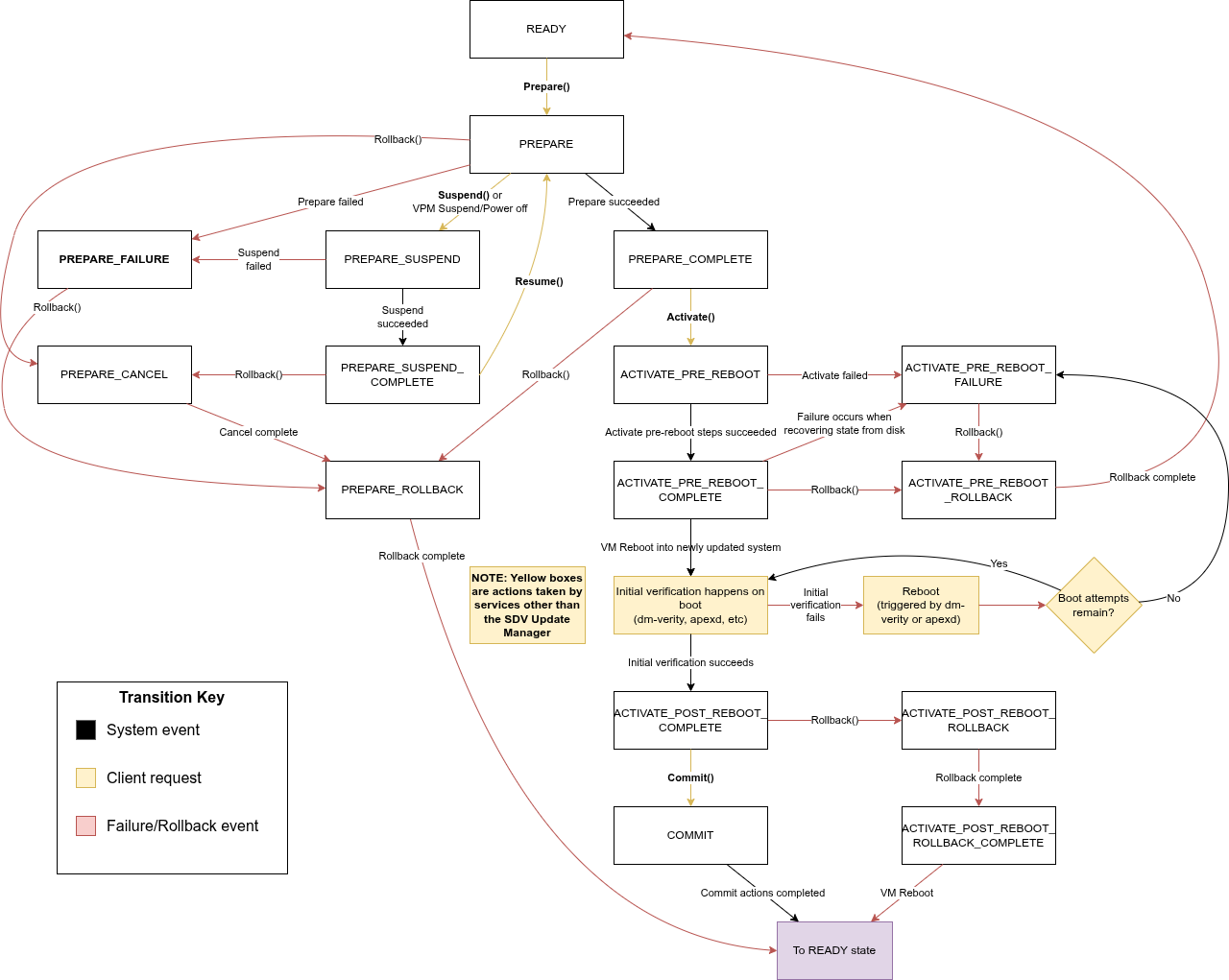
图 2. 更新管理器状态机。
API
更新管理器提供了一个 API,用于通过状态机驱动更新流程。该 API 使用 VSIDL,支持位于任何支持 SDV Comms 的虚拟机中的客户端,并提供请求失败通知。
安全与访问权限
系统使用授权政策限制 API 访问权限。只有授权客户端才能调用更新管理器。
动态更新
由于更新操作可能需要长时间运行,因此更新管理器会提供异步状态更新。客户端必须通过订阅状态更新来监控状态。
订阅管理
订阅:客户端通过调用
SubscribeToStatusUpdates()方法来订阅状态更新:rpc SubscribeToStatusUpdates(SubscribeToStatusUpdatesRequest) returns (SubscribeToStatusUpdatesResponse) {} message SubscribeToStatusUpdatesRequest {} message SubscribeToStatusUpdatesResponse {}在调用
SubscribeToStatusUpdates()之前,客户端必须启动实现UpdateManagerListenerService的 RPC 接口。退订:客户端可以通过调用
UnsubscribeFromStatusUpdates()停止接收状态更新:rpc UnsubscribeFromStatusUpdates(UnsubscribeFromStatusUpdatesRequest) returns (UnsubscribeFromStatusUpdatesResponse) {} message UnsubscribeFromStatusUpdatesRequest {} message UnsubscribeFromStatusUpdatesResponse {}
UpdateManagerListenerService
在 UpdateManagerService 上调用 SubscribeToStatusUpdates() 的客户端必须实现以下服务才能接收状态更新:
service UpdateManagerListenerService {
  /* Called when there is a status update from the Update Manager. */
  rpc OnStatusUpdate(OnStatusUpdateRequest) returns (OnStatusUpdateResponse) {}
}

message OnStatusUpdateRequest {
  oneof status_update {
    UpdateManagerStatus update_manager_status = 1;
    UpdateProgress update_progress = 2;
  }
}

message OnStatusUpdateResponse {}
OnStatusUpdateRequest 使用 status_update 字段传递以下两种可能的消息之一:
UpdateManagerStatus:当更新管理器的状态发生变化时发送。UpdateProgress:在PREPARE和ACTIVATE_PRE_REBOOT状态期间发送,用于指示更新进度,因为该过程可能需要相当长的时间。
状态和错误消息
状态消息包含有关状态和任何失败的详细信息:
UpdateManagerStatus:报告更新的当前阶段以及任何失败原因:message UpdateManagerStatus { /* The current state of the update */ UpdateState update_state = 1; /* The reason for the failure, if the update failed */ FailureReason failure_reason = 2; } enum UpdateState { /* The Update Manager is ready to accept a new update. */ READY = 0; /* An update is being prepared. */ PREPARE = 1; /* The update failed during the prepare step. Roll back the update to start a * new update. */ PREPARE_FAILURE = 2; /* The update was prepared successfully. */ PREPARE_COMPLETE = 3; /* A rollback has started from the prepare step. When complete, transitions * to READY. */ PREPARE_ROLLBACK = 4; /* The prepared update is being activated. */ ACTIVATE_PRE_REBOOT = 5; /* The update failed during the activate step before the reboot. Roll back the * update to start a new update. */ ACTIVATE_PRE_REBOOT_FAILURE = 6; /* The update was activated successfully. Reboot to complete activation. */ ACTIVATE_PRE_REBOOT_COMPLETE = 7; /* A rollback has started from the activate pre-reboot step. When complete, * transitions to READY. */ ACTIVATE_PRE_REBOOT_ROLLBACK = 8; /* An update was successfully activated after the reboot. The update needs to * be committed or rolled back to be completed. */ ACTIVATE_POST_REBOOT_COMPLETE = 9; /* A rollback has started from the activate post-reboot step. */ ACTIVATE_POST_REBOOT_ROLLBACK = 10; /* The rollback was completed successfully. Reboot to complete the * rollback. */ ACTIVATE_POST_REBOOT_ROLLBACK_COMPLETE = 11; /* The update is being committed. When complete, transitions to READY */ COMMIT = 12; /* The prepare request is being cancelled */ PREPARE_CANCEL = 13; /* The system update has started suspending */ PREPARE_SUSPEND = 14; /* The system update has finished suspending */ PREPARE_SUSPEND_COMPLETE = 15; } message FailureReason { /* The original error that triggered the failure */ ErrorCode error_code = 1; /* Binder error message for most ErrorCodes. */ string error_message = 2; } enum ErrorCode { Unspecified = 0; /* Error from UpdateEngine service */ UpdateEngineError = 1; // Error from the ApexService ApexServiceError = 2; // Error from the BootControlService BootControlServiceError = 3; // Error from the VoldService VoldServiceError = 4; }UpdateProgress:报告系统更新期间 Update Engine 的当前状态:message UpdateProgress { /* Matches the enum UpdateStatus from the UpdateEngine service. */ int32 status_code = 1; /* A value ranging from 0.0 to 1.0, 1.0 representing the process is complete. */ float percentage = 2; }
立即获取状态
您可以随时通过调用 GetStatus() 检索当前状态和载荷。SystemUpdatePayload 和 ServiceBundleUpdatePayload 消息在准备中进行了说明。
rpc GetStatus(GetStatusRequest) returns (GetStatusResponse) {}

message GetStatusRequest {}

message GetStatusResponse {
  /* The status of the Update Manager */
  UpdateManagerStatus update_manager_status = 1;
  /* The current update payload, if one has been set through the Prepare() request */
  oneof payload {
    SystemUpdatePayload system_update_payload = 2;
    ServiceBundleUpdatePayload service_bundle_update_payload = 3;
  }
}
准备
Prepare 请求通过暂存载荷来启动更新流程,但系统会等待激活更新:
rpc Prepare(PrepareRequest) returns (PrepareResponse) {}

message PrepareRequest {
  oneof payload {
    SystemUpdatePayload system_update_payload = 1;
    ServiceBundleUpdatePayload service_bundle_update_payload = 2;
  }
}

message PrepareResponse {}
如果请求有效,状态会转换为 PREPARE,并且更新管理器会开始更新。
载荷的类型决定了更新类型。
系统更新载荷
系统更新使用 SystemUpdatePayload 数据,这需要 OTA 更新映像的路径。其他参数是从图片中解析出来的,但您可以指定这些参数来替换解析出的值。
message SystemUpdatePayload {
  /* Absolute path to the update image (e.g., /updates/ota_update.zip) */
  string payload = 1;

  /* Offset (in bytes) into the payload where the payload binary starts. */
  optional int64 payload_offset = 2;

  /* The amount of data (in bytes) to read from "payload" as the update payload. */
  optional int64 payload_size = 3;

  /* The header key value pairs to apply with the payload. */
  map<string, string> header_key_value_pairs = 4;
}
更新管理器会处理 OTA 映像(由客户端在 /data/ota_package 目录中提供)以运行安装后步骤,但不会切换活动启动 slot。然后,如果成功,则过渡到 PREPARE_COMPLETE 状态;如果失败,则过渡到 PREPARE_FAILURE 状态。
系统更新暂停
您只能暂停系统更新的更新过程。此请求仅在处于 PREPARE 状态时有效。
暂停:暂停更新,使状态通过
PREPARE_SUSPEND进行转换。rpc Suspend(SuspendRequest) returns (SuspendResponse) {} message SuspendRequest {} message SuspendResponse {}如果成功,状态会转换为
PREPARE_SUSPEND_COMPLETE。如果失败,状态会转换为PREPARE_FAILURE。继续:继续暂停的更新。此优惠仅在
PREPARE_SUSPEND_COMPLETE州有效。rpc Resume(ResumeRequest) returns (ResumeResponse) {} message ResumeRequest {} message ResumeResponse {}状态会转换回
PREPARE状态。
服务 bundle 更新载荷
服务软件包更新使用 ServiceBundleUpdatePayload,其中包含 APEX 文件的路径并设置了激活尝试次数限制。
message ServiceBundleUpdatePayload {
  /* Absolute path to an .apex file. Multiple .apex files can be included. */
  repeated string apex_path = 1;

  /* Number of boots to attempt activation before aborting. Must be > 0. */
  int32 boot_attempts = 2;
}
更新管理器会验证 APEX 文件是否已正确签名,并在会话中暂存这些文件。如果成功,状态会转换为 PREPARE_COMPLETE。如果失败,状态会转换为 PREPARE_FAILURE。
激活
Activate 请求会在下次重新启动时激活准备好的更新。
rpc Activate(ActivateRequest) returns (ActivateResponse) {}

message ActivateRequest {}

message ActivateResponse {}
重新启动前
更新管理器在激活更新时会过渡到 ACTIVATE_PRE_REBOOT 状态。更新管理器还会创建一个在系统重新启动时生效的用户数据检查点。
激活操作因更新类型而异:
- 系统更新:系统运行安装后步骤,并设置启动 slot 以在下次重新启动时切换。
- 服务软件包更新:系统将已暂存的 APEX 会话标记为可供激活。
如果系统成功激活更新,状态会转换为 ACTIVATE_PRE_REBOOT_COMPLETE,表示虚拟机已准备好重新启动。否则,状态转换为 ACTIVATE_PRE_REBOOT_FAILURE。
重新启动后
重新启动后,系统会在检查点模式下启动。在此模式下,系统不会将对用户数据分区所做的任何更改提交到永久存储空间。如果系统未成功提交更新,则会将这些更改还原为初始状态。
启动次数限制
在以下任一情况下,系统都会还原对用户数据分区所做的更改:
- 客户端发送显式
Rollback()请求并重新启动系统。 - 系统启动次数过多,但客户端未调用
Commit()或Rollback()。不同更新类型的启动次数限制有所不同:- 系统更新:由
BootControl实现设置。例如,Cuttlefish 设备所用实现中的默认限制为七次启动。 - 服务包更新:客户端提供的
ServiceBundleUpdatePayload的boot_attempts字段会在发出Prepare()请求时设置此值。
- 系统更新:由
验证
然后,系统会验证更新:
- 系统更新: dm-verity 检查更新后的 slot 是否损坏。
- 服务软件包更新:
apexd检查每个 APEX 的签名,并将 APEX 的映像装载到文件系统。
如果验证成功,状态会转换为 ACTIVATE_POST_REBOOT_COMPLETE。更新管理器会等待 Commit() 或 Rollback()。
如果验证失败,系统会重新启动。当系统达到启动限制时,系统会恢复到原始状态:
- 系统更新:系统还原到原始 slot。
- 服务软件包更新:丢弃更新后的 APEX,并重新激活原始 APEX。
如果任何更新类型的验证失败,则在恢复原始状态后,状态会转换为 ACTIVATE_PRE_REBOOT_FAILURE。
回滚
Rollback 请求开始将系统恢复到更新前的状态。
rpc Rollback(RollbackRequest) returns (RollbackResponse) {}

message RollbackRequest {}

message RollbackResponse {}
您可以在多种状态下提出 Rollback() 请求。根据初始状态,系统会采取不同的操作,并进入不同的状态:
| 发布回滚时的状态 | 状态转换 | 系统操作 |
|---|---|---|
(仅限系统更新)PREPARE、PREPARE_SUSPEND_COMPLETE |
→ PREPARE_CANCEL → PREPARE_ROLLBACK →
READY |
系统更新:取消系统更新。 |
PREPARE_FAILURE、PREPARE_COMPLETE |
→ PREPARE_ROLLBACK → READY |
系统更新:取消系统更新。 服务软件包更新:中止已暂存的 APEX 会话。 |
ACTIVATE_PRE_REBOOT_COMPLETE、ACTIVATE_PRE_REBOOT_FAILURE |
→ ACTIVATE_PRE_REBOOT_ROLLBACK → READY |
停用用户数据检查点。 系统更新:取消启动槽位切换。 服务软件包更新:移除已暂存的 APEX。 |
ACTIVATE_POST_REBOOT_COMPLETE |
→
ACTIVATE_POST_REBOOT_ROLLBACK → ACTIVATE_POST_REBOOT_ROLLBACK_COMPLETE |
停用用户数据检查点。 系统更新:切换回原来的启动槽位。 服务软件包更新:还原活动 APEX 会话。 需要进行最终重启才能使回滚生效,之后状态会转换为 READY。
|
提交
此请求表示更新已成功完成,并且所有更改都已永久应用。
rpc Commit(CommitRequest) returns (CommitResponse) {}

message CommitRequest {}

message CommitResponse {}
在执行提交操作时,状态会转换为 COMMIT:
- 系统更新:更新管理器将启动标记为成功,这可防止日后回滚,并在后续启动时选择此槽位。
- 服务软件包更新:更新管理器将暂存的 APEX 会话标记为成功,关闭更新会话并使软件包永久处于有效状态。
在系统提交更新后,更新管理器会提交用户数据检查点。系统会将此启动期间写入的所有新用户数据提交到永久存储空间。更新管理器会转换回 READY,表明更新已完成。
卸载 APEX
UninstallApex 请求会移除服务包的 /data 版本。您可以在任何状态下调用 UninstallApex,但虚拟机必须重新启动,卸载才能生效。因此,请避免在更新进行期间调用 UninstallApex。UninstallApex 不会移除预安装的 APEX、擦除 APEX 数据或移除不活跃的 APEX 版本。
rpc UninstallApex(UninstallApexRequest) returns (UninstallApexResponse) {}

message UninstallApexRequest {
  message ApexInfo {
    string module_name = 1;
    int64 version_code = 2;
  }
  repeated ApexInfo apexes = 1;
}

message UninstallApexResponse {}