

सरकारी नियामक, कई ज़रूरी शर्तें लागू करते हैं, ताकि यह पक्का किया जा सके कि पीछे की ओर देखने की सुविधा से, वाहन को सटीक और समय पर घुमाने के लिए ज़रूरी जानकारी मिल सके. इससे ड्राइवर को अपने आस-पास के माहौल के बारे में जानकारी मिलती है.
कैमरा मॉनिटरिंग सिस्टम (सीएमएस) पर आधारित, पीछे की ओर देखने की सुविधा देने वाले सिस्टम के लिए, नेशनल हाइवे ट्रैफ़िक सेफ़्टी एडमिनिस्ट्रेशन (एनएचटीएसए) की ज़रूरी शर्तें (यूएनईसीई46 से ली गई S6.6.2.3) ये हैं:
S5.5.3 जवाब देने में लगने वाला समय. S14.2 के मुताबिक टेस्ट किए जाने पर, पीछे की ओर देखने की सुविधा देने वाले कैमरे से ली गई इमेज, S5.5.1 (फ़ील्ड ऑफ़ व्यू) और S5.5.2 (साइज़) की ज़रूरी शर्तें पूरी करती है. यह इमेज, वाहन को पीछे की ओर ले जाने की गतिविधि शुरू होने के 2.0 सेकंड के अंदर दिखती है.
S5.5.4 इमेज दिखने में लगने वाला समय. पीछे की ओर देखने की सुविधा देने वाले कैमरे से ली गई इमेज, S5.5.1 और S5.5.2 की ज़रूरी शर्तें पूरी करती है. यह इमेज, वाहन को पीछे की ओर ले जाने की गतिविधि खत्म होने के बाद नहीं दिखती है.
S5.5.5 डीऐक्टिवेशन. पीछे की ओर देखने की सुविधा देने वाले कैमरे से ली गई इमेज, S5.5.1 और S5.5.2 की ज़रूरी शर्तें पूरी करती है. यह इमेज, वाहन को पीछे की ओर ले जाने की गतिविधि के दौरान तब तक दिखती है, जब तक ड्राइवर व्यू में बदलाव नहीं करता या वाहन की दिशा चुनने वाला कंट्रोल, रिवर्स की स्थिति से नहीं हटता.
S6.6.2.3.3.5 आर्टफ़ैक्ट. ऑपरेटर के मैन्युअल में, संभावित आर्टफ़ैक्ट और फ़ील्ड ऑफ़ व्यू और ऑब्जेक्ट के आंशिक रूप से दिखने पर पड़ने वाले उनके असर के बारे में बताया जाना चाहिए. इससे ड्राइवर को ज़्यादा सतर्क और सावधान रहने की ज़रूरत पड़ सकती है.
S6.2.2.3.4.1 फ़्रेम दर. कैमरे के सामने मौजूद ऑब्जेक्ट की गतिविधियां, आसानी से और बिना किसी रुकावट के दिखती हैं. सिस्टम की कम से कम फ़्रेम रेट 30 हर्ट्ज़ (30 एफ़पीएस के बराबर) होती है. कम रोशनी में या कम स्पीड पर वाहन चलाते समय, सिस्टम की कम से कम फ़्रेम दर 15 हर्ट्ज़ होती है.
S6.2.2.3.4.2 इमेज बनने में लगने वाला समय. मॉनिटर पर इमेज बनने में लगने वाला समय, 22 डिग्री सेल्सियस ± 5 डिग्री सेल्सियस के तापमान पर 55 मिसेकंड से कम होता है.
S6.2.2.3.4.3 सिस्टम का इंतज़ार का समय. कैमरा मॉनिटर सिस्टम (सीएमएस) में, सीनरी को लगभग एक ही समय पर रेंडर करने के लिए, इंतज़ार का समय काफ़ी कम होता है. 22 डिग्री सेल्सियस ± 5 डिग्री सेल्सियस के तापमान पर, इंतज़ार का समय 200 मिसेकंड से कम होता है.
हमने Android Automotive OS (AAOS) के एक्सटेंडेड व्यू सिस्टम (ईवीएस) को, AAOS के बेयर मेटल पर इन ज़रूरी शर्तों का पालन करने के लिए लॉन्च किया है. हमने AAOS डिवाइसों पर वर्चुअलाइज़ेशन के लिए भी इसी तरह की सेवा लॉन्च की है. इसमें हाई अवेलेबिलिटी रेंडरर (एचएआर) का इस्तेमाल किया जाता है. इससे भी इन ज़रूरी शर्तों का पालन किया जाता है.
कैमरे की झलक दिखाने वाला पाइपलाइन
कैमरे की झलक दिखाने वाले पाइपलाइन में ये पांच चरण शामिल होते हैं:

पहली इमेज. कैमरे की झलक दिखाने वाले पाइपलाइन के चरण.
कैमरा सर्विस ब्लॉक का मतलब, कैमरा सर्विस प्लैटफ़ॉर्म और उसका ऐब्स्ट्रैक्शन लेयर है. इसकी मदद से, ऐप्लिकेशन उपलब्ध कैमरों को ऐक्सेस और इस्तेमाल कर सकते हैं. डिसप्ले सर्विस फ़ंक्शन, उपयोगकर्ताओं के लिए इमेज डेटा को विज़ुअलाइज़ करता है. ऐप्लिकेशन, कैमरा सर्विस और डिसप्ले सर्विस की मदद से, टारगेट यूज़र जर्नी को लागू करता है.
पीछे की ओर देखने की सुविधा देने वाले कैमरे की मुख्य यूज़र जर्नी यह है:
ड्राइवर, वाहन को पीछे की ओर ले जाने की गतिविधि शुरू करने के लिए, दिशा चुनने वाले कंट्रोल (गियर) को रिवर्स में डालता है.
सिस्टम, वाहन को पीछे की ओर ले जाने की गतिविधि ब्रॉडकास्ट करता है. ऐप्लिकेशन को ब्रॉडकास्ट मिलता है. इसके बाद, यह कैमरा इनपुट ब्लॉक (कैमरा सर्विस) और रेंडरर (डिसप्ले सर्विस) को शुरू करता है.
कैमरा इनपुट ब्लॉक, कैमरा सर्विस प्लैटफ़ॉर्म को शुरू करता है और ऐप्लिकेशन को सर्विस हैंडल दिखाता है.
रेंडरर, चौथे चरण में कैमरा इनपुट के लिए, व्यू विंडो को शुरू करता है.
ऐप्लिकेशन, कैमरा इनपुट ब्लॉक से फ़्रेम बफ़र और इवेंट भेजने का अनुरोध करता है.
ऐप्लिकेशन, कॉलबैक (एसिंक्रोनस) के ज़रिए डिलीवर किए गए फ़्रेम बफ़र को एनक्यू करता है. फ़्रेम बफ़र, कैमरा इनपुट ब्लॉक के होते हैं. इसलिए, ऐप्लिकेशन इनमें बदलाव नहीं कर सकता.
ऐप्लिकेशन, फ़्रेम बफ़र को डीक्यू करता है (अगर क्यू खाली नहीं है) और उपयोगकर्ता का व्यू कंपोज़ करता है. उपयोगकर्ता, कॉन्टेंट में बदलाव करने के लिए, इसकी कॉपी बना सकते हैं.
ऐप्लिकेशन, रेंडरर को बफ़र भेजता है.
रेंडरर, डिसप्ले पर मिले बफ़र का कॉन्टेंट दिखाता है.
अगर वाहन को पीछे की ओर ले जाने की गतिविधि जारी रहती है, तो सातवें चरण पर जाएं. वाहन को पीछे की ओर ले जाने की गतिविधि पूरी होने पर, ऐप्लिकेशन, कैमरा इनपुट ब्लॉक से फ़्रेम बफ़र और इवेंट भेजने का अनुरोध करता है. हालांकि, इससे पहले उपयोगकर्ता को व्यू नहीं दिखता.
ऐप्लिकेशन, कैमरे को बंद कर सकता है और रेंडरर को रिलीज़ कर सकता है. हालांकि, यह ज़रूरी नहीं है.
पहली इमेज में, फ़्लो दिखाया गया है. इस इमेज में, कैमरा सर्विस प्लैटफ़ॉर्म का इस्तेमाल करने के लिए, QNX Camera Library एपीआई के एलिमेंट इस्तेमाल किए गए हैं.
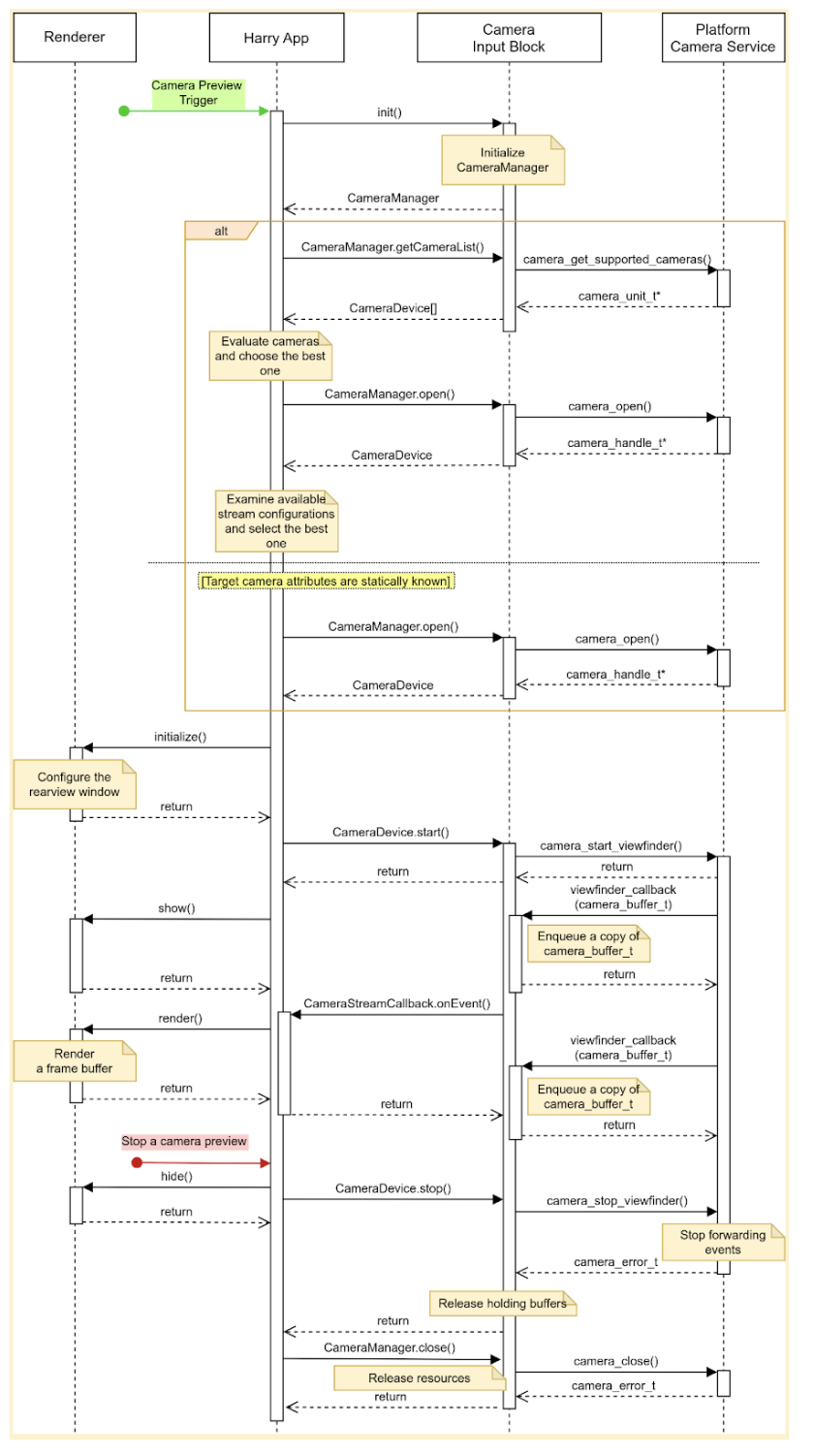
दूसरी इमेज. एचएआर की मुख्य यूज़र जर्नी.
कैमरा इनपुट ब्लॉक, तीन इंटरफ़ेस के बारे में बताता है:
CameraManager, कैमरा डिवाइसों को मैनेज करने के तरीके बताता है. उदाहरण के लिए, ऐप्लिकेशन इस इंटरफ़ेस का इस्तेमाल करके, टारगेट कैमरा डिवाइस को खोलता (रिज़र्व करता) है.CameraDevice, कैमरा डिवाइस को कंट्रोल करने के तरीके बताता है. उदाहरण के लिए, डेटा स्ट्रीम को शुरू या बंद करना.CameraStreamListener, टारगेट कैमरे से अलग-अलग इवेंट पाने का एक तरीका बताता है.
डिज़ाइन
इस सेक्शन में, सिस्टम के डिज़ाइन के बारे में जानकारी दी गई है.
उपयोगकर्ता अनुभव
ड्राइवर, गियर को रिवर्स में डालने पर, इंस्ट्रूमेंट क्लस्टर डिसप्ले पर रियर कैमरे की झलक देख सकता है. ड्राइवर के गियर को रिवर्स से हटाने पर, डिसप्ले पर कैमरे की झलक दिखनी बंद हो जाती है.
अन्य यूज़र जर्नी को चालू किया जा सकता है. उदाहरण के लिए, टर्न सिग्नल चालू होने पर, ड्राइवर उन जगहों की झलक देख सकता है जो शीशों में नहीं दिखती हैं.
कैमरे की झलक देखना शुरू करना
कैमरों का इस्तेमाल करते समय, ऐप्लिकेशन उपलब्ध कैमरों की गिनती करता है और उनका आकलन करता है, ताकि मकसद के हिसाब से सबसे अच्छा कैमरा ढूंढा जा सके. उदाहरण के लिए, पीछे की ओर देखने की सुविधा के लिए, ऐप्लिकेशन उपलब्ध कैमरों की सूची में से ऐसा कैमरा ढूंढता है जो वाहन के पीछे का हिस्सा दिखाता हो.
ऐप्लिकेशन, हर कैमरे की विशेषताओं की जांच करके इसका आकलन करता है. जैसे, जगह, लेंस की दिशा, फ़्रेम दर, आउटपुट रिज़ॉल्यूशन, और आउटपुट फ़ॉर्मैट. अगर एक से ज़्यादा कैमरों की ज़रूरी विशेषताएं एक जैसी हैं, तो ऐप्लिकेशन अन्य विशेषताओं की जांच कर सकता है. जैसे, फ़ील्ड ऑफ़ व्यू और फ़ोकल दूरी.
इस इमेज में, स्टैटिक कैमरा कॉन्फ़िगरेशन के साथ कैमरे की झलक देखने की सुविधा शुरू करने का क्रम दिखाया गया है:
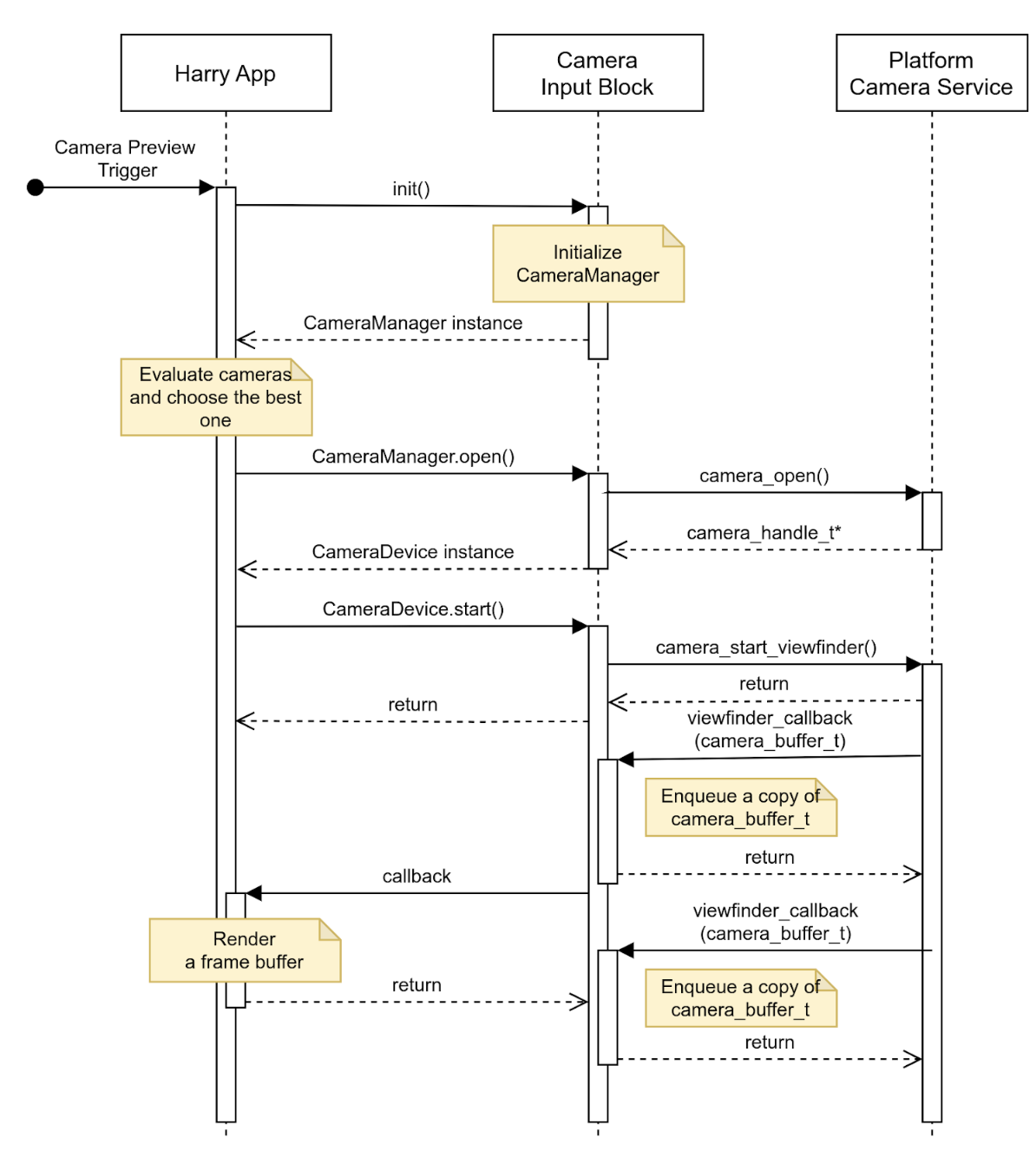
तीसरी इमेज. स्टैटिक कैमरा कॉन्फ़िगरेशन के साथ कैमरे की झलक देखना शुरू करना.
कैमरे की झलक देखना बंद करना
वाहन को पीछे की ओर ले जाने की गतिविधि खत्म होने पर, ऐप्लिकेशन पीछे की ओर देखने की सुविधा देना बंद कर देता है. खाली स्क्रीन या स्थिर इमेज दिखाने से बचने के लिए, ऐप्लिकेशन पहले उपयोगकर्ता को व्यू नहीं दिखाता. इसके बाद, कैमरा इनपुट ब्लॉक से इवेंट भेजना बंद करने का अनुरोध करता है.
इस इमेज में, टारगेट कैमरा डिवाइस से डेटा स्ट्रीम को बंद करने का क्रम दिखाया गया है:
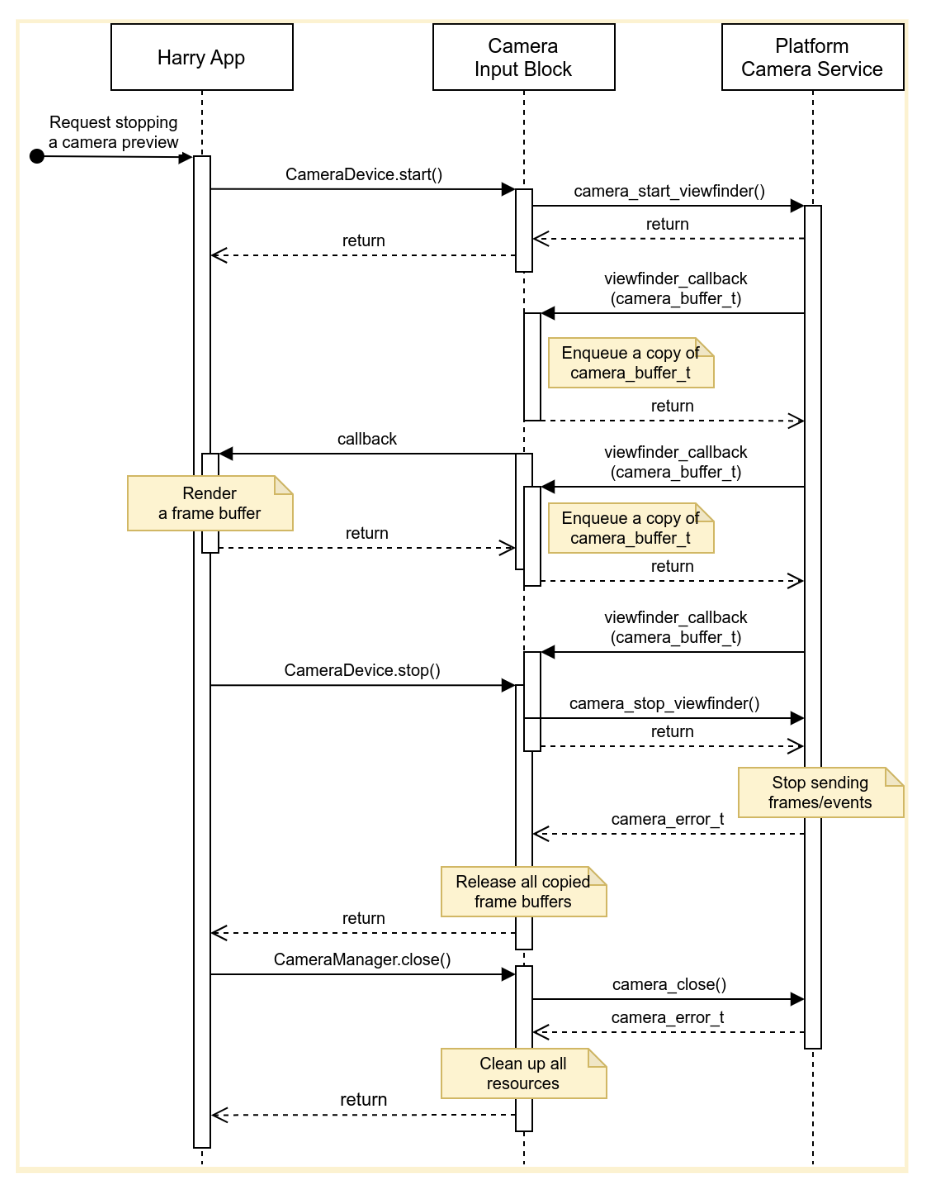
चौथी इमेज. टारगेट कैमरा डिवाइस से डेटा स्ट्रीम को बंद करना.
गड़बड़ियां
कैमरा डिवाइस, अचानक नया फ़्रेम बफ़र भेजना बंद कर सकता है. ऐसी घटनाओं का पता लगाने के लिए, कैमरा इनपुट ब्लॉक एक टाइमर लागू कर सकता है. यह टाइमर, नया फ़्रेम आने पर खत्म हो जाता है. साथ ही, यह टाइमर खत्म होने पर एक सूचना भेजता है.
जब ऐप्लिकेशन को सूचना मिलती है, तो वह उपयोगकर्ता को बताता है कि कैमरे की झलक अब लाइव नहीं है. इसके बाद, वह कैमरा डिवाइस को बंद करके और फिर से खोलकर, कैमरे की झलक को वापस लाने की कोशिश करता है. पांचवीं इमेज में दिखाया गया है कि ऐप्लिकेशन, टाइम आउट को कैसे हैंडल करता है:
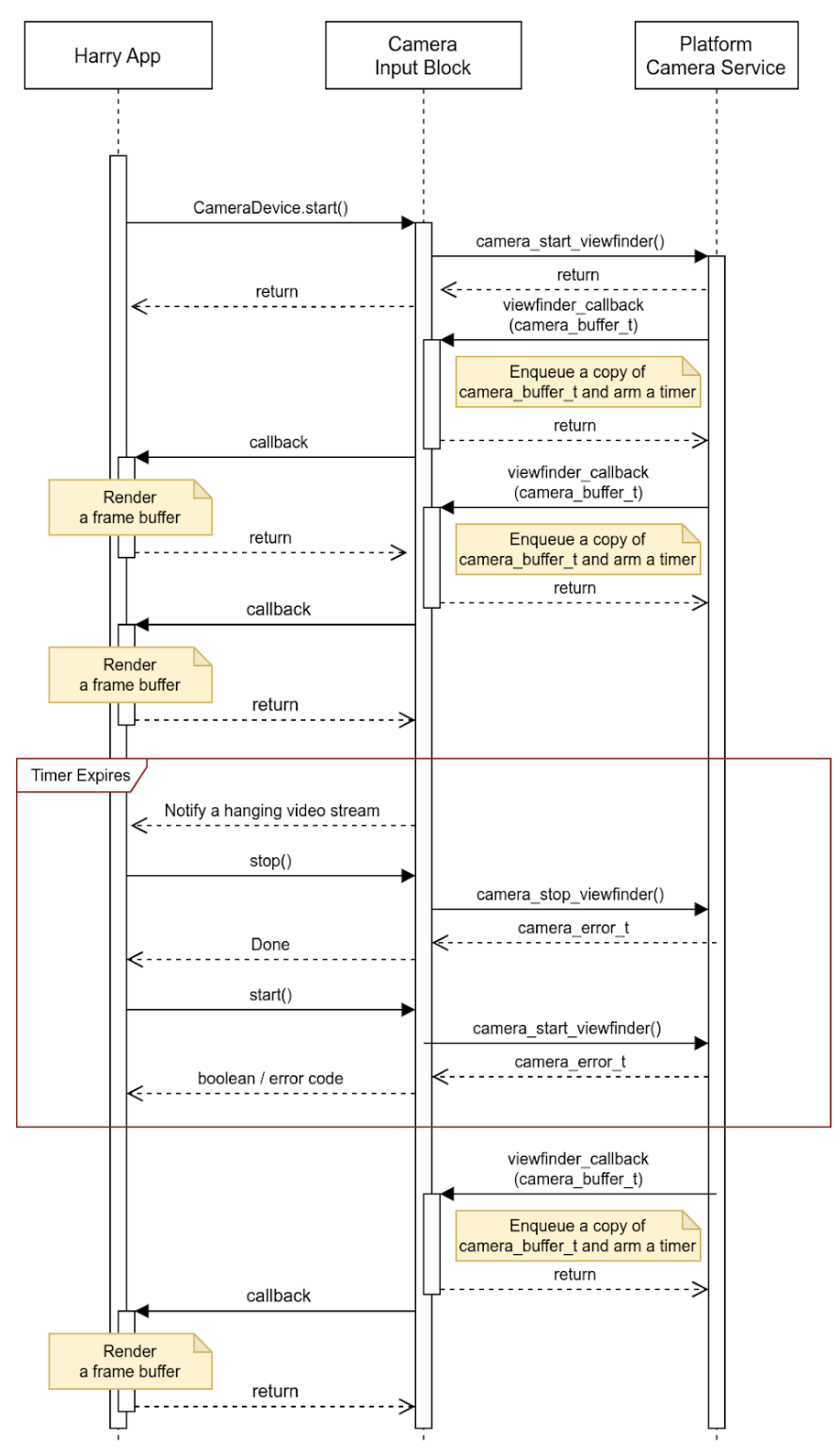
पांचवीं इमेज. टाइम आउट (डेटा स्ट्रीम का रुक जाना) को हैंडल करना.
कैमरा इनपुट ब्लॉक, डेटा स्ट्रीम के रुक जाने के अलावा अन्य घटनाओं की रिपोर्ट कर सकता है. साथ ही, बफ़र में ज़्यादा जानकारी एम्बेड कर सकता है. ओईएम, अपने प्लैटफ़ॉर्म पर घटनाओं को हैंडल करने के लिए, इस इवेंट मेटाडेटा का इस्तेमाल कर सकते हैं.
गतिविधियां
एपीआई का इस्तेमाल, होस्ट पर चलने वाले और एचएआर (नीचे दिए गए डायग्राम में नीले ब्लॉक) की मदद से इंस्ट्रूमेंट क्लस्टर डिसप्ले को मैनेज करने वाले ऐप्लिकेशन करते हैं.
पांचवीं इमेज में, सिस्टम का डायग्राम दिखाया गया है:
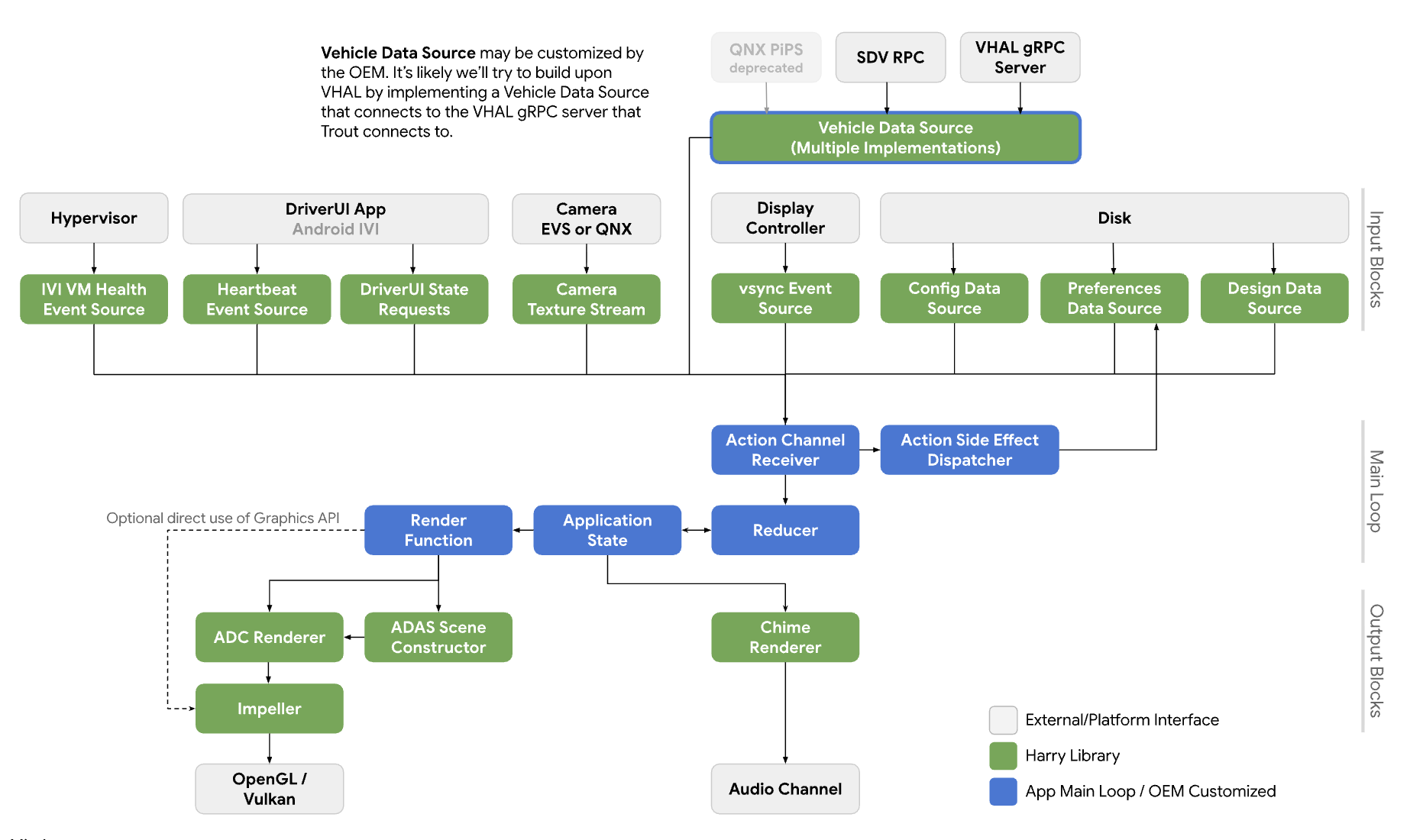
छठी इमेज. सिस्टम का डायग्राम.
सेवाएं
एपीआई कॉल, कॉल करने वाली प्रोसेस के कॉन्टेक्स्ट में चलने चाहिए.
API
नया एपीआई सिर्फ़ उन ऐप्लिकेशन के लिए है जो एचएआर की मदद से, इंस्ट्रूमेंट क्लस्टर डिसप्ले पर कैमरे की झलक को मैनेज करते हैं. एपीआई, प्लैटफ़ॉर्म ऐब्स्ट्रैक्शन लेयर के ज़रिए उपलब्ध है और यह डाइनैमिक तरीके से लिंक होता है.
CameraInputBlock इंटरफ़ेस, कैमरे की सुविधा को शुरू करने और इनपुट ब्लॉक मैनेजर पाने के तरीके बताता है. ऐप्लिकेशन, कैमरा डिवाइसों को मैनेज करने के लिए, दिखाए गए CameraManager इंस्टेंस का इस्तेमाल करता है.
// This class represents a camera input block for the application that manages the
// instrument cluster display with Harry.
public class CameraInputBlock : public InputBlock {
    public:
        // Clean up the resources.
        virtual ~CameraInputBlock();

        // A method inherited from InputBlock class. This method initializes
        // CameraInputBlock instance; e.g. checking the platform camera service
        // is live.
        //
        // @return CAMERA_EPERM if the platform camera service is not
        //                      available.
        //         CAMERA_OK otherwise.
        virtual CameraError init() override;

        // A method inherited from InputBlock class. This method release all
        // resources held by this CameraInputBlock instance.
        virtual void release() override;

        // This method returns a CameraManager instance. The caller uses
        // this instance to manage camera devices.
        //
        // @param out If this method is successful, this points to a valid
        //            CameraManager instance.
        // @return CAMERA_EACCESS when we fail to create CameraManager instance
        //         to return.
        //         CAMERA_OK otherwise.
        virtual CameraError getCameraManager(
            std::shared_ptr<CameraManager>* out) = 0;

    private:
        // Handle to manage camera devices.
        std::shared_ptr<CameraManager> mMgr;

        // Handle to manage camera devices that have been opened by clients.
        std::set<CameraDevice> mCameras;
};
CameraManager क्लास, कैमरों को खोलने (या उनका मालिकाना हक पाने) के तरीके बताती है. साथ ही, जब ऐप्लिकेशन उस कैमरे का इस्तेमाल करना बंद कर देता है, तो उसे रिलीज़ करने के तरीके भी बताती है. ऐप्लिकेशन, एक से ज़्यादा कैमरे खोल सकता है और उनके स्ट्रीम का इस्तेमाल करके, फ़ील्ड ऑफ़ व्यू या मल्टीव्यू अनुभव बना सकता है.
// This pure virtual class declares methods to manage camera devices.
public class CameraManager {
    public:
        // This method returns a list of CameraDescriptor objects representing
        // available cameras.
        //
        // @param out A list of CameraDescriptor instances. This list may be
        //            empty if the platform camera service does not list any
        //            camera.
        // @return CAMERA_EACCESS if we failed to build a camera list.
        //         CAMERA_OK otherwise.
        virtual CameraError getCameraList(
            std::vector<CameraDescriptor>* out) = 0;

        // Open a camera device associated with a given string identifier.
        //
        // @param ID A string identifier of a camera device to request.
        // @param out A pointer to CameraDevice shared pointer object. This
        //            is null when we fail to open a target device.
        // @return CAMERA_ENODEV if no camera is associated with a given id.
        //         CAMERA_EACCESS if it fails to open a target device.
        //         CAMERA_OK otherwise.
        virtual CameraError open(
            std::string ID, std::shared_ptr<CameraDevice>* out) = 0;

        // Close a camera device associated with a given string identifier.
        // This method is assumed to be always successful.
        //
        // @param id A string identifier of a camera device to close.
        virtual void close(std::string id) = 0;
};
अगर ऐप्लिकेशन यह पता नहीं लगा पाते कि किन कैमरों का इस्तेमाल करना है, तो वे उस कैमरे को चुन सकते हैं जो कॉन्टेक्स्ट के हिसाब से सबसे अच्छा काम करता है. CameraManager::getCameraList(), CameraDescriptor इंस्टेंस की सूची दिखाता है. इससे हर कैमरे की विशेषताओं के बारे में पता चलता है.
CameraDevice क्लास, एक कैमरा डिवाइस को दिखाता है. साथ ही, यह उसके डेटा स्ट्रीम को शुरू और बंद करने के तरीके बताता है. अगर कैमरे की विशेषताएं स्टैटिक तौर पर पता नहीं हैं, तो क्लाइंट उन्हें अपने डिस्क्रिप्टर से पाते हैं और उन्हें पार्स करते हैं.
उदाहरण के लिए, कोई क्लाइंट, टारगेट कैमरा डिवाइस के मेटाडेटा से, स्ट्रीम कॉन्फ़िगरेशन की सूची पा सकता है. इसके बाद, वह सबसे अच्छे एट्रिब्यूट (उदाहरण के लिए, फ़्रेम दर, रिज़ॉल्यूशन, और आउटपुट फ़ॉर्मैट) वाला कॉन्फ़िगरेशन चुन सकता है.
// This class represents a single camera device.
public class CameraDevice {
    public:
        // Start a data stream that attributes are matching to given
        // configuration best.
        // If a selected configuration is not given (null), a data stream is
        // initiated in its default configuration and return.
        //
        // @param configuration Selected attributes of the imagery data stream.
        // @param listener An object to listen to an active data stream.
        // @param effective Actual attributes of started data stream.
        // @return CAMERA_EINVAL if a listener object is invalid.
        //         CAMERA_EIO if we failed to start a video stream.
        //         CAMERA_OK otherwise.
        virtual CameraError start(
                std::shared_ptr<CameraStreamConfiguration>& configuration,
                std::shared_ptr<CameraStreamListener>& listener,
                std::shared_ptr<CameraStreamConfiguration>* effective) = 0;

        // Stop a data stream.
        virtual void stop() = 0;

        // Get a camera descriptor.
        //
        // @param desc A set of attributes that defines this camera device.
        // @return CAMERA_ENODATA if a descriptor is not available.
        //         CAMERA_OK otherwise.
        CameraError getDescriptor(std::shared_ptr<CameraDescriptor>* desc) = 0;

        // Return a consumed buffer to the camera device. A client of active
        // stream must return a frame buffer explicitly by calling this method.
        virtual void doneWithFrame(std::shared_ptr<FrameBuffer>& buffer) = 0;

    private:
        // Describe this camera device.
        CameraDescriptor mDescriptor;

        // A weak reference to a listening client.
        std::weak_ptr<CameraStreamListener> mClient;
};

// This class declares attributes that characterize a camera device.
public class CameraDescriptor {
    public:
        // Unique std::string object to identify a single camera device.
        std::string mId;

        // A set of stream configurations this camera device is capable of. A
        // camera must have at least one stream configuration.
        std::set<CameraStreamConfiguration> mConfigurations;

        // Are more attributes needed to exist, such as locations, lens
        // facing directions, and intrinsic/extrinsic parameters?
};

// This class declares attributes that characterize an imagery data stream.
public class CameraStreamConfiguration {
    public:
        // Width of output of this stream in pixels.
        unsigned int mWidthInPixels;

        // Height of output of this stream in pixels.
        unsigned int mHeightInPixels;

        // An average number of frames per second.
        double mFrameRate;

        // A format of this stream's output. A client could calculate a
        // byte-per-pixel (bpp) from this.
        CameraColorFormat mFormat;
};

// This class represents a listener/callback object to listen to frames and
// events.
public class CameraStreamListener {
    public:
        // A listener method to receive various stream events including a new
        // frame buffer.
        //
        // @param event CameraStreamEvent object that represents a single event
        //              such as an arrival of a new frame buffer, camera stream
        //              is terminated, and so forth.
        virtual void onEvent(std::shared_ptr<CameraStreamEvent>* event) = 0;
};
CameraDevice::start() तीन आर्ग्युमेंट लेता है:
कॉल करने वाले व्यक्ति ने जो स्ट्रीम कॉन्फ़िगरेशन चुना है.
स्ट्रीम इवेंट पाने के लिए लिसनर.
असरदार स्ट्रीम कॉन्फ़िगरेशन का पॉइंटर. हमारा सुझाव है कि कॉल करने वाला व्यक्ति, आने वाले फ़्रेम बफ़र को अपनी ज़रूरत के हिसाब से हैंडल करने के लिए, इस वैल्यू की जांच करे.
जब CameraDevice::start(), कैमरा सर्विस प्लैटफ़ॉर्म के साथ डेटा स्ट्रीम शुरू करता है, तो यह कॉल करने वाले व्यक्ति के लिसनर ऑब्जेक्ट का कमज़ोर रेफ़रंस रखता है, ताकि कॉल करने वाले व्यक्ति के अचानक बंद होने का पता लगाया जा सके.
जब कोई क्लाइंट, फ़्रेम बफ़र का इस्तेमाल करना बंद कर देता है, तो उसे CameraDevice::doneWithFrame() तरीके को कॉल करके, कैमरा डिवाइस को यह सूचना देनी होगी कि उसे अब फ़्रेम बफ़र की ज़रूरत नहीं है.
जब कोई स्ट्रीम शुरू होती है, तो क्लाइंट को इवेंट मैसेज मिलते हैं. एक सामान्य मैसेज, नया फ़्रेम बफ़र होता है. रजिस्टर किए गए कॉलबैक फ़ंक्शन के ज़रिए, क्लाइंट को kNewFrameBuffer इवेंट मिलता है. इसमें फ़्रेम बफ़र के मेटाडेटा के साथ-साथ, इमेज डेटा भी होता है. StreamEventType , अन्य स्ट्रीम इवेंट को हैंडल करने के लिए, ज़्यादा टाइप दिखाता है. जैसे, डेटा स्ट्रीम का रुक जाना या बंद हो जाना.
// This class lists events possibly occurring while a data stream is active.
enum class CameraStreamEventType {
    // A delivery of a new frame buffer.
    kNewFrameBuffer,
    // A data stream has been stopped.
    kStreamStopped,
    // No new frame buffer arrives for a while.
    kStreamHang,
    // Add more.
    ...
};

// This class represents a single instance of StreamEventType.
public class CameraStreamEvent {
    public:
        // Return a type of this event.
        //
        // @return CameraStreamEventType enum value.
        CameraStreamEventType getType() { return mType; }

        // Return a pointer to data associated with this event.
        //
        // @return A shared pointer object of the buffer that contains data for
        //         this event.
        std::shared_ptr<void> getData() { return mData; }

    private:
        // Describe a type of this event.
        CameraStreamEventType mType;

        // A pointer to the data buffer.
        std::shared_ptr<void> mData;
};

// This class inherits StreamEvent class and has additional fields to represent
// the frame buffer.
public class FrameBufferEvent : public CameraStreamEvent {
    public:
        // Return an identifier of this frame buffer.
        //
        // @return A unique integer value to identify this frame buffer.
        int getBufferID() { return mBufferID; }

        // Give access to frame buffer metadata.
        //
        // @return A shared pointer to the buffer that contains data besides
        //         the imagery data.
        std::shared_ptr<void> getMetadata() { return mMetadata; }

    private:
        // Unique integer to identify this buffer.
        int mBufferID;

        // A pointer to metadata of this frame buffer.
        std::shared_ptr<void> mMetadata;
};
इस सैंपल में, CameraInputBlock इंटरफ़ेस और उसके ऐप्लिकेशन का लागू किया गया वर्शन दिखाया गया है:
CameraError getCameraManager(std::shared_ptr<CameraManager>* out) {
    // During an instantiation, CameraManager will retrieve a list of camera
    // devices from the platform camera service and identify their attributes.
    *out = std::make_shared<CameraManager>();
    return CAMERA_OK;
}

// This method returns a list of CameraDescriptor objects representing available
// cameras.
CameraError CameraManager::getCameraList(std::vector<CameraDescriptor>* out) {
    if (mCameraList.size() < 1) {
        // Query a list of cameras and get their attributes.
    }
    *out = mCameraList;
    return CAMERA_OK;
}

// Open a camera device associated with a given string identifier.
CameraError CameraManager::open(std::string id, std::shared_ptr<CameraDevice>* out) {
    if (!mCameraList.contains(id)) {
        // We cannot identify any camera with a given value.
        return CAMERA_NODEV;
    }

    // During a construction, CameraDevice will obtain a handle of a target
    // camera device from the platform camera service.
    std::shared_ptr<CameraDevice> h = std::make_shared<CameraDevice>(id);
    if (!h) {
        // We fail to open a camera device.
        return CAMERA_EACCESS;
    }

    *out = h;
    return CAMERA_OK;
}

// Close a camera device associated with a given string identifier. This method
// is assumed to be always successful.
void CameraManager::close(std::string id) {
    if (!mCameraList.contains(id)) {
        // We ignore calls with unknown identifiers.
        return;
    }

    // mCameraList.remove() returns an object removed from the list.
    std::shared_ptr<CameraDevice> device = mCameraList.remove(id);

    // Ensure a device stops streaming.
    device->stop();
}

// Start a data stream that attributes are matching to given configuration
// best.
// If a selected configuration is not given (null), a data stream will be
// initiated in its default configuration and return.
CameraError CameraDevice::start(
        std::shared_ptr<CameraStreamConfiguration>& configuration,
        std::shared_ptr<CameraStreamListener>& listener,
        std::shared_ptr<CameraStreamConfiguration>* effective) {
    if (!listener) {
        return CAMERA_EINVAL;
    }

    // selectStreamConfiguration examines this camera's stream configurations
    // and returns the one closest to the selected configuration.
    CameraStreamConfiguration config = selectStreamConfiguration(configuration);

    // mDevice refers to the camera handle for the platform camera service. We
    // may need to translate CameraStreamConfiguration for the platform service.
    mDevice->configure(
        configuration.mWidth, configuration.mHeight, configuration.mFormat);

    // Start a data stream with a callback object.
    if (!mDevice->startStream(mCallback)) {
        // We failed to start a data stream.
        return CAMERA_EIO;
    }

    return CAMERA_OK;
}

// Stop a data stream.
void CameraDevice::stop() {
    if (!mDevice) {
        // Nothing to do if we don't have a valid camera handle for the
        // platform camera service.
        return;
    }

    mDevice->stopStream();
}

// Get a camera descriptor.
CameraError CameraDevice::getDescriptor(std::shared_ptr<CameraDescriptor>* desc) {
    if (!mDescriptor) {
        return CAMERA_ENODATA;
    }

    *desc = *mDescriptor;
    return CAMERA_OK;
}

// Return a consumed buffer to the camera device. A client of active stream
// must return a frame buffer explicitly by calling this method.
void CameraDevice::doneWithFrame(std::shared_ptr<FrameBuffer>& buffer) {
    if (!mBufferRecords.contains(buffer.getId())) {
        // Ignore a call with unknown frame buffer.
        return;
    }

    // Simply remove from the record.
    (void)mBufferRecords.remove(buffer.getId());
}

// This method handles gear-shift events.
void Application::handleGearShift(GearSelection selection) {
    switch (selection) {
        case GEAR_SELECTION_REVERSE:
            // Upon the reverse gear selection, we are going to start a video
            // stream and show its preview on the instrument cluster display.
            (void)startStream(mCameraInputBlock);

            // FIXME: Exact method to control the camera preview window on the
            // instrument display is to be determined.
            show(mRearVisibilityWindow);
            break;

        default:
            // Upon all other gear selection, we are going to stop a video
            // stream (if it's running) and hide the preview.
            stopStream(mCameraInputBlock);

            // FIXME: Exact method to control the camera preview window on the
            // instrument display is to be determined.
            hide(mRearVisibilityWindow);
            break;
    }
}

bool Application::startStream(std::shared_ptr<CameraInputBlock> handle) {
    return handle->start(std::bind(&Application::handleStreamCallback, this);
}

void Application::stopStream(std::shared_ptr<CameraInputBlock> handle) {
    handle->stop();
}

// This method handles a stream callback.
void Application::handleStreamCallback(StreamEvent& event) {
    switch (event.getType()) {
        case StreamEventType::kNewFrameBuffer:
            // Handle a new frame buffer. We may just enqueue it for the
            // future or forward to CameraInputBlock client.
            break;

        case StreamEventType::kStreamStopped:
            // Handle as an incident if this event is not expected.
            break;

        // More cases to be added.
    }
}

void Application::handleNewFrameBuffer(StreamEvent& event) {
    // Enqueue a new frame buffer for the further processing. A buffer
    // must be returned explicitly by calling
    // CameraDevice.doneWithFrame(FrameBuffer&) method.
}

void Application::handleStreamEvent(StreamEvent& event) {
    // Handle a received stream event except a new frame buffer's
    // arrival; e.g. a video stream is terminated unexpectedly.
}
परफ़ॉर्मेंस
पीछे की ओर देखने की सुविधा, सरकार के इन नियमों के मुताबिक है.
| मान | कानून |
|---|---|
| जवाब देने में लगने वाला समय | सीएफ़आर 571.111 S5.5.3 |
| फ़्रेम दर | यूएनईसीई आर46 6.2.2.3.4 |
| इमेज बनने में लगने वाला समय | यूएनईसीई आर46 6.2.2.3.4.2 |
| सिस्टम का इंतज़ार का समय | यूएनईसीई आर46 6.2.2.3.4.3 |
निजता
निजता से जुड़ी खास जानकारी:
एपीआई के लिए, लागू किए गए वर्शन को व्यक्तिगत पहचान से जुड़ी जानकारी (पीआईआई) इकट्ठा, लॉग या सेव करने की ज़रूरत नहीं होती. हालांकि, कैप्चर किए गए इमेज डेटा (या उससे जुड़े मेटाडेटा) में व्यक्तिगत पहचान से जुड़ी जानकारी हो सकती है. इसलिए, एपीआई का इस्तेमाल करने वाले ऐप्लिकेशन को, उपयोगकर्ता की साफ़ तौर पर सहमति लेनी होगी.
उपयोगकर्ता, इंस्ट्रूमेंट क्लस्टर डिसप्ले पर झलक देखने के लिए, कैमरा डिवाइसों को कंट्रोल नहीं कर सकते. इसकी वजह यह है कि कैमरे, सुरक्षा से जुड़ी अहम भूमिका निभाते हैं. ओईएम, सेटअप के दौरान या ड्राइवर से उपयोगकर्ता की सहमति लेते हैं.
यह एपीआई, बैकग्राउंड कैमरा क्लाइंट के साथ काम नहीं करता. इसलिए, निजता इंडिकेटर, जो उपयोगकर्ताओं को यह बताता है कि कोई कैमरा डिवाइस डेटा कैप्चर कर रहा है, इस एपीआई के दायरे से बाहर है.