

정부 규제 기관은 간접 후방 시야가 차량을 정확하고 시기적절하게 조작하는 데 충분한 정보를 제공하도록 여러 요구사항을 구현합니다. 이는 운전자의 주변 인식에 영향을 미칩니다.
카메라 모니터링 시스템 (CMS)을 기반으로 하는 후방 시야 시스템의 경우, 미국 고속도로교통안전국 (NHTSA)은 이러한 요구사항 (UNECE46에서 참조된 S6.6.2.3)을 충족하도록 요구합니다.
S5.5.3 응답 시간. S14.2에 따라 테스트할 때 S5.5.1 (시야) 및 S5.5.2 (크기)의 요구사항을 충족하는 후방 이미지는 후진 이벤트가 시작된 후 2.0초 이내에 표시됩니다.
S5.5.4 지속 시간. S5.5.1 및 S5.5.2의 요구사항을 충족하는 후방 이미지는 후진 이벤트가 종료된 후에는 표시되지 않습니다.
S5.5.5 비활성화. S5.5.1 및 S5.5.2의 요구사항을 충족하는 후방 이미지는 운전자가 뷰를 수정하거나 차량 방향 선택기가 후진 위치에서 이동할 때까지 후진 이벤트 중에 계속 표시됩니다.
S6.6.2.3.3.5 아티팩트. 사용 설명서에서는 운전자가 특히 주의를 기울여야 할 수 있는 시야 및 객체의 부분적 폐색에 대한 가능한 아티팩트와 그 영향을 언급해야 합니다.
S6.2.2.3.4.1 프레임 속도. 카메라 앞의 객체 움직임이 부드럽고 유연하게 렌더링됩니다. 시스템의 최소 프레임 속도는 30Hz (30fps와 동일) 이상입니다. 저조도 조건 또는 저속으로 조작하는 동안 시스템의 최소 프레임 속도는 15Hz 이상입니다.
S6.2.2.3.4.2 이미지 형성 시간. 모니터의 이미지 형성 시간은 섭씨 22도 ± 섭씨 5도에서 55ms 미만입니다.
S6.2.2.3.4.3 시스템 지연 시간. 카메라 모니터 시스템 (CMS)은 거의 동시에 장면을 렌더링할 수 있을 만큼 충분히 짧은 지연 시간을 갖습니다. 지연 시간은 섭씨 22도 ± 섭씨 5도에서 200ms 미만입니다.
베어 메탈 AAOS에서 이러한 요구사항을 준수하기 위해 Android Automotive OS (AAOS) 확장 뷰 시스템 (EVS) 을 도입했습니다. 또한 이러한 요구사항을 준수함을 보여주는 고가용성 렌더러 (HAR)가 있는 AAOS 기기의 가상화에 유사한 서비스를 도입했습니다.
카메라 미리보기 파이프라인
이러한 5단계로 카메라 미리보기 파이프라인이 구성됩니다.

그림 1. 카메라 미리보기 파이프라인 단계.
카메라 서비스 블록 은 앱이 사용 가능한 카메라에 액세스하고 사용할 수 있도록 하는 카메라 서비스 플랫폼 및 추상화 레이어를 나타냅니다. 디스플레이 서비스 함수는 사용자에게 이미지 데이터를 시각화합니다. 앱은 카메라 서비스 및 디스플레이 서비스로 타겟 사용자 여정을 구현합니다.
기본 후방 시야 사용자 여정은 다음과 같습니다.
운전자가 방향 선택기 (기어)를 후진에 배치하여 후진 이벤트를 트리거합니다.
시스템이 후진 이벤트를 브로드캐스트합니다. 앱이 브로드캐스트를 수신하고 카메라 입력 블록 (카메라 서비스)과 렌더러(디스플레이 서비스)를 초기화합니다.
카메라 입력 블록이 카메라 서비스 플랫폼을 초기화하고 서비스 핸들을 앱에 반환합니다.
렌더러가 4단계의 카메라 입력의 뷰 창을 초기화합니다.
앱이 카메라 입력 블록에 프레임 버퍼와 이벤트를 전송하도록 요청합니다.
앱이 콜백을 통해 전달된 프레임 버퍼를 대기열에 추가합니다 (비동기). 프레임 버퍼는 카메라 입력 블록이 소유하므로 앱에서 수정할 수 없습니다.
앱이 프레임 버퍼를 대기열에서 삭제하고 (대기열이 비어 있지 않은 경우) 사용자 뷰를 구성합니다. 사용자는 사본을 만들어 콘텐츠를 수정할 수 있습니다.
앱이 버퍼를 렌더러에 전송합니다.
렌더러가 수신된 버퍼의 콘텐츠를 디스플레이에 그립니다.
후진 이벤트가 계속 진행 중이면 7단계로 이동합니다. 후진 이벤트가 완료되면 앱은 사용자에게 뷰를 숨긴 후 카메라 입력 블록에 프레임 버퍼와 이벤트 전송을 중지하도록 요청합니다.
앱은 선택적으로 카메라를 닫고 렌더러를 해제합니다.
그림 1은 흐름을 보여줍니다. 이 이미지는 QNX 카메라 라이브러리 API의 요소를 사용하여 카메라 서비스 플랫폼을 사용합니다.
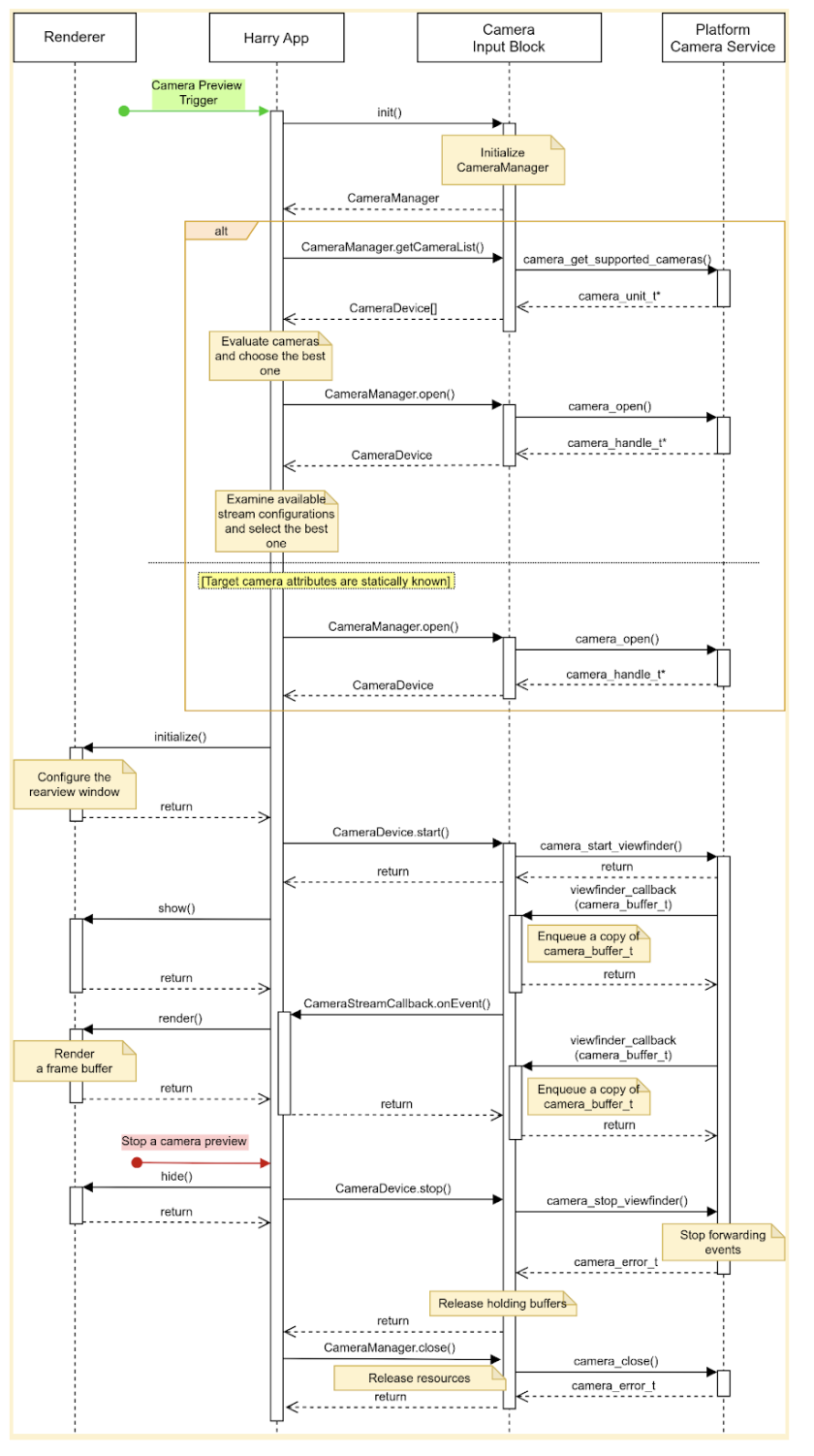
그림 2. HAR 기본 사용자 여정.
카메라 입력 블록은 세 가지 인터페이스를 선언합니다.
CameraManager: 카메라 기기를 관리하는 메서드를 선언합니다. 예를 들어 앱은 이 인터페이스를 사용하여 타겟 카메라 기기를 엽니다 (예약).CameraDevice: 카메라 기기를 제어하는 메서드를 선언합니다. 예를 들어 데이터 스트림을 시작하거나 중지합니다.CameraStreamListener: 타겟 카메라에서 다양한 이벤트를 수신하는 단일 메서드를 선언합니다.
디자인
이 섹션에서는 시스템 디자인을 자세히 설명합니다.
사용자 환경
운전자는 기어를 후진에 배치할 때 계기판 디스플레이에서 후면 카메라를 미리 볼 수 있습니다. 운전자가 기어를 후진에서 이동하면 디스플레이에서 카메라 미리보기가 중지됩니다.
추가 사용자 여정을 사용 설정할 수 있습니다. 예를 들어 운전자는 방향 지시등이 활성화될 때 거울에 보이지 않는 영역을 미리 볼 수 있습니다.
카메라 미리보기 시작
카메라를 사용할 때 앱은 사용 가능한 카메라를 열거하고 평가하여 의도한 목적에 가장 적합한 카메라를 찾습니다. 예를 들어 후방 시야의 경우 앱은 사용 가능한 카메라 목록에서 차량의 후면을 보여주는 카메라를 찾습니다.
앱은 위치, 렌즈 방향, 프레임 속도, 출력 해상도, 출력 형식과 같은 각 카메라의 특성을 검사하여 이를 평가합니다. 여러 카메라에 동일한 필수 특성이 있는 경우 앱은 시야 및 초점 거리와 같은 추가 특성을 검사할 수 있습니다.
이 이미지는 정적 카메라 구성으로 카메라 미리보기를 시작하는 시퀀스를 보여줍니다.
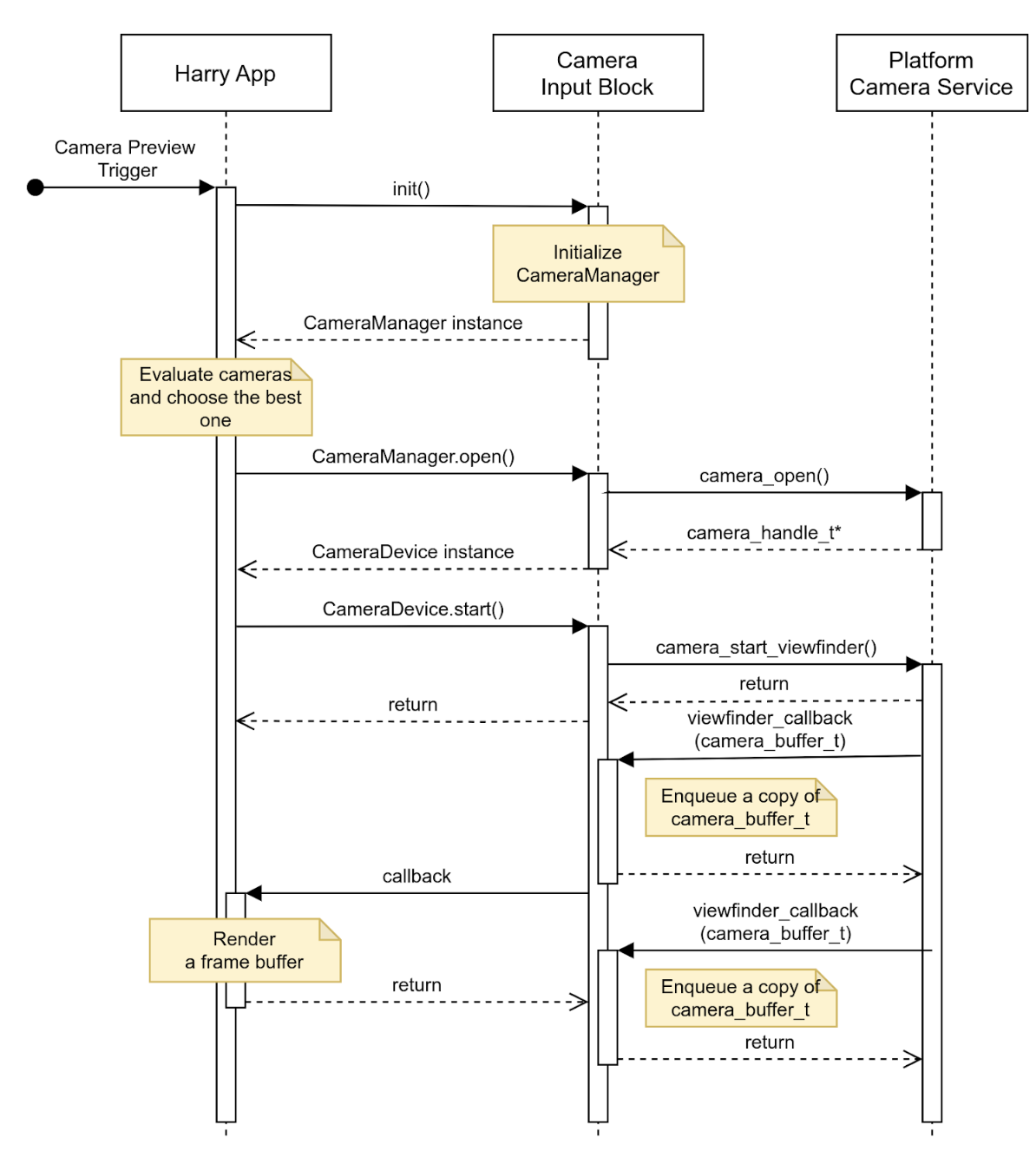
그림 3. 정적 카메라 구성으로 카메라 미리보기 시작.
카메라 미리보기 중지
후진 이벤트가 종료되면 앱에서 후방 시야 제공을 중지합니다. 빈 화면이나 스틸 이미지가 표시되지 않도록 앱은 먼저 사용자에게 뷰를 숨긴 다음 카메라 입력 블록에 이벤트 전송을 중지하도록 요청합니다.
이 이미지는 타겟 카메라 기기에서 데이터 스트림을 중지하는 시퀀스를 보여줍니다.
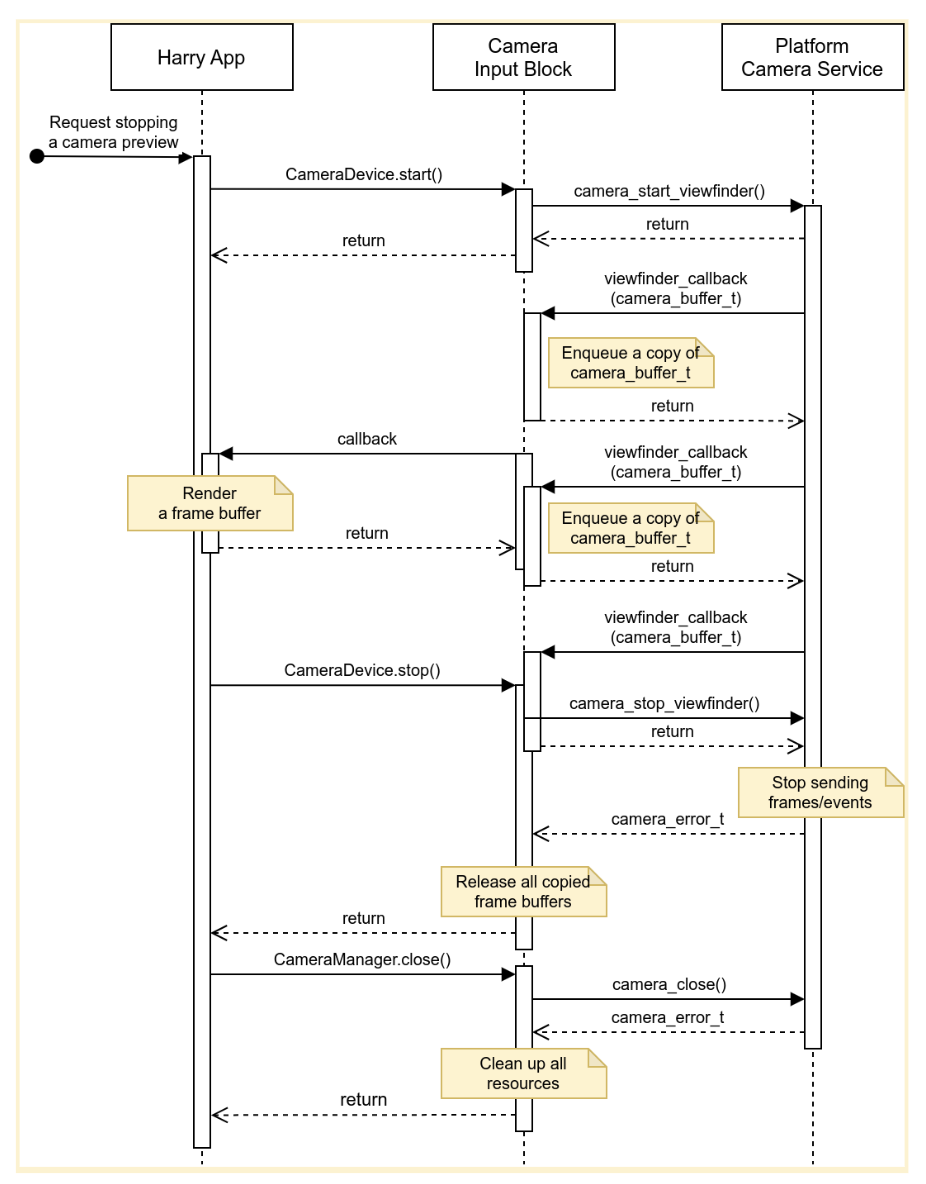
그림 4. 타겟 카메라 기기에서 데이터 스트림 중지.
오류
카메라 기기가 새 프레임 버퍼 전송을 예기치 않게 중지할 수 있습니다. 이러한 인시던트를 감지하기 위해 카메라 입력 블록은 새 프레임이 도착하면 만료되는 타이머를 구현하고 이 타이머가 만료되면 알림을 전송할 수 있습니다.
앱이 알림을 수신하면 앱은 카메라 미리보기가 더 이상 실시간이 아니라고 사용자에게 알리고 카메라 기기를 닫았다가 다시 열어 카메라 미리보기를 복원하려고 시도합니다. 그림 5는 앱이 제한 시간을 처리하는 방법을 보여줍니다.
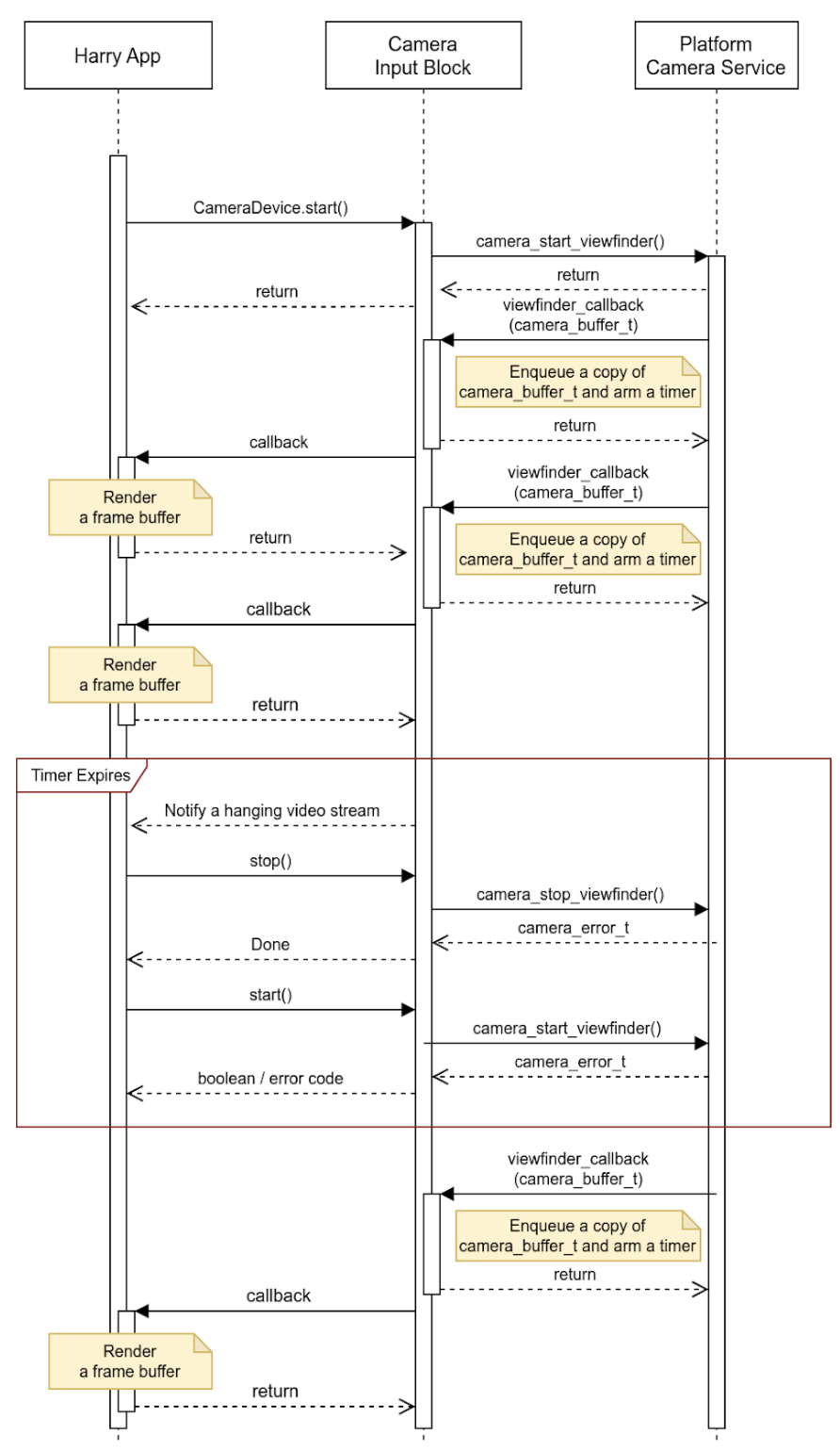
그림 5. 제한 시간 처리 (데이터 스트림 정지).
카메라 입력 블록은 데이터 스트림 정지 외에 인시던트를 보고하고 버퍼에 세부정보를 더 많이 삽입할 수 있습니다. OEM은 이 이벤트 메타데이터를 사용하여 플랫폼에서 인시던트를 처리할 수 있습니다.
활동
API는 호스트에서 실행되고 HAR을 통해 계기판 디스플레이를 관리하는 앱에서 사용됩니다 (아래 다이어그램의 파란색 블록).
시스템 다이어그램은 그림 5에 나와 있습니다.
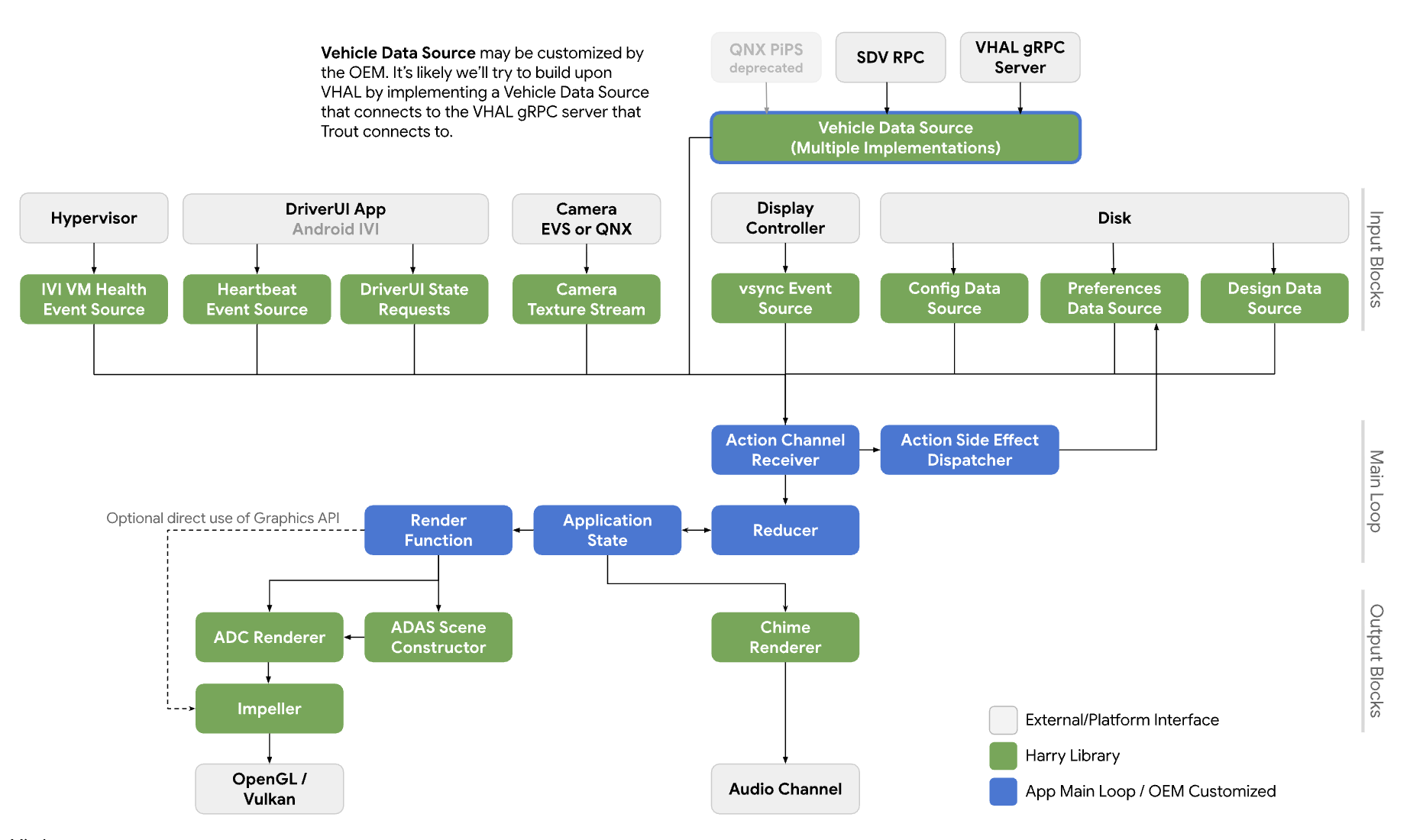
그림 6. 시스템 다이어그램.
서비스
API 호출은 호출 프로세스의 컨텍스트에서 실행될 것으로 예상됩니다.
API
새 API는 HAR을 통해 계기판 디스플레이에서 카메라 미리보기를 관리하는 앱 전용입니다. API는 플랫폼 추상화 레이어를 통해 사용할 수 있으며 동적으로 연결됩니다.
CameraInputBlock 인터페이스는 카메라 기능을 초기화하고 입력 블록 관리자를 가져오는 메서드를 선언합니다. 앱은 반환된 CameraManager 인스턴스를 사용하여 카메라 기기를 관리합니다.
// This class represents a camera input block for the application that manages the
// instrument cluster display with Harry.
public class CameraInputBlock : public InputBlock {
    public:
        // Clean up the resources.
        virtual ~CameraInputBlock();

        // A method inherited from InputBlock class. This method initializes
        // CameraInputBlock instance; e.g. checking the platform camera service
        // is live.
        //
        // @return CAMERA_EPERM if the platform camera service is not
        //                      available.
        //         CAMERA_OK otherwise.
        virtual CameraError init() override;

        // A method inherited from InputBlock class. This method release all
        // resources held by this CameraInputBlock instance.
        virtual void release() override;

        // This method returns a CameraManager instance. The caller uses
        // this instance to manage camera devices.
        //
        // @param out If this method is successful, this points to a valid
        //            CameraManager instance.
        // @return CAMERA_EACCESS when we fail to create CameraManager instance
        //         to return.
        //         CAMERA_OK otherwise.
        virtual CameraError getCameraManager(
            std::shared_ptr<CameraManager>* out) = 0;

    private:
        // Handle to manage camera devices.
        std::shared_ptr<CameraManager> mMgr;

        // Handle to manage camera devices that have been opened by clients.
        std::set<CameraDevice> mCameras;
};
CameraManager 클래스는 카메라를 열거나 소유하는 메서드를 선언하고 앱이 해당 카메라를 완료하면 카메라를 해제합니다. 앱은 둘 이상의 카메라를 열고 스트림을 사용하여 더 넓은 시야 또는 멀티뷰 환경을 만들 수 있습니다.
// This pure virtual class declares methods to manage camera devices.
public class CameraManager {
    public:
        // This method returns a list of CameraDescriptor objects representing
        // available cameras.
        //
        // @param out A list of CameraDescriptor instances. This list may be
        //            empty if the platform camera service does not list any
        //            camera.
        // @return CAMERA_EACCESS if we failed to build a camera list.
        //         CAMERA_OK otherwise.
        virtual CameraError getCameraList(
            std::vector<CameraDescriptor>* out) = 0;

        // Open a camera device associated with a given string identifier.
        //
        // @param ID A string identifier of a camera device to request.
        // @param out A pointer to CameraDevice shared pointer object. This
        //            is null when we fail to open a target device.
        // @return CAMERA_ENODEV if no camera is associated with a given id.
        //         CAMERA_EACCESS if it fails to open a target device.
        //         CAMERA_OK otherwise.
        virtual CameraError open(
            std::string ID, std::shared_ptr<CameraDevice>* out) = 0;

        // Close a camera device associated with a given string identifier.
        // This method is assumed to be always successful.
        //
        // @param id A string identifier of a camera device to close.
        virtual void close(std::string id) = 0;
};
앱에서 사용할 카메라를 감지할 수 없는 경우 앱은 컨텍스트에서 가장 잘 작동하는 카메라를 선택할 수 있습니다. CameraManager::getCameraList() 는 각 카메라의 특성을 제공하는 CameraDescriptor 인스턴스 목록을 반환합니다.
CameraDevice 클래스는 단일 카메라 기기를 나타내며 데이터 스트림을 시작하고 중지하는 메서드를 선언합니다. 카메라 특성을 정적으로 알 수 없는 경우 클라이언트는 설명자에서 가져와 파싱합니다.
예를 들어 클라이언트는 메타데이터에서 타겟 카메라 기기가 제공하는 스트림 구성 목록을 가져와 가장 적합한 속성 (예: 프레임 속도, 해상도, 출력 형식)이 있는 구성을 선택할 수 있습니다.
// This class represents a single camera device.
public class CameraDevice {
    public:
        // Start a data stream that attributes are matching to given
        // configuration best.
        // If a selected configuration is not given (null), a data stream is
        // initiated in its default configuration and return.
        //
        // @param configuration Selected attributes of the imagery data stream.
        // @param listener An object to listen to an active data stream.
        // @param effective Actual attributes of started data stream.
        // @return CAMERA_EINVAL if a listener object is invalid.
        //         CAMERA_EIO if we failed to start a video stream.
        //         CAMERA_OK otherwise.
        virtual CameraError start(
                std::shared_ptr<CameraStreamConfiguration>& configuration,
                std::shared_ptr<CameraStreamListener>& listener,
                std::shared_ptr<CameraStreamConfiguration>* effective) = 0;

        // Stop a data stream.
        virtual void stop() = 0;

        // Get a camera descriptor.
        //
        // @param desc A set of attributes that defines this camera device.
        // @return CAMERA_ENODATA if a descriptor is not available.
        //         CAMERA_OK otherwise.
        CameraError getDescriptor(std::shared_ptr<CameraDescriptor>* desc) = 0;

        // Return a consumed buffer to the camera device. A client of active
        // stream must return a frame buffer explicitly by calling this method.
        virtual void doneWithFrame(std::shared_ptr<FrameBuffer>& buffer) = 0;

    private:
        // Describe this camera device.
        CameraDescriptor mDescriptor;

        // A weak reference to a listening client.
        std::weak_ptr<CameraStreamListener> mClient;
};

// This class declares attributes that characterize a camera device.
public class CameraDescriptor {
    public:
        // Unique std::string object to identify a single camera device.
        std::string mId;

        // A set of stream configurations this camera device is capable of. A
        // camera must have at least one stream configuration.
        std::set<CameraStreamConfiguration> mConfigurations;

        // Are more attributes needed to exist, such as locations, lens
        // facing directions, and intrinsic/extrinsic parameters?
};

// This class declares attributes that characterize an imagery data stream.
public class CameraStreamConfiguration {
    public:
        // Width of output of this stream in pixels.
        unsigned int mWidthInPixels;

        // Height of output of this stream in pixels.
        unsigned int mHeightInPixels;

        // An average number of frames per second.
        double mFrameRate;

        // A format of this stream's output. A client could calculate a
        // byte-per-pixel (bpp) from this.
        CameraColorFormat mFormat;
};

// This class represents a listener/callback object to listen to frames and
// events.
public class CameraStreamListener {
    public:
        // A listener method to receive various stream events including a new
        // frame buffer.
        //
        // @param event CameraStreamEvent object that represents a single event
        //              such as an arrival of a new frame buffer, camera stream
        //              is terminated, and so forth.
        virtual void onEvent(std::shared_ptr<CameraStreamEvent>* event) = 0;
};
CameraDevice::start()는 세 가지 인수를 사용합니다.
호출자가 선택한 스트림 구성.
스트림 이벤트를 수신하는 리스너.
유효한 스트림 구성의 포인터. 호출자가 의도한 대로 수신 프레임 버퍼를 처리하려면 이 값을 검사하는 것이 좋습니다.
CameraDevice::start()가 카메라 서비스 플랫폼으로 데이터 스트림을 시작하면 호출자의 예기치 않은 종료를 감지하기 위해 호출자의 리스너 객체에 약한 참조를 보유합니다.
클라이언트가 프레임 버퍼를 완료하면 클라이언트는 CameraDevice::doneWithFrame() 메서드를 호출하여 더 이상 프레임 버퍼가 필요하지 않음을 카메라 기기에 알려야 합니다.
스트림이 시작되면 클라이언트가 이벤트 메시지를 수신합니다. 일반적인 메시지는 새 프레임 버퍼입니다. 등록된 콜백 함수를 통해 클라이언트는 프레임 버퍼 메타데이터와 함께 이미지 데이터가 포함된 kNewFrameBuffer 이벤트를 수신합니다. StreamEventType 는 다른 스트림 이벤트를 처리하기 위해 더 많은 유형을 선언합니다. 예를 들어 중지되거나 정지된 데이터 스트림입니다.
// This class lists events possibly occurring while a data stream is active.
enum class CameraStreamEventType {
    // A delivery of a new frame buffer.
    kNewFrameBuffer,
    // A data stream has been stopped.
    kStreamStopped,
    // No new frame buffer arrives for a while.
    kStreamHang,
    // Add more.
    ...
};

// This class represents a single instance of StreamEventType.
public class CameraStreamEvent {
    public:
        // Return a type of this event.
        //
        // @return CameraStreamEventType enum value.
        CameraStreamEventType getType() { return mType; }

        // Return a pointer to data associated with this event.
        //
        // @return A shared pointer object of the buffer that contains data for
        //         this event.
        std::shared_ptr<void> getData() { return mData; }

    private:
        // Describe a type of this event.
        CameraStreamEventType mType;

        // A pointer to the data buffer.
        std::shared_ptr<void> mData;
};

// This class inherits StreamEvent class and has additional fields to represent
// the frame buffer.
public class FrameBufferEvent : public CameraStreamEvent {
    public:
        // Return an identifier of this frame buffer.
        //
        // @return A unique integer value to identify this frame buffer.
        int getBufferID() { return mBufferID; }

        // Give access to frame buffer metadata.
        //
        // @return A shared pointer to the buffer that contains data besides
        //         the imagery data.
        std::shared_ptr<void> getMetadata() { return mMetadata; }

    private:
        // Unique integer to identify this buffer.
        int mBufferID;

        // A pointer to metadata of this frame buffer.
        std::shared_ptr<void> mMetadata;
};
이 샘플은 CameraInputBlock 인터페이스와 앱의 구현을 보여줍니다.
CameraError getCameraManager(std::shared_ptr<CameraManager>* out) {
    // During an instantiation, CameraManager will retrieve a list of camera
    // devices from the platform camera service and identify their attributes.
    *out = std::make_shared<CameraManager>();
    return CAMERA_OK;
}

// This method returns a list of CameraDescriptor objects representing available
// cameras.
CameraError CameraManager::getCameraList(std::vector<CameraDescriptor>* out) {
    if (mCameraList.size() < 1) {
        // Query a list of cameras and get their attributes.
    }
    *out = mCameraList;
    return CAMERA_OK;
}

// Open a camera device associated with a given string identifier.
CameraError CameraManager::open(std::string id, std::shared_ptr<CameraDevice>* out) {
    if (!mCameraList.contains(id)) {
        // We cannot identify any camera with a given value.
        return CAMERA_NODEV;
    }

    // During a construction, CameraDevice will obtain a handle of a target
    // camera device from the platform camera service.
    std::shared_ptr<CameraDevice> h = std::make_shared<CameraDevice>(id);
    if (!h) {
        // We fail to open a camera device.
        return CAMERA_EACCESS;
    }

    *out = h;
    return CAMERA_OK;
}

// Close a camera device associated with a given string identifier. This method
// is assumed to be always successful.
void CameraManager::close(std::string id) {
    if (!mCameraList.contains(id)) {
        // We ignore calls with unknown identifiers.
        return;
    }

    // mCameraList.remove() returns an object removed from the list.
    std::shared_ptr<CameraDevice> device = mCameraList.remove(id);

    // Ensure a device stops streaming.
    device->stop();
}

// Start a data stream that attributes are matching to given configuration
// best.
// If a selected configuration is not given (null), a data stream will be
// initiated in its default configuration and return.
CameraError CameraDevice::start(
        std::shared_ptr<CameraStreamConfiguration>& configuration,
        std::shared_ptr<CameraStreamListener>& listener,
        std::shared_ptr<CameraStreamConfiguration>* effective) {
    if (!listener) {
        return CAMERA_EINVAL;
    }

    // selectStreamConfiguration examines this camera's stream configurations
    // and returns the one closest to the selected configuration.
    CameraStreamConfiguration config = selectStreamConfiguration(configuration);

    // mDevice refers to the camera handle for the platform camera service. We
    // may need to translate CameraStreamConfiguration for the platform service.
    mDevice->configure(
        configuration.mWidth, configuration.mHeight, configuration.mFormat);

    // Start a data stream with a callback object.
    if (!mDevice->startStream(mCallback)) {
        // We failed to start a data stream.
        return CAMERA_EIO;
    }

    return CAMERA_OK;
}

// Stop a data stream.
void CameraDevice::stop() {
    if (!mDevice) {
        // Nothing to do if we don't have a valid camera handle for the
        // platform camera service.
        return;
    }

    mDevice->stopStream();
}

// Get a camera descriptor.
CameraError CameraDevice::getDescriptor(std::shared_ptr<CameraDescriptor>* desc) {
    if (!mDescriptor) {
        return CAMERA_ENODATA;
    }

    *desc = *mDescriptor;
    return CAMERA_OK;
}

// Return a consumed buffer to the camera device. A client of active stream
// must return a frame buffer explicitly by calling this method.
void CameraDevice::doneWithFrame(std::shared_ptr<FrameBuffer>& buffer) {
    if (!mBufferRecords.contains(buffer.getId())) {
        // Ignore a call with unknown frame buffer.
        return;
    }

    // Simply remove from the record.
    (void)mBufferRecords.remove(buffer.getId());
}

// This method handles gear-shift events.
void Application::handleGearShift(GearSelection selection) {
    switch (selection) {
        case GEAR_SELECTION_REVERSE:
            // Upon the reverse gear selection, we are going to start a video
            // stream and show its preview on the instrument cluster display.
            (void)startStream(mCameraInputBlock);

            // FIXME: Exact method to control the camera preview window on the
            // instrument display is to be determined.
            show(mRearVisibilityWindow);
            break;

        default:
            // Upon all other gear selection, we are going to stop a video
            // stream (if it's running) and hide the preview.
            stopStream(mCameraInputBlock);

            // FIXME: Exact method to control the camera preview window on the
            // instrument display is to be determined.
            hide(mRearVisibilityWindow);
            break;
    }
}

bool Application::startStream(std::shared_ptr<CameraInputBlock> handle) {
    return handle->start(std::bind(&Application::handleStreamCallback, this);
}

void Application::stopStream(std::shared_ptr<CameraInputBlock> handle) {
    handle->stop();
}

// This method handles a stream callback.
void Application::handleStreamCallback(StreamEvent& event) {
    switch (event.getType()) {
        case StreamEventType::kNewFrameBuffer:
            // Handle a new frame buffer. We may just enqueue it for the
            // future or forward to CameraInputBlock client.
            break;

        case StreamEventType::kStreamStopped:
            // Handle as an incident if this event is not expected.
            break;

        // More cases to be added.
    }
}

void Application::handleNewFrameBuffer(StreamEvent& event) {
    // Enqueue a new frame buffer for the further processing. A buffer
    // must be returned explicitly by calling
    // CameraDevice.doneWithFrame(FrameBuffer&) method.
}

void Application::handleStreamEvent(StreamEvent& event) {
    // Handle a received stream event except a new frame buffer's
    // arrival; e.g. a video stream is terminated unexpectedly.
}
성능
후방 시야는 이러한 정부 규제를 준수합니다.
| 값 | 규정 |
|---|---|
| 응답 시간 | CFR 571.111 S5.5.3 |
| 프레임 속도 | UNECE R46 6.2.2.3.4 |
| 이미지 형성 시간 | UNECE R46 6.2.2.3.4.2 |
| 시스템 지연 시간 | UNECE R46 6.2.2.3.4.3 |
개인 정보 보호
개인 정보 보호 관련 사항은 다음과 같습니다.
API는 개인 식별 정보 (PII)를 수집, 로깅 또는 저장하기 위한 구현을 요구하지 않습니다. 하지만 캡처된 이미지 데이터 (또는 연결된 메타데이터)에 PII가 포함될 수 있으므로 API를 사용하는 앱은 사용자의 명시적 동의를 얻어야 합니다.
카메라가 안전에 중요한 역할을 하므로 사용자는 계기판 디스플레이에서 미리 볼 수 있도록 카메라 기기를 제어할 수 없습니다. OEM은 설정 중 또는 운전자로부터 사용자 동의를 얻습니다.
이 API는 백그라운드 카메라 클라이언트를 지원하지 않습니다. 따라서 카메라 기기가 데이터를 캡처하고 있음을 사용자에게 알리는 개인 정보 보호 표시기는 범위에서 벗어납니다.