

政府监管机构实施了多项要求,以确保间接后方视野能够提供足够的信息,让驾驶员能够以精确且及时的方式操纵车辆。这会影响驾驶员对周围环境的感知。
对于基于摄像头监控系统 (CMS) 的后方视野系统,美国国家公路交通安全管理局 (NHTSA) 要求您满足以下要求(UNECE46 中引用的 S6.6.2.3):
S5.5.3 响应时间。当按照 S14.2 进行测试时,符合 S5.5.1(视野)和 S5.5.2(尺寸)要求的后视图像会在倒车事件开始后的 2.0 秒内显示。
S5.5.4 停留时间。符合 S5.5.1 和 S5.5.2 要求的后视图像不会在倒车事件结束后显示。
S5.5.5 停用。在倒车事件期间,符合 S5.5.1 和 S5.5.2 要求的后视图像会一直可见,直到驾驶员修改视图或车辆方向选择器移出倒车位置。
S6.6.2.3.3.5 制品。操作手册应提及可能的制品及其对视野范围和物体部分遮挡的影响,这可能需要驾驶员特别警惕和注意。
S6.2.2.3.4.1 帧速率。摄像头前物体的移动会呈现流畅的效果。系统的最低帧速率至少为 30 Hz(相当于 30 fps)。在低光照条件下或以低速操纵时,系统的最低帧速率至少为 15 Hz。
S6.2.2.3.4.2 图像形成时间。在 22 摄氏度 ± 5 摄氏度的温度下,显示器的图像形成时间小于 55 毫秒。
S6.2.2.3.4.3 系统延迟时间。摄像头监控系统 (CMS) 的延迟时间足够短,可以近乎同时呈现场景。 在 22 摄氏度 ± 5 摄氏度的温度下,延迟时间低于 200 毫秒。
我们引入了 Android Automotive OS (AAOS) Extended View System (EVS) 以符合裸机 AAOS 上的这些要求。我们为搭载高可用性 渲染器 (HAR) 的 AAOS 设备引入了类似的服务,该服务也展示了对这些要求的合规性。
摄像头预览流水线
摄像头预览流水线由以下五个阶段组成:

图 1. 摄像头预览流水线阶段。
“摄像头服务块”是指摄像头服务平台及其抽象层,可让应用访问和使用可用的摄像头。 显示服务功能可将图像数据可视化呈现给用户。应用通过摄像头服务和显示服务实现目标用户体验历程。
主要后方视野用户体验历程如下:
驾驶员将方向选择器(档位)置于倒车档,以触发倒车事件。
系统广播倒车事件。应用接收广播并初始化相机输入块(摄像头服务)和渲染器(显示服务)。
相机输入块初始化摄像头服务平台,并将服务句柄返回给应用。
渲染器初始化第 4 步中相机输入的视图窗口。
应用请求相机输入块开始发送帧缓冲区和事件。
应用通过回调(异步)将传送的帧缓冲区排入队列。 帧缓冲区归相机输入块所有,因此应用无法修改它们。
应用将帧缓冲区出列(如果队列不为空),并合成用户视图。用户可以制作副本以修改内容。
应用将缓冲区发送给渲染器。
渲染器在显示屏上绘制收到的缓冲区的内容。
如果倒车事件仍在进行中,请转到第 7 步。倒车事件完成后,应用会在向用户隐藏视图后,请求摄像头输入块停止发送帧缓冲区和事件。
应用可以选择关闭摄像头并释放渲染器。
图 1 说明了流程。此图片使用了 QNX 摄像头 库 API 中的元素来使用摄像头服务平台。
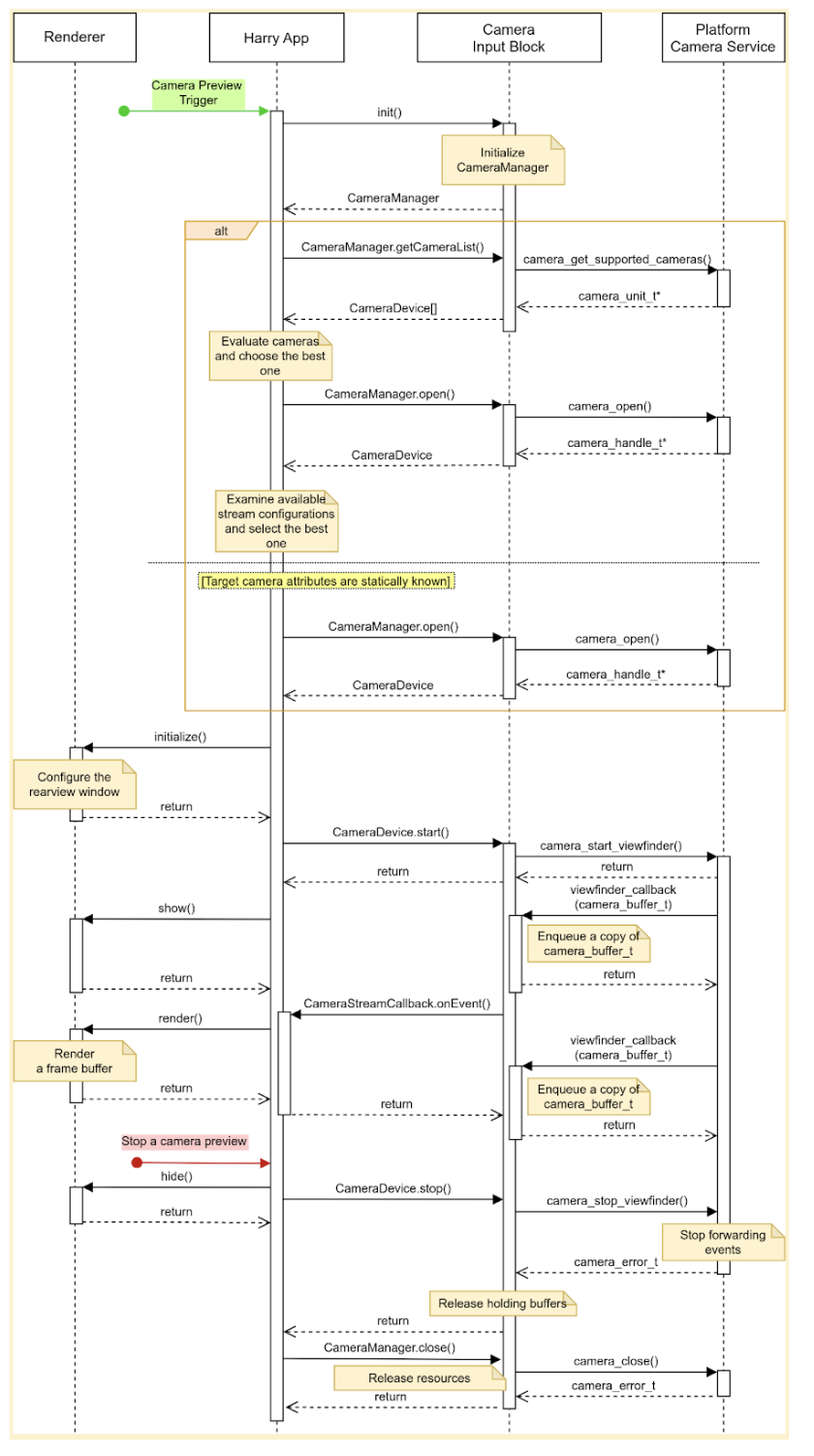
图 2. HAR 主要用户体验历程。
相机输入块声明了三个接口:
CameraManager,声明用于管理摄像头设备的方法;例如,应用使用此接口打开(预留)目标摄像头设备。CameraDevice声明用于控制摄像头设备的方法;例如,启动或停止数据流。CameraStreamListener声明了一个方法,用于接收来自目标摄像头的各种事件。
设计
本部分详细介绍了系统设计。
用户体验
驾驶员将档位置于倒车档时,可以在仪表盘显示屏上预览后置摄像头。驾驶员将档位移出倒车档时,显示屏会停止预览摄像头。
可以启用其他用户体验历程。例如,驾驶员可以在转向信号灯亮起时预览后视镜中看不到的区域。
启动摄像头预览
使用摄像头时,应用会枚举并评估可用的摄像头,以找到最适合预期用途的摄像头。例如,对于后方视野,应用会从可用摄像头列表中查找显示车辆后方的摄像头。
应用会通过检查每个摄像头的特征(例如位置、镜头朝向、帧速率、输出分辨率和输出格式)来评估这一点。如果多个摄像头具有相同的所需特征,应用可能会检查其他特征,例如视野和焦距。
此图片显示了使用静态摄像头配置启动摄像头预览的序列:
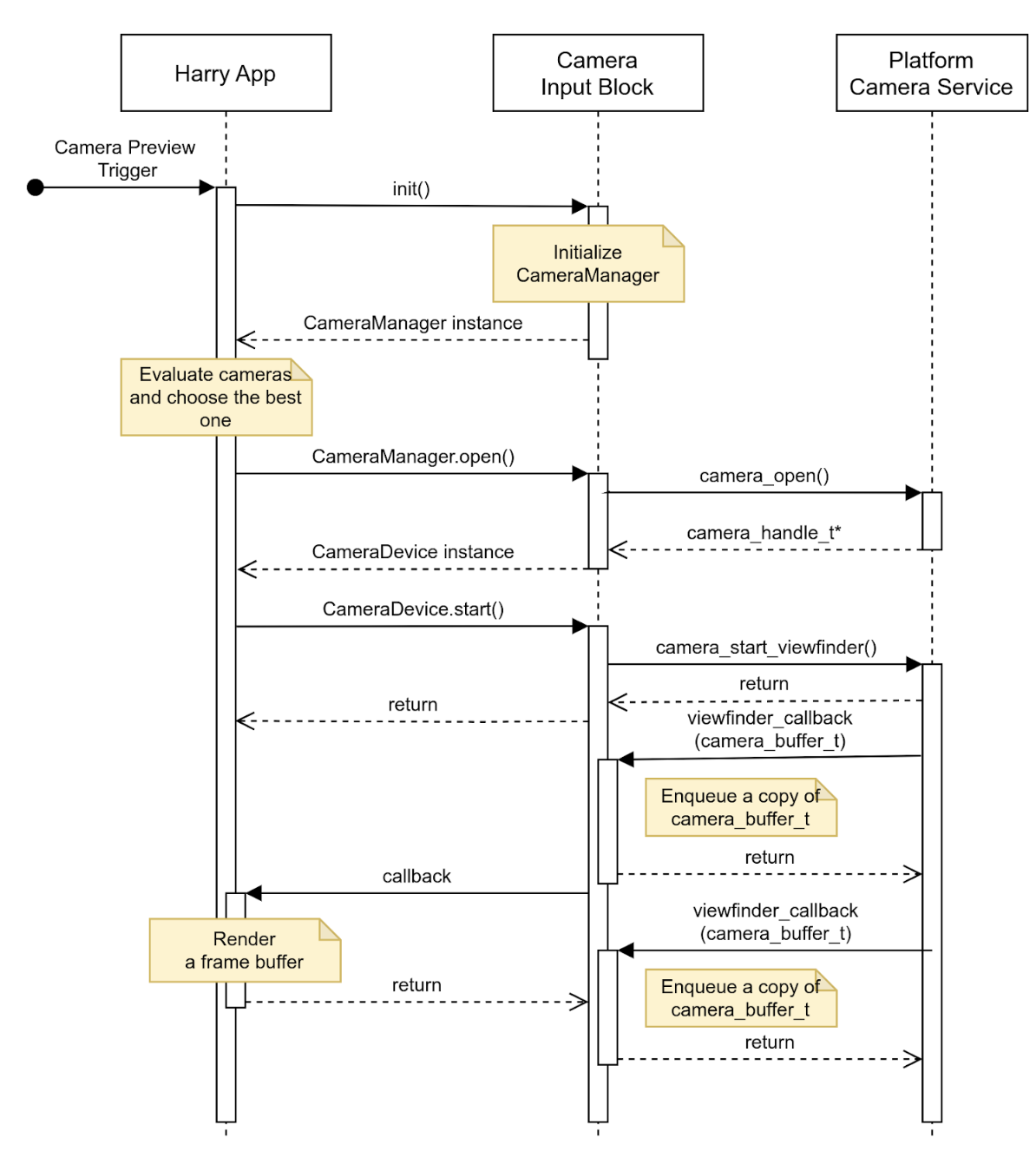
图 3. 使用静态摄像头配置启动摄像头预览。
停止摄像头预览
倒车事件结束后,应用会停止提供后方视野。为避免显示空白屏幕或静止图像,应用会先向用户隐藏视图,然后请求摄像头输入块停止发送事件。
此图片显示了停止来自目标摄像头设备的数据流的序列:
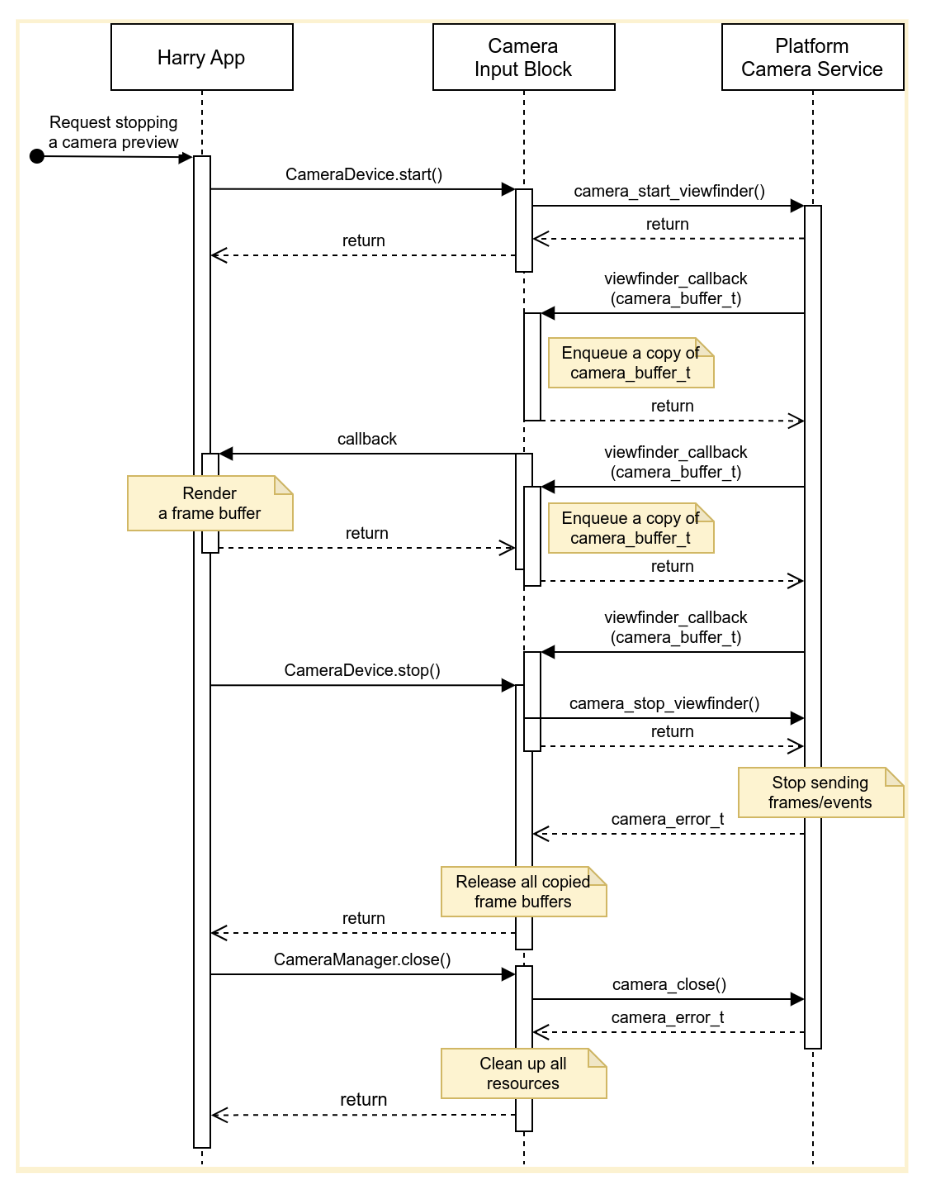
图 4. 停止来自目标摄像头设备的数据流。
错误
摄像头设备可能会意外停止发送新的帧缓冲区。为了检测此类事件,摄像头输入块可能会实现一个计时器,该计时器会在新帧到达时过期,并在计时器过期时发送通知。
当应用收到通知时,应用会通知用户摄像头预览不再实时,并尝试通过关闭摄像头设备并重新打开来恢复摄像头预览。图 5 显示了应用如何处理超时:
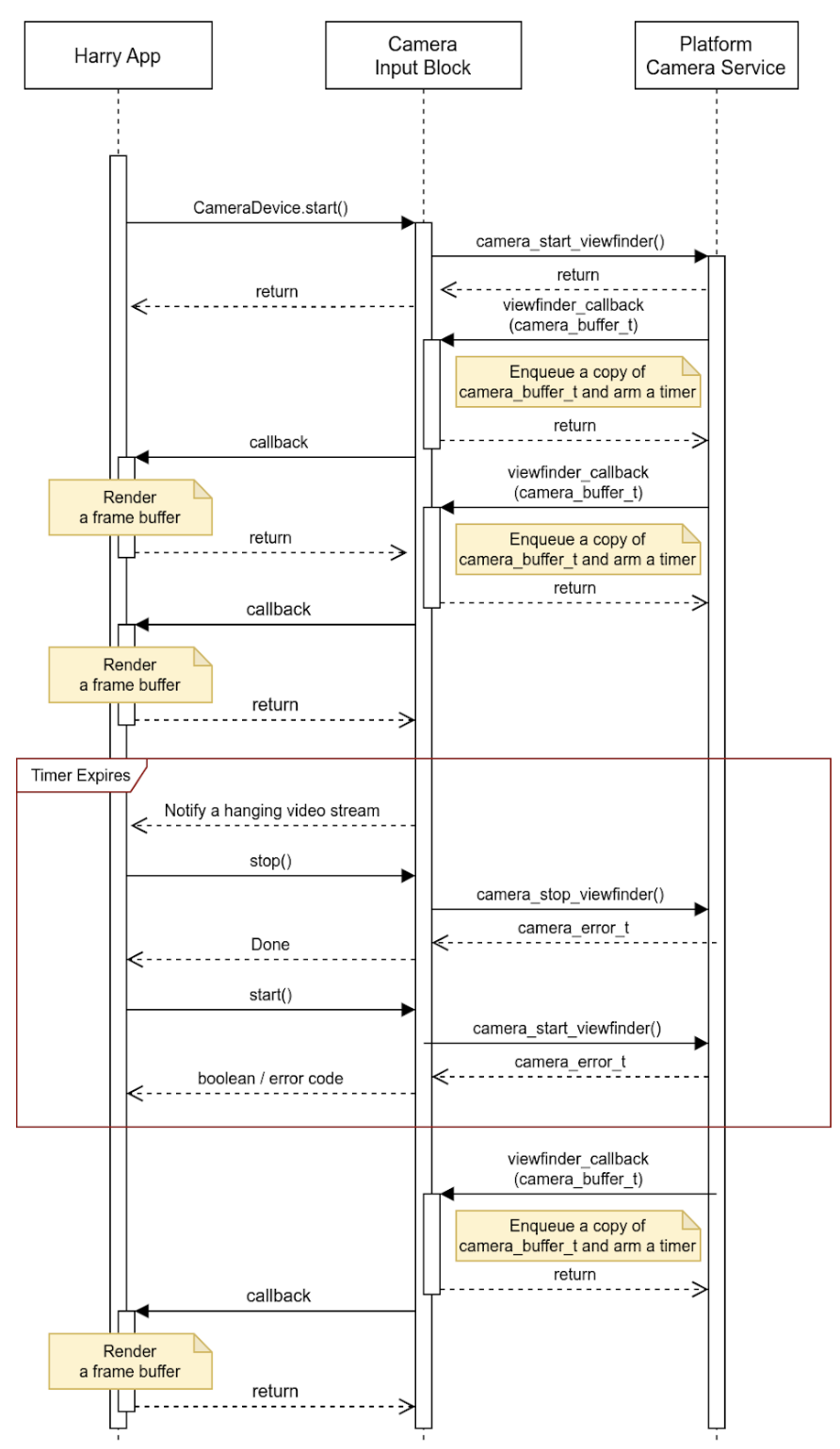
图 5. 处理超时(数据流挂起)。
相机输入块可以报告除数据流挂起之外的突发事件,并在缓冲区中嵌入更多详细信息。原始设备制造商 (OEM) 可以使用此事件元数据来处理其平台上的事件。
活动
API 由主机上运行的应用使用,并通过 HAR 管理仪表盘显示屏(下图中的蓝色块)。
图 5 中展示了系统图:
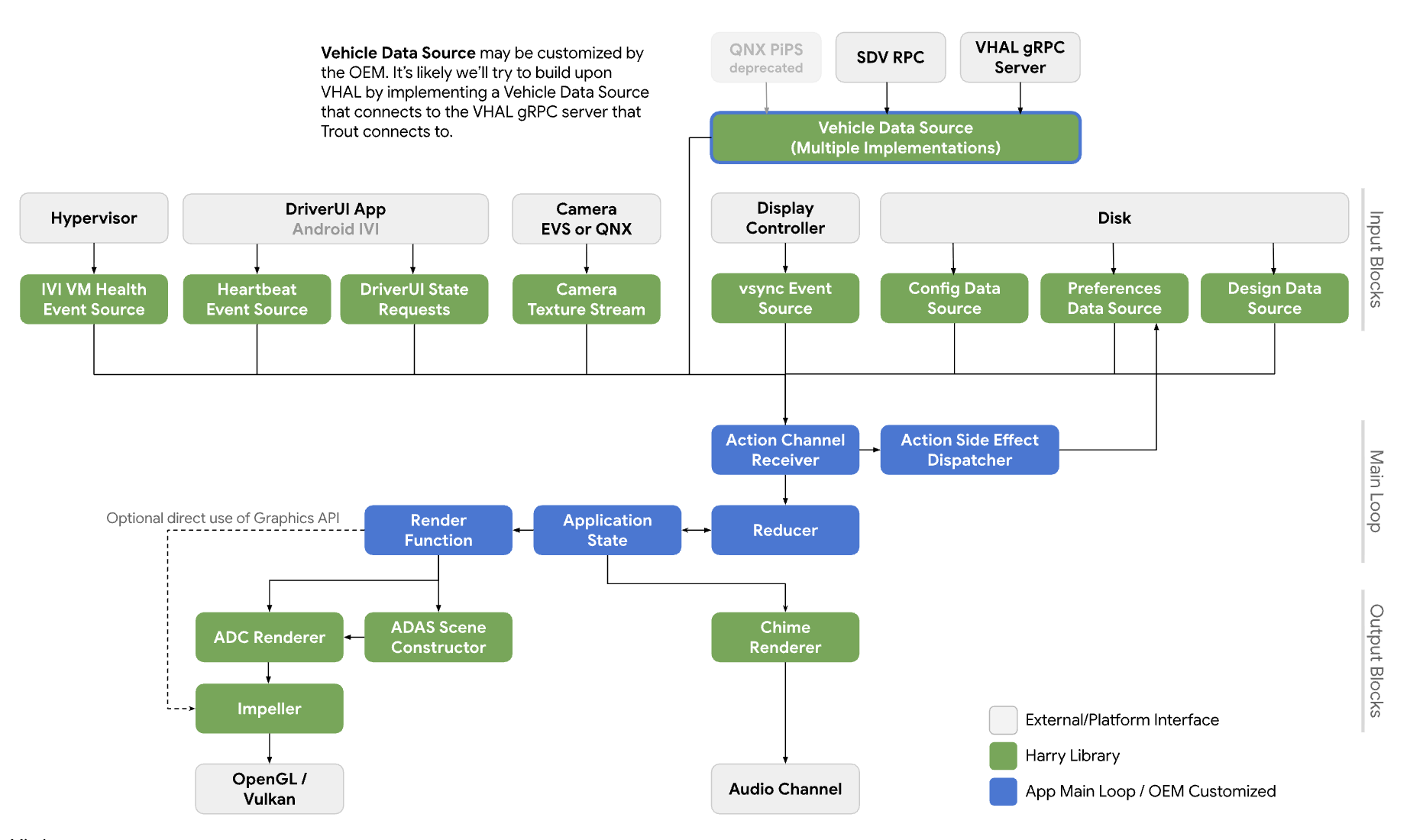
图 6. 系统图。
服务
API 调用预计会在调用进程的上下文中运行。
API
新 API 仅适用于通过 HAR 管理仪表盘显示屏上的摄像头预览的应用。该 API 通过 平台抽象层提供,并动态链接。
CameraInputBlock 接口声明了用于初始化摄像头功能并获取输入块管理器的方法。应用使用返回的 CameraManager 实例来管理摄像头设备。
// This class represents a camera input block for the application that manages the
// instrument cluster display with Harry.
public class CameraInputBlock : public InputBlock {
    public:
        // Clean up the resources.
        virtual ~CameraInputBlock();

        // A method inherited from InputBlock class. This method initializes
        // CameraInputBlock instance; e.g. checking the platform camera service
        // is live.
        //
        // @return CAMERA_EPERM if the platform camera service is not
        //                      available.
        //         CAMERA_OK otherwise.
        virtual CameraError init() override;

        // A method inherited from InputBlock class. This method release all
        // resources held by this CameraInputBlock instance.
        virtual void release() override;

        // This method returns a CameraManager instance. The caller uses
        // this instance to manage camera devices.
        //
        // @param out If this method is successful, this points to a valid
        //            CameraManager instance.
        // @return CAMERA_EACCESS when we fail to create CameraManager instance
        //         to return.
        //         CAMERA_OK otherwise.
        virtual CameraError getCameraManager(
            std::shared_ptr<CameraManager>* out) = 0;

    private:
        // Handle to manage camera devices.
        std::shared_ptr<CameraManager> mMgr;

        // Handle to manage camera devices that have been opened by clients.
        std::set<CameraDevice> mCameras;
};
CameraManager 类声明了用于打开(或拥有)摄像头并在应用完成对该摄像头的使用后释放摄像头的方法。应用可以打开多个摄像头并使用其数据流来创建更广阔的视野或多视图体验。
// This pure virtual class declares methods to manage camera devices.
public class CameraManager {
    public:
        // This method returns a list of CameraDescriptor objects representing
        // available cameras.
        //
        // @param out A list of CameraDescriptor instances. This list may be
        //            empty if the platform camera service does not list any
        //            camera.
        // @return CAMERA_EACCESS if we failed to build a camera list.
        //         CAMERA_OK otherwise.
        virtual CameraError getCameraList(
            std::vector<CameraDescriptor>* out) = 0;

        // Open a camera device associated with a given string identifier.
        //
        // @param ID A string identifier of a camera device to request.
        // @param out A pointer to CameraDevice shared pointer object. This
        //            is null when we fail to open a target device.
        // @return CAMERA_ENODEV if no camera is associated with a given id.
        //         CAMERA_EACCESS if it fails to open a target device.
        //         CAMERA_OK otherwise.
        virtual CameraError open(
            std::string ID, std::shared_ptr<CameraDevice>* out) = 0;

        // Close a camera device associated with a given string identifier.
        // This method is assumed to be always successful.
        //
        // @param id A string identifier of a camera device to close.
        virtual void close(std::string id) = 0;
};
如果应用无法检测要使用的摄像头,则可以选择在上下文中效果最佳的摄像头。CameraManager::getCameraList() 会返回 CameraDescriptor 实例列表,其中提供了每个摄像头的特征。
CameraDevice 类表示单个摄像头设备,并声明了用于启动和停止其数据流的方法。如果摄像头特征不是静态已知的,客户端会从其描述符获取这些特征并对其进行解析。
例如,客户端可以从目标摄像头设备的元数据中获取该设备提供的数据流配置列表,并选择具有最佳属性(例如帧速率、分辨率和输出格式)的配置。
// This class represents a single camera device.
public class CameraDevice {
    public:
        // Start a data stream that attributes are matching to given
        // configuration best.
        // If a selected configuration is not given (null), a data stream is
        // initiated in its default configuration and return.
        //
        // @param configuration Selected attributes of the imagery data stream.
        // @param listener An object to listen to an active data stream.
        // @param effective Actual attributes of started data stream.
        // @return CAMERA_EINVAL if a listener object is invalid.
        //         CAMERA_EIO if we failed to start a video stream.
        //         CAMERA_OK otherwise.
        virtual CameraError start(
                std::shared_ptr<CameraStreamConfiguration>& configuration,
                std::shared_ptr<CameraStreamListener>& listener,
                std::shared_ptr<CameraStreamConfiguration>* effective) = 0;

        // Stop a data stream.
        virtual void stop() = 0;

        // Get a camera descriptor.
        //
        // @param desc A set of attributes that defines this camera device.
        // @return CAMERA_ENODATA if a descriptor is not available.
        //         CAMERA_OK otherwise.
        CameraError getDescriptor(std::shared_ptr<CameraDescriptor>* desc) = 0;

        // Return a consumed buffer to the camera device. A client of active
        // stream must return a frame buffer explicitly by calling this method.
        virtual void doneWithFrame(std::shared_ptr<FrameBuffer>& buffer) = 0;

    private:
        // Describe this camera device.
        CameraDescriptor mDescriptor;

        // A weak reference to a listening client.
        std::weak_ptr<CameraStreamListener> mClient;
};

// This class declares attributes that characterize a camera device.
public class CameraDescriptor {
    public:
        // Unique std::string object to identify a single camera device.
        std::string mId;

        // A set of stream configurations this camera device is capable of. A
        // camera must have at least one stream configuration.
        std::set<CameraStreamConfiguration> mConfigurations;

        // Are more attributes needed to exist, such as locations, lens
        // facing directions, and intrinsic/extrinsic parameters?
};

// This class declares attributes that characterize an imagery data stream.
public class CameraStreamConfiguration {
    public:
        // Width of output of this stream in pixels.
        unsigned int mWidthInPixels;

        // Height of output of this stream in pixels.
        unsigned int mHeightInPixels;

        // An average number of frames per second.
        double mFrameRate;

        // A format of this stream's output. A client could calculate a
        // byte-per-pixel (bpp) from this.
        CameraColorFormat mFormat;
};

// This class represents a listener/callback object to listen to frames and
// events.
public class CameraStreamListener {
    public:
        // A listener method to receive various stream events including a new
        // frame buffer.
        //
        // @param event CameraStreamEvent object that represents a single event
        //              such as an arrival of a new frame buffer, camera stream
        //              is terminated, and so forth.
        virtual void onEvent(std::shared_ptr<CameraStreamEvent>* event) = 0;
};
CameraDevice::start() 接受三个参数:
调用方选择的数据流配置。
用于接收数据流事件的监听器。
指向有效数据流配置的指针。我们强烈建议调用方检查此值,以便按预期处理传入的帧缓冲区。
当 CameraDevice::start() 使用摄像头服务平台启动数据流时,它会保留对调用方监听器对象的弱引用,以检测调用方是否意外终止。
当客户端完成对帧缓冲区的使用后,必须调用 CameraDevice::doneWithFrame() 方法,通知摄像头设备它不再需要该帧缓冲区。
数据流启动后,客户端会收到事件消息。常见消息是新的帧缓冲区。通过注册的回调函数,客户端会收到包含图像数据以及帧缓冲区元数据的 kNewFrameBuffer 事件。StreamEventType 声明了更多类型来处理其他数据流事件。例如,已停止或挂起的数据流。
// This class lists events possibly occurring while a data stream is active.
enum class CameraStreamEventType {
    // A delivery of a new frame buffer.
    kNewFrameBuffer,
    // A data stream has been stopped.
    kStreamStopped,
    // No new frame buffer arrives for a while.
    kStreamHang,
    // Add more.
    ...
};

// This class represents a single instance of StreamEventType.
public class CameraStreamEvent {
    public:
        // Return a type of this event.
        //
        // @return CameraStreamEventType enum value.
        CameraStreamEventType getType() { return mType; }

        // Return a pointer to data associated with this event.
        //
        // @return A shared pointer object of the buffer that contains data for
        //         this event.
        std::shared_ptr<void> getData() { return mData; }

    private:
        // Describe a type of this event.
        CameraStreamEventType mType;

        // A pointer to the data buffer.
        std::shared_ptr<void> mData;
};

// This class inherits StreamEvent class and has additional fields to represent
// the frame buffer.
public class FrameBufferEvent : public CameraStreamEvent {
    public:
        // Return an identifier of this frame buffer.
        //
        // @return A unique integer value to identify this frame buffer.
        int getBufferID() { return mBufferID; }

        // Give access to frame buffer metadata.
        //
        // @return A shared pointer to the buffer that contains data besides
        //         the imagery data.
        std::shared_ptr<void> getMetadata() { return mMetadata; }

    private:
        // Unique integer to identify this buffer.
        int mBufferID;

        // A pointer to metadata of this frame buffer.
        std::shared_ptr<void> mMetadata;
};
此示例展示了 CameraInputBlock 接口及其应用的实现:
CameraError getCameraManager(std::shared_ptr<CameraManager>* out) {
    // During an instantiation, CameraManager will retrieve a list of camera
    // devices from the platform camera service and identify their attributes.
    *out = std::make_shared<CameraManager>();
    return CAMERA_OK;
}

// This method returns a list of CameraDescriptor objects representing available
// cameras.
CameraError CameraManager::getCameraList(std::vector<CameraDescriptor>* out) {
    if (mCameraList.size() < 1) {
        // Query a list of cameras and get their attributes.
    }
    *out = mCameraList;
    return CAMERA_OK;
}

// Open a camera device associated with a given string identifier.
CameraError CameraManager::open(std::string id, std::shared_ptr<CameraDevice>* out) {
    if (!mCameraList.contains(id)) {
        // We cannot identify any camera with a given value.
        return CAMERA_NODEV;
    }

    // During a construction, CameraDevice will obtain a handle of a target
    // camera device from the platform camera service.
    std::shared_ptr<CameraDevice> h = std::make_shared<CameraDevice>(id);
    if (!h) {
        // We fail to open a camera device.
        return CAMERA_EACCESS;
    }

    *out = h;
    return CAMERA_OK;
}

// Close a camera device associated with a given string identifier. This method
// is assumed to be always successful.
void CameraManager::close(std::string id) {
    if (!mCameraList.contains(id)) {
        // We ignore calls with unknown identifiers.
        return;
    }

    // mCameraList.remove() returns an object removed from the list.
    std::shared_ptr<CameraDevice> device = mCameraList.remove(id);

    // Ensure a device stops streaming.
    device->stop();
}

// Start a data stream that attributes are matching to given configuration
// best.
// If a selected configuration is not given (null), a data stream will be
// initiated in its default configuration and return.
CameraError CameraDevice::start(
        std::shared_ptr<CameraStreamConfiguration>& configuration,
        std::shared_ptr<CameraStreamListener>& listener,
        std::shared_ptr<CameraStreamConfiguration>* effective) {
    if (!listener) {
        return CAMERA_EINVAL;
    }

    // selectStreamConfiguration examines this camera's stream configurations
    // and returns the one closest to the selected configuration.
    CameraStreamConfiguration config = selectStreamConfiguration(configuration);

    // mDevice refers to the camera handle for the platform camera service. We
    // may need to translate CameraStreamConfiguration for the platform service.
    mDevice->configure(
        configuration.mWidth, configuration.mHeight, configuration.mFormat);

    // Start a data stream with a callback object.
    if (!mDevice->startStream(mCallback)) {
        // We failed to start a data stream.
        return CAMERA_EIO;
    }

    return CAMERA_OK;
}

// Stop a data stream.
void CameraDevice::stop() {
    if (!mDevice) {
        // Nothing to do if we don't have a valid camera handle for the
        // platform camera service.
        return;
    }

    mDevice->stopStream();
}

// Get a camera descriptor.
CameraError CameraDevice::getDescriptor(std::shared_ptr<CameraDescriptor>* desc) {
    if (!mDescriptor) {
        return CAMERA_ENODATA;
    }

    *desc = *mDescriptor;
    return CAMERA_OK;
}

// Return a consumed buffer to the camera device. A client of active stream
// must return a frame buffer explicitly by calling this method.
void CameraDevice::doneWithFrame(std::shared_ptr<FrameBuffer>& buffer) {
    if (!mBufferRecords.contains(buffer.getId())) {
        // Ignore a call with unknown frame buffer.
        return;
    }

    // Simply remove from the record.
    (void)mBufferRecords.remove(buffer.getId());
}

// This method handles gear-shift events.
void Application::handleGearShift(GearSelection selection) {
    switch (selection) {
        case GEAR_SELECTION_REVERSE:
            // Upon the reverse gear selection, we are going to start a video
            // stream and show its preview on the instrument cluster display.
            (void)startStream(mCameraInputBlock);

            // FIXME: Exact method to control the camera preview window on the
            // instrument display is to be determined.
            show(mRearVisibilityWindow);
            break;

        default:
            // Upon all other gear selection, we are going to stop a video
            // stream (if it's running) and hide the preview.
            stopStream(mCameraInputBlock);

            // FIXME: Exact method to control the camera preview window on the
            // instrument display is to be determined.
            hide(mRearVisibilityWindow);
            break;
    }
}

bool Application::startStream(std::shared_ptr<CameraInputBlock> handle) {
    return handle->start(std::bind(&Application::handleStreamCallback, this);
}

void Application::stopStream(std::shared_ptr<CameraInputBlock> handle) {
    handle->stop();
}

// This method handles a stream callback.
void Application::handleStreamCallback(StreamEvent& event) {
    switch (event.getType()) {
        case StreamEventType::kNewFrameBuffer:
            // Handle a new frame buffer. We may just enqueue it for the
            // future or forward to CameraInputBlock client.
            break;

        case StreamEventType::kStreamStopped:
            // Handle as an incident if this event is not expected.
            break;

        // More cases to be added.
    }
}

void Application::handleNewFrameBuffer(StreamEvent& event) {
    // Enqueue a new frame buffer for the further processing. A buffer
    // must be returned explicitly by calling
    // CameraDevice.doneWithFrame(FrameBuffer&) method.
}

void Application::handleStreamEvent(StreamEvent& event) {
    // Handle a received stream event except a new frame buffer's
    // arrival; e.g. a video stream is terminated unexpectedly.
}
性能
后方视野符合以下政府法规。
| 值 | 法规 |
|---|---|
| 响应时间 | CFR 571.111 S5.5.3 |
| 帧速率 | UNECE R46 6.2.2.3.4 |
| 图像形成时间 | UNECE R46 6.2.2.3.4.2 |
| 系统延迟时间 | UNECE R46 6.2.2.3.4.3 |
隐私权
具体而言,对于隐私权:
API 不要求实现收集、记录或存储个人身份信息 (PII)。不过,由于捕获的图像数据(或关联的元数据)可能包含 PII,因此使用该 API 的应用必须获得用户的明确同意。
用户无法控制摄像头设备在仪表盘显示屏上进行预览,因为摄像头承担着安全关键型角色。OEM 会在设置期间或从驾驶员处获得用户同意。
此 API 不支持后台摄像头客户端。因此,告知用户摄像头设备正在捕获数据的隐私权指示器不在范围内。