

Cổng Software Defined Vehicle (SDV) trên hệ thống Thông tin giải trí trong xe (IVI) giúp giao tiếp giữa các hệ thống IVI và các dịch vụ SDV từ xa. Cổng này cho phép các ứng dụng Java OEM và các dịch vụ gốc (chẳng hạn như VHAL) tương tác với các dịch vụ SDV. Cổng sử dụng các phương thức giao tiếp đã thiết lập, bao gồm cả đăng ký dịch vụ, khám phá và RPC.
Cổng này đáp ứng các yêu cầu cụ thể của dự án SDV AAOS, chẳng hạn như cho phép triển khai tham chiếu VHAL bằng cách sử dụng SDV Data Tunnel để biết thông tin về tài sản. Thư viện này cũng cho phép các ứng dụng Android Java và Kotlin trên IVI sử dụng ngăn xếp SDV Comms, đăng ký làm dịch vụ, tìm các dịch vụ SDV khác và giao tiếp với các dịch vụ đó.
Để biết vị trí mã của Cổng SDV và ví dụ về các ứng dụng SDV Gateway, hãy xem phần Vị trí mã.
Các mô hình tích hợp Cổng SDV
Sử dụng SDV-IVI Comms thông qua SDV Gateway trên cấu trúc IVI
SDV Gateway tương tác với các ứng dụng Java, dịch vụ gốc, ngăn xếp SDV Comms và mạng lưới xe. Hình 1 minh hoạ những lượt tương tác này:
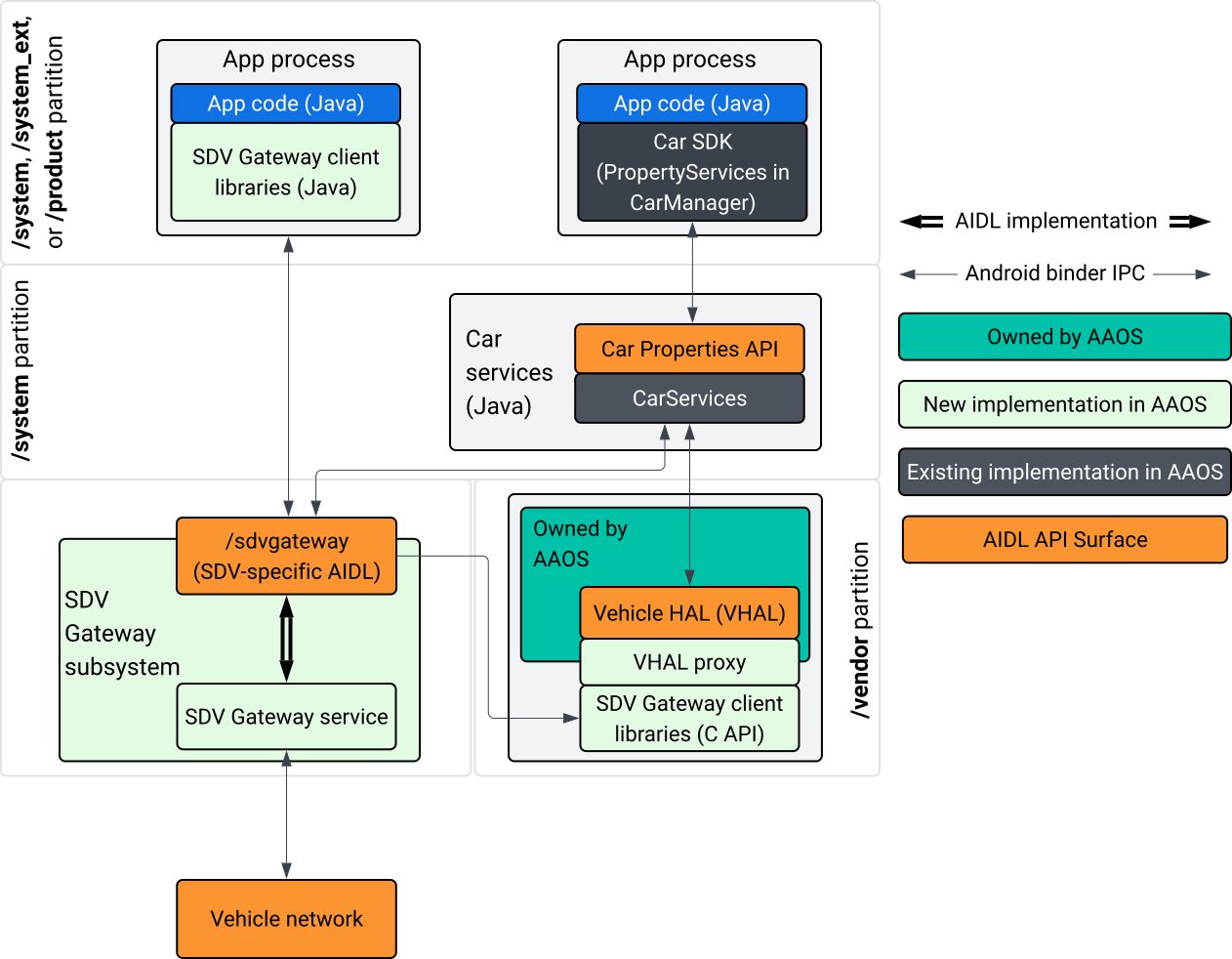
Hình 1. Tương tác với Cổng SDV.
Trong sơ đồ hệ thống này:
- Các ứng dụng tương tác với SDV Gateway thông qua các dịch vụ khách hàng của ứng dụng.
- AAOS SDV SDK cung cấp cho bạn:
- API ISdvGateway AIDL để giao tiếp liên quy trình.
- Thư viện Comms để tương tác mạng.
- API C tiện lợi để tích hợp dịch vụ gốc.
- Dịch vụ và hệ thống con SDV Gateway triển khai API ISdvGateway AIDL.
- Dịch vụ SDV Gateway quản lý:
- Khám phá dịch vụ hai chiều.
- Giao tiếp với các dịch vụ SDV từ xa.
- Logic nghiệp vụ cốt lõi.
- Hệ thống con SDV Gateway kết nối với mạng lưới trên xe.
- Các dịch vụ gốc, bao gồm cả việc triển khai VHAL, có thể sử dụng trực tiếp API ISdvGateway AIDL hoặc thông qua C API của SDK.
- Proxy VHAL đóng vai trò là một hoạt động triển khai VHAL tham chiếu, kết hợp với hoạt động tích hợp ánh xạ VSIDL.
Mô hình tích hợp cho Cổng SDV trên dịch vụ gốc IVI
Mô hình tích hợp được minh hoạ trong Hình 2:
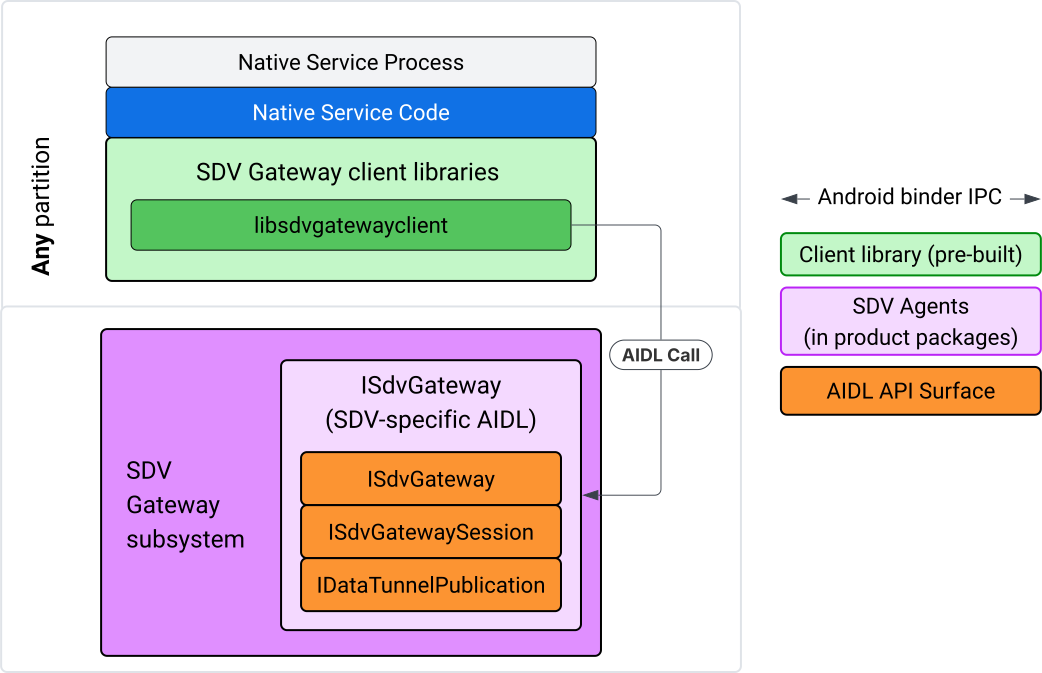
Hình 2. Mô hình tích hợp SDV Gateway.
Sử dụng SDV Gateway trên dịch vụ gốc IVI
Hình 3 minh hoạ việc sử dụng Cổng SDV trên IVI:
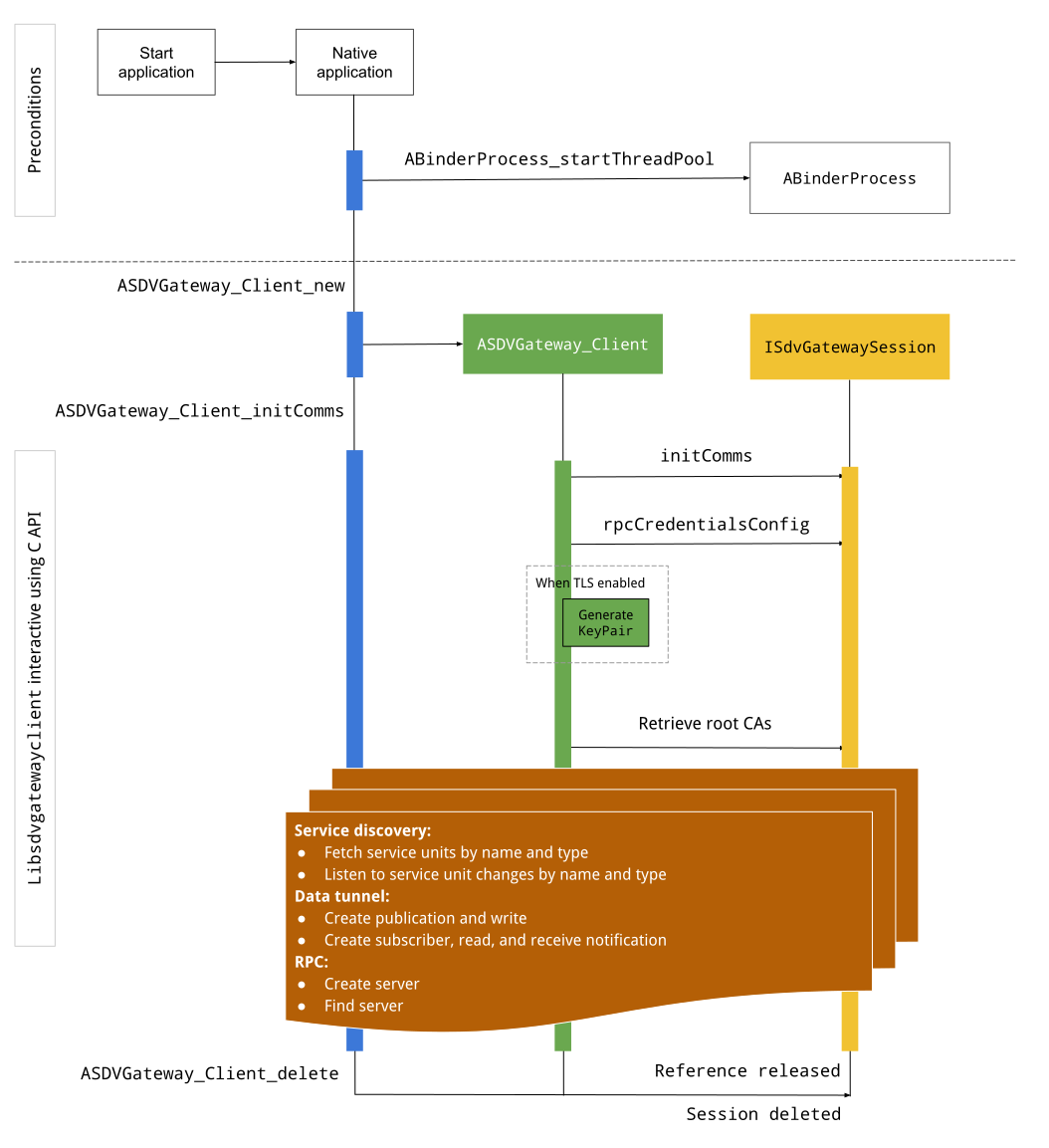
Hình 3. Cổng SDV trên IVI.
Điều kiện tiên quyết
Khởi động nhóm luồng Binder:
Thư viện ứng dụng SDV Gateway yêu cầu một nhóm luồng Binder đã bắt đầu để nhận các lệnh gọi lại không đồng bộ từ các dịch vụ Binder.
API cần thiết để tạo ứng dụng SDV Gateway không thành công khi một nhóm luồng Binder không khởi động.
Thêm thư viện ứng dụng Gateway gốc
Thư viện Native Gateway Client (Ứng dụng Cổng gốc) cung cấp một API C. Thêm một thực thể libsdvgatewayclient làm phần phụ thuộc để sử dụng C API:
cc_binary {
    name: "your_binary_name",
    srcs: ["main.cpp"],
    shared_libs: [
        "libsdvgatewayclient",
    ],
}
Tải ứng dụng Gateway gốc
#include "libsdvgatewayclient.h"
Tạo một phiên bản ứng dụng gốc
ASDVGateway_Client* client;
ASDVGateway_StatusCode_t statusCode = ASDVGateway_Client_new(
     &client, /*outStatus*/nullptr);
Sau khi được tạo, ứng dụng sẽ:
Lưu giữ trạng thái cho tất cả các lượt tương tác tiếp theo với dịch vụ Cổng.
Đóng vai trò là bối cảnh của mọi hoạt động tương tác với các dịch vụ khác có hỗ trợ SDV và được truyền dưới dạng tham số đầu tiên cho các hàm C API.
Mã trạng thái và thông báo lỗi
Hầu hết các hàm C API đều có định nghĩa này:
ASDVGateway_StatusCode_t ApiFunctionName(..., ASDVGateway_Status_t* outStatus);
Để đánh giá mức độ thành công, bạn có thể kiểm tra mã trạng thái được trả về, có kiểu ASDVGateway_StatusCode_t. Bạn cũng có thể truyền một con trỏ đến một cấu trúc mà hàm có thể điền mã trạng thái và thông báo lỗi. Con trỏ được truyền dưới dạng tham số cuối cùng, có tên là outStatus. Giá trị rỗng có nghĩa là cấu trúc đầu ra không được dùng.
Đối tượng gọi phải phân bổ cấu trúc trạng thái bộ nhớ cho thông báo lỗi. Cấu trúc trạng thái có thể chứa cả mã trạng thái và thông báo lỗi. Có sẵn ví dụ về cách truy xuất thông báo lỗi khi tạo ứng dụng mới.
Cách đánh giá mức độ thành công:
Kiểm tra mã trạng thái được trả về, thuộc loại
ASDVGateway_StatusCode_t.Truyền một con trỏ đến một cấu trúc mà hàm có thể điền mã trạng thái và thông báo lỗi.
- Con trỏ được truyền dưới dạng tham số cuối cùng, có tên là
outStatus. - Giá trị rỗng có nghĩa là cấu trúc đầu ra không được sử dụng.
- Đối tượng gọi phải phân bổ cấu trúc trạng thái bộ nhớ cho thông báo lỗi.
- Cấu trúc trạng thái có thể chứa mã trạng thái và thông báo lỗi.
- Con trỏ được truyền dưới dạng tham số cuối cùng, có tên là
Sau đây là mẫu cho thấy cách truy xuất thông báo lỗi cho một ứng dụng khách mới:
#include <iostream>
#include <array>

struct StatusWithErrorMsg : ASDVGateway_Status_t {
    StatusWithErrorMsg() {
        // Ensure the base struct pointers point to our internal buffer
        errorMessage = errorMessageBuffer.data();
        maxErrorMessageSize = errorMessageBuffer.size();

        // Good practice: Zero-initialize the buffer
        errorMessageBuffer.fill(0);
    }

    std::array<char, 256> errorMessageBuffer;
};

// --- Execution ---

ASDVGateway_Client* client = nullptr;
StatusWithErrorMsg status;

// Initialize the client
ASDVGateway_StatusCode_t statusCode = ASDVGateway_Client_new(&client, &status);

// Log Results
std::cout << "Returned statusCode:    " << statusCode << std::endl;
std::cout << "Status Struct Code:     " << status.statusCode << std::endl;
std::cout << "Status Error Message:   " << status.errorMessage << std::endl;
Trong ví dụ này:
Mã trạng thái có trong cấu trúc trạng thái có cùng giá trị với mã trạng thái được trả về.
Thông báo lỗi chỉ được điền đến giới hạn
maxErrorMessageSizeký tự (bao gồm cả ký tự kết thúc rỗng\0). Nếu không xảy ra lỗi (mã trạng thái làOK), thông báo lỗi sẽ là một chuỗi trống.
Init comms
Init comms khởi động hoạt động giao tiếp giữa ứng dụng gọi và các ứng dụng khác bằng cách sử dụng SDV Comm Stack và SDV Gateway. Bạn có thể gọi init comms trong cả hai ngữ cảnh này:
Sau khi ứng dụng được tạo.
Trước mọi lượt tương tác với Đường hầm dữ liệu, RPC hoặc Khám phá dịch vụ.
Ví dụ:
ASDVGateway_InitCommsParams_t params{
.packageName = "android.sdv.samples.gateway.client",
.serviceBundleName = "NativeTestApp",
.serviceInstanceName = "default",
};
// Initialize communications and capture the status code
ASDVGateway_StatusCode_t statusCode = ASDVGateway_Client_initComms(client, ¶ms, &status);
// Recommended check
if (statusCode != ASDVGateway_StatusCode_OK) {
std::cerr << "Failed to init comms: " << status.errorMessage << std::endl;
}
Khám phá dịch vụ
Bạn có thể nhận được thông báo khi các đơn vị dịch vụ thuộc một loại hoặc tên cụ thể được đăng ký hoặc huỷ đăng ký. Hàm callback được thông báo trong một luồng thuộc về ứng dụng khách cổng. Lệnh gọi lại này ban đầu được kích hoạt với tất cả các đơn vị dịch vụ đã đăng ký ngay sau lệnh gọi API C. Sau lần kích hoạt ban đầu, các thông báo sẽ tiếp tục được cập nhật cho đến khi trình nghe được huỷ đăng ký một cách rõ ràng.
class NativeSdvGatewayTestApp {
public:
    static void ServiceUnitChangeListenerCallback(
        const ASDVGateway_ServiceUnitChangeEventType eventType,
        const ASDVGateway_ServiceUnitDefinition* serviceUnitDefinition,
        void* userData
    ) {
        auto* testApp = reinterpret_cast<NativeSdvGatewayTestApp*>(userData);

        if (testApp) {
            // Logic to react when services are registered or unregistered
            // e.g., testApp->handleServiceChange(eventType, serviceUnitDefinition);
        }
    }
};

// --- Listener Registration ---

// Ensure thisApp remains in scope as long as the listener is active
NativeSdvGatewayTestApp* thisApp = get_current_app_context();

ASDVGateway_UnitType_t unitType{
    .sdvPackageName     = "android.sdv.samples.sdv_gateway",
    .serviceBundleName  = "DtPublisher",
    .unitTypeName       = "TirePressure",
};

// Register the listener
ASDVGateway_Client_registerListenerForServiceUnitChangeByType(
    client,
    &unitType,
    NativeSdvGatewayTestApp::ServiceUnitChangeListenerCallback,
    static_cast<void*>(thisApp), // userData
    &listenerHandle,
    &status
);

// --- Cleanup ---

// Unregistering stops all notification to the callback function
ASDVGateway_Client_unregisterListenerForServiceUnitChangeByType(
    client,
    listenerHandle,
    &status
);
Để truy xuất các đơn vị dịch vụ đã đăng ký mà không cần thông báo thêm, hãy sử dụng API ASDVGateway_Client_fetchServiceUnitsByType và ASDVGateway_Client_fetchServiceUnitsByName.
class NativeSdvGatewayTestApp {
public:
    /**
     * Callback triggered for each service unit found that matches the requested type.
     */
    static void FetchServiceUnitsCallback(
        const ASDVGateway_ServiceUnitDefinition* serviceUnitDefinition,
        void* userData
    ) {
        auto* app = reinterpret_cast<NativeSdvGatewayTestApp*>(userData);

        if (serviceUnitDefinition) {
            // The service unit is registered with service discovery.
            // Example: processServiceUnit(serviceUnitDefinition);
        }
    }
};

// --- Execution ---

ASDVGateway_UnitType_t unitType{
    .sdvPackageName     = "android.sdv.samples.sdv_gateway",
    .serviceBundleName  = "DtPublisher",
    .unitTypeName       = "TirePressure",
};

// Context used to differentiate between various fetchServiceUnits calls
void* userData = static_cast<void*>(thisApp);

ASDVGateway_Client_fetchServiceUnitsByType(
    client,
    &unitType,
    NativeSdvGatewayTestApp::FetchServiceUnitsCallback,
    userData,
    &status
);
Lệnh gọi lại được kích hoạt đồng bộ trong luồng của phương thức gọi trong lệnh gọi API ASDVGateway_Client_fetchServiceUnitsByType. Sử dụng ASDVGateway_Client_fetchServiceUnitsByName để lấy các đơn vị dịch vụ đã đăng ký theo tên thay vì theo loại đơn vị:
ASDVGateway_StatusCode_t ASDVGateway_Client_fetchServiceUnitsByName(
    // [in]  Opaque pointer to a client object.
    const ASDVGateway_Client* client,

    // [in]  Pointer to a structure containing the package name,
    //       service bundle name, and service unit name.
    const ASDVGateway_UnitNameDiscoveryArgs_t* unitName,

    // [in]  Callback function to be called for each service unit
    //       definition registered. Called synchronously in the
    //       caller's thread before the fetch completes.
    ASDVGateway_FetchServiceUnitsCallback callback,

    // [in]  Optional value passed back as a parameter of the callback.
    void* userData,

    // [out] Optional pointer to status structure for result
    //       codes and error messages.
    ASDVGateway_Status_t* outStatus
);
Luồng RPC
Thư viện ứng dụng Gateway xử lý các chế độ cài đặt Bảo mật tầng truyền tải (TLS) để giao tiếp với các ứng dụng khác có hỗ trợ SDV. Cụ thể, nó truy xuất các chế độ cài đặt TLS cần thiết cho việc giao tiếp. Sau đây là cách xác định mức sử dụng TLS:
TLS được dùng khi Chế độ khởi động SDV là
LOCKED.Giao tiếp không an toàn được dùng khi Chế độ khởi động SDV là
UNLOCKED. Khi TLS được dùng, thư viện ứng dụng Cổng sẽ tạo một cặp khoá mà chỉ quy trình ứng dụng mới biết. Ứng dụng sẽ truy xuất thông tin xác thực RPC để tạo một máy chủ RPC hoặc một kênh ứng dụng RPC. RPC sử dụng một VLAN SDV-RPC chuyên dụng. Thư viện ứng dụng Gateway gọi android_setprocnetwork để chuyển mạng mặc định của quy trình sang VLAN SDV-RPC trong hoặc sau lệnh gọiASDVGateway_Client_initComms.
Khả năng sử dụng RPC
Một ứng dụng được định cấu hình để khởi động khi khởi động sớm có thể khởi động trước khi VLAN SDV-RPC có sẵn. Kiểm tra xem RPC có sẵn hay không trước khi cố gắng tạo bất kỳ máy chủ RPC hoặc ổ cắm máy khách RPC nào:
// Check if the RPC (Remote Procedure Call) service is available
bool isRpcAvailable = ASDVGateway_Client_isRpcAvailable(client);

if (isRpcAvailable) {
    // Proceed with RPC calls
} else {
    // Handle the case where RPC is not yet ready or available
}
hoặc
// Check if the process is correctly bound to the SDV RPC Network Interface/VLAN
bool isRpcNetworkBound = ASDVGateway_Client_isProcessBoundToSdvRpcNetworkInterface(client);

if (!isRpcNetworkBound) {
    // Usually implies the process isn't running on the correct network interface
    // or the VLAN configuration is missing.
    std::cerr << "Warning: Process is not bound to the SDV RPC VLAN." << std::endl;
}
Đặt một trình nghe cho các sự kiện của ứng dụng bằng cách sử dụng ASDVGateway_Client_setClientNotificationCallback để nhận thông báo khi trạng thái sẵn có của RPC thay đổi.
ASDVGateway_Client_isProcessBoundToSdvRpcNetworkInterface được ưu tiên nếu ứng dụng chuyển đổi mạng của quy trình vì ứng dụng này kiểm tra cả việc RPC có sẵn và quy trình được liên kết với VLAN SDV-RPC.
Chuyển đổi mạng mặc định của quy trình
Bạn có thể cần chuyển từ VLAN SDV-RPC làm mạng mặc định của quy trình để mở các ổ cắm cho các kết nối liên kết với Internet. Gọi ASDVGateway_Client_unbindProcessFromSdvRpcNetworkInterface và ASDVGateway_Client_bindProcessToSdvRpcNetworkInterface để huỷ liên kết và liên kết lại quy trình với VLAN SDV-RPC. Hai lệnh gọi này hoạt động như các công tắc toàn cục, chuyển đổi giao diện mạng mà các socket được liên kết với tất cả các luồng của quy trình.
// 1. Unbind: Sockets return to the "default" network interface (e.g., wlan0, eth0)
ASDVGateway_StatusCode_t unbindStatus =
    ASDVGateway_Client_unbindProcessFromSdvRpcNetworkInterface(client, &status);

// 2. Bind: Sockets are now bound to the dedicated SDV-RPC VLAN
ASDVGateway_StatusCode_t bindStatus =
    ASDVGateway_Client_bindProcessToSdvRpcNetworkInterface(client, &status);

// Validation
if (bindStatus == ASDVGateway_StatusCode_OK) {
    // Sockets are successfully bound to the SDV-RPC VLAN
}
Thông báo RPC
Đặt trình nghe ứng dụng để nhận thông báo về các thay đổi đối với trạng thái sẵn có của RPC và thông báo cập nhật đối với các chứng chỉ gốc mà máy chủ RPC phải chấp nhận:
class NativeSdvGatewayTestApp {
public:
    static void ClientNotificationCallback(
        ASDVGateway_ClientNotificationType_t notificationType,
        void* userData
    ) {
        auto* testApp = reinterpret_cast<NativeSdvGatewayTestApp*>(userData);
        if (!testApp) return;

        switch (notificationType) {
            case ASDVGateway_ClientNotificationType_RootCertsChanged:
                std::cout << "onClientNotification: Root Certs Changed" << std::endl;
                // Handle certificate rotation logic here
                break;

            case ASDVGateway_ClientNotificationType_RpcAvailabilityChanged:
                std::cout << "onClientNotification: RPC Availability Changed" << std::endl;
                // Handle reconnection or UI updates here
                break;

            default:
                std::cout << "onClientNotification: Received Unknown Notification ("
                          << notificationType << ")" << std::endl;
                break;
        }
    }
};

// --- Registration ---

NativeSdvGatewayTestApp* thisApp = get_current_app_context();

// Register the notification callback to monitor system-level changes
ASDVGateway_StatusCode_t statusCode = ASDVGateway_Client_setClientNotificationCallback(
    client,
    NativeSdvGatewayTestApp::ClientNotificationCallback,
    static_cast<void*>(thisApp), // userData
    &status
);
Luồng máy chủ RPC
Bạn phải sử dụng thông tin xác thực để tạo máy chủ RPC:
ASDVGateway_RpcCredentials_t* rpcCredentials = nullptr;

// Retrieve the credentials from the client
ASDVGateway_StatusCode_t statusCode = ASDVGateway_Client_rpcCredentials(client, &rpcCredentials, &status);

// Validation: Differentiating between an error and a deliberate "insecure mode"
if (status.statusCode != ASDVGateway_StatusCode_OK) {
    std::cerr << "Error retrieving credentials: " << status.errorMessage << std::endl;
    return;
}

// Logic for choosing Security Credentials
if (rpcCredentials == nullptr) {
    // If the call succeeded but credentials are null, the system expects insecure communication
    std::cout << "Configuring for Insecure Mode" << std::endl;
} else {
    std::cout << "Configuring for Secure Mode:" << std::endl;
    std::cout << "  Private Key: " << (rpcCredentials->privateKeyPem ? "Present" : "Missing") << std::endl;
    std::cout << "  RootCerts:   " << rpcCredentials->rootCertsPem << std::endl;
    std::cout << "  CertChain:   " << rpcCredentials->certChainPem << std::endl;
    std::cout << "  SAN:         " << rpcCredentials->subjectAlternativeName << std::endl;
}

// --- Cleanup ---

// Release the memory once the RPC server/client is initialized
if (rpcCredentials != nullptr) {
    ASDVGateway_Client_deleteRpcCredentials(client, rpcCredentials);
}
Khi bạn đã tạo máy chủ RPC và biết cổng nghe của máy chủ đó, hãy đăng ký máy chủ RPC để máy chủ này có thể phát hiện các ứng dụng khác:
ASDVGateway_RegisterRpcServerParams_t params{
.serviceUnitName = "android-sdv-samples-sunroof-sunroof",
.unitType = ASDVGateway_UnitType_t{
.sdvPackageName = "android.sdv.samples.sunroof",
.serviceBundleName = "SunroofServer",
.unitTypeName = "Sunroof",
},
.listeningPort = listeningPort,
.serverUnitMetadata = ASDVGateway_ServerUnitMetadata_t{
.version = 1,
},
};
// Register the RPC server with the SDV Gateway
ASDVGateway_StatusCode_t statusCode = ASDVGateway_Client_registerRpcServer(
client,
¶ms,
&status
);
// Basic error handling
if (statusCode != ASDVGateway_StatusCode_OK) {
std::cerr << "Failed to register RPC server: " << status.errorMessage << std::endl;
}
Khi hệ thống cập nhật chứng chỉ gốc tại thời gian chạy (ví dụ: trong quá trình thay đổi trạng thái VM), các máy chủ RPC phải làm mới danh sách chứng chỉ được chấp nhận:
Đặt một trình nghe cho các sự kiện của ứng dụng bằng cách sử dụng
ASDVGateway_Client_setClientNotificationCallbackđể nhận thông báo khi các chứng chỉ gốc được cập nhật.Gọi
ASDVGateway_Client_rpcCredentialsđể nhận các chứng chỉ gốc đã cập nhật.
Luồng ứng dụng RPC
Dưới đây là quy trình cho ứng dụng RPC:
ASDVGateway_FindRpcServerByNameParams_t params{
.packageName = "android.sdv.samples.cluster",
.serviceBundleName = "ClusterServer",
.serviceUnitName = "android-sdv-samples-cluster-cluster",
};
ASDVGateway_SocketAddress_t socketAddress;
ASDVGateway_RpcCredentials_t* rpcCredentials = nullptr;
// Perform the lookup to find the server's location and security requirements
ASDVGateway_StatusCode_t statusCode = ASDVGateway_Client_findRpcServerByName(
mClient,
¶ms,
&socketAddress,
&rpcCredentials,
&status
);
// Mandatory check: Distinguish between system errors and intentional "Insecure Mode"
if (status.statusCode != ASDVGateway_StatusCode_OK) {
std::cerr << "Failed to find RPC server: " << status.errorMessage << std::endl;
return;
}
// Logic for establishing the RPC channel
if (rpcCredentials == nullptr) {
std::cout << "Connecting via Insecure Mode to "
<< socketAddress.address << ":" << socketAddress.port << std::endl;
} else {
std::cout << "Connecting via Secure Mode to "
<< socketAddress.address << ":" << socketAddress.port << std::endl;
std::cout << " RootCerts: " << rpcCredentials->rootCertsPem << std::endl;
std::cout << " SAN: " << rpcCredentials->subjectAlternativeName << std::endl;
// Note: privateKeyPem and certChainPem are typically used if the client
// needs to perform mutual TLS (mTLS).
}
// Cleanup: Release the credential memory once the RPC channel is established
if (rpcCredentials != nullptr) {
ASDVGateway_Client_deleteRpcCredentials(client, rpcCredentials);
}
Tạo nhà xuất bản và xuất bản thông báo
API ASDVGateway_Client_createPublication được dùng để đăng ký một đơn vị dịch vụ của nhà xuất bản với Cổng SDV thông qua giao diện AIDL và tạo một Hàng đợi tin nhắn nhanh (FMQ) trong quy trình ứng dụng. Binder chỉ tham gia vào việc thiết lập FMQ, chứ không tham gia vào việc ghi tin nhắn. Sau đó, API ASDVGateway_Client_publishMessages được dùng để phát hành thông báo cho ấn phẩm đã tạo. Thao tác này liên quan đến việc ghi vào FMQ của ấn phẩm và thông báo rằng các thông báo đã được ghi.
ASDVGateway_CreatePublicationParams_t params{
.serviceUnitName = "mirror-position-adjust-impl-1",
.unitType = ASDVGateway_UnitType_t{
.sdvPackageName = "android.sdv.samples.sdv_gateway",
.serviceBundleName = "DtPublisher",
.unitTypeName = "MirrorPositionAdjust",
},
.publisherUnitMetadata = ASDVGateway_PublisherUnitMetadata_t{
.version = 1,
.messageSizeBytes = 64,
.messageCount = 16,
},
};
ASDVGateway_PublicationMetadata_t metadata;
// 1. Create the Publication (allocates resources on the gateway)
ASDVGateway_StatusCode_t createStatus = ASDVGateway_Client_createPublication(
client,
¶ms,
&metadata,
&status
);
if (status.statusCode != ASDVGateway_StatusCode_OK) {
std::cerr << "Failed to create publication: " << status.errorMessage << std::endl;
return;
}
// 2. Publish Messages
// Note: serializedMessage should contain your encoded protobuf data
std::vector<uint8_t> serializedMessage;
ASDVGateway_Client_publishMessages(
client,
serializedMessage.data(),
serializedMessage.size(),
metadata.publicationId,
&status
);
Tạo một đối tượng nhận thông báo bằng trình nghe thông báo
Để đăng ký nhận thông báo về Data Tunnel (chẳng hạn như thông báo về tình trạng sẵn có của tin nhắn) cho một ấn phẩm, hãy sử dụng ASDVGateway_Client_subscribeToPublicationByNameAPI. API này cũng thiết lập FMQ để đọc các thông báo đã xuất bản. Bạn có thể định cấu hình lệnh gọi lại thông báo trong quá trình đăng ký hoặc sau đó.
#include <map>
#include <memory>
#include <iostream>

class NativeSdvGatewayTestApp {
public:
    struct SubscriptionContext {
        int32_t subscriptionId;
        std::string topicName;
        // Add other context-specific data here (e.g., counters, buffers)
    };

    /**
     * Callback triggered when new data is published to a subscribed topic.
     */
    static void SubscriptionNotificationCallback(
        const ASDVGateway_SubscriptionNotificationData_t* notification,
        void* userData
    ) {
        // The SDV Gateway client passes back the userData pointer.
        // We ensure validity by managing the lifecycle of SubscriptionContext
        // within the mSubscriptions map.
        auto* ctx = reinterpret_cast<SubscriptionContext*>(userData);

        if (ctx && notification) {
            // React to data being available for the subscription.
            // Example: handleIncomingData(notification->data, notification->size);
            std::cout << "Notification received for sub ID: " << ctx->subscriptionId << std::endl;
        }
    }

private:
    // Maps subscription handles/IDs to their respective contexts
    std::map<int32_t, std::unique_ptr<SubscriptionContext>> mSubscriptions;
};

// --- Usage ---
NativeSdvGatewayTestApp app;
Khi đăng ký, bạn có thể chỉ định các lựa chọn khác cùng với tên đơn vị dịch vụ của nhà xuất bản. Các lựa chọn này cho phép bạn truy xuất thông báo được xuất bản gần đây nhất trước khi đăng ký và xác định khoảng thời gian tối thiểu giữa các thông báo.
ASDVGateway_SubscribeToPublicationByNameParams_t params{
.sdvVmName = "vm1",
.packageName = "test.package.impl.name",
.serviceBundleName = "TestBundleImpl",
.serviceUnitName = "GrpcServerImpl",
};
ASDVGateway_Subscriber_Options_t options{
// Ensure we receive the most recent message immediately upon subscribing
.flags = ASDVGATEWAY_SUBSCRIBER_OPTIONS_FLAG_FETCHLASTMESSAGE,
.minIntervalMs = 0, // No rate limiting; receive updates as they happen
};
// 1. Prepare the context for the callback
auto subCtx = std::make_unique<SubscriptionContext>();
ASDVGateway_PublicationMetadata_t metadata{};
// 2. Perform the subscription
ASDVGateway_StatusCode_t statusCode = ASDVGateway_Client_subscribeToPublicationByName(
client,
¶ms,
&options,
NativeSdvGatewayTestApp::SubscriptionNotificationCallback,
static_cast<void*>(subCtx.get()), // Pass the raw pointer as userData
&metadata,
&status
);
// 3. Validation and Lifecycle Management
if (status.statusCode != ASDVGateway_StatusCode_OK) {
// Error handling: subCtx will be automatically deleted here
std::cerr << "Subscription failed: " << status.errorMessage << std::endl;
return;
}
// Store the context using the publicationId as the key.
// Once moved, the map owns the lifetime of subCtx.
app.mSubscriptions.emplace(metadata.publicationId, std::move(subCtx));
Dùng API ASDVGateway_Client_readAvailableMessages để đọc thông báo từ ấn phẩm:
uint32_t messagesAvailable = 0;

// 1. Check how many messages are waiting in the queue
ASDVGateway_StatusCode_t availStatus = ASDVGateway_Client_availableToRead(
    client,
    metadata.publicationId,
    &messagesAvailable,
    &status
);

if (status.statusCode != ASDVGateway_StatusCode_OK) {
    // Error handling for availability check
    return;
}

if (messagesAvailable == 0) {
    // No messages available for this publication at this time
    return;
}

// 2. Prepare the buffer
// metadata.messageSizeBytes was provided during the publication/subscription setup
std::vector<uint8_t> bytesForMessages;
bytesForMessages.resize(metadata.messageSizeBytes * messagesAvailable);

// 3. Read the messages from the Gateway into your local buffer
uint32_t actualMessageCount = 0; // Filled by the SDK with the number of messages read
ASDVGateway_StatusCode_t readStatus = ASDVGateway_Client_readAvailableMessages(
    client,
    metadata.publicationId,
    bytesForMessages.data(),
    bytesForMessages.size(),
    &actualMessageCount,
    &status
);

if (status.statusCode == ASDVGateway_StatusCode_OK) {
    // Successfully read 'actualMessageCount' messages
    // Process bytesForMessages...
}
Để đặt lệnh gọi lại sau khi đăng ký, hãy sử dụng API ASDVGateway_Client_setNotificationCallbackForPublicationId:
ASDVGateway_StatusCode_t ASDVGateway_Client_setNotificationCallbackForPublicationId(
    // [in]  Opaque pointer to the client object.
    const ASDVGateway_Client* client,

    // [in]  Identifies the specific publication to monitor.
    const int32_t publicationId,

    // [in]  Function pointer triggered when new data is available
    //       for the specified publication.
    ASDVGateway_SubscriptionNotificationCallback notificationCallback,

    // [in]  Optional user-defined context passed back to the callback.
    void* notificationCallbackUserData,

    // [out] Optional pointer to a status structure for result codes
    //       and error messages.
    ASDVGateway_Status_t* outStatus
);
Thiết lập dịch vụ init
Trước tiên, hãy làm theo phần Danh tính cho các dịch vụ gốc để chỉ định một danh tính dịch vụ cho dịch vụ thông qua mã nhận dạng thiết bị Android (AID).
Giả sử dịch vụ của bạn có tên là native_sdv_gateway_client_service, tệp thực thi nằm trên phân vùng /vendor tại /vendor/bin/native_sdv_gateway_client_service và bạn sử dụng vendor_gateway_client làm mã nhận dạng thiết bị Android (AID) để chạy dịch vụ.
Với chế độ thiết lập đó, bạn có thể xác định dịch vụ khởi động sau đây:
service native_sdv_gateway_client_service /vendor/bin/native_sdv_gateway_client_service
    class core
    user vendor_gateway_client
    group inet
    disabled
    oneshot
Cấu hình này sử dụng các thông số sau:
vendor_gateway_clientlà AID được tạo hoặc chọn cho dịch vụ.group inetlà bắt buộc đối với các ứng dụng cổng SDV để sử dụng giao diện mạng nhằm giao tiếp giữa các VM SDV. Bạn có thể thêm các nhóm khác khi cần.- Ví dụ này sử dụng
disabledvàoneshot. Bạn có thể cần điều chỉnh các lựa chọn về dịch vụ cho dịch vụ của mình. Bắt đầu dịch vụ sausdv_gateway.
Tạo các quy tắc SELinux cho dịch vụ
Để sử dụng SDV Gateway API, bạn cần có các quy tắc SELinux sau đây cho dịch vụ:
# Define the domain for the service
type native_sdv_gateway_client_service, domain;

# Define the executable file type on the vendor partition
type native_sdv_gateway_client_service_exec, exec_type, file_type, vendor_file_type;

# Macro to transition from 'init' to this service's domain upon execution
init_daemon_domain(native_sdv_gateway_client_service)

# Macro to grant the necessary permissions to communicate with the SDV Gateway
sdv_gateway_client_domain(native_sdv_gateway_client_service)
Trong các quy tắc SELinux:
init_daemon_domaincho phép bắt đầu dịch vụ từinit.sdv_gateway_client_domaincung cấp mọi quyền SELinux cần thiết để tương tác với Cổng SDV. Dòng sau đây cấp các quy tắc này cho tệp thực thi:/vendor/bin/native_sdv_gateway_client_service u:object_r:native_sdv_gateway_client_service_exec:s0
Mã mẫu
Để tìm hiểu thêm về cách chạy mã mẫu gốc minh hoạ cách ghi lại các API C, hãy xem system/software_defined_vehicle/samples/sdv_gateway/NativeSdvGatewayTestApp/README.md.
Cổng SDV trên ứng dụng IVI Java
Mô hình tương tác cho Cổng SDV trên IVI được minh hoạ trong sơ đồ này:
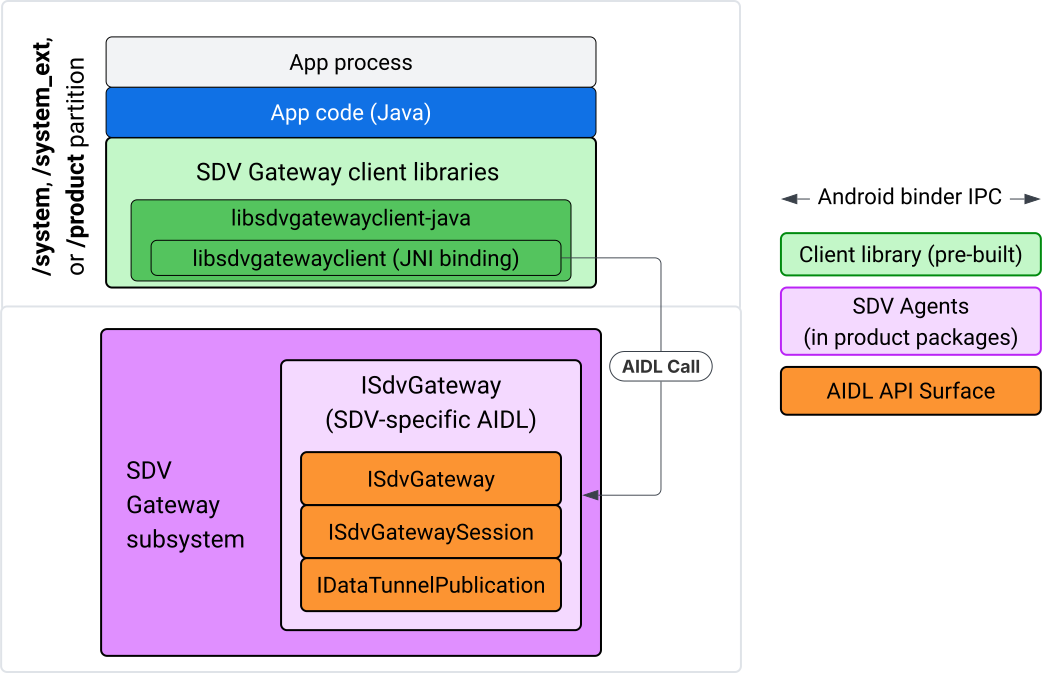
Hình 4. Cổng SDV trên ứng dụng IVI Java.
Cụ thể, mô hình này:
- Gửi tất cả các lệnh gọi đến lớp JNI.
- Liên kết API Java và C.
- Xác định các hoạt động tương tác AIDL với
ISdvGateway:- Init comms
- Tìm hoặc tạo máy chủ RPC
- Tạo pub/sub
- Thực hiện các hoạt động tương tác Data Tunnel để khám phá dịch vụ
- Nhận thông báo (ví dụ: dữ liệu có sẵn)
- Đọc và ghi thông báo (FMQ cho pub/sub) để tạo cặp khoá và chứng chỉ cho TLS
Bao gồm các thư viện ứng dụng Gateway
Thư viện Java và trình bao bọc JNI cho API C libsdvgatewayclient được cài đặt trong APEX trên mục tiêu IVI. Thêm phần phụ thuộc thời gian biên dịch vào mã giả lập thư viện Java, thư viện Java phải được dùng trong thời gian chạy và APEX bắt buộc chứa thư viện Java.
android_app {
    name: "YourAppName",
    // ...
    static_libs: [
        "libsdvgatewayclient-java",
    ],
    libs: [
        "libsdvgatewayclient-java-sdk.stubs",
    ],
    uses_libs: [
        "libsdvgatewayclient-java-sdk",
    ],
    required: [
        "com.sdv.google.gateway.client",
    ],
    // ...
}
Trong trường hợp ứng dụng không đi kèm được tạo bên ngoài cây SDV, quy trình này cũng tương tự:
Sao chép JAR mã giả lập của thư viện Java đã tạo và JAR hỗ trợ cho RPC vào thư mục libs của ứng dụng. Để biết thông tin chi tiết, hãy xem
system/software_defined_vehicle/sdv_gateway/libsdvgatewayclient_apex/README.md.Thêm JAR gốc làm phần phụ thuộc chỉ biên dịch. Ví dụ: hãy cập nhật cấu hình Gradle để phụ thuộc vào các phần giữ chỗ bằng cách thêm một mục
compileOnlyvào phầndependencies:dependencies { // The library supporting functions for SDK RPC. // Statically linked into the app APK. implementation(files("libs/libsdvgatewayclient-java.jar")) // Stub of the SDV-Gateway client library. // Used only for compilation; the real implementation is provided // by the com.sdv.google.gateway.client APEX at runtime. compileOnly(files("libs/libsdvgatewayclient-java-sdk.jar")) }Thêm thư viện Java vào phần ứng dụng của tệp
AndroidManifest.xml.<manifest xmlns:android="http://schemas.android.com/apk/res/android"> <application> <!-- Declares that this app requires the SDV Gateway client library. The 'android:required="true"' attribute ensures the app won't install/run if the library is missing from the system. --> <uses-library android:name="libsdvgatewayclient-java-sdk" android:required="true" /> </application> </manifest>
Tải thư viện
Tạo một đối tượng SdvGatewayClient (do thư viện ứng dụng cung cấp):
import google.sdv.gateway.client.SdvGatewayClient;

// --- Inside your Activity, Service, or ViewModel ---

// Initialize the SDV Gateway Client
SdvGatewayClient gatewayClient = new SdvGatewayClient();
Init comms
Gọi initComms() bằng tên ứng dụng làm tên gói dịch vụ:
// Define a unique name for your service bundle (usually constant)
private static final String SERVICE_BUNDLE_NAME = "MySdvServiceBundle";

// ... inside an Activity or Service context ...

try {
    // Initialize communications with the SDV Gateway
    // context.getPackageName() provides "android.sdv.samples.gateway.client" or similar
    gatewayClient.initComms(context.getPackageName(), SERVICE_BUNDLE_NAME);

    Log.i("SDV_GATEWAY", "Communications initialized successfully");
} catch (Exception e) {
    // Unlike the C API which uses status codes,
    // the Java SDK often throws exceptions for initialization failures.
    Log.e("SDV_GATEWAY", "Failed to initialize communications", e);
}
Khám phá dịch vụ
Java API chứa các phương thức để:
Nhận thông báo khi các đơn vị dịch vụ có một loại đơn vị cụ thể (hoặc thay vào đó, khớp với một tên cụ thể) đang được đăng ký hoặc huỷ đăng ký.
Liệt kê các đơn vị dịch vụ hiện tại có một loại đơn vị cụ thể (hoặc thay vào đó, hãy so khớp một tên loại đơn vị dịch vụ cụ thể). Để nhận thông báo về các thay đổi đối với đơn vị dịch vụ, hãy tạo một trình nghe:
import google.sdv.gateway.client.ServiceUnitChangeListener;
import google.sdv.gateway.client.ServiceUnitChangeEventType;
import google.sdv.gateway.client.ServiceUnitDefinition;

// --- Implementation ---

ServiceUnitChangeListener listener = new ServiceUnitChangeListener() {
    @Override
    public void onServiceUnitChanged(
        ServiceUnitChangeEventType eventType,
        ServiceUnitDefinition serviceUnitDefinition
    ) {
        // This is triggered when services matching your criteria
        // are registered or unregistered on the vehicle network.
        if (eventType == ServiceUnitChangeEventType.REGISTERED) {
            // Handle new service discovery
        } else if (eventType == ServiceUnitChangeEventType.UNREGISTERED) {
            // Handle service removal
        }
    }
};
Phương thức addListenerForServiceUnitChangeByName Java sẽ thông báo cho trình nghe:
// 1. Register the listener for a specific service unit by name
AutoCloseable handle = gatewayClient.addListenerForServiceUnitChangeByName(
    new UnitNameDiscoveryArgs(
        "",                                   // sdvVmName (empty for local/auto-discovery)
        "android.sdv.samples.cluster",        // sdvPackageName
        "ClusterServer",                      // serviceBundleName
        "android-sdv-samples-cluster-cluster" // serviceUnitName
    ),
    listener
);

// --- Later in the application lifecycle ---

// 2. To stop receiving notifications and clean up resources, close the handle.
try {
    if (handle != null) {
        handle.close();
    }
} catch (Exception e) {
    Log.e("SDV_GATEWAY", "Error while closing the listener handle", e);
}
Ngoài ra, hãy sử dụng phương thức addListenerForServiceUnitChangeByType Java để thông báo cho trình nghe khi các dịch vụ có loại đơn vị được chỉ định đã đăng ký hoặc chưa đăng ký:
// 1. Register a listener based on the Service Unit Type
AutoCloseable handle = gatewayClient.addListenerForServiceUnitChangeByType(
    new UnitType(
        "com.android.testapp.sdvcarmonitor", // sdvPackageName
        "SunroofRpcServer",                  // serviceBundleName
        "Sunroof"                            // unitTypeName
    ),
    listener
);

// --- Execution Loop / Lifecycle ---

// 2. To stop receiving notifications and clean up memory, close the handle.
// This effectively unregisters the listener from the SDV Gateway.
try {
    if (handle != null) {
        handle.close();
    }
} catch (Exception e) {
    Log.e("SDV_GATEWAY", "Failed to close the service unit listener handle", e);
}
Đối với addListenerForServiceUnitChangeByName và addListenerForServiceUnitChangeByType, sau khi được thêm, trình nghe sẽ được thông báo về tất cả các đơn vị dịch vụ đã đăng ký. Để chỉ nhận các đơn vị dịch vụ đã đăng ký theo tên hoặc loại, hãy sử dụng các API Java listServiceUnitsByName và listServiceUnitsByType:
import google.sdv.gateway.client.ServiceUnitDefinition;
import google.sdv.gateway.client.UnitNameDiscoveryArgs;
import google.sdv.gateway.client.UnitType;

// --- 1. Synchronous Lookup by Specific Name ---
ServiceUnitDefinition[] definitionsByName = gatewayClient.listServiceUnitsByName(
    new UnitNameDiscoveryArgs(
        "",                                   // sdvVmName
        "android.sdv.samples.cluster",        // sdvPackageName
        "ClusterServer",                      // serviceBundleName
        "android-sdv-samples-cluster-cluster" // serviceUnitName
    )
);

// --- 2. Synchronous Lookup by Service Type ---
ServiceUnitDefinition[] definitionsByType = gatewayClient.listServiceUnitsByType(
    new UnitType(
        "com.android.testapp.sdvcarmonitor", // sdvPackageName
        "SunroofRpcServer",                  // serviceBundleName
        "Sunroof"                            // unitTypeName
    )
);

// Example processing
if (definitionsByType.length > 0) {
    ServiceUnitDefinition firstSunroof = definitionsByType[0];
    // Proceed to connect...
}
Luồng máy chủ RPC
Các ứng dụng SDV Gateway trong hệ thống IVI sử dụng lệnh gọi quy trình từ xa (gRPC) của Google để giao tiếp với các dịch vụ SDV. Những hoạt động tương tác này dựa vào các định nghĩa proto trong danh mục VSIDL, nhất quán hoặc tương tự như các định nghĩa được dùng trên SDV Core. Đối với các ứng dụng Java, gRPC-Java là phương thức triển khai được chọn. Định nghĩa proto máy chủ mẫu, sunroof.proto, được cung cấp cho máy chủ ứng dụng.
service Sunroof {
    /**
     * Retrieves the current state of the sunroof (e.g., position, tilt, status).
     *
     * @param .google.protobuf.Empty - No input parameters required.
     * @return SunroofStateResponse - The current telemetry data for the sunroof.
     */
    rpc GetSunroofState(.google.protobuf.Empty) returns (SunroofStateResponse) {}
}
Liên kết với thư viện proto tương ứng và xác định dịch vụ:
import com.android.sdv.sdvgrpclibrary.SunroofGrpc;
import com.android.sdv.sdvgrpclibrary.SunroofStateResponse; // Assuming this is the generated class
import com.google.protobuf.Empty;
import io.grpc.stub.StreamObserver;

/**
 * Implementation of the Sunroof gRPC service.
 * This class handles the logic for the RPCs defined in your .proto file.
 */
static class SunroofGrpcImpl extends SunroofGrpc.SunroofImplBase {

    @Override
    public void getSunroofState(Empty request, StreamObserver<SunroofStateResponse> responseObserver) {
        // 1. Fetch current sunroof data (e.g., from a Hardware Abstraction Layer)
        int currentPosition = 50; // Example value: 50% open

        // 2. Build the Protobuf response message
        SunroofStateResponse response = SunroofStateResponse.newBuilder()
                .setPercentageOpen(currentPosition)
                .build();

        // 3. Send the response to the client using the observer
        responseObserver.onNext(response);

        // 4. Close the stream to signal that the RPC is finished
        responseObserver.onCompleted();
    }
}
Đăng ký máy chủ gRPC bằng thông tin đăng nhập kênh bảo mật và không bảo mật:
// 1. Define the type signature for the service
UnitType unitType = new UnitType(
    "com.android.testapp.sdvcarmonitor", // sdvPackageName
    "SunroofRpcServer",                  // serviceBundleName
    "Sunroof"                            // typeName (Unit Type)
);

// 2. Register the RPC server with the Gateway
// The gateway creates a mapping between the ServiceUnitName and your implementation.
server = gatewayClient.registerRpcServer(
    "SunroofRpcServerImpl-1",                       // serviceUnitName (Unique instance name)
    unitType,                                       // unitType defined earlier
    "SUNROOF_GRPC_SERVER_VALUE_HOLDER".getBytes(),  // appMetadataValueHolder (Static discovery data)
    1,                                              // appMetadataVersion
    new SunroofGrpcImpl()                           // The actual gRPC service implementation
);
Trong nội bộ, thư viện ứng dụng sẽ tạo đối tượng máy chủ gRPC, SdvGatewayClient.java, đồng thời xử lý các bản cập nhật cho chứng chỉ gốc:
// 1. Initialize credentials (Insecure for dev, TLS for production)
ServerCredentials serverCredentials = InsecureServerCredentials.create();

// 2. Build and start the OkHttp-based gRPC server
final int bindAnyPort = 0;
final Server server = OkHttpServerBuilder
    .forPort(bindAnyPort, serverCredentials)
    .addService(gRpcServerImplementation) // Your SunroofGrpcImpl
    .build()
    .start();

// The assigned port can now be retrieved using server.getPort()
int actualPort = server.getPort();

// 3. Prepare the JNI data structure
// This object mirrors the ASDVGateway_ServiceUnitDefinition_t C struct
JniServiceUnitDefinition definition = new JniServiceUnitDefinition();

// Fill the RPC service definition params (Port, Name, Type, etc.)
definition.setPort(actualPort);
definition.setServiceUnitName("SunroofRpcServerImpl-1");

// 4. Perform the cross-language call
// This jumps from Java -> JNI -> ASDVGateway_Client_registerRpcServer (C API)
mJniClient.nativeRegisterRpcServer(definition);
Luồng ứng dụng RPC
Đoạn mã mẫu này cung cấp định nghĩa proto máy chủ (tpms.proto) cho máy chủ mà ứng dụng kết nối với tư cách là một máy khách:
/**
 * The TPMS service provides real-time pressure and temperature
 * data for all tires on the vehicle.
 */
service Tpms {
    /**
     * Returns the full state of all monitored tires.
     */
    rpc GetTpmsState(.google.protobuf.Empty) returns (TpmsStateResponse) {}

    /**
     * A filtered query that returns only the tires
     * below the recommended pressure threshold.
     */
    rpc GetLowTires(.google.protobuf.Empty) returns (LowTiresResponse) {}
}
Liên kết với thư viện proto tương ứng:
import com.android.sdv.sdvgrpclibrary.TpmsGrpc;
import io.grpc.ManagedChannel;

// --- Inside your Client Application ---

// 1. Request a ManagedChannel from the Gateway for a specific service unit
ManagedChannel managedChannel = gatewayClient.connectToRpcServerByName(
    "",                                     // sdvVmName (empty for local/auto-lookup)
    "android.sdv.samples.cluster",          // packageName
    "ClusterServer",                        // serviceBundleName
    "android-sdv-samples-cluster-cluster"  // serviceUnitName
);

// 2. Use the channel to create a gRPC stub (e.g., for the TPMS service)
TpmsGrpc.TpmsBlockingStub tpmsStub = TpmsGrpc.newBlockingStub(managedChannel);

// 3. Now you can call RPC methods directly
// TpmsStateResponse response = tpmsStub.getTpmsState(Empty.getDefaultInstance());
Về nội bộ, API ASDVGateway_Client_findRpcServerByName được gọi để tìm máy chủ RPC. Nếu tìm thấy máy chủ RPC, kênh được quản lý sẽ được tạo ở chế độ không an toàn hoặc được chỉ định sử dụng cấu hình TLS, tương tự như quy trình máy chủ RPC, tuỳ thuộc vào cấu hình Khám phá dịch vụ. Ứng dụng tạo các phần giữ chỗ bằng đối tượng ManagedChannel và gọi các phương thức của máy chủ:
import com.android.sdv.sdvgrpclibrary.TpmsGrpc;
import com.android.sdv.sdvgrpclibrary.TpmsStateResponse;
import com.google.protobuf.Empty;
import io.grpc.stub.MetadataUtils;

// 1. Create a "Blocking Stub" from the existing ManagedChannel.
// We apply an interceptor to attach mandatory metadata (headers)
// required by the SDV Gateway for authorization.
TpmsGrpc.TpmsBlockingStub tpmsStub = TpmsGrpc.newBlockingStub(managedChannel)
    .withInterceptors(MetadataUtils.newAttachHeadersInterceptor(mMetadata));

// 2. Execute the RPC call.
// Because this is a "BlockingStub," the thread will wait here until
// the vehicle service responds or times out.
TpmsStateResponse tpmsStateResponse = tpmsStub.getTpmsState(Empty.getDefaultInstance());

// 3. Extract the domain-specific state object from the Protobuf response.
// 'newState' can now be used to update your UI or application logic.
newState = tpmsStateResponse.getTpmsState();
Chuyển đổi mạng mặc định của quy trình
Bạn có thể cần chuyển từ VLAN SDV-RPC làm mạng mặc định của quy trình để mở các ổ cắm cho các kết nối liên kết với Internet. Gọi unbindProcessFromSdvRpcNetworkInterface và bindProcessToSdvRpcNetworkInterface để huỷ liên kết và liên kết lại quy trình với SDV-RPC VLAN. Hai lệnh gọi này hoạt động như các công tắc toàn cục, chuyển đổi giao diện mạng mà các ổ cắm được liên kết với tất cả các luồng của quy trình.
// 1. Redirect all socket traffic from this process to the SDV-RPC VLAN.
// This call is required for making RPC calls or hosting RPC services for SDV.
gatewayClient.bindProcessToSdvRpcNetworkInterface();

// --- Process is now communicating over the SDV-RPC interface ---

// 2. Revert the process network binding back to the "default" interface.
// This allows the app to access internet resources again.
gatewayClient.unbindProcessFromSdvRpcNetworkInterface();
Tạo nhà xuất bản và xuất bản thông báo
// 1. Define the interface and type for the publication
UnitType unitType = new UnitType(
    "android.sdv.samples.tires.interface", // sdvPackageName
    "TirePressurePublisherInterface",      // serviceBundleName
    "TirePressure"                         // typeName
);

// 2. Configure the Publisher's buffer and message constraints
PublisherUnitMetadata publisherUnitMetadata = new PublisherUnitMetadata(
    1,   // version
    64,  // message size in bytes (fixed size for performance)
    128  // max message count (buffer depth)
);

// 3. Create the Publication instance through the Gateway
Publisher tirePublisher = gatewayClient.createPublication(
    "tire-pressure-service-unit-name",
    unitType,
    publisherUnitMetadata
);

// 4. Prepare and publish a message
// In a real app, you would encode your sensor data into this byte array
byte[] msg = new byte[publisherUnitMetadata.messageSizeBytes];

// ... fill msg with data ...

tirePublisher.publish(msg);
Về nội bộ, Java createPublication và các API xuất bản dựa vào các API ASDVGateway_Client_createPublication và ASDVGateway_Client_readAvailableMessages gốc. Để biết thông tin chi tiết về C API, hãy xem phần Sử dụng Cổng SDV trên một dịch vụ gốc IVI. Đối tượng Publisher cung cấp một ngữ cảnh để viết thông báo và quản lý vòng đời của hoạt động xuất bản.
Tạo người đăng ký bằng trình nghe thông báo
Java API cho phép truyền một trình nghe làm tham số đến phương thức đăng ký nhận thông báo và trả về một đối tượng Subscription.
Listenersẽ nhận được thông báo khi có dữ liệu cho ấn phẩm đã đăng ký.Subscriptionhoạt động như một đối tượng bối cảnh và có thể dùng để đọc thông báo cũng như đóng gói thuê bao.
// 1. Define the Listener to handle incoming data notifications
SubscriptionNotificationListener listener = new SubscriptionNotificationListener() {
    @Override
    public void onSubscriptionNotification(
        Subscription subscription,
        SubscriptionNotificationType notificationType
    ) {
        // Only process if the notification indicates new data is ready
        if (notificationType != SubscriptionNotificationType.DataAvailable) {
            return;
        }

        // Read the message from the subscription buffer
        byte[] content = subscription.readMessage();

        // Note: This callback often runs on a background thread provided by the SDK.
        // If you need to update the UI, use a Handler or View.post().
        processTireData(content);
    }
};

// 2. Subscribe to the publication by its unique name
Subscription tireSubscription = gatewayClient.subscribeToPublicationByName(
    "",                                  // sdvVmName (empty for auto-lookup)
    "android.sdv.samples.dt_publisher",  // packageName
    "SdvGatewayDtPublisher",             // serviceBundleName
    "tire",                              // serviceUnitName
    listener
);

// 3. Read Messages
// You can poll or register callbacks for new messages.
// When polling the message, call this method in a loop.
// When registering callbacks, call this method to get the message payload.
byte[] manualContent = tireSubscription.readMessage();
Mã mẫu
Các lệnh gọi lại của trình nghe được gọi trên một luồng duy nhất do ứng dụng quản lý để giảm thiểu quá trình xử lý trong trình nghe nhằm ngăn chặn sự chậm trễ trong việc nhận thông báo cho các lượt đăng ký khác. Lớp Java tận dụng một C API để quản lý gói thuê bao, xử lý thông báo và truy xuất thông báo. Để xem minh hoạ về cách sử dụng API, hãy xem mẫu ứng dụng Java có trong tệp nhị phân tại system/software_defined_vehicle/samples/sdv_gateway/README.md.
Các quyền bắt buộc
Bạn không cần có quyền đặc biệt để gọi API ứng dụng SDV Gateway, nhưng bạn cần áp dụng Quy tắc SELinux phù hợp cho các ứng dụng của mình.
- Đối với các hoạt động đăng ký và xuất bản đường hầm dữ liệu, bạn không cần có bất kỳ quyền nào.
- Đối với SDV RPC, bạn cần có các quyền sau:
android.permission.INTERNETandroid.permission.CONNECTIVITY_USE_RESTRICTED_NETWORKS
Đối với android.permission.CONNECTIVITY_USE_RESTRICTED_NETWORKS, bạn cũng cần một tệp danh sách cho phép trong etc/permissions ở cùng phân vùng với ứng dụng của mình, ví dụ: đối với SdvCarMonitorTestApp (tên gói com.android.testapp.sdvcarmonitor), tệp này sẽ có dạng như sau:
<?xml version="1.0" encoding="utf-8"?>

<permissions>
    <privapp-permissions package="com.android.testapp.sdvcarmonitor">
        <permission name="android.permission.CONNECTIVITY_USE_RESTRICTED_NETWORKS"/>
    </privapp-permissions>
</permissions>
Quy tắc SELinux
Để sử dụng SDV Gateway API, các ứng dụng Java cần có các quyền tương tự như các dịch vụ gốc. Cấp các quyền này bằng cách sử dụng macro sdv_gateway_client_domain() SELinux:
sdv_gateway_client_domain(my_oem_sdv_gateway_client_app)
OEM xác định miền my_oem_sdv_gateway_client_app cho các ứng dụng Java được phép sử dụng Cổng SDV. Chỉ sử dụng Cổng SDV từ các ứng dụng hệ thống và ứng dụng có đặc quyền.
Vị trí của mã
Lấy mã nguồn cho Cổng SDV tại system/software_defined_vehicle/sdv_gateway/. Bạn có thể lấy các mẫu Cổng SDV cho:
- Client C API:
system/software_defined_vehicle/samples/sdv_gateway/NativeSdvGatewayTestApp/ - Client Java API:
system/software_defined_vehicle/samples/sdv_gateway/SdvCarMonitorTestApp/